
Pawandeep-prog/Snapframe
Pawandeep-prog/Snapframe has 293 GitHub stars and 32 forks. GitHot measured 0 stars in 24 hours. Last checked 2026-11-19 07:06 UTC. Last push 2026-07-01.
What you can do
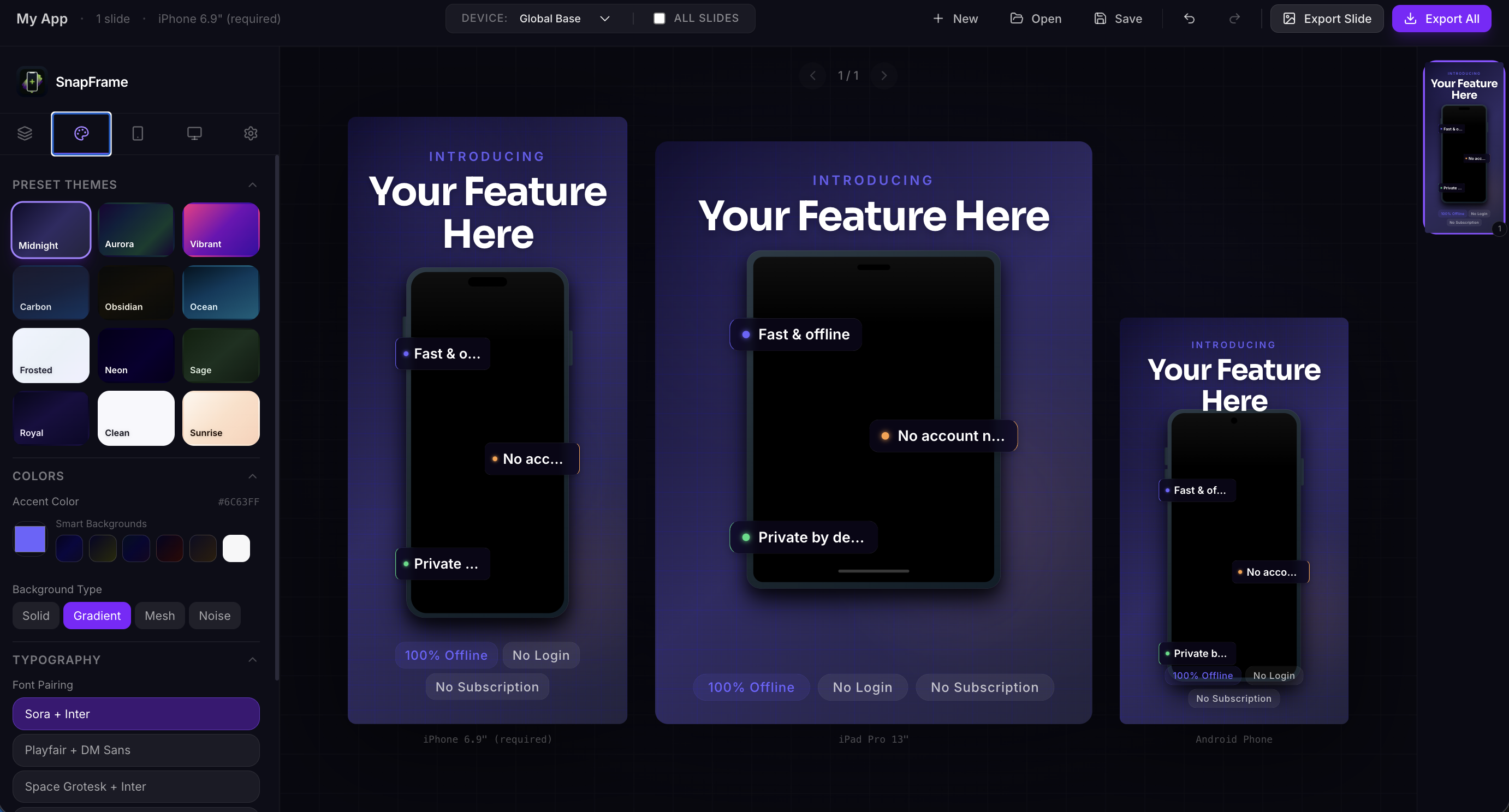
- Professional Templates: Choose from curated themes or create your own custom styles.
- Device Frames: High-quality device mockups (iPhone, etc.) to showcase your app in context.
- Per-Slide Theming: Customize individual slides or apply global themes across your entire project.
- Dynamic Text Blocks: Add professional typography with customizable layouts and positioning.
Measured star growth
- in 24h
- 0
- in 7 days
- Collecting history
- in 15 days
- Collecting history
- in 1 month
- Collecting history
Net star changes over overlapping periods, not daily totals. Missing measurements are left blank. Stars measure attention, not software quality.
About
Local Screenshot generator for play store and app store
Developer ToolsREADME.md
Original
Snapframe 🖼️
A professional web-based screenshot builder designed for app developers and designers. Create stunning, marketing-ready screenshots for your apps with ease.



✨ Features
- Professional Templates: Choose from curated themes or create your own custom styles.
- Device Frames: High-quality device mockups (iPhone, etc.) to showcase your app in context.
- Per-Slide Theming: Customize individual slides or apply global themes across your entire project.
- Dynamic Text Blocks: Add professional typography with customizable layouts and positioning.
- Real-time Preview: See your changes instantly as you edit.
- High-Quality Export: Export your screenshots as PNG, JPG, or a compressed ZIP archive for all resolutions.
- Undo/Redo Support: Full history management to iterate quickly without fear.
- Offline First: Fast and responsive UI with local state management.
- JSON Editor: Build entire screenshot sets programmatically — paste JSON directly and see a live preview side by side. Perfect for AI-assisted workflows.
🚀 Tech Stack
- Framework: React 19
- Build Tool: Vite
- Styling: Tailwind CSS 4
- State Management: Zustand
- Icons: Lucide React
- Export Engine:
html-to-image&jszip
🤖 JSON Editor & AI Workflow
The JSON Editor (toolbar → JSON button) lets you create and edit projects entirely in JSON — no clicking through the UI required.
Split-panel interface:
- Left — editable JSON with live validation and a status bar showing error details
- Right — live
ScreenshotCardpreview that updates as you type, with slide navigation for multi-slide projects
Typical AI-powered flow:
- Open the JSON Editor and click Copy to grab the current project JSON
- Paste it into Claude, ChatGPT, or any AI tool with a prompt like:
"Add 3 slides for a meditation app using a calm green theme"
- Paste the AI response back into the editor — the live preview updates instantly
- Click Apply & Close to load it into the project, then export as usual
See JSON_SCHEMA.md for the full field reference, all valid values, and copy-paste examples.
⚠️ Browser Compatibility
| Browser | Status |
|---|---|
| Chrome | Fully supported |
| Firefox | Known rendering issues — investigation in progress |
🌐 Live Demo
No install needed — just open it in your browser:
https://pawandeep-prog.github.io/Snapframe/
🛠️ Local Setup
Getting started with Snapframe locally is simple:
Clone the repository:
git clone https://github.com/Pawandeep-prog/Snapframe.git
cd Snapframe
Install dependencies:
npm installRun the development server:
npm run devOpen in browser: Navigate to
http://localhost:5173
📦 Building for Production
To create an optimized production build:
npm run build
The output will be in the dist/ directory.
📄 License
This project is licensed under the MIT License - see the LICENSE file for details.
Built with ❤️ by Pawandeep Singh