
PaoloJN/recap
PaoloJN/recap has 666 GitHub stars and 72 forks. GitHot measured +1 stars in 24 hours. Last checked 2026-11-15 23:08 UTC. Last push 2026-11-11.
What you can do
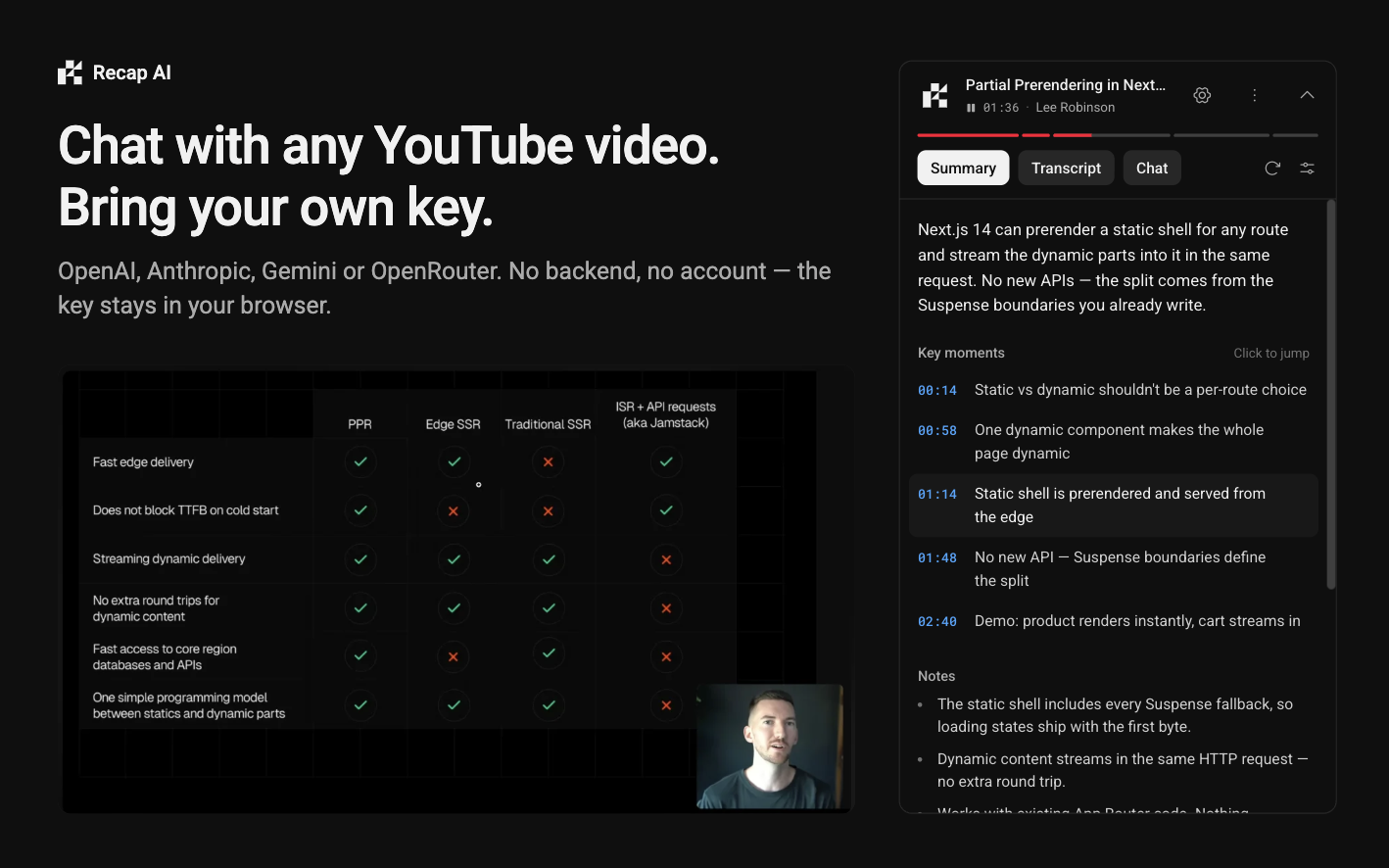
- Structured summary with key moments, notes, a plain-terms paragraph and a "current moment" marker that follows playback. Styles: Detailed, TL;DR and Key moments.
- Chapter bar under the header, synced to playback. Click a segment to jump. Videos without chapters get a single bar.
- Transcript that works without a key: search, follow playback, click to jump, chapter headers, copy.
- Chat with quotes from the transcript, a "Current moment" toggle, citation chips that seek the video, and per-video history.
Measured star growth
- in 24h
- +1
- in 7 days
- Collecting history
- in 15 days
- Collecting history
- in 1 month
- Collecting history
Net star changes over overlapping periods, not daily totals. Missing measurements are left blank. Stars measure attention, not software quality.
About
Recap AI for YouTube summaries, a searchable transcript and chat about the video
Creative & MediaREADME.md
OriginalRecap AI
Recap AI for YouTube: summaries, a searchable transcript and chat about the video, in the sidebar, powered by your own OpenAI, Anthropic, Google or OpenRouter key, or optionally by Recap Pro.
Features
- Structured summary with key moments, notes, a plain-terms paragraph and a "current moment" marker that follows playback. Styles: Detailed, TL;DR and Key moments.
- Chapter bar under the header, synced to playback. Click a segment to jump. Videos without chapters get a single bar.
- Transcript that works without a key: search, follow playback, click to jump, chapter headers, copy.
- Chat with quotes from the transcript, a "Current moment" toggle, citation chips that seek the video, and per-video history.
- Starter questions generated from the summary.
- Bring your own key for OpenAI, Anthropic, Google or OpenRouter, with a model picker. The key is tested in the panel before it is saved.
- Usage counters for the month (tokens, summaries, chats).
- Auto-summarize (off by default), filler-word stripping, answer language and custom instructions.
- Text size (S, M, L) and theme (follow YouTube, dark or light).
- Export a video's summary and chat as Markdown, or all chats in one file.
- Shortcuts:
Alt+Ytoggle panel,Alt+Cfocus chat,Alt+Ssummarize,Alt+Fsearch transcript.Alt+Ycan be rebound atchrome://extensions/shortcuts.
Install
From a release:
- Download the zip from the latest GitHub Release.
- Unzip it.
- Open
chrome://extensionsand turn on Developer mode. - Click Load unpacked and select the unzipped folder.
Or build from source, as described under Development, and load .output/chrome-mv3 the same way.
Firefox: run pnpm build:firefox, open about:debugging#/runtime/this-firefox, click Load Temporary Add-on and pick .output/firefox-mv2/manifest.json. The Firefox build is dev-only for now and is not on Firefox Add-ons.
Setup
- Open a YouTube video. The card shows "Add a key".
- Click Add API key and pick a provider.
- Paste your key and click Test key.
- Click Save and continue.
Get a key here:
- OpenAI: https://platform.openai.com/api-keys
- Anthropic: https://platform.claude.com/settings/keys
- Google: https://aistudio.google.com/apikey
- OpenRouter: https://openrouter.ai/settings/keys
The transcript tab works without a key.
Recap Pro
Recap Pro is an optional way to use Recap without your own key. Sign in at recapai.dev (it opens in a normal tab and brings you back to the video), get a free trial (20 summaries and 50 chat messages per account), then move to a paid plan managed at recapai.dev. "Use my own key" stays available at any point.
Pro is turned on at build time. Release builds include it when the repository's WXT_PRO_ORIGIN variable is set. If you build from source without WXT_PRO_ORIGIN, you get the bring-your-own-key extension only: no Recap Pro option, no requests to recapai.dev.
A Pro build adds no permission. Sign-in opens recapai.dev in a normal tab, and the Pro server allows the extension's requests through CORS, so no host access to recapai.dev is needed. The Firefox build needs Firefox 115 or later.
Privacy
- Your key is stored in the extension's local storage on your device and sent only to the provider you pick.
- With your own key, requests go only to YouTube and the provider you chose. There is no server of ours in between.
- No analytics, no telemetry, no tracking.
- Recap Pro (only in builds that include it, and only while it is the selected provider): the transcript text and chat messages for each request are sent to recapai.dev and on to the model provider. The server stores request counts and token totals, not content. Your sign-in token is stored in the extension's local storage. Requests made with your own key never touch recapai.dev.
- Transcripts come from YouTube's own transcript feature. It is undocumented and may change. If it breaks, the panel shows "no transcript".
Development
pnpm install
pnpm dev        # run the extension in Chrome with hot reload
pnpm dev:firefox  # same, in Firefox (needs Firefox installed; builds .output/firefox-mv2)
pnpm test       # unit tests
pnpm check      # lint and format (Biome)
pnpm typecheck
pnpm build
pnpm zip        # package into .output/ (add -b firefox or use zip:firefox for Firefox)
pnpm icons      # regenerate extension icons
To work on Recap Pro against a local recap-website:
WXT_PRO_ORIGIN=http://localhost:3000 pnpm dev
Or put WXT_PRO_ORIGIN=http://localhost:3000 in .env.local (see .env.example).
Tech stack
- WXT for the extension framework
- React 19 and TypeScript
- Tailwind CSS v4 and shadcn/ui
- Phosphor icons
- Vercel AI SDK and Streamdown
- Biome for lint and format
- Vitest for tests
License
See LICENSE.