
PansaLegrand/dojo-video-harness
PansaLegrand/dojo-video-harness has 53 GitHub stars and 1 forks. GitHot measured 0 stars in 24 hours. Last checked 2026-11-15 10:25 UTC. Last push 2026-11-12.
Measured star growth
- in 24h
- 0
- in 7 days
- Collecting history
- in 15 days
- Collecting history
- in 1 month
- Collecting history
Net star changes over overlapping periods, not daily totals. Missing measurements are left blank. Stars measure attention, not software quality.
About
Local open-source video editor and educational TypeScript agent harness. Bring your own LLM and ASR keys. Powered by Dojo Video Engine.
AIREADME.md
OriginalDojo Video Harness


A local, English-only open-source video editor with a small TypeScript editing agent. It shares DojoClip’s Next.js App Router, React 18, Tailwind 3, and editor components, with a simpler local host. Bring your own LLM and transcription providers. Edit the same timeline by hand or through chat, see changes directly, and export through Dojo Video Engine in your browser.
The agent is intentionally understandable: a model adapter, typed function calls, a tool registry, Markdown skills, bounded execution, and explicit user decisions. The difficult video-specific rules live in the tested document and command kernel. The shared loop 0.1.3 supports durable checkpoints and deterministic context pruning; the local host owns which interrupted boundaries can safely resume.
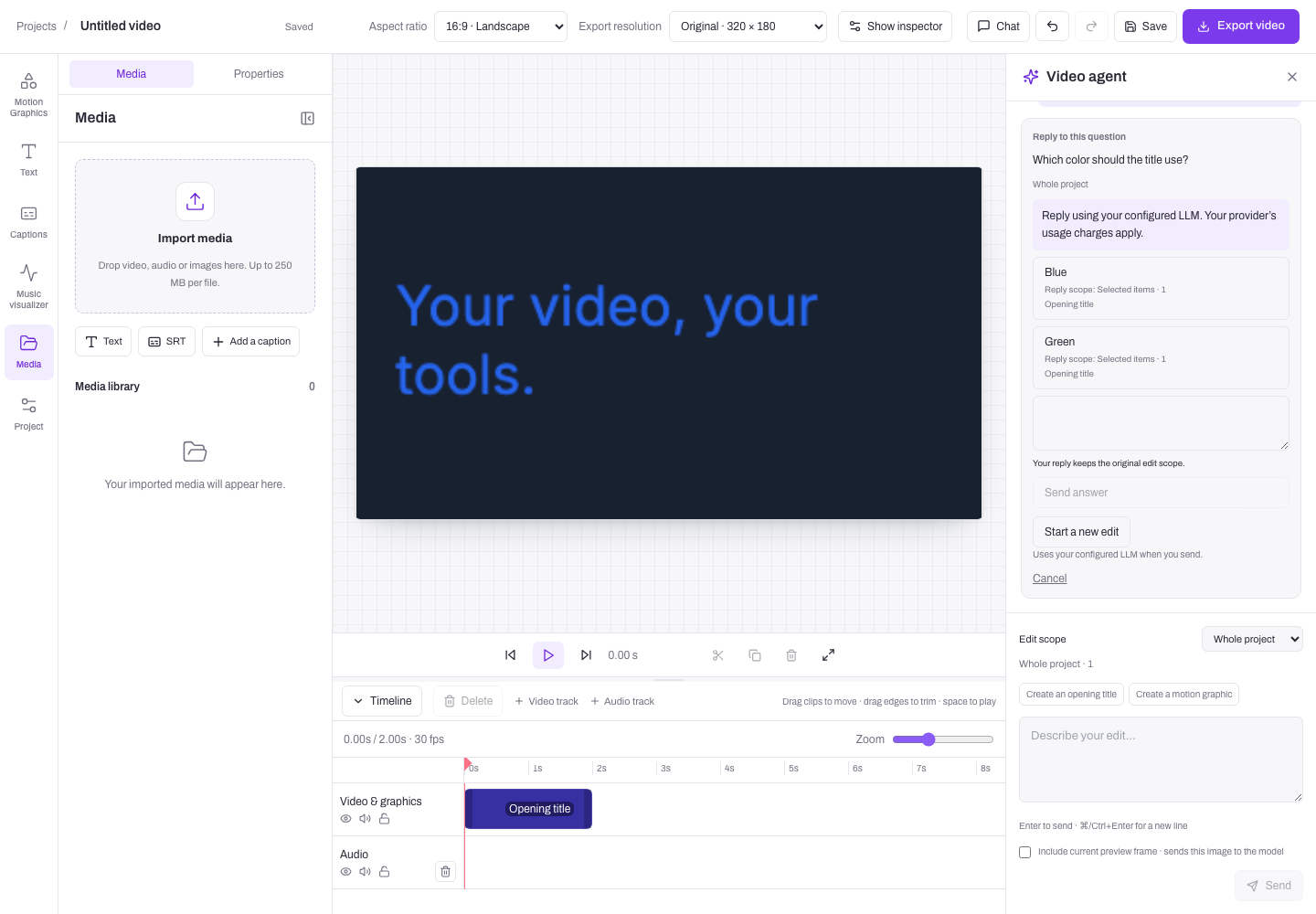
Browser-test screenshot with synthetic model responses.
Run locally
Requirements: Git, Node 20.19+ (Node 22 recommended), npm, and a desktop browser with WebCodecs support (Chromium is the tested path). No database, Redis, DojoClip account, or cloud worker is needed. FFmpeg is required only for the browser acceptance test, not the app.
git clone https://github.com/PansaLegrand/dojo-video-harness.git
cd dojo-video-harness
npm run launch
launch installs locked dependencies when missing, creates .env without
overwriting an existing file, checks the local environment, and starts the editor.
It opens the browser automatically from an interactive terminal. Otherwise open
http://127.0.0.1:4310. The engine is installed automatically from the public
@dojo-video-engine/* npm packages, pinned to 1.2.3; no separate engine clone
or pnpm installation is needed. Node 22 is pinned in .nvmrc.
Create a project and import media. Manual editing, subtitle import, preview, motion graphics, and MP4 export work without API keys. For chat, configure Vercel AI Gateway or a GPT-6-series provider with a compatible Responses API. In Provider settings, enter its base URL, model ID, and API key using the configuration below. Speech recognition has its own provider settings. Saves apply to new requests immediately; running jobs keep their original configuration. Saved keys are never returned to the browser.
| What you want to do | Provider credentials |
|---|---|
| Edit manually, import subtitles, preview, and export MP4 | None |
| Edit through chat or translate captions | Your GPT provider key |
| Transcribe imported speech | Your ASR provider key, configured separately |
For later starts, use npm run dev. Other useful commands:
npm run setup        # Install/check without starting; preserves .env
npm run setup -- --install  # Reinstall locked dependencies
npm run doctor       # Check Node, local storage, and port availability
npm run dev -- --no-open    # Start without opening the browser
After pulling repository updates, run npm run setup -- --install before
starting again. This installs the updated lockfile and preserves your .env
and local project data.
The setup and launcher work in PowerShell as well as macOS/Linux terminals. The
startup CI runs on Windows, macOS, and Linux. If the port is occupied, the launcher
explains how to open the existing editor or change PORT in .env. It does not
silently switch addresses, because imported browser media belongs to its origin.
Advanced configuration can still use .env (copied from .env.example). Settings
saved in the app override its provider values and are stored in the private local
data directory as provider-settings.json. Keep that directory private and out
of Git when changing DATA_DIR.
DojoClip is the reference for shared editor and chat UI. The open-source engine and harness are the starting point for rendering and agent runtime changes; DojoClip consumes them through commercial adapters. Local persistence, provider keys, and usage copy stay in this harness's host adapters. See synchronization and readiness and syncing the product UI.
The agent and caption translation support GPT models through the Responses API. Vercel AI Gateway is the documented, live-tested example for GPT-6:
LLM_BASE_URL=https://ai-gateway.vercel.sh/v1
LLM_MODEL=openai/gpt-6-sol
LLM_API_KEY=your-vercel-ai-gateway-key
Other GPT-6-series providers can use the same adapter if their /responses
endpoint supports the harness's function calls and tool-result continuation.
Set the provider's base URL (without /responses), exact model ID, and matching
key. Model IDs must use the gpt-* or openai/gpt-* form; gpt-6-sol is the
default when no model is configured. GPT-6 availability alone does not establish
API compatibility; validate another endpoint with the optional live check below.
The harness does not silently switch providers or retry paid requests.
Use the key for the endpoint you configure. The model name is sent unchanged;
there is no automatic model switching or retry. Non-GPT model names are rejected
before a request. Other model families and Chat Completions are outside the
supported scope. Speech recognition supports ElevenLabs Scribe and OpenAI-compatible
word-timestamp endpoints with its own key; configuring chat does not configure ASR.
Choose Use ElevenLabs in Provider settings to select
https://api.elevenlabs.io/v1 and scribe_v1, then enter your own ElevenLabs key.
ASR must provide genuine word timestamps (verbose_json for compatible endpoints); segment-only output
is rejected rather than converted into invented word timings. This adapter caps
transcription uploads at 25 MiB. Choose a smaller audio source when needed.
Saved keys stay in the local data directory and server process. .env, project data, uploaded sources, and
exported videos are ignored by Git. Imported originals first live in browser
IndexedDB. Choosing transcription explicitly copies the source to the local host
and sends it to the configured ASR provider. Choosing chat sends project context;
preview pixels are included only when you check the preview-image option. Provider
usage is charged by your provider. The editor and rendering run locally; configured remote GPT and ASR providers
receive only the context or media needed for the selected operation.
To run the built application:
npm run build
npm start
What is implemented
- The extracted DojoClip manual editor: multi-track timeline, selection, trim, split, text/graphics, captions, styles, transitions, linked groups, source ranges, quiet-section analysis, undo/redo, and browser recovery.
- Dojo Video Engine preview, local proxies within admission limits, and browser MP4 export. The pinned engine packages include the reconciled DojoClip correctness patches.
- Local project persistence with serialized transactions, atomic file replacement, revisions, conflict detection, operation receipts, and history.
- A framework-independent agent loop using real function calls. Inspect a project, read a skill, search transcript evidence, propose an edit, or ask a question.
- New editor runs use local-editor-v5 with paginated asset/cue readers and the completion-preflight profile: freeze a typed checklist, review the complete in-memory candidate, repair failed checks, then propose exactly the reviewed commands. Deterministic receipts bind the snapshot, checklist, commands and preview; the host checks outcomes again after rebase.
- Durable local model/tool checkpoints, with cumulative budgets and frozen request, source, tool/skill and provider bindings. A restart can continue a saved model response or completed tool boundary without requesting that response again. Uncertain model or external-tool submissions stop for manual reconciliation.
- New runs reserve serialized UTF-8 space for the complete model reply before submission. Compact checkpoint storage retains original instructions and a pending reply once; accepted 0.1.1 runs retain their original profile and budget.
- Desktop chat resizes from its left edge, up to half the window width; the left panel toggle stays at the bottom of the tool rail. Narrow screens retain the chat drawer.
- Instruct and edit: ordinary local chat edits apply automatically, with selective Undo and optional before/after comparison. Structured questions resolve missing information; cancellation and the product’s quick-edit controls remain available. Tool events remain available through the local API.
- Provider-backed captions and translation, with persisted source-bound receipts.
- Speech-dependent chat pauses for explicit source/provider consent when genuine transcript evidence is missing, then resumes the original instruction after the source-bound receipt is available. Later styling, translation and graphic steps can use that evidence in the same bounded model/tool run.
- Readable title, lower-third and supplied-text caption preparation with explicit bounds and responsive defaults; chat applies them without a confirmation click. See layout checks and bounded real-footage acceptance.
- Native countdowns and animated text can be separate, editable timeline clips before or after footage. They are grouped graphics, not automatically generated MP4 assets. Move, trim, edit their contents, and export the combined timeline. See the intro/outro behavior tests.
- One-instruction workflows for joining imported clips, overlaying a logo, generating and translating captions, then exporting the reviewed revision.
- Approved instrumental music generation through Kie V6, with local storage and automatic, exactly-once insertion into the approved audio track.
This is a standalone extraction, not a claim of complete hosted-product parity. DojoClip billing, accounts, collaboration, hosted asset galleries, and production worker infrastructure are outside this local application. Image/video generation jobs are an extension point, not a shipped provider integration. Both ordinary speech-dependent chat and the combined editing workflow can prepare transcription after explicit source/provider consent; standalone caption controls remain available. Registered browser tools support consented source sampling, candidate previews, one receipt-bound correction and a second preview before final proposal. Export intents bind to guarded Apply and verified local output. See current localhost adapter scope.
Basic workflows and background music
Import clips and a logo, choose Whole project scope, and ask:
Join Clip A then Clip B, add Logo, generate English captions, translate them to Spanish, then export.
Review the workflow card and approve provider access. After preparation, use the normal Compare / Apply controls, then Export approved workflow. Export is performed by the browser and saved locally against the applied revision. Sources are limited to 25 MiB each for this first transcription workflow; existing linked captions and unsupported steps require a separate edit rather than a partial plan.
For music, configure Background music · Kie in /en/settings (or use
MUSIC_BASE_URL=https://api.kie.ai, MUSIC_MODEL=V6, MUSIC_API_KEY privately).
Ask for background music, or use the Background music panel without a GPT key.
Generate and insert music approves one paid provider job and its exact track,
start time, maximum length and volume. The first provider track is saved locally
and inserted when ready. Cancellation and undo do not repeat generation or refund
provider charges. Uncertain submissions require reconciliation with the existing
provider task ID. A locked or changed target pauses insertion.
A single request can prepare music and a visual edit together. The agent uses
prepare_background_music with continueEditing: true, then returns the visual
proposal. Review/apply the visuals before approving the separate paid music job.
See the presentation rehearsal for a
bounded example and its evidence.
Skills stay simple: add a trusted lowercase skills/name.md file and restart the
host. SKILLS_DIR can select another local directory. Markdown guides existing
tools; it does not install executable tools. There is no npm plugin installer.
See the extension guide and
implementation and evidence.
Read the implementation
Coding agents should begin with the repository guide for ownership, commands, invariants, and the readiness plan.
Start with the guided walkthrough, then follow:
| Location | Responsibility |
|---|---|
packages/agent/src/loop.ts |
Bounded model → tool → observation loop |
packages/agent/src/tools.ts |
Tool descriptions, runtime validation, effects |
skills/ |
Domain instructions loaded by the read_skill tool |
packages/adapters/src/ |
LLM and ASR transports; no document mutation |
packages/core/src/lib/video-project/ |
Authoritative document, commands, scope, evidence, history |
packages/ui/src/components/editor/dojo-video-engine/ |
Real manual editor and chat/review UI |
app/ |
English App Router pages and local API route handlers |
packages/ui/src/host/ |
Local user, copy, and provider-request adapters |
apps/server/src/agent-service.ts |
Durable runs, questions, approvals, cancellation |
apps/server/src/store.ts |
Local transactions, receipts, revisions |
apps/server/src/local-api.ts |
Local services behind Next route handlers |
config/engine-release.json |
Pinned engine version, source commit, and registry integrity |
There is no LangChain, Vercel agent runtime, Pi runtime, or coding-agent subprocess in the execution path. Pi inspired the small-core approach; a provider or runtime adapter can be added without giving it authority over document commits.
The harness packages are source workspaces in this repository. They are not
published npm packages. The engine is consumed from the public
@dojo-video-engine/* packages at exact version 1.2.3. There is no runtime dependency on a sibling checkout. Development
uses the product’s Next.js 15.5 family, React 18.3, Tailwind 3.4, and shared TypeScript aliases; independently packaged
embeddable SDK distributions are a subsequent release step.
Verification
The current schema/recovery update uses loop 0.1.3/kit 0.1.5. The full check passes 598 tests, TypeScript, kit generation/integrity, 85 managed UI hashes and production build. All 66 actual browser checks pass under local-editor-v5, including the source-overview → cue-reader → dependent-edit path with one ASR and five model fixture calls. New local-editor-v5 runs default to sixteen model steps with existing tool/output allowances. Editing schemas require nonempty proposals, and nested review-schema references resolve against the advertised tool root. Regression tests resolve every advertised local reference, compile the schemas with Ajv, and validate a mixed-media command batch while rejecting empty/answer/retrieval edits. Caption context initially supplies source identity and counts; the agent reads exact requested-range cues before translation. The host supplies reader snapshot hashes. Earlier profiles retain their budgets and exact inventory/skill/prompt digests.
New loop snapshots preserve a returned paid reply and exact reported usage when a provider exceeds the requested output allowance, then stop before its tools or answer execute. Disk replay returns the same explicit error without a provider request. The frozen budget remains unchanged. Timestamp validation also rejects missing/nonfinite speech timing before constructing immutable source evidence; legacy transcript normalization remains unchanged unless explicitly opted in.
Readers can page beyond 500 cues; caption-pair preparation remains bounded to 500 cues per operation. Larger assembly and general continuation remain roadmap work. These local gates use controlled provider HTTP; live commercial Kie qualification is tracked separately before release acceptance.
The preceding efficient-reader update used kit 0.1.4 and passed 565 tests, TypeScript, kit generation/integrity, 85 managed UI hashes, production build and all 66 browser checks. Provided metadata is authoritative, and discovery focuses on missing facts for requested assets and source ranges.
The earlier paginated-reader update uses loop 0.1.2/kit 0.1.3. Focused reader, range and completion regressions pass with frozen legacy profile digests, and the full unit suite passes 554 tests. The production build and all 66 browser checks also pass with 85 managed product UI files. Browser model/ASR responses use controlled HTTP fixtures while React, persistence, media, rendering and export execute normally. The new readers bind snapshot/filter/scope/source identity to cursor pages, retain UTF-8 byte bounds and expose complete/incomplete coverage. Explicit source ranges are prepared in a candidate and produce matching source-trim/caption commands.
The earlier loop 0.1.2/kit 0.1.2 candidate passed 511 tests. Its host regressions cover saved-response/tool/terminal recovery, uncertain paid outcomes, cumulative and unknown usage, request/source/provider/tool drift, cancellation, ASR receipt reuse and fresh clarification-child budgets. The host retains original instructions and source evidence while pruning only eligible older read context; it does not call an LLM to summarize the conversation. See the agent system map for the recovery limits. The byte-bound regressions cover multibyte context, host-envelope overhead, opaque provider output, frozen request configuration and legacy checkpoint replay. Completion regressions cover complete bilingual cue coverage, reciprocal pairing, spoken-number evidence and display holds, ending timing/text, fitted font size, cumulative visibility, overlap, checklist/receipt tampering and pinned-state replay. These checks protect declared intent and bounded layout samples; they do not establish universal semantic or creative quality. Provider generation remains host-owned external work.
The earlier release checks passed on 2026-11-02: 228 tests, production build, 25 browser editing/export checks, and startup checks on Windows, macOS, and Linux. These checks use synthetic providers. See the engine migration notes.
Separately, live GPT qualification through Vercel AI Gateway
passed all 54 baseline trials and 18 extended trials using openai/gpt-6-sol.
Earlier provider failures remain recorded; the Gateway run used an explicitly selected
endpoint, without automatic fallback or paid retries. A bounded ElevenLabs probe
also verified genuine source-bound word timestamps; see the
ASR and recovery evidence.
The editor flow is instruct → edit → undo if needed. Ordinary local edits use
the existing validated save path automatically, once manual drafts are saved.
Paid/cloud workflows retain their consent and approval steps. The earlier live
qualification reports used explicit review mode; see the
direct-editing checks for the current browser flow.
Paired real-media
human acceptance and broader editing coverage remain open. The agent can correct
tool validation errors and perform the bounded preview workflow described in
the current agent map. New local runs select
local-editor-v14 with kit 0.2.8, loop 0.2.0 and engine 1.2.3. The 0.2.8 local gate
passed 968 tests/build and 66 browser checks. Validated captionPairs supply any
missing caption-pair checks before the checklist freezes. Supplied checks remain
intact, with at most 12 combined. The 61 focused checks include two speech sources,
six translation batches, nine additional outcomes, native review and saved-result
replay. Earlier profile contracts remain archived. The host retains its
64-model-call/64-tool/32,000-output-token allowance. Live bilingual fidelity and
creative quality have separate outcome acceptance. Public CI is pending for the
pushed candidate.
Follow the readiness plan before a launch.
The focused lower-third live gate finished at 11/12 after local fixes; it is not yet qualified. The report retains the failures, rendering evidence, request budget and remaining placement issue.
A bounded conversational-correction diagnostic passed two live four-turn conversations: add text → change its color → change its backing → enlarge it, with no selection or repeated target identification. It preserved the same object and unrelated text, and verified rendered changes. This covers applied edits in short conversations; pending proposals and long histories remain unqualified.
To check your own changes:
npm run check
npx playwright install chromium
npm run test:browser
An optional live GPT acceptance test uses a temporary synthetic timeline and up to
eight paid requests. Set LLM_BASE_URL, LLM_MODEL, and LLM_API_KEY in the shell
(or load your own .env before running); the script does not read another checkout:
npm run test:live:gpt -- --live
It verifies inspection/skill use, proposal review, explicit application, and a question/answer continuation. It is not part of CI and never uses customer media. See the live Gateway qualification and the original GPT adapter verification.
An optional ASR probe accepts one owned recording of at most 30 seconds / 5 MiB
and a file containing its expected spoken text. With your ASR variables set
privately, run npm run test:live:asr -- --live --file speech.wav --expected-file speech.txt.
It makes one request, checks transcription and genuine source-bound timestamps,
and retains local evidence. It is separate from the GPT request budget and CI.
The browser test needs ffmpeg and ffprobe on PATH. It starts an isolated real
local server and synthetic LLM/ASR HTTP endpoints, uses actual browser storage and
rendering, and decodes the exported MP4. It never uses .env provider credentials.
Artifacts go to ignored test-results/. This verifies adapter and workflow behavior,
not the quality or account compatibility of a live paid provider.
The App Router serves the editor at /en/applications/editor/:projectId and the shared product home at /en/applications/video-edit-ai. Only English UI routes are enabled. The /en prefix keeps shared navigation easy to sync. Video text, speech recognition, and caption translation can still use other languages supported by your providers.
See architecture, extension guide, edge cases, and provenance.
The editable vector and Three.js contract records the bounded 2D/3D workflow. Engine 1.2.1 qualification records the published package pins, registry provenance and fresh-install browser checks.
Milestone launch checks
The harness readiness plan defines the ordered work, test matrix, acceptance criteria, and engine handoff for the current editing workflow. Its original review-mode qualification remains separately identified from the current direct-editing browser checks. It separates planned coverage from existing tests.
Use npm run verify:milestone for the complete local gate. Before a launch, use
npm run verify:milestone -- --live on a clean committed candidate with your GPT
provider configured. The paid gate repeats 18 scenarios three times, including an
eight-turn conversation, pending questions/restarts, basic edits, and hard boundaries.
It records complete reports and requires a separate human visual/audio review.
See the coverage matrix, launch criteria, and commands.
Engine and application ownership
dojo-video-engine owns rendering, playback, export, and low-level scene APIs. This repository owns the editor UI and agent harness. The engine no longer ships a competing editor or agent demo.
License
MIT for the harness and extracted editor code. Dojo Video Engine and third-party assets retain their own copyright notices. See THIRD_PARTY.md.