
PZW152/one-click-eu-lord
PZW152/one-click-eu-lord has 125 GitHub stars and 2 forks. GitHot measured 0 stars in 24 hours, +1 in 7 days, and +8 in 15 days. Last checked 2026-11-25 01:59 UTC. Last push 2026-11-06.
Measured star growth
- in 24h
- 0
- in 7 days
- +1
- in 15 days
- +8
- in 1 month
- Collecting history
Net star changes over overlapping periods, not daily totals. Missing measurements are left blank. Stars measure attention, not software quality.
About
一鍵轉生歐爺 · 一键转生欧爷 · One-Click EU Lord — give Windows 11 every gain from Ireland's EU/EEA (DMA) policy without the features the EU build removes, and keep it across updates. One 166 KB exe, no runtime, fully reversible. 繁中 / 简中 / English.
SecurityREADME.en.md
OriginalOne-Click EU Lord v3
Pure Rust rewrite. The GUI follows Windows 11 Fluent design and the system light/dark theme.
This tool never installs or uninstalls software. It only changes Windows EU/EEA policy data, the device region, and a persistence scheduled task. Use Windows Settings → Apps for software removal.
Policy rule
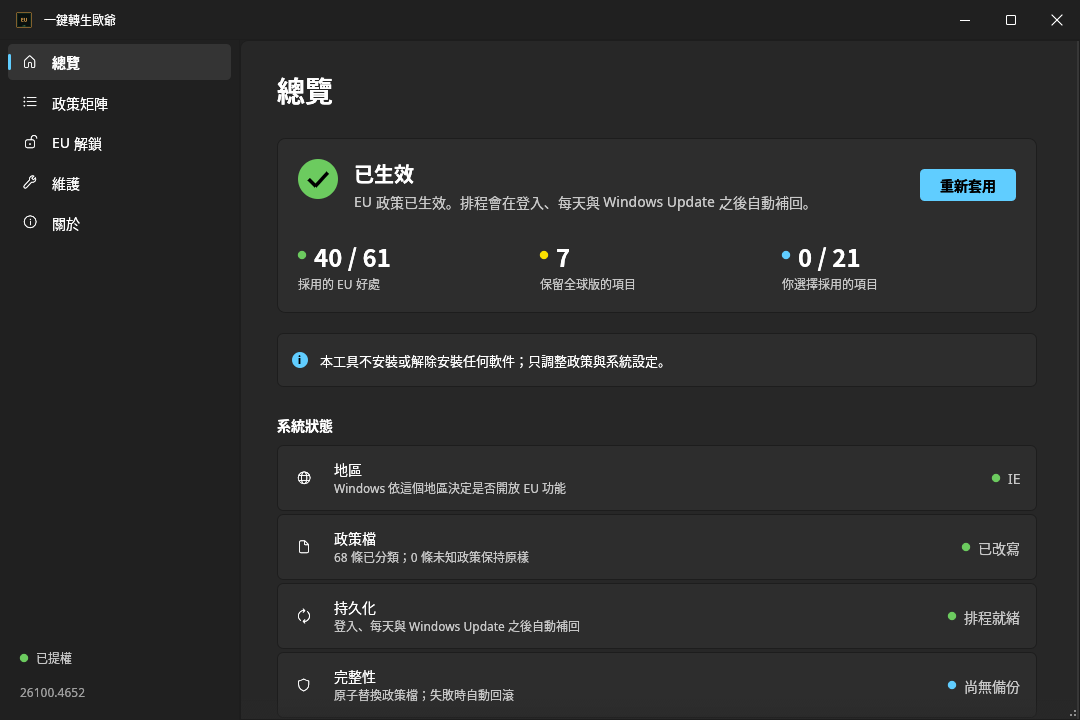
The Windows EU/EEA policy set contains 68 entries that differ from the global set:
| Class | Count | Rule |
|---|---|---|
| Benefit | 40 | Take the EU/EEA state |
| Loss | 7 | Keep the global state |
| Choice | 21 | Keep global unless the user opts into EU |
Unknown policies are left exactly as Windows shipped them: no rewrite, no removal of conditions.
Screenshot
Usage
- Download
EULord.exefrom Releases. - Run it. The GUI starts with normal rights (
asInvoker); UAC is requested only for apply/restore. - First launch: scan the OS build and policy file.
- Review the 40/7/21 classification; choices are off by default.
- Apply. The first apply shows a pre-flight diff; later applies are one-click.
Apply flow: backup → restore point → atomic policy replace → device region → scheduled task → verify. Critical failures roll back automatically. The task re-applies at logon, daily, and after Windows Update.
Safety
- Atomic file replacement via
ReplaceFileW/MoveFileExW. - Backup, journal, verify, and rollback.
- Restrictive ACL on
C:\\ProgramData\\OneClickEULordwhen elevated. - On-demand UAC via
ShellExecuteExW(runas); no admin launch by default. - No software-uninstall execution path; the EU Unlocks page is read-only policy information.
CLI
eulord status --json
eulord plan --json
eulord verify --json
eulord apply --json
eulord repair --json
eulord reapply --json
eulord restore --json
eulord purge --yes --json
eulord export .\\state.json
eulord import .\\state.json
Exit codes: 0 success, 1 error, 2 confirmation required, 3 administrator required, 4 partial/verify failure.
Build
cargo test --workspace --locked
cargo build --release --locked --bin eulord
.\\tools\\Build.ps1 -Profile release
.\\tools\\Test.ps1
MSVC/Windows SDK is recommended. For a local GNU toolchain, put WinLibs mingw64\\bin on PATH and use the GNU target.
MSIX and signing
packaging/ and tools/Pack-Msix.ps1 contain the MSIX and .appinstaller auto-update pipeline, but no code-signing certificate is included. Provide a trusted PFX and update the Publisher in packaging/AppxManifest.xml to the certificate subject. Without a certificate, use the portable build.
Data locations
C:\\ProgramData\\OneClickEULord\\: installed copy, backups, journal, logs, state.%LOCALAPPDATA%\\OneClickEULord\\state.json: UI preferences and non-elevated state fallback.C:\\Windows\\System32\\IntegratedServicesRegionPolicySet.json: Windows policy file.HKLM\\SOFTWARE\\Microsoft\\Windows\\CurrentVersion\\Control Panel\\DeviceRegion: device GeoID.- Scheduled task:
OneClickEULord-Persist.
Limitations
- Only x64 is verified; arm64 needs an arm64 target build and MSIX repackaging.
- Unknown policies are untouched, so future Windows builds are not automatically covered.
- MSIX code signing is an external prerequisite; portable is the default release.
- No software uninstall, UCPD bypass, Microsoft account change, or licensing change.
License
MIT. Not affiliated with Microsoft.
Explore related projects
Loading…