
PKHarsimran/website-downloader
About
Website-downloader is a powerful and versatile Python script designed to download entire websites along with all their assets. This tool allows you to create a local copy of a website, including HTML pages, images, CSS, JavaScript files, and other resources. It is ideal for web archiving, offline browsing, and web development.
ProductivityWhat you can do
- 🚀 Fast — parallel page fetching (--page-threads, ~3–4× faster on multi-page sites), threaded asset downloads, and optional lxml parsing (pip install -e ".[fast]").
- 🔁 Incremental — --update skips unchanged pages and assets using ETag/Last-Modified, perfect for recurring archives.
- ⚛️ JavaScript-aware — optional Playwright rendering for client-rendered sites (--render-js).
- 🍪 Authenticated — reuse browser cookies and custom headers for portals, intranets, and staging sites you're allowed to access.
Measured star growth
- in 24h
- +1
- in 7 days
- +3
- in 15 days
- Collecting history
- in 1 month
- Collecting history
Net star changes over overlapping periods, not daily totals. Missing measurements are left blank. Stars measure attention, not software quality.
README.md
Original🌐 Website Downloader CLI
Turn any website you're authorized to copy into a fast, browsable offline mirror — with one command.





A modern, hackable alternative to wget --mirror and HTTrack — built in pure Python, without dragging in a heavy crawler framework.
📖 Read the Wiki — full CLI reference, cookbook, and troubleshooting · 📦 Install from PyPI
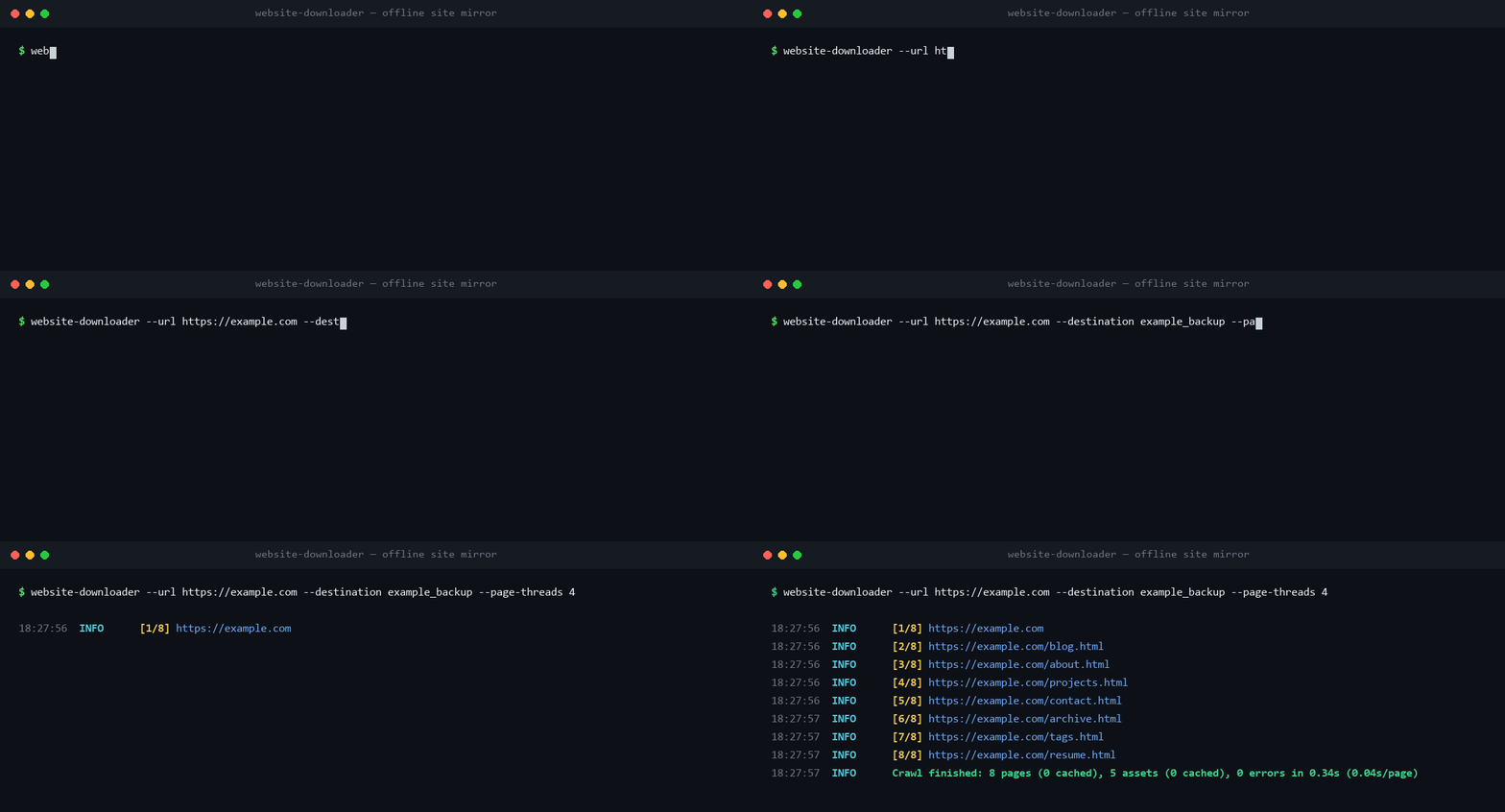
Open example_backup/index.html in your browser — the whole site works from disk: pages, styles, scripts, images, fonts, and media, all with links rewritten for offline browsing.
⚡ Quick Start
git clone https://github.com/PKHarsimran/website-downloader.git
cd website-downloader

python -m venv .venv
.venv\Scripts\activate        # macOS/Linux: source .venv/bin/activate
pip install -e .

website-downloader --url https://example.com --destination example_backup --max-pages 100
The classic script entry point still works too:
python website-downloader.py --url https://example.com --destination example_backup
☕ Support This Project
Saved you a few clicks? Fuel the next download.

A little caffeine keeps the crawler crawling. Thanks for the support!
🤔 Why Not Just wget or HTTrack?
Those tools are great — until you hit a modern website. This project exists for the gap between "one-liner that misses half the assets" and "write your own Scrapy project."
| website-downloader | wget --mirror | HTTrack | Scrapy | |
|---|---|---|---|---|
Modern assets: srcset, data-src, poster, CSS @import, JS asset strings |
✅ | partial | partial | build it yourself |
| JavaScript rendering (React, Vue, Next.js) | ✅ Playwright | ❌ | ❌ | plugin |
Incremental re-mirroring (ETag / Last-Modified) |
✅ | timestamps only | ✅ | manual |
| Cookies + custom headers for authorized portals | ✅ | ✅ | ✅ | ✅ |
| Selective CDN mirroring with a domain allowlist | ✅ | ❌ | partial | manual |
| Zip + WARC export | ✅ | WARC ✅ | ❌ | manual |
| Windows-safe paths (long paths, reserved names, query hashing) | ✅ | ❌ | partial | manual |
| Small, readable Python codebase you can extend | ✅ | ❌ (C) | ❌ (C) | framework |
✨ Highlights
- 🚀 Fast — parallel page fetching (
--page-threads, ~3–4× faster on multi-page sites), threaded asset downloads, and optional lxml parsing (pip install -e ".[fast]"). - 🔁 Incremental —
--updateskips unchanged pages and assets usingETag/Last-Modified, perfect for recurring archives. - ⚛️ JavaScript-aware — optional Playwright rendering for client-rendered sites (
--render-js). - 🍪 Authenticated — reuse browser cookies and custom headers for portals, intranets, and staging sites you're allowed to access.
- 🧭 Sitemap seeding — start from
sitemap.xml(including nested sitemap indexes) for complete discovery. - 📦 Portable output — export mirrors as zip archives or WARC 1.1 response records.
- 📋 Crawl reports —
--manifest crawl.jsonrecords pages, assets, titles, headings, HTTP status codes, skipped resources, and errors. - 🤝 Polite by default — sequential pages unless you opt in,
--respect-robots,--delay, retry with backoff, and per-asset size caps. - 🪟 Cross-platform paths — sanitizes Windows reserved names, shortens long paths, and hashes query strings to avoid collisions.
- 🧪 Tested — pytest suite running against a real local HTTP fixture server, with CI and lint gates.
🛠 How It Works
Follow the crawler from a starting URL to an offline mirror in this 32-second animated walkthrough:
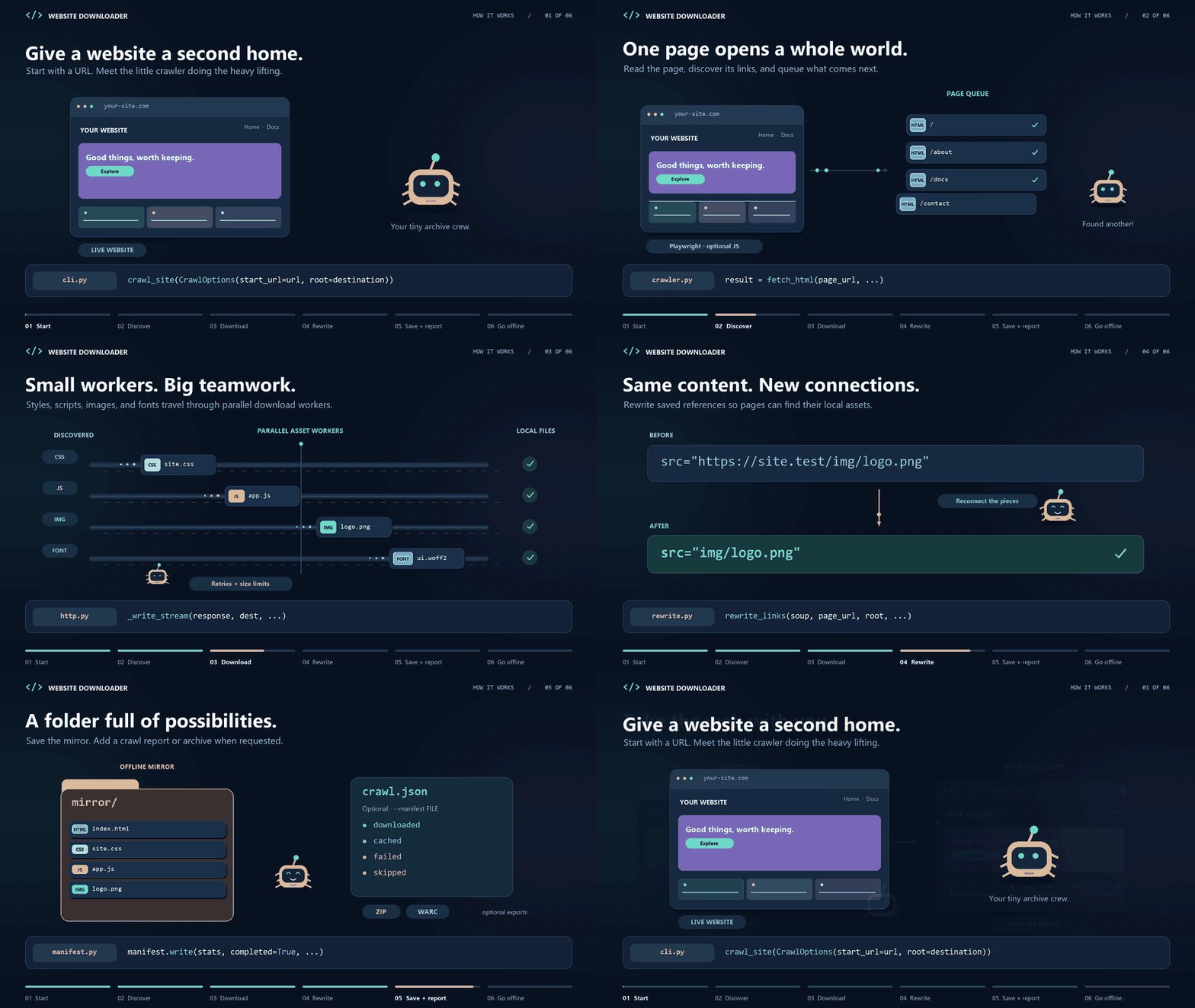
Download the 720p video · Scene-by-scene guide
Explore the detailed crawl flowchart
flowchart TD
    A["Start with a URL and CLI options"] --> B["Create session with cookies, headers, retries"]
    B --> C{"Use sitemap?"}
    C -- "Yes" --> D["Load sitemap URLs into the page queue"]
    C -- "No" --> E["Queue the starting URL"]
    D --> F["Fetch next page"]
    E --> F
    F --> G{"Update cache says unchanged?"}
    G -- "Yes" --> H["Reuse saved local file"]
    G -- "No" --> I{"Render JavaScript?"}
    I -- "No" --> J["Download HTML with requests"]
    I -- "Yes" --> K["Render page with Playwright"]
    J --> L["Parse HTML with BeautifulSoup"]
    K --> L
    H --> L
    L --> M["Find page links and asset links"]
    M --> N{"Same-site page?"}
    N -- "Yes" --> O["Queue page for crawling"]
    N -- "No" --> P{"Asset allowed?"}
    P -- "Yes" --> Q["Download asset"]
    P -- "No" --> R["Keep original reference or skip"]
    O --> S["Rewrite links for offline browsing"]
    Q --> S
    R --> S
    S --> T["Save mirror folder"]
    T --> U{"Export requested?"}
    U -- "Zip/WARC" --> V["Write portable archive"]
    U -- "No" --> W["Open index.html locally"]
    V --> W
In plain English:
- You give the CLI a starting URL and optional crawl settings.
- It can seed pages from
sitemap.xml, custom headers, cookies, and robots rules. - It downloads or optionally renders each page with Playwright.
- It finds links, images, scripts, stylesheets, fonts, media, and metadata assets.
- It follows same-site pages up to your
--max-pageslimit. - It saves assets locally and rewrites references so pages still work offline.
- With
--update, unchanged resources are skipped using cache metadata. - With
--zip-outputor--warc-output, the result is also exported as an archive.
📦 Install Options
Start with the core install, then add extras only when you need them:
| Install | Use when you want |
|---|---|
pip install -e . |
Normal static-site crawling with requests and BeautifulSoup. |
pip install -e ".[fast]" |
Faster HTML parsing with lxml (used automatically when installed). |
pip install -e ".[render]" |
Playwright-powered JavaScript rendering with --render-js or --headless. |
pip install -e ".[ux]" |
Rich-powered terminal progress with --progress. |
pip install -e ".[dev]" |
Tests, formatting, linting, and local contributor work. |
📖 Cookbook
Mirror a small public site:
website-downloader ^
  --url https://example.com ^
  --destination example_backup ^
  --max-pages 50
Speed up a large mirror with parallel page fetching:
website-downloader ^
  --url https://example.com ^
  --max-pages 500 ^
  --page-threads 4
--page-threads defaults to 1 so crawls stay polite; raise it only for sites that can handle concurrent requests. --render-js always uses a single page worker.
Download selected CDN assets:
website-downloader ^
  --url https://example.com ^
  --destination example_backup ^
  --download-external-assets ^
  --external-domains cdn.example.com fonts.gstatic.com
Mirror an authorized site with cookies:
website-downloader ^
  --url https://intranet.example.com ^
  --destination intranet_backup ^
  --cookie-file example-cookie.txt
Cookie files use normal cookie header syntax:
sessionid=abc123; csrftoken=xyz789
Send custom headers such as bearer tokens:
website-downloader ^
  --url https://docs.example.com ^
  --destination docs_backup ^
  --header "Authorization: Bearer <token>" ^
  --header "X-Environment: staging"
Mirror several starting points on the same site, following links up to 2 levels deep from each:
website-downloader ^
  --url https://example.com/docs/ ^
  --url https://example.com/blog/ ^
  --destination example_backup ^
  --max-depth 2
--url can be repeated, or supplied from a file instead:
website-downloader --url-file starting-urls.txt --destination example_backup --max-depth 2
# starting-urls.txt
https://example.com/docs/
https://example.com/blog/
--max-depth counts links away from each starting URL (0 mirrors only the starting URLs
themselves); omit it for unlimited depth, bounded only by --max-pages.
Use a sitemap as the crawl seed:
website-downloader ^
  --url https://example.com ^
  --destination example_backup ^
  --sitemap
Point at a custom sitemap URL or local sitemap file:
website-downloader --url https://example.com --sitemap https://example.com/sitemap.xml
Skip parts of a site you don't want mirrored (e.g. a forum bolted onto a site you're archiving):
website-downloader ^
  --url https://example.com ^
  --destination example_backup ^
  --exclude "*/forum/*" ^
  --exclude "*/drafts/*"
Patterns are glob-style (fnmatch) and match against both the full URL and the path, so /forum/*
and */forum/* both work. Load a longer list from a file instead of repeating --exclude:
website-downloader --url https://example.com --exclude-file exclude-patterns.txt
# exclude-patterns.txt
*/forum/*
*/drafts/*
Use safer crawl limits:
website-downloader ^
  --url https://example.com ^
  --max-pages 50 ^
  --threads 4 ^
  --delay 0.25 ^
  --respect-robots ^
  --max-asset-bytes 25000000 ^
  --user-agent "WebsiteDownloader/0.2"
Update an existing mirror without re-downloading unchanged resources:
website-downloader ^
  --url https://example.com ^
  --destination example_backup ^
  --update
Export a portable zip and WARC archive:
website-downloader ^
  --url https://example.com ^
  --destination example_backup ^
  --zip-output example_backup.zip ^
  --warc-output example_backup.warc
Write a crawl manifest for auditing or automation:
website-downloader --url https://example.com --destination example_backup --manifest example_backup/crawl.json
The versioned JSON report includes downloaded, cached, failed, and skipped resources, page titles and headings, direct page-to-asset references, and crawl statistics. Local paths are relative to the mirror folder. It works with parallel crawling, --update, and --render-js; unavailable HTTP status codes are null. See the manifest format and limitations. Resume support remains on the roadmap.
⚛️ JavaScript-Rendered Sites
Some modern sites do not expose their real links and assets until JavaScript runs. For those, install the optional Playwright extra:
pip install -e ".[render]"
playwright install chromium
website-downloader --url https://example.com --render-js --max-pages 20
--headless is also available as a friendly alias for --render-js.
--render-js and --headless are optional because Playwright is heavier than the default requests + BeautifulSoup path. Use them when a normal crawl only captures an empty app shell or misses important client-rendered links.
📊 Live Progress
Install the optional UX extra for a Rich-powered terminal dashboard:
pip install -e ".[ux]"
website-downloader --url https://example.com --progress
If rich is not installed, the crawler falls back to normal logging instead of failing.
🎛 Feature Flags At A Glance
| Flag | What it does | Best for |
|---|---|---|
--url (repeatable) / --url-file |
Seeds the crawl from multiple starting URLs. | Mirroring several sections of a site in one run. |
--max-depth |
Limits how many link-hops are followed from each starting URL. | Staying focused near your starting points instead of crawling the whole site. |
--page-threads |
Fetches HTML pages concurrently (default 1). | Faster mirroring of large sites that tolerate concurrent requests. |
--render-js / --headless |
Uses Playwright before parsing the page. | React, Vue, Angular, Next.js, and other client-rendered sites. |
--cookie-file |
Sends saved browser/session cookies. | Authorized portals, staging sites, docs behind login. |
--header |
Adds custom request headers. | Bearer tokens, staging headers, API gateway headers. |
--update |
Reuses cache metadata and skips unchanged resources when the server supports it. | Recurring mirrors and archives. |
--sitemap |
Seeds the crawl from sitemap.xml or a supplied sitemap. |
Faster, more complete discovery. |
--exclude / --exclude-file |
Skips pages whose URL matches a glob pattern. | Ignoring forums, drafts, or other sections you don't want mirrored. |
--progress |
Shows a Rich terminal progress dashboard when installed. | Long crawls where visibility matters. |
--manifest FILE |
Writes a versioned JSON report of resource outcomes, page metadata, and errors. | Auditing mirrors and integrating with automation. |
--zip-output |
Exports the mirror folder as a zip. | Sharing, attaching, or storing snapshots. |
--warc-output |
Writes a simple WARC response archive. | Archival workflows and future replay tooling. |
🔁 What Gets Rewritten
| Source | Rewritten for offline use |
|---|---|
| Page links | <a href> for same-site pages |
| Images and media | src, data-src, poster, srcset |
| Stylesheets and icons | <link href> for fetchable resource types |
| Metadata images | og:image, twitter:image |
| Inline styles | style="background: url(...)" |
| CSS files | url(...) and @import |
| JavaScript files | Common static asset strings like /img/logo.png |
| External assets | Optional CDN copies under cdn/<domain>/... |
When external scripts or stylesheets are localized, the tool removes integrity and crossorigin where needed because those attributes often break offline copies.
📁 Output Example
example_backup/
  index.html
  about.html
  assets/
    site.css
    app.js
  img/
    logo.png
    hero.webp
  fonts/
    inter.woff2
  cdn/
    cdn.example.com/
      library.js
Open index.html in your browser to browse the mirrored copy.
🧑💻 Development
pip install -e ".[dev]"
pytest
black . --check
isort . --check-only
ruff check .
Using PyCharm? Open the repo folder, point it at a Python 3.10+ virtualenv, run pip install -e ".[dev]" in the terminal, and use the pytest runner on the tests folder.
Project structure
| Path | Purpose |
|---|---|
website_downloader/cli.py |
Argument parsing, validation, logging, and CLI entry point. |
website_downloader/crawler.py |
Crawl coordination, page/asset worker pools, robots.txt support, and stats. |
website_downloader/http.py |
Requests sessions, HTML fetches, binary downloads, and downloaded CSS/JS post-processing. |
website_downloader/rewrite.py |
HTML, CSS, JavaScript, and srcset reference rewriting. |
website_downloader/paths.py |
Filesystem-safe page, asset, and CDN path mapping. |
website_downloader/render.py |
Optional Playwright page rendering. |
website_downloader/cache.py |
Update-mode metadata for ETag and Last-Modified. |
website_downloader/sitemap.py |
Sitemap and sitemap-index loading. |
website_downloader/progress.py |
Optional Rich progress dashboard. |
website_downloader/exports.py |
Zip and WARC export helpers. |
website_downloader/manifest.py |
Thread-safe crawl reporting and atomic JSON output. |
tests/ |
Local pytest suite with a tiny fixture HTTP server. |
🗺 Roadmap
- Resume interrupted crawls using persisted queue and resource state.
- Login-flow recording for complex SSO sites.
- Stronger WARC metadata and replay compatibility.
- Visual diff mode for migration and redesign checks.
Have an idea? Open an issue — feature requests and bug reports are very welcome.
🛡 Responsible Use
Only mirror sites you own, have permission to archive, or are legally allowed to access. Authentication cookies can expose private content, so keep cookie files out of source control and avoid sharing generated mirrors that contain private data. Use --respect-robots, lower --threads, and --delay for polite crawling.
🤝 Contributing
Contributions are welcome! Open an issue or pull request for bug reports, feature ideas, or improvements. The codebase is intentionally small and modular — most features live in a single focused module, so it's an easy project to hack on.
By submitting a contribution, you agree to the Contributor License Agreement: you keep the copyright to your work and license it to the project so it can be maintained and distributed (including under future licensing terms).
If this tool saved you time, consider starring the repo ⭐ — it helps others find it.
⭐ Star History
See how the repository's GitHub stars have grown over time:
📄 License & Ownership
This project is released under the MIT License — free to use, fork, modify, and ship, including in commercial products, as long as the copyright and license notice are kept.
The copyright is owned by Harsimran Sidhu. The MIT license grants broad permission to use the code; it does not transfer ownership. The name "Website Downloader CLI" and any associated branding are not covered by the code license.
Commercial use, hosting, and support
The open-source license already covers most commercial use. If you'd like something the MIT license doesn't provide — a commercial/OEM license with different terms, a hosted or managed version, priority support, or custom features — reach out via a GitHub issue or the contact on the maintainer's GitHub profile.
Explore related projects
Loading…