
P403n1x87/austin
P403n1x87/austin has 2,215 GitHub stars and 68 forks. GitHot measured +2 stars in 24 hours. Last checked 2026-11-06 22:58 UTC. Last push 2026-10-28.
Python frame stack sampler for CPython
Measured star growth
- in 24h
- +2
- in 7 days
- Update delayed
- in 15 days
- Update delayed
- in 1 month
- Update delayed
Net star changes over overlapping periods, not daily totals. Missing measurements are left blank. Stars measure attention, not software quality.
README.md
Original
A Frame Stack Sampler for CPython


Documentation • Synopsis • Installation • Usage • Compatibility • Contribute

This is the nicest profiler I’ve found for Python. It’s
cross-platform, doesn’t need me to change the code that’s being profiled, and
its output can be piped directly into flamegraph.pl. I just used it
to pinpoint a gross misuse of SQLAlchemy at work that’s run in some code at the
end of each day, and now I can go home earlier.
-- gthm on lobste.rs
If people are looking for a profiler, Austin looks pretty
cool. Check it out!
-- Michael Kennedy on Python Bytes 180
 on

Synopsis
Austin is a Python frame stack sampler for CPython written in pure C. Samples are collected by reading the CPython interpreter virtual memory space to retrieve information about the currently running threads along with the stack of the frames that are being executed. Hence, one can use Austin to easily make powerful statistical profilers that have minimal impact on the target application and that don't require any instrumentation.
The key features of Austin are:
- Zero instrumentation;
- Minimal impact;
- Fast and lightweight;
- Time and memory profiling;
- Built-in support for multi-process applications (e.g.
mod_wsgi). - Support for agentic workflows, with an MCP server and a query API for coding agents.
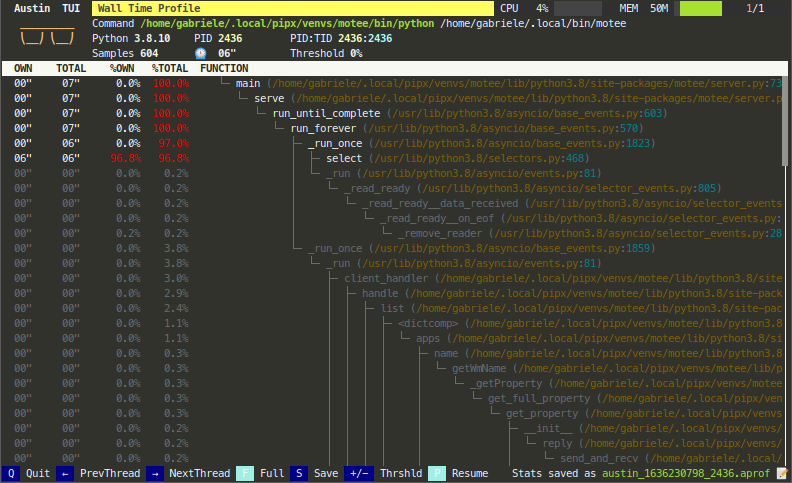
The simplest way to turn Austin into a full-fledged profiler is to use together with the VS Code extension or combine it with FlameGraph or Speedscope. However, Austin's binary output can be piped into any other external or custom tools for further processing. Look, for instance, at the following Python TUI
Check out A Survey of Open-Source Python Profilers by Peter Norton for a general overview of Austin.
Check out the documentation for more tool ideas and examples!
💜
Austin is a free and open-source project. A lot of
effort goes into its development to ensure the best performance and that it
stays up-to-date with the latest Python releases. If you find it useful,
consider sponsoring this
project.
🙏
Documentation
The full documentation, with one version for each Austin minor release, is available at https://p403n1x87.github.io/austin/. It covers
- the complete installation instructions for every platform;
- the command line options and environment variables;
- the features of Austin, like memory profiling, native frame stacks and
asynciosupport; - platform-specific details, e.g. permissions on Linux and macOS;
- the ecosystem of tools built around Austin;
- the specification of the MOJO binary format.
Installation
Austin is available from PyPI and from the major software repositories of the most popular platforms
| Platform | Command |
|---|---|
| Any (PyPI) | pip install austin-dist |
| Linux (Snap) | sudo snap install austin --classic |
| Debian/Ubuntu | sudo apt install austin |
| macOS | brew install austin |
| Windows | choco install austin or scoop install austin |
| Linux/macOS (Conda) | conda install -c conda-forge austin |
Pre-compiled binaries and installers are available from the latest release page. See the installation page for how to build Austin from sources.
Usage
To profile a Python script, run
austin -o profile.mojo python myscript.py
To profile a running Python application, attach Austin to it with
austin -o profile.mojo -p <pid>
Austin writes its samples in the binary MOJO format. The recommended way to
visualise them is with the Austin VS Code extension, which opens .mojo files
directly. The austin-python package provides tools to convert them to other
formats, like the collapsed stacks used by FlameGraph, or Speedscope.
Coding agents can analyse Austin profiles too, either through the MCP server
that comes with the VS Code extension, or with the austin-query tool from the
austin-python package. See agentic workflows for how to set them up.
The usage page describes all the command line options, and the features page covers each of them in detail.
Compatibility
Austin runs on Linux, macOS and Windows. The compatibility page lists the supported Python versions and architectures for each release, and the platform-specific details to be aware of.
Why Austin
Austin is written in pure C, has no dependencies beyond the standard C library, and is just a sampler, so it can sample at very high rates with minimal impact on the target application. Read more about why Austin in the documentation.
Examples
See the examples in the documentation, and the ecosystem page for the tools that build on Austin.
Contribute
If you like Austin and you find it useful, there are ways for you to contribute.
If you want to help with the development, then have a look at the open issues and have a look at the contributing guidelines before you open a pull request.
You can also contribute to the development of the Austin by becoming a sponsor and/or by buying me a coffee on BMC or by chipping in a few pennies on PayPal.Me.
Explore related projects
codecrafters-io/build-your-own-x
Master programming by recreating your favorite technologies from scratch.
560,619 starspublic-apis/public-apis
A collective list of free APIs
496,873 starsmorluto/rea
Reverse engineer anything with agents, from app behavior down to native binaries.
439,555 starsopenclaw/openclaw
The AI that really does things. Any OS. Any Platform. The lobster way. 🦞
394,105 stars