
Open330/tend has 43 GitHub stars and 3 forks. GitHot measured 0 stars in 24 hours and 0 in 7 days. Last checked 2026-11-14 21:56 UTC. Last push 2026-11-13.
Measured star growth
- in 24h
- 0
- in 7 days
- 0
- in 15 days
- Collecting history
- in 1 month
- Collecting history
Net star changes over overlapping periods, not daily totals. Missing measurements are left blank. Stars measure attention, not software quality.
About
Know which tmux coding agent is waiting on you — and jump to it. Works with the Claude Code, Codex, and Gemini CLI sessions you already run. No wrapper, no new terminal.
Developer ToolsREADME.md
Original
The operations platform for your team of coding agents.
See which agent is waiting on you and jump to it — then run the whole team as Work: launch agents, let them review each other, and follow them across hosts. Start with zero setup on the Claude Code, Codex, and Antigravity CLI sessions you already run in tmux; let Tend launch and own agents when you want more.


[!NOTE] Muxa is now Tend. Coming from Muxa? Move your install over with
scripts/migrate-from-muxa.py. See docs/MIGRATING_FROM_MUXA.md.
Try tend
Try tend in your browser before installing. Type directly in the terminal and follow one key at a time.
| Start here | What you can try |
|---|---|
| tmux basics | Attach to a prepared session from a normal shell, learn session → window → pane, move and zoom panes, and switch windows. |
| Watch and collaboration | Answer a waiting agent, request a review, and read the reply in the mailbox. |
| Workspace navigation | Browse and search the watch tree to connect to sessions, windows, and panes. |
| Inspect a screen | Use previews, raw terminal output, inspector sizing, and help. |
| Free exploration | Explore several sessions and windows with the shortcut reference alongside. |
When a continue action appears, press Alt + Enter (Option + Return on Mac)
to advance without clicking. Switching guides keeps the same terminal and
request history. This is a browser-local simulation; it runs no real shell commands or agent API calls.
For practice in real tmux, install Tend and use tend onboard below.
Get started
Requires tmux 3.x (or herdr) and a Unix-like OS.
brew install open330/tap/tend
tend           # view existing agents, start one here, or try the demo
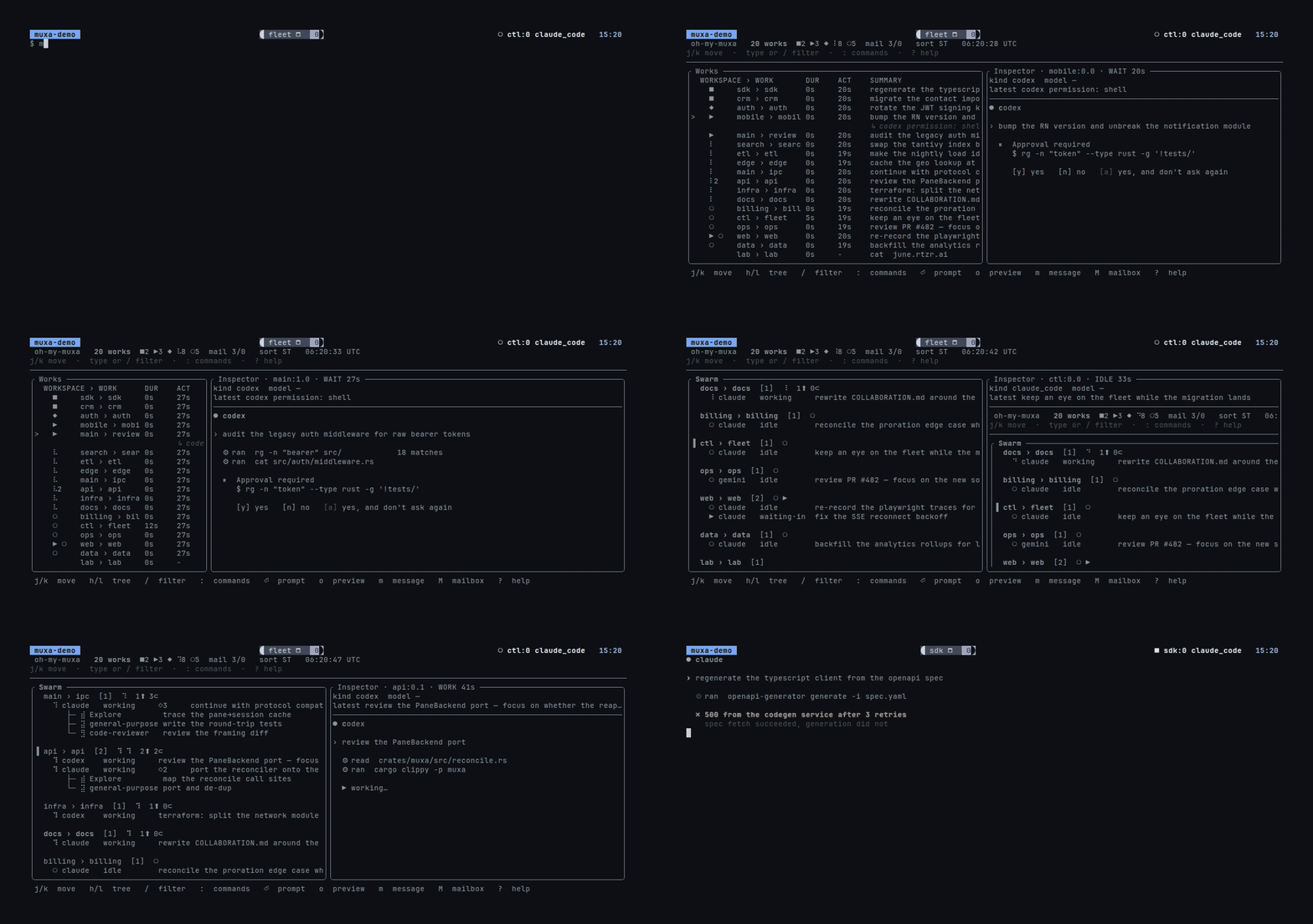
tend watch — the fleet, the inspector, the swarm view, and tend attend.
tend opens watch directly when agents are already tracked. Otherwise, choose
an installed agent to start in the current folder, view existing terminals, or
try the demo. Starting an agent previews and backs up the hook/tmux changes;
cancelling setup also cancels the launch. MCP is not required.
Try the core workflow outside tmux:
tend onboard --quick
The three-step demo prepares practice agents, then lets you open watch, inspect
their states, and attend the waiting agent. It makes no agent API calls and
removes its private sandbox on exit. tend onboard keeps the full 16-step tour;
tend onboard --quick --print shows the short written guide.
To try the actual CLI without installing it, take the full tour in a throwaway
tmux server. The script runs the real tend onboard from a checksum-verified copy of the
release binary, deletes it on exit, and never touches your existing tmux
server. It needs network access and a supported release platform; the live
tour also needs tmux. tend onboard --print gives a non-interactive guide.
curl -fsSL https://raw.githubusercontent.com/Open330/tend/main/scripts/onboard.sh | sh
Why tend
Tend has two layers. Attention works on agents you already run; Runtime organizes the agents Tend launches into Work. Attention never requires Runtime. See Direction.
- Keeps your setup. Reads agent state from Claude Code, Codex, and
Antigravity CLI (
agy) hooks and opencode plugin events, with screen detection for hook-less agents, and maps it onto the tmux panes you already have. You can keep launching agents yourself, or use tend's optional agent and pipeline launchers. tmux, rmux, and herdr can be observed at the same time; zellij has a CLI baseline. - Tells you who is waiting. tmux status line, the
tend watchTUI, and desktop notifications. - Takes you there.
tend attendfocuses the pane blocked longest;--cycletabs through every agent that needs you. - Keeps reviews and replies together. Press
min watch to send a peer request, thenMto read requests and replies in the mailbox. - Lets one agent drive the rest.
tend mcpgives a coding agent the same view, plus send-prompt and wait-for-change tools.
[!IMPORTANT] Beta. Event ingest, the daemon, CLI, live TUI, desktop notifications, stats, and reports work end-to-end, but APIs may still change before 1.0.
What You Get
| Surface | What it does |
|---|---|
tend status-line |
One-line tmux status-right summary for the active pane. |
tend peek |
prefix + q overlay: each pane's live screen dimmed under a box with its handle (@claude) and tmux pane id, its agent's state, summary, and latest prompt/response; a separate Links panel below shows roles, primary/worker purpose and request/reply state, with full pane IDs and connecting arrows following the real pane layout — including how long ago you last prompted it and which pane was prompted most recently; press a digit to jump, or ` |
tend sidebar show |
Persistent left/right agent explorer, with matching pane colors and sidebar-aware focus zoom. Usage. |
tend watch |
Main TUI for agents, prompts, live previews, hierarchy-aware mailbox history, and table/sequence collaboration. |
tend dashboard |
tend watch on its Work board: Works first, P prompts and A interrupts every live agent of the selected Work. |
tend attend |
Jump to the agent blocked on input/choice/error longest. |
tend stats / tend stats report |
Local analytics for prompt history, agent state duration, tmux foreground time, and human thinking time. |
tend timeline |
Full-screen TUI timeline of agent work, waiting, errors, human interaction, and tmux foreground time. |
tend stats activity |
Raw duration ledger query for debugging exactly what fed stats/report. |
tend automation |
Rules that act on agent state — the built-in one resumes a session after its usage cap resets. |
tend swap |
Restart agents on their own accounts with --all --to same --when-idle, or move agents onto another account (configured accounts, or the optional aas provider) and resume them in place — the rate-limited ones, named panes, or all. Part of the optional account module ([modules] accounts, on when your config already uses accounts). See docs/ACCOUNT_SWAP.md. |
| Tend for Mac | Native app that opens on Home (Work units in Your turn / In progress / Finished lanes), plus Explore, Inbox, Ask, Shells, and Files, with a libghostty terminal and notifications; native PTYs remain owned by tendd. |
| Dashboard | Optional loopback HTTP UI with live updates, timeline, collaboration graphs, and OIDC pane/window sharing with view or prompt permissions. |
| BarShelf widget (macOS) | Menu-bar popover summary of active, working, waiting, and error agents, per host (local or SSH). See docs/WATCH.md. |
| Notifications | Optional desktop alerts when agents need attention. |
More install options
Homebrew (above) is the main path. For the Mac app (notarized, updates through Homebrew since it has no built-in updater):
brew install --cask open330/tap/tend-app
Or the one-shot installer (builds from source, requires Rust 1.89+):
curl -fsSL https://raw.githubusercontent.com/Open330/tend/main/scripts/install.sh | sh
Or from source:
git clone https://github.com/Open330/tend.git
cd tend
cargo install --path crates/tendd --locked
cargo install --path crates/tend-cli --locked
tend init
Verify:
tend daemon start
tend daemon status
tend status
tend watch
Build Tend for Mac
The native macOS app embeds a libghostty terminal while keeping shells and
agents in tendd, so closing the app does not stop them. Ghostty, its Swift
surface, and the required Zig compiler are pinned and verified; Tend builds its
own local XCFramework instead of consuming a prebuilt terminal binary.
brew install xcodegen
apps/tend-macos/Scripts/build-app.sh --open
After building, run apps/tend-macos/Scripts/smoke-test.sh for a
non-interactive product smoke test.
See Tend for Mac for the architecture, build inputs, and IPC contract.
Organize work in tmux
Optional: you can keep using your own tmux layout. If you want tend to manage where agents run as well, it gives tmux a work model.
Tend treats tmux as a work execution adapter, not just a collection of terminal panes. The durable logical model is Workspace → Work → Run → Agent session:
| tmux object | Tend meaning | How it is used |
|---|---|---|
| session | Workspace execution context | Contains active Run windows for one managed workspace. |
| window | One active Work Run | Carries a link to stable Work identity and cwd; closing it ends the Run. |
| pane | Agent execution surface | Binds an implementer, reviewer, or helper Agent session to that Run. |
The intended workflow is equally direct:
- Start a work ID once; Tend creates or reuses the workspace session, creates its work window, and starts the first agent pane.
- Add implementer, reviewer, or helper agents as additional panes in that Work Run. Other Work items use sibling Run windows.
- Observe, preview, message, and control those agents through
tend watch, or let an agent use the same policy throughtend mcp. - Close an agent pane, work window, or whole workspace session explicitly. Tend refuses to terminate unmanaged tmux objects.
An optional Linear/GitHub/Jira issue is a reference attached to Work, not the
Work identity or local board stage. See the Work domain model.
In short: Workspace → Work → Run → Agent session, with tmux as the current
binding. Run tend onboard for one continuous safe scenario.
It creates a private throwaway tmux server, daemon, and mailbox, then lets you
type tmux new-session, see the hierarchy, prove detach/attach persistence,
start sandboxed agents, and use the real Tend watch, attend, and messaging
workflow. It never touches your existing tmux server and removes the sandbox on
exit.
Clear a stale agent record
Reinstalling Tend preserves its registry. A cmux record can outlive the agent
because cmux observation is partial; an unseen surface does not prove an exit.
tend registry prune only removes orphan rows without a pane, surface, or pid.
For a stale record that still carries a pane, find its agent_session_id in
tend status --json, then run:
tend registry forget <agent_session_id>
# Add --yes to skip the confirmation.
This removes exactly one registry row without stopping its process or terminal. Later hooks or scans may register an active agent again. Prompt history is kept.
Ask for human attention
An agent can run tend msg attention "Approve staging deployment?" --action approval,
or use the tend_request_attention MCP tool. Required approval, choice, and
information requests appear in Tend for Mac's Attention, Inbox, Dock badge, and
notifications across connected Fleet hosts. A response on one client resolves
the same durable request on other connected clients. See Fleet setup.
Collaborate from tend watch
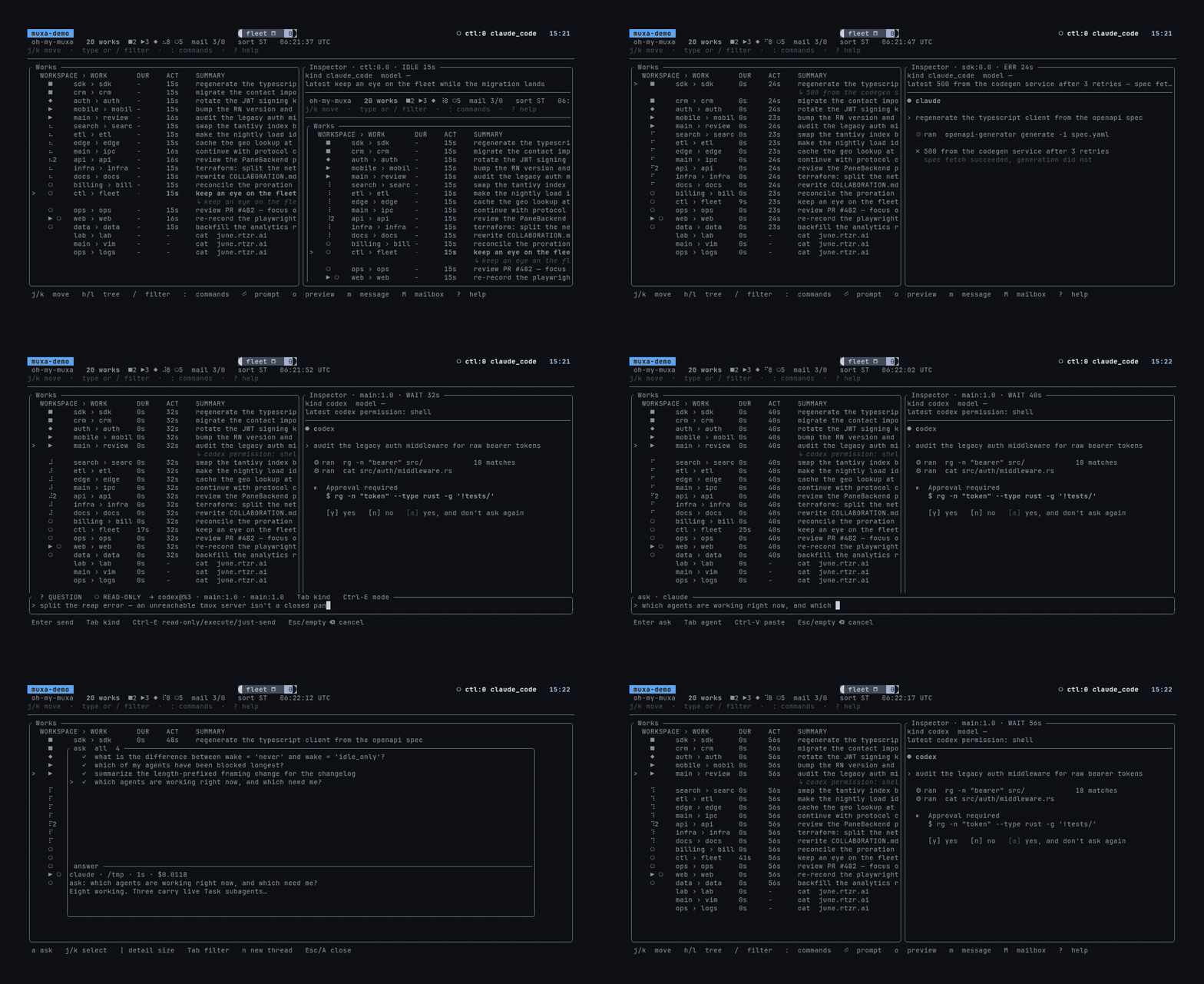
M mailbox · m message the row under the cursor · a/A headless ask.
The model is simple: one tmux window is one room. Interactive watch and
dashboard messages are sent by the operator console, so either popup can be
opened from an agent or a spare shell pane. Agent-initiated MCP and tend msg
requests still use that agent's pane identity.
One-time setup: add the following to ~/.config/tend/config.toml, restart
tendd, and run tend init to install the prefix+s watch popup.
[collaboration]
enabled = true
wake = "idle_only"
# Default: deliver operator messages directly; keep agent messages as notices.
wake_payload = "operator_full"
Install shared collaboration instructions, the symlinked skill, and MCP for detected Codex and Claude Code installations, then restart running agents. The standard preset includes this setup.
tend init --component agent-instructions,agent-skills,agent-mcp
Init adds Codex's required pane environment forwarding to [mcp_servers.tend]
while preserving existing variables and other settings:
env_vars = ["RMUX", "RMUX_PANE", "TMUX", "TMUX_PANE", "TEND_SOCKET"]
Tend also recovers the pane from process ancestry across active pane backends for existing default-endpoint Codex registrations, so older setups fail safely rather than appearing paneless.
See Global agent integration for canonical paths, updates, and removal; MCP setup also covers manual registration.
Connected agents are told that room peers can serve as read-only reviewers or narrowly scoped execution subagents.
You can call a colleague directly from a connected Claude or Codex conversation. The agent maps the mention to Tend's durable peer-call tool:
@peer review the current changes
@codex /review-plan-feedback using commit abc123 as context
@peer's report: summarize it and apply only valid advice
@peer and @tend-peer are reserved for Tend collaboration. New requests use
the peer-call tool; references to an existing peer report use the durable
mailbox report tool and never imply a GitHub PR without an explicit PR reference.
@peer chooses a healthy same-window agent deterministically; @claude,
@codex, @agy, @alias, and role:name narrow the target. Calls default
to REVIEW · READ-ONLY. Executing changes requires an explicit task
authorization, and creating a new agent pane requires a separate confirmation.
Restart an already-running agent after upgrading Tend or changing registered
skills so its MCP process loads the new tool and templates.
Agents reported as synthetic by tend doctor are omitted from collaboration
until a hook event establishes a stable session identity. Submit a prompt or
restart that agent, then check again.
Then:
- Run two agents in two panes of the same tmux window.
- Press
prefix+sfrom any pane and select the recipient's session, window, or pane. Parent rows resolve to the lowest numeric live agent and show the exact target in the composer title. - Press
m, type the request, and pressEnter. At any point in the draft,/opens reusable skills registered withtend skill add; selection inserts at the cursor and a secondEntersends. PressMto read and reply from the mailbox.
Press prefix+M from an agent pane, or Alt-M on its row in local watch, to
move it into a new session/window or an existing window without restarting.
The shared menu supports destination search, follow/stay, split direction,
and undo. On a window row, Alt-M moves every pane and the layout together;
Ctrl-W in the popup switches pane/window scope. See moving a running agent.
The default tmux prefix is Ctrl and b together, then release both keys.
Press s next to open watch. Inside watch, use these keys without the prefix:
| Key | Action |
|---|---|
j / ↓, k / ↑ |
Select the next / previous item |
h / l, ← / → |
Move to a parent or child |
/ |
Search agents and workspaces |
Enter |
Connect to the selected target |
o |
Preview the selected pane |
m |
Compose a message |
M |
Open the mailbox |
? |
Show all keyboard shortcuts |
q |
Close watch and return to the original pane |
M on a window combines its room; on a session it combines all windows and
groups the read-only history by window. On the collaboration screen, v
toggles the newest-first table and chronological sequence (tend watch --screen collab --collab-layout sequence starts there directly). The web
dashboard adds a cross-room node-edge graph, sequence drill-down, filters, and
cursor pagination. Durable history is indexed in collaboration.sqlite3; an
existing collaboration.json is imported once and retained as a migration
backup until you remove or archive that duplicate copy.
For request/reply details, see docs/COLLABORATION.md; for skill registration and composer controls, see docs/WATCH.md.
For install modes, tend init presets, systemd, manual hook wiring, and
rollback details, see docs/INSTALL.md.
Core Commands
Managed tmux policy binds a workspace context to a session, an active Work Run
to a window, and an Agent session to a pane. tend onboard teaches that mapping
in sixteen live steps on a private sandbox. You create a real session and
window, inspect the tree, detach and reattach, split a pane and let the tour
bring up two scripted agents, then use real tend watch — including the
j/k, Enter and ? keys it is driven with — tend attend, and tend msg
against a real sandbox mailbox. The narration observes tmux and Tend state; it
does not intercept your keys. Korean is selected automatically for a Korean
locale, can be requested with --lang ko, and can be toggled with F2 during
the tour. --print emits the same sixteen-step workflow without starting tmux.
| Command | Purpose |
|---|---|
tend status [--flat|--json] [-v] |
Agents as a session / window / pane tree (--flat: one row per agent), or a versioned JSON snapshot for desktop integrations. -v also lists where each row's state came from (hook, provider_record, ~screen, ~timing, …; ~ marks a heuristic). |
tend watch [--view session|window|pane] |
Live workspace → work → agent TUI picker/dashboard. |
tend dashboard [--since today] |
The watch Work board: per-agent and Work-wide prompt/interrupt, messages and mailbox as an agent, collaboration counts, and an ACT/WACT summary. |
tend attend [--cycle] [--list] |
Focus or list agents needing attention. |
tend status-line [--pane %N] |
tmux status-line output. |
tend peek [--plain] [--expanded] |
Per-pane overlay for the current tmux window; --plain prints it as text. The overlay is a tmux popup, so where nothing can draw one — a front-end that attaches no client (cmux), or a control-mode client (tmux -CC — amux, iTerm2) — peek prints the text report instead and says why on stderr. |
tend recap [--pane %N] |
Recent prompts from retained disk history. |
tend agent search 'question' / tend agent read EVENT_ID |
Search historical Claude/Codex conversations and commands with a Korean/English question, then inspect surrounding evidence and paired tool results. Guide. |
tend peers / tend identity / tend msg |
Discover and name same-window agents, then exchange durable request/reply messages. |
tend workers [--idle-hours N] [--json] |
List every worker tend launched for peer work, across all rooms: state, observed idle time, open requests, and flags (error = never reused, so a replacement may be spawned; long-idle; possible-overlap, informational). Read-only; only sessions positively known to be workers are listed. It also lists launches still holding capacity without a registered worker; tend workers release <launch-id> --reason <why> frees an uncertain one after you check its launcher stopped (refused while a live process still matches; audited; never stops a process). tend doctor summarises the same findings. |
tend skill add/list/show/remove |
Manage reusable / prompt templates for watch/dashboard messages, watch ask, and MCP peer calls. |
tend fleet host add/list/label/annotate/doctor |
Manage physical SSH nodes and Kubernetes-style labels/annotations. |
tend fleet status/watch/capture/send/attach |
Central host → session → window → pane(agent) observation and control. |
tend stats --since today |
Focused WACT/ACT/WORK/WAIT summary; group by day/project/agent/session. Add --graph for graph-only WACT over time or --verbose for diagnostic columns. |
tend stats report --since week |
All breakdowns (day/project/agent/session) as focused ACT/WACT tables; add --json or --markdown to export. |
tend timeline --since today |
Interactive session-grouped timeline; filter with --session main / --agent codex, sort with --sort waiting, or use --view heatmap. |
tend stats activity --type agent|tmux|human |
Raw activity ledger intervals. |
tend registry sync / prune / forget / panes |
Backfill the registry, drop orphan rows, forget an exact agent session, or list pane hosts. |
tend proc register --name X [--pid N] |
Surface an arbitrary background process (script, game, automation loop) as a pid-tracked row in tend status. |
tend proc run --detach --name X -- <cmd> |
Run a command in a tend-owned PTY; it also appears in tend status as a task. tend proc attach/detach X reconnects or leaves it. |
tend agent start --agent codex [--host auto|native|tmux] |
Start an allowlisted agent. auto uses tmux inside tmux and a tend-owned PTY in a plain terminal. |
tend work init |
Describe a work pipeline in your own words; an agent writes the [ticket]/[[route]]/[pipeline.*] config, validated and shown before anything is written. |
tend work compose "implementer in claude, reviewer in codex after it" |
Draft one pipeline from a description without writing anything: the reply is the same JSON tend work pipeline set --from-json accepts, validated like it, so Tend.app can show it for review first. |
tend ask providers / tend ask provider add anthropic-work --engine anthropic / tend ask provider use codex |
List the Ask providers with what each needs, and compose the list: an instance names its engine (Claude Code, Codex CLIs; Anthropic, OpenAI APIs; Apple Intelligence on a Mac, with no key), its model, and its own key variable, so several keys for one engine can coexist. use makes one the default and saves it as [ask] agent. |
tend automation list / tend automation test resume-after-limit |
Inspect the rule engine and see what a rule would do right now without firing it. A rule reacts to an agent event (a session limit, a wait for input, an idle stretch) after a delay, with guards that a rule cannot opt out of. See docs/AUTOMATION.md. |
tend config show / tend config set --from new.toml |
Read and replace the daemon's config.toml through tendd, which parses and validates before writing. Tend.app's Settings › Advanced edits the same file the same way. |
tend work preset apply solo --route '.*' |
Write a built-in pipeline (solo, pair, triad) into config.toml without an agent turn; tend work options --json prints the routes, pipelines, skills, and presets a launcher can offer. |
tend work up eng-1234 --body "..." |
Resolve the ticket, route it to a workspace, and create whichever pipeline agent panes are missing — delivering the request to the ones already running. Re-running converges; also tend_start_work over MCP. See docs/PIPELINE.md. |
tend work start tend-onboarding --workspace tend --agent codex ... |
Create/reuse workspace session tend, create/reuse its work window, and add an agent pane. |
tend workspace list/show/view/close |
Inspect, give the current terminal an independent grouped view of, or explicitly close workspace/project sessions. |
tend window rename NAME |
Give a tmux window a stable normalized name, or restore process-based naming with --auto. |
tend work list/show/close [--workspace tend] |
Inspect Work and its current Run binding, or explicitly close that Run window. |
tend agent start --host tmux --workspace tend --work tend-onboarding ... |
Add an allowlisted agent pane to one managed tmux Work window; also exposed as MCP tend_start_agent. |
tend agent control (--pane %N|--session pty-N) --action interrupt |
Interrupt or explicitly terminate one managed tmux pane or tend-owned PTY agent session. |
tend onboard [--tour live] [--lang auto|en|ko] |
Sixteen live steps on a throwaway tend: real tmux, watch, attend, and mailbox. Refuses to nest inside an existing tmux session. F2 switches language, --no-quiz offers F12 immediately, and --print emits the written guide. |
tend automation list/test/log |
Rules that watch agent state and act on it — resume a session once its usage cap resets, nudge an idle agent, interrupt a stuck one. Ships enabled with no rules; pause, cooldown, per-rule hourly caps, a fire-time re-check, and a durable ledger keep it from running away. See docs/AUTOMATION.md. |
tend mcp |
MCP stdio server so a coding agent can orchestrate tend — inspect agents, send prompts, capture panes, wait for changes (claude mcp add --scope user tend -- tend mcp, see docs/MCP.md). |
tend snapshot |
Capture this multiplexer's workspace — sessions, windows, panes, geometry, working directories, each pane's own command line, and tend's Work, workspace and role/task/alias marks — into $XDG_DATA_HOME/tend/snapshots. |
tend restore [DIR] [--run] |
Rebuild a workspace from a snapshot, marks included: sessions and windows it creates get their workspace and Work back and their panes their role, task and alias (never a worker grant, never on top of marks a target already has, and never onto a session that was already there). Prints the plan unless --run, because restoring into a server that still has those sessions adds panes rather than replacing them. --boot is the login-hook form: it restores only into a server with no sessions, starting it if needed — tend init --component restore-at-login registers it with systemd, launchd or Task Scheduler. |
tend reload mcp [--codex-home DIR] |
Ask the existing Codex app-server to refresh all configured MCP connections for that profile. It reports queued acceptance and connection verification; exit 2 means refresh is pending, unverified, or still needs a client-side reconnect it lists (a standalone Codex CLI is named with its session id to resume). It does not restart panes or app-server. --all targets discovered stale shared Codex profiles; --dry-run previews scope. |
tend reload mux [--snapshot DIR] |
Explicit name for the full multiplexer reload below. |
tend reload [--snapshot DIR] |
Snapshot, restart the multiplexer, and put the workspace back — the way to pick up a new tmux/rmux build without rebuilding thirty panes by hand. Run it from outside the server it restarts; a pane tend tracked comes back on its own conversation, and an agent the reload cut off mid-turn is sent continue once it has resumed (--continue TEXT to change it, --no-continue to skip). |
tend init |
Interactive install/uninstall wizard. |
tendd |
Daemon process. |
Common stats queries:
tend stats --since today --group-by session
tend stats --since yesterday --group-by project
tend stats report --since last-week
tend timeline --since today --session main
tend timeline --since today --exclude-session 'monitor*'
tend stats --since month --exclude-pane '%42' --exclude-session 'monitor*'
tend timeline --since today --group-by kind --sort waiting
tend timeline --view heatmap --since 12w
tend timeline --day 2026-06-06
tend stats activity --since today --type human
--since accepts today, yesterday, week for a rolling 7-day window,
month for a rolling 30-day window, last-week / "last week" for the
previous Monday-Sunday calendar week, last-month / "last month" for the
previous calendar month, rolling durations like 24h/7d/4w, local dates
like 2026-06-06, RFC3339 timestamps, and all. See
docs/ACTIVITY.md for ledger semantics, including
HUMAN, THINK, and ACT.
tend stats, tend stats report, and tend timeline also accept
--exclude-pane and --exclude-session for long-lived monitoring scopes.
Patterns are case-sensitive and support * and ?, e.g.
--exclude-session 'monitor*'.
Supported Agents
Hook-based (authoritative). These wire into their existing hook/event systems, so tend gets exact state transitions:
| Agent | Status | Config |
|---|---|---|
| Claude Code | Supported | ~/.claude/settings.json |
| OpenAI Codex | Supported | ~/.codex/config.toml |
Google Antigravity CLI (agy) |
Supported | ~/.gemini/config/hooks.json — details |
| opencode | Supported (plugin events) | ~/.config/opencode/plugins/tend.ts (1.x), plugins/tend/tui.ts (2.x) — details |
The Google Gemini CLI is no longer supported; use its successor, the
Antigravity CLI. tend init removes the hooks an older tend wrote into
~/.gemini/settings.json, and tend doctor points out any that remain.
The daemon also reads Codex session-rollout logs every two seconds to recover activity and turn completion when hooks miss an update. Quota percentages and credits are telemetry; an actual limit failure is needed before showing a quota error.
Screen-detected (fallback). Agents with no hooks are classified from
their pane contents via TOML manifests — bundled for agy, codex, cursor-agent,
amp, copilot, aider, and goose, extensible per user. Hooks win when
present, with one carve-out: agy fires no hook for an approval prompt, so its
panes stay screen-inferred for that one signal. See
docs/SCREEN_DETECTION.md.
On herdr hosts, tend additionally surfaces every agent herdr's own detection sees, with no manifest needed.
Fleet Hosts
Run tendd locally as a central controller for this machine and several
SSH-reachable machines. The controller appears immediately as the local
node, without Fleet configuration. Each physical node keeps its own stable UUID and label/annotation metadata;
the controller maintains one persistent outbound SSH stdio relay and an
independent last-known cache per node. observe is the default, while
control must be granted per host. No remote TCP listener is opened.
tend fleet status                         # local is already present
tend fleet status -L environment,region   # opt-in label columns
tend fleet status -o wide                 # hostname/version/latency when space permits
tend fleet host label local environment=development
tend fleet host add dev tend-devbox --label environment=development --mode observe
tend fleet host doctor dev
tend fleet watch
# equivalent entry point: tend watch --fleet
# `tend init` also binds this view to tmux prefix+S (local watch stays prefix+s)
# with only local, this is the full native watch with no redundant host row
See docs/FLEET.md for selectors, TUI controls, security, performance, MCP tools, and dashboard APIs.
Pane Backends
tend observes agents across terminal-multiplexer backends and can watch several at once (e.g. during a tmux→herdr migration):
| Host | Status | Notes |
|---|---|---|
| tmux | Full | The default backend. |
| rmux | Initial CLI backend | Pane discovery, capture, focus, and targeted input; see docs/RMUX.md. The host on native Windows — see docs/WINDOWS.md. |
| herdr | Full | Via herdr's socket API; see docs/HERDR.md. |
| cmux | Labs (adopt-only) | Identifies the current surface from hook env, focuses it and sends targeted text; no full inventory, pid map or capture. See docs/CMUX.md. |
| zellij | Labs (adopt-only) | Observes hooked panes and jumps to them; no capture or send. The planned WASM plugin was dropped. |
See docs/MULTI_HOST.md for observing multiple hosts simultaneously.
More Docs
| Topic | Doc |
|---|---|
| Install and wiring | docs/INSTALL.md |
| Onboarding and work/agent policy (한국어) | docs/ONBOARDING.ko.md |
Work pipelines (tend work up) |
docs/PIPELINE.md · 한국어 |
MCP control plane (tend mcp) |
docs/MCP.md |
| herdr host support | docs/HERDR.md |
| rmux host support | docs/RMUX.md |
| Native Windows (PowerShell + rmux) | docs/WINDOWS.md |
| Multi-host observation | docs/MULTI_HOST.md |
| Physical SSH fleet | docs/FLEET.md |
Antigravity CLI (agy) support |
docs/ANTIGRAVITY.md |
| Screen-manifest detection | docs/SCREEN_DETECTION.md |
| Live TUI and prompt composer | docs/WATCH.md |
| CLI dashboard | docs/DASHBOARD_CLI.md |
| Stats, reports, activity ledger | docs/ACTIVITY.md |
| Timeline TUI and dashboard graph | docs/TIMELINE.md |
| Configuration reference | docs/CONFIGURATION.md |
| Web dashboard | docs/DASHBOARD.md |
| External sinks | docs/SINKS.md |
| Zellij plan | docs/ZELLIJ.md |
| Architecture and development | docs/ARCHITECTURE.md |
| Agent collaboration | docs/COLLABORATION.md |
Development
cargo test --workspace
cargo clippy --workspace --all-targets -- -D warnings
cargo fmt --all -- --check
License
MIT OR Apache-2.0.
The third-party product logos in apps/tend-macos/Resources/Assets.xcassets/AgentLogos are trademarks of their owners and are not covered by this licence; see AgentLogos-NOTICE.md.
Peek expanded reader
Inside peek, press | to read the active pane in fullscreen. Use j/k, arrows, PgUp/PgDn, or Home/End to scroll; n/p changes panes, r refreshes the reading snapshot, |/Esc returns to the overlay, and q closes it. Tab switches between saved agent text and terminal history. Saved responses may be capped at ingestion; terminal history includes everything tmux still retains, but cannot recover discarded scrollback.
tend peek --expanded opens the reader directly. Existing tmux prefix + | split bindings are preserved. To assign that key to the reader instead:
bind-key | display-popup -B -E -w 100% -h 100% -x 0 -y 0 "tend peek --expanded"
Part of Open330 · open source tools for AI-agent workflows · open330.github.io