
Omraj09/MacMelody
Omraj09/MacMelody has 39 GitHub stars and 0 forks. Star changes are not measured yet. Last checked 2026-11-11 04:06 UTC. Last push 2026-11-03.
Native macOS menu bar companion for OnePlus, OPPO & realme earbuds (Battery, ANC, EQ, and Gestures).
Measured star growth
- in 24h
- Update delayed
- in 7 days
- Update delayed
- in 15 days
- Update delayed
- in 1 month
- Update delayed
Net star changes over overlapping periods, not daily totals. Missing measurements are left blank. Stars measure attention, not software quality.
README.md
Original
MacMelody
Native macOS menu bar companion for OnePlus, OPPO & realme earbuds.
Control your earbuds directly from your Mac with fluid Apple Liquid Glass aesthetics.
No phone apps, no accounts, no cloud—just direct Bluetooth.






⭐️ Enjoying MacMelody? Star the repository to support development and help fellow Mac users discover it!
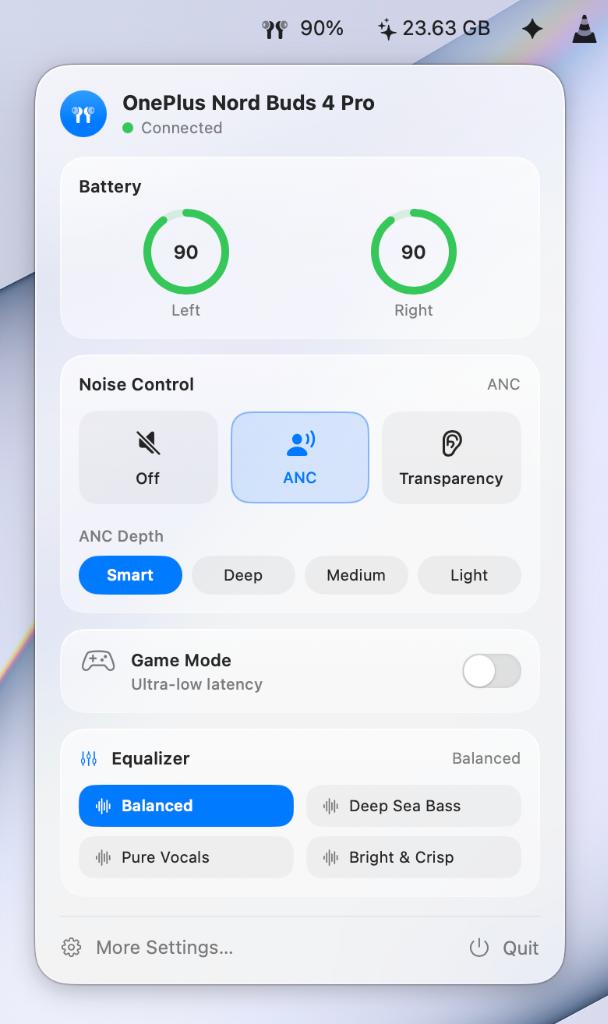
🎛️ Menu Bar Control Panel
Quick access from your menu bar with genuine macOS Liquid Glass vibrancy:
|
 |
🖥️ Main Device Dashboard
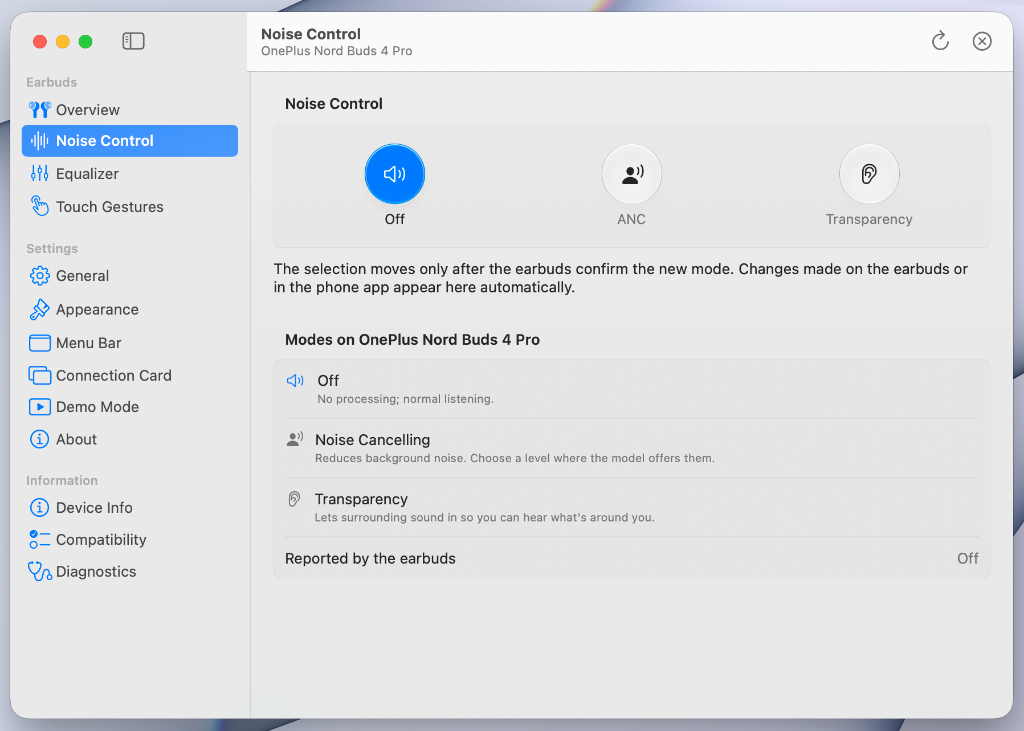 |
Detailed device management and configuration window:
|
🎧 Supported Models
MacMelody communicates natively with 35+ models across OnePlus, OPPO, and Realme via the direct OPOv1 protocol over Bluetooth RFCOMM & BLE.
🔍 Search & Quick-Find: Click any brand toggle below to view compatible models, or press ⌘ + F (Ctrl + F) to search for your device.
OnePlus Earbuds (14 Models) — Click to Toggle
| Model | Status | Tailored Hardware Features |
|---|---|---|
| OnePlus Nord Buds 4 Pro | 🟢 Verified | Battery, ANC Tree (Smart/Deep/Med/Light), EQ, Gestures |
| OnePlus Buds 3 | 🟢 Verified | Battery, ANC Tree (Smart/Deep/Med/Light), EQ Presets, Game Mode, In-Ear Detection |
| OnePlus Buds Pro 3 | 🟡 Not Verified | Battery, Dynaudio EQ, 50dB Adaptive ANC, Dual Connection, Stem Gestures |
| OnePlus Buds Pro 2 / 2R | 🟡 Not Verified | Battery, Dynaudio EQ, ANC Tree, Dual Connection, Gestures |
| OnePlus Buds 4 | 🟡 Not Verified | Battery, ANC Tree, Master EQ, Dual Connection, In-Ear Detection, Gestures |
| OnePlus Nord Buds 4 | 🟡 Not Verified | Battery, 48dB ANC Tree, Dual Connection, In-Ear Detection, Gestures |
| OnePlus Nord Buds 3 Pro | 🟡 Not Verified | Battery, 49dB ANC Tree, Dual Connection, In-Ear Detection, Gestures |
| OnePlus Nord Buds 3 | 🟡 Not Verified | Battery, 32dB ANC Tree, Dual Connection, In-Ear Detection, Gestures |
| OnePlus Nord Buds 3r | 🟡 Not Verified | Battery, Master EQ, Dual Connection, Gestures (Non-ANC) |
| OnePlus Nord Buds 2 | 🟡 Not Verified | Battery, Core ANC, In-Ear Detection, Master EQ, Gestures |
| OnePlus Nord Buds 2r | 🟡 Not Verified | Battery, Master EQ, Game Mode, Gestures (Non-ANC) |
| OnePlus Nord Buds | 🟡 Not Verified | Battery, Sound Master EQ, Ultra-Low Latency, Gestures (Non-ANC) |
| OnePlus Buds Z2 | 🟡 Not Verified | Battery, Core ANC, In-Ear Detection, Master EQ, Gestures |
| OnePlus Buds Pro | 🟡 Not Verified | Battery, ANC Tree, In-Ear Detection, Master EQ, Gestures |
OPPO Earbuds (14 Models) — Click to Toggle
| Model | Status | Tailored Hardware Features |
|---|---|---|
| OPPO Enco X4 | 🟡 Not Verified | Battery, Dynaudio EQ, 55dB ANC Tree, Dual Connection, Stem Gestures |
| OPPO Enco X2 | 🟡 Not Verified | Battery, Dynaudio EQ, ANC Tree, Dual Connection, Gestures |
| OPPO Enco Air5 Pro | 🟡 Not Verified | Battery, 55dB ANC Tree, Dual Connection, In-Ear Detection, Gestures |
| OPPO Enco Air5 | 🟡 Not Verified | Battery, Master EQ, Dual Connection, Gestures (Semi-in-ear / Non-ANC) |
| OPPO Enco Air4 Pro | 🟡 Not Verified | Battery, 49dB ANC Tree, Master EQ, Dual Connection, In-Ear Detection, Gestures |
| OPPO Enco Air3 Pro | 🟡 Not Verified | Battery, Bamboo Driver ANC Tree, Dual Connection, Gestures |
| OPPO Enco Air3 | 🟡 Not Verified | Battery, Master EQ, Dual Connection, Gestures (Semi-in-ear / Non-ANC) |
| OPPO Enco Air2 Pro | 🟡 Not Verified | Battery, 28dB Core ANC, In-Ear Detection, Master EQ, Gestures |
| OPPO Enco Buds3 Pro+ | 🟡 Not Verified | Battery, 32dB Hybrid ANC, Dual Connection, Master EQ, Gestures |
| OPPO Enco Buds3 Pro | 🟡 Not Verified | Battery, 32dB Hybrid ANC, Dual Connection, Master EQ, Gestures |
| OPPO Enco Buds3 | 🟡 Not Verified | Battery, Master EQ, Low Latency, Gestures (Non-ANC) |
| OPPO Enco Buds 2 | 🟡 Not Verified | Battery, Enco Live Stereo EQ, Low Latency, Gestures (Non-ANC) |
| OPPO Enco Free3 | 🟡 Not Verified | Battery, Bamboo Diaphragm ANC Tree, In-Ear Detection, Gestures |
| OPPO Enco X | 🟡 Not Verified | Battery, Dynaudio EQ, ANC Tree, In-Ear Detection, Gestures |
Realme Earbuds (15 Models) — Click to Toggle
| Model | Status | Tailored Hardware Features |
|---|---|---|
| Realme Buds Air 8 Pro | 🟡 Not Verified | Battery, 55dB ANC Tree, 360° Dual Connection, In-Ear Detection, Gestures |
| Realme Buds Air 8 | 🟡 Not Verified | Battery, 55dB ANC Tree, Dynamic Bass EQ, Dual Connection, In-Ear Detection, Gestures |
| Realme Buds Air 7 Pro | 🟡 Not Verified | Battery, 53dB ANC Tree, Dual Connection, In-Ear Detection, Gestures |
| Realme Buds Air 7 | 🟡 Not Verified | Battery, 52dB ANC Tree, Dynamic Bass EQ, Dual Connection, In-Ear Detection, Gestures |
| Realme Buds Air 6 Pro | 🟡 Not Verified | Battery, 50dB ANC Tree, 360° Dual Connection, In-Ear Detection, Gestures |
| Realme Buds Air 6 | 🟡 Not Verified | Battery, 50dB ANC Tree, Dynamic Bass EQ, Dual Connection, In-Ear Detection, Gestures |
| Realme Buds Air 5 Pro | 🟡 Not Verified | Battery, 50dB ANC Tree, Dual Connection, In-Ear Detection, Gestures |
| Realme Buds Air 5 | 🟡 Not Verified | Battery, Multi-level ANC, Dynamic Bass EQ, Dual Connection, In-Ear Detection, Gestures |
| Realme Buds T310 | 🟢 Verified | Battery, 46dB Hybrid ANC, Dual Connection, Gestures |
| Realme Buds T300 | 🟡 Not Verified | Battery, 30dB Core ANC, Dual Connection, Gestures |
| Realme Buds T200 | 🟡 Not Verified | Battery, 32dB Core ANC, Dynamic Bass EQ, Low Latency, Gestures |
| Realme Buds T200x | 🟡 Not Verified | Battery, 25dB Core ANC, Dynamic Bass EQ, Low Latency, Gestures |
| Realme Buds T200 Lite | 🟡 Not Verified | Battery, AI ENC, Dual-Device Pairing, Dynamic Bass EQ, Gestures (Non-ANC) |
| Realme Buds T110 | 🟡 Not Verified | Battery, AI ENC, Dynamic Bass EQ, Low Latency, Gestures (Non-ANC) |
| Realme Buds N1 | 🟡 Not Verified | Battery, 46dB Hybrid ANC, 360° Dual Connection, Gestures |
📥 Quick Install
- Download MacMelody.dmg.
- Drag MacMelody into your Applications folder.
- Open the app and allow Bluetooth access when prompted.
💡 First-time Open (macOS Gatekeeper): If macOS shows "cannot verify that this app is free of malware", simply Right-Click (or Control-Click)
MacMelody.appand choose Open, or go to System Settings → Privacy & Security and click Open Anyway. You can also run:xattr -cr /Applications/MacMelody.app - Connect your earbuds to your Mac via Bluetooth—MacMelody pairs automatically.
Building from source
Requirements: macOS 14.0+, Command Line Tools (xcode-select --install), and Swift 6.
git clone https://github.com/Omraj09/MacMelody.git
cd MacMelody

# Build and install to /Applications
./scripts/build-app.sh --install

# Package DMG installer
./scripts/build-dmg.sh
⌨️ Shortcuts
| Key | Function |
|---|---|
| ⌘ + 1 | Noise Control: Off |
| ⌘ + 2 | Noise Control: Active Noise Cancellation |
| ⌘ + 3 | Noise Control: Transparency |
| ⌘ + , | Settings & Diagnostics |
| ⌘ + Q | Quit MacMelody |
🔒 Privacy
- 100% Local: No analytics, no network requests, and zero telemetry.
- Hardware-Verified: Settings only display as changed once confirmed by your physical earbuds.
📄 License
Created by Omraj Sawant under the MIT License.
MacMelody is an independent open-source utility and is not affiliated with OnePlus, OPPO, realme, or Apple Inc.
Explore related projects
ytdl-org/youtube-dl
Command-line program to download videos from YouTube.com and other video sites
141,539 starsexcalidraw/excalidraw
Virtual whiteboard for sketching hand-drawn like diagrams
135,492 starsgodotengine/godot
Godot Engine – Multi-platform 2D and 3D game engine
120,003 starsmrdoob/three.js
JavaScript 3D Library.
118,122 stars