
OTAKUWeBer/ChessPilot
OTAKUWeBer/ChessPilot has 37 GitHub stars and 7 forks. GitHot measured +1 stars in 24 hours. Last checked 2026-11-15 15:03 UTC. Last push 2026-11-12.
What you can do
- 100% Offline — all detection & analysis run locally.
- Automatic Stockfish Download (CPU-Optimized) — ChessPilot automatically detects your CPU features (AVX2, AVX512, POPCNT, etc.) and downloads the most optimized Stockfish build on first run.
- FEN Extraction — ONNX-based piece detector (Zai-Kun’s model).
- Stockfish Analysis — instant best-move suggestions.
Measured star growth
- in 24h
- +1
- in 7 days
- Collecting history
- in 15 days
- Collecting history
- in 1 month
- Collecting history
Net star changes over overlapping periods, not daily totals. Missing measurements are left blank. Stars measure attention, not software quality.
About
Introducing an advanced chess bot that automates gameplay on 2D on-screen chess boards, delivering a seamless and immersive experience.
ProductivityREADME.md
Original

ChessPilot — v2.x
A fully offline chess position evaluator and autoplayer for Windows and Linux — powered by ONNX and Stockfish.


A lightweight, privacy-first tool that reads a **2D on-screen chess board** (Chess.com, Lichess, WorldChess, etc.), evaluates the position locally with Stockfish, and (optionally) plays the best move automatically.
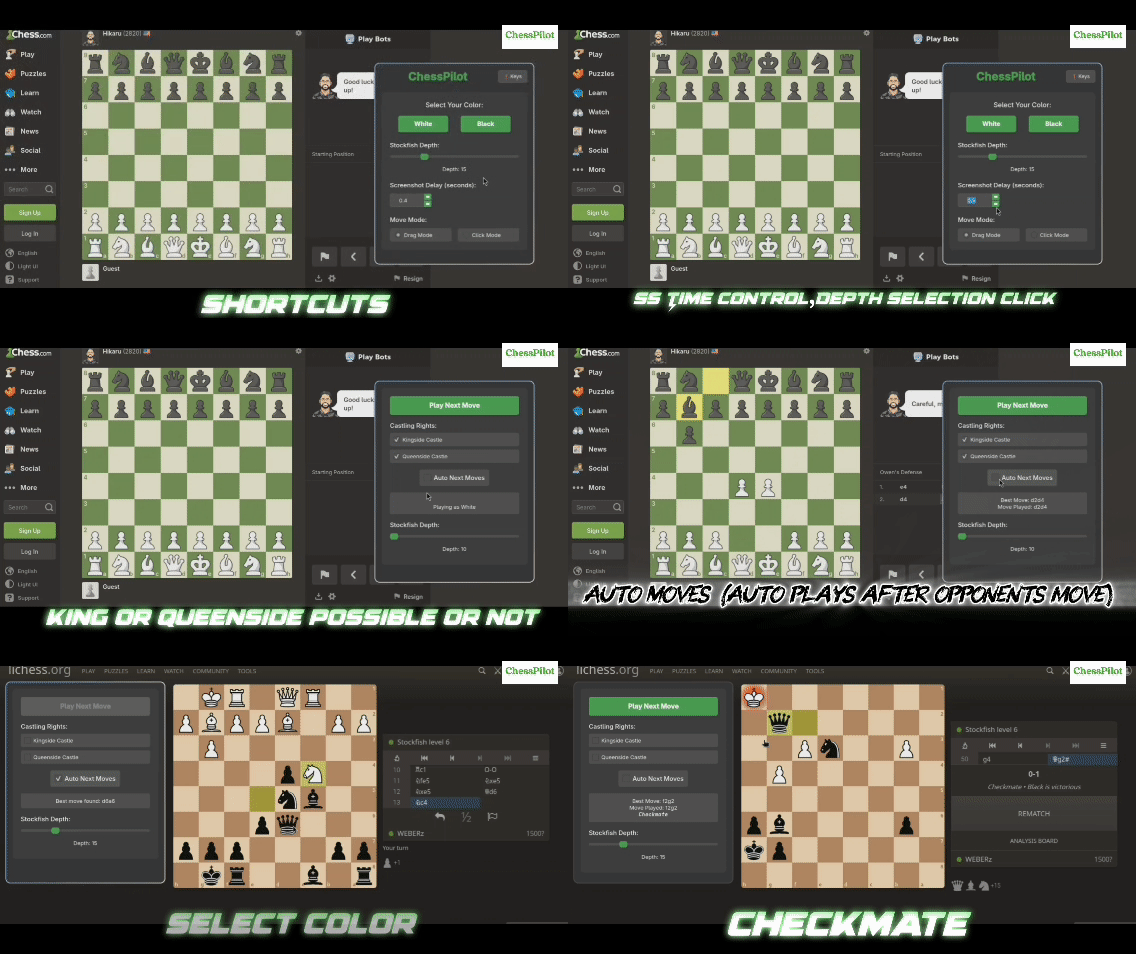
🎥 Demo Video
🎉 Highlights (What's New)
v2.3.0 — Architectural Modularization, Reliability & Quality
- Modular Subsystem Separation — Refactored the monolithic downloader into focused, decoupled modules:
cpu_features.py,download_dialog.py, anddownloader.py. - Pure Core Domain & Perception Service — Extracted desktop screen capture and ONNX board inference out of
core/into a dedicated perception service (board_reader.py), keeping the core domain purely mathematical and free of I/O. - Automated Unit & Integration Test Suite — Added a 25-test automated test suite covering live Stockfish UCI communication, archive extraction, coordinate notation, FEN serialization, and move validation (
python -m unittest discover tests -v). - Hardened Exception Architecture — 100% of bare
try-except-passblocks eliminated across the codebase; replaced with strictly typed exceptions and structured debug logging (CodeFactor A+ grade). - Safe Extraction for Modern Python — Added
filter='data'archive extraction support, ensuring complete forward compatibility with Python 3.12, 3.13, and 3.14. - Centralized Detection Constants — Unified piece class IDs and detection mappings into
model_classes.py.
v2.2.1 — Production Stability, Automation & Performance
- Universal Move Automation — Added intermediate drag-and-drop movement events on Windows for seamless recognition on Chromium-based browsers (Chess.com, Lichess).
- Smart Auto-Castling Detection — Automatically detects when online platforms move the rook upon king castling, preventing redundant clicks or lingering selections.
- Streamlined Pawn Promotion — Eliminated redundant inference overhead during promotions; fully compatible with platform auto-queen settings.
- Thread-Safe UI Operations — All background loop and move executor UI state transitions are strictly dispatched through the Qt main event loop (
QTimer.singleShot), guaranteeing zero thread-affinity conflicts or UI freezes. - Optimized CPU & Logging — Replaced high-frequency screenshot log spam with debug-level telemetry to minimize disk I/O and CPU overhead during auto-play.
- Overlapping Detection Precision — Piece recognition resolves overlapping bounding boxes using square-level confidence grids.
v2.2.0 — The Architecture & Aesthetics Update
- Massive Structural Refactor — The monolithic executor module has been split into clean
core,game, andutilsdomains, improving performance and maintainability. - Bulletproof Engine Stability — Prevented Stockfish from hanging infinitely (the "stuck analyzing" bug) by adding precise timeouts, and added safe
Ctrl+Cinterrupt handlers to end the process cleanly without core dumping. - Gorgeous UI Modernization — Replaced mismatched styles with a cohesive "Emerald and Slate" dark theme managed through a centralized Styles class.
- Linux Patches — Fixed Wayland cursor tracking and pawn promotion screenshot captures.
v2.1.0 — Stability, Precision & Performance
- Full pawn promotion support — handled automatically and reliably.
- Small under-the-hood improvements for cross-platform stability.
v2.0.0 — PyQt6 UI (Polished)
- Brand-new PyQt6-based frontend (replaces old Tkinter UI).
- Same workflow and shortcuts — just smoother and more stable.
⚡ Features
- 100% Offline — all detection & analysis run locally.
- Automatic Stockfish Download (CPU-Optimized) — ChessPilot automatically detects your CPU features (AVX2, AVX512, POPCNT, etc.) and downloads the most optimized Stockfish build on first run.
- FEN Extraction — ONNX-based piece detector (Zai-Kun’s model).
- Stockfish Analysis — instant best-move suggestions.
- Auto Move Execution — applies engine moves to the GUI board.
- Manual Play — use Play Next Move to control timing.
- Automatic Promotion — follows Stockfish’s preferred choice.
- Castling Rights & Depth Control — flexible configuration.
- Retry Logic — failed moves automatically retried up to 3 times.
- Cross-Platform — AppImage/DEB for Linux, EXE for Windows.
📦 Download
The ONNX model (chess_detectionv0.0.4.onnx) is included inside all official AppImage, EXE, and DEB builds.
🔒 Windows Antivirus Warnings (False Positives)
Windows may flag unsigned executables — this is common for small open-source projects.
If you see a warning:
- Verify the release on GitHub.
- Scan the binary on VirusTotal.
- Build from source (
python src/main.py) for maximum safety. - Only run if comfortable — or use a VM.
🛠️ Engine Configuration (engine_config.txt)
Place this file next to the executable to customize Stockfish:
# ChessPilot Engine Configuration

# Memory in MB (64–1024 recommended)
setoption name Hash value 512

# Number of CPU threads
setoption name Threads value 2
Restart ChessPilot after editing.
⚙️ Prerequisites (From Source)
PyQt6 is required for the UI.
Related Links
- ONNX Model: https://github.com/Zai-Kun/2d-chess-pieces-detection
- VC++ Redistributable (Windows): https://learn.microsoft.com/en-us/cpp/windows/latest-supported-vc-redist
- Stockfish Engine: https://stockfishchess.org/
Linux
Install system dependencies:
# Ubuntu / Debian
sudo apt install python3-pyqt6

# Arch Linux
sudo pacman -S python-pyqt6

# Fedora
sudo dnf install python3-qt6
Wayland Users (Arch Linux only)
If you are running Wayland instead of X11, install the following:
sudo pacman -S wayland-utils
Install Python dependencies:
pip install -r requirements.txt
Make sure your Python virtual environment is activated if you are using one.
Windows
pip install -r requirements.txt
If you see errors about missing vcruntime or msvcp DLLs, install the latest VC++ Redistributable - here.
▶️ Run (From Source)
git clone https://github.com/OTAKUWeBer/ChessPilot.git
cd ChessPilot
pip install -r requirements.txt
python src/main.py
Workflow
- Choose White or Black.
- Set castling rights if needed.
- Adjust analysis depth.
- Pick Manual or Auto mode.
- (Press ESC to reopen color selection.)
Running Tests
To run the automated test suite:
python -m unittest discover tests -v
✅ Platform Support
- Windows — tested, EXE provided
- Linux — tested, AppImage & DEB provided (Wayland supported)
- macOS — not yet supported (looking for contributors)
🔁 Troubleshooting & FAQ
Board detection is incorrect → Move the ChessPilot UI aside so the detector has a clear view of the board. → Ensure the board is 2D and unobstructed.
Offline Setup / Stockfish didn’t download
→ ChessPilot is 100% offline-ready. If you have no internet access or automatic download fails, simply place your stockfish (or stockfish.exe) binary and chess_detection.onnx next to the ChessPilot executable (or in the src/ directory when running from source).
→ System-installed Stockfish from your PATH is also automatically detected on Linux.
Where to find logs → Click "⌨ Shortcuts" in the app and select "Open Logs Folder" (or press L). → Or open manually:
- Windows:
%LOCALAPPDATA%\ChessPilot\logs\chesspilot.log - Linux:
~/.local/share/chesspilot/logs/chesspilot.log(or$XDG_STATE_HOME/chesspilot/logs)
How to report an issue When opening an issue on GitHub, please make sure to include:
- Operating System & Display Server: (e.g. Windows 11, or Ubuntu 24.04 Wayland/X11).
- Installation Method: (Pre-built Windows
.exe, Linux AppImage/DEB, or from source). - Log File (
chesspilot.log): Include relevant log output (or attach the file). - Chess Platform & Browser: (e.g. Chess.com on Google Chrome, Lichess on Firefox).
- Screenshots / Video: If board detection fails, attach a screenshot of the chessboard as shown on your display.
🤝 Contributing
PRs and issues are welcome.
Areas that need help:
- macOS packaging
- UI/UX enhancements
📜 License
This project is under the MIT License.
🙏 Acknowledgments
Project & Dependencies
- Zai-Kun — ONNX 2D chess piece detector
- Stockfish Team — world-class chess engine
- Microsoft VC++ Runtime
- All contributors and testers