
Nexuist/seeV has 35 GitHub stars and 4 forks. GitHot measured 0 stars in 24 hours. Last checked 2026-11-14 19:11 UTC. Last push 2026-08-12.
Measured star growth
- in 24h
- 0
- in 7 days
- Collecting history
- in 15 days
- Collecting history
- in 1 month
- Collecting history
Net star changes over overlapping periods, not daily totals. Missing measurements are left blank. Stars measure attention, not software quality.
About
A macOS command line wrapper around the Apple Vision framework
Machine LearningREADME.md
OriginalseeV
seeV is a macOS command line wrapper around the Apple Vision framework. Its goal is to unlock the functionality of the framework for images and videos in shell scripts and other command line tools. seeV is written in Swift and requires macOS 15 or later.
Most seeV operations have no runtime dependencies or network requirements because Vision.framework ships with macOS. The nsfw command and the NSFW phase of all additionally require Ollama and an installed image-capable ShieldGemma 2 model. The most command never uses Ollama.
Supported Operations
Subject Extraction
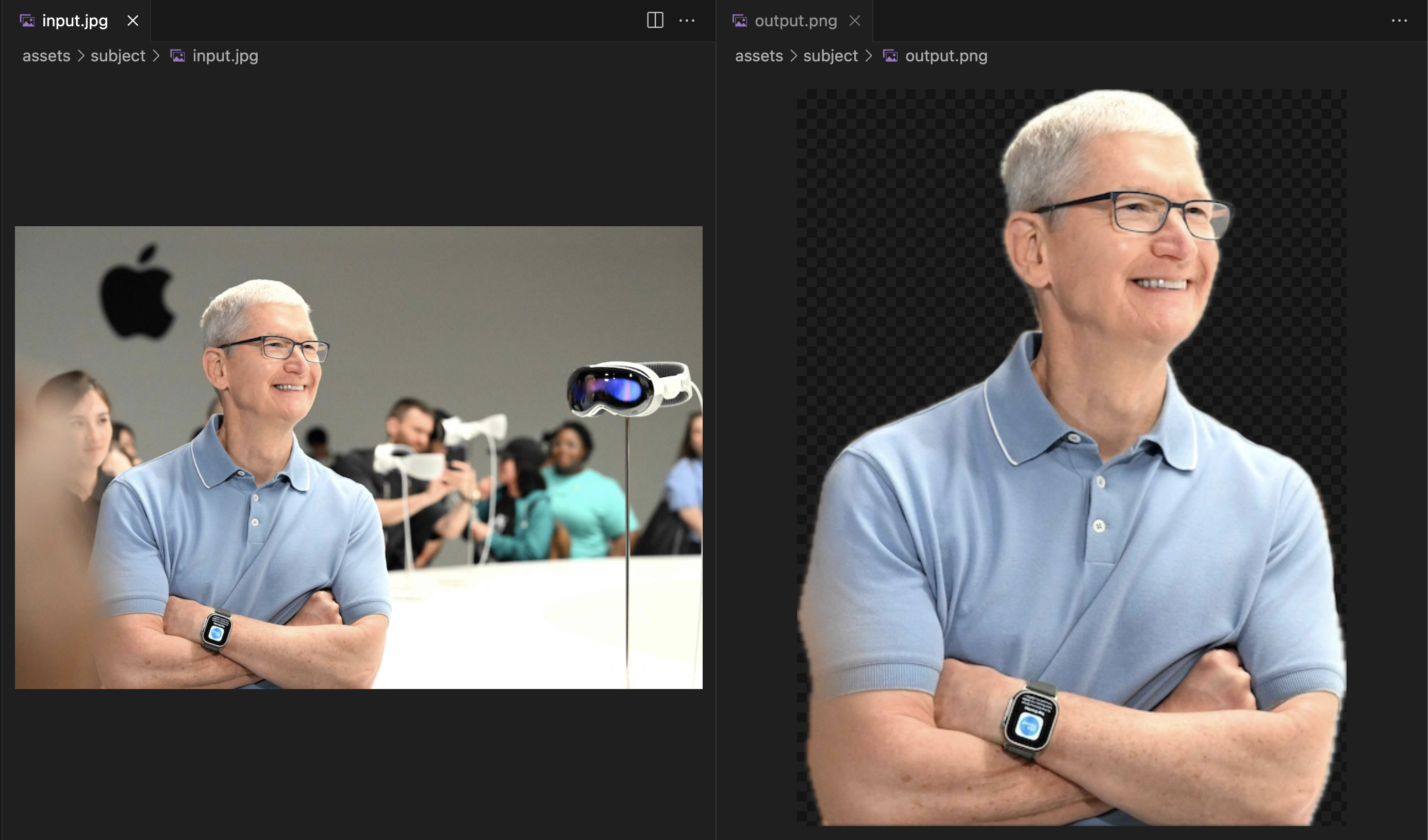
seev input.jpg -o output.png
- On a 2020 M1 MacBook Air subject extraction completes in under one second
- Image can be output to a specified file or stdout
Face Detection
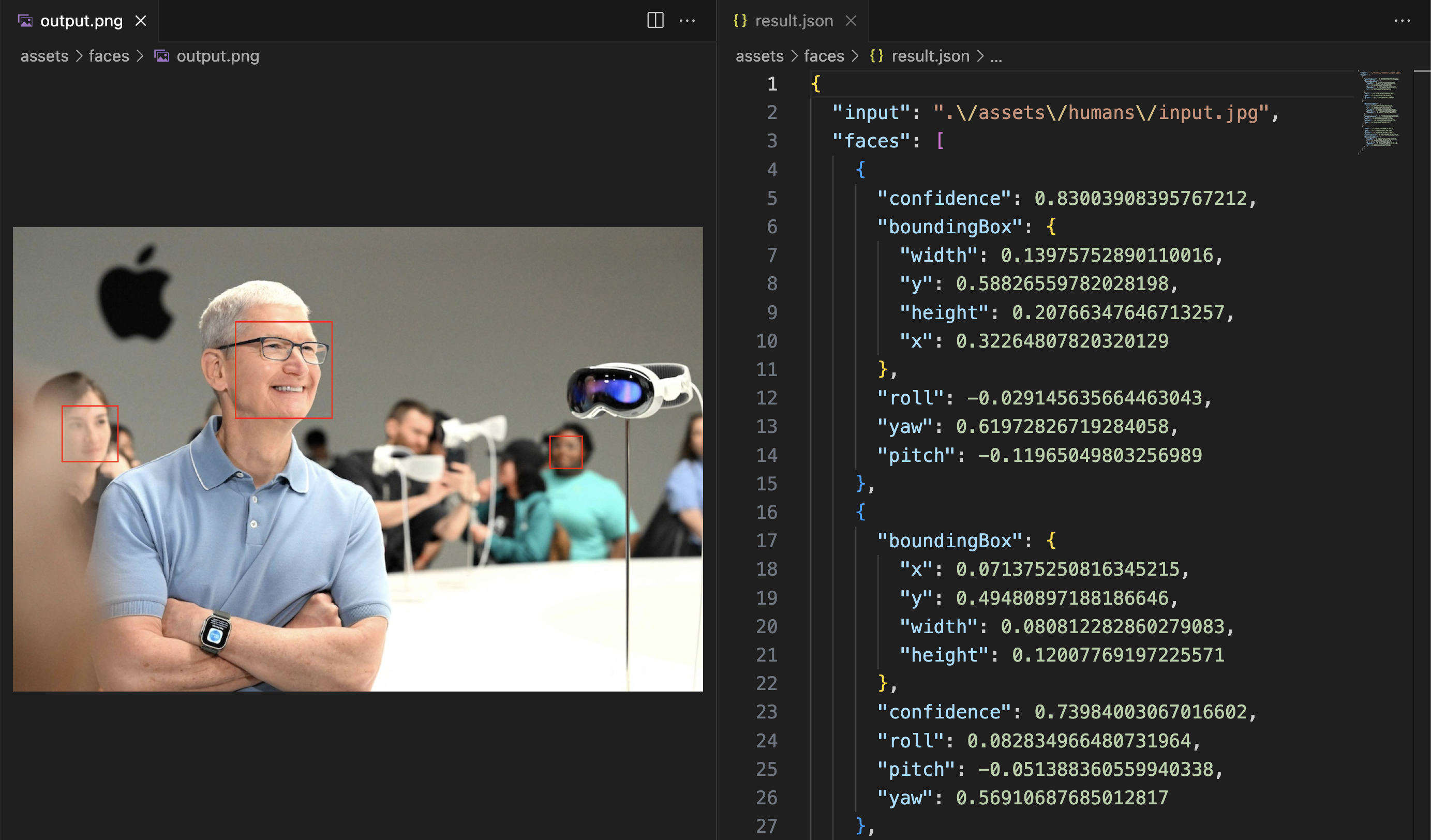
seev faces input.jpg -o output.png
- Results are output in JSON and include the bounding box of each detected face
- Red bounding boxes can be drawn around each face
- Output can be cropped to just the face
Human Detection
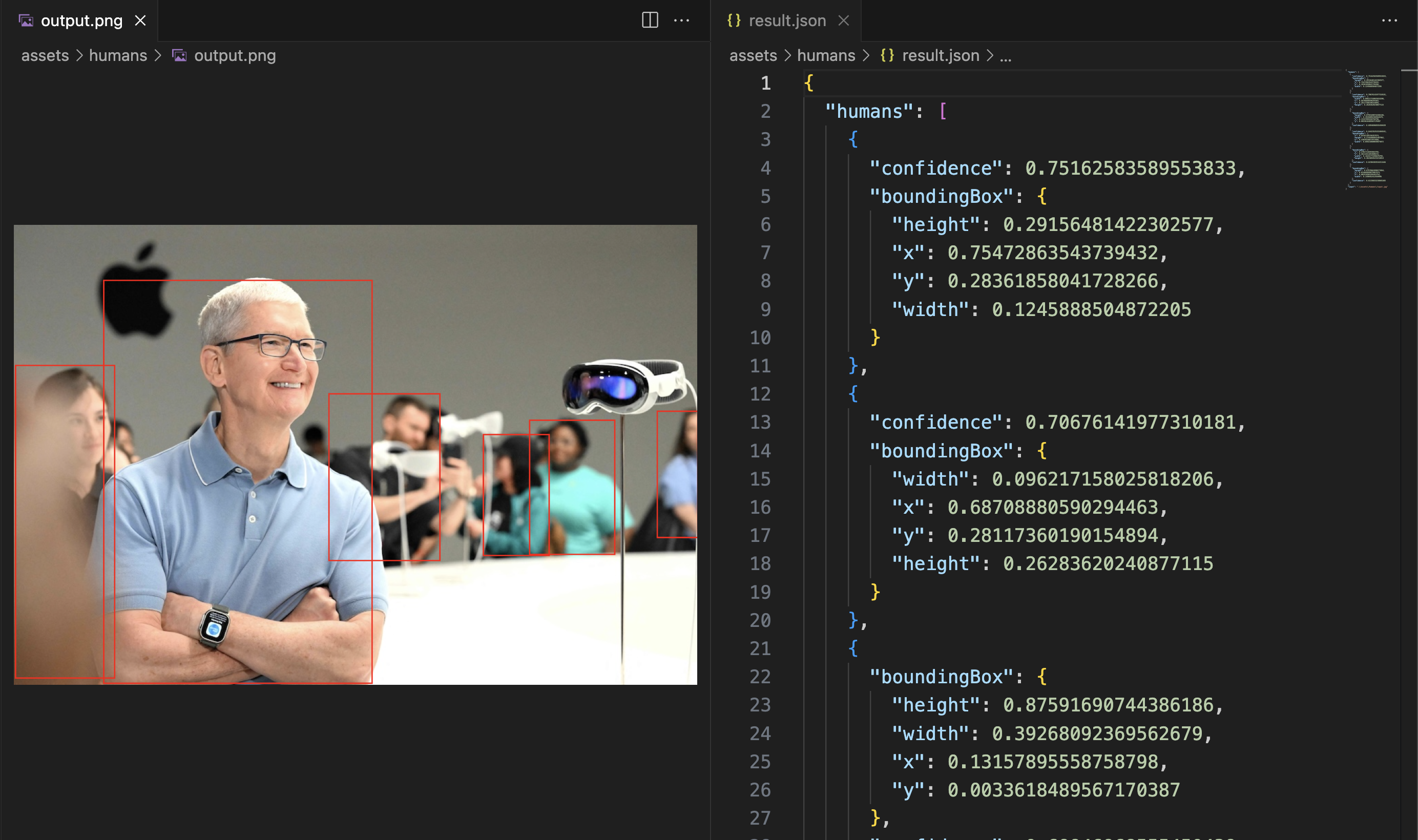
seev humans input.jpg -o output.png
- Results are output in JSON and include the bounding box of each detected human
- Only the upper body needs to be visible for detection (does not require full body)
- Red bounding boxes can be drawn around each human
Pose Detection
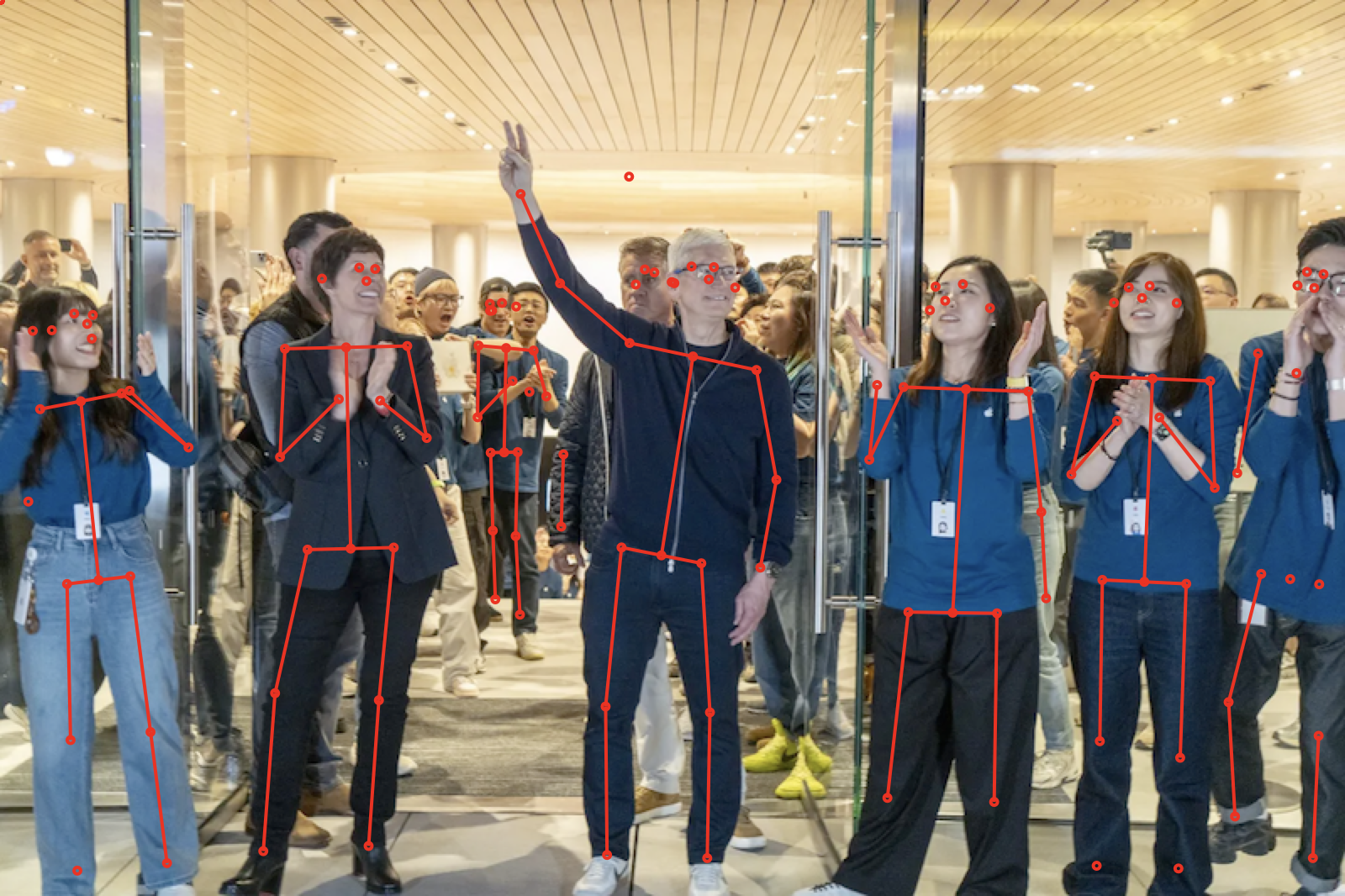
seev poses input.jpg -o output.png
- Results are output in JSON and include the joints with x/y coordinates and confidence
- Joint locations and limb connections are drawn to the output image when
-ois provided
Text Detection (OCR)
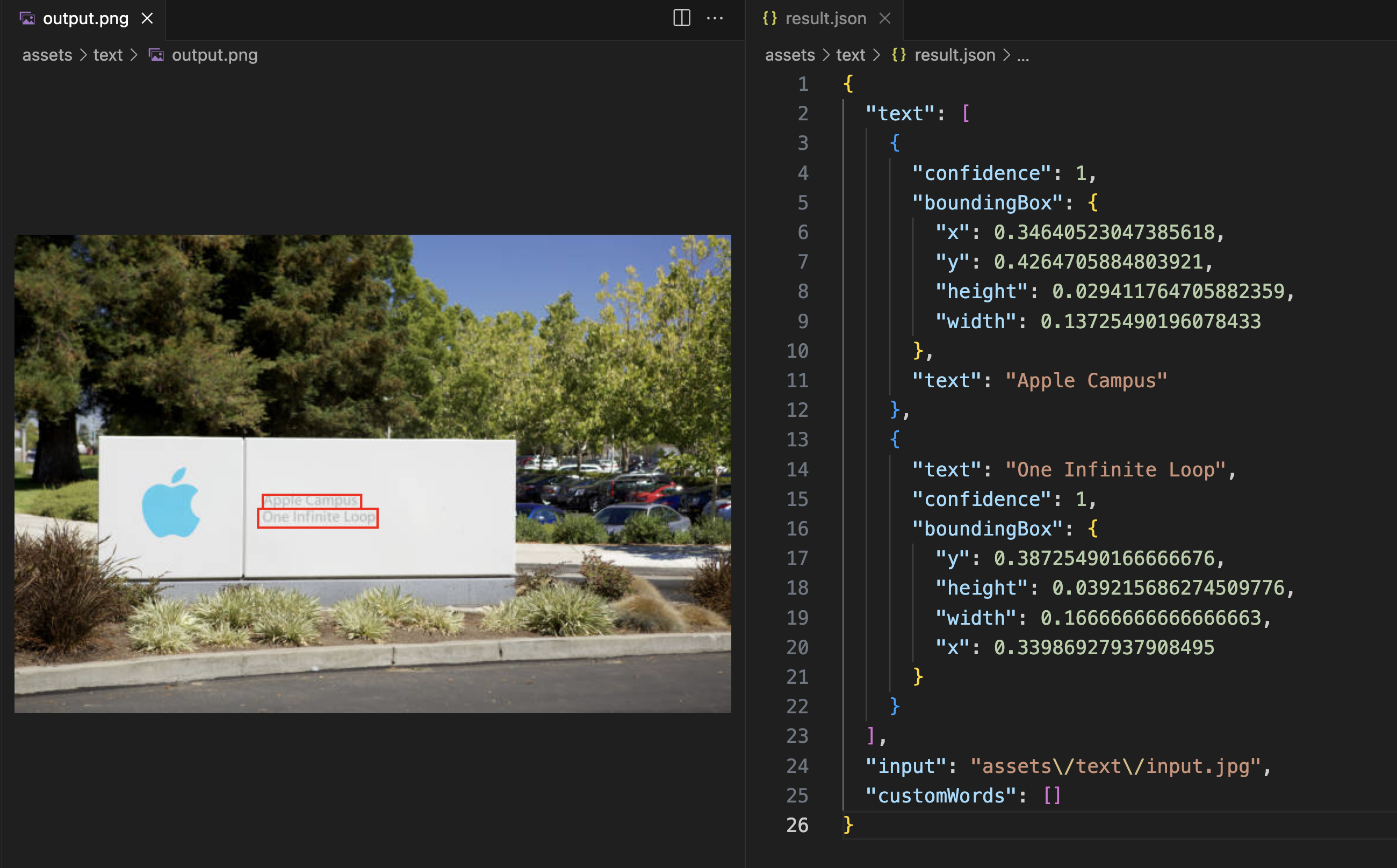
seev text input.jpg -o output.png
- Results are output in JSON and include the bounding box of each detected phrase
- Red bounding boxes can be drawn around each phrase
- Custom words to identify can be provided as a command line argument
Image Classification
seev classify input.jpg --minimum-confidence 0.4
- Returns identifiers from Apple's image classifier with their confidence levels
- Specific identifiers can be included with
--include-identifiers, even below the confidence threshold
Embeddings
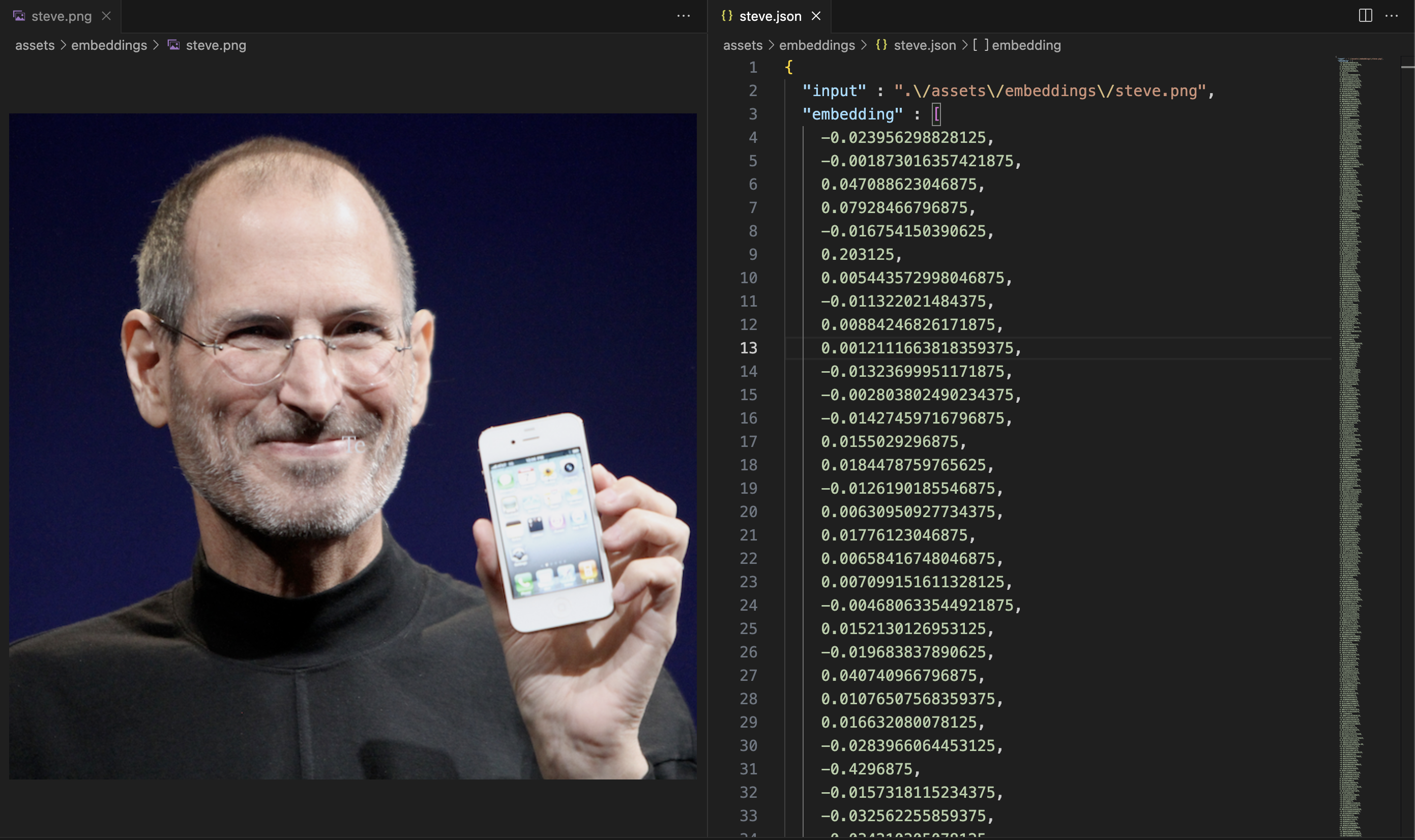
seev embeddings input.jpg
- Embeddings are provided as a JSON object and include an array of floating point numbers
- See example
- Embeddings can be used to quantitatively assess image similarity
Image Distance
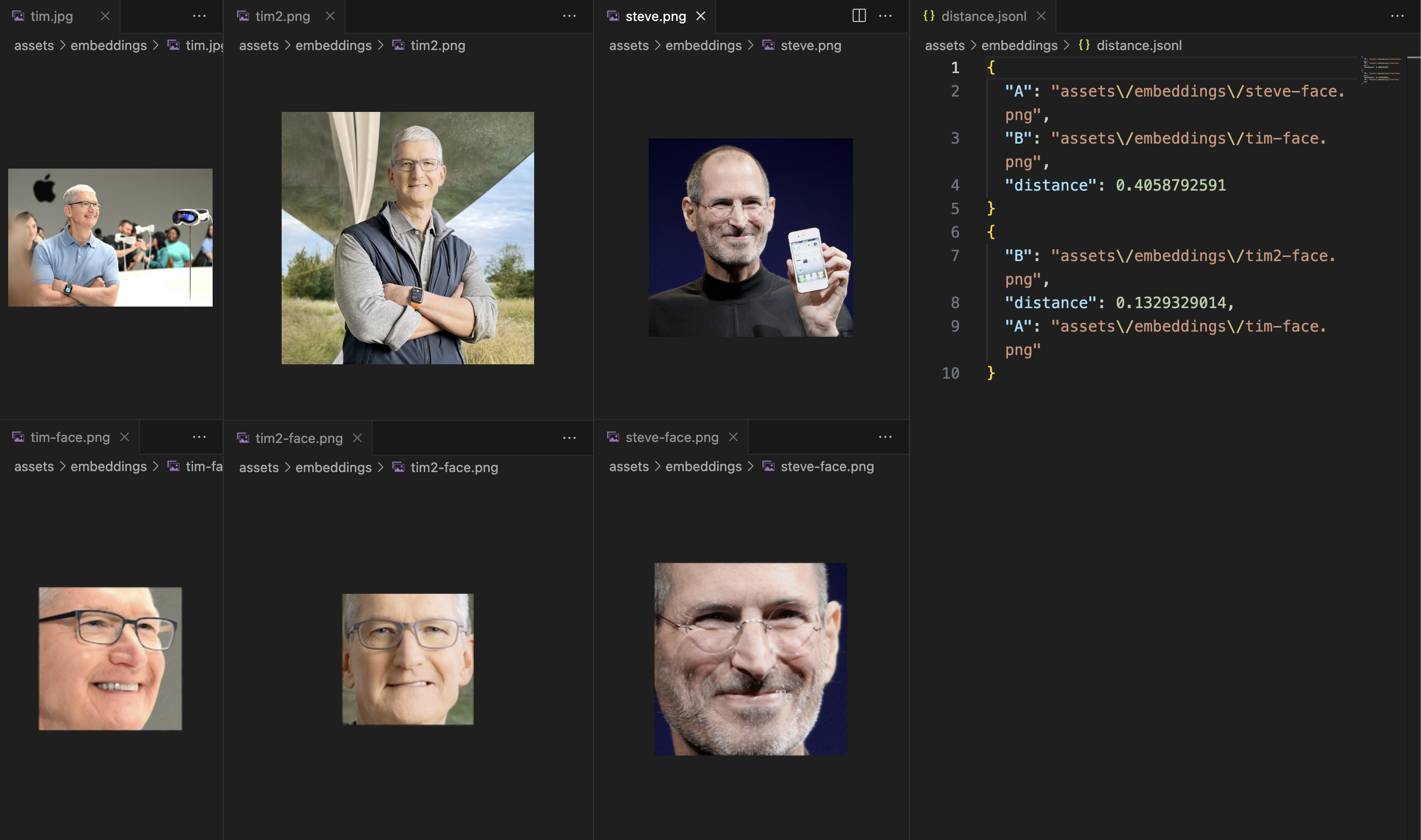
seev distance input.jpg comparison.png
- Calculates distance between images e.g. how similar are two images
- Automatically generates embeddings and compares using cosine similarity
- Distance is a floating point number between 0 and 1
- Lower distance means images are more similar
Image Quality
seev quality input.jpg
The quality command uses Apple Vision to score the aesthetic quality of an image or representative video frames:
{
  "input": "input.jpg",
  "overallScore": 0.72,
  "isUtility": false
}
overallScoreranges from-1(least desirable) to1(most desirable).isUtilityidentifies useful images that may not have memorable or exciting content.- Scores are most useful for ranking images or video frames rather than as a universal pass/fail threshold.
SHA-1 Hashing
seev sha1 input.jpg
- Returns a SHA-1 hash of the input file as JSON
- The hash can be used to identify exact duplicate files; it does not measure visual similarity
Image Moderation
seev nsfw classifies images as NSFW using ShieldGemma 2 through Ollama. Its policy covers nudity, visible intimate body parts, and erotic presentation. It does not perform text moderation. Images remain on the local machine when using the default local Ollama endpoint.
seev nsfw input.jpg
The result is a boolean policy decision:
false
ShieldGemma is a policy classifier: for each image and policy it answers Yes or No. It does not return bounding boxes or identify individual body parts. Applications should treat the result as one moderation signal, use a review path for uncertain or high-impact decisions, and evaluate the model against examples that match their own policy.
Ollama setup
Install Ollama:
brew install ollama
Start Ollama in one terminal:
ollama serve
Then download the image-capable ShieldGemma 2 model from another terminal:
ollama pull hf.co/infil00p/shieldgemma-2-4b-it-GGUF:Q4_K_M
The ollama serve process must be running when seev nsfw is invoked. If Ollama is already running as an app or background service, do not start a second instance.
The command always uses the ShieldGemma model above. The Ollama endpoint defaults to http://127.0.0.1:11434 and can be overridden:
seev nsfw input.jpg --ollama-host http://127.0.0.1:11434
When a non-local Ollama endpoint is configured, the image is sent to that endpoint. On failure, seev nsfw writes a human-readable error to stderr, produces no JSON, and exits with a nonzero status. Errors are grouped into three categories: the fixed model is not installed, Ollama is unavailable, or an unknown classification error occurred.
The GGUF package above is a third-party Ollama-compatible conversion of Google's ShieldGemma 2, not an Ollama model published by Google.
Combined Analysis
seev all input.jpg
The all command runs faces, humans, text, poses, classification, quality, embeddings, SHA-1, and NSFW classification independently. It accepts the same --ollama-host option as nsfw. A successful NSFW result is returned as a boolean. A failed operation does not discard successful results; failures are returned in an errors object keyed by operation. For example, an unavailable Ollama service produces an errors.nsfw message while the Vision results are still returned. The command exits with a failure status only when every operation fails.
Use most for combined analysis without full-image embeddings, per-face embeddings, or NSFW classification. This keeps the JSON output substantially smaller and does not require Ollama:
seev most input.jpg
Video Input
Frame-based commands automatically recognize video files. There is no separate video command:
seev faces input.mp4
seev quality input.mp4 --max-frames 5
seev nsfw input.mp4
seev most input.mp4
faces, humans, text, embeddings, classify, poses, quality, nsfw, all, and most accept video input. The only video-specific option is --max-frames, which defaults to 10 and sets an upper bound on the number of representative frames analyzed.
Video results contain the duration and the actual timestamp of each decoded frame:
{
  "input": "input.mp4",
  "durationSeconds": 93.4,
  "frames": [
    {
      "timestampSeconds": 4.67,
      "nsfw": false,
      "faces": []
    }
  ]
}
Frames are sampled from the center of evenly spaced time ranges for broad temporal coverage, avoiding the exact beginning and end of the video. seeV asks AVFoundation for nearby keyframes and scales them to a maximum dimension of 1280 pixels for faster analysis. If a frame cannot be decoded, seeV makes one nearby fallback attempt. The same face, text, or other result remains present in every sampled frame where it is detected; results are not deduplicated across frames.
For images, standalone nsfw returns a JSON boolean. For videos, each frame contains an nsfw boolean alongside its timestamp. Per-operation failures remain under the frame's errors object.
sha1 hashes a video as one file. distance and subject extraction remain image-only. Annotated or cropped image output options such as -o and --cropped are not supported for video input.
Representative-frame sampling is a fast heuristic, not exhaustive video moderation. Content that appears only between sampled frames may not be detected; increase --max-frames when greater coverage is required.
Installation
Release
You can download the latest M1 build from the Releases page.
Build from Source
swift build --configuration release
cp -f .build/release/seev /usr/local/bin/seev
Development
swift run seev <arguments>
- Don't forget to increment the version number in
seev.swift
Next Steps
- Determine which Vision.framework features to support next (pose detection, animals, etc)
- Provide feedback and development direction in this issue
License
MIT License

Copyright (c) 2024 Andi Andreas

Permission is hereby granted, free of charge, to any person obtaining a copy
of this software and associated documentation files (the "Software"), to deal
in the Software without restriction, including without limitation the rights
to use, copy, modify, merge, publish, distribute, sublicense, and/or sell
copies of the Software, and to permit persons to whom the Software is
furnished to do so, subject to the following conditions:

The above copyright notice and this permission notice shall be included in all
copies or substantial portions of the Software.

THE SOFTWARE IS PROVIDED "AS IS", WITHOUT WARRANTY OF ANY KIND, EXPRESS OR
IMPLIED, INCLUDING BUT NOT LIMITED TO THE WARRANTIES OF MERCHANTABILITY,
FITNESS FOR A PARTICULAR PURPOSE AND NONINFRINGEMENT. IN NO EVENT SHALL THE
AUTHORS OR COPYRIGHT HOLDERS BE LIABLE FOR ANY CLAIM, DAMAGES OR OTHER
LIABILITY, WHETHER IN AN ACTION OF CONTRACT, TORT OR OTHERWISE, ARISING FROM,
OUT OF OR IN CONNECTION WITH THE SOFTWARE OR THE USE OR OTHER DEALINGS IN THE
SOFTWARE.