
NevermindNilas/Nelux has 29 GitHub stars and 2 forks. GitHot measured 0 stars in 24 hours. Last checked 2026-11-14 18:27 UTC. Last push 2026-11-04.
Measured star growth
- in 24h
- 0
- in 7 days
- Collecting history
- in 15 days
- Collecting history
- in 1 month
- Collecting history
Net star changes over overlapping periods, not daily totals. Missing measurements are left blank. Stars measure attention, not software quality.
About
NeLux: High-performance video processing for Python, powered by FFmpeg and PyTorch. Ultra-fast video decoding directly to tensors.
Machine LearningREADME.md
Original


NeLux
NeLux is a high-performance Python library for decoding video straight into PyTorch tensors and encoding tensors back into video. It runs FFmpeg in-process, with NVDEC/NVENC hardware acceleration on NVIDIA GPUs, and is built for ML pipelines that need many frames quickly.
- Fast decode. The CPU path decodes at 1.1–1.7× torchcodec's frame rate. On
NVDEC, frames are converted to RGB by CUDA kernels and stay on the GPU as
torch.Tensors. See Benchmarks. - Exact output. The CPU RGB conversion is byte-identical to
ffmpeg -vf format=rgb24. Frame indices follow presentation order, so variable-frame-rate (VFR) video, B-frames and timestamp gaps don't shift which frame an index returns. - ML-friendly access. Batch and random access, slicing, clip samplers, in/out segment lists, CHW views, decoder-side resize, and RGB, RGBA or grayscale output.
- Encoding. Encode from CPU or CUDA tensors with any FFmpeg encoder, including NVENC, QSV, AMF and VideoToolbox. Output goes to a file, a Python file object or memory. You can also copy audio and subtitles across, or transcode a file without an RGB round trip.
- Images, audio and metadata. JPEG/PNG decode and encode (nvJPEG on CUDA, libjpeg-turbo on CPU), audio sample tensors, motion vectors, and ffprobe-equivalent metadata without a subprocess.
- Nothing else to install. FFmpeg ships inside the wheel.
Originally created by Trentonom0r3.
Contents
- Installation
- Quick Start
- Guides: random access and sampling · in/out points · encoding · transcoding · images and audio · motion vectors
- Features
- Benchmarks
- API Reference
- Requirements
- Building from Source
- Troubleshooting
- Documentation
- License
Installation
Install PyTorch first, then NeLux. Any PyTorch release from 2.14 on works: NeLux is built on PyTorch's stable ABI, so one wheel runs under every torch release from 2.14 forward, CPU or CUDA build, with no version matching. The GPU paths (NVDEC/NVENC) need a CUDA build of torch and an NVIDIA driver for CUDA 13 (see Requirements).
# Windows / Linux with an NVIDIA GPU
pip install torch --index-url https://download.pytorch.org/whl/cu132

# macOS, or Linux CPU-only
pip install torch

pip install nelux
| Platform | Backends | Bundled hardware encoders |
|---|---|---|
| Windows x64 | CPU + CUDA (NVDEC/NVENC) | NVENC, QSV, AMF, MediaFoundation |
| Linux x86_64 (manylinux_2_28+) | CPU + CUDA (NVDEC/NVENC) | NVENC, QSV, AMF |
| macOS arm64 (Apple Silicon, ≥ 14.0) | CPU | VideoToolbox (no CUDA on macOS) |
FFmpeg is bundled. Every wheel ships the same pinned build,
TAS-FFMPEG 9.0.2, verified by hash
from tools/ffmpeg.lock. Nothing needs to be installed or
put on PATH. You can check which FFmpeg was loaded at runtime:
>>> import nelux
>>> nelux.__version__, nelux.__ffmpeg_version__, nelux.__cuda_support__
('0.21.0', '9.0.2-tas', True)
Quick Start
Decode frames
from nelux import VideoReader

reader = VideoReader("input.mp4")                 # CPU decode
# reader = VideoReader("input.mp4", decode_accelerator="nvdec")  # frames on cuda:0

for frame in reader:
    frame.shape   # torch.Size([1080, 1920, 3]): HWC
    frame.dtype   # torch.uint8 (torch.uint16 for >8-bit sources unless force_8bit=True)

    # NeLux never converts to float for you; normalize for your model.
    x = frame.permute(2, 0, 1).unsqueeze(0).float() / 255.0
Pass dimension_order="CHW" to get CHW views, and resize=(W, H) to scale
inside the decoder instead of after it.
Random access and batches
vr = VideoReader("video.mp4")

vr[42]                          # one frame        [H, W, 3]
vr[0:100:10]                    # slice            [10, H, W, 3]
vr[[-3, -2, -1]]                # list, negatives  [3, H, W, 3]
vr.get_batch([0, 10, 20])       # explicit batch   [3, H, W, 3]
vr.get_frame_played_at(12.5)    # Frame shown at 12.5 s, with pts and duration

len(vr), vr.shape, vr.fps, vr.duration
GPU pipeline: NVDEC → model → NVENC
from nelux import VideoReader, VideoEncoder

reader = VideoReader("in.mp4", decode_accelerator="nvdec")
with VideoEncoder("out.mp4", codec="hevc_nvenc", width=reader.width,
                  height=reader.height, fps=reader.fps) as enc:
    for frame in reader:              # cuda uint8 [H, W, 3]
        enc.encode_frame(model(frame))  # RGB→YUV runs on the GPU
The frames stay on the GPU the whole way. NVENC runs in torch's own CUDA context, so it doesn't need a second one.
Encode, or transcode a whole file
import nelux

# Frames → file, pre-configured from the source's size and frame rate
with reader.create_encoder("output.mp4") as enc:
    enc.add_passthrough("input.mp4")   # keep the audio and subtitles
    for frame in reader:
        enc.encode_frame(frame)

# Re-encode a file directly, without an RGB round trip
nelux.transcode("input.mp4", "output.mkv", codec="libx265", options={"crf": "22"})

# A tensor stack straight to MP4 bytes in memory
data = nelux.encode_video(frames, format="mp4", fps=30)   # 1-D uint8 tensor
Guides
Short tours of each area. docs/usage.md is the full reference.
Random access, batches and clip sampling
By default, VideoReader gives exact frame indices. An index counts frames
in decoded presentation order, so VFR, B-frames, open GOPs and repeated or
missing timestamps never change which pixels it selects. The index is built by
a software scan the first time you need it, such as for len(), a random read
or a batch. You can reuse that scan in other readers of the same file.
import torch
import nelux

with nelux.VideoReader("video.mp4", resize=(224, 224), dimension_order="CHW") as vr:
    pixels = vr.get_batch([19, 12, 12, 0])     # [4, 3, 224, 224]; duplicates decoded once
    frame  = vr.get_frame_at(12)               # Frame(data, pts_seconds, duration_seconds)
    timed  = vr.get_frames_at([0, 12, 19])     # FrameBatch with timing tensors
    index  = vr.frame_index

    clips = nelux.samplers.clips_at_random_indices(
        vr, num_clips=4, num_frames_per_clip=16,
        generator=torch.Generator().manual_seed(0))
    clips.data.shape                           # [4, 16, 3, 224, 224]

# Reuse the scan across readers, even with a different resize or accelerator
other = nelux.VideoReader("video.mp4", frame_index=index, decode_accelerator="nvdec")
The samplers are clips_at_indices, clips_at_regular_indices,
clips_at_random_indices and clips_at_timestamps. Each one decodes its clips
in a single deduplicated batch. Set seek_mode="approximate" to skip the scan
and use faster, FPS-derived seeking instead.
Inputs can be a path, URL or PathLike; encoded bytes; a binary file object;
or a 1-D uint8 tensor or array. stream_index= selects a stream other than
the best video stream. See
presentation-aware video access for the timing rules,
CUDA buffer ownership (copy_frames, async_frames) and validation.
In/out point lists
set_ranges takes (in, out) pairs, so one forward pass can cover several
disjoint sections of a file. iter_segments() tells you which section each
frame came from.
vr = VideoReader("video.mp4")

# Frame indices, seconds, or timecode strings; use one unit throughout.
vr.set_ranges([(0, 1000), (5000, 6000)])
vr.set_ranges([("0:00:00", "2:00:00"), ("3:00:00", "4:00:00")])

for segment, frame in vr.iter_segments():
    out = grade_daylight(frame) if segment == 0 else grade_night(frame)

vr.ranges              # [(0.0, 7200.0), (10800.0, 14400.0)]
vr.clear_ranges()      # back to the whole file
Segments must be ascending and non-overlapping, though they can touch. Ranges
are half-open ([in, out)), and times are relative to the first decoded frame.
set_range(start, end) is the single-segment form. See
Multiple Segments for the
EOF and timestamp rules.
Encoding
VideoEncoder takes RGB [H, W, 3], RGBA [H, W, 4] or grayscale
[H, W, 1]/[H, W] tensors from the CPU or GPU:
- dtype sets the precision.
uint8takes the 8-bit path. With a >8-bitpixel_format(yuv420p10le,p010,yuv422p10le, …), auint16tensor keeps its full precision, and a float tensor in[0, 1]scales to 16 bits. - CUDA tensors are converted on the GPU by kernels that write the same bytes
as the CPU path, so CPU and CUDA input produce identical files. CHW views and
padded rows don't need
.contiguous(). - Gray output is lossless.
pixel_format="gray"/"gray16le"stores values exactly, up to 16 bits, which suits depth maps and masks (round-trip throughffv1). - Alpha is written when the
pixel_formathas an alpha plane, such asyuva444p10lewith ProRes 4444.
from nelux import VideoEncoder

with VideoEncoder("out.mp4", codec="libx264", width=1920, height=1080, fps=23.976,
                  preset="slow", options={"crf": "18", "tune": "film"}) as enc:
    for frame in frames:
        enc.encode_frame(frame)
- Codec defaults. When you don't pass
codec, NeLux picks one that fits the container (libx264 for mp4/mkv/mov, VP9 for webm, …). Each codec keeps its own GOP and B-frame defaults, as theffmpegCLI does.fpsis kept as an exact rational: 23.976 becomes 24000/1001. presettakes an int (1 is fastest, mapped per codec) or an ffmpeg preset name.optionspasses any AVOption through. The functionnelux.get_available_encoders()lists everything in the build.- Encoder-side resize. With
resize=True, resize_filter="lanczos",encode_frameaccepts any input size and scales it within the conversion pass the encoder already runs. The output is byte-identical toffmpeg -vf scale=WxH. - Image sequences. A name like
"frames_%08d.png"writes one numbered file per frame.codec="png", pixel_format="rgb48be"withuint16input writes 16-bit PNG.
Audio and subtitles. Call add_passthrough before the first encode_frame.
It copies the source's audio and subtitle streams, and transcodes any the
container can't hold (for example, AAC into WebM):
reader.set_range(2.0, 6.0)
with reader.create_encoder("clip.mp4") as enc:
    enc.add_passthrough("input.mp4", subtitles=False, start=2.0, end=6.0)
    for frame in reader:
        enc.encode_frame(frame)
nelux.merge_streams("video.mp4", "audio.m4a", "out.mp4") muxes separately
downloaded video and audio tracks without re-encoding.
Destinations other than a file. VideoEncoder, encode_video, transcode
and encode_image also accept None or a binary file object as the
destination. With None, the encoded result comes back as a CPU uint8
tensor and no temporary file is written. Outputs over 16 MiB are handed over
without a copy. Seekable streams are written while encoding, and pipes and
sockets get the finished container when the encoder closes. Pass format= when
there's no file name to infer it from:
with VideoEncoder(None, format="mkv", width=640, height=360, fps=30) as enc:
    for frame in frames:
        enc.encode_frame(frame)
data = enc.get_encoded_data()          # torch.uint8, 1-D

with open("out.mp4", "wb") as f:
    nelux.encode_video(frames, f, format="mp4", fps=30)
See encoding and encoded destinations.
Transcoding
nelux.transcode re-encodes a file's video in-process. A VideoReader →
encode_frame loop converts every frame to RGB and back again. transcode
skips that: each decoded frame goes straight to the encoder, or through a single
libswscale pass when the encoder needs another pixel format. Into NVENC, the
source is decoded on NVDEC. Output size, frame rate, pixel format, colour tags,
rotation and audio sync follow what ffmpeg -i in -c:v <codec> does. For
libx264 (at fixed threads), utvideo, ffv1, prores_ks and rawvideo, the tests
produce identical packets to the CLI.
nelux.transcode("input.mp4", "output.mp4", codec="libx264", preset="veryfast",
                options={"crf": "23"})
nelux.transcode("input.mp4", "clip.mov", codec="prores_ks", start=2.0, end=6.0)
nelux.transcode("input.mp4", "gpu.mp4", codec="hevc_nvenc")
encoded = nelux.transcode("input.mp4", None, format="mkv", codec="ffv1")
Audio and subtitles are copied by default. transcode doesn't scale; to
resize, use a reader with VideoEncoder(resize=True) instead.
Images and audio
import torch
import nelux

image = nelux.decode_image("photo.jpg")                          # [H, W, 3] uint8; bytes work too
batch = nelux.decode_images(["a.jpg", "b.jpg"], device="cuda")   # nvJPEG on CUDA
png   = nelux.encode_image(image, format="png")                  # encoded bytes as a uint8 tensor
jpg   = nelux.encode_image(image, format="jpeg", quality=90)     # libjpeg-turbo, parallel strips

with nelux.AudioReader("movie.mp4", sample_rate=16000, num_channels=1) as audio:
    clip = audio.get_samples_played_in_range(10.0, 20.0)   # clip.data: [1, 160000] float32
Still images are decoded in memory. Audio ranges are exact, sample-aligned
slices of the decoded stream. By default, video frames are rotated and flipped
according to the container's display matrix (apply_rotation=True). See
media APIs.
Motion vectors
NeLux exposes the per-frame motion-vector side data that FFmpeg's CPU decoders emit for P- and B-frames. These are the block vectors the decoder used for prediction. They're useful for optical-flow pretraining, frame interpolation, super-resolution, scene-cut detection and codec diagnostics.
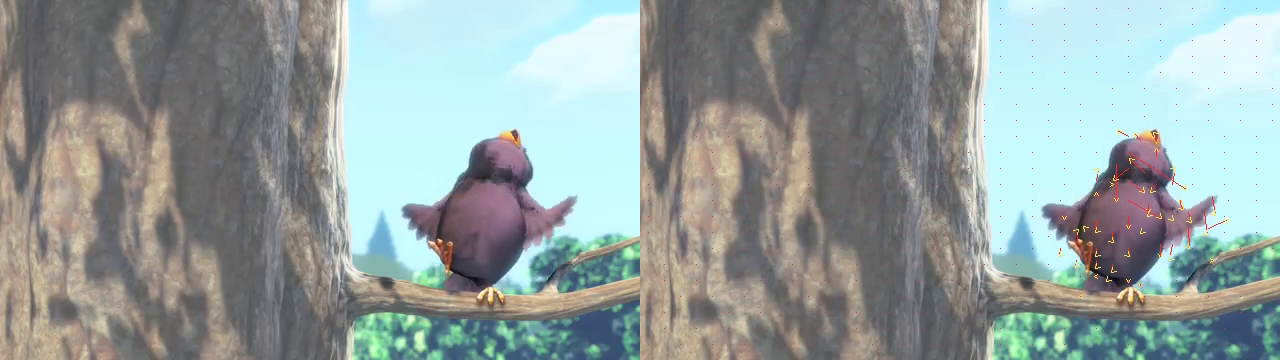
Generated by examples/motion_vector_overlay.py
on a 640x360 H.264 clip: every 4th vector drawn as a red arrow from the
destination block toward its motion-compensated source.
# Opt-in, because exporting vectors costs decode time. CPU decode only:
# NVDEC does not surface side data.
vr = VideoReader("video.mp4", decode_accelerator="cpu", motion_vectors=True)

frame, vectors = vr.read_frame_with_motion_vectors()   # vectors: list[dict]
for mv in vectors:
    dx = mv["motion_x"] / mv["motion_scale"]           # pixel-space displacement
    dy = mv["motion_y"] / mv["motion_scale"]
vr.frame_type                                          # "I" | "P" | "B"
Motion-vector field schema
Each entry has these fields, which match FFmpeg's AV_FRAME_DATA_MOTION_VECTORS:
| Key | Meaning |
|---|---|
source |
1 = motion from a past reference, 2 = from a future reference |
w, h |
block width and height in pixels |
src_x, src_y |
source block position (in the reference) |
dst_x, dst_y |
destination block position (in this frame) |
motion_x, motion_y |
signed motion, in motion_scale units |
motion_scale |
divisor for motion_x/motion_y (for example, 4 for quarter-pel H.264) |
I-frames return an empty list, as do decoders that don't export side data
(some mpeg4 builds).
Features
Decoding
- NVDEC with fused CUDA NV12/P010/P016/YUV444 → RGB kernels. Output stays on
cuda:Nwith no host round trip. - HWC output in the native dtype:
uint8, oruint16for >8-bit sources (force_8bit=Trueclamps to 8-bit). Passdimension_order="CHW"for CHW/NCHW views. color_format:"rgb"(default);"rgba", which carries the source alpha plane (ProRes 4444, VP9, PNG); or"gray", BT.601/709-correct luma. RGBA and gray are CPU decode only.- A CPU path that matches ffmpeg byte for byte. It's a pure libswscale
pipeline, and the output is bit-identical to
ffmpeg -vf format=rgb24on every common YUV/RGB format. - Decoder-side
resize=(W, H): libswscale on the CPU, cuvid's built-in resize on NVDEC. Either way it's a single pass. - Exact presentation-order indexing, with batch decoding that minimizes
seeks and deduplicates frames, plus reusable
FrameIndexobjects and clip samplers. - In/out point lists with per-segment iteration.
reconfigure(path)reuses a reader for another file, which is 10–50× faster than constructing a new one.- Decode-free metadata.
nelux.probe(path)returns an ffprobe-equivalent dict (codecs, color, frame rates, audio, subtitles, rotation). It opens no decoder, allocates no frame buffer and spawns no subprocess.
Encoding
- Any FFmpeg encoder. Software (x264, x265, SVT-AV1, libaom, VP9, ProRes, FFV1, DNxHR, …) and hardware: NVENC, QSV, AMF, MediaFoundation and VideoToolbox, depending on platform.
- Byte-exact AVX2 and CUDA RGB → YUV converters, so CPU and CUDA input produce identical bitstreams. CPU frames going into NVENC are also converted on the GPU.
- Frame-parallel encoding. Still-image codecs that libavcodec runs on a single core (DPX, SGI, Targa, BMP, the PNM family, libwebp, …) encode several frames at once, with byte-identical output: on 24 threads, SGI runs 4.7× faster than before.
- 8, 10, 12 and 16-bit input as
uint8,uint16or float tensors, plus alpha and lossless gray paths. - Audio and subtitle passthrough with trimming,
merge_streams, andtranscodematched to the ffmpeg CLI. - Output to a file, a file object or memory, with zero-copy handover of large in-memory outputs.
Performance knobs
convert_workers=Nsets the size of the CPU RGB-conversion pool. The default,None, usesmin(cores, 16)for maximum throughput.0matches torchcodec's single-threaded footprint.prefetch=Trueturns on a background decode thread. It's off by default because the queue handoff costs more than it saves unless your per-frame work is heavy.nelux.suggest_config(path)reports a recommended(convert_workers, prefetch)pair without applying it.async_frames=True(NVDEC) returns surfaces asynchronously, andcopy_frames=Truegives each CUDA frame its own storage so you can queue frames safely.
Supported codecs and formats
| CPU path | NVDEC path | |
|---|---|---|
| Codecs | anything libavcodec decodes (H.264, HEVC, VP8/9, AV1, MPEG-2/4, ProRes, DNxHD, FFV1, …) | H.264, HEVC (4:4:4 on Ampere+), VP8, VP9, AV1, MPEG-1/2/4, VC-1; GPU-dependent |
| Pixel formats | all common YUV/RGB (yuv420p/422p/444p at 8–16 bit, nv12, rgb24, gbrp, alpha formats, …) | NV12, P010, P016, YUV444 (8/10/12/16-bit) |
| Containers | anything libavformat demuxes, including concatenated MPEG-TS | same |
Benchmarks
These measure H.264 decode to an RGB uint8 HWC tensor on an Intel
i9-13900K (24 threads), RTX 3090, Windows 11, FFmpeg 8.x, PyTorch 2.11+cu130 and
NeLux 0.11.0, the last release they were re-measured on. Each row is the
median of 5 fresh subprocess runs of 600 frames (300 at 4K). Every decoder
produces the same output format.
CPU: NeLux default vs torchcodec vs ffmpeg
| Resolution | Decoder | fps | CPU% avg | RSS MB |
|---|---|---|---|---|
| 720p | nelux (default) | 3422 | 874 | 2350 |
| torchcodec | 2924 | 344 | 2395 | |
| ffmpeg-rgb24 (subprocess) | 2273 | — | — | |
| 1080p | nelux (default) | 2642 | 1426 | 4480 |
| torchcodec | 1589 | 502 | 4502 | |
| ffmpeg-rgb24 (subprocess) | 1102 | — | — | |
| 4K | nelux (default) | 607 | 1656 | 9205 |
| torchcodec | 367 | 487 | 9098 | |
| ffmpeg-rgb24 (subprocess) | 254 | — | — |
NeLux spreads the libswscale conversion across cores, which gives 14–67% more fps than torchcodec at every resolution. The cost is roughly 2.5–3× the CPU time, while RSS is about the same.
Single-threaded mode (convert_workers=0) vs torchcodec
With the conversion pool turned off, NeLux uses the same single-threaded architecture as torchcodec, and fps, CPU and RSS land within about 2%:
| Resolution | Decoder | fps | CPU% | RSS MB |
|---|---|---|---|---|
| 720p | nelux (convert_workers=0) |
3167 | 366 | 598 |
| torchcodec | 3090 | 343 | 673 | |
| 1080p | nelux (convert_workers=0) |
1755 | 435 | 659 |
| torchcodec | 1728 | 432 | 732 | |
| 4K | nelux (convert_workers=0) |
394 | 440 | 1022 |
| torchcodec | 401 | 477 | 1095 |
NVDEC vs ffmpeg-nvdec
| Resolution | Decoder | fps | CPU% | GPU mem MB |
|---|---|---|---|---|
| 720p | nelux (decode_accelerator="nvdec") |
1651 | 45 | 2886 |
| ffmpeg-nvdec (subprocess) | 1253 | — | 2902 | |
| 1080p | nelux | 667 | 40 | 2911 |
| ffmpeg-nvdec | 592 | — | 2967 | |
| 4K | nelux | 175 | 24 | 3052 |
| ffmpeg-nvdec | 162 | — | 3259 |
On NVDEC, NeLux is 8–32% faster than ffmpeg-nvdec and uses less CPU, because NV12 → RGB runs as a fused CUDA kernel and frames stay on the GPU.
Quality vs ffmpeg -vf format=rgb24
Of 14 pixel-format and colorspace combinations, 12 are byte-identical (PSNR
∞, SSIM 1.000). The other two are yuv420p10le (47.9–48.3 dB PSNR, VMAF
99.85+), where the 10→8-bit downconversion rounds differently from ffmpeg's
direct path. See
tests/output/pixfmt_matrix/REPORT.md.
Caveats. These numbers come from a single machine, and later releases have
changed the decode path (the 0.17 batch rewrite, among others). CPU% for the
ffmpeg subprocess is omitted because the sampler gets too few readings during
its short run. To reproduce, run python tests/comprehensive_bench.py --tag mybox.
More comparisons are in
python-decoders-benchmarks.
API Reference
The type stubs (nelux/__init__.pyi) are the
authoritative signatures, and docs/usage.md covers every
parameter.
VideoReader
VideoReader(
    input_path,                                    # path/URL, PathLike, bytes, binary file
                                                   #   object, or 1-D uint8 tensor/array
    num_threads: int = 0,                          # 0 = ffmpeg auto
    force_8bit: bool = False,                      # >8-bit sources → uint8
    backend: Literal["pytorch", "numpy"] = "pytorch",
    decode_accelerator: Literal["cpu", "nvdec"] = "cpu",
    cuda_device_index: int = 0,
    resize: tuple[int, int] | None = None,         # decoder-side scale to (W, H)
    prefetch: bool = False,                        # background decode thread
    convert_workers: int | None = None,            # None = min(cores, 16); 0 = single-threaded
    color_format: Literal["rgb", "gray", "rgba"] = "rgb",
    resize_filter: str = "bilinear",               # sws kernel (CPU)
    motion_vectors: bool = False,                  # opt-in MV export (CPU)
    stream_index: int | None = None,               # absolute container stream index
    *,
    dimension_order: Literal["HWC", "CHW"] = "HWC",
    copy_frames: bool = False,                     # clone shared CUDA output buffers
    seek_mode: Literal["exact", "approximate"] = "exact",
    frame_index: FrameIndex | None = None,         # reuse another reader's exact index
    async_frames: bool = False,                    # NVDEC asynchronous surface release
    apply_rotation: bool = True,                   # honour display-matrix rotation/flip
)
| Properties | width, height, fps, min_fps, max_fps, duration, total_frames, frame_count, shape, pixel_format, bit_depth, channels, aspect_ratio, codec, has_audio, properties, metadata, frame_index, frame_type |
| Sequential | iteration / read_frame(), read_frame_with_motion_vectors() |
| Random access | vr[i], vr[a:b:c], vr[[...]], frame_at(index or seconds), get_frame_at(i), get_frames_at(indices), get_frame_played_at(s), get_frames_played_at(seconds) |
| Batches | get_batch(indices), get_batch_range(start, end, step), decode_batch(indices) |
| Ranges | set_range(start, end), set_ranges([...]), ranges, clear_ranges(), iter_segments(), current_segment, reset() |
| Other | reconfigure(source), create_encoder(output_path=None, *, format="mp4"), start_prefetch() / stop_prefetch(), supported_codecs(), context manager |
Slices follow Python's rules: vr[:-1] drops the last frame and vr[::-1]
reverses. An index past the end raises IndexError rather than clamping.
VideoEncoder
VideoEncoder(
    output_path: str | PathLike | BinaryIO | None = None,  # None = encode into memory
    codec: str | None = None,          # default chosen from the container
    width: int | None = None,          # 1920
    height: int | None = None,         # 1080
    bit_rate: int | None = None,       # 4_000_000 unless a quality option is set
    fps: float | None = None,          # 30.0; kept as an exact rational
    preset: int | str | None = None,   # 1..N (fastest first) or an ffmpeg preset name
    cq: int | None = None,             # constant quality, lower = better
    pixel_format: str | None = None,   # "yuv420p"
    options: dict[str, str] | None = None,  # extra AVOptions, applied last
    resize: bool = False,              # scale any input size to width x height
    resize_filter: str = "bilinear",
    *,
    format: str = "mp4",               # container when there is no file name
)
Methods: encode_frame(frame), add_passthrough(source, audio=True, subtitles=True, start=0.0, end=None, allow_transcode=True), close() (or use
it as a context manager), get_encoded_data() (memory output), and
is_hardware_encoder.
Module functions
import nelux

nelux.probe(path)                         # metadata dict, no decoder opened (cached)
nelux.probe_cache_clear()
nelux.transcode(source, output_path=None, *, format="mp4", start=0.0, end=None,
                audio=True, subtitles=True, allow_transcode=True, **encoder_options)
nelux.encode_video(frames, output_path=None, *, format="mp4", dimension_order="HWC", **options)
nelux.merge_streams(video_source, audio_source, output)
nelux.decode_image(source, *, device="cpu") / nelux.decode_images(sources, *, device="cpu")
nelux.encode_image(image, output_path=None, *, format="png", ...)
nelux.AudioReader(source, *, stream_index=None, sample_rate=None, num_channels=None)
nelux.samplers.clips_at_indices / clips_at_regular_indices / clips_at_random_indices / clips_at_timestamps
nelux.suggest_config(path=None)           # recommended (convert_workers, prefetch), never applied
nelux.get_available_encoders()            # [{"name", "long_name", "is_hardware"}, ...]
nelux.get_nvenc_encoders()
nelux.set_log_level(nelux.LogLevel.debug)
nelux.diagnose_runtime_dlls()             # Windows: report DLLs that failed to load

nelux.__version__, nelux.__ffmpeg_version__, nelux.__cuda_support__, nelux.__torch_abi__
Requirements
- Python 3.13+
- PyTorch 2.14 or newer, any release (one wheel covers them all). NVDEC and NVENC need a CUDA build; ROCm builds are not supported for the GPU paths.
- NumPy, which is installed automatically.
- For NVDEC/NVENC: an NVIDIA GPU with compute capability 7.5+ (Turing, i.e.
GTX 16xx / RTX 20xx, and newer) and a driver for CUDA 13 (R580 or newer).
NeLux carries its own CUDA 13 runtime, so this holds whichever CUDA version
your torch wheel was built for; the cu13x wheels are the ones tested.
CUDA 13 dropped Maxwell, Pascal and Volta. Those cards need a source build
against CUDA 12.x (
CUDAARCHS=61 pip install .). - OS: Windows 10/11; Linux (manylinux_2_28+, e.g. Ubuntu 22.04+); macOS 14+ on Apple Silicon.
Building from Source
The build uses scikit-build-core, CMake, Ninja and vcpkg. There's no setup.py.
git clone https://github.com/NevermindNilas/NeLux.git
cd NeLux

# Fetch the pinned FFmpeg into external/ffmpeg (hash-checked against tools/ffmpeg.lock)
./tools/download_ffmpeg.sh             # Linux / macOS
# pwsh tools/download_ffmpeg.ps1       # Windows

# Editable install; set NELUX_ENABLE_CUDA=ON for NVDEC/NVENC
NELUX_ENABLE_CUDA=ON pip install -e .

# Or build a wheel
NELUX_ENABLE_CUDA=ON pip wheel . -w dist/
- The build either gets the exact pinned TAS-FFMPEG or fails loudly.
- On Windows, you also need MSVC 18 (or compatible).
CMakePresets.jsonhasx64-release-cuda,x64-release-cpuand debug presets if you'd rather run CMake directly.- See docs/BUILD.md for the Windows workflow, and docs/linux.md for Linux prerequisites. For FFmpeg, use the download script above instead of vcpkg.
Troubleshooting
ImportErrorabout torch. NeLux needs PyTorch 2.14 or newer (nelux.__torch_abi__is the oldest release the wheel supports). Any later release works with the same wheel.__ffmpeg_version__isn't'9.0.2-tas'. A different FFmpeg with the same soname was loaded first. On Windows, the first DLL of a given name to load serves the whole process, so another package that shipsavcodec-63.dllcan take over.'unknown'means either the extension predates this attribute (rebuild it), or, on Windows, that no FFmpeg could be loaded at all. Runnelux.diagnose_runtime_dlls()to see which.- NVDEC frames are on the GPU. Call
.cpu()if you need them on the host. To keep sequential CUDA frames around, usecopy_frames=True, because the output buffer is reused. - Always close encoders, or use
with. An unfinalized MP4 has nomoovatom and won't play.
Documentation
- Usage guide: the complete API reference
- Presentation-aware video access: exact indexing, timing, samplers and CUDA buffer ownership
- Media APIs: orientation, audio, images and encoded destinations
- Changelog: version history
- Corpus validation: reference checks and CI gates
examples/: runnable scripts (batching, prefetch, reconfiguration, encoding, motion vectors, inference overlap)
License
NeLux is licensed under the GNU Affero General Public License v3.0 (AGPL-3.0). See LICENSE.
The bundled FFmpeg binaries are GPL-2.0-or-later, because libx264 and
libx265 are linked in. Their licence texts, and a pointer to the complete
corresponding source, are installed in nelux/ffmpeg-licenses/ inside the
package.
Acknowledgments
- FFmpeg: the backbone of video processing in NeLux
- PyTorch: tensors and CUDA integration
- Trentonom0r3: the original author
- Contributors: thanks to everyone who has contributed to NeLux!