
NervJS/nerv
NervJS/nerv has 5,407 GitHub stars and 261 forks. GitHot measured 0 stars in 24 hours and -2 in 7 days. Last checked 2026-11-04 23:13 UTC. Last push 2021-03-29.
A blazing fast React alternative, compatible with IE8 and React 16.
Measured star growth
- in 24h
- 0
- in 7 days
- -2
- in 15 days
- Update delayed
- in 1 month
- Update delayed
Net star changes over overlapping periods, not daily totals. Missing measurements are left blank. Stars measure attention, not software quality.
README.md
Original


Nerv is a virtual-dom based JavaScript (TypeScript) library with identical React 16 API, which offers much higher performance, tinier package size and better browser compatibility.
Features
⚛ Identical React API, no 'nerv-compat' is needed
️⚔ Battle tested, serve in JD.com home page and TOPLIFE.com
⚡️ High performance
🤣 IE8 compatibility
🎯 Tiny size, 9Kb gzipped
🌗 Isomorphic rendering on both client and server
💫 Support React 16 features, Error Boundaries, Portals, custom DOM attributes, etc.
Packages
This repository is a monorepo that we manage using Lerna. That means that we actually publish several packages to npm from the same codebase, including:
| Package | Description |
|---|---|
nervjs |
The core of Nerv |
nerv-redux |
Nerv binding for Redux |
nerv-devtools |
Provides support for React's Dev Tools for Nerv |
nerv-server |
Support for server side rendering |
nerv-test-utils |
Suite of utilities for testing Nerv applications |
nerv-utils |
Internal Helpers functions for Nerv |
nerv-shared |
Internal shared functions for Nerv |
nerv-create-class |
The legacy createClass API for Nerv |
Getting Started
The easiest way to get started with Nerv is using CodeSandbox Playground, If you use React, you already know how to use Nerv.
Install
Of course we recommend that you use Nerv with Webpack and Babel.First you can install Nerv like this
With npm
$ npm install --save nervjs
With yarn
$ yarn add nervjs
Usage
Import what you need. Nerv provides both named and default exports, you can use Nerv as a namespace or simply import what you need as locals.
Default exports:
import Nerv from 'nervjs'
class HelloMessage extends Nerv.Component {
  render() {
    return <div>Hello {this.props.name}</div>
  }
}

Nerv.render(
  <HelloMessage name="Nerv" />,
  document.getElementById('app')
)
Named:
import { Component, render } from 'nervjs'
class HelloMessage extends Component {
  render() {
    return <div>Hello {this.props.name}</div>
  }
}

render(
  <HelloMessage name="Nerv" />,
  document.getElementById('app')
)
☝️ For more information please move to the official development document
Examples
- TodoMVC, built with Nerv and Redux
- Nerv's landing page, built with Nerv and react-intl
- JD.com
- TOPLIFE.com
Switching to Nerv from React
Switching to Nerv from React is easy as adding alias nervjs for react and react-dom. No changes in code needed.
Usage with Webpack
Add an alias in your webpack.config.js:
{
  // ...
  resolve: {
    alias: {
      'react': 'nervjs',
      'react-dom': 'nervjs',
      // Not necessary unless you consume a module using `createClass`
      'create-react-class': "nerv-create-class"
    }
  }
  // ...
}
Usage with Babel
Install the babel plugin for aliasing
$ npm install --save-dev babel-plugin-module-resolver
In .babelrc:
{
  "plugins": [
    ["module-resolver", {
      "root": ["."],
      "alias": {
        "react": "nervjs",
        "react-dom": "nervjs",
        // Not necessary unless you consume a module using `createClass`
        "create-react-class": "nerv-create-class"
      }
    }]
  ]
}
Usage with Browserify
Install the aliasify transform:
$ npm i --save-dev aliasify
Then in your package.json:
{
  "aliasify": {
    "aliases": {
      "react": "nervjs",
      "react-dom": "nervjs"
    }
  }
}
Compatible with React
Nerv currently support React API and features:
react
- React.createClass (legacy)
- React.createElement
- React.cloneElement
- React.Component
- React.PureComponent
- React.PropTypes
- React.Children
- React.isValidElement
- React.createFactory
- Error Boundaries (React 16)
react-dom
- React.unstable_renderSubtreeIntoContainer (legacy)
- ReactDOM.render
- ReactDOM.unmountComponentAtNode
- ReactDOM.findDOMNode
- ReactDOM.hydrate (React 16)
- ReactDOM.createPortal (React 16)
Internet Explorer 8 (or below) compatibility
First, install es5-polyfill:
npm install --save es5-polyfill
Then insert the code into the beginning of your entry file:
require('es5-polyfill');
At last, setting .babelrc if you are using babel:
{
  "presets": [
    ["env", {
      "spec": true,
      "useBuiltIns": false
    }],
    ["es3"]
  ],
  ...
}
Developer Tools
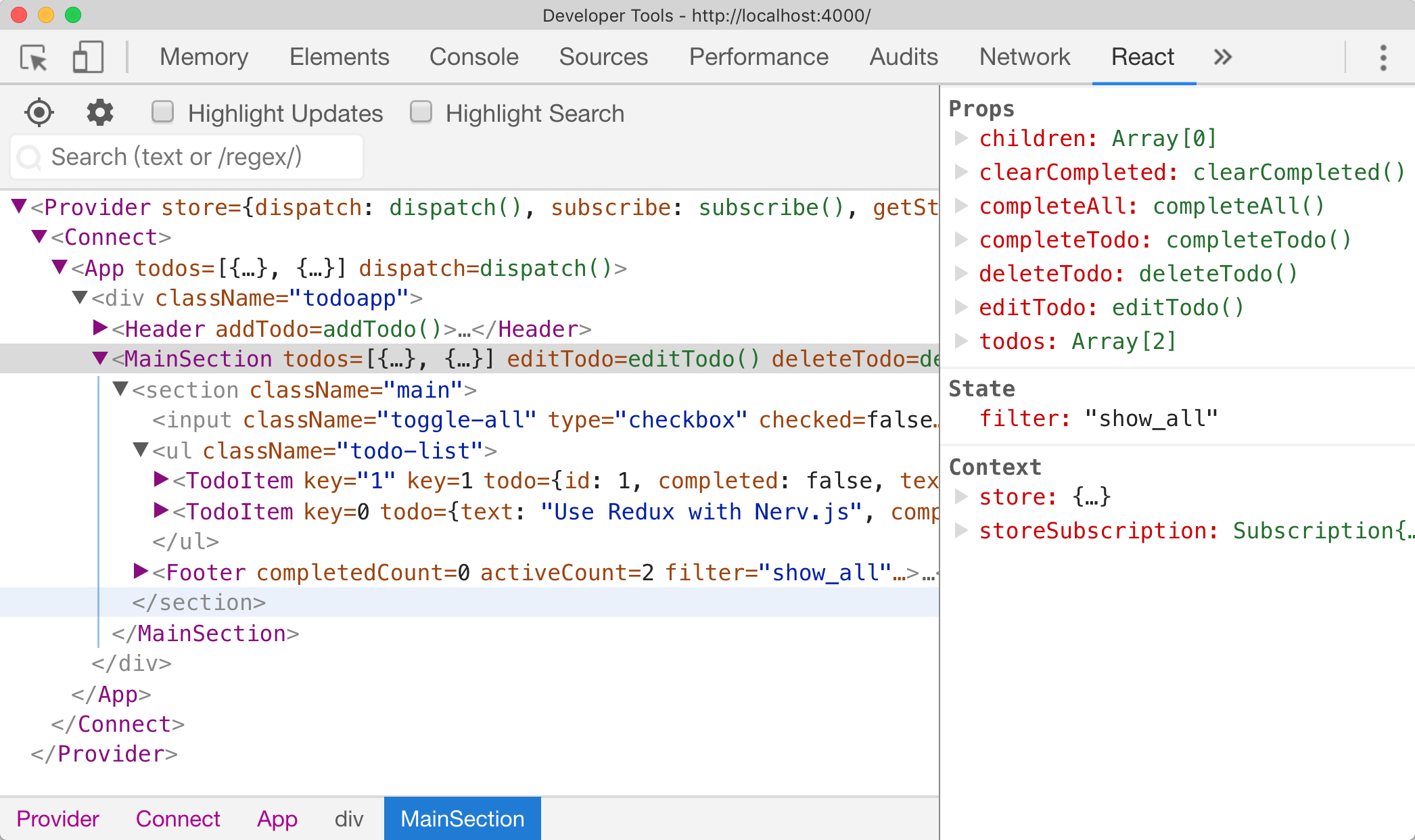
Nerv has a development tools module which allows you to inspect the component hierarchies via the React Chrome Developer Tools plugin.
To enable the Nerv development tools you must install the nerv-devtools module and then require('nerv-devtools') before the initial Nerv.render().
if (process.env.NODE_ENV !== 'production')  {
  require('nerv-devtools')
}
// before Nerv.render()
Nerv.render(<App />, document.getElementById('#root'))
Change Log
Acknowledgement
AOTU.IO(JD Multi-terminal Development Department)
License

Explore related projects
freeCodeCamp/freeCodeCamp
freeCodeCamp.org's open-source codebase and curriculum. Learn math, programming, and computer science for free.
458,601 starsdonnemartin/system-design-primer
Learn how to design large-scale systems. Prep for the system design interview. Includes Anki flashcards.
376,959 starsreact/react
The library for web and native user interfaces.
251,995 starsvuejs/vue
This is the repo for Vue 2. For Vue 3, go to https://github.com/vuejs/core
212,500 stars