
Navinspire-ia/navin has 37 GitHub stars and 5 forks. GitHot measured 0 stars in 24 hours. Last checked 2026-11-14 19:49 UTC. Last push 2026-11-12.
Measured star growth
- in 24h
- 0
- in 7 days
- Collecting history
- in 15 days
- Collecting history
- in 1 month
- Collecting history
Net star changes over overlapping periods, not daily totals. Missing measurements are left blank. Stars measure attention, not software quality.
About
Open-source AI agents for coding, research and automation. Run locally with your models, persistent memory, multi-agent execution, skills, MCP and self-evolving.
Developer ToolsREADME.md
Original
Turn a goal into work that gets done.
An open source AI agent workspace that can code, research, use tools and carry context across sessions.
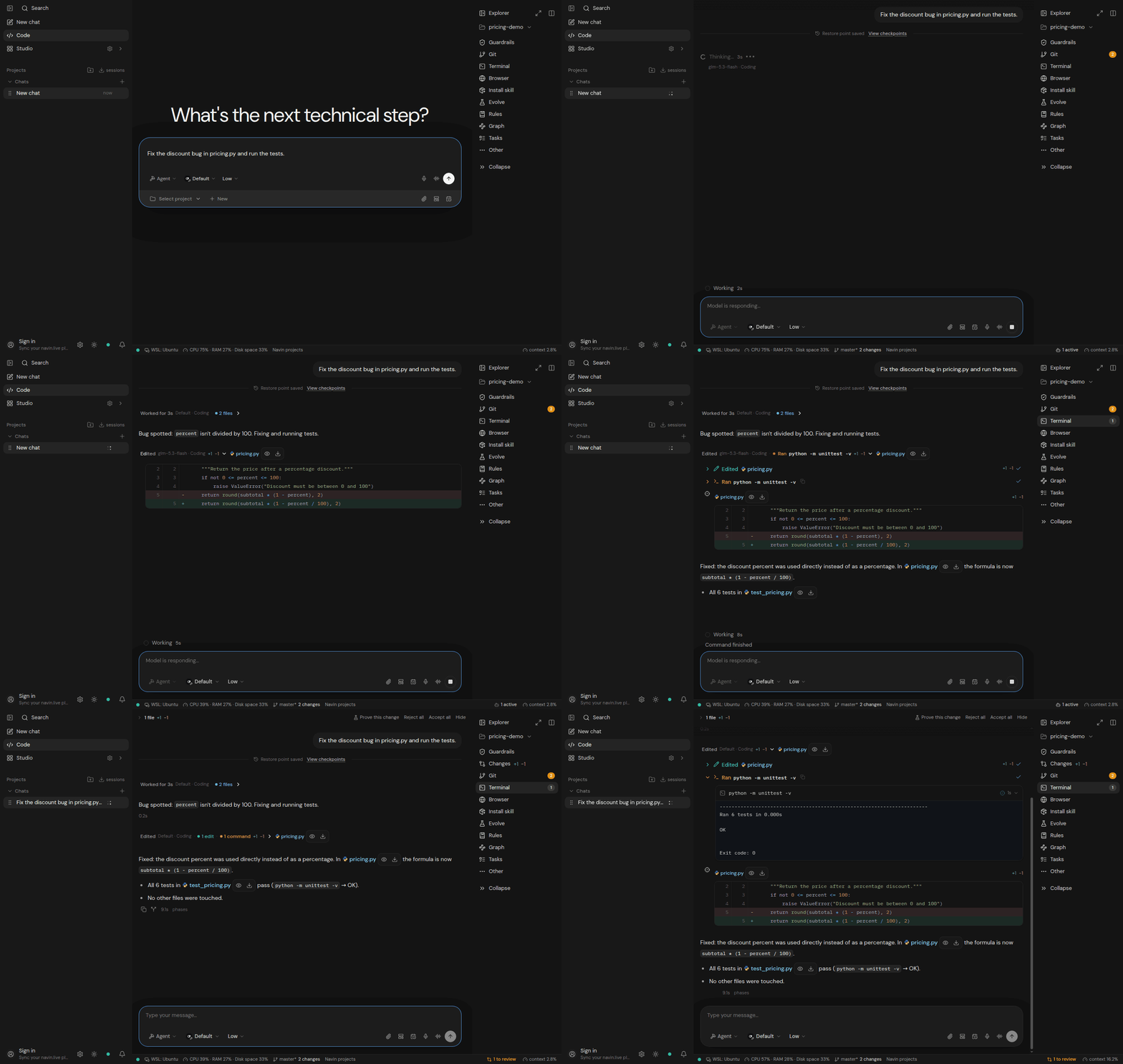
Recorded Navin Desktop session, shortened: inspect → fix → 6 tests pass. Still image and walkthrough
Run it in your terminal, your browser or the desktop app. Choose your models. Keep control.
English · Français · العربية · Español · Português · Deutsch · 简体中文 · 日本語 · 한국어 · Svenska



Get started · Download desktop · Explore the docs · Contribute
Give Navin a mission
"Find the cause of this bug, fix it, run the relevant tests and explain the changes."
"Research these competitors, compare their offers with sources and turn the findings into a report."
"Watch this project for actionable changes and tell me when something needs my attention."
Navin connects the model to your files, terminal, browser and tools. It can plan the work, delegate focused tasks to subagents, check results and continue while the goal and configured limits allow it.
The interesting part is what carries forward: project knowledge, decisions, reusable skills and the context of the work.
Get started
Navin Desktop (Windows / macOS / Linux)
Download Navin Desktop for Windows, macOS or Linux
CLI
Linux / macOS / WSL
curl https://navin.live/install -fsS | bash
Windows PowerShell
irm 'https://navin.live/install?win32=true' | iex
Open a terminal in your project, then launch:
cd your-project
navin-cli
- Open Settings with Ctrl+G and configure a provider with your API key or a local model endpoint.
- Select a model and a mode: Ask, Plan, Agent, Review, Security or Debug.
- Start with: "Read this project and explain how it works. Then suggest one useful improvement."
The software is free to use under its open source license. External model APIs and connected services may charge for usage. Installation and troubleshooting.
Build from source (gateway + WebUI)
To run or change Navin on your machine:
git clone https://github.com/Navinspire-ia/navin.git
cd navin
make install
make start
make install sets up missing system packages where supported, the Python backend and the WebUI. make start launches the gateway and the WebUI at localhost:5173.
If you skip system setup (NAVIN_SKIP_SYSTEM=1 or sh scripts/install.sh --no-system), install Python 3.11+, Git, Make, Node.js 18+ and npm first.
On Linux/macOS, the native sandbox also needs rustup (make native).
CLI from the checkout: .venv/bin/navin-cli (Windows: .venv\Scripts\navin-cli). Full installation guide.
One workspace, many kinds of work
| You want to... | Navin brings |
|---|---|
| Ship software | Repository exploration, code editing, terminal commands, Git, browser preview, tests and review. |
| Understand a codebase | Project Graph, Code Index, definitions, references and impact analysis. |
| Research and extract | Web search, browser tools, scraping, structured extraction and source-based reports. |
| Create deliverables | Documents, presentations, spreadsheets, architecture diagrams and media workflows. |
| Work on growth | Leads, enrichment, SEO, marketing research and campaign preparation. |
| Handle professional workflows | Tender analysis, career research, meeting transcription, notes and action items. |
| Delegate a larger task | Focused subagents that work in parallel and bring results back to the main agent. |
| Keep work moving | Goal loops, scheduled tasks and Heartbeat checks while the gateway is running. |
Some workflows need extra dependencies, configured integrations or a compatible model. See the capability map for settings and module guides.
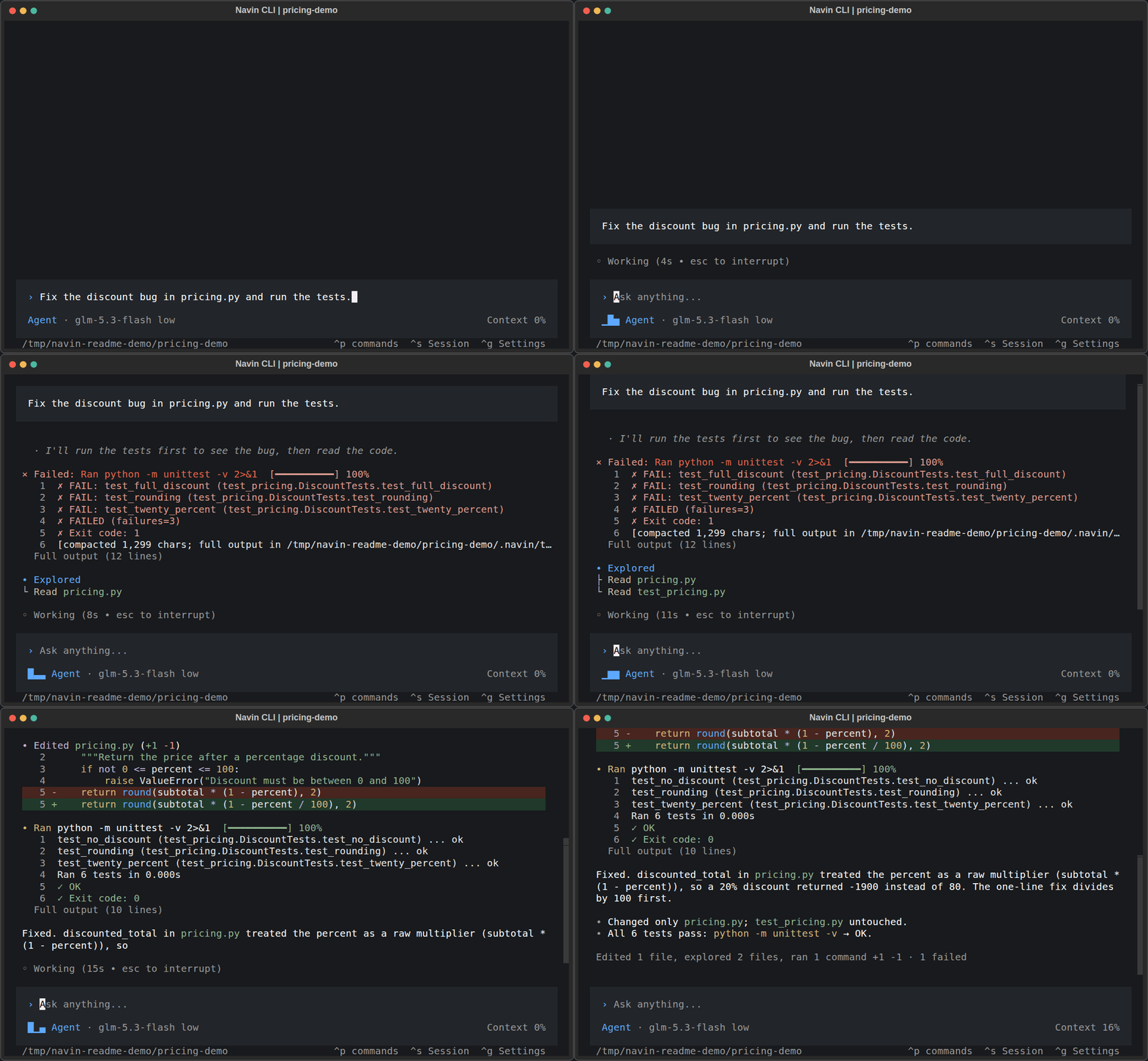
Recorded CLI session, shortened: inspect → fix → 6 tests pass. Still image and walkthrough
What makes Navin worth exploring
Context that survives the chat. Project memory and the code graph help the agent recover decisions and find relevant files. Optional episodic memory adds recall of earlier work. Memory · Project Graph
Tools that do the work. Files, shell, Git, browser automation, APIs and MCP connect reasoning to execution. Skills package repeatable workflows; plugins and integrations extend the toolset. MCP setup · Skills
Your choice of models. Connect OpenAI, Anthropic, Google, Mistral, DeepSeek, Qwen and other providers, or local endpoints through Ollama, LM Studio and vLLM. Route different tasks to different models. Available capabilities depend on the selected provider and model. Configuration
Longer tasks with explicit controls. Loops keep a goal moving; Heartbeat checks for useful follow-up work. Approvals, resource budgets, checkpoints and stop controls govern execution. Automations · Security
Local execution keeps your workspace on your machine. When you choose a remote model or connected service, the relevant request data is sent to that service.
From a goal to verified work

Open the interactive workflow by downloading the HTML and opening it in a browser. The diagram shows how execution and persistent context connect.
An agent that can learn from experience
Navin includes experimental, opt-in learning layers:
| Layer | What it explores |
|---|---|
| Self-Evolve / Auto-Skills | Turn repeated failures into candidate skills, evaluate them and promote or roll them back. |
| World model | Learn local predictions of tool outcomes from recorded trajectories. |
| Policy learning | Evaluate suggestions for the next action against held-out cases. |
These layers are off by default. Evaluation gates control activation, and publishing a skill for every project requires a human action. They do not fine-tune the chat model.
The ambition is increasingly capable autonomous agents. Navin does not claim to be AGI.
Skills evolution · World model · Policy learning
Connect the tools you already use
- Model access: your own API keys or local inference.
- Extensions: MCP servers, skills, plugins and custom tools.
- Channels: Telegram, Slack, Discord, WhatsApp, Email, Teams and more through configured integrations.
- Surfaces: CLI, WebUI and downloadable desktop applications.
This GitHub repository contains the public agent runtime, CLI, WebUI and supporting tools. Desktop packaging, the navin.live service, website infrastructure and release publishing are maintained separately.
Build Navin with us
Try one real task. Tell us where the agent helped and where it got stuck.
- Report a reproducible bug or propose a feature.
- Add a provider, improve a skill, build an integration or contribute an evaluation case.
- Improve a translation or share a workflow others can reproduce.
- Read CONTRIBUTING.md and the CLA before submitting a pull request.
Created by Navinspire IA, maintained by @aymenghad and the Navin contributors.
License
AGPL-3.0, with a commercial licensing option from Navinspire IA. Contributions follow the Contributor License Agreement.
Make your next project a little more autonomous.
Install Navin · Read the docs · Star the project
If Navin helps you, a star makes it easier for someone else to discover it.