
NPCmillionaire/unredact.tools
NPCmillionaire/unredact.tools has 15 GitHub stars and 0 forks. GitHot measured +1 stars in 24 hours. Last checked 2026-11-15 17:10 UTC. Last push 2026-11-13.
Measured star growth
- in 24h
- +1
- in 7 days
- Update delayed
- in 15 days
- Update delayed
- in 1 month
- Update delayed
Net star changes over overlapping periods, not daily totals. Missing measurements are left blank. Stars measure attention, not software quality.
About
See what your files leak (GPS, serials, authors, failed redactions, deleted text, watermarks), then scrub them.
SecurityREADME.md
Original🕵️ unredact.tools
See what your files give away before someone else does. Then scrub it.





Install · Usage · What it detects · How sanitizing works · Roadmap
Local-first OPSEC for files: metadata, hidden content, redactions, pixels, prints and shadows.
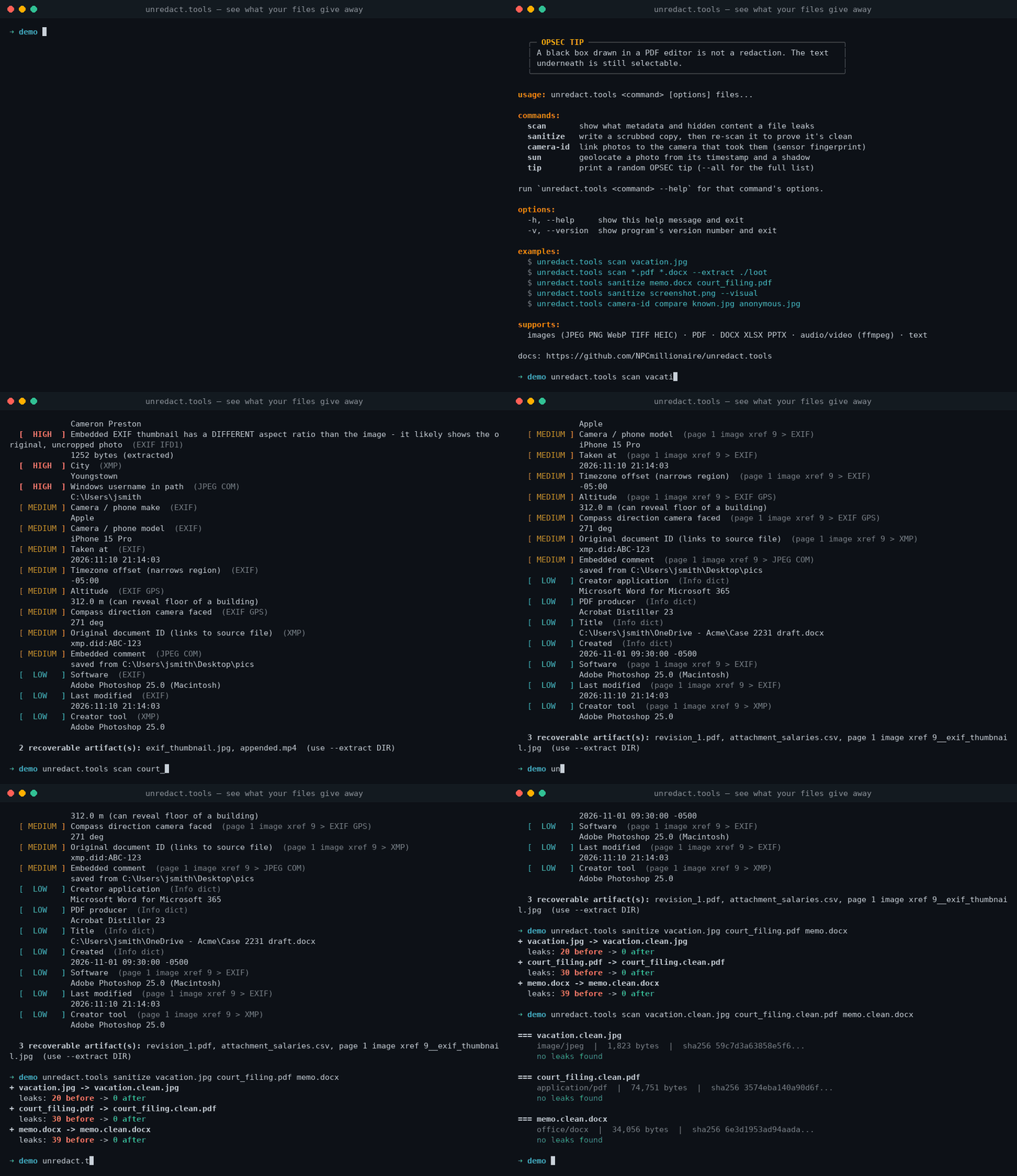
Every photo, PDF, and Office document carries more than what's on screen: GPS coordinates, camera serial numbers, usernames, earlier drafts, deleted text, comments, and invisible watermarks that identify exactly whose copy leaked.
unredact.tools answers one question: if I send this, what does the person receiving it learn about me? Then it gives you a copy that answers "nothing."
🔍
|
🧽
|
📜 Why this exists
People have been caught by metadata for as long as files have carried it.
| Year | Incident | What leaked |
|---|---|---|
| 2012 | John McAfee is located while hiding from authorities | GPS EXIF data in a photo a journalist posted |
| 2017 | The source of a leaked NSA document is identified | Printer tracking dots on the scan identified the printer and the time it was printed |
| 2019 | Paul Manafort's lawyers file a "redacted" PDF | Black boxes drawn over text that was still there; reporters copied it out within minutes |
| Always | Everyday Office and PDF files | Tracked changes, comments, author usernames, and every incrementally saved earlier version |
Good tools exist (ExifTool, mat2, Dangerzone), but each one does a single job, and none of them explains the risk. unredact.tools combines detection, explanation, and sanitizing in one command.
📦 Install
One line (macOS and Linux: Homebrew, apt, dnf, pacman, zypper, apk):
curl -fsSL https://raw.githubusercontent.com/NPCmillionaire/unredact.tools/main/install.sh | bash
The installer finds Python 3.10+, installs tesseract and ffmpeg (it asks first), and puts everything in its own virtualenv under ~/.local/share/unredact.tools. Nothing touches your system Python. It links unredact.tools, unredact and unredact-file into ~/.local/bin, then checks which features are working.
curl -fsSL .../install.sh | bash -s -- --with-ai     # + Ollama and the vision model for --scene / sun --auto
curl -fsSL .../install.sh | bash -s -- --minimal     # metadata only, no OCR/vision
curl -fsSL .../install.sh | bash -s -- --uninstall
Re-running it updates to the latest version. The installer is tested on clean Ubuntu and macOS machines in CI on every push.
From source:
git clone https://github.com/NPCmillionaire/unredact.tools
cd unredact.tools
pip install -e ".[all]"            # or just `pip install -e .` for metadata-only
brew install tesseract ffmpeg      # apt install tesseract-ocr ffmpeg on Linux
This installs three equivalent commands: unredact.tools, the short unredact, and the legacy unredact-file.
Optional extras
| Extra | Command | Adds |
|---|---|---|
| HEIC / HEIF | pip install -e ".[heic]" |
iPhone photos |
| Audio / video | brew install ffmpeg · apt install ffmpeg |
MP4, MOV, MKV, MP3, FLAC… |
| Visual checks | pip install -e ".[vision]" + brew install tesseract · apt install tesseract-ocr |
OCR, QR/barcodes, plates, faces, pixelation, printer dots, camera ID |
| AI scene review (optional) | Ollama + ollama pull qwen3-vl:8b |
scan --scene: reflections, landmarks, regional clues |
| City odds | pip install -e ".[geo]" |
offline city list for sun's where-people-live breakdown |
| Everything | pip install -e ".[all]" |
all of the above |
| Dev / tests | pip install -e ".[dev]" |
pytest + leaky-fixture generators |
🚀 Usage
Scan
unredact.tools scan photo.jpg                     # human-readable report
unredact.tools scan *.pdf *.docx                  # many files at once
unredact.tools scan memo.docx --extract ./loot    # save recovered artifacts
unredact.tools scan filing.pdf --json             # machine-readable
unredact.tools scan photo.jpg --all               # include info-level findings
unredact.tools scan big_folder/* --fast           # metadata only (skip OCR / vision)
unredact.tools scan selfie.jpg --scene            # + AI scene review (local Ollama)
--scene asks a vision model to look at the image the way an OSINT analyst would: reflections in sunglasses and windows, landmarks and skylines, regional giveaways (outlets, road markings, signage language), logos, documents, and which way the shadows fall. It runs locally through Ollama by default. --scene anthropic uses Claude through the Anthropic API instead (needs ANTHROPIC_API_KEY). That option uploads the image after it's re-encoded with all metadata stripped, and the tool warns you each time.
--extract writes out everything the scan recovered (embedded thumbnails, earlier PDF revisions, attachments, motion-photo video, embedded documents) to ./loot/<file>_artifacts/.
Sanitize
unredact.tools sanitize photo.jpg                   # → photo.clean.jpg
unredact.tools sanitize a.pdf b.docx c.mp4          # batch
unredact.tools sanitize report.pdf -o public.pdf    # custom output path
unredact.tools sanitize report.pdf --pdf-mode text  # keep selectable text

# visual redaction (images and raster PDFs)
unredact.tools sanitize screenshot.png --redact-text --redact-codes
unredact.tools sanitize party.jpg --blur-faces
unredact.tools sanitize driveway.jpg --redact-plates
unredact.tools sanitize photo.jpg --redact-region 120,40,300,60
unredact.tools sanitize screenshot.png --visual      # faces + codes + text + plates
Printer tracking dots are removed automatically. When a leak survives, sanitize tells you which flag fixes it:
$ unredact.tools sanitize screenshot.png
  leaks: 9 before -> 9 after
  remaining [CRITICAL] Boarding pass barcode (Aztec): DOE, JANE - booking ABC123 ...
  hint: re-run with --redact-codes --redact-text
Camera ID (sensor fingerprint)
Every camera sensor leaves a unique, fixed noise pattern (PRNU) in its photos. It survives metadata stripping and JPEG compression, and it can link an "anonymous" photo back to your phone. Check whether yours can be linked, then break the link:
unredact.tools camera-id build my_phone/*.jpg -o myphone.npz     # fingerprint from 10-30 photos
unredact.tools camera-id match myphone.npz anonymous_post.jpg     # z-score vs. chance
unredact.tools camera-id compare known.jpg suspect1.jpg           # quick 1-to-1 check
unredact.tools sanitize anonymous_post.jpg --desync               # imperceptible resample + crop
  camA_test.jpg: same camera (strong match)  (z=129.3, corr=0.134)
  camB_test.jpg: no match  (z=-0.6)
  camA_test.clean.jpg (--desync): no match  (z=-1.1)
[!NOTE] The original file is never modified. Every output is re-scanned automatically, and anything that survived is listed.
Sun & shadow geolocation
The sun's height and direction at a given moment depend only on where you are. A photo's timestamp plus one measurable shadow narrows down where it was taken, with no GPS required. This is the technique Bellingcat and other OSINT investigators use by hand.
unredact.tools sun --photo beach.jpg --shadow-ratio 1:1.8                 # time from EXIF
unredact.tools sun --time 2026-11-10T14:30-05:00 --shadow-ratio 1:2.38 --shadow-bearing 37
unredact.tools sun --time 2026-11-10T14:30-05:00 --where 41.10,-80.65     # what shadows should look like there
  sun elevation from the shadow: 22.8°
  best match: 41.25, -80.75  (candidate area ~666 x 876 km)
Measure the shadow in the photo, with odds. You don't have to measure anything by hand. Mark an object's base, its top and its shadow's tip, and the tool corrects for perspective and reports how likely each place is:
unredact.tools sun --picker street.jpg     # writes a click-to-mark page, gives you the command
unredact.tools sun --photo street.jpg --object 1267,1693,1221,944,1666,1465 --horizon 1051,1102,2927,1053
unredact.tools sun --photo street.jpg --auto          # a vision model marks the points (local Ollama)
  sun elevation: 22.8° ± 1.7°  (3 object(s): 22.8°, 22.8°, 22.8°; camera tilt from horizon you marked)
  95% of the probability: a band ~735 km wide, 8.9 million km² in total

  WHERE (weighted by where people live)
      77% ███████████████░░░░░ United States
      11% ██░░░░░░░░░░░░░░░░░░ Canada
  most likely areas (city + 150 km)
      18% ████░░░░░░░░░░░░░░░░ New York City, NY
      14% ███░░░░░░░░░░░░░░░░░ Washington, DC

  77% chance this photo was taken in United States; 18% near New York City
How the odds are made:
- Camera tilt comes from a horizon you mark, from straight vertical edges in the photo (vanishing-point RANSAC), or from the objects themselves. Focal length comes from EXIF.
- Error bars come from 3,000 simulated re-measurements with realistic noise: point placement, focal length, camera tilt, objects that lean, ground that slopes.
- Places are scored by how well the sun there matches the measurement, then weighted by the photo's time-zone band and by population (an offline list of ~34,000 cities), on the assumption that photos are taken where people live.
- A compass heading (EXIF
GPSImgDirectionor--heading) narrows the ring toward one area. Without it, a single shadow can't give a point, and the output says so. - Two photos beat one. Measure two photos of the same place taken hours apart,
--saveeach, thensun --combine a.json b.json. Each shadow gives its own ring and the place must lie where they cross. In a simulated test this cut the 95% region from 8.9 to 1.1 million km² and centred it on the true city. - Checking the meter: on photos that still have GPS, the tool prints how far off it was.
--log results.jsonlrecords each result, andsun --report results.jsonltells you whether the 95% ranges really contain the truth 95% of the time.
The older manual inputs still work. Without a shadow bearing you get a circle of possible places, narrowed to the photo's time zone. Adding the bearing narrows it to one area. --geojson writes every candidate point for a map. scan flags photos whose EXIF time includes a time zone, since that's what makes this attack possible.
Printer tracking dots, decoded
Color laser printers hide a faint yellow dot grid on every page. When a scan carries the Xerox DocuColor pattern (the one the EFF reverse-engineered in 2005), scan decodes it: printer serial number and the date and time it was printed. Parity correction fixes single misread dots, and every copy of the grid on the page votes on the result. Other brands' patterns are still detected, extracted and removed, but they haven't been publicly decoded.
  [CRITICAL] Printer tracking dots DECODED (Xerox DocuColor)
             Printer serial number 21052857, printed 2026-11-12 13:45 (printer clock, often UTC).
             70/70 copies of the pattern agree; parity OK.
Help & OPSEC tips
unredact.tools --help        # banner, commands, examples, plus a rotating OPSEC tip
unredact.tools tip           # one random tip
unredact.tools tip --all     # all 40
Colors follow your terminal: they're off automatically when piped, and NO_COLOR / --no-color are respected.
Use it as a CI gate
The exit code is 0 when nothing high or critical is found and 2 when something is, so you can block a release that would publish leaky files:
- run: pip install git+https://github.com/NPCmillionaire/unredact.tools
- run: unredact.tools scan public/**/*.{pdf,jpg,png,docx} --no-color
🧠 What it detects
Findings are graded by severity and rolled up into the "what this file gives away" summary.
| Severity | Meaning |
|---|---|
| 🟥 critical | Pinpoints you or exposes content you meant to remove (exact GPS, text under a redaction box, deleted text) |
| 🟧 high | Identifies you, your device, or your org (names, serials, usernames, hidden sheets) |
| 🟨 medium | Narrows things down (timezone, device model, edit history) |
| 🟦 low | Fingerprints or context (software versions, timestamps, IDs) |
Detection is organized into four layers:
| Layer | Focus | Status |
|---|---|---|
| 1 · Hard metadata | Fields stored alongside the content | ✅ shipped |
| 2 · Broken redactions & hidden content | Content the author believes is gone or invisible | ✅ shipped |
| 3 · Visual content OSINT | What the pixels themselves reveal | ✅ shipped (AI scene review is opt-in) |
| 4 · Fingerprinting & tracking | Marks that tie a file to a person, device, or copy | ✅ shipped |
✅ shipped · 🚧 partial · 🗺️ planned
Layer 1 · Hard metadata
Deterministic fields that sit next to the content. These are the easiest to check and the most often forgotten.
| Leak | Where it hides | |
|---|---|---|
| ✅ | GPS coordinates (with map link), altitude, compass heading, speed | EXIF GPS IFD · XMP · video ©xyz / ISO 6709 |
| ✅ | Timestamps + timezone offset | EXIF DateTimeOriginal/OffsetTime · PDF Info · core.xml · zip entry times |
| ✅ | Device make, model, body + lens serial numbers | EXIF · XMP aux:SerialNumber · com.apple.quicktime.* |
| ✅ | Owner, author, artist, last-modified-by, manager, company | EXIF · IPTC · XMP dc:creator · PDF Info · Office props |
| ✅ | Software versions and edit history | EXIF Software · XMP xmpMM:History · PDF Producer · Office AppVersion |
| ✅ | Usernames in file paths (C:\Users\jsmith\…, /Users/cam/…) |
PDF titles · JPEG comments · Excel absPath · Word templates |
| ✅ | Internal infrastructure: UNC shares, SharePoint URLs, private IPs | Office .rels · data connections · metadata strings |
| ✅ | Microsoft 365 tenant ID | Sensitivity-label props (MSIP_Label_*_SiteId) |
| ✅ | Editing time, revision count, last printed | docProps/app.xml · docProps/core.xml |
| ✅ | Vendor MakerNote blobs (shutter count, internal IDs) | EXIF MakerNote |
| ✅ | Document IDs that link copies and versions | XMP DocumentID · PDF trailer /ID |
| ✅ | AI-generation prompts and settings | PNG parameters chunk (Stable Diffusion, ComfyUI) |
Layer 2 · Broken redactions & hidden content
Content the author believes is gone or invisible but isn't. This layer gives the project its name.
| Leak | How it's found | |
|---|---|---|
| ✅ | Failed PDF redactions: text still under black boxes, black images, or unapplied redaction annotations | Finds dark shapes and images, then extracts the words beneath |
| ✅ | Earlier PDF versions, with a diff of the text deleted since | Splits at each %%EOF and re-parses every revision |
| ✅ | Tracked deleted text in Word, plus change authors | Walks w:del / w:moveFrom |
| ✅ | Comments, commenters, collaborator IDs and emails | comments*.xml · people.xml · xl/persons |
| ✅ | Hidden text: w:vanish, white-on-white, microscopic, transparent, off-page |
Run properties · span color/size/alpha |
| ✅ | Hidden sheets, rows, and columns; pivot caches holding deleted data | workbook.xml · sheet XML · pivotCache |
| ✅ | Speaker notes and hidden slides | ppt/notesSlides · show="0" |
| ✅ | EXIF thumbnail of the original, uncropped photo | Thumbnail vs. image aspect-ratio check |
| ✅ | Motion-photo video and other data appended after the image ends | Walks JPEG markers to the true end-of-image |
| ✅ | Attachments and embedded objects, scanned recursively | EmbeddedFiles · word/embeddings/ |
| ✅ | Hidden PDF layers, extra image frames (depth/gain maps) | OCG state · MPO frames |
| ✅ | Metadata inside embedded images (a JPEG in a PDF keeps its GPS) | Every embedded image is scanned as its own file |
| ✅ | Reversible pixelation: mosaics over text that Depix-style attacks can undo | Lattice analysis: block-aligned edges, flat cells, many tones |
| ✅ | Sensitive text readable in the image: SSNs, card numbers (Luhn-checked), API keys, emails, phones, street addresses, IPs, URLs, usernames in paths | Local OCR (Tesseract), word-level boxes so --redact-text can black them out |
Layer 3 · Visual content OSINT
What a human analyst, or a vision model, can work out from the pixels themselves. Stripping metadata doesn't touch this.
| Leak | |
|---|---|
| ✅ | Reflections, landmarks, regional clues, logos, interiors via the opt-in --scene AI review (local Ollama or Claude), with a location and time-of-day guess |
| ✅ | QR codes and barcodes (QR, Aztec, PDF417, Data Matrix, 1D), decoded. Boarding passes are parsed (IATA BCBP): name, booking reference, flight, route, seat |
| ✅ | Faces: bystanders and children, via OpenCV's YuNet detector, with --blur-faces (heavy blur + noise, not a reversible mosaic) |
| ✅ | License plates: localized by character-cluster geometry and confirmed by OCR. --redact-plates boxes them out |
| ✅ | Sun-angle geolocation: sun turns a timestamp + shadow into candidate locations. scan gives the sun position at capture for GPS-tagged photos |
| 🚧 | Readable text in the scene: OCR catches printed text (labels, screens, documents). Street signs in natural photos are hit-or-miss, and --scene helps there |
| 🗺️ | Cross-file correlation through unredact.me: "this camera serial also appears in 3 photos on your public Flickr" |
Layer 4 · Fingerprinting & tracking
Marks that tie a file to a specific person, device, or copy, often added deliberately to catch leakers.
| Leak | Notes | |
|---|---|---|
| ✅ | Zero-width character watermarks (canary traps) | U+200B–U+200F, U+2060–U+2064, U+FEFF |
| ✅ | Unicode tag smuggling: invisible text, decoded and shown | Also used for prompt-injection payloads |
| ✅ | Homoglyph substitution: Cyrillic/Greek look-alikes swapped into Latin words | Mixed-script word detection |
| ✅ | Odd-width space patterns | Weak signal, flagged as low |
| ✅ | Word rsid session IDs that link drafts | w:rsid* attributes |
| ✅ | Phone-home objects: JavaScript, Launch, SubmitForm, remote references | PDF object scan |
| ✅ | Persistent document IDs | PDF /ID · XMP instance IDs |
| ✅ | Printer tracking dots (Machine Identification Code) on scans and scanned PDFs, with Xerox DocuColor decoding (serial + print time) | Yellow-speck isolation, grid extraction, odd-parity correction, majority vote. Removed by sanitize |
| ✅ | Camera sensor fingerprint (PRNU) linking photos to one camera | camera-id build/match with z-scores; sanitize --desync breaks it |
🧽 How sanitizing works
[!IMPORTANT] Sanitizing means rebuilding the file from its visible content, not deleting known-bad fields one by one. A rebuild never copies a field the tool doesn't know about.
flowchart LR
    A[original file] --> B[detect type]
    B --> C[rebuild from<br>visible content]
    C --> D[file.clean.ext]
    D --> E{re-scan}
    E -- "0 leaks" --> F[✅ done]
    E -- "anything left" --> G[⚠️ listed in output]
| Format | What happens |
|---|---|
| 🖼️ Images | Bakes EXIF rotation into the pixels and converts the ICC profile to sRGB, then copies raw pixels only into a new image and re-encodes it. EXIF, GPS, XMP, IPTC, thumbnails, MakerNotes, comments, text chunks, appended video, and extra frames are all gone. |
📄 PDF · raster (default) |
Every page is rendered to an image and rebuilt into a new PDF (the Dangerzone approach). Nothing survives except pixels. |
📄 PDF · text |
Burns in real redactions under every detected black box, removes hidden text, annotations, JavaScript, attachments, thumbnails and metadata, strips EXIF from embedded JPEGs, rewrites the whole file (old revisions gone), and assigns a fresh random /ID. |
| 📝 Office | Empties properties, accepts all tracked changes, deletes comments, people and speaker notes, removes hidden text and rsids, nulls template and data-source paths, unhides hidden sheets, rows and slides (so you see what you're sending), sanitizes embedded media, and zeroes zip timestamps. |
| 🎬 Audio / video | ffmpeg -c copy (no quality loss). Keeps only video, audio, and subtitle streams, which drops timed GPS and gyro tracks. Wipes all metadata and sets bitexact flags. |
| 👁️ Visual (opt-in) | --redact-text, --redact-codes, --redact-region draw solid boxes (nothing to un-pixelate). --blur-faces uses heavy blur plus noise. --desync resamples ~1-2% and crops to break PRNU. Printer dots are always removed from images and scanned PDF pages. |
| 🔤 Text | Removes zero-width and tag characters, normalizes odd spaces, and fixes homoglyphs, but only inside mixed-script words, so real Cyrillic or Greek text is left alone. |
[!TIP] Use
rasterwhen the stakes are real. Usetextwhen you need the PDF to stay searchable (court filings, published reports).
🗂️ Supported formats
| Type | Scan | Sanitize | Needs |
|---|---|---|---|
| JPEG · PNG · WebP · TIFF · GIF · BMP | ✅ | ✅ | |
| HEIC · HEIF · AVIF | ✅ | ✅ → JPEG | pillow-heif |
| ✅ | ✅ | ||
| DOCX · XLSX · PPTX (+ macro variants) | ✅ | ✅ | |
| MP4 · MOV · M4A · MKV · WebM · MP3 · FLAC · WAV | ✅ | ✅ | ffmpeg |
| Plain text (txt · md · csv · json…) | ✅ | ✅ | |
| ZIP | ✅ names + comment | ❌ | |
| ODT · ODS · camera RAW | 🗺️ | 🗺️ |
🏗️ Architecture
Module layout
unredact_tools/
├── cli.py        scan / sanitize commands, report rendering, exit codes
├── scanner.py    magic-byte type detection → dispatch
├── model.py      Report · Finding · Artifact · "facts" for the summary
├── common.py     username/host/email/IP detectors · canary-trap text analysis
├── xmp.py        generic XMP packet walker
├── image.py      EXIF/GPS/IPTC/XMP/thumbnail/trailer analysis + pixel-rebuild sanitizer
├── pdf.py        redaction checks, revisions, hidden text, JS · raster/text sanitize
├── office.py     OOXML part-level analysis + package rewriter
├── media.py      ffprobe / ffmpeg wrapper
├── vision.py     OCR · QR/barcodes · plates · faces · pixelation · printer dots · PRNU
├── printerdots.py  DocuColor tracking-dot extraction + decoding
├── sun.py        NOAA solar position · shadow geolocation
├── shadow.py     perspective-corrected shadow measurement · Monte Carlo odds · picker
├── scene.py      opt-in AI scene review (Ollama / Anthropic)
├── banner.py     help banner + OPSEC tip box
└── tips.py       rotating OPSEC advice
Design principles
- 🔒 Local-first. Nothing leaves your machine. A privacy tool that makes you upload the file defeats its own purpose.
- 💬 Explain, don't just list. Every finding is translated into what an adversary learns from it.
- 🧱 Rebuild, don't patch. Sanitizers build new files from visible content.
- ✅ Prove it. Every sanitize re-runs the scanner on its own output.
- 🪆 Recursive. An image inside a Word document inside a PDF attachment gets the same scrutiny as a standalone file.
⚠️ Limitations
[!WARNING] AI scene review is a second opinion, not ground truth. Vision models miss things and occasionally invent them. Treat
--scenefindings as leads to check, and keep the deterministic detectors as the baseline.
- PRNU survives a normal
sanitize. Only--desyncbreaks it.camera-idneeds full-resolution, uncropped originals to match. - OCR is English-first and tuned for screenshots and documents. Handwriting, stylized fonts and text in natural scenes are often missed.
- Printer-dot decoding covers Xerox DocuColor only. Other brands' grids are detected and removed but not interpreted. Invisible (non-yellow) schemes aren't detected.
- License-plate detection is classical computer vision + OCR. It works on clear, roughly frontal plates; small, angled or dirty plates in busy street scenes can be missed.
- Sun geolocation is only as good as the shadow measurement. About 1° of error moves the answer by roughly 100 km.
- Raster PDF mode loses text selection and accessibility. Use
--pdf-mode textif you need them. - Excel sanitize removes comment VML, which also removes legacy form controls.
- Encrypted PDFs are reported but not analyzed.
- Detection is heuristic. An unusual redaction (a dark pattern fill, a clipping-path trick) could be missed.
🗺️ Roadmap
- Layer 1: hard metadata across images, PDF, Office, and media
- Layer 2: failed redactions, revisions, tracked changes, hidden content
- Layer 4: text canaries, rsids, phone-home objects
- Self-verifying
sanitize - Layer 2: reversible-pixelation detection · OCR of sensitive text in images
- Layer 3: QR / barcode decoding + boarding-pass parsing · face detection
- Layer 4: printer tracking dots (detect + remove) · PRNU camera ID +
--desync - Visual sanitizing:
--blur-faces,--redact-codes,--redact-text,--redact-region - Layer 3: AI scene review (
--scene) · sun-angle geolocation (sun) · license plates - Printer-dot decoding (Xerox DocuColor: serial number + print time)
- Shadow measurement from marked or model-found points, with Monte Carlo odds and a calibration report
- Dedicated object-shadow pairing model for
--auto(instance shadow detection) and a neural horizon estimator - Decoders for other printer dot layouts (Canon, HP, Epson; see DEDA's research)
- ODF and camera RAW support
- Browser/WASM version on unredact.tools (files never leave the device)
- unredact.me integration to cross-reference serials, usernames, and document IDs
- Batch API for newsrooms and law firms
🧪 Development
pip install -e ".[dev]"
pytest -q
tests/make_fixtures.py generates deliberately leaky files: a GPS-tagged photo with an uncropped thumbnail and appended video, a court-style PDF with a failed redaction and an earlier revision, a Word memo with deleted tracked changes and canary characters, a spreadsheet with a hidden sheet, a deck with speaker notes, a watermarked text file, and a GPS-tagged MP4. The tests assert that every fixture leaks before sanitizing and leaks nothing after.
To see it in action:
python tests/make_fixtures.py ./demo
unredact.tools scan ./demo/* --extract ./demo/loot
📚 Prior art
| Tool | Focus |
|---|---|
| ExifTool | The reference metadata reader/writer |
| mat2 | Metadata removal, Tails/Tor ecosystem |
| Dangerzone | Untrusted documents → safe pixel-only PDFs |
| Depix | Recovers text from pixelated screenshots (the attack Layer 2 will warn about) |
| x-ray | Free Law Project's bad-redaction finder for court PDFs |
| DEDA | TU Dresden's printer-tracking-dot extraction and anonymisation |
| YuNet | Face detector bundled for --blur-faces (MIT) |
| EFF DocuColor guide | The 2005 decoding of Xerox tracking dots that printerdots.py implements |
| SunCalc | The manual tool investigators use for shadow geolocation |
unredact.tools · built by NPCmillionaire · Cloudsculpting Labs
Know what you're sharing.