
Muhib-Mehdi/OSINT-NEXUS
Muhib-Mehdi/OSINT-NEXUS has 46 GitHub stars and 9 forks. GitHot measured 0 stars in 24 hours and 0 in 7 days. Last checked 2026-11-09 16:39 UTC. Last push 2026-08-15.
A powerful, cross-platform Open Source Intelligence tool featuring AI-driven entity correlation, advanced graph analytics, breach intelligence, and professional reporting. Built with Python & PyQt6
Measured star growth
- in 24h
- 0
- in 7 days
- 0
- in 15 days
- Update delayed
- in 1 month
- Update delayed
Net star changes over overlapping periods, not daily totals. Missing measurements are left blank. Stars measure attention, not software quality.
README.md
Original🔍 OSINT-Nexus
Next-Generation Open Source Intelligence Platform
Combining the power of passive reconnaissance with AI-driven analysis and stunning visual link exploration








Features • Installation • Screenshots • Usage • Architecture • Contributing
📋 Table of Contents
- Overview
- Why OSINT-Nexus?
- Features
- Screenshots
- Installation
- Usage
- Architecture
- System Design Diagrams
- OSINT Modules
- AI-Powered Features
- Graph Analytics
- Configuration
- Report Generation
- Keyboard Shortcuts
- Contributing
- License & Contact
🎯 Overview
OSINT-Nexus is a powerful, cross-platform Open Source Intelligence (OSINT) gathering and visualization application. It combines the passive reconnaissance capabilities of tools like TheHarvester and SpiderFoot with the powerful visual link analysis of Maltego — enhanced with AI-powered analysis using Google Gemini and advanced graph analytics using cutting-edge algorithms.
💡 Built for security researchers, penetration testers, and intelligence analysts who need comprehensive, actionable insights from public data.
🏆 Why OSINT-Nexus?
| Feature | OSINT-Nexus | Maltego | SpiderFoot | TheHarvester |
|---|---|---|---|---|
| Interactive Graph Visualization | ✅ Force-directed | ✅ Commercial | ❌ Basic | ❌ None |
| AI-Powered Analysis | ✅ Gemini Integration | ❌ None | ❌ None | ❌ None |
| Graph Analytics (PageRank, Louvain) | ✅ Built-in | ❌ None | ❌ None | ❌ None |
| Breach Intelligence | ✅ HaveIBeenPwned | 💰 Paid Add-on | ✅ Basic | ❌ None |
| Professional Reporting | ✅ HTML/PDF/STIX | ✅ HTML | ❌ None | |
| Cross-Platform | ✅ Windows/Linux | ✅ All | ✅ Web-based | ✅ CLI |
| Open Source | ✅ MIT License | ❌ Proprietary | ✅ MIT | ✅ GPL |
| Price | 🆓 Free | 💰 $999+/year | 🆓 Free | 🆓 Free |
✨ Features
🔍 Intelligence Gathering
| Module | Capabilities | Input Types |
|---|---|---|
| Email Harvester | Discover emails, names, subdomains | Domain |
| Social Profiler | Find social media accounts | Username, Email |
| Phone Recon | Carrier, location, line type | Phone Number |
| Domain Infrastructure | WHOIS, DNS, MX, NS records | Domain, IP |
| GitHub Recon | Repos, commits, collaborators | Username |
| Breach Intelligence | Password exposure, breach history | Email, Domain |
| Image Forensics | EXIF metadata, GPS extraction | Domain, URL |
🤖 AI-Powered Analysis
- Entity Correlation - Automatically discover hidden relationships
- Threat Assessment - AI-generated risk scores and narratives
- Natural Language Queries - Ask questions in plain English
- Executive Summaries - Auto-generate professional reports
📊 Advanced Analytics
- Community Detection - Louvain algorithm for clustering
- Centrality Analysis - PageRank, betweenness, closeness
- Anomaly Detection - Statistical outlier identification
- Path Finding - Shortest paths between entities
📄 Professional Reporting
- HTML Reports - Beautiful, dark-themed interactive reports
- PDF Reports - Print-ready professional documents
- STIX 2.1 Export - CTI standard for threat sharing
📸 Screenshots
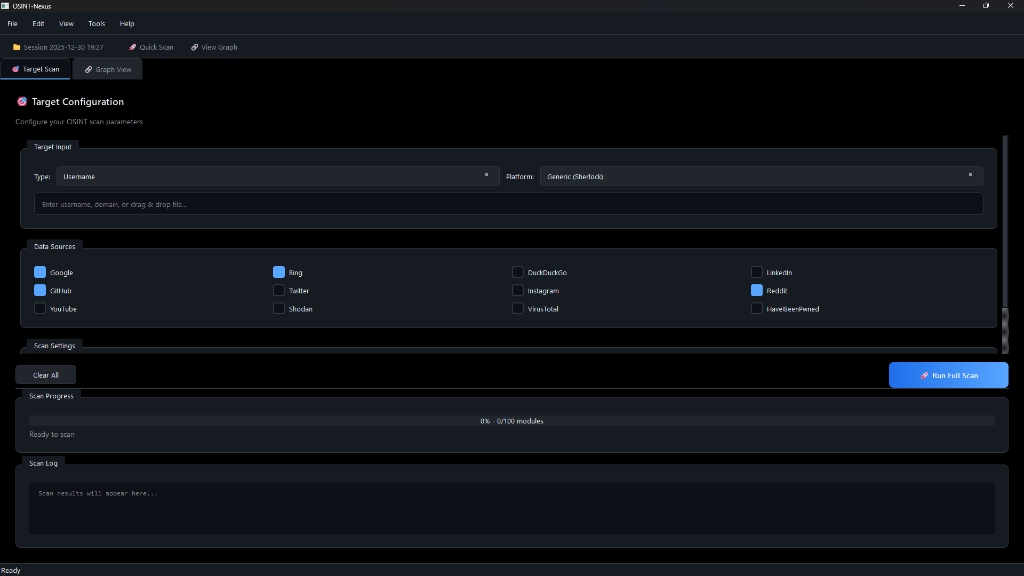
Target Scan Interface
Configure your OSINT scan parameters with an intuitive dark-mode interface
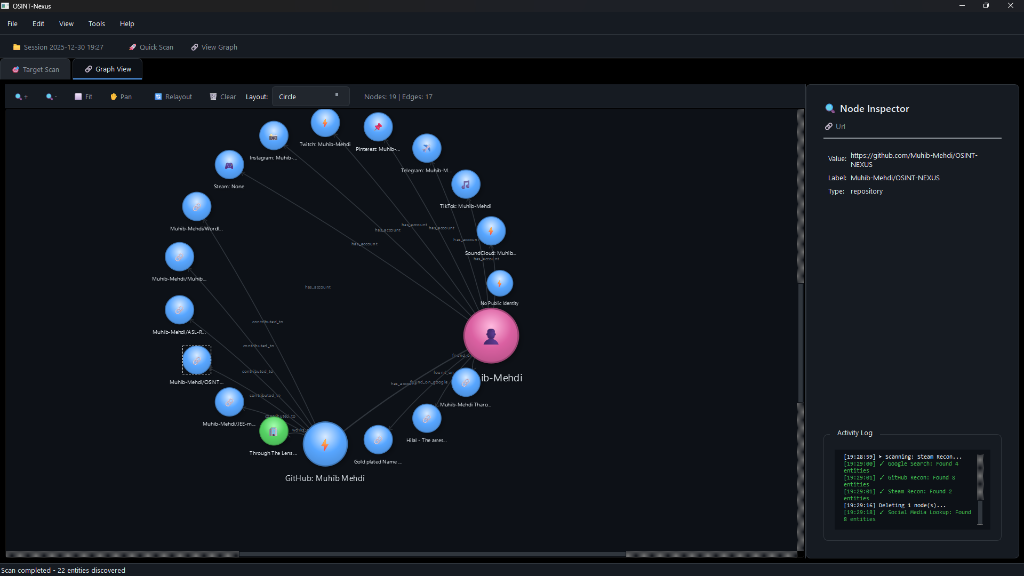
Interactive Graph Visualization
Explore entity relationships with force-directed graph layout and real-time analysis
🚀 Installation
Prerequisites
| Requirement | Version | Purpose |
|---|---|---|
| Python | 3.10+ | Runtime |
| pip | Latest | Package manager |
| Git | Any | Clone repository |
| Gemini API Key | Optional | AI features |
| HIBP API Key | Optional | Breach intelligence |
Quick Start
# Clone the repository
git clone https://github.com/Muhib-Mehdi/OSINT-NEXUS.git
cd OSINT-NEXUS

# Create virtual environment
python -m venv venv

# Activate virtual environment
# Windows:
.\venv\Scripts\activate
# Linux/Mac:
source venv/bin/activate

# Install dependencies
pip install -r requirements.txt

# Run the application
python src/main.py
📦 Building Standalone Executable
Windows
# Install PyInstaller
pip install pyinstaller

# Build executable
pyinstaller build.spec

# The executable will be in dist/OSINT-Nexus/
Linux
# Install PyInstaller
pip install pyinstaller

# Build executable
pyinstaller build.spec

# Run installer (optional)
sudo ./installers/installer_linux.sh
📖 Usage
Workflow Overview
flowchart LR
    A[🎯 Enter Target] --> B[📡 Select Modules]
    B --> C[🚀 Run Scan]
    C --> D[🔗 View Graph]
    D --> E[🤖 AI Analysis]
    E --> F[📄 Export Report]

    style A fill:#58a6ff,color:#fff
    style B fill:#3fb950,color:#fff
    style C fill:#f0883e,color:#fff
    style D fill:#a371f7,color:#fff
    style E fill:#db61a2,color:#fff
    style F fill:#79c0ff,color:#fff
Step-by-Step Guide
Create/Open Project
File → New ProjectorCtrl+N- Enter project name and description
Configure Target
- Select target type (Username, Domain, Email, IP, Phone)
- Enter target value
- Choose data sources (Google, GitHub, Shodan, etc.)
Run Scan
- Click
🚀 Run Full Scan - Monitor progress in the log panel
- Modules run in parallel for speed
- Click
Explore Results
- Switch to
Graph Viewtab - Click nodes to inspect entities
- Right-click for transforms and actions
- Switch to
Analyze with AI
- Configure Gemini API in Settings
- Use natural language queries
- Generate threat assessments
Export Report
File → Export → HTML/PDF/STIX- Professional reports ready for sharing
🏗️ Architecture
graph TB
    subgraph UI["🖥️ User Interface (PyQt6)"]
        MW[Main Window]
        ST[Scan Tab]
        GT[Graph Tab]
        SD[Settings Dialog]
    end

    subgraph Core["⚙️ Core Engine"]
        OE[OSINT Engine]
        TP[Thread Pool]
        DB[(SQLite DB)]
    end

    subgraph Modules["🔌 OSINT Modules"]
        EH[Email Harvester]
        SL[Social Lookup]
        BI[Breach Intel]
        IF[Image Forensics]
        TR[Transforms]
    end

    subgraph Advanced["🧠 Advanced Features"]
        AI[AI Engine<br/>Gemini]
        GA[Graph Analytics<br/>NetworkX]
        RG[Report Generator]
    end

    MW --> ST
    MW --> GT
    MW --> SD
    ST --> OE
    OE --> TP
    TP --> Modules
    OE --> DB
    GT --> GA
    GT --> AI
    MW --> RG

    style UI fill:#21262d,color:#e6edf3
    style Core fill:#161b22,color:#e6edf3
    style Modules fill:#0d1117,color:#e6edf3
    style Advanced fill:#30363d,color:#e6edf3
📐 System Design Diagrams
To better understand the internal workings of OSINT-Nexus, here are some additional architectural diagrams.
🔄 Data Flow Sequence
This sequence diagram illustrates how data flows from the user input through the system components during a scan operation.
sequenceDiagram
    participant User
    participant GUI as Main Window
    participant Engine as OSINT Engine
    participant Module as Data Module
    participant DB as SQLite DB
    participant Graph as Graph View

    User->>GUI: Initiates Scan
    GUI->>Engine: start_scan(target)
    Engine->>DB: create_scan_record()
    Engine->>Module: run(target)
    activate Module
    Module->>Module: Fetch External Data
    Module-->>Engine: return ScanResult
    deactivate Module
    Engine->>DB: save_entities(results)
    Engine->>GUI: signal_scan_complete()
    GUI->>Graph: update_graph()
    Graph->>User: Display Network Visualization
🧩 Class Structure
A high-level view of the core class relationships and inheritance hierarchy.
classDiagram
    class MainWindow {
        +init_ui()
        +setup_tabs()
    }
    class OSINTEngine {
        +start_scan()
        +register_module()
    }
    class BaseModule {
        <<Abstract>>
        +run()
        +process()
    }
    class Database {
        +get_entities()
        +save_project()
    }
    class GraphView {
        +add_node()
        +apply_layout()
    }

    MainWindow *-- OSINTEngine
    MainWindow *-- Database
    MainWindow *-- GraphView
    OSINTEngine o-- BaseModule
    BaseModule <|-- EmailHarvester
    BaseModule <|-- SocialLookup
    BaseModule <|-- BreachIntel
🚦 Scan Lifecycle State Machine
The states a scan operation goes through from initiation to completion.
stateDiagram-v2
    [*] --> Idle
    Idle --> Initializing : Start Scan
    Initializing --> Running : Modules Loaded
    state Running {
        [*] --> FetchingData
        FetchingData --> Processing
        Processing --> SavingResults
        SavingResults --> FetchingData : More Targets
        SavingResults --> [*]
    }
    Running --> Completed : All Tasks Done
    Running --> Failed : Error Occurred
    Running --> Cancelled : User Abort
    Completed --> Idle
    Failed --> Idle
    Cancelled --> Idle
🔌 OSINT Modules
📧 Email Harvester
Discovers emails, names, and subdomains from target domains.
Input: Domain
Output: Emails, Names, Subdomains
Sources: Google, Bing, DuckDuckGo, LinkedIn
👤 Social Profile Lookup
Finds social media profiles across 300+ platforms.
Input: Username, Email
Output: Social profiles, Account URLs
Platforms: Twitter, Instagram, GitHub, LinkedIn, Reddit, etc.
📱 Phone Recon
Extracts carrier and location information from phone numbers.
Input: Phone Number
Output: Carrier, Country, Line Type, Valid Status
🌐 Domain Infrastructure
Comprehensive domain and IP reconnaissance.
Input: Domain, IP
Output: WHOIS, DNS records, MX, NS, Subdomains
🔓 Breach Intelligence
Checks emails against known data breaches.
Input: Email, Domain
Output: Breach records, Exposure dates, Compromised data types
API: HaveIBeenPwned
📷 Image Forensics
Extracts hidden metadata from images.
Input: Domain, URL
Output: EXIF data, GPS coordinates, Camera info, Timestamps
🤖 AI-Powered Features
⚠️ Requires Google Gemini API Key — Get yours free at aistudio.google.com
Entity Correlation
🧠 AI Analysis: "Found connection between target email and
3 GitHub repositories. High likelihood of same individual
based on commit patterns and timezone analysis."
Threat Assessment
| Entity | Risk Score | Level | Recommendation |
|---|---|---|---|
[email protected] |
7.2/10 | High | Investigate breach exposure |
192.168.1.1 |
2.1/10 | Low | No immediate concerns |
Natural Language Queries
Ask questions like:
- "Show me all emails from gmail.com"
- "Find connections between domain and GitHub accounts"
- "What entities have the highest risk score?"
📊 Graph Analytics
Algorithms Implemented
| Algorithm | Purpose | Academic Reference |
|---|---|---|
| Louvain | Community detection | Blondel et al. 2008 |
| PageRank | Node importance | Brin & Page 1998 |
| Betweenness | Bridge identification | Freeman 1977 |
| Closeness | Information spread | Sabidussi 1966 |
Anomaly Detection
Automatically identifies:
- 🔴 Outliers - Unusually connected entities
- 🟡 Hubs - Central connection points
- 🟠 Bridges - Entities connecting communities
- ⚪ Isolated - Disconnected nodes
⚙️ Configuration
API Keys Setup
Navigate to Tools → Settings → API Keys
🔑 Google Gemini (AI Features)
- Visit aistudio.google.com/app/apikey
- Click "Create API Key"
- Copy and paste into OSINT-Nexus settings
Features Enabled: Entity correlation, threat assessment, NL queries, executive summaries
🔐 HaveIBeenPwned (Breach Intelligence)
- Visit haveibeenpwned.com/API/Key
- Purchase API key ($3.50/month)
- Enter in OSINT-Nexus settings
Features Enabled: Email breach lookup, domain breach search
🔍 Shodan (Infrastructure Scanning)
- Create account at shodan.io
- Navigate to Account → API Key
- Enter in OSINT-Nexus settings
Features Enabled: Open port scanning, service detection, vulnerability lookup
📄 Report Generation
Export Formats
| Format | Use Case | Features |
|---|---|---|
| HTML | Web sharing, presentations | Interactive, dark theme, responsive |
| Formal reports, printing | Professional layout, print-ready | |
| STIX 2.1 | CTI platforms | Industry standard, machine-readable |
Report Contents
- 📊 Executive Summary with statistics
- 🔍 Entity breakdown by type
- 🔗 Relationship mapping
- 📈 Analytics insights
- 🤖 AI-generated narratives (if enabled)
⌨️ Keyboard Shortcuts
| Shortcut | Action |
|---|---|
Ctrl+N |
New Project |
Ctrl+O |
Open Project |
Ctrl+S |
Save Project |
Ctrl+L |
Relayout Graph |
Ctrl+0 |
Fit Graph to View |
Ctrl++ |
Zoom In |
Ctrl+- |
Zoom Out |
Ctrl+Q |
Exit Application |
🤝 Contributing
Contributions are welcome! Here's how you can help:
Development Setup
# Fork and clone
git clone https://github.com/YOUR_USERNAME/OSINT-NEXUS.git
cd OSINT-NEXUS

# Install dev dependencies
pip install -r requirements.txt

# Create feature branch
git checkout -b feature/amazing-feature

# Make changes and test
python src/main.py

# Commit and push
git commit -m "Add amazing feature"
git push origin feature/amazing-feature
Contribution Guidelines
- 🍴 Fork the repository
- 🌿 Create a feature branch
- 💻 Write clean, documented code
- ✅ Test your changes
- 📝 Update documentation if needed
- 🔄 Submit a Pull Request
Areas for Contribution
- 🔌 New OSINT modules
- 🤖 AI analysis improvements
- 📊 Additional graph algorithms
- 🌍 Internationalization
- 📱 Mobile responsiveness
- 🧪 Test coverage
⚖️ Legal Disclaimer
⚠️ IMPORTANT: This tool is designed for legitimate security research and authorized penetration testing only.
By using OSINT-Nexus, you agree to:
- ✅ Only gather information you are authorized to access
- ✅ Comply with all applicable laws and regulations
- ✅ Use gathered information responsibly and ethically
- ✅ Respect privacy and data protection requirements
The developers are not responsible for any misuse of this tool.
📜 License & Contact
MIT License
This project is licensed under the MIT License - see the LICENSE file for details.
👨💻 Author
Muhib Mehdi


⭐ Star History
If you find this project useful, please consider giving it a star!
Made with ❤️ for the Security Community
Combining the power of AI, graph analytics, and comprehensive OSINT capabilities
Explore related projects
trimstray/the-book-of-secret-knowledge
A collection of inspiring lists, manuals, cheatsheets, blogs, hacks, one-liners, cli/web tools and more.
257,250 starsHack-with-Github/Awesome-Hacking
A collection of various awesome lists for hackers, pentesters and security researchers
125,103 starsswisskyrepo/PayloadsAllTheThings
A list of useful payloads and bypass for Web Application Security and Pentest/CTF
82,542 starscaddyserver/caddy
Fast and extensible multi-platform HTTP/1-2-3 web server with automatic HTTPS
78,935 stars