
MuhammadMustafa18/VisionHarness
MuhammadMustafa18/VisionHarness has 10 GitHub stars and 2 forks. GitHot measured 0 stars in 24 hours. Last checked 2026-11-14 19:54 UTC. Last push 2026-11-10.
What you can do
- Natural Language to CV - Conversational planner transforms plain English objectives into deterministic, structured workflow specs (spec.json).
- Multimodal Scene Grounding - VLM inspects sample frames to understand camera angles, identify objects, and propose normalized polygon zones or crossing lines.
- Interactive Geometry Editor - Visually fine-tune, drag, or redraw polygon vertices and tripwire lines directly on the video canvas with audit diff history.
- Live Stream Ingestion - Connect phone IP webcams (HTTP-MJPEG), security cameras (RTSP), USB webcams, or pre-recorded MP4/AVI videos.
Measured star growth
- in 24h
- 0
- in 7 days
- Collecting history
- in 15 days
- Collecting history
- in 1 month
- Collecting history
Net star changes over overlapping periods, not daily totals. Missing measurements are left blank. Stars measure attention, not software quality.
About
Describe what you want to detect in plain English, get a working computer vision pipeline. Supports CCTV streams and video uploads.
Creative & MediaREADME.md
Original
VisionOps (VisionHarness)
Autonomous AI Computer Vision Agent & Real-Time CCTV Intelligence Platform.
An open-source, self-hosted agentic platform that turns natural language into verified computer vision workflows with spatial grounding, real-time live streaming, and instant WhatsApp security dispatch.
Free & Open Source · Zero Cloud Subscription · Bring Your Own Model · Real-Time Local Execution
Website · See It in Action · Try a Prompt · Features & Capabilities · WhatsApp Alert Bridge · Get Started · Architecture · Build from Source · Contact
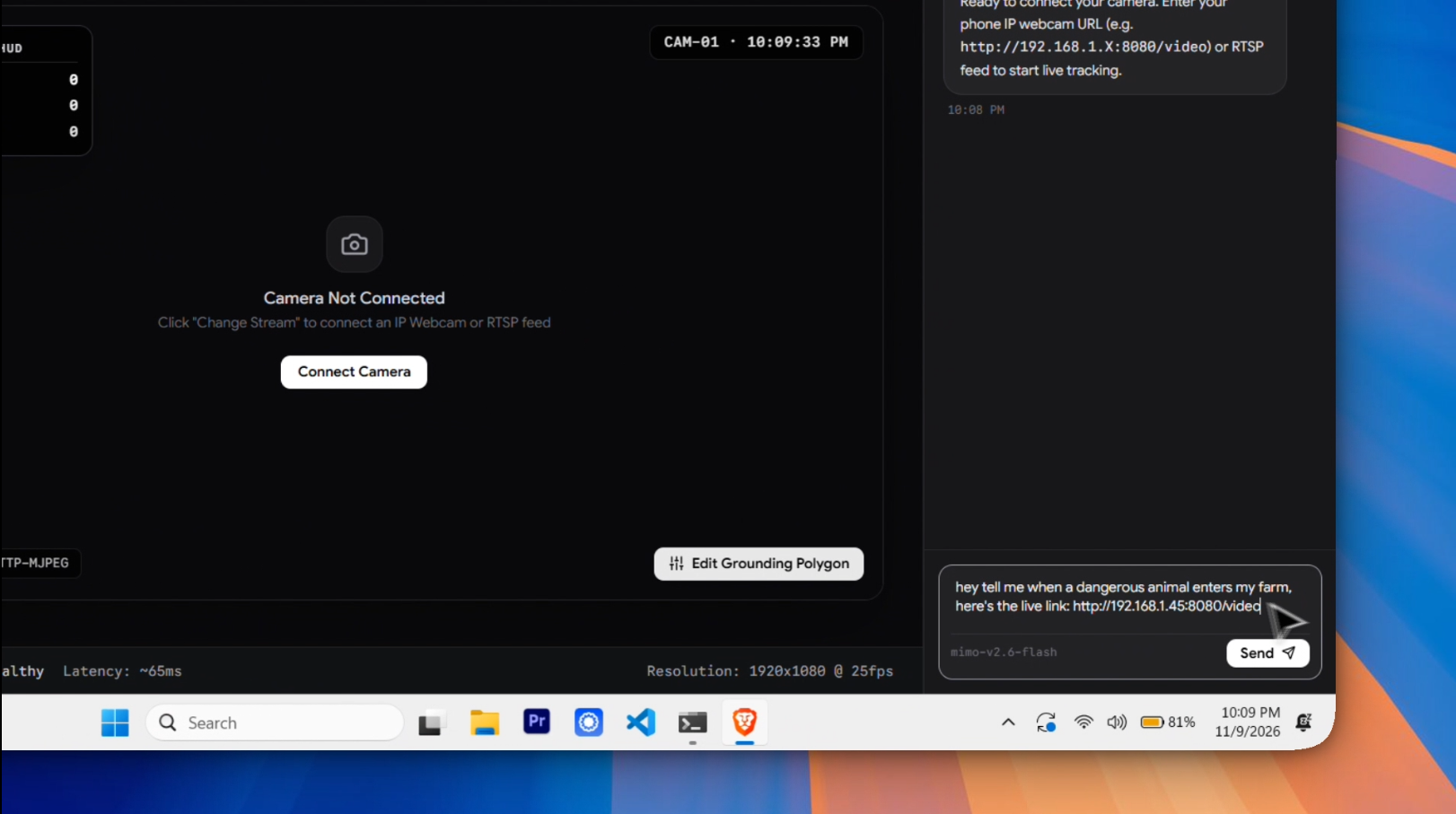
VisionOps Studio: Autonomous multi-model reasoning, interactive polygon editor, live CCTV telemetry HUD, and WhatsApp alert dispatcher.
Overview
Give VisionOps a video file, webcam, or RTSP security camera stream, describe what you want in plain English, and let the agent configure, visually ground, verify, and monitor the scene in real time.
Your hardware is the vision computer. Detection (YOLOv8 / YOLO11), multi-object association (ByteTrack / BoT-SORT), spatial geometry (Polygon Zones & Tripwire Lines), video decoding, and alerting run locally on your machine. No mandatory enterprise SaaS contracts or closed-source platform locks.
VisionOps is free, open-source software. Language model inference uses standard OpenAI-compatible or Anthropic-compatible endpoints (Gemini, Claude, DeepSeek, local vLLM/Ollama). Model keys and video frames stay on your device unless sent to your chosen LLM/VLM for initial spatial scene grounding.
What's New in v0.2
- Live CCTV & IP Webcam Studio: Connect any phone IP camera (
http://<ip>:8080/video) or security camera RTSP feed. Features zero-lag thread buffering (CAP_PROP_BUFFERSIZE=1), live in-video HUD overlays, and real-time telemetry streaming (FPS, footfall, current inside, active tracks). - Instant VLM Spatial Grounding: When a video or stream connects, the vision agent snapshots the scene and automatically identifies perspective, key physical boundaries, and objects using multimodal VLM intelligence.
- Interactive Visual Geometry Editor: Move vertices, reshape polygons, or set directional tripwires directly on the canvas with real-time audit diff logging before executing.
- WhatsApp Alert Dispatcher (Baileys Multi-Device): Real-time CCTV intrusion and breach notifications sent directly to your WhatsApp with snapshot pictures attached — no WhatsApp Business API fees or approvals needed. Built on
@whiskeysockets/baileyswith in-app QR code pairing. - Google Flow-Inspired Minimalist Studio: Clean monochrome zinc & obsidian interface, collapsible navigation, separate tabs for offline Workspaces, Live Camera Feeds, Models/Characters, and Notification Alerts.
See It in Action
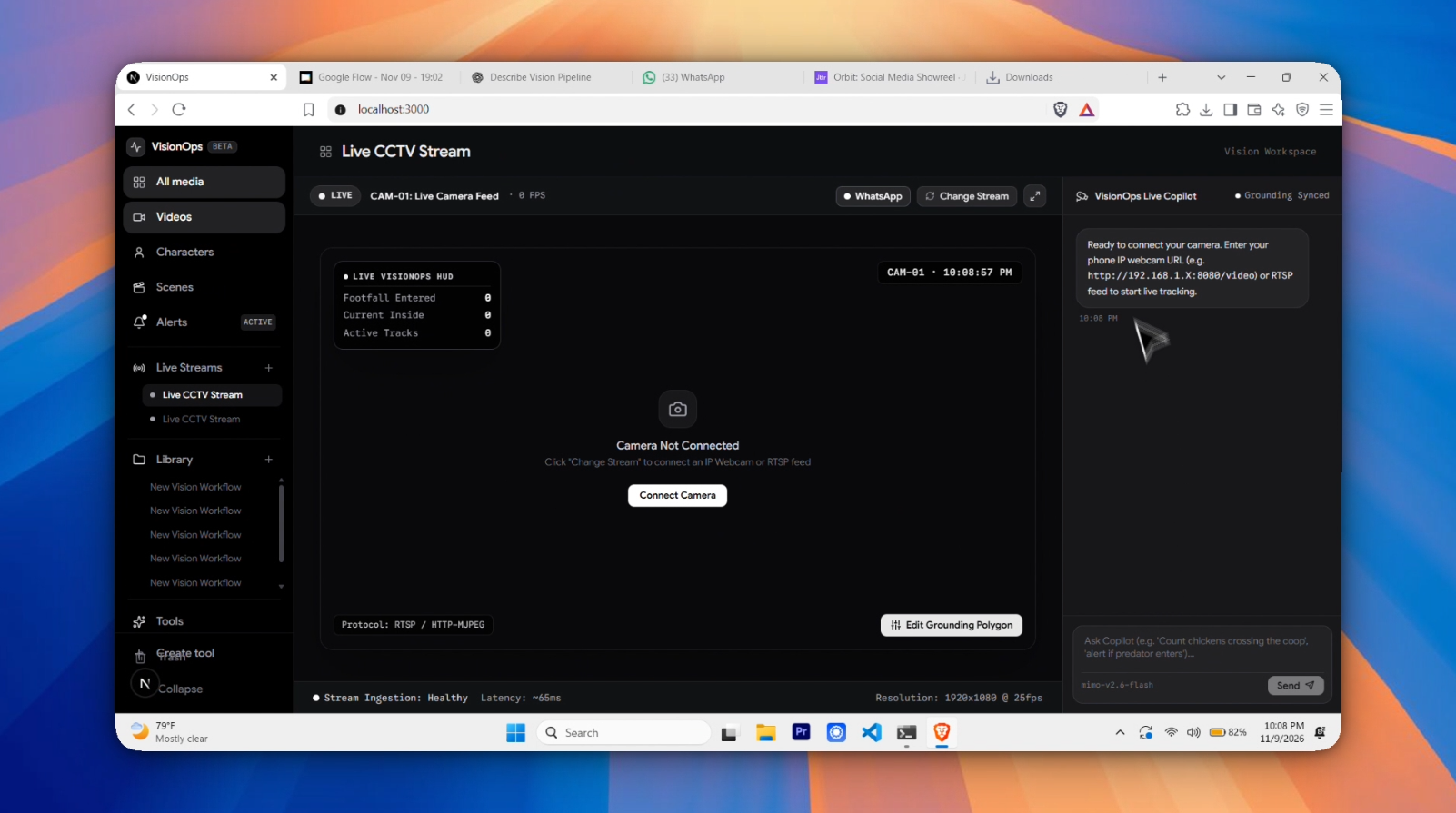
Live CCTV stream monitoring with active in-video HUD telemetry (Footfall, Occupancy, Tracks, FPS) and right-side Copilot drawer.
Features & Capabilities
Try a Prompt
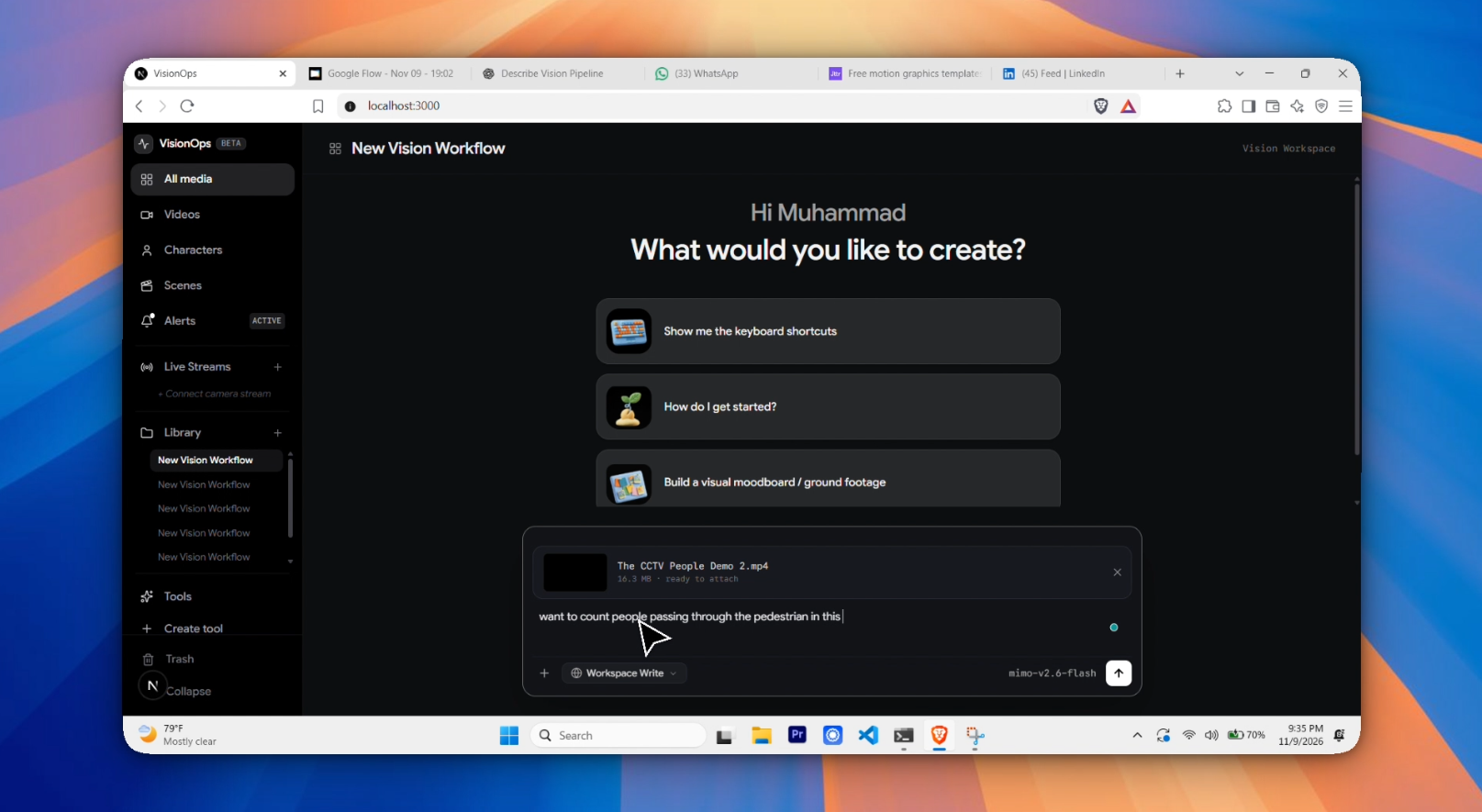
- "Count how many people enter and exit through the front doorway."
- "Track clear plastic bottles on the conveyor belt and alert me if throughput drops below 10/min."
- "Monitor the chicken enclosure perimeter and alert my WhatsApp if a predator or dog enters the zone."
- "Calculate the average dwell time of customers waiting in the checkout queue."
The vision agent decomposes requests, maps user concepts to detector classes, checks spatial orientation, and presents verified execution plans before running inference.
What Your Vision Agent Can Do
| Capability | In VisionOps |
|---|---|
| Natural Language to CV | Conversational planner transforms plain English objectives into deterministic, structured workflow specs (spec.json). |
| Multimodal Scene Grounding | VLM inspects sample frames to understand camera angles, identify objects, and propose normalized polygon zones or crossing lines. |
| Interactive Geometry Editor | Visually fine-tune, drag, or redraw polygon vertices and tripwire lines directly on the video canvas with audit diff history. |
| Live Stream Ingestion | Connect phone IP webcams (HTTP-MJPEG), security cameras (RTSP), USB webcams, or pre-recorded MP4/AVI videos. |
| Zero-Lag CCTV Engine | Background threaded frame grabber with single-frame FIFO buffer prevents network latency buildup. |
| In-Video Telemetry HUD | Dynamic in-stream HUD cards render live FPS, cumulative footfall, current occupants, and active track counts directly into the frame. |
| Instant WhatsApp Alerts | Dispatches high-priority security notifications with attached snapshot crops directly to your WhatsApp chat or security group. |
| Component Registry | Searchable verified models: YOLOv8/YOLO11 detectors, ByteTrack & BoT-SORT trackers, Supervision spatial annotators. |
Interactive Geometry & Spatial Grounding
Before running automated tracking, VisionOps lets you inspect, confirm, or reshape the proposed spatial zones right on your video:
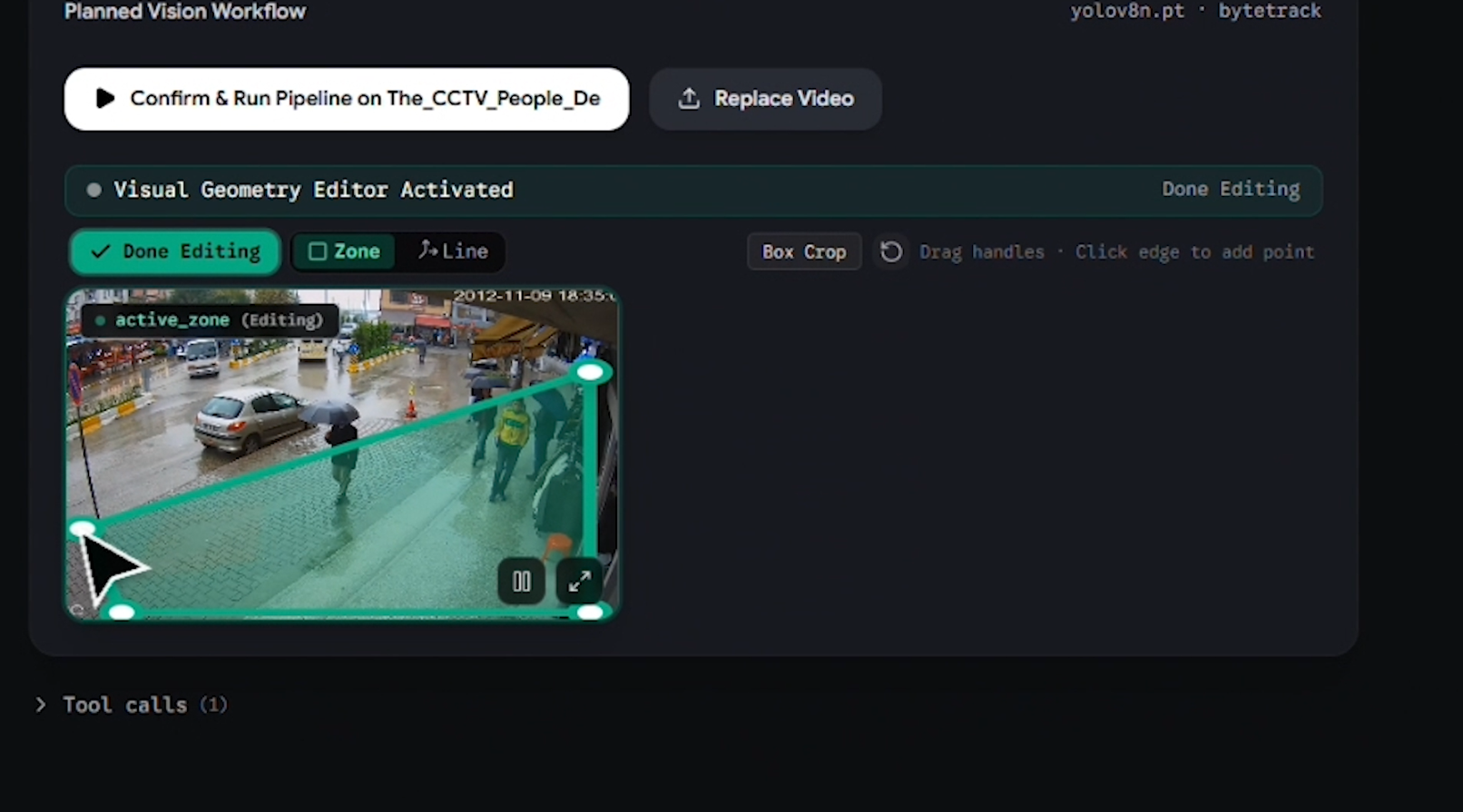
Interactive Geometry Editor: Drag vertices, define tripwire lines, and set entry/exit direction triggers with complete audit logging.
Automated Workflow Execution & Metrics
When you approve a workflow, the engine executes deterministic tracking and renders verified bounding boxes, persistent IDs, and aggregate operational metrics:
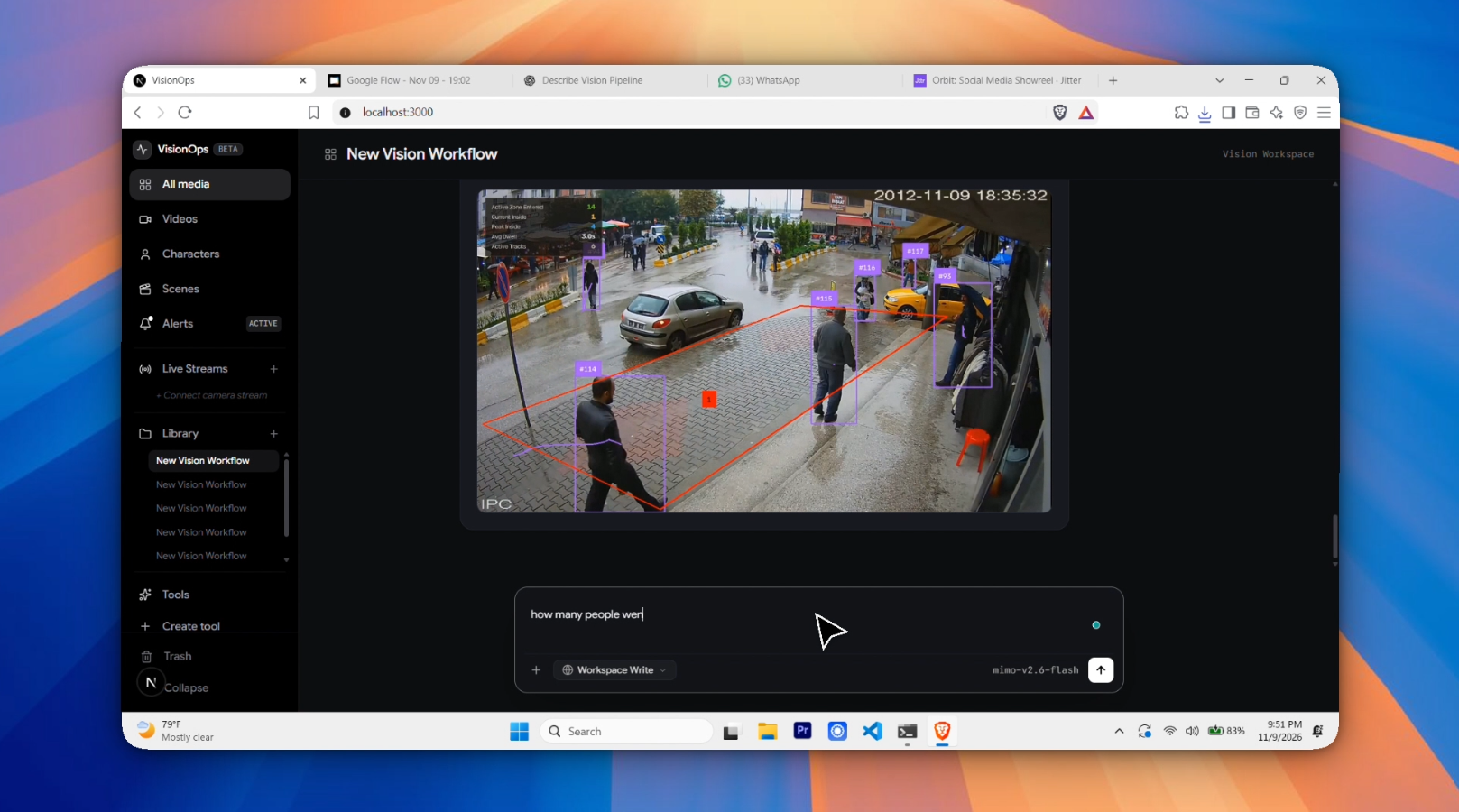
Processed video preview with live track histories, directional crossing counts, and summary statistics.
WhatsApp Alert Dispatcher (Baileys)
VisionOps includes a local Baileys microservice running on the WhatsApp Web Multi-Device protocol:

In-App WhatsApp Pairing: Scan the QR code once with your phone to link your personal WhatsApp account in seconds.
- Scan & Go: Open the Alerts tab in VisionOps, scan the pairing QR code with your phone (Settings → Linked Devices → Link a Device), and you're paired in seconds.
- Message Yourself: Alerts can be sent directly to your own personal "You" chat — no second SIM or phone required.
- Custom Groups & Numbers: Route breach alerts to a family WhatsApp group or security team JID.
- Snapshot Proof: Dispatches both rich text details (timestamp, camera name, object counts) and the exact high-res video frame of the intrusion.
- Anti-Spam Throttling: Built-in 45-second debounce window prevents notification flooding.
- 1-Click Disconnect: Log out and clear credentials from local storage at any time with a single click.
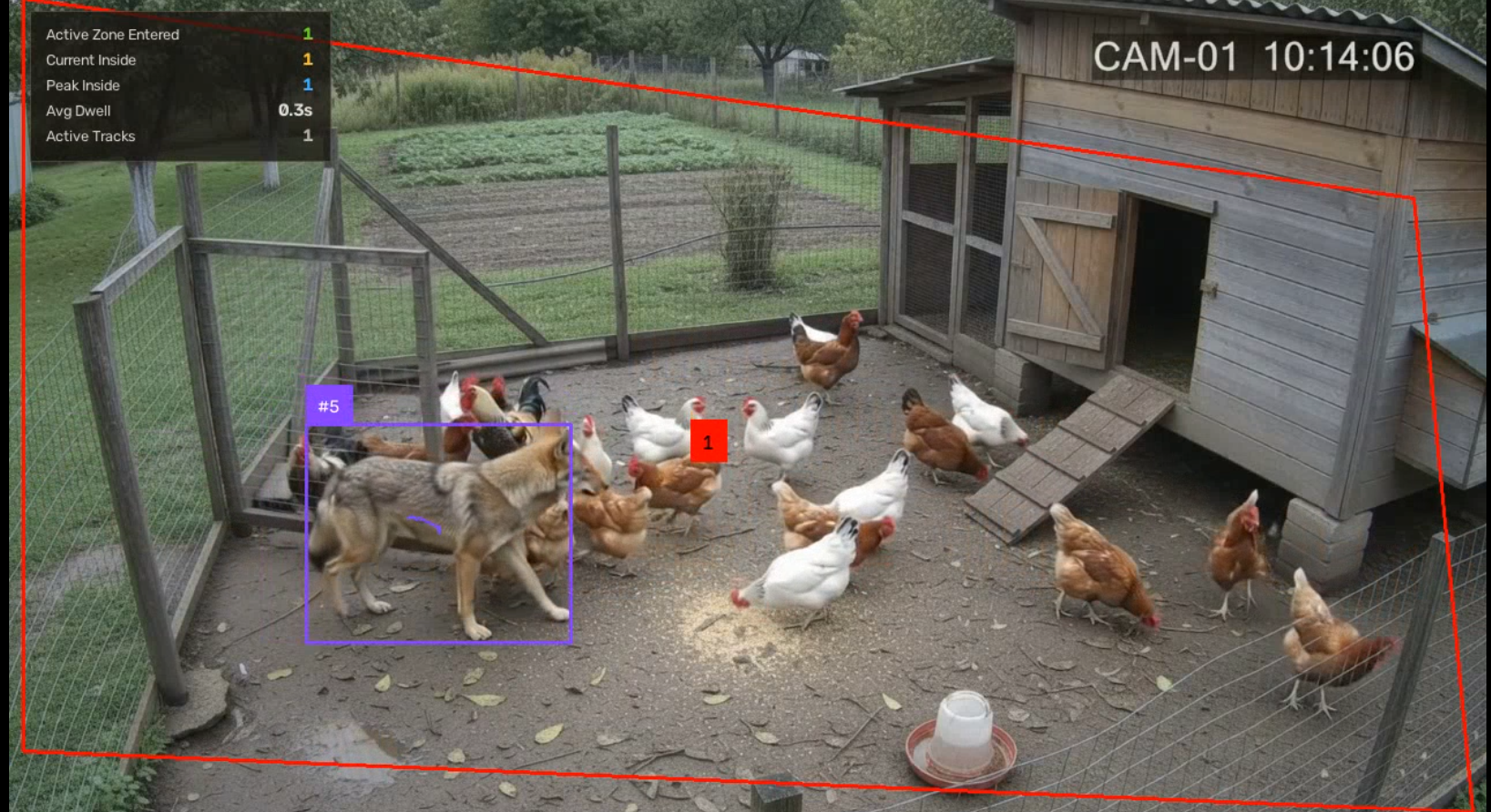
Real-Time Intrusion Alert: Exact snapshot frame captured and transmitted directly to WhatsApp when a zone boundary is breached.
How It Works
flowchart TD
    User["User Prompt / CCTV Stream"] --> Agent["ReAct Vision Agent (Antigravity SDK)"]
    Agent --> VLM["VLM Scene Grounder (Perspective & Spatial Zones)"]
    VLM --> Editor["Interactive Canvas Geometry Editor"]
    Editor --> Engine["Vision Runtime Engine (YOLO + ByteTrack)"]
    Engine --> HUD["In-Video Telemetry HUD & Live MJPEG Stream"]
    Engine -->|"Breach Triggered"| Alert["FastAPI Alert Dispatcher"]
    Alert --> Baileys["Baileys WhatsApp Bridge (Local Node.js)"]
    Baileys --> Phone["Your WhatsApp Phone / Security Group 📱"]
What is Local vs. Cloud?
| Runs Locally on Your Machine | Uses Your Chosen API / Network |
|---|---|
| YOLOv8 / YOLO11 object detection & inference | Language model reasoning (OpenAI, Anthropic, Gemini, or local Ollama) |
| ByteTrack multi-object persistent tracking | Initial VLM scene perspective grounding |
| Spatial polygon geometry & line crossing logic | WhatsApp Web socket communication |
| OpenCV video decoding & MJPEG streaming | Remote RTSP / IP camera network feed |
| Baileys WhatsApp credential storage & bridge | Optional public webhooks |
Get Started
[!WARNING]
VisionOps v0.2 Beta: Active development release. Please report edge cases, model questions, or stream connection issues on GitHub Issues!
Prerequisites
- Python: 3.10+
- Node.js: 18.0+
- GPU (Optional): NVIDIA GPU with CUDA support for accelerated inference (CPU fallback supported).
Step 1: Clone the Repository
git clone https://github.com/MuhammadMustafa18/VisionHarness.git
cd VisionHarness
Step 2: Set Up Python Backend
# Create and activate virtual environment
python -m venv venv

# Windows:
venv\Scripts\activate
# Linux/macOS:
source venv/bin/activate

# Install Python requirements
pip install -r requirements.txt
Step 3: Configure Environment Variables
Copy .env.example to .env and add your model provider keys:
cp .env.example .env
ANTHROPIC_BASE_URL=https://generativelanguage.googleapis.com/v1beta/openai
ANTHROPIC_AUTH_TOKEN=your_gemini_or_openai_api_key_here
ANTHROPIC_MODEL=mimo-v2.6-flash
Step 4: Install WhatsApp Bridge & Frontend Dependencies
# Install Baileys WhatsApp Bridge
cd services/whatsapp-bridge
npm install
cd ../..

# Install Web Frontend
cd web
npm install
cd ..
Running the Application
Start the three companion services (or run each in a dedicated terminal):
# Terminal 1: FastAPI Vision Engine & API
python -m uvicorn visionharness.server:app --port 8000

# Terminal 2: WhatsApp Baileys Alert Bridge
node services/whatsapp-bridge/server.js

# Terminal 3: Next.js Studio Frontend
cd web && npm run dev
Open your browser at http://localhost:3000.
Connecting a Camera
Option 1: Phone as Camera (Recommended for Quick Demo)
- Install IP Webcam (Android) or IP Camera Lite (iOS) on your phone.
- Connect your phone and PC to the same Wi-Fi network.
- Start the server on the app. It will display a local address (e.g.,
http://192.168.1.45:8080). - In VisionOps, click Videos or Live Streams in the sidebar, paste:
http://192.168.1.45:8080/video - Click Connect Camera — the scene is grounded instantly and live telemetry begins!
Option 2: Physical CCTV Camera (RTSP)
Enter the RTSP stream URL of your security camera:
rtsp://admin:[email protected]:554/stream1
Option 3: Virtual CCTV (Local Video File)
Paste any local video path to simulate a surveillance feed:
output/demo_vlm_hud_video.mp4
Comparison
| Feature / Metric | VisionOps (VisionHarness) | Traditional Enterprise CCTV | Cloud Video AI SaaS |
|---|---|---|---|
| Pricing | $0 / Free & Open Source | $500–$5,000+ per camera license | $0.10–$0.50 per stream minute |
| Setup Time | < 3 minutes | Weeks of NVR / proprietary setup | Cloud ingestion setup & bandwidth costs |
| Interaction | Natural Language Copilot | Hardcoded rigid rule menus | Complex JSON API configurations |
| Mobile Alerts | Direct WhatsApp + Snapshot | SMS (paid) or Proprietary App | Email / Webhook only |
| Camera Support | RTSP, Phone IP Webcam, USB, MP4 | Vendor-locked IP cameras | Cloud-compatible streams only |
| Data Privacy | Local execution on your hardware | Local NVR hardware | Stream leaves premises to third-party cloud |
Project Structure
VisionHarness/
├── visionharness/               # Core Python Engine
│   ├── agent/                   # ReAct Agent loop, tools, and VLM grounding
│   ├── runtime/                 # Live camera worker, zero-lag grabber & YOLO engine
│   ├── core/                    # Session stores, schemas, and specs
│   └── server.py                # FastAPI endpoints (SSE streams, sessions, telemetry)
├── services/
│   └── whatsapp-bridge/         # Baileys WhatsApp microservice (Node.js)
├── web/                         # Next.js Studio Frontend
│   ├── components/              # Interactive GeometryEditor, chat drawers, telemetry
│   └── pages/                   # Flow-inspired minimalist Studio canvas
├── images/                      # Documentation screenshots, assets & sample test images
├── uploads/                     # Uploaded user video footage
└── output/                      # Rendered video outputs & alert snapshot crops
Build from Source & Verification
To verify frontend TypeScript types and Turbopack builds:
cd web
npm run build
To run test suites:
pytest tests/
License & Credits
VisionOps (VisionHarness) is open-source software licensed under the MIT License.
Built with:
- Ultralytics YOLO — Object detection & segmentation.
- Supervision — Spatial analytics, polygon zones, and annotators.
- Baileys — WhatsApp Web Multi-Device protocol engine.
- Next.js & Tailwind CSS — Studio frontend.
- FastAPI & OpenCV — Real-time backend streaming and inference.
Author & Contact
Created by Muhammad Mustafa. For inquiries, contributions, and discussions:
- GitHub: @MuhammadMustafa18
- Repository: https://github.com/MuhammadMustafa18/VisionHarness