
MrBaoboer/PayDance
MrBaoboer/PayDance has 87 GitHub stars and 18 forks. GitHot measured 0 stars in 24 hours. Last checked 2026-11-18 23:53 UTC. Last push 2026-11-16.
Measured star growth
- in 24h
- 0
- in 7 days
- Collecting history
- in 15 days
- Collecting history
- in 1 month
- Collecting history
Net star changes over overlapping periods, not daily totals. Missing measurements are left blank. Stars measure attention, not software quality.
About
薪跳 PayDance:轻量优雅的「实时工资」小软件,根据用户的薪资和上下班时间动态计算每一秒的收入增长,让劳动时间价值变得可视化
Productivitydocs/README_EN.md
Original
PayDance 薪跳
Put "the money you are earning today" on your desktop, and watch it grow, second by second
Live Preview · Download · 中文


What It Is
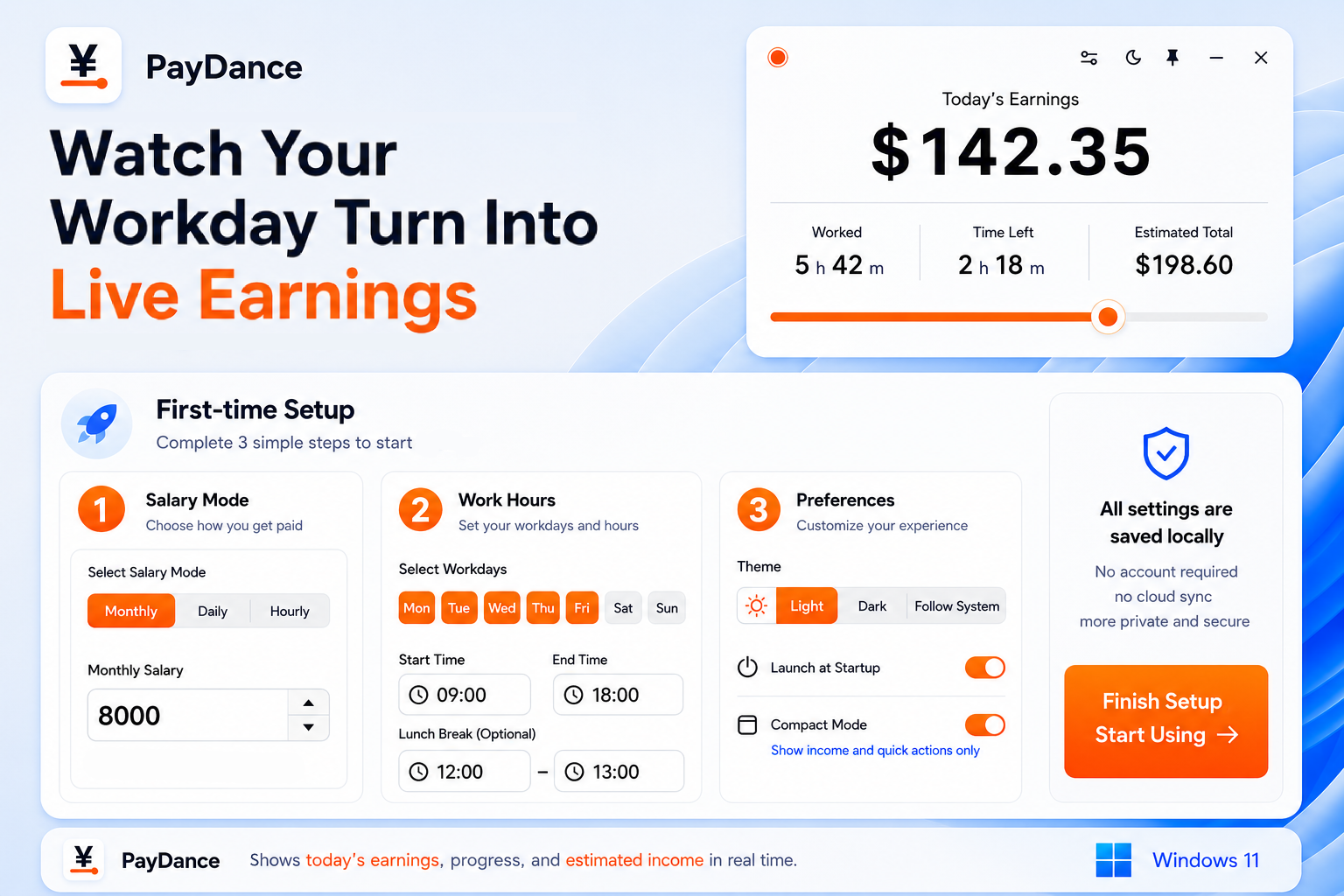
PayDance (薪跳) is a desktop real-time salary dashboard. Set your salary and working hours, and it shows your income growing second by second on your desktop, making the value of your working time visible.
The main window shows today's earnings, work progress, time remaining, and daily estimate. The mini floating window keeps only the amount, ready for a quick glance from the corner of your screen.
Features
- Live earnings: Today's amount updates continuously and is shown to two decimal places.
- Common pay schedules: Supports monthly, daily, and hourly pay, configurable workdays, lunch-break exclusion, and overnight shifts.
- Mini window: Shows only the amount, stays draggable and always on top, and supports 10%–100% opacity. Double-click it to restore the main window.
- Local-first: No account required; your salary settings stay on your own machine.
- Bilingual UI: The interface, tray menu, and validation messages support Simplified Chinese and English.
- Windows integration: Includes light and dark themes, a system tray, auto-start, and background updates.
Get It
| Link | Notes | |
|---|---|---|
| 🌐 | Live Preview | Browser-based, all core features available, nothing to install |
| ⬇️ | Windows Desktop | Portable EXE with tray, always-on-top, mini float, and auto-start |
Each release includes a SHA256 checksum file so you can verify the download.
Tech Stack
| Layer | Technologies |
|---|---|
| Desktop shell | Tauri 2 + Rust |
| Frontend | Vue 3 + TypeScript + Vite |
| UI | Windows 11 styling, CSS Container Queries, Lucide Icons |
| Storage | Local app data directory (Tauri Store) / browser localStorage |
| Testing | Vitest + Rust unit tests + vue-tsc + cargo clippy |
The Web Preview and desktop app share the same core salary logic and frontend UI.
Development
Install dependencies
npm install
Desktop app
npm run tauri dev
Web Preview
npm run dev:web
Build Windows portable EXE
npm run build:exe
Build web preview
npm run build:web
Reset local config to open the first-run wizard again
Remove-Item "$env:APPDATA\com.masterbao.paydance\salary-settings.json"
For commit conventions, verification commands, and contribution workflow, see the Contributing Guide.
Privacy
PayDance requires no login, uploads no data, and includes no telemetry. All configuration is saved locally via Tauri Store in salary-settings.json, containing only salary parameters, work hours, and UI preferences.
Documentation
License
Designed and developed by Mr.Baoboer. Code licensed under AGPL-3.0-only.
For full license information and trademark policy, see the Legal Guide.