
Mlilion/Codata
Mlilion/Codata has 31 GitHub stars and 9 forks. GitHot measured 0 stars in 24 hours. Last checked 2026-11-15 01:48 UTC. Last push 2026-11-12.
Measured star growth
- in 24h
- 0
- in 7 days
- Collecting history
- in 15 days
- Collecting history
- in 1 month
- Collecting history
Net star changes over overlapping periods, not daily totals. Missing measurements are left blank. Stars measure attention, not software quality.
About
data agent 从问数到数据开发治理,自然语言问数、SQL 查询、图表看板与多 Agent 专家团分析,支持 MCP 数据源、自带模型和本地 Ollama。
AIREADME.en.md
OriginalCodata

Local-first Data Agent for natural-language analytics, SQL, charts, dashboards, and expert-team workflows
⬇ Download Codata (Windows / macOS) | Online demo · Join via WeChat | Semantic Model Admin | 简体中文
Ask data questions. Inspect the SQL. Pin charts. Turn analysis into reusable work.
Try the online demo: scan with WeChat to join the group
QR code expired? Visit the Community section to add the maintainer and join.
Codata is an open-source, local-first desktop Data Agent workspace. It connects a local desktop app, a Next.js interface, and a FastAPI agent backend so analysts and business teams can ask questions in natural language, let the agent discover tables and metric definitions, run SQL, render result cards, create charts, and pin useful outputs into dashboards.
The product is designed around a practical analytics loop:
Ask a data question
  -> discover tables / metrics
  -> generate or reuse SQL
  -> execute against the connected data platform
  -> inspect results, SQL, and charts
  -> pin charts to dashboards or escalate to an expert team
Highlights
- Natural-language data analysis: ask questions such as "compare paid conversion by channel" or "find the biggest drop this week".
- Data-source aware agent flow: the Data Agent is prompted to inspect schemas, search registered metrics, avoid invented tables or columns, run SQL, and fix query errors.
- SQL result cards: query results render as structured artifacts with table, SQL, and chart-ready metadata.
- Metric caliber discipline: core business metrics should prefer registered indicator definitions; custom SQL caliber is made explicit when no verified metric exists.
- Dashboards: pin chart results into named dashboards, rename items, reorder layouts, and refresh pinned SQL-backed cards.
- Expert teams for deeper analysis: reusable multi-agent teams can split work across data discovery, SQL, attribution, visualization, and reporting specialists.
- Local-first desktop runtime: conversations, settings, dashboards, memory, artifacts, and workflow metadata are stored locally by default.
- Bring your own models: configure OpenAI-compatible providers, custom endpoints, direct provider adapters, or local Ollama models.
- Extensible tools and connectors: MCP, skills, plugins, file tools, report generation, and desktop integrations are available where configured.
Screenshots
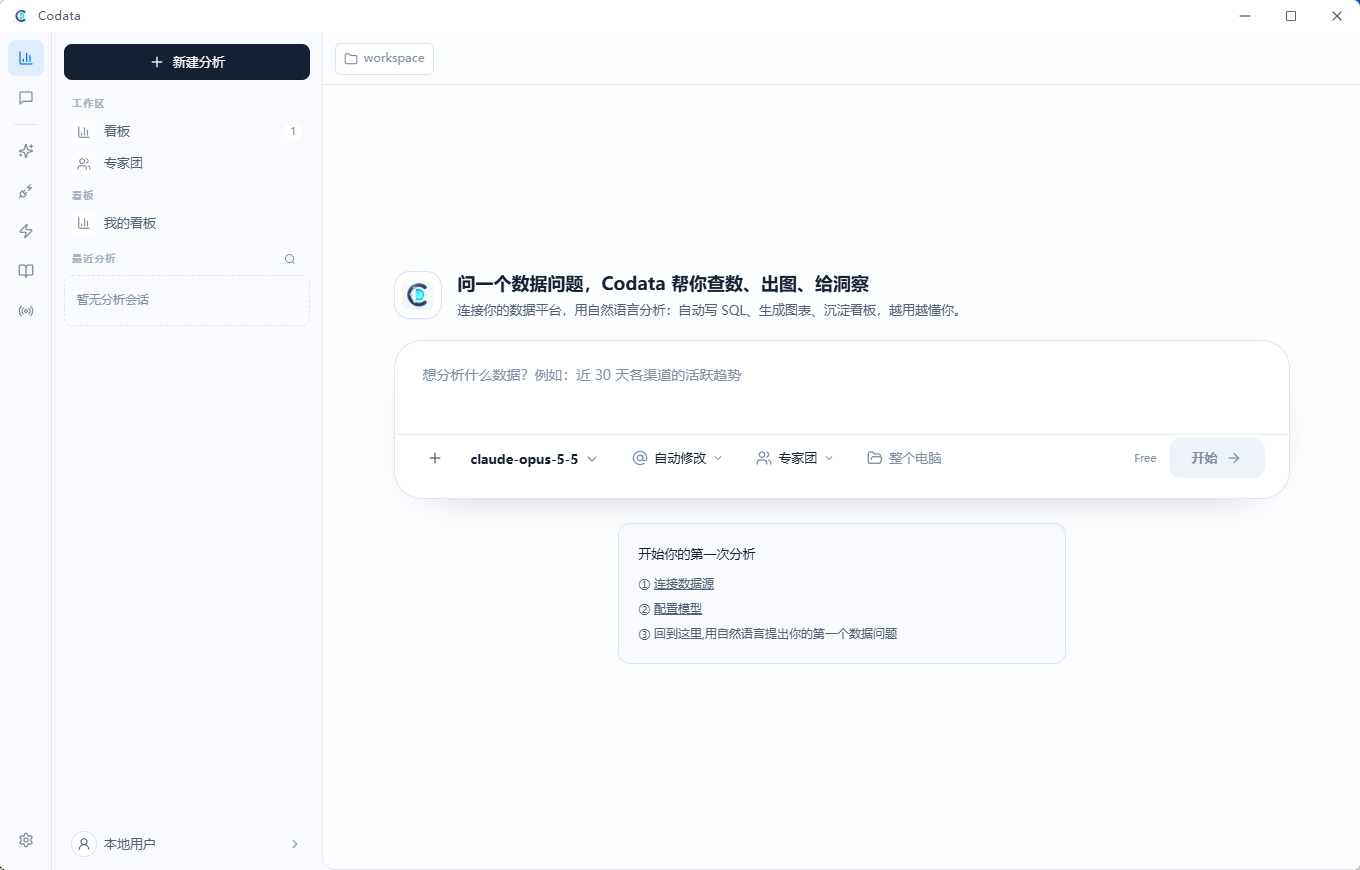
Workspace
Local-first desktop workspace: dashboards, expert teams, skills, knowledge base, and recent analyses on the left; ask a data question in the center.
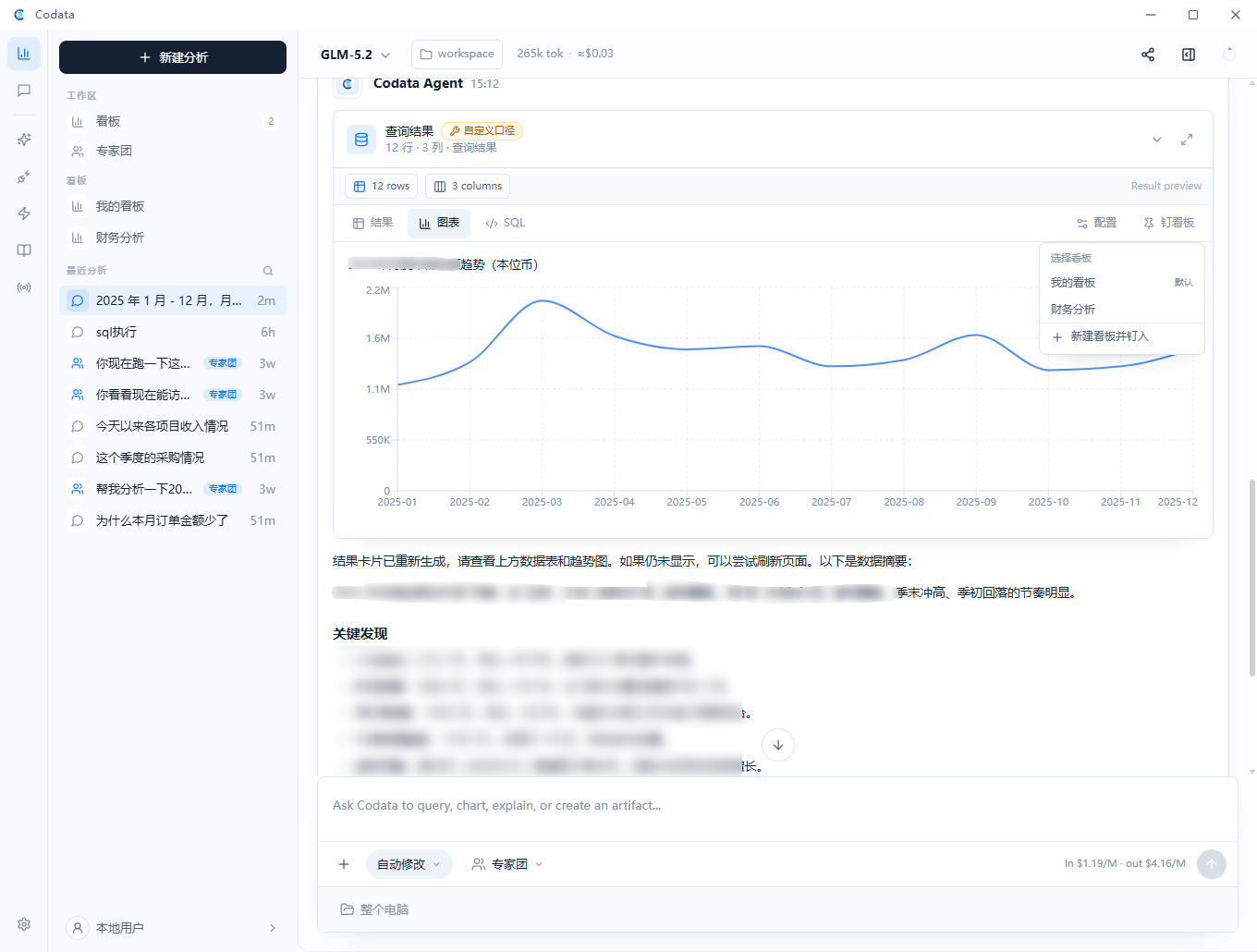
Natural-language analysis: results, charts, and SQL
One question returns a result card, chart, and inspectable SQL. Results carry a caliber badge and can be pinned to a dashboard.
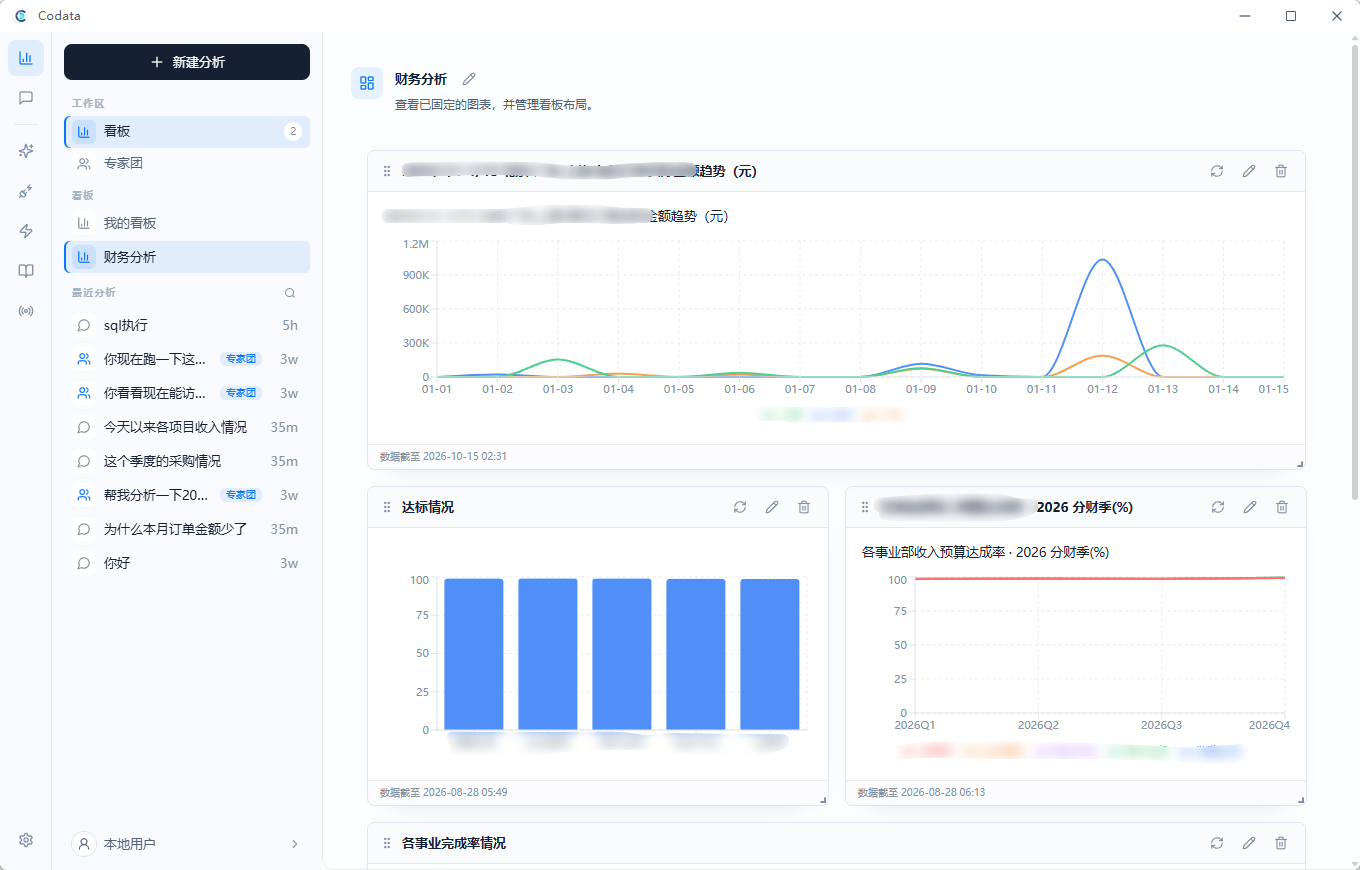
Dashboards
Pin useful charts into named dashboards, arrange the layout, and refresh them from the original SQL.
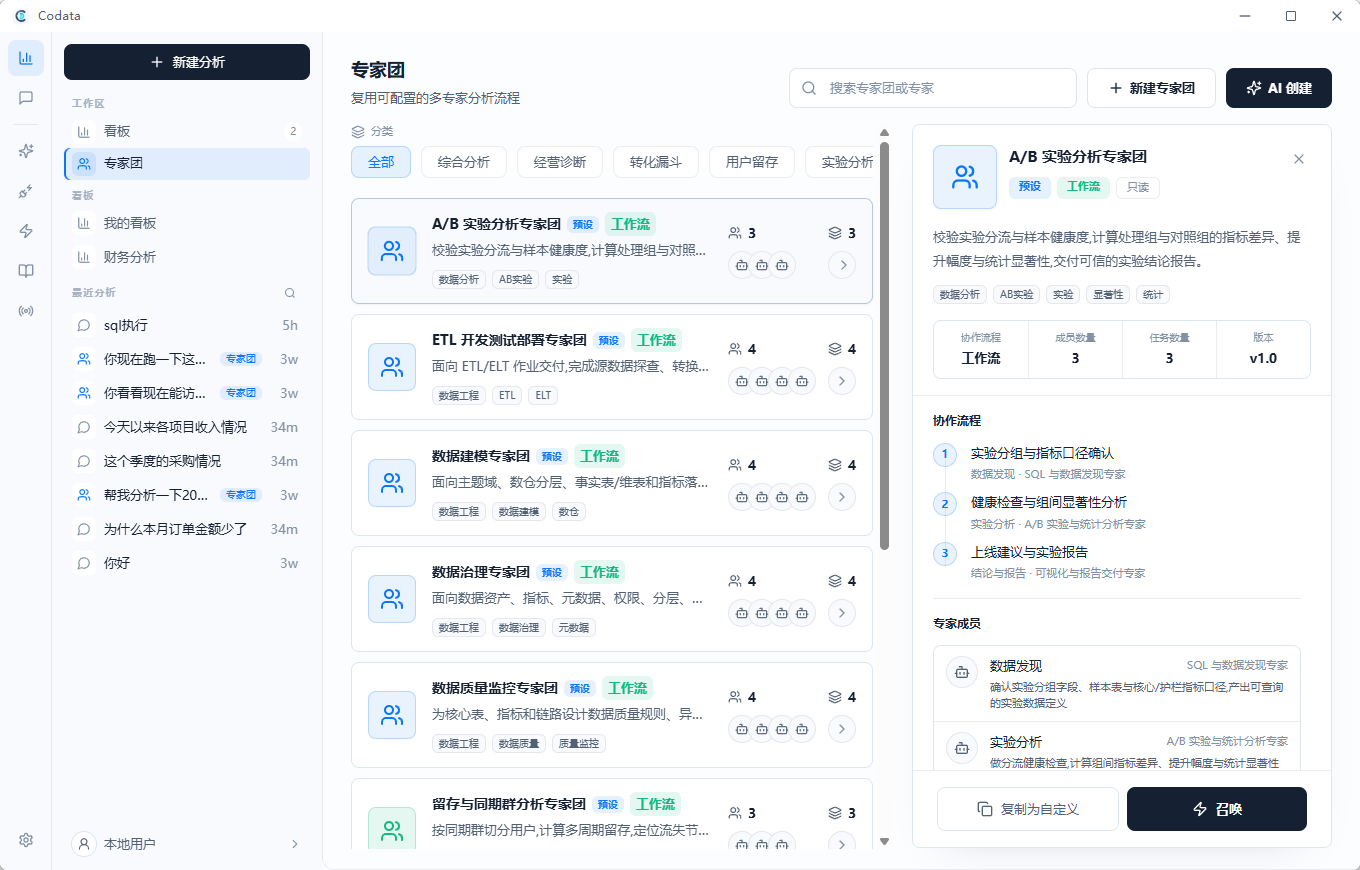
Expert teams
Reuse multi-expert workflows per analysis scenario and inspect members, tasks, dependencies, and execution order.
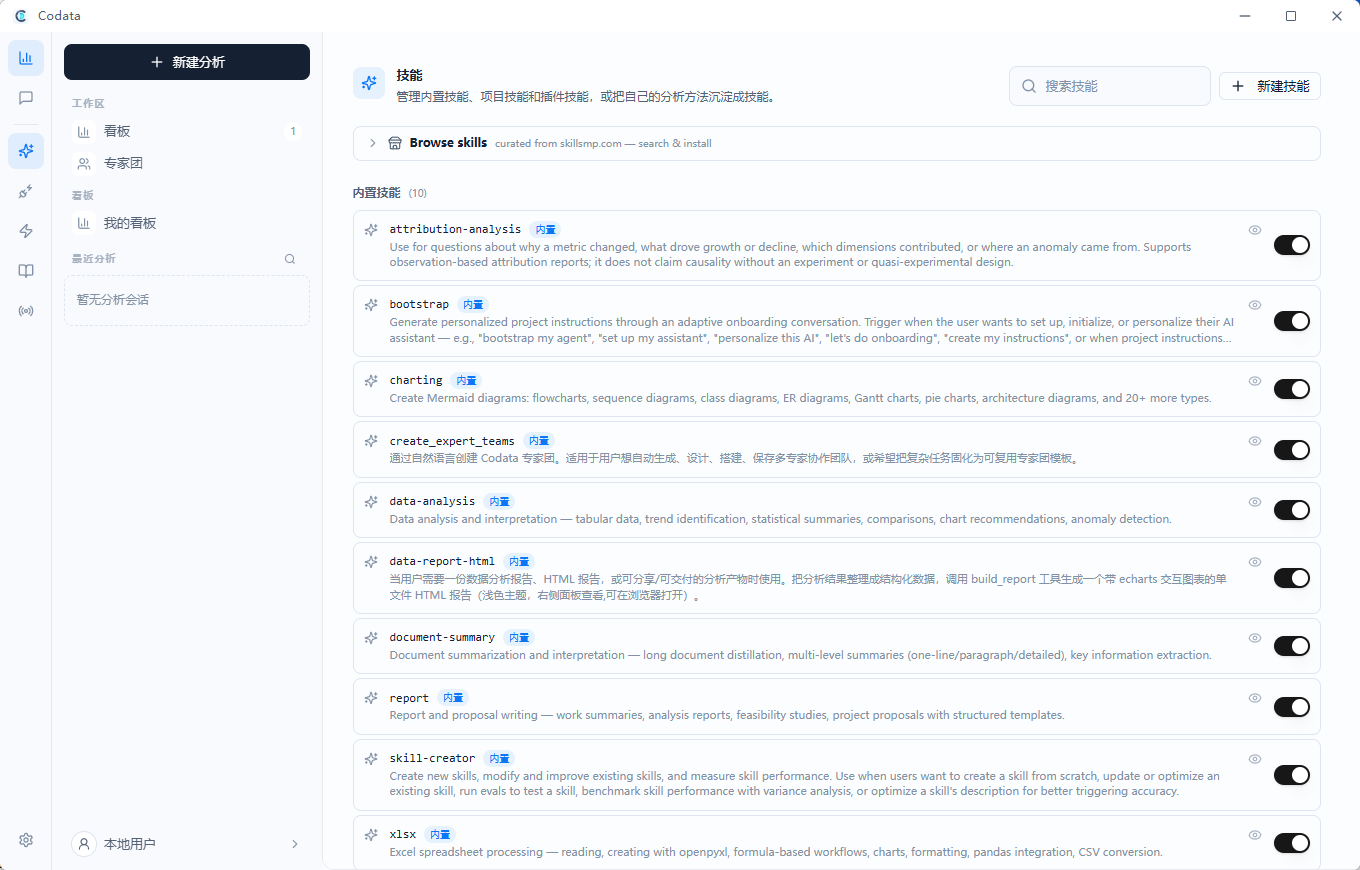
Skills
Built-in skills cover attribution analysis, charting, data reports, Excel handling, and more. Enable them individually, or capture your team's own analysis method as a new skill.
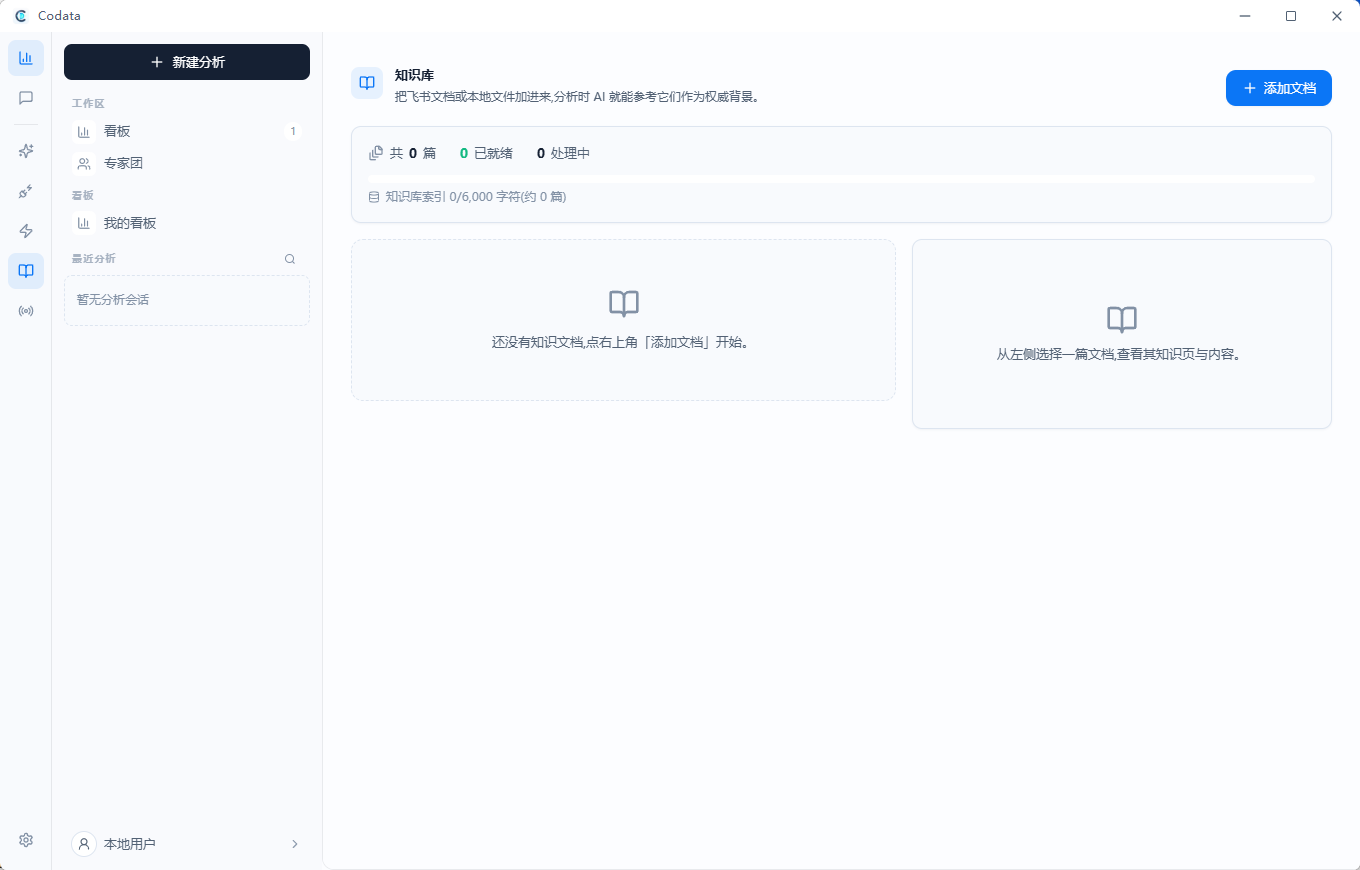
Knowledge base
Add documents and local files to the knowledge base so analyses can cite them as authoritative background.
Message channels
Connect Codata to Feishu, DingTalk, WeCom, and WeChat to use analysis directly from chat.
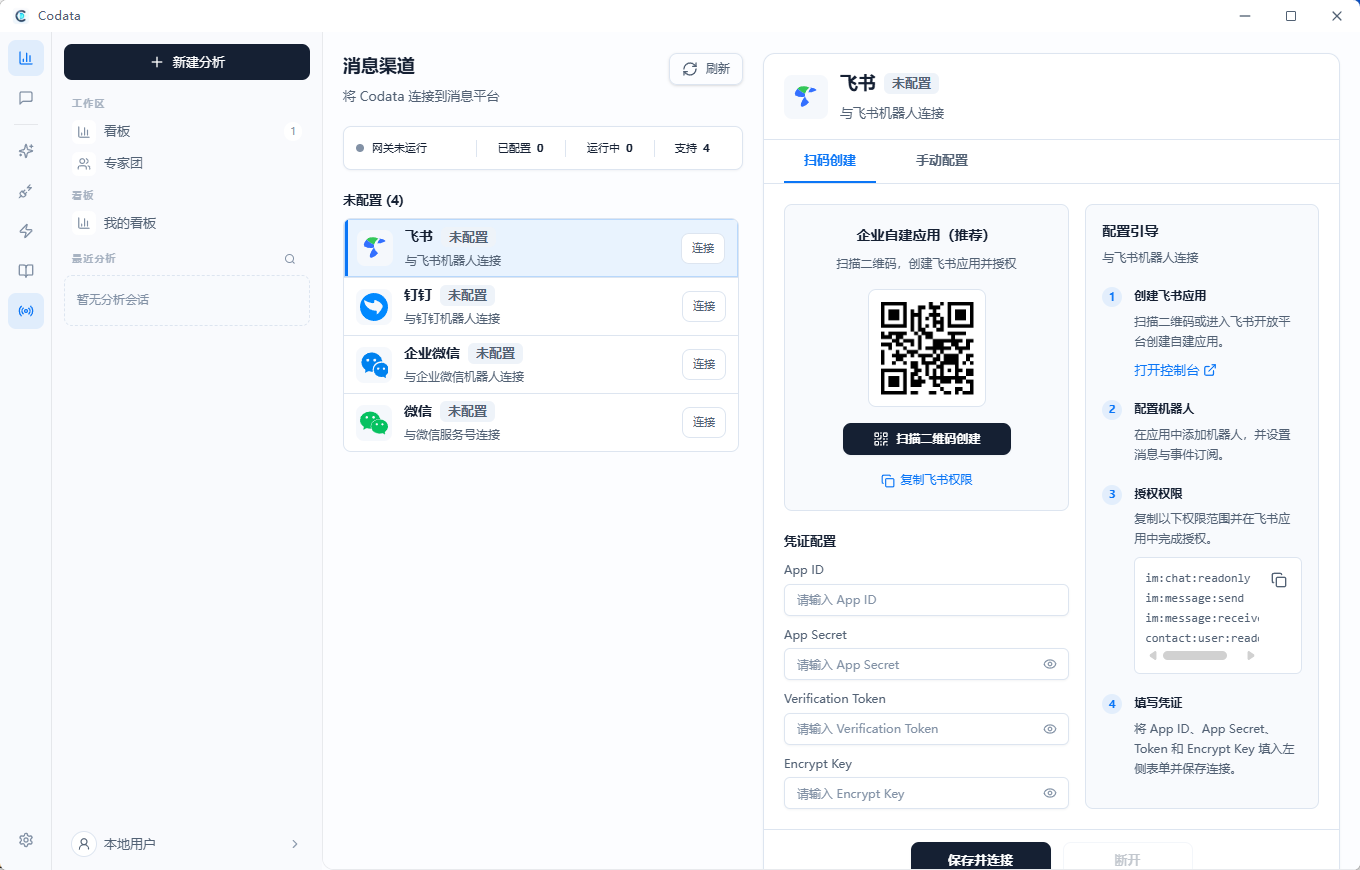
Business data and names in the screenshots have been blurred. The current release may differ slightly.
Table of Contents
Data Agent Workflow
Codata is focused on data work rather than generic chat. In Codata mode, the assistant is expected to:
- Understand the user's analytical intent.
- Discover available tables, fields, and metric definitions through the connected data platform.
- Prefer registered metric calculation rules for core business indicators.
- Write SQL only after schema and caliber are clear.
- Run the query through the data execution tool.
- Repair SQL when the data platform returns errors.
- Explain results with concrete numbers, caveats, and the SQL behind the answer.
- Produce charts, dashboards, or reports when the result should be reused.
Connect your own MCP data source; no service endpoints or organization-specific connectors are preconfigured. The agent discovers the source's available schema and query tools. Registered metrics are preferred when available, but a semantic model is not required. The built-in run_query wrapper and SQL-based dashboard refresh require a compatible execute_sql result protocol (the reference data-client adapter); other sources use their own MCP query tools and may not support automatic dashboard refresh. When no data source is connected, Codata asks you to connect one.
Core Capabilities
Natural-language querying
Users can describe the question in business language. Codata turns that request into a data workflow: schema inspection, metric lookup, SQL generation, execution, and explanation.
SQL and result inspection
SQL-backed outputs are not hidden behind prose. Result cards preserve the query result, SQL text, columns, rows, and chart metadata so users can inspect how the answer was produced.
Metric and caliber awareness
For core metrics such as DAU, GMV, conversion rate, retention, revenue, or cost, Codata is designed to look for registered indicator definitions before hand-writing SQL. If no registered metric exists, the answer should label the calculation as a custom caliber.
Charts and dashboards
Codata can render chart-ready data artifacts and pin useful results into dashboards. Dashboard items store a snapshot of the SQL result and can refresh through the connected data execution path when possible.
Analysis memory
Codata stores structured analysis memory locally so recurring topics, metric preferences, and user conventions can inform later data sessions.
Files and reports
The desktop runtime can read local files such as CSV, Excel, PDFs, documents, and workspace files. Data analysis can be turned into Markdown, HTML, office files, code artifacts, or dashboard panels depending on the selected workflow.
Dashboards and Artifacts
Codata separates daily analytical Q&A from reusable outputs:
- Inline result cards are useful for one-off exploration.
- Pinned dashboard charts are useful for repeat monitoring and comparison.
- Generated reports are useful when an analysis needs to be shared or preserved as a snapshot.
- Artifact panels make generated files, HTML, code, and previews visible alongside the conversation.
Expert Teams
Expert teams are Codata's orchestration layer for complex analysis. A team is a structured configuration with members, tasks, dependencies, context policies, tools, and a finalization rule.
For data work, an expert team can divide a complex request into roles such as:
- data discovery and schema inspection
- metric caliber verification
- SQL execution and correction
- attribution or anomaly analysis
- chart specification
- report writing and final delivery
Codata supports three execution modes:
| Mode | Best for | How it works |
|---|---|---|
sequential |
Linear analysis workflows | Runs tasks in order. |
workflow |
Fixed dependency graphs | Builds a DAG and runs dependency-ready tasks. |
hierarchical |
Open-ended investigations | A manager agent delegates work to specialists and synthesizes the final answer. |
Architecture
User
  -> Tauri desktop shell
  -> Next.js frontend
  -> FastAPI backend
  -> agent runtime, data tools, dashboards, expert teams, storage, providers, MCP
- Tauri desktop shell: native packaging, desktop permissions, updater integration, bundled resources, and platform-specific behavior.
- Next.js frontend: Codata workspace, chat, data result cards, dashboards, expert teams, artifacts, settings, plugins, and activity panels.
- FastAPI backend: agent loop, resumable streaming, MCP tool integration, SQL execution wrapper, dashboard refresh, expert-team orchestration, file parsing, SQLite persistence, provider routing, and scheduled jobs.
Companion Projects
- Semantic Model Admin: a companion semantic governance and admin platform for maintaining business domains, entities, semantic fields, semantic models, joins, metrics, dimensions, and the knowledge base, with trusted querying exposed through an MCP server. Once Codata connects to its MCP server, analyses can use the published semantic models and metric definitions directly.
Download & Docs
- Desktop download (Windows / macOS): https://github.com/Mlilion/Codata/releases/latest
- Latest release manifest (JSON with per-platform direct links, sizes, and SHA-256): https://github.com/Mlilion/Codata/releases/latest/download/downloads-latest.json
- Source and releases: https://github.com/Mlilion/Codata
The download page contains the following installers:
| Platform | Installer |
|---|---|
| Windows x64 | Codata_<version>_x64-setup.exe (NSIS installer) |
| macOS Apple Silicon | Codata_<version>_arm64.dmg |
| macOS Intel | Codata_<version>_x64.dmg |
Automatic updates are disabled in the default open-source build. Install new versions manually from GitHub Releases. Release builds target Windows x64 and macOS Apple Silicon / Intel; Linux is not release-validated. macOS release builds require Developer ID signing, Apple notarization, and stapled tickets; missing credentials or failed verification block publication. Windows installers remain unsigned and may trigger SmartScreen. See release signing setup.
Quick Start
Prerequisites
- Node.js 20 or newer.
- Python 3.12 or newer.
- Rust and Cargo for Tauri desktop builds.
- Platform-specific Tauri prerequisites for macOS, Windows, or Linux.
- A configured model provider, OpenAI-compatible endpoint, custom endpoint, or local Ollama model.
- A user-configured MCP data source for live database analysis.
Install dependencies
Windows PowerShell (Python 3.12, Node.js, and npm on PATH):
git clone https://github.com/Mlilion/Codata.git
Set-Location Codata
npm ci
npm --prefix frontend ci --legacy-peer-deps
npm --prefix desktop-tauri ci
py -3.12 -m venv backend\venv
.\backend\venv\Scripts\python.exe -m pip install -e "./backend[dev,build]"
macOS / Linux:
git clone https://github.com/Mlilion/Codata.git
cd Codata
npm ci
npm --prefix frontend ci --legacy-peer-deps
npm --prefix desktop-tauri ci
python3.12 -m venv backend/venv
./backend/venv/bin/python -m pip install -e "./backend[dev,build]"
Python development dependencies use version ranges; release packaging uses
backend/requirements.txt. For a release build, install that file into the build
environment and retain the resolved dependency inventory. Do not assume a
development install reproduces the release environment.
Run the development stack
npm run dev:all
The frontend development server uses port 3000. The backend development server uses port 8000. Desktop development starts the Tauri shell against the local frontend and backend stack.
Use dev:all for authenticated browser development; starting only the frontend
does not create the shared development session token. You can inspect the UI
without model credentials, but model calls require your own key or local model.
Live data analysis requires your own MCP connection; no demo database is bundled.
Development Commands
npm run dev:frontend
npm run dev:backend
npm run dev:desktop

npm run build:frontend
npm run build:backend
npm run sync:desktop-meta
npm run build:desktop
Before the first desktop development/build, run npm run prepare:desktop-runtime.
It downloads the pinned Node.js runtime, including its license. Desktop builds
also require the platform's Tauri system prerequisites, a working Rust toolchain,
and the backend build extra (PyInstaller) installed above. build:desktop builds
frontend/backend resources through Tauri's build hook. Local unsigned builds do
not need release tokens or signing keys.
Verification commands:
npm run verify:open-source-boundary
npm run audit:open-source-boundary:strict
npm run verify:frontend-assets
npm run preflight:ui
The desktop release build expects the exported frontend in frontend/out and the bundled backend in backend/dist/codata-backend. Run npm run sync:desktop-meta before desktop builds so Tauri metadata matches the root package version.
Repository Layout
desktop-tauri/    Tauri v2 desktop shell and Rust integration
frontend/         Next.js UI for Codata workspace, chat, dashboards, expert teams, settings, and artifacts
backend/          FastAPI backend, agent runtime, data tools, expert orchestration, storage, and providers
scripts/          Build, release, verification, signing, and version utilities
design-system/    Product design references and visual assets
Data Boundary
Model providers and MCP connections are user-configured. There is no default model/API proxy; optionally set CODATA_PROXY_URL to your own HTTP proxy. No enterprise SSO connector or SAP browser integration is bundled. Existing user settings outside this source tree are not erased by this change; review saved connectors before reusing an older installation.
Run npm run audit:open-source-boundary:strict before publishing. It checks the current source snapshot, including untracked files, without requiring Git metadata. It does not audit Git history, grant permission to publish employer-owned code, or replace a credentials/license review.
Codata stores conversations, dashboard state, generated artifacts, settings, memories, and workflow metadata locally by default. When users choose a cloud model or external connector, the relevant prompt context and payload are sent to that configured provider or connector.
For database work, Codata depends on the connected data platform and its permissions. Users are responsible for choosing provider routes, model access, data-source permissions, SQL safety rules, connector scopes, and deployment settings that fit their privacy and compliance requirements.
Local-first does not mean fully offline: cloud models, MCP tools, channels, catalogs/downloads, and some CDN-backed previews can use the network. See Security Policy for the data boundary and Third-party notices for redistribution requirements. PPTX files can be downloaded, but visual PPTX preview is not included.
Community
Join the Codata user group for online demo access details, questions, analytics workflows, and feature suggestions. The group is hosted on WeChat and is primarily Chinese-speaking.
|
Codata Agent group Scan with WeChat to join |

Maintainer WeChat Add with the note "Codata" |
Group invite QR codes expire (usually after 7 days). If the left code no longer works, scan the maintainer's code on the right and add a note saying "Codata"; you will be invited to the group. You can also report issues via GitHub Issues.
Development Notes
See Contributing for the issue, review, and contribution process. Before merging, run the verification commands that match the area you changed, and pay special attention to data-source permissions, model-provider routing, SQL safety, and what context may leave the local machine. See Security Policy for security handling expectations.