
Mintimate/oh-my-rime
Mintimate/oh-my-rime has 5,027 GitHub stars and 318 forks. GitHot measured 0 stars in 24 hours and +11 in 7 days. Last checked 2026-11-12 14:44 UTC. Last push 2026-11-08.
The Simple Config Template Of Rime By Mintimate.
Measured star growth
- in 24h
- 0
- in 7 days
- +11
- in 15 days
- Update delayed
- in 1 month
- Update delayed
Net star changes over overlapping periods, not daily totals. Missing measurements are left blank. Stars measure attention, not software quality.
README_en.md
Original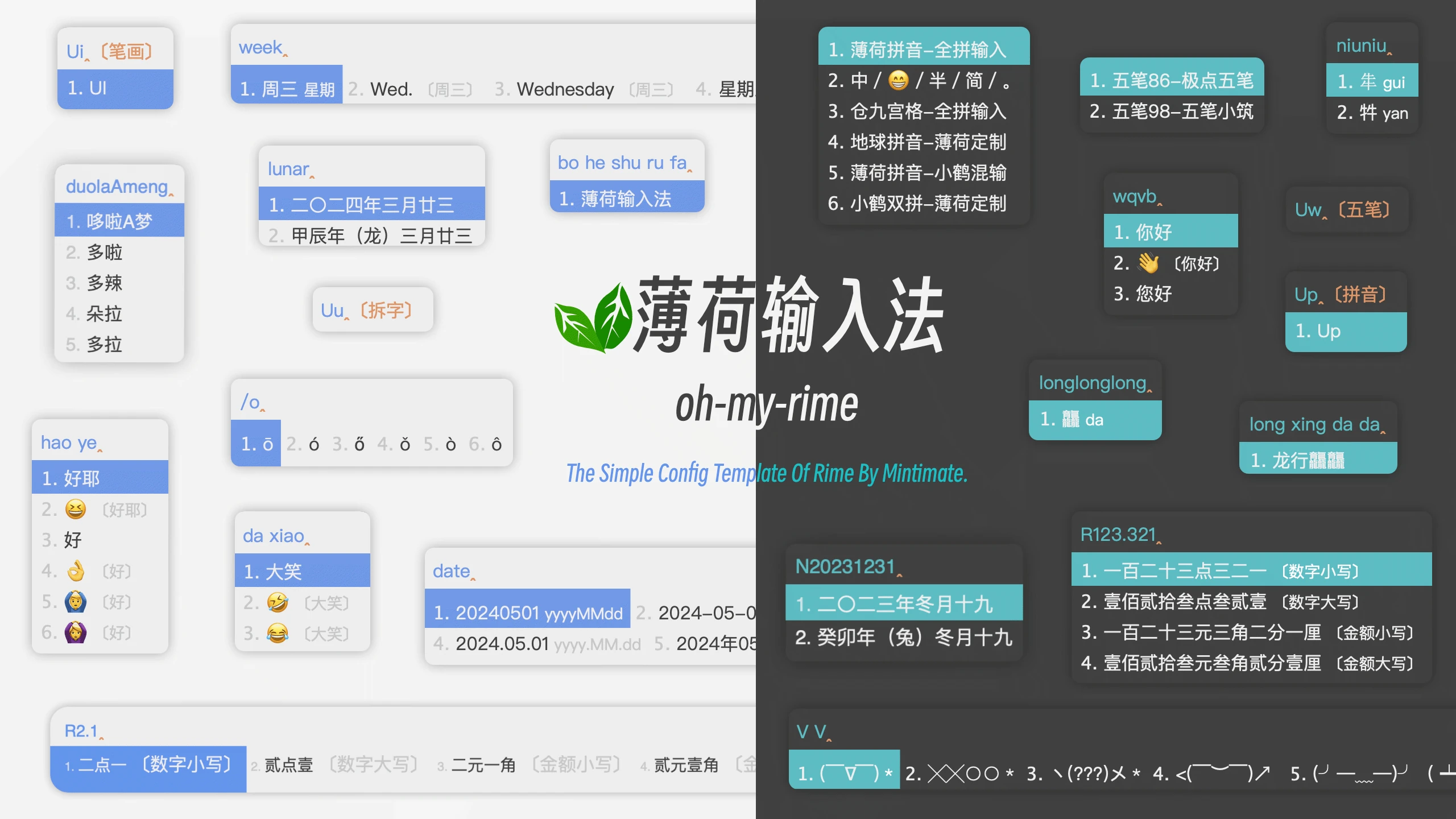
A template for quickly initializing Rime. Since I use oh-my-zsh normally and get a similar feeling when using Rime, I named it oh-my-rime. You can also call it Mint IME or Mint.
If you encounter difficulties downloading, use the mirror repository pushed by GitHub Action:
Or, if you just want to download the Oh-my-rime without cloning the repository via Git, you can use the CNB automated pipeline packaged zip file when encountering download difficulties:
- oh-my-rime.zip: https://cnb.cool/Mintimate/rime/oh-my-rime/-/releases/download/latest/oh-my-rime.zip
2025-07-09 Breaking Changes:
- The dictionary has been switched from the Frost dictionary to the Wanxiang dictionary to enhance the Terra schema experience and improve compatibility with the Wanxiang model.
- The pinyin files within the dictionary have been renamed to start with
rime_mintfor easier future maintenance.
Due to these breaking changes, the following issues still need to be addressed:
- After switching to the Wanxiang dictionary, user dictionaries (.userdb) require script rewriting. Otherwise, tone marks will not display. Provide offline tools for user migration.
- The conflict between the Wanxiang pre-editing script and the error correction script has been resolved, but the error correction style is now consistent with the Wanxiang dictionary style, making them indistinguishable. Consideration is being given to potential adjustments in the future.
Oh-my-rime guide
Rime configuration tutorial:
- [Cross-platform open source input method Rime customization guide, create a powerful personalized input method] (https://www.mintimate.cn/2023/03/18/rimeQuickInit)
- Bilibili Video(macOS/Windows/Linux): https://www.bilibili.com/video/BV12M411T7gf
- Bilibili Video(iOS/Android): https://www.bilibili.com/video/BV1Mr42137Ns
- Youtube Video: https://www.youtube.com/watch?v=yc4AivDDpMM
You have a QQ account, you can join the group chat(No Ads!): 703260572
It is strongly recommended to refer to the documentation ↗ for operation!!!
Project documentation CDN acceleration and security protection sponsored by Tencent EdgeOne.

The input method scheme included:
- Mint Pinyin (薄荷拼音) - Full Spelling Input: Full spelling input, suitable for the largest population, so it's the default input method.
- Double Pinyin Fly( 小鹤双拼) - Mint Customized: Based on Double Pinyin Fly, with added customizations. Supports input of phonetic and shape (shape code) components.
- Mint Pinyin (薄荷拼音) - Xiaohe Mixed Input: Supports Double Pinyin Fly input while in full spelling input mode.
- Terra Pinyin - Mint Customized: Based on Terra Pinyin, with added customizations and extended massive word library.
- Wubi 98 (五笔98) - XiaoZhu: A simplified version based on Wubi 98, looking forward to your contributions.
- Wubi 86 (五笔86) - JiDian: A simplified version based on Wubi 86, looking forward to your contributions.
You can switch between input methods by pressing "Ctrl" + "~" after installation. (Mint Pinyin is activated by default).
Currently, Mint comes with two sets of skins: blue series and green series. You can freely choose to activate within the personalized configuration of Squirrel and Weasel , or you can use your own color matching (it is recommended to use custom to overwrite the mint configuration) (https://www.minitimate.cc/zh/guide /configurationOverride.html#%E4%BF%AE%E6%94%B9%E8%96%84%E8%8D%B7%E8%BE%93%E5%85%A5%E6%B3%95%E7% 9A%84%E9%85%8D%E7%BD%AE)).

Install
The following tutorials are available for Linux, macOS and Windows (Xp~)
- Install Rime Input Method and log out or restart the computer;
- Download all the configuration files of this warehouse to the local rime configuration file;
- Redeploy Rime;
- Get started
- Make secondary modifications according to your own habits
Tips
The default address of the local rime configuration file is as follows
-Windows
- Weasel:
%APPDATA%\Rime-Mac OS X - Squirrel:
~/Library/Rime - Fcitx5 macOS:
~/.local/share/fcitx5/rime - Linux
- iBus:
~/.config/ibus/rime - Fcitx5:
~/.local/share/fcitx5/rime
- iBus:
- Fctix5 Android:
/storage/emulated/0/Android/data/org.fcitx.fcitx5.android/files/data/rime/
The default address of the local rime log file is as follows: -Windows
- Weasel:
%TEMP%-Mac OS X - Squirrel:
$TMPDIR - Linux
-iBus:
/tmp
If you need to use rime in trime with android, you can use oh-my-rime's theme by: Mint_light_blue and Mint_dark_blue
With the Hamster input method, how is the 9-grid input used?
Inside the Oh-my-rime, the 9-grid layout has been adapted from Hamster's 9-grid arrangement and the rime-ice's 9-grid. To utilize the 9-grid input, both the 9-grid scheme (set under Input Scheme settings) and the 9-grid layout (键盘设置 - 键盘布局 - 中文 9 键) need to be enabled simultaneously.
If you like to use Rime to type long sentences, it is strongly recommended to use it with a language model. Reference tutorial:
Configuration file description
default.yamlset the input method, how to switch the input method, turn the page, etc.squirrel.yamlMac version to set which software defaults to English input, input method skin, etc.weasel.yamlWin version to set which software defaults to English input, input method skin, etc.
Most of the configuration files are commented. Cooperate with the tutorial: Configuration Overrides and Customization
Customization and Updates of Dictionaries
The dictionary directory dicts in this repository consists of the following:
- Rime-ice Pinyin Dictionary
- Rime-frost Pinyin Dictionary
- Rime-Wanxiang Pinyin Dictionary
- 98 Wubi Dictionary
- 86 Wubi Dictionary
Detailed explanation:
dicts
├── custom_simple.dict.yaml    # Custom dictionary (recommended for user-added entries)
├── other_emoji.dict.yaml      # Emoji dictionary
├── other_kaomoji.dict.yaml    # Kaomoji dictionary (activated by pressing 'vv')
├── rime_ice.ext.dict.yaml     # Frost dictionary (auto-updated via GitHub Actions)
├── rime_ice.cn_en.txt         # Frost dictionary (auto-updated via GitHub Actions)
├── rime_ice.en.dict.yaml      # Frost dictionary (auto-updated via GitHub Actions)
├── rime_ice.en_ext.dict.yaml  # Frost dictionary (auto-updated via GitHub Actions)
├── rime_ice.others.dict.yaml  # Frost dictionary (auto-updated via GitHub Actions)
├── rime_mint.base.dict.yaml            # Basic vocabulary (Wanxiang Pinyin dictionary)
├── rime_mint.chars.dict.yaml           # Single characters (Wanxiang Pinyin dictionary)
├── rime_mint.compatible.dict.yaml      # Multiple-pronunciation compatibility (Wanxiang Pinyin dictionary)
├── rime_mint.correlation.dict.yaml     # Mispronunciation and typo compatibility (Wanxiang Pinyin dictionary)
├── rime_mint.places.dict.yaml          # Place names (Wanxiang Pinyin dictionary)
├── rime_mint.artists.dict.yaml         # Artist names (Wanxiang Pinyin dictionary)
├── rime_mint.famous.dict.yaml          # Famous people’s names (Wanxiang Pinyin dictionary)
├── rime_mint.ext.dict.yaml             # Empty compatibility dictionary for older configs (no sync or default import)
├── wubi86_core.dict.yaml           # Wubi 86 core dictionary
└── wubi98_base.dict.yaml           # Wubi 98 base dictionary
On 2026-10-15, Wanxiang reorganized its dictionaries and removed the standalone lianxiang association dictionary. rime_mint.base provides basic vocabulary. rime_mint.ext.dict.yaml is now an empty placeholder for older configurations; it is no longer synchronized or loaded by default. You can remove dicts/rime_mint.ext from existing custom import_tables lists.
For subsequent updates to the dictionaries, you can download the files inside the dicts directory of this repository and replace the existing files, except for the custom_simple.dict.yaml file.
If you want to expand the dictionaries on your own, you can import them in the dictionary configuration file of your input method. For example, in the Mint Pinyin dictionary configuration file rime_mint.dict.yaml:
---
name: rime_mint                  # 注意name和文件名一致
version: "2025.07.06"
sort: by_weight
use_preset_vocabulary: false
# 此处为 输入法所用到的词库,既补充拓展词库的地方
# Wanxiang Pinyin dictionary, updated by the sync tool
import_tables:
  - dicts/custom_simple          # 自定义
  - dicts/rime_mint.chars        # Single characters (Wanxiang Pinyin dictionary)
  - dicts/rime_mint.base         # Basic vocabulary (Wanxiang Pinyin dictionary)
  - dicts/rime_mint.correlation  # Mispronunciation and typo compatibility (Wanxiang Pinyin dictionary)
  - dicts/rime_mint.compatible   # Multiple-pronunciation compatibility (Wanxiang Pinyin dictionary)
  - dicts/rime_mint.places       # Place names (Wanxiang Pinyin dictionary)
  - dicts/rime_mint.artists      # Artist names (Wanxiang Pinyin dictionary)
  - dicts/rime_mint.famous       # Famous people’s names (Wanxiang Pinyin dictionary)
  - dicts/other_kaomoji          # 颜文字表情(按`VV`呼出)
  - dicts/rime_ice.others        # 雾凇拼音 others词库(用于自动纠错)
  # 20240608 Emoji完全交由OpenCC,不再使用字典作为补充
  # - dicts/other_emoji            # Emoji(仅仅作为补充,实际使用一般是OpenCC生效)
...
Support
- Mintimate's Blog: https://www.mintimate.cn
- Mintimate's 爱发电: Join the electric circle and support creation!
- Bilibili: @Mintimate
- Youtube: @Mintimate
References/Acknowledgments
- Rime-RimeWithSchemata
- Rime/Xiaolanghao/Shuxuguan Input Method Configuration Notes
- rime-setting
- rime-ice | The long-term maintenance version of Simplified Chinese Characters
- rime-radical-pinyin | Rime Component-based Character Input Schemes (Full Spelling and Double Pinyin)
- rime-wubi86-jidian
- Extending RIME with Lua scripts
- rime-frost | Based on a remastered Rime-ice Pinyin, that is more pure, more accurate in word frequency, and more intelligent.
- Rime-Wanxiang | A powerful Chinese Pinyin input method
Especially rime-ice, this solution project, a large number of references to rime-ice. For the word library part, use Python to synchronize the basic word library of rime-ice and enable the ext extension word library that rime-ice does not enable by default.
Other Recommended
- 98 Wubi, http://www.98wubi.com/
- 86 Wubi, https://github.com/KyleBing/rime-wubi86-jidian
- Rime Pinyin, an excellent Chinese thesaurus
- Wanxiang Pinyin: A Powerful Yet Complex Pinyin Input Solution
The vocabulary of oh-my-rime: ① Starting from 2024-07-29, the pinyin vocabulary uses the frost vocabulary, previously using the terra pinyin vocabulary; ② Starting from 2025-07-09, the vocabulary uses the myriad pinyin vocabulary.
Star History
Contributors ✨
Explore related projects
codecrafters-io/build-your-own-x
Master programming by recreating your favorite technologies from scratch.
562,190 starspublic-apis/public-apis
A collective list of free APIs
498,586 starsmorluto/rea
Reverse engineer anything with agents, from app behavior down to native binaries.
455,812 starsopenclaw/openclaw
The AI that really does things. Any OS. Any Platform. The lobster way. 🦞
394,414 stars