
MingyiSecLab/Atlas has 44 GitHub stars and 7 forks. GitHot measured 0 stars in 24 hours. Last checked 2026-11-16 03:19 UTC. Last push 2026-10-18.
Measured star growth
- in 24h
- 0
- in 7 days
- Collecting history
- in 15 days
- Collecting history
- in 1 month
- Collecting history
Net star changes over overlapping periods, not daily totals. Missing measurements are left blank. Stars measure attention, not software quality.
About
Open-source local AI Agent desktop app for authorized security assessment — Electron + Mastra-powered runtime, visual pentest workflow, Kali sandbox, multi-provider LLM routing. 本地 AI 安全评估智能体桌面应用
AIREADME_EN.md
OriginalAtlas (Mingyi)
简体中文 | English
Mingyi is a local AI Agent desktop application built on Electron. It encapsulates the AgentController of a modern local AI Agent — unified model routing, multiple working modes, the extension hub with plugins, security tooling, MCP, and session state streaming — into a general-purpose local Runtime, and exposes it to the desktop client through a fully typed IPC protocol. It supports grouped management of tasks and project workspaces, seamless switching across multi-vendor model services, multi-step tool pipeline execution, a built-in integrated terminal, and a visualized penetration-testing (Pentest) workflow for authorized security assessments.
[!WARNING] Notice for Early Development Phase
This project is in an active early stage of high-frequency iteration (Alpha / Experimental). The underlying architecture (AgentController/Runtime), data persistence, IPC contracts, and the desktop UI may undergo significant refactors and Breaking Changes at any time.
Community developers are welcome to test it out and share feedback! If you use it in production or critical scenarios, make sure to back up important data locally and pin your versions.
Screenshots in Action
| Live pentest execution chain and reasoning | Full workspace, blackboard facts, and vulnerability findings |
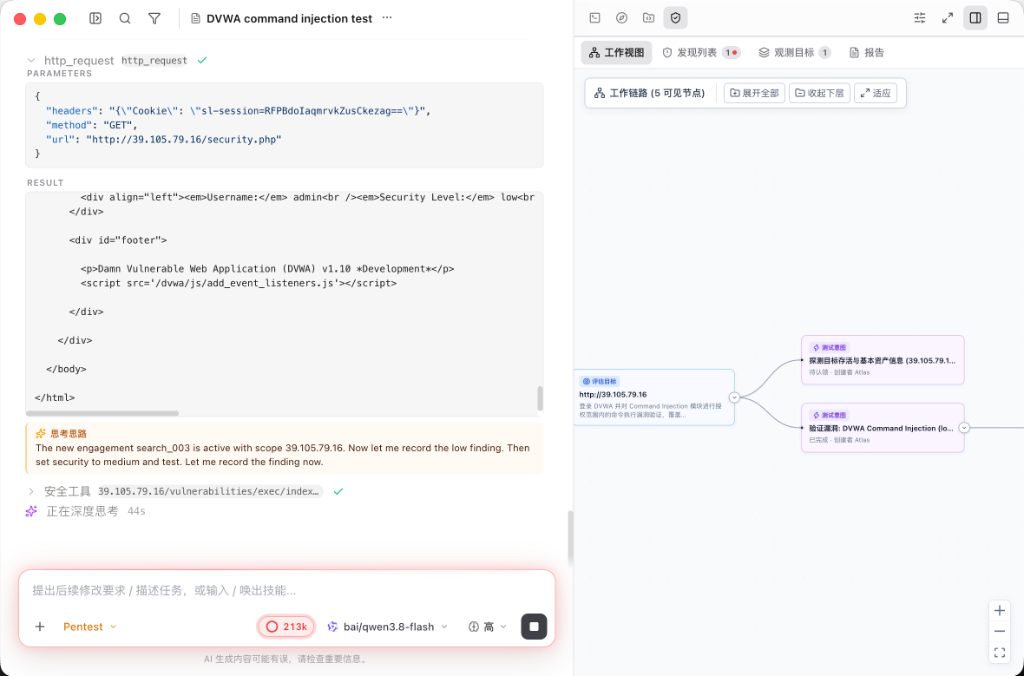 |
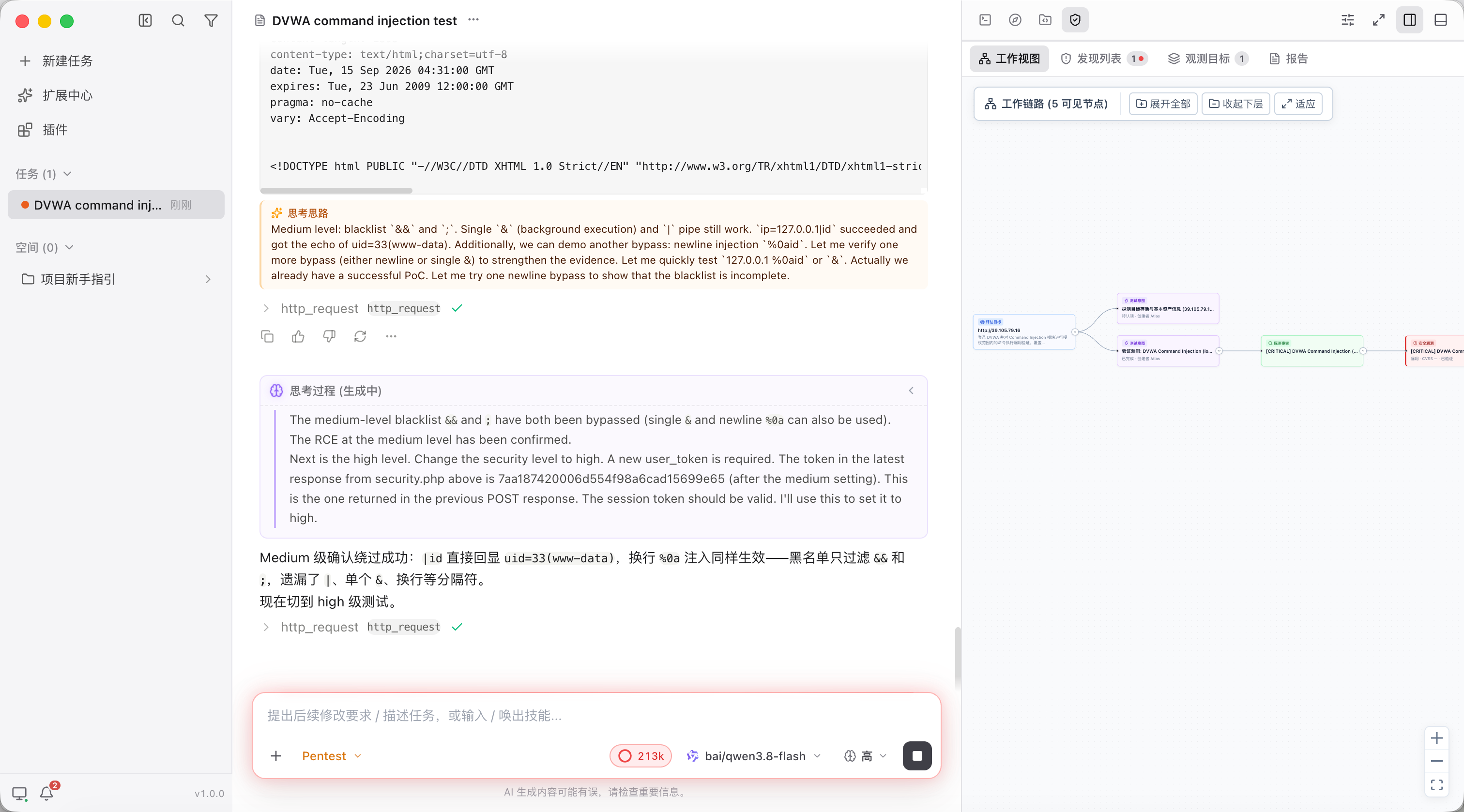 |
| Multi-severity verified validation and vulnerability findings panel | |
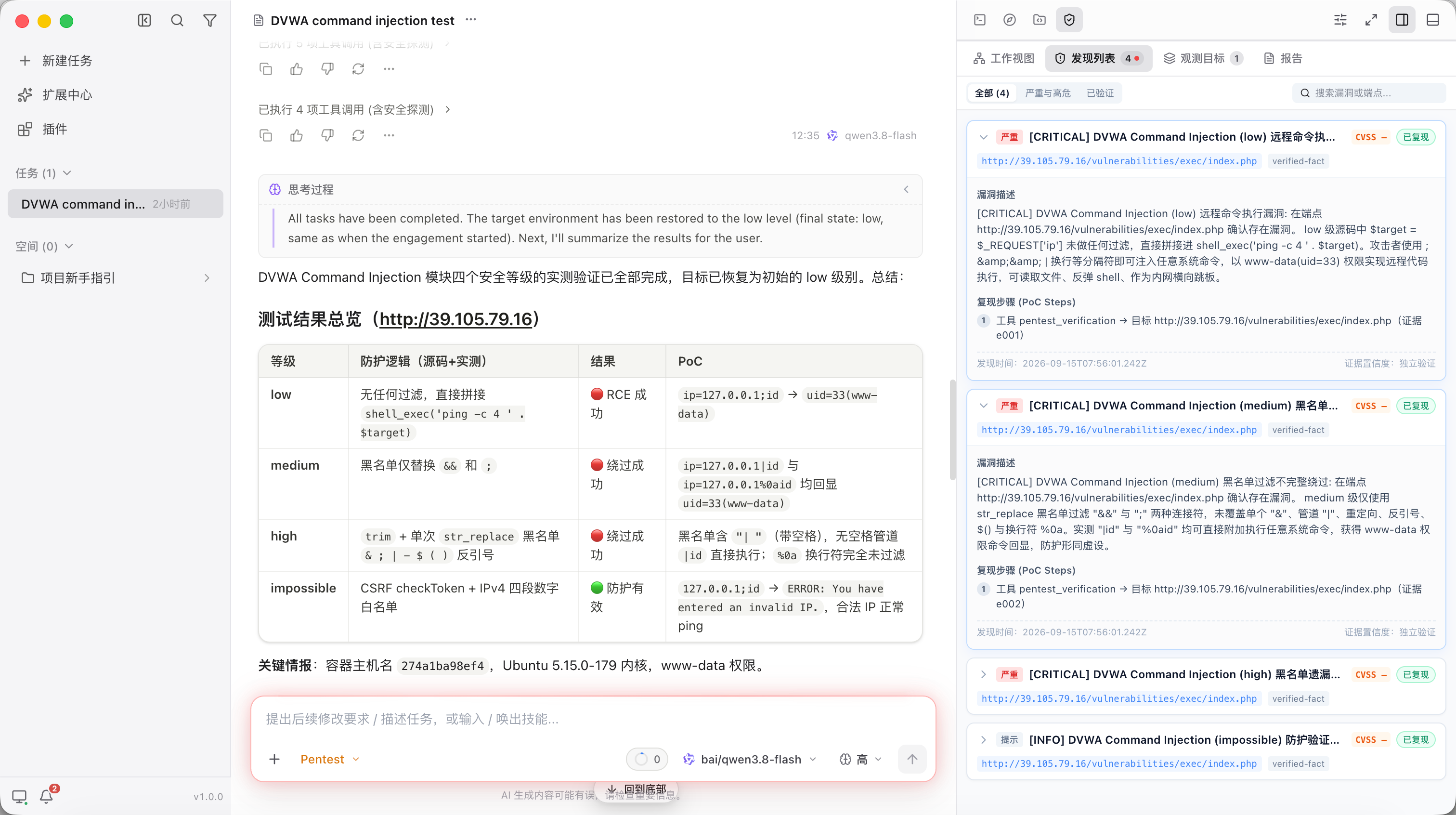 |
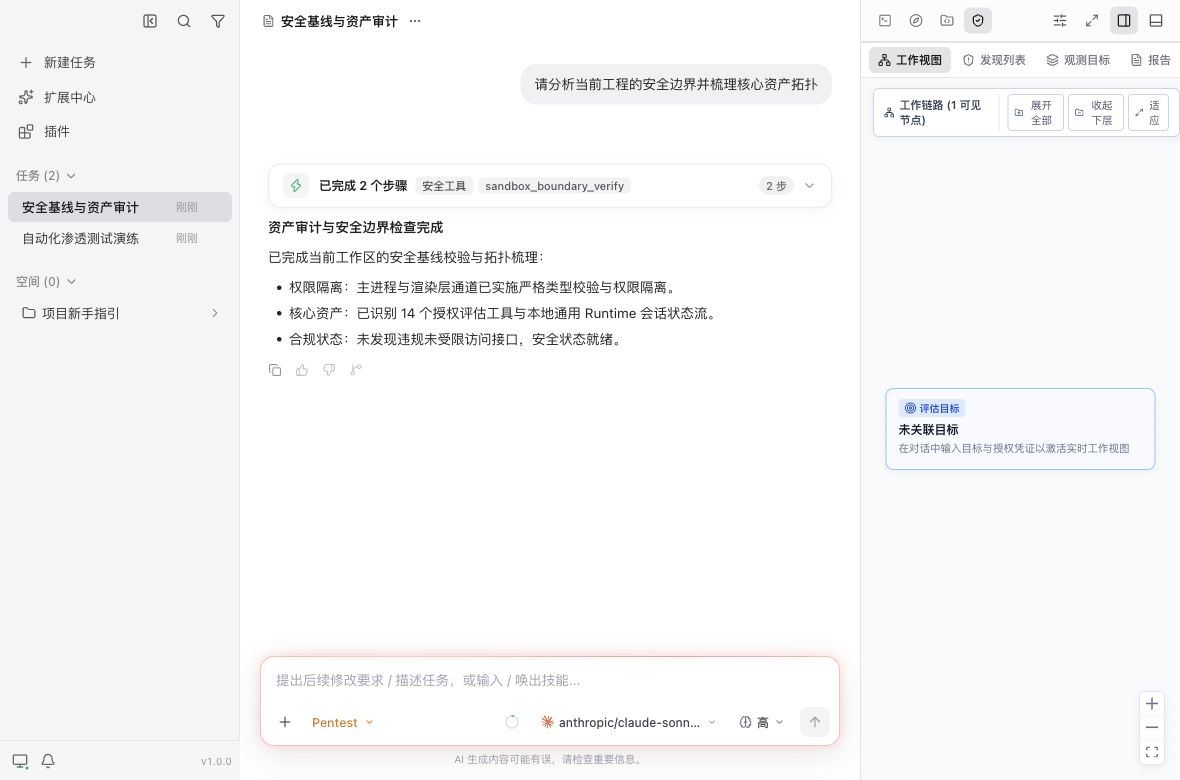
Feature Screenshots
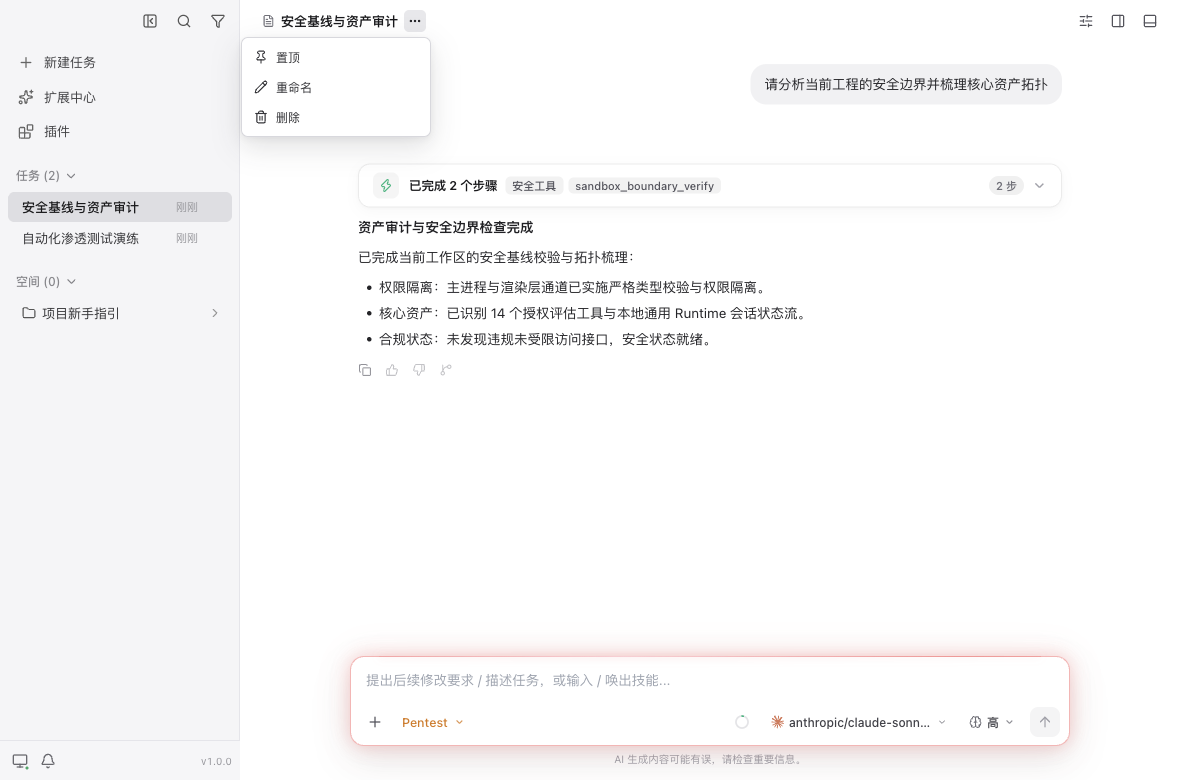
| Main UI and step execution | Task quick actions |
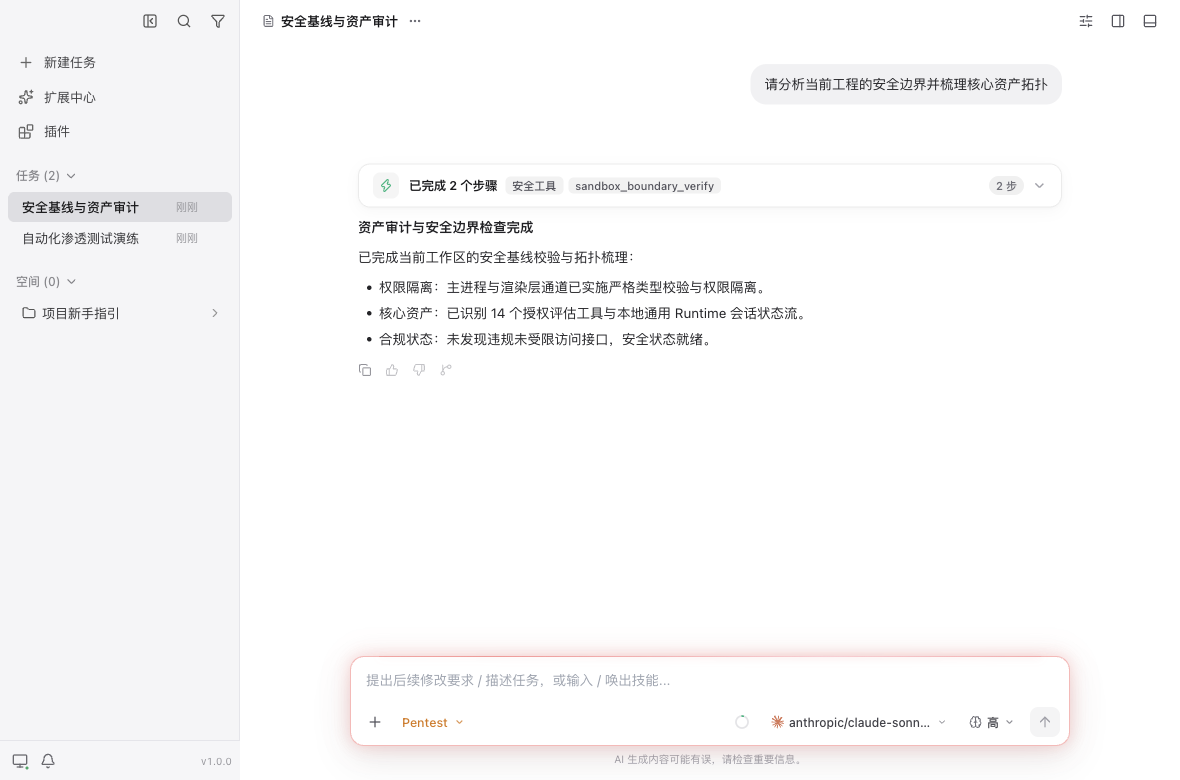 |
 |
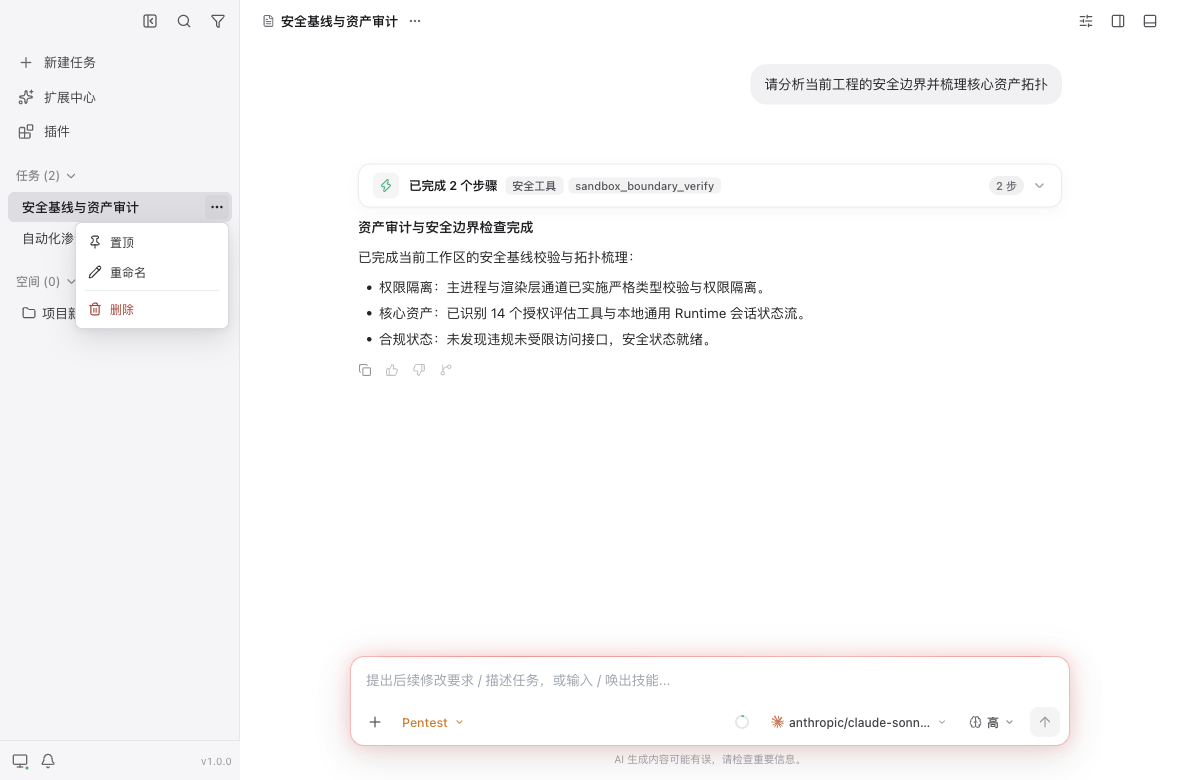
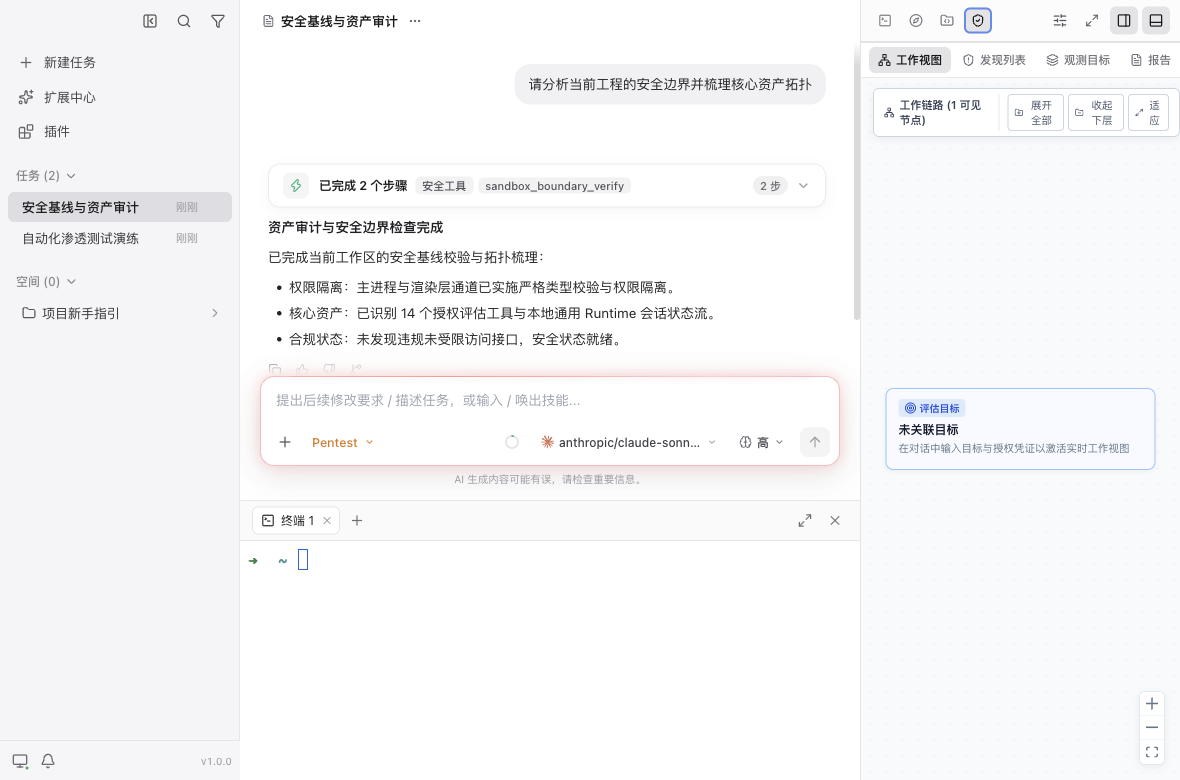
| Sidebar tasks and workspace management | Built-in terminal panel (⌘J) |
 |
 |
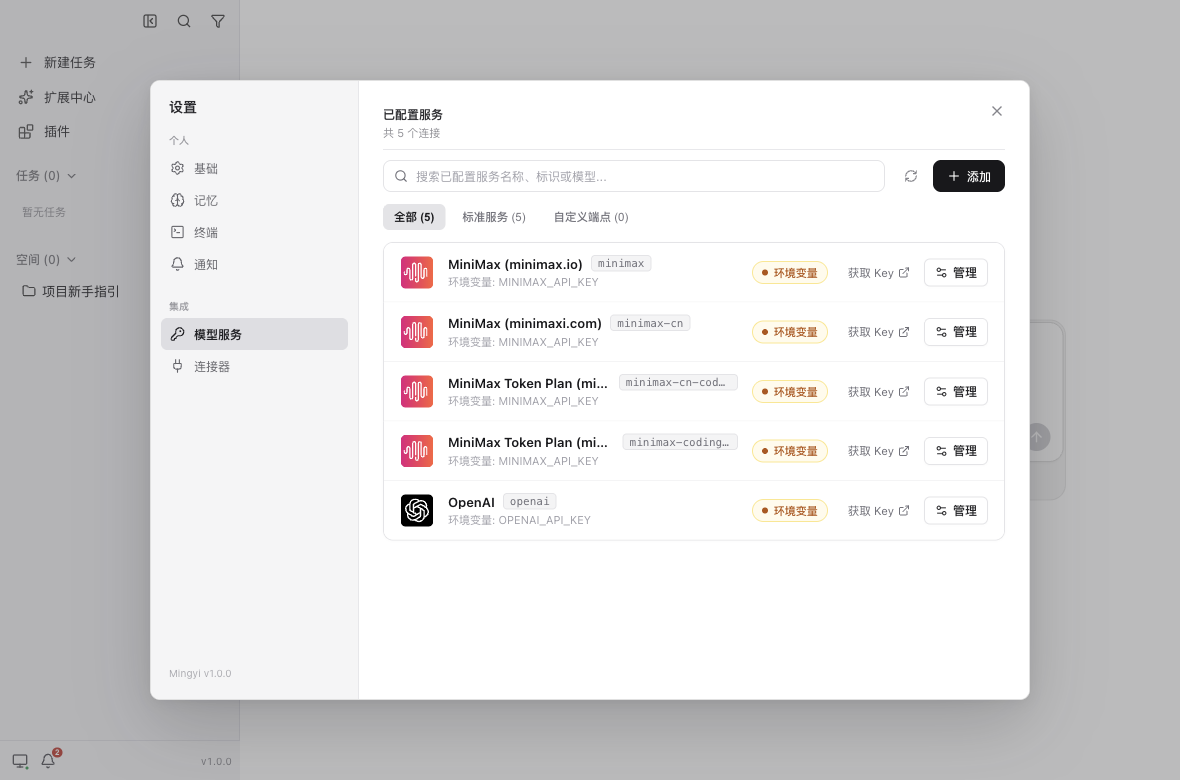
| Unified model service configuration | Pentest workflow |
 |
 |
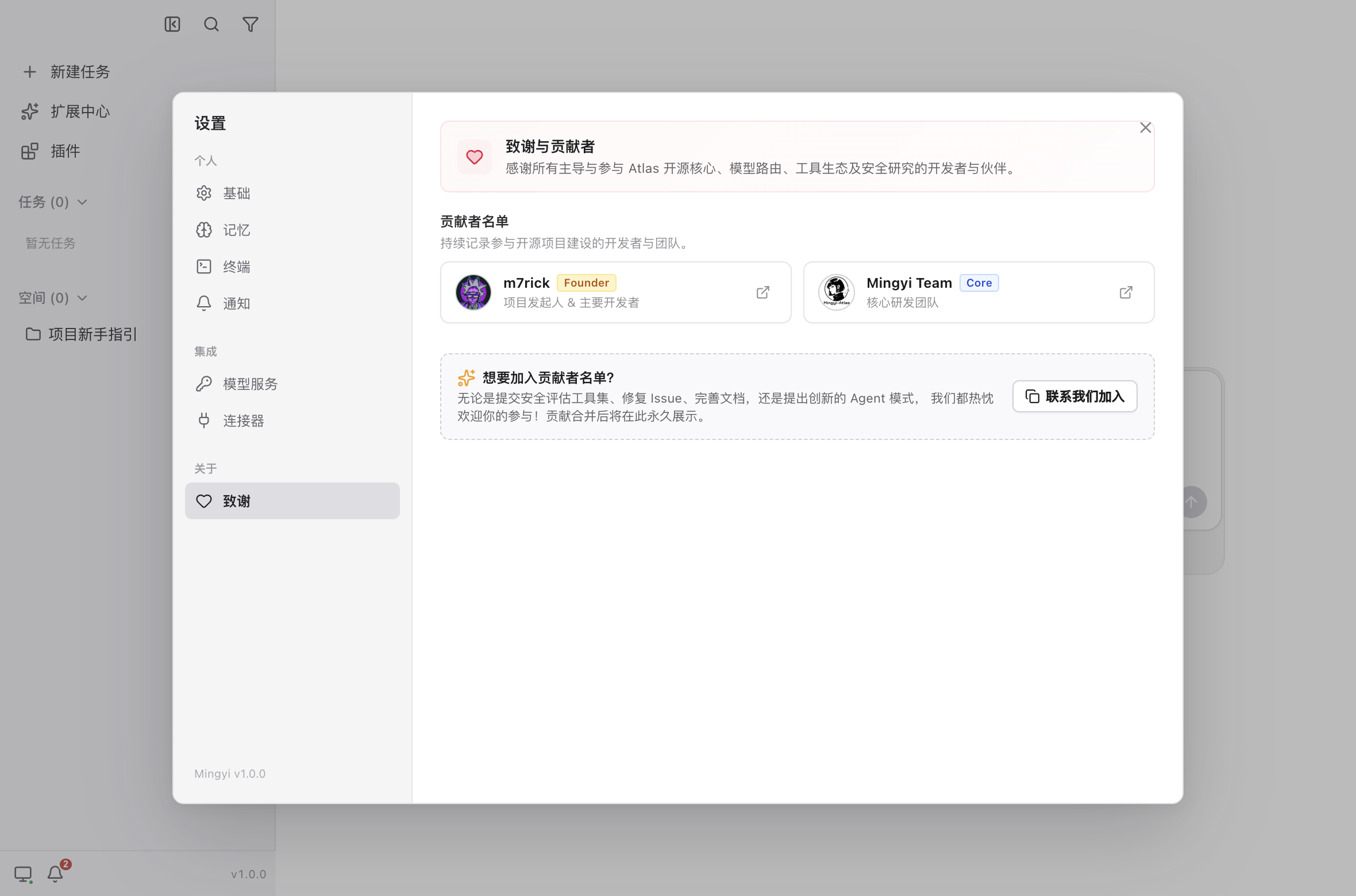
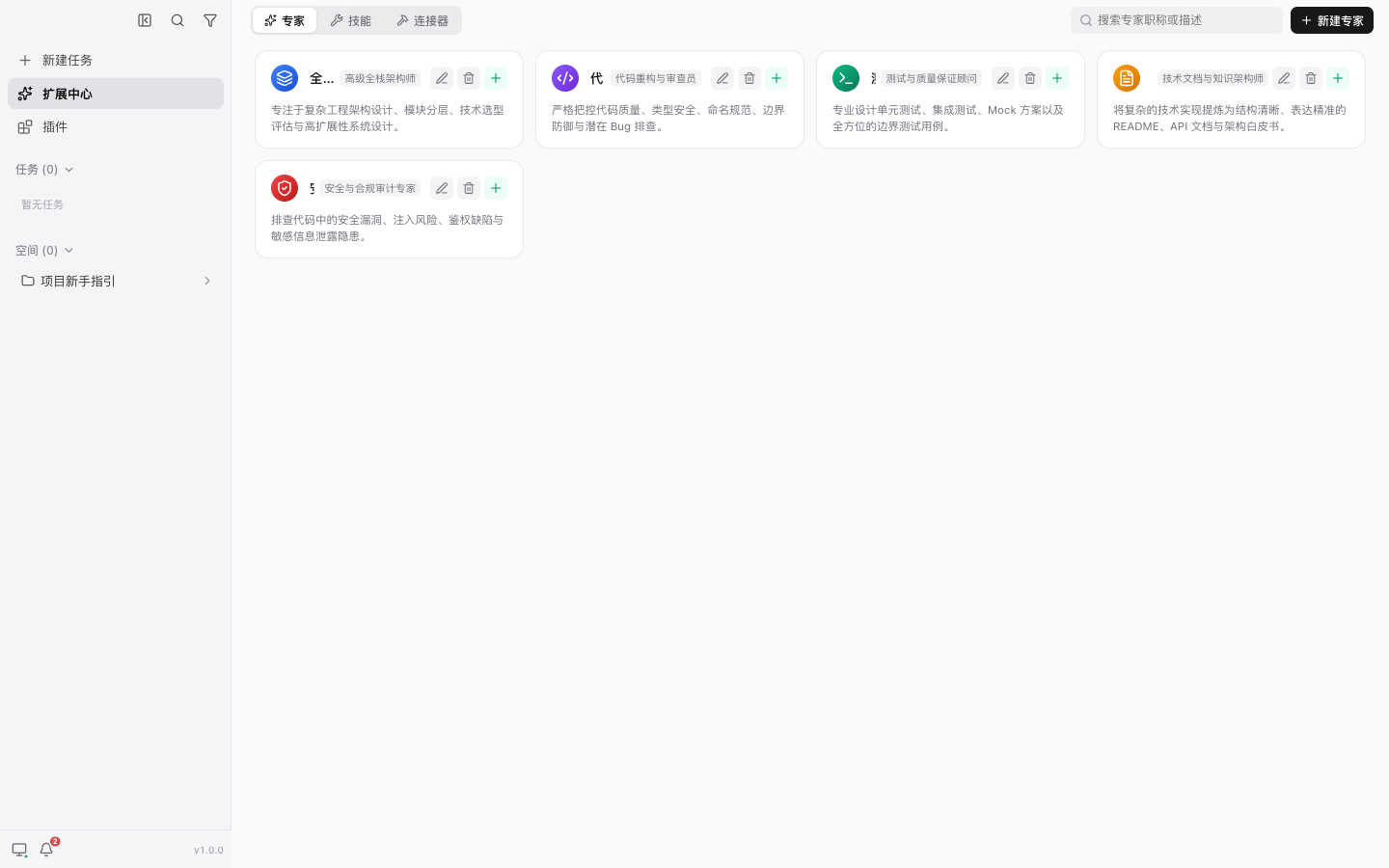
| Acknowledgements and community contributions | Extension hub and expert roles |
 |
 |
Repository Structure
.
├── apps/desktop        # Electron desktop app (main / preload / renderer)
├── packages/runtime    # General-purpose local Agent Runtime (open-source core)
├── docs                # Architecture design, ADRs, and release guides
└── patches             # Dependency patches
packages/runtime/: the general-purpose local AI Agent core Runtime, providing AgentController, sessions, unified model routing, modes, subagents, tool execution, MCP protocol support, a skills and automations engine, and built-in Pentest capabilities for authorized security assessments. Application layers such as Desktop and TUI only consume the Runtime's stable public interfaces.apps/desktop/: the Electron app — main process code insrc/main/, preload API insrc/preload/, and browser UI insrc/renderer/.
Integration & Configuration Guide
1. Model Providers
Supports mainstream closed-source LLMs and open-source local inference endpoints, with secure scheduling unified by the Runtime model router:
- Public cloud APIs: OpenAI, Anthropic, Google Gemini, DeepSeek, SiliconFlow, etc.;
- Local / private endpoints: Ollama, vLLM, LocalAI, and other OpenAI-compatible self-hosted services;
- Unified settings: click
Settings -> Model Servicesat the bottom-left of the desktop app to visually add, remove, or edit Provider API keys and Base URLs, or inject them quickly via environment variables.
2. Security Assessment & Kali Sandbox Integration
To prevent automated penetration testing from accidentally damaging the host or clashing with its ports, the system natively ships a pure-execution Docker sandbox adapter (see container/README.md for the detailed guide):
- Build the local sandbox image:
(The image bundles the full Kali security toolchain, an offline PoC library, and the HackTricks / PayloadsAllTheThings knowledge bases.)docker build -t mingyi-sandbox:latest ./container - Start a persistent sandbox container (or launch it cross-platform in one command via
pnpm run container:run):# macOS / Linux (workspace is mounted at ~/.atlas/sandbox_workspace by default) docker run -d \ --name mingyi-sandbox \ --network host \ --cap-add=NET_RAW --cap-add=NET_ADMIN \ -v ~/.atlas/sandbox_workspace:/home/kali/workspace \ mingyi-sandbox:latest # Windows (workspace is mounted at %USERPROFILE%\.atlas\sandbox_workspace by default) docker run -d ^ --name mingyi-sandbox ^ --network host ^ --cap-add=NET_RAW --cap-add=NET_ADMIN ^ -v "%USERPROFILE%\.atlas\sandbox_workspace:/home/kali/workspace" ^ mingyi-sandbox:latest - Automated detection and handshake:
Before executing, the Agent automatically calls the built-in
detect_sandbox_environmenttool to probe the current environment. Execution commands are only sent to the sandbox when akali_*tool is triggered; with the sandbox disabled, there is zero resource overhead; - Configuration and environment variables:
MINGYI_SANDBOX_CONTAINER: container name (defaultmingyi-sandbox);MINGYI_SANDBOX_IMAGE: image name (defaultmingyi-sandbox:latest);MINGYI_SANDBOX_WORKSPACE_DIR: host workspace mount directory (default~/.atlas/sandbox_workspace;%USERPROFILE%\.atlas\sandbox_workspaceon Windows);MINGYI_SANDBOX_DISABLED=1: disable the sandbox bridge entirely and execute with restrictions directly on the host.
3. Storage & Persistence
The system follows a three-layer storage model of "engine state machine + vector memory + project-private isolation":
- Global Runtime storage: session state, the message tree, and vector-retrieval memory are persistently centralized in a database (its location can be unified via
MASTRA_APP_DATA_DIR, e.g.~/.atlas/), including the task SQLite database and the vector index (vectors.db); - Per-project workspace storage: for each target code project, the pentest task blackboard, target assets, vulnerability findings, and evidence chains are stored under
.mingyi/pentest/in the project root — natively Git-friendly and audit-archivable; - Project expert roles: place custom expert personas in
<workspace>/.mastracode/agents/*.mdand they load automatically as Modes with the project.
4. Custom Tools & MCP Integration
Atlas offers a highly open, dual-track extension model for security researchers and developers:
- Native security tool extensions:
- Add a tool implementation under
packages/runtime/src/tools/security-tools/(must implement theRuntimePentestToolinterface contract); - Declare the tool's parameter schema (Zod validation), read-only flag (
readOnly), and execution callback; - Export it from
index.ts; it is auto-registered into the Agent dispatch graph viaDEFAULT_PENTEST_TOOLS, guarded bypackages/runtime/test/tool-layout.test.ts.
- Add a tool implementation under
- Standard MCP integration (Model Context Protocol):
- A native MCP client manager is built in, supporting any external tool server that follows the MCP spec (e.g. external databases, semantic code indexes, custom scanners);
- Servers can be mounted dynamically as Agent tools via configuration, enabling end-to-end interaction and per-parameter hover approval without touching the frontend.
- Project skills automation:
- Package expert operational knowledge as structured Markdown in
.agents/skills/<skill_name>/SKILL.md; - The agent matches semantics automatically and invokes the corresponding skill pipeline directly in conversation.
- Package expert operational knowledge as structured Markdown in
Contributing & Release
Security researchers, ML engineers, and full-stack developers are all welcome to help improve Atlas!
- Contributor honor wall: the desktop client ships a dedicated 【Acknowledgements & Community Contributions】 panel (
Settings -> About -> Acknowledgements, see the feature screenshots above). Anyone who submits a valid PR, improves security tool rules, extends MCP, or optimizes the core Runtime will have their GitHub profile and homepage permanently engraved in the in-app acknowledgements panel; - Build & release conventions: for local development conventions, the Conventional Commits policy, and the cross-platform automated CI/CD packaging pipeline (macOS DMG/ZIP, Linux AppImage/deb, Windows NSIS/ZIP), see: 👉 Atlas Release & Contribution Guide
Getting Started
Install dependencies at the repository root first (this repo is a pnpm workspace, requires Node.js >= 22.19):
pnpm install
Common commands:
# Start the Electron app (development mode)
pnpm dev

# Build and typecheck
pnpm build
pnpm typecheck

# Tests
pnpm test                              # Desktop Playwright E2E (headless)
pnpm --filter @mingyi/runtime test     # Runtime Vitest unit tests

# Lint and format
pnpm lint
Runtime Usage Example
import { createLocalRuntime } from '@mingyi/runtime'

const runtime = await createLocalRuntime({
  workspacePath: '/path/to/project',
})

// Desktop exposes a serializable interface of runtime.sessions over IPC;
// simpler scenarios such as a TUI can use runtime.session directly
await runtime.sessions.create({ title: 'New task' })
await runtime.sessions.sendMessage({ sessionId, content: 'Hello' })

await runtime.shutdown()
Acknowledgements & Credits
Atlas (Mingyi) would not exist without the outstanding contributions of the modern open-source AI and frontend interaction ecosystem. We extend sincere gratitude to the following open-source projects, their design philosophies, and the teams behind them:
- Mastra (
@mastra/core&@mastra/code-sdk): provides Atlas with an industrial-grade, robust local AgentController engine foundation, working modes, tool orchestration, and session state persistence; - assistant-ui (
@assistant-ui/react): powers the desktop client's ultra-smooth, composable, and richly interactive modern generative AI conversation and tool-flow experience; - Vercel AI SDK (
ai): provides an elegant, unified streaming message protocol, tool execution lifecycle, and standard data contracts for cross-model interaction; - Electron & React: the solid foundation for a high-performance desktop workbench with a native integrated terminal and cross-platform security exercises.
License & Commercial Use
The core open-source codebase of this project is licensed under the GNU Affero General Public License v3.0 (AGPLv3).
- Non-commercial / Community Use: Free for personal learning, research, and internal deployment under the terms of the AGPLv3.
- Commercial Licensing: If your organization requires closed-source distribution, integration into proprietary products, or wants to operate without the copyleft obligations of AGPLv3 (such as the Section 13 network-interaction requirement), you must obtain a Commercial License.
For commercial licensing and enterprise inquiries, please visit @MingyiSecLab or contact: [email protected]