
MegaSuperKitty/WeClaw
MegaSuperKitty/WeClaw has 369 GitHub stars and 40 forks. GitHot measured 0 stars in 24 hours. Last checked 2026-11-19 01:30 UTC. Last push 2026-05-08.
What you can do
- Cross-platform personal agent: mobile QQ ↔ Windows PC collaboration
- Multi-agent architecture: parallel decomposition and execution for complex tasks
- Intelligent routing: choose ReAct or ReCAP based on task complexity
- Context engineering: compression, unloading, and filesystem support to avoid context overflow
Measured star growth
- in 24h
- 0
- in 7 days
- Collecting history
- in 15 days
- Collecting history
- in 1 month
- Collecting history
Net star changes over overlapping periods, not daily totals. Missing measurements are left blank. Stars measure attention, not software quality.
About
WeClaw: A Personal Assistant Powered by Mobile QQ and Windows PC Collaboration✨inspired by OpenClaw✨
Web & AppsREADME.md
Original
WeClaw: A Personal Assistant Powered by Mobile QQ and Windows PC Collaboration


A cross-platform personal assistant agent inspired by OpenClaw, designed for Windows PCs. It bridges mobile QQ and Windows capabilities so users can use natural language to plan and execute tasks end-to-end across devices.
WeClaw can also be accessed via a CLI, and can be customized to integrate with platforms such as WhatsApp, Discord, Telegram, and more.
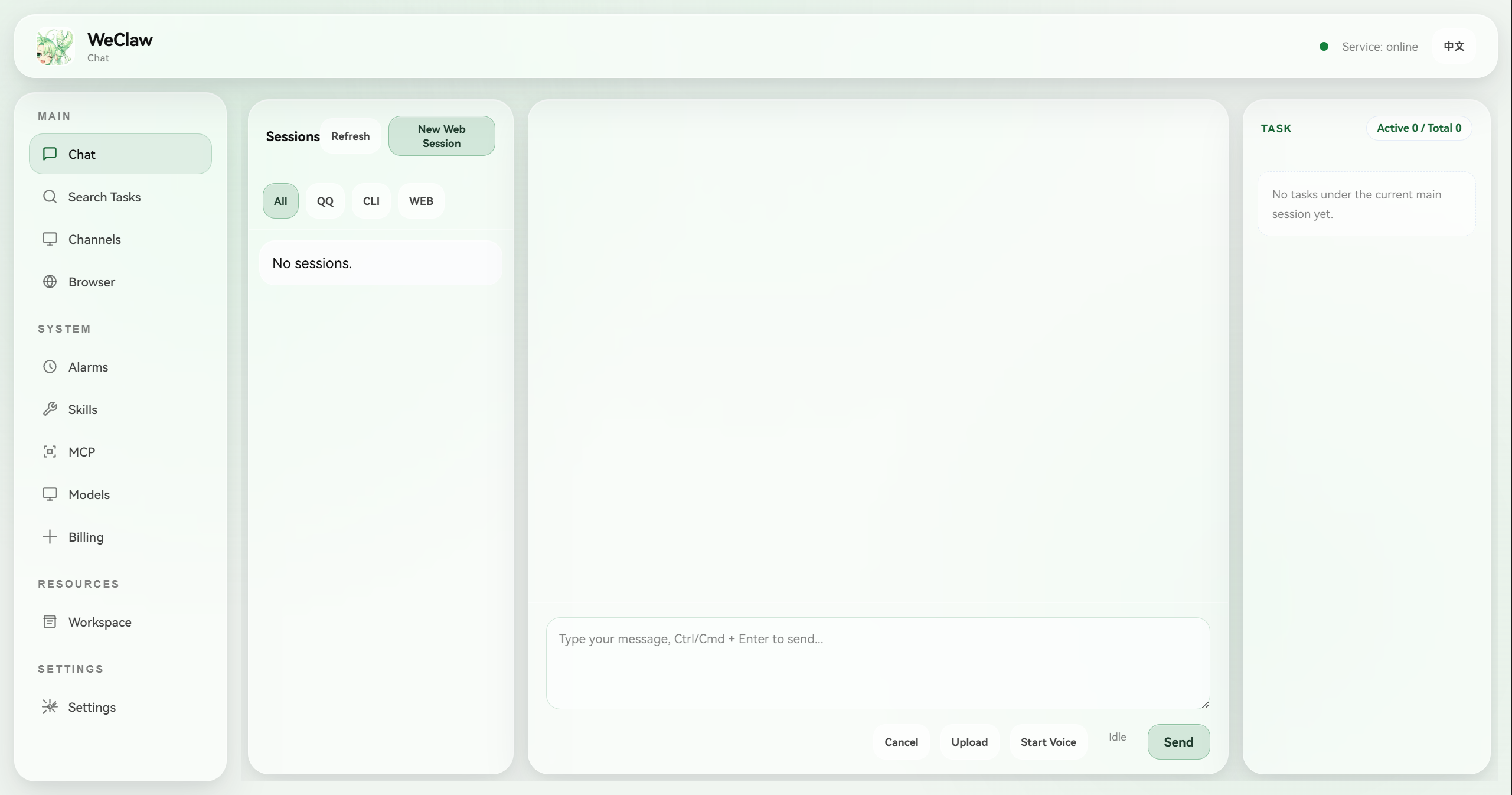
GUI Preview
Timeline
- 2026-02-03 🎉 WeClaw is now open source.
- 2026-02-23 🖥️ Added a graphical Agent Console (
WeClaw_console/) for unified operations:- Chat (SSE streaming + ReAct trace)
- Voice input (browser recording + local transcription)
- Search tasks (session retrieval and context navigation)
- Channels (Web / CLI / QQ / Discord)
- Plugin Channel Host (workspace-installed TypeScript channel runtime)
- Scheduled tasks (Cron) and heartbeat
- Skills management
- Model configuration and switching
- Model billing and call audit (token statistics)
- 2026-03-07 🔌 Added an integrated MCP stack:
- Local and remote MCP client runtime
- Web Console MCP discovery, configuration, and runtime management
- 2026-03-09 🚪 Unified the project startup flow around the Web Console:
- Added
entry_weclaw_console.pyas the recommended root entrypoint - Added
python -m WeClaw_consolepackage startup
- Added
- 2026-05-08 💬 Added free-form conversation:
- Talk with the agent continuously without starting an explicit task
- Use the main session / task session mechanism to separate open-ended chat from executable tasks
- Move naturally from conversation into task execution while keeping context continuity
Core Highlights
- Cross-platform personal agent: mobile QQ ↔ Windows PC collaboration
- Multi-agent architecture: parallel decomposition and execution for complex tasks
- Intelligent routing: choose
ReActorReCAPbased on task complexity - Context engineering: compression, unloading, and filesystem support to avoid context overflow
- Secure sandbox and async execution: more stable long-running task pipelines
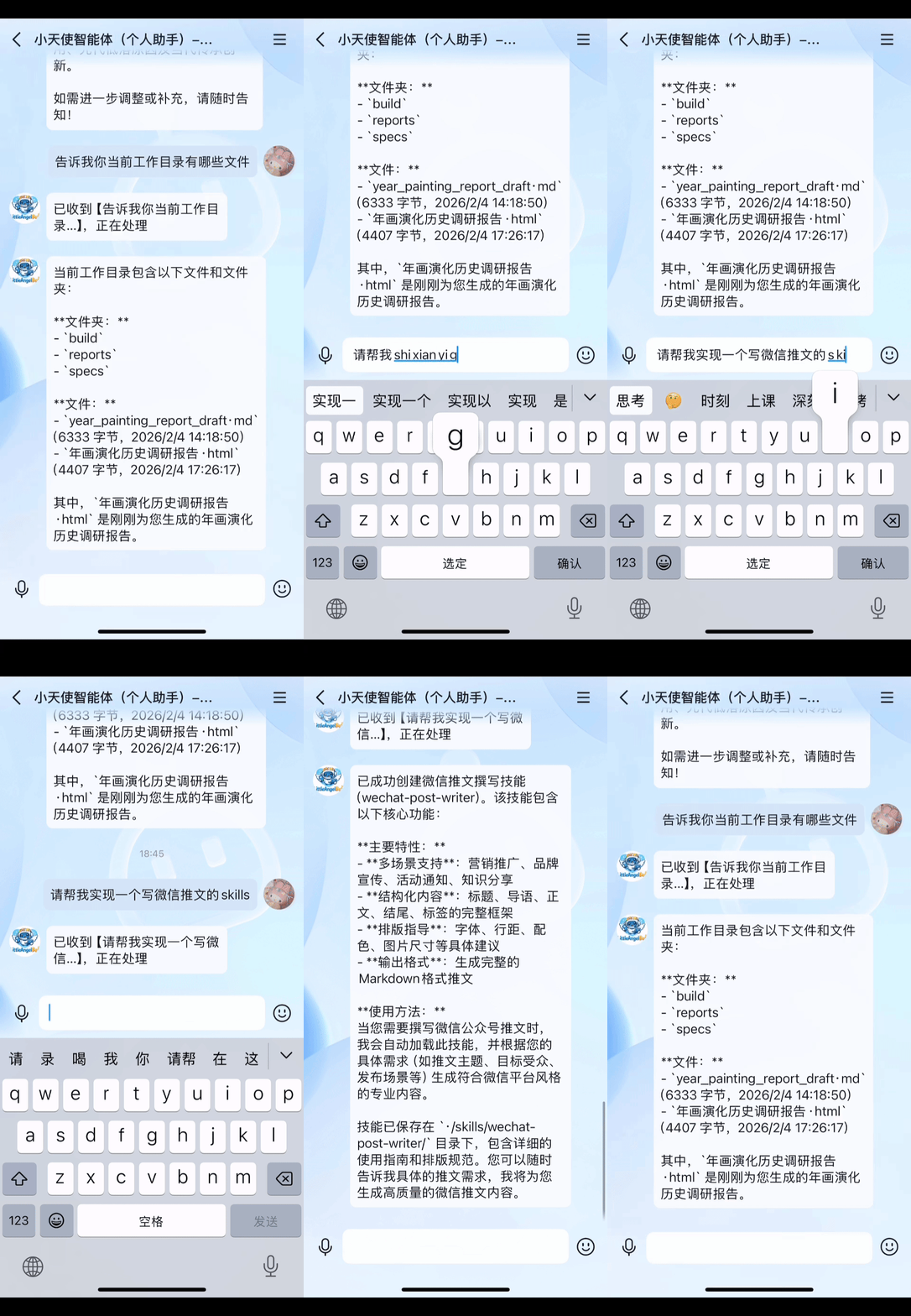
- Skills integration: unified mechanism supporting customization and extension
- Free-form conversation alongside task sessions: switch naturally between everyday chat and executable tasks
- Task state management: supports long-chain, multi-turn task automation
- Stable execution strategy: plan first, then act
- Experience learning is being integrated: improves with usage
Demo GIFs
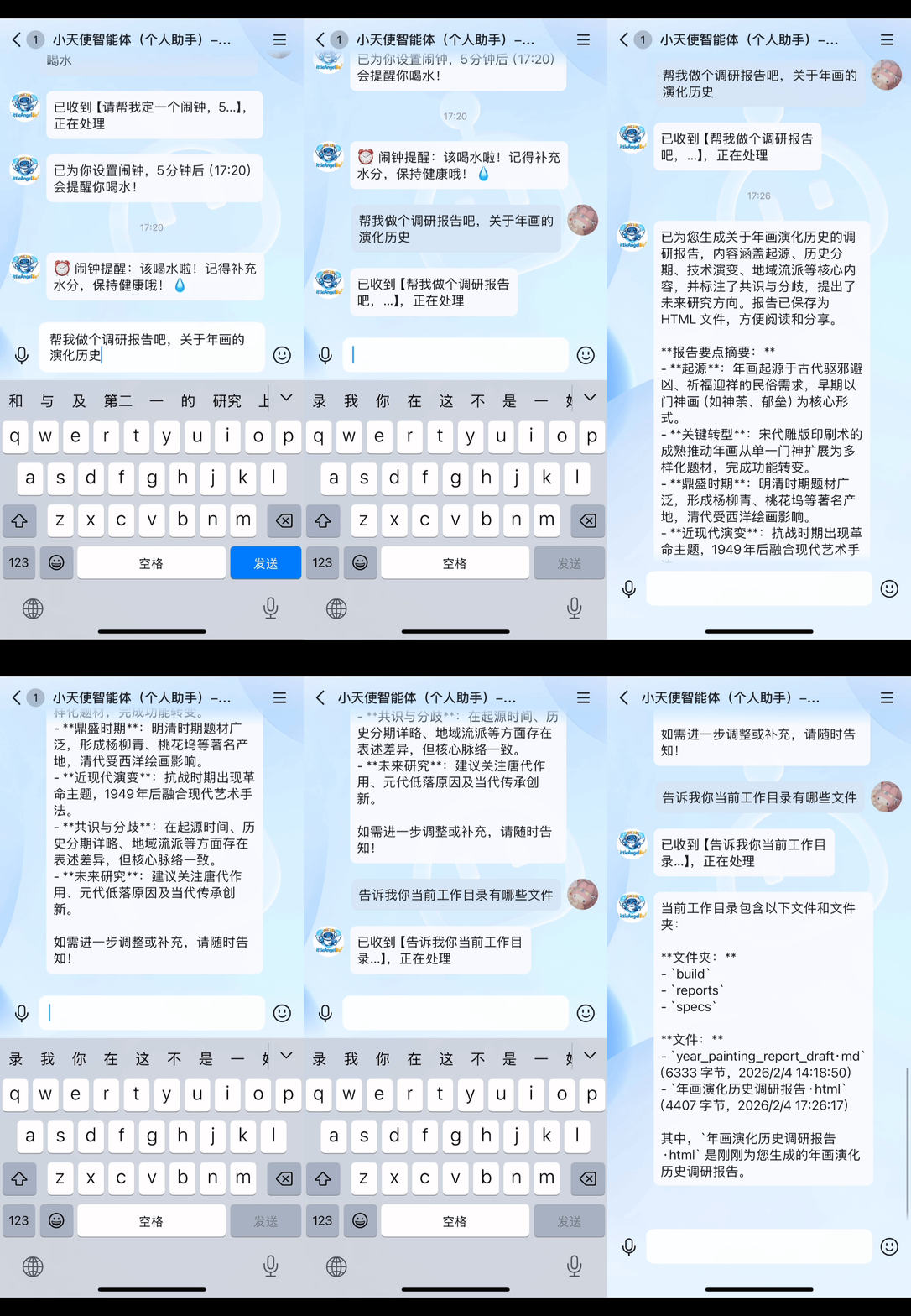
🔎 Information Gathering & Report Generation |
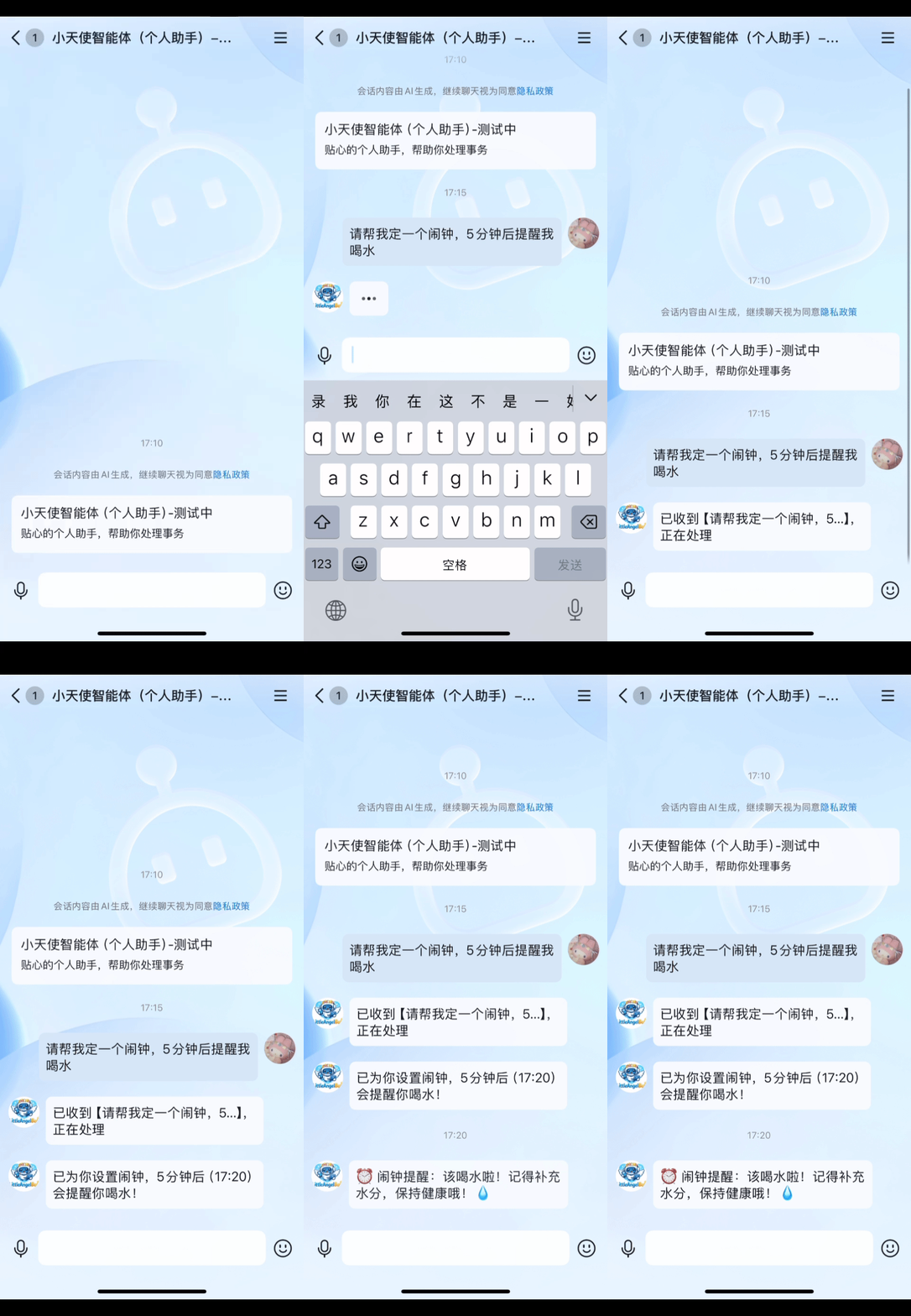
⏰ Scheduled Tasks & Automation |
🧩 Automatic Skills Creation |
💻 Coding & Remote Execution |
|---|---|---|---|
|
|
|
|
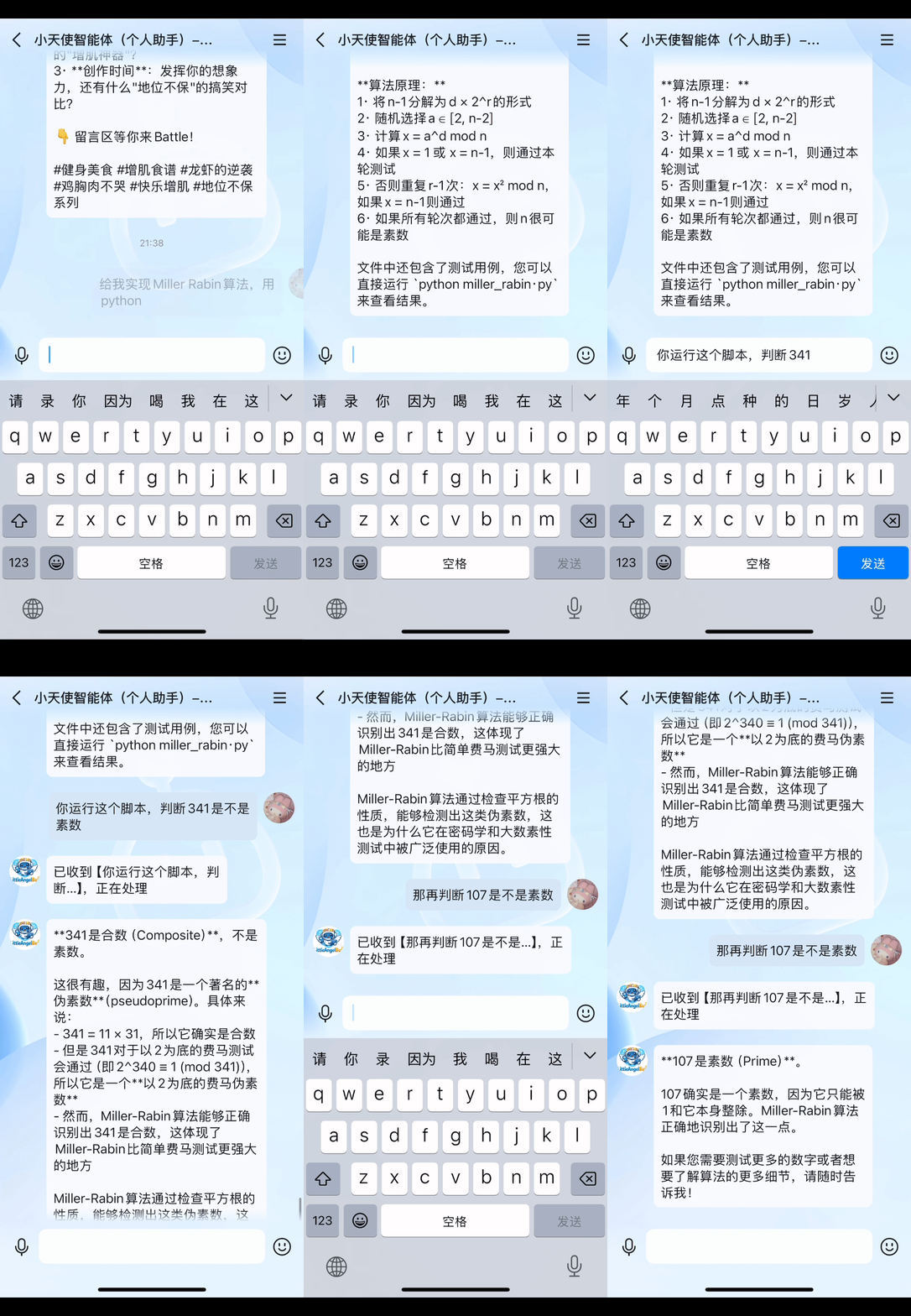
Capability Overview
- Information gathering and organization
- Report and document generation
- Scheduled tasks and automation
- Cross-device development and execution of coding tasks
Graphical Agent Console
The project now includes a local graphical control plane in WeClaw_console/ to manage core agent capabilities in one place.
By default, the console binds to 127.0.0.1 and is intended for local development and operations.
Main modules:
- Chat: free-form conversation, task session management, streaming responses, and tool trace visualization
- Voice Input: browser-side recording with local speech-to-text (Chinese and English)
- Search Tasks: cross-session retrieval with fast jump to relevant context
- Channels: unified channel configuration and status for Web / CLI / QQ / Discord / Plugin Channel Host
- Cron & Heartbeat: periodic jobs, manual triggers, and runtime status controls
- Skills: discover and manage available skills from the workspace
- Models: configure multiple providers/profiles and switch active runtime model
- Model Billing: inspect call volume, token usage, failure rate, and call-level details
Recommended Startup
The Web Console is now the recommended primary entrypoint for the project.
python entry_weclaw_console.py
Alternative package-style startup:
python -m WeClaw_console
Then open http://127.0.0.1:7788 in your browser.
Recommended workflow: start from the Web Console first, then use the Channels page to manage CLI / QQ / Discord.
If you enable Plugin Channel Host, WeClaw will prepare its Node runtime under ~/.weclaw/agents/<agent_id>/runtime/plugin_channel_host/ on first start, instead of relying on checked-in node_modules/ or dist/ inside the source tree.
Direct channel scripts are still supported for advanced use:
python channels/cli.py
python channels/adapters/qq.py
python channels/adapters/discord.py
Use Cases
You can direct the agent anytime, anywhere (on the subway, while traveling, or on your bed):
- Fast collection and structured organization of work/study materials
- Automatic generation of reports, checklists, and summaries
- Multi-step tasks that require cross-device collaboration
- Personal development workflows and script-based automation
Prerequisites
For normal use, configure model providers, profiles, API keys, and the active model from the Web Console Models page. Environment variables and ~/.weclaw/agents/<agent_id>/runtime/secrets.yaml are mainly for bootstrap, headless use, or manual recovery.
Environment variables:
LLM_API_KEY(required, for model calls)LLM_BASE_URL(optional; defaults are chosen byLLM_PROVIDER)LLM_MODEL(optional; defaults are chosen byLLM_PROVIDER)LLM_PROVIDER(optional,openai|anthropic|dashscope; can be auto-detected)BRAVE_API_KEY(optional, for web search)ZHIPU_API_KEY(optional, for web search)BOTPY_APPID(required, for QQ entry)BOTPY_SECRET(required, for QQ entry)WE_CLAW_HOME(optional, global WeClaw state root; defaults to~/.weclaw)
Agent Runtime Secrets File
Create ~/.weclaw/agents/<agent_id>/runtime/secrets.yaml and fill in your keys. If WE_CLAW_HOME is set, replace ~/.weclaw with that state root:
LLM_API_KEY: ""
LLM_BASE_URL: ""
LLM_MODEL: ""
LLM_PROVIDER: ""
ZHIPU_API_KEY: ""
BOTPY_APPID: ""
BOTPY_SECRET: ""
Note: Get the QQ bot APPID and SECRET by registering on Tencent QQ Open Platform and creating a bot: https://q.qq.com/#/
Run
Web Console (Recommended)
python entry_weclaw_console.py
Or:
python -m WeClaw_console
Open http://127.0.0.1:7788 after startup.
CLI
python channels/cli.py
QQ Direct Message
python channels/adapters/qq.py
Discord
python channels/adapters/discord.py
Project Structure
channels/adapters/qq.py: QQ direct message entrychannels/cli.py: CLI entrycore/agent/bot_runtime.py: core bot logicintegrations/: MCP, retrieval, browser, metering, and LLM integration layerstools/: tool capabilitiesskills/: bundled default skill templates copied into workspace-local skills on first use
Additional entrypoint files introduced for the Web Console workflow:
entry_weclaw_console.py: unified root entry for the browser consolechannels/: direct channel entrypoints for CLI / QQ / Discord
Development and Extension
- Add or modify skills in agent-local
~/.weclaw/agents/<agent_id>/skills/local/ - Add new tool capabilities in
tools/ - Customize behavior through the unified Skills mechanism
License
MIT