
Maxaccurate/ZestDrop
Maxaccurate/ZestDrop has 29 GitHub stars and 1 forks. GitHot measured +1 stars in 24 hours. Last checked 2026-11-15 15:29 UTC. Last push 2026-10-26.
What you can do
- Images - JPG, PNG, WebP, HEIC, TIFF, AVIF, BMP, SVG input; PDF, and DOCX from JPG/PNG - Compress, metadata, location, colour and light adjustments, backgrounds and shadows, crop, rotate by any angle and flip, resize, watermark, icon sets, text recognition (OCR), redaction, animations, collages, combine into a PDF
- Video - MP4, MOV, MKV, WebM, AVI, WMV, GIF; extract MP3 - Compress, metadata, location, trim, split, crop, rotate, resolution and frame rate, speed (keeps the pitch), fades, reverse and loop, subtitles and soundtracks, watermark, timed redaction, frame capture, contact sheets, GIF, join
- Audio - MP3, M4A, WAV, FLAC, OGG, Opus, AIFF, WMA - Compress, metadata, loudness normalisation, trim and silence removal, channels and balance, volume and fades, noise reduction, join, ringtones (.m4r), visualiser videos, beep redaction
- Documents - PDF → DOCX, JPG, PNG, TXT; TXT ↔ PDF, images, SRT, VTT; Word, Excel and PowerPoint exports - PDF compress, merge, split, reorder, rotate and remove pages, passwords, page numbers, headers and footers, extract images, watermark, redaction, searchable PDF (OCR)
Measured star growth
- in 24h
- +1
- in 7 days
- Collecting history
- in 15 days
- Collecting history
- in 1 month
- Collecting history
Net star changes over overlapping periods, not daily totals. Missing measurements are left blank. Stars measure attention, not software quality.
About
Drag. Drop. Convert. Open-source desktop file tools for Windows.
ProductivityREADME.md
Original
ZestDrop
Drag. Drop. Convert.
A free file converter for Windows that lives in the system tray. Hold Shift while dragging any file, and a wheel of formats appears under your cursor. Drop on one to convert.
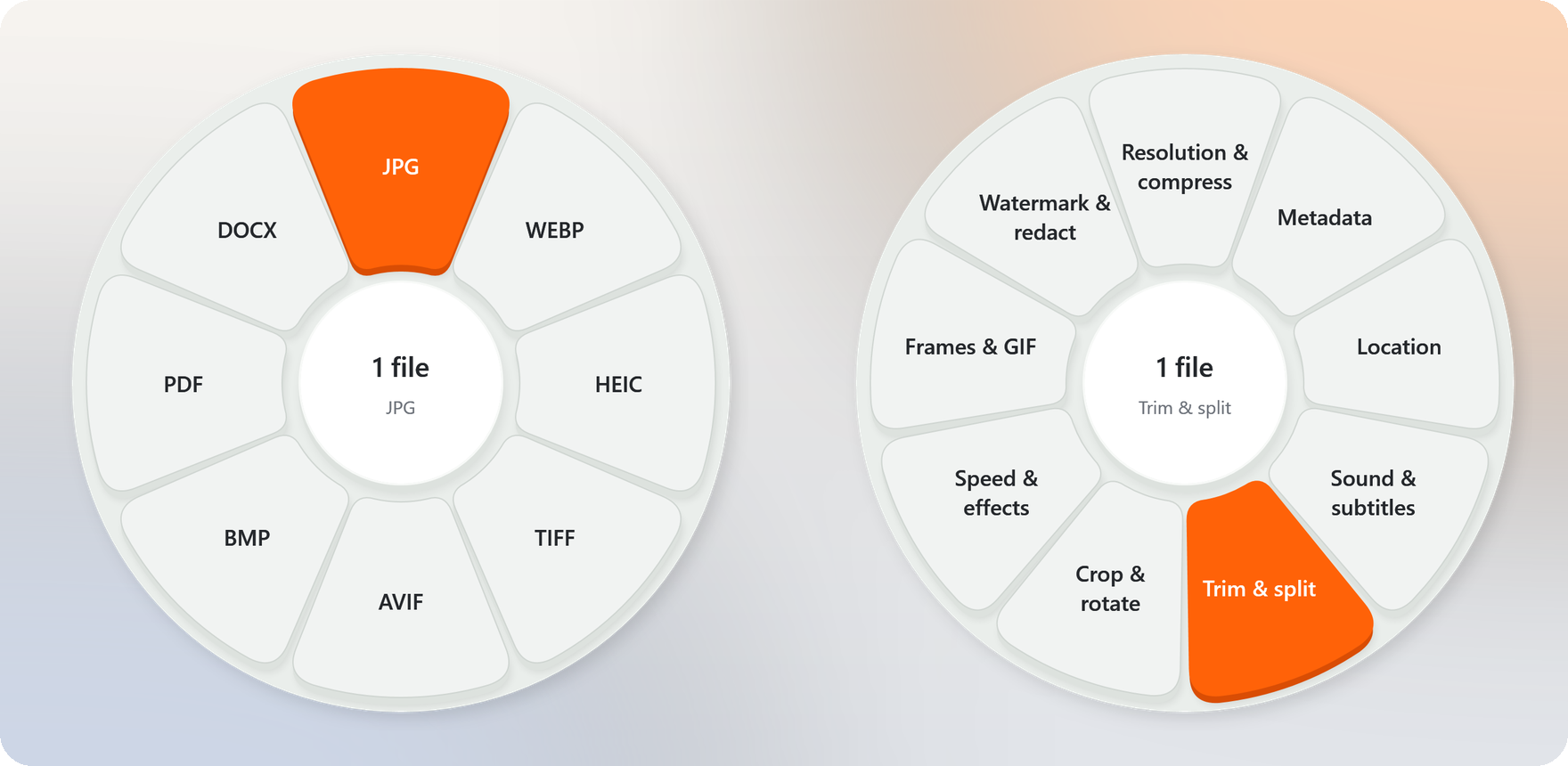
- Hundreds of conversions and 48 tools across images, video, audio, documents and archives, plus 3D models, CAD drawings, fonts, e-books, subtitles, email and data files.
- No main window. The wheel appears while you drag, and the result is saved next to the original file.
- Works offline. Files are processed on your PC and never uploaded. ZestDrop does not connect to the internet.
- Everything included. The download bundles .NET, Python, FFmpeg and 7-Zip; there is nothing else to install.
- English, Simplified Chinese and Arabic, with light and dark appearances.
Download
Windows 10 version 1809 or later, x64.
| Download | Size | |
|---|---|---|
| Microsoft Store | Get ZestDrop from the Microsoft Store | Installs and updates through the Store |
| Online installer | ZestDrop-v1.2.1-windows-x64-online-setup.exe | 2.2 MB to start; downloads and verifies the 156.2 MB installer |
| Offline installer | ZestDrop-v1.2.1-windows-x64-setup.exe | 156.2 MB |
| Portable 7z | ZestDrop-v1.2.1-windows-x64.7z | 152.5 MB |
| Portable ZIP | ZestDrop-v1.2.1-windows-x64.zip | 250.4 MB |
All GitHub download options provide the same complete application; the online installer downloads the offline package during setup. The installers install for the current user (no administrator rights), add a Start menu shortcut and an uninstaller, and offer an optional desktop shortcut. For a portable bundle, extract the whole archive and run ZestDrop.exe from the ZestDrop folder; keep backend, runtime and the DLLs next to it.
The GitHub builds are unsigned, so Windows SmartScreen may warn on first launch. See the release notes and installation and packaging for upgrades and uninstalling.
How to use it
- Start dragging one or more files on the desktop or in File Explorer.
- Press Shift for the format wheel, or Ctrl+Shift for the tools wheel. You can let go of the keys once the wheel appears.
- Release the mouse on an option. Conversions start right away; tools that need settings open a small window.
| While dragging | |
|---|---|
| Shift / F8 | Formats |
| Ctrl+Shift / F9 | Tools |
| Esc, or release outside the wheel | Cancel |
F8 and F9 also work for drags started in other apps. They are not global hotkeys: when you are not dragging, other apps receive them as usual.
New files are saved next to the originals and never overwrite anything; a duplicate name gets a number. Right-click the tray icon to open the latest result, show or cancel jobs, and change settings.
Screenshots
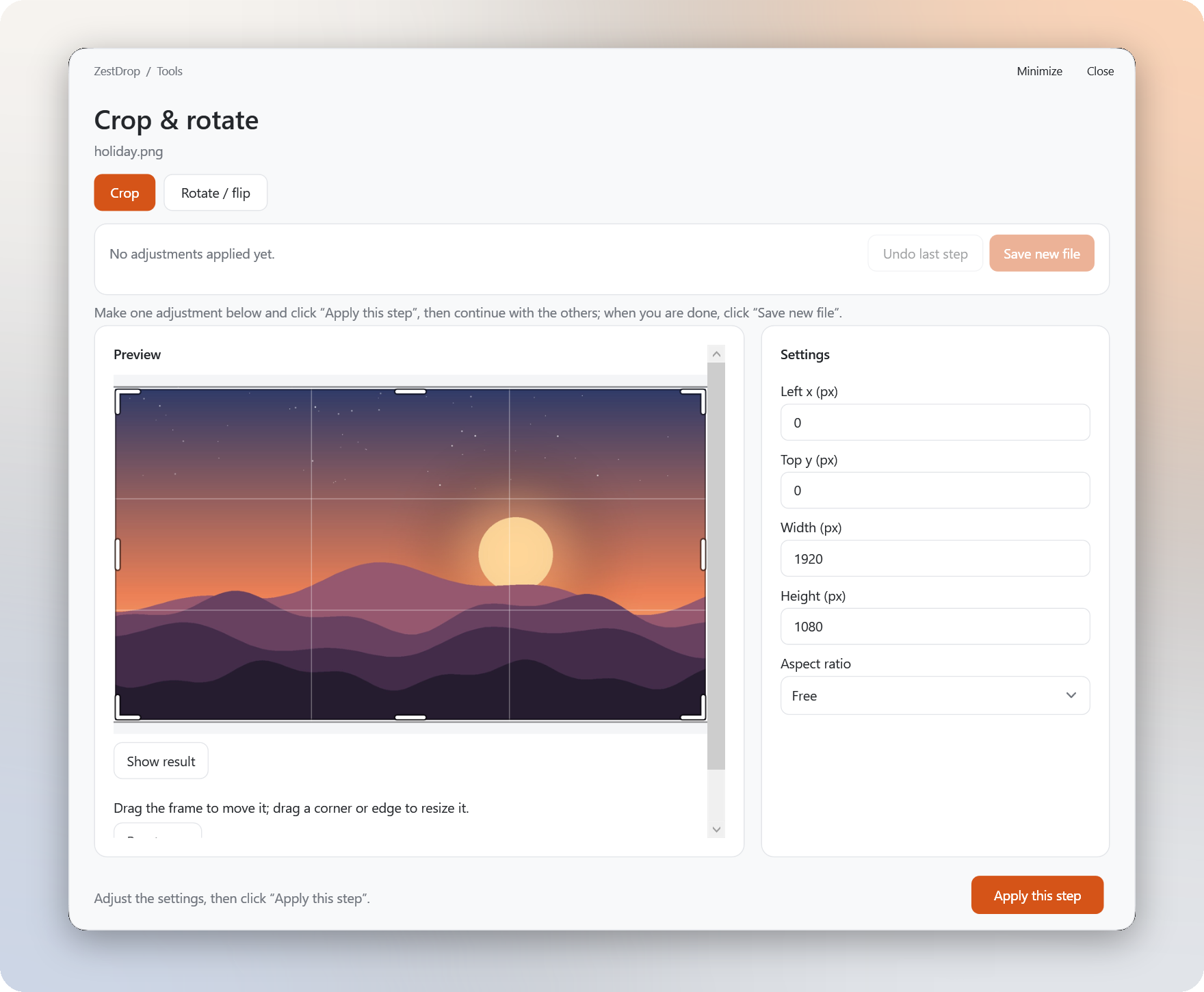
Related tools share one window. Apply one step, continue on the result, undo if needed, and save once.
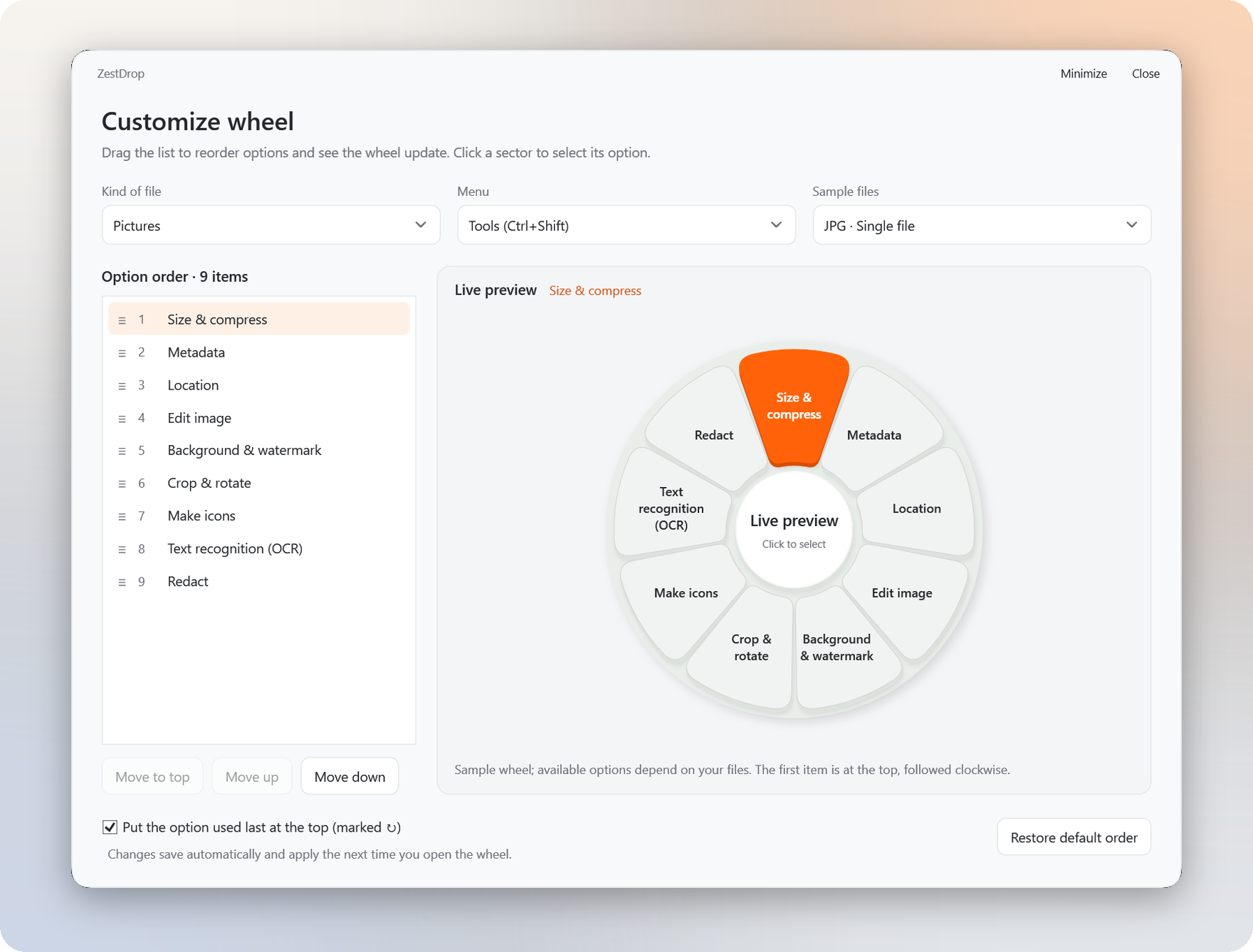
Customize wheel. Drag the list and watch the real wheel change; every change saves by itself.
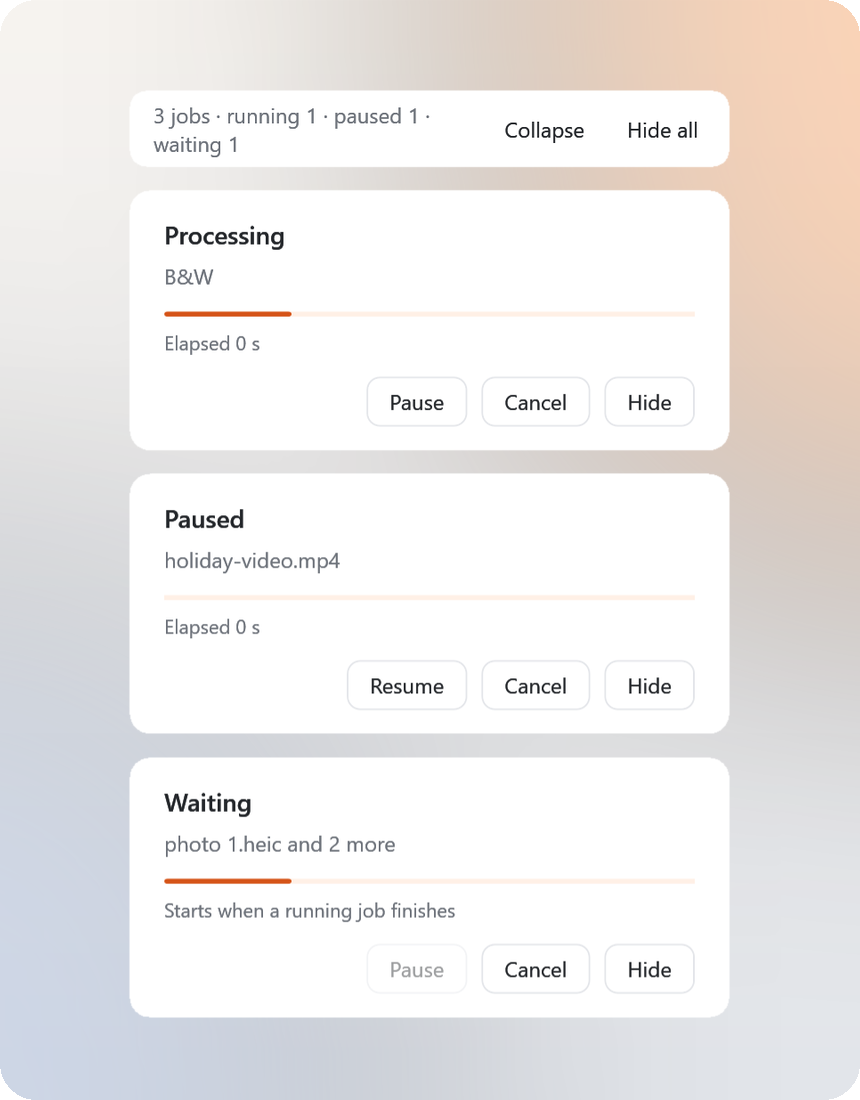
Progress cards. Pause, resume, cancel or hide each job.
What it can do
| Formats | Tools | |
|---|---|---|
| Images | JPG, PNG, WebP, HEIC, TIFF, AVIF, BMP, SVG input; PDF, and DOCX from JPG/PNG | Compress, metadata, location, colour and light adjustments, backgrounds and shadows, crop, rotate by any angle and flip, resize, watermark, icon sets, text recognition (OCR), redaction, animations, collages, combine into a PDF |
| Video | MP4, MOV, MKV, WebM, AVI, WMV, GIF; extract MP3 | Compress, metadata, location, trim, split, crop, rotate, resolution and frame rate, speed (keeps the pitch), fades, reverse and loop, subtitles and soundtracks, watermark, timed redaction, frame capture, contact sheets, GIF, join |
| Audio | MP3, M4A, WAV, FLAC, OGG, Opus, AIFF, WMA | Compress, metadata, loudness normalisation, trim and silence removal, channels and balance, volume and fades, noise reduction, join, ringtones (.m4r), visualiser videos, beep redaction |
| Documents | PDF → DOCX, JPG, PNG, TXT; TXT ↔ PDF, images, SRT, VTT; Word, Excel and PowerPoint exports | PDF compress, merge, split, reorder, rotate and remove pages, passwords, page numbers, headers and footers, extract images, watermark, redaction, searchable PDF (OCR) |
| Archives | ZIP, TAR, GZIP, RAR, 7z | Extract, convert, pack files and folders, AES-256 passwords, split volumes |
| 3D models | GLB, glTF, OBJ, STL, 3MF, PLY; FBX input; PNG/JPG previews | |
| CAD drawings | DWG ↔ DXF; SVG, PDF, PNG, JPG | |
| Fonts | TTF, OTF, WOFF, WOFF2, EOT | |
| E-books | EPUB, KEPUB, FB2, DOCX, Markdown, HTML, TXT; MOBI, AZW3 and CBZ input | |
| Subtitles | SRT, VTT, ASS, SAMI, LRC, TTML, SUB; SCC input | |
| Data and email | JSON, JSON Lines, YAML, TOML, XML, CSV, TSV, vCard; EML and MSG to HTML or text |
The wheel shows only what fits the files you drag; with several files selected it shows the operations they all support. Layout-preserving Office exports need the matching desktop Microsoft Word, Excel or PowerPoint.
More features
- Combined tool windows. When a single photo or video has ten or more tools, related tools share one wheel option and one window, such as Crop & rotate, Size & compress or Sound & subtitles. Prefer the older layout? Choose the two-level wheel on the welcome screen or in the tray menu.
- Location. See where a photo or video says it was taken, then remove that location or set a new one by pasting coordinates or borrowing another photo's. Nothing else changes, and JPEGs are not re-encoded.
- Redact PDF. Black out marked areas and any text you type. The content underneath is removed from the file, not just covered.
- Background jobs. Each job gets a progress card in the corner of the screen. Two jobs run at once and the rest wait their turn; pausing a job suspends it completely, including FFmpeg.
- Audio and video previews. Tool windows have a player with a seek bar and volume, draggable trim handles, and previews of the effect before you save.
- Customize wheel shows the list and a live wheel side by side: drag rows or press Alt+Up / Alt+Down, and pick a file type, menu and sample to arrange each wheel.
- Sticky wheel (optional) keeps the wheel open after you release the mouse, so you can hover and click instead.
- Command line.
zestdrop convert photo.png --to webp,zestdrop watch ./inbox --to pngandzestdrop formatswork from Command Prompt or PowerShell. - Watch folders process new files automatically, with an optional inbox mode that moves each original into an
originalsfolder afterwards. - Appearance and language. Match Windows, Light or Dark; English, 简体中文 or العربية (right-to-left). Both are in the tray menu.
See the usage guide (in Chinese) for every feature and its limits.
Privacy
ZestDrop works entirely on your PC. It has no account, no telemetry and no network access, and your files are never uploaded. Settings are stored in %LOCALAPPDATA%\ZestDrop\settings.json and logs in %LOCALAPPDATA%\ZestDrop\logs. The full policy is at zestdrop.org/privacy.
Build from source
Requires Windows x64 and the .NET 10 SDK. Preparing the portable runtime also needs Python 3.13 with pip and 64-bit 7-Zip (in its default location, or pass its folder).
# Download portable Python and FFmpeg, install pinned packages, and copy 7-Zip
python work/prepare-runtime.py

# Build the self-contained app and copy the Python backend
./build.ps1

# Start the tray app
./outputs/ZestDrop/ZestDrop.exe
- 7-Zip elsewhere:
python work/prepare-runtime.py --sevenzip-dir "D:/Tools/7-Zip". - Already have a complete bundle? Copy its
runtimefolder tooutputs/ZestDrop/runtimeand runbuild.ps1../build.ps1 -SkipRuntimeCheckbuilds the C# app without checking the runtime. - Release packages:
package-exe.ps1(offline installer),package-online-exe.ps1(online installer) andpackage-msix.ps1(Microsoft Store). See installation and packaging.
Project structure
| Path | Contents |
|---|---|
work/ZestDrop/ |
C# WPF app: drag detection, the wheel, tool windows, progress cards and the Office bridge |
work/ZestDrop/backend/ |
Python engines for images, media, documents and archives |
work/F9Checks/, work/ProgressChecks/ |
C# checks for tool parameters, progress and wheel behaviour |
work/test-*.py |
Backend and app dispatch checks using generated fixtures |
packaging/ |
Inno Setup installer definitions, the Microsoft Store manifest, logos, listing text and screenshots |
docs/ |
Usage guide, release notes, installer notes and validation records |
outputs/ |
Build output, runtimes and reports (ignored by Git) |
Microsoft Store package
./package-msix.ps1 builds the app (-SkipBuild reuses outputs/ZestDrop) and packs it into outputs/msix/ZestDrop_<version>_x64.msix with the Windows SDK's makeappx. The package is unsigned on purpose: upload it in Partner Center and the Store signs it. The identity values in packaging/AppxManifest.xml come from Partner Center. packaging/store-listing.md has the listing text, and packaging/make-screenshots.py rebuilds the screenshots from the app's debug render modes.
Before uploading, run ./outputs/ZestDrop/runtime/python/python.exe packaging/check-package.py. It opens the built .msix as a zip (nothing is installed) and checks the manifest, logo sizes, installed path lengths, stray logs, caches or debug files, and the license notices. A Store install is read-only, so ZestDrop writes nothing next to its own files.
Validation
C# checks that need neither Office nor the portable runtime:
New-Item -ItemType Directory -Force outputs | Out-Null
dotnet run --project work/F9Checks -- outputs/f9-parameter-tests.json
dotnet run --project work/ProgressChecks -- outputs/progress-ui-tests.json
After preparing the runtime and building the app, run the backend checks with the portable Python:
./outputs/ZestDrop/runtime/python/python.exe work/test-full-backend.py
./outputs/ZestDrop/runtime/python/python.exe work/test-advanced-branches.py
./outputs/ZestDrop/runtime/python/python.exe work/test-app-cli.py
./outputs/ZestDrop/runtime/python/python.exe work/test-f9-refinements.py
./outputs/ZestDrop/runtime/python/python.exe work/test-progress.py
./outputs/ZestDrop/runtime/python/python.exe work/test-i18n.py
./outputs/ZestDrop/runtime/python/python.exe work/test-location-redaction.py
Run test-full-backend.py first; it generates the shared fixtures. To also pause and resume a real FFmpeg job in the C# checks, set $env:ZESTDROP_APP = (Resolve-Path ./outputs/ZestDrop).Path before running ProgressChecks. Office checks need the desktop Office apps: run test-office.py, then test-office-extra.py. See the validation summary (in Chinese); these records do not cover every PC, DPI setting or manual interaction.
License
ZestDrop's source code is under the MIT License. Python, .NET, FFmpeg, 7-Zip and the other bundled components keep their own licenses; see the dependency record and THIRD-PARTY-NOTICES.txt in the download. The bundled FFmpeg is a GPLv3 build; its source is attached to the v0.1.0 release.
Chinese interface text uses the bundled Source Han Sans CN Medium font, under the SIL Open Font License 1.1. Latin text uses Segoe UI.
Report reproducible bugs in Issues, without uploading private files.