
Matteo842/SaveState
Matteo842/SaveState has 526 GitHub stars and 12 forks. GitHot measured 0 stars in 24 hours and +3 in 7 days. Last checked 2026-11-09 13:39 UTC. Last push 2026-10-29.
Free open-source game save backup manager for Windows & Linux. Drag & drop a launcher shortcut to set up a game; auto-finds saves for Steam, Epic, GOG and 28+ emulators (RetroArch, Dolphin, Yuzu...). Desktop shortcuts for one-click backup, zip rotation, optional cloud sync.
What you can do
- One-click backup & restore with compressed .zip archives and automatic rotation
- Drag & drop from Steam, Epic, GOG, Battle.net, Ubisoft, EA App, Playnite, Heroic, and more
- Smart save detection — Steam awareness, deep scan, and fuzzy matching when paths aren't obvious
- Cloud sync (optional) — Google Drive, WebDAV, FTP/FTPS, SMB/NAS, or Git
Measured star growth
- in 24h
- 0
- in 7 days
- +3
- in 15 days
- Collecting history
- in 1 month
- Collecting history
Net star changes over overlapping periods, not daily totals. Missing measurements are left blank. Stars measure attention, not software quality.
README.md
OriginalSaveState




A user-friendly GUI for Windows and Linux to back up and restore video game save files. Perfect for games without cloud saves, managing multiple save locations, or syncing progress across devices.
🖥️ Looking for the Android/Mobile version? Check out SaveState for Android
Zero Configuration Required — Download, run, and start backing up. No config files to edit, no setup wizard, no account needed. If a guide tells you to configure SaveState before using it, that guide is wrong.
No Admin Rights Needed — This app does NOT require administrator privileges. If Windows asks you to run it as admin, don't — something is wrong.
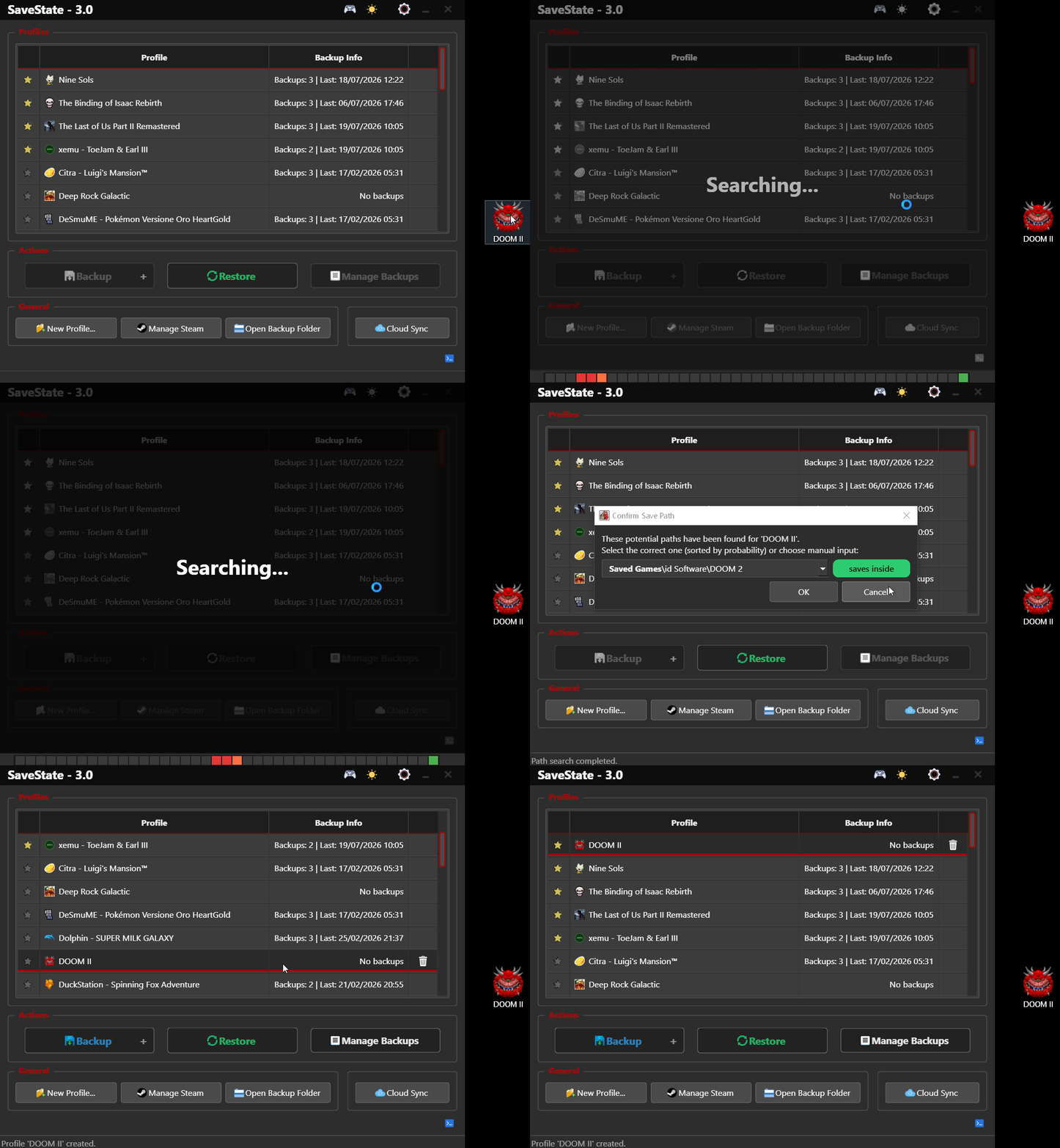
Add a game in one drag: drop any launcher shortcut onto SaveState — it finds the save folder for you.
Features
- One-click backup & restore with compressed
.ziparchives and automatic rotation - Drag & drop from Steam, Epic, GOG, Battle.net, Ubisoft, EA App, Playnite, Heroic, and more
- Smart save detection — Steam awareness, deep scan, and fuzzy matching when paths aren't obvious
- Cloud sync (optional) — Google Drive, WebDAV, FTP/FTPS, SMB/NAS, or Git
- Deep emulator support — RetroArch, Dolphin, ares, and many more with guided setup where it helps
- Per-profile settings, minimize to tray, portable mode, and Linux AppImage
Supported Emulators
SaveState automatically detects save data locations for a wide range of emulators:
| RetroArch ★ | Ryujinx | Yuzu | Rpcs3 |
| Dolphin ★ | ares ★ | DuckStation | PPSSPP |
| Citra | Azahar | mGBA | Snes9x |
| DeSmuME | Cemu | Flycast | ShadPs4 |
| SameBoy | PCSX2 * | Xenia | Eden (yuzu) |
| melonDS | Gopher64 | Citron | Vita3K |
| Mednafen/Mednaffe | ymir | xemu † | KytyPS5 |
★ Enhanced integration with guided setup
* PlayStation 2 memory card functionality in SaveState utilizes and adapts code from the mymcplusplus project, which is based on mymc+ by Florian Märkl and the original mymc by Ross Ridge. The mymcplusplus source code is distributed under the GNU General Public License v3.0. SaveState, including these derived components, is also licensed under GPLv3.
† Original Xbox (xemu) support uses a surgical QCOW2/FATX backup engine developed for this project. The research lab, method notes, and engine that made title-level extract/restore possible (including on HDDs where a game was never launched) are published separately as xemu_tools by the same author (Matteo842).
Install
Windows (recommended) — download SaveState_vX.X.X_Win.zip from Releases, extract, and run. No installer.
Or via WinGet:
winget install Matteo842.SaveState
Linux — download SaveState.tar.gz from Releases, extract the AppImage, then:
chmod +x SaveState*.AppImage
./SaveState*.AppImage
From source: see Building from Source.
Quick start
- Launch the app — defaults work out of the box.
- Drag a game shortcut onto the window (or use Manage Steam / New Profile...).
- Select a profile → Backup / Restore.
Optional: Settings for backup folder, cloud sync, and per-profile limits. Right-click a profile for more options.
Docs
More detail without bloating this page:
- Usage — profiles, restore, launchers, UI screenshots
- Cloud Sync — providers and setup
- How Save Search Works — heuristics & flowchart
- Building from Source — Python / dependencies
Feedback & ideas → Issues. Code PRs are not accepted; see CONTRIBUTING.md.
🔐 Code Signing & Security
This project is supported by the SignPath Foundation for free code signing.

The artifact is signed by SignPath.io using a certificate from the SignPath Foundation.
Legal
License
Distributed under the GNU General Public License v3.0. See the LICENSE file for more information.
Explore related projects
n8n-io/n8n
Fair-code workflow automation platform with native AI capabilities. Combine visual building with custom code, self-host or cloud, 400+ integrations.
209,923 starslanggenius/dify
Build Agentic workflows, RAG pipelines, with rich AI model and tool support on one collaborative workspace. Deploy on cloud, VPC, or self-hosted, so teams move from prototype to production without rebuilding the stack.
160,773 starsmicrosoft/PowerToys
Microsoft PowerToys is a collection of utilities that supercharge productivity and customization on Windows
140,755 starsstablyai/orca
Orca is the place for working with a fleet of agents (e.g. Grok Bot, Claude Code). Run any coding agent with your own subscription. Available on desktop, mobile and remote runtime.
120,262 stars