
Martossien/transcria
Martossien/transcria has 47 GitHub stars and 8 forks. GitHot measured 0 stars in 24 hours. Last checked 2026-11-10 00:58 UTC. Last push 2026-11-06.
Self-hosted meeting transcription portal — speech-to-text, speaker diarization, LLM-corrected transcripts, structured summaries and Word minutes, on your own GPUs. Flask + PostgreSQL, GDPR audit trail, distributed GPU topologies, docker
Measured star growth
- in 24h
- 0
- in 7 days
- Update delayed
- in 15 days
- Update delayed
- in 1 month
- Update delayed
Net star changes over overlapping periods, not daily totals. Missing measurements are left blank. Stars measure attention, not software quality.
README.md
OriginalTranscrIA


Try it right now, no install: the audio preflight demo runs TranscrIA's "will this recording transcribe well?" analysis entirely in your browser (nothing is uploaded — WebAssembly), then transcribes it right there with the same CPU-only Kroko model the portal ships (English/French, ~7× real time on one core).
Self-hosted meeting transcription portal. TranscrIA turns long meeting recordings into usable deliverables on your own GPUs: corrected, speaker-attributed transcripts (SRT), structured summaries, quality reports, and meeting-type-aware Word minutes. No cloud, no per-minute API bill, full data sovereignty.
It is built as a service for teams that process real meetings week after week — not as a thin wrapper around a transcription model. A guided, human-in-the-loop workflow, a production GPU queue, and role-based multi-user access are first-class, not afterthoughts.
The interface and the generated deliverables speak French and English, and since 0.4.3 German, Spanish and Italian in beta (badged in the selector until a native speaker reviews them — reviews welcome). Pick the language from the navbar; default French, French fallback everywhere. See also README français.
Non-technical reader? (project manager, business owner, decision maker) — a business-oriented overview exists: use cases, benefits, example results and the user journey, no jargon → docs/PRESENTATION.en.md (version française).
Project status
Current release: 0.4.7 (releases · changelog). The transcription pipeline, the human-in-the-loop wizard, the GPU queue and scheduler, exports, multi-user access, and both single-box and distributed deployments are validated end-to-end (unit and integration suite plus real-GPU runs). Reference quality relies on gated models (see Requirements and Known limitations). We prefer to state limits plainly rather than imply the tool does more than it does.
Recent milestones, newest first (all on the 0.2.0 stable line):
| Version | What it brought |
|---|---|
| 0.4.7 | The speaker-detection-by-default release — auto diarization: Nemotron 3 for 1 to 8 speakers (no token, seconds, on CPU right at upload — no more waiting for VRAM when a file is uploaded), pyannote above 8 or for an exact count; prebuilt audio.cpp binary (55 MB, sha256-verified, nothing to compile) installed by default; existing installs are offered the switch (Models page, home checklist, doctor) and never switched silently; Qwen 3.8-27B validated on Ollama and vLLM too |
| 0.4.6 | The engines-up-to-date release — audio.cpp v0.9.0, parakeet.cpp, llama.cpp v0.5.0 and opencode brought to upstream; Qwen 3.8-27B on the 32 GB tier (medium reasoning effort, E2E 17/17); Nemotron 3 diarization: 8 speakers, no token, GPU or CPU (7 exact speakers on a 1h52 meeting in 15 s); opencode v1 and v2 both recognized, your own opencode is never overwritten; upstream traps absorbed (--no-mmap removed from llama.cpp, semver) |
| 0.4.5 | The rules-bench release — a campaign of ~35 full runs on real meetings turned lessons into code: correction prompt rebuilt (v4) to speak to the agents that actually correct, human-validated facilitator structuring the summary, length anchored to duration, deterministic guards (ambiguous forms, acronym expansions, SRT structure, repaired markers), a factual diff appended to every correction report, a two-sensor watchdog (7 false kills avoided, measured), audio.cpp/parakeet.cpp/opencode brought up to date |
| 0.4.4 | The first-external-feedback release — the portal's first visit now creates the admin account (no more password hunting: two real tester installs surfaced two real bugs, fixed at the root with drift tests, and the install gate now plays this exact journey); install.sh offers to install ffmpeg when missing; native RTX 50xx (Blackwell) in the GPU images (CUDA 12.8 + torch cu130, sm_120 — driver ≥ 580 required); the Spanish catalog got a native-speaker review (thanks @AlexMnrs, first external contribution) |
| 0.4.3 | Three beta languages, and Windows 11 joins in — full German / Spanish / Italian support (UI, LLM prompts, Word minutes, quality reports, voice-consent form) behind a beta badge until native speakers review the translations (enforced glossaries, formal register, contract tests on every machine-parsed marker; validated by a real-GPU E2E on German audio). And a guided Windows 11 install: one PowerShell script checks the machine, asks two questions (target drive C:/D:/E:, bundled or slim image) and drives WSL2 + Docker Desktop end to end, re-runnable after each reboot |
| 0.4.2 | Install for everyone, and 8 GB gaming cards join the party — install.sh gets an express mode (auto-detections, one summary, one confirmation; --expert keeps the step-by-step), a first-run checklist on the home page shows what is missing with a fix link, and a one-page QUICKSTART goes from zero to first minutes. New 8 GB LLM tier (Qwen3.5-4B Q5_K_M, qualified on real meetings) plus a CPU profile (Kroko, no GPU): the full workflow now runs on 8-11 GB cards — native, Docker slim and bundled (the image bakes both tiers and the entrypoint auto-downgrades under 12 GB). The Models page drives Ollama end-to-end (list + one-click model switch), the SRT editor gains a reliability layer (per-segment doubt indicators, "next doubtful" navigation, restorable removed-segments panel), summaries start at upload by default, and worker-based STT engines get batched summaries (one model load instead of one per chunk) |
| 0.4.1 | The portal upgrades itself, and certain STT hallucinations vanish from deliverables — the Maintenance page can check for a newer release (strict network opt-in) and upgrade the install in two clicks (verified tag only, systemd oneshot, fallback backup, live progress). Per-engine hallucination signature catalogue mined from real meeting audio (whisper subtitle credits, voxtral polite fillers, cohere learned tics): confirmed hallucinations are deleted only with double proof (signature + acoustic corroboration), always traced and recoverable; doubtful ones are flagged to the correction LLM. Speech-free audio (noise, music, silence) now fails in seconds with a clear message instead of feeding an empty transcript to the LLM |
| 0.4.0 | Meetings come to you — with no inbound port — four platforms validated for real: Jitsi (browser bot), Visio (La Suite numérique) (native LiveKit client, no browser), Zoom (official SDK, no scraping) and Google Meet (Pub/Sub pull — no bot in the meeting at all, from calendar to minutes). All four work outbound only: nothing to open on the firewall. Scheduling from the UI, platform credentials handed only to the runner that claims the session, room passcode encrypted at rest, live states on the job card, and an install kit for a remote runner. Separate tracks transcribe each participant apart: overlapping words survive, each under its own name. Zoom RTMS and Teams ship prepared but not validated (logic tested, network wiring unconfirmed — they are the only two requiring a public entry point) |
| 0.3.9 | Enterprise identity — delegate authentication to your identity provider: OIDC single sign-on (Keycloak, Entra ID…), a trusted authentication proxy (Authelia, oauth2-proxy — headers trusted only from the proxy's socket address), and LDAP / Active Directory directly (mandatory LDAPS/StartTLS with certificate verification, injection-safe filters, AD result codes in the audit, nested groups). Plus personal API tokens (tia_…, Authorization: Bearer) for scripts. Everything is configurable from the admin UI with just-in-time provisioning and group→role mapping; every authentication path is audited (PSSI/DPO). Opt-in — local accounts stay the default and a break-glass local login is always available |
| 0.3.8 | Speed & operator experience — served STT goes parallel: multi-instance pools (extra_urls + one-click plan on the new /admin/hardware page — real-meeting gains up to 3.7× on a 2 h recording, single-GPU machines benefit too); summary auto-starts at upload (opt-in); a new one-pass srt_moss profile (transcription + speakers, zero wizard step, guarded against silent skips and truncation — short meetings); freshness guarantees for exports (stale-synthesis banner, always-fresh ZIP); reset-admin-password CLI; a non-Latin drift guard that clears qwen3asr for primary-backend use; safer defaults measured in production (persistent MOSS site, 120 s opencode watchdog grace) |
| 0.3.7 | Quality & hardening — the 15-wave code-quality campaign delivered end to end: layered architecture locked by CI ratchets, a single GPU probe and unified kill patterns, zero legacy install modules, a generated API reference with a marked scriptable contract (⭐ upload → process → status → download), and real concurrency/deployment bugs found and fixed along the way (concurrent-job LLM race, resource-node runtimes env, audiocpp --with-model paths) |
| 0.3.6 | Served STT runtimes — audio.cpp and parakeet.cpp become first-class engines: pinned installer builds, on-demand start before jobs (all-in-one and GPU-node topologies), per-engine health checks, VRAM admission, native fallback — qualified on the real-meeting benchmark (qwen3asr 0.421 WER, nemotron 0.492 at ~2 s/5-min window) |
| 0.3.5 | New engines & smarter editor — MOSS-Transcribe-Diarize backend (transcription + speakers + timestamps in one pass, best text WER of our benchmark) and Kroko-ASR, the no-GPU backend (155 MB per language, CPU only, matches our GPU engines on real meetings); after editing the SRT, the editor now offers a quick DOCX or an LLM-updated synthesis (proposed, never automatic, versioned) |
| 0.3.4 | STT engines & benchmarks — engines measured on real French meetings against a human reference (published results); new Mistral Voxtral Mini 3B backend (Apache-2.0, best measured WER); targeted multi-STT on by default (arbitrated re-transcription of degraded segments only — zero cost on clean audio, best-effort) |
| 0.3.3 | Polish — the last French leftovers in the English UI closed; the deliverable language now follows the interface choice |
| 0.3.2 | Bilingual French / English end to end — web UI, generated deliverables (minutes, corrections, DOCX, reports), installer, doctor, voice-consent PDF. Default stays French; English is an explicit choice (navbar switcher, per-user preference, per-job deliverable language, install-time question). More languages need no refactor |
| 0.3.1 | Operator tooling — a Maintenance admin page (create, schedule, restore backups) and a Models page that downloads the models this install needs |
| 0.3.0 | Ingestion of the documents presented in a meeting (PDF / Word / PowerPoint) to ground both the summary and the SRT correction |
Jump to: What it does · Screenshots · Built for teams · Processing profiles · How it works · Installation · Deployment · Known limitations · Tech stack · Documentation
What it does
- A real audio module, not an
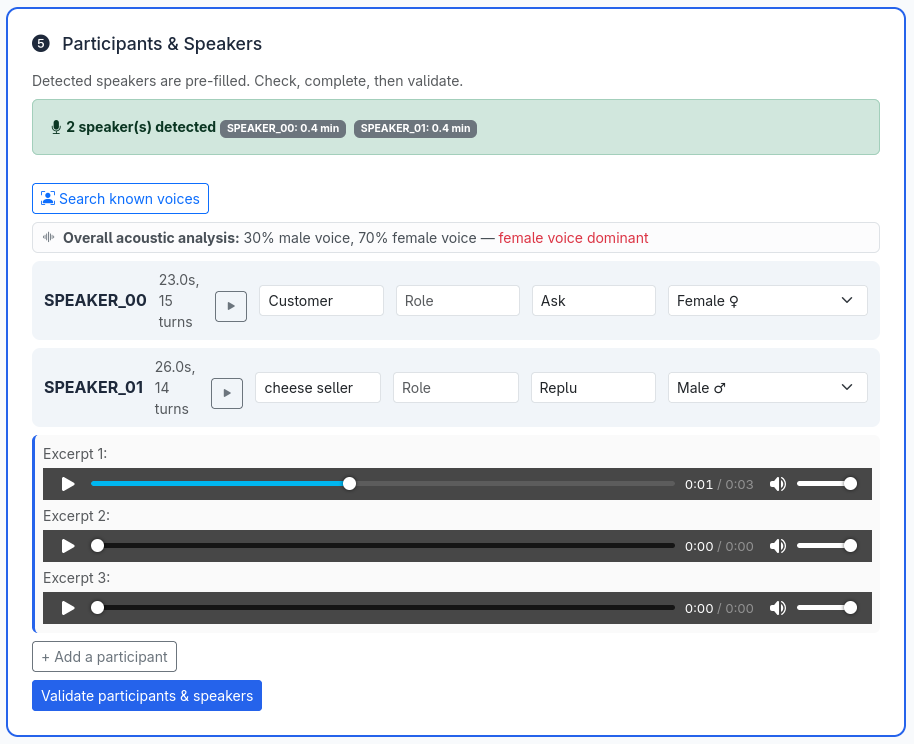
ffmpegwrapper. Acoustic preflight (SNR, clipping, bandwidth, risk flags), speech/music/noise scene analysis, a per-window difficulty timeline shown before transcription, optional Demucs source separation, loudness normalization, and Silero VAD — all coordinated with GPU/VRAM management. - Human-in-the-loop where it matters. Detected speakers come with playable audio excerpts, talk time, and an acoustic gender hint; users validate names, participants, and a domain lexicon before the final pass. Known-voice matching is consent-based (signed form, hashed proof, source audio deleted by default).
- LLM arbitration with guardrails. A local OpenAI-compatible LLM produces the structured summary, corrects the SRT using the validated lexicon and context, and a final review pass harmonizes the deliverables — with anti-hallucination cleanup, retry-then-fail-loud semantics, and prompts editable in the admin UI. You can ground the summary further by pasting the meeting invitation and attaching the documents presented (PDF, Word, PowerPoint): their text is extracted to feed the agenda, terminology, and structure to the LLM (images are deferred to future vision support; emails are stripped and the files themselves are never stored).
- A built-in transcript editor made for real proofreading. A full-screen workshop on any finished job: click-to-edit text with audio auto-pause, a zoomable real waveform with draggable segment handles (server-computed peaks, smooth even on 4-hour meetings), split-at-cursor, multi-select actions (merge / reassign / delete), solo-listen per speaker, quality findings as a clickable checklist, and three safety nets — undo/redo, a server-side draft every 5 seconds, and explicit restorable versions.
- Chat with the finished deliverables. On a completed job's results page, discuss the transcript, summary, and quality findings with the local LLM (fast, read-only answers), then apply a change in one click: a corrected term is fixed coherently across every deliverable (summary, SRT, structured data). Each apply snapshots a restorable version, and exports are regenerated at download so they always reflect the latest state.
- Chat with your meetings. Ask a free-text question across every meeting you are allowed to see ("what did we decide about the training budget this autumn?", "where do we stand on the actions from the 12th?"). The permission filter runs before the LLM, every meeting used is cited by number and verified after, and a meeting that is not found is said to be not found — the answer escalates from short cards to full summaries, and to one transcript only on request. A "My actions" view lists every action item, by meeting or by owner, with no LLM at all (docs/DISCUTER_REUNIONS.md).
- Production-grade orchestration. A persistent GPU job queue (priorities, anti-starvation aging, pause/resume, scheduled starts), VRAM-aware admission per remaining pipeline phase, calendar-based GPU scheduling, a resumable pipeline (a re-queued job never redoes finished work), and machine-calibrated time estimates that learn from your own past runs. "Waiting for VRAM" is a first-class, admin-alerted state, not a silent failure.
- Compliance by design. Multi-user RBAC (roles, groups), a full GDPR audit trail (actor, IP, timestamp, filterable and exportable), consent-gated voice profiles, and secrets kept out of the versioned configuration.
Screenshots
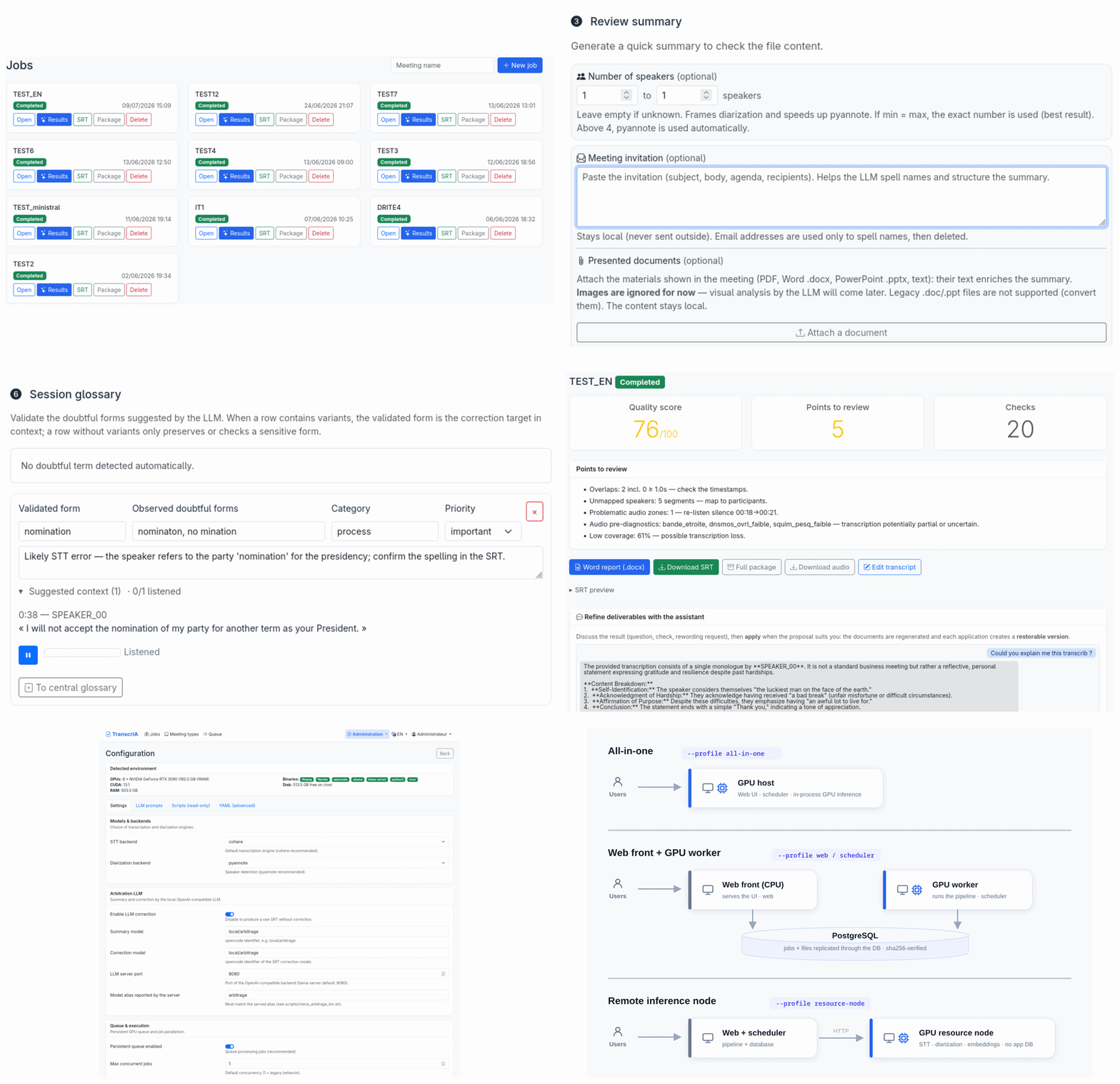
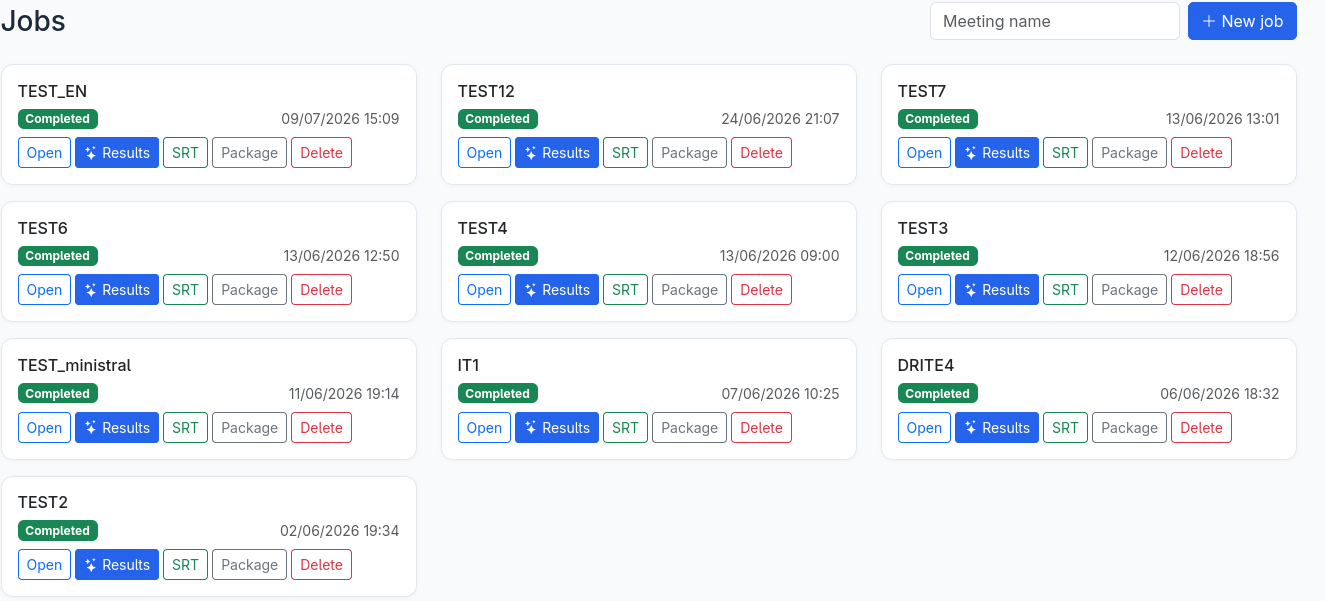
Home — jobs at a glance, one-click SRT / ZIP downloads
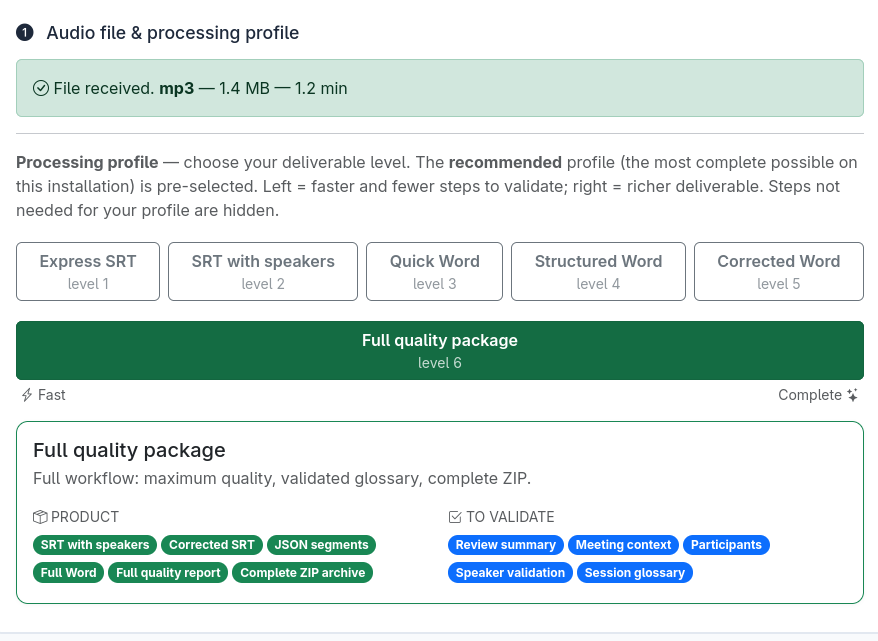
Processing profiles — pick your deliverable on a single slider right after upload; the portal pre-selects the most complete profile your hardware can run and hides the steps it doesn't need
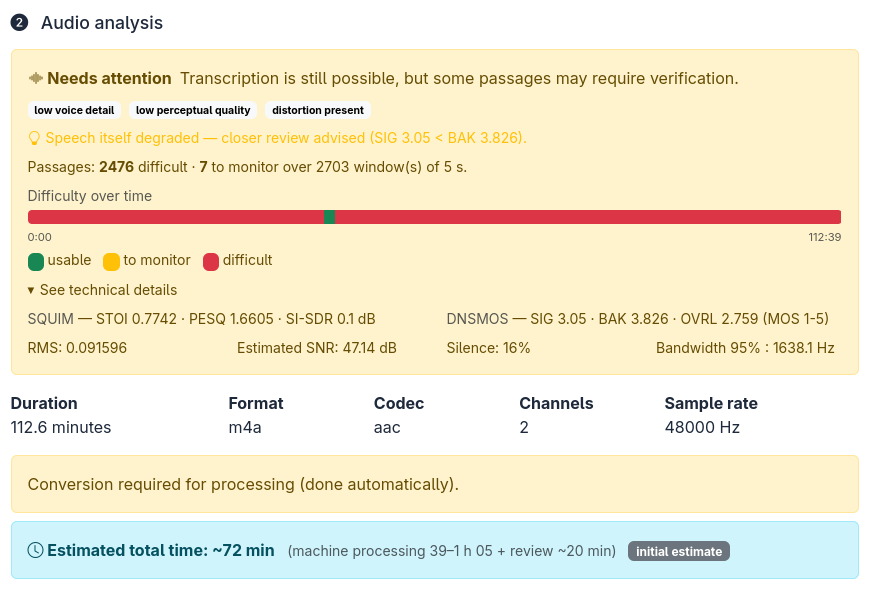
Audio analysis — an honest verdict before you spend GPU time: SQUIM/DNSMOS perceptual scores, SNR, a per-window difficulty timeline, and a calibrated time estimate. A rough recording is flagged "needs attention", not silently transcribed into mush
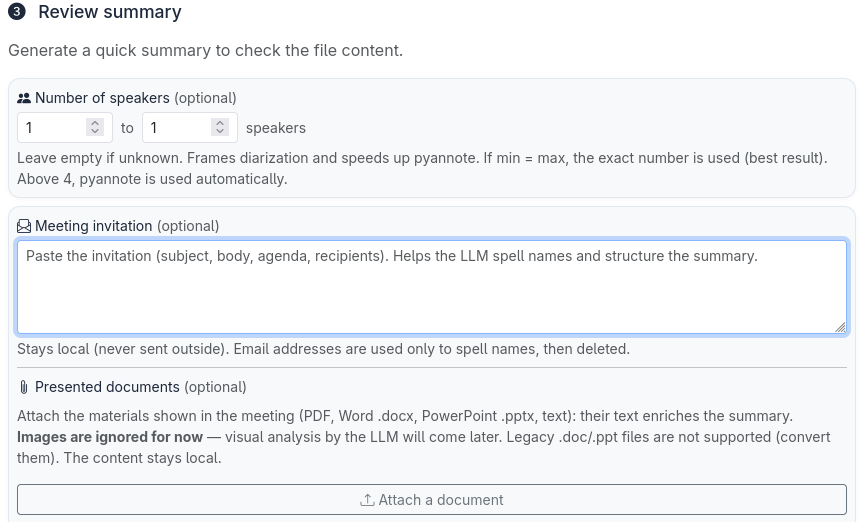
Bring the meeting's own documents — paste the invitation and attach the slides, agenda or briefing note (PDF, Word, PowerPoint). Their text is extracted (images deferred to future LLM vision) and used two ways: it grounds the summary in the real agenda and terminology, and it becomes a spelling reference so the correction can fix named entities — e.g. a product name or an acronym wrongly transcribed. Everything stays local; emails are stripped and the files themselves are never stored
Speaker validation — listen to excerpts, name speakers, acoustic gender hints, and match a detected speaker against your consent-gated voice enrollment database (GDPR) in one click
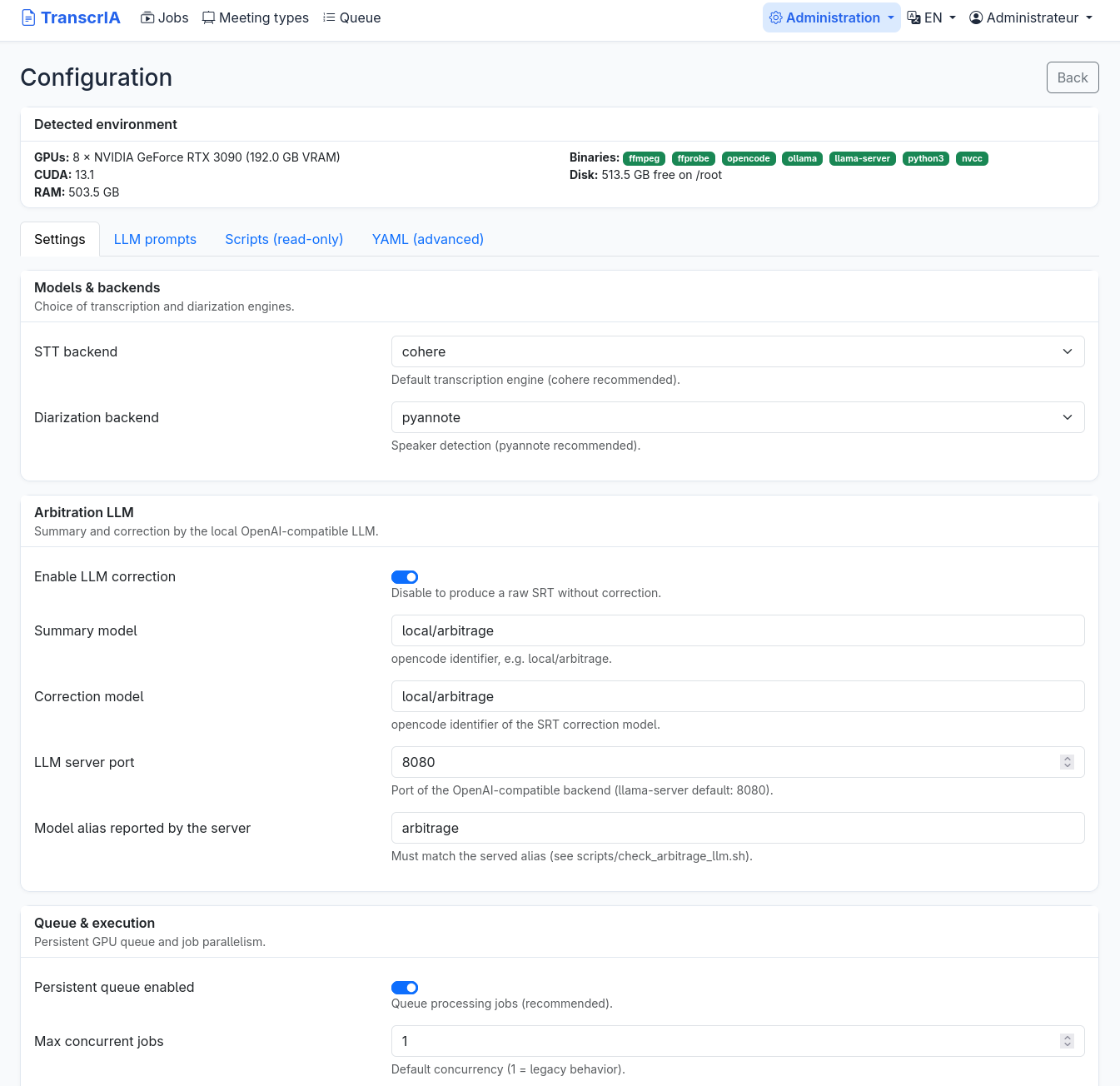
Configuration — detected hardware, friendly forms, LLM prompts editable in-app, full YAML for experts
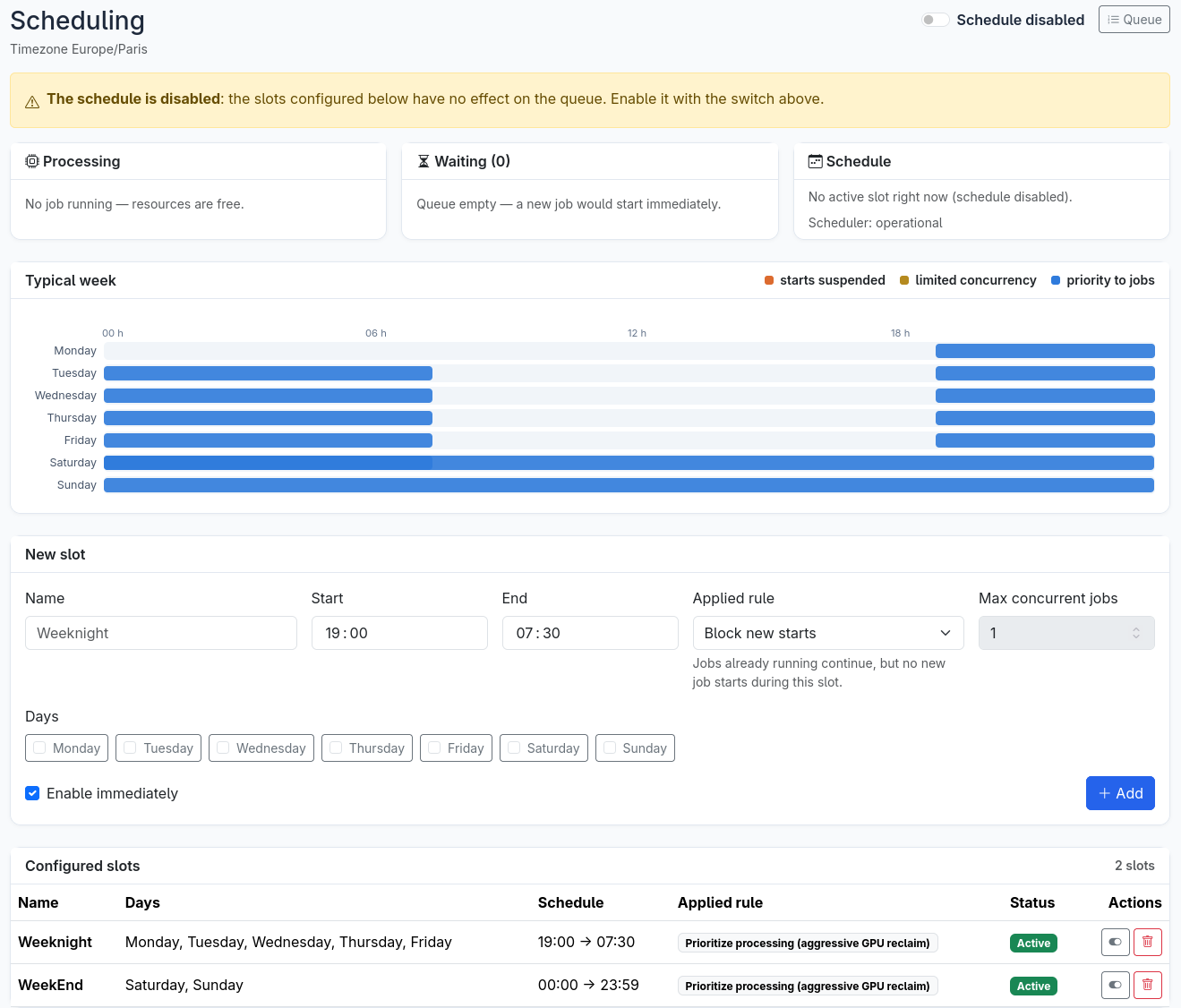
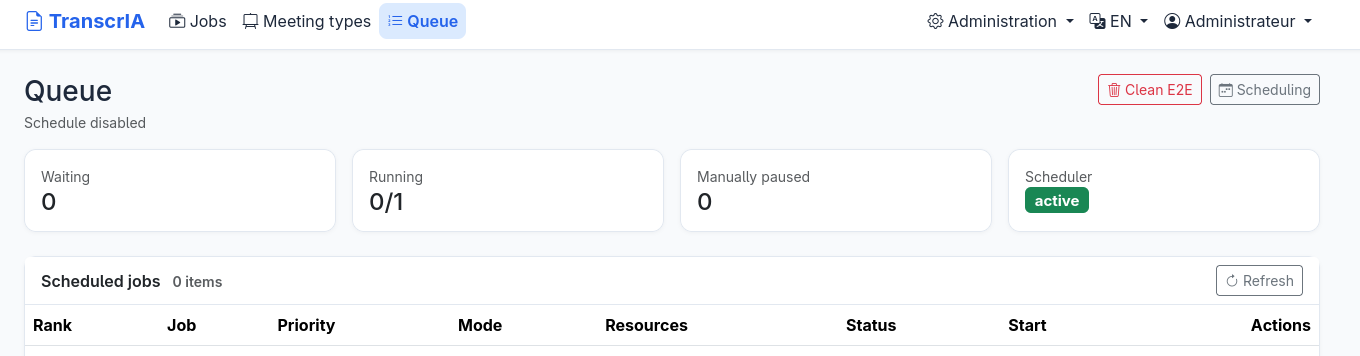
GPU scheduling and queue — calendar windows, persistent queue with priorities and estimated wait times
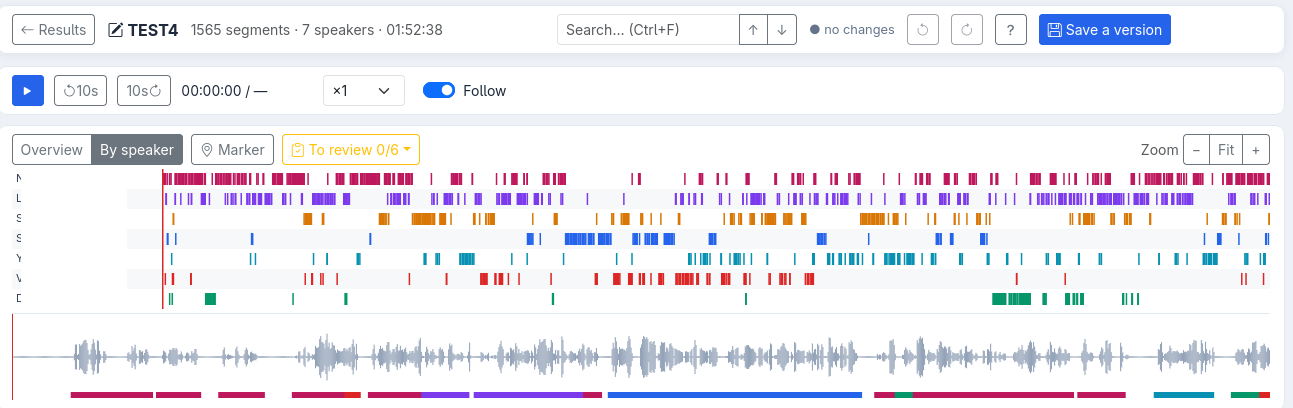
Built-in editor — proofread like a document: click any line to fix the text (audio auto-pauses while you type), rename or reassign a speaker in one place, merge or split segments. The timeline puts every speaker on a lane over the whole meeting, with a per-speaker colored waveform you click to jump and drag to zoom; server-computed peaks keep it smooth on multi-hour recordings
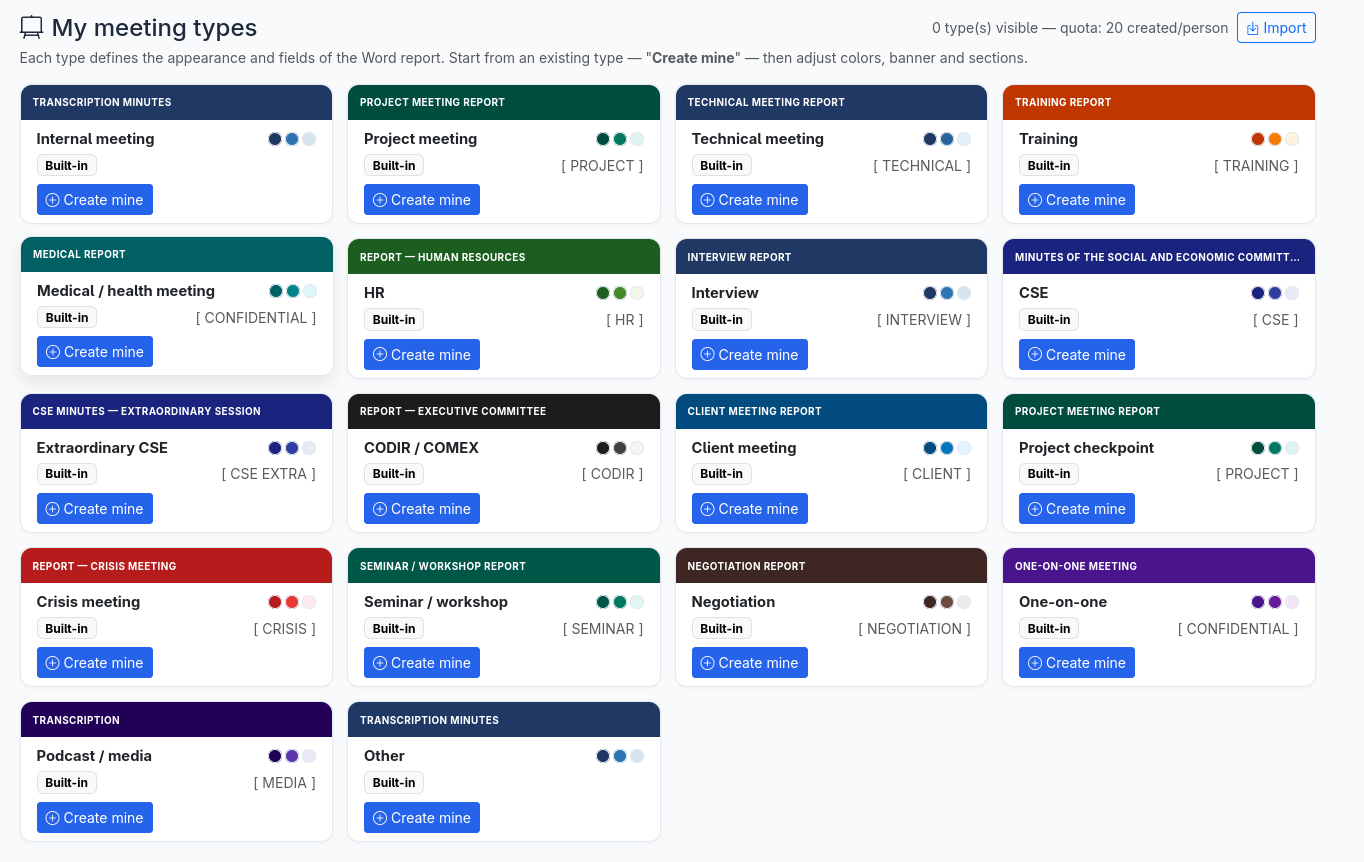
Word report templates — 18 built-in meeting types (works council, executive committee, project review, crisis, HR, negotiation, and more), each with its own cover theme, badge, and structured fields. Duplicate one, adjust palette / banner / sections, add a logo, preview the DOCX live, then share it to a group or carry it between installs as JSON
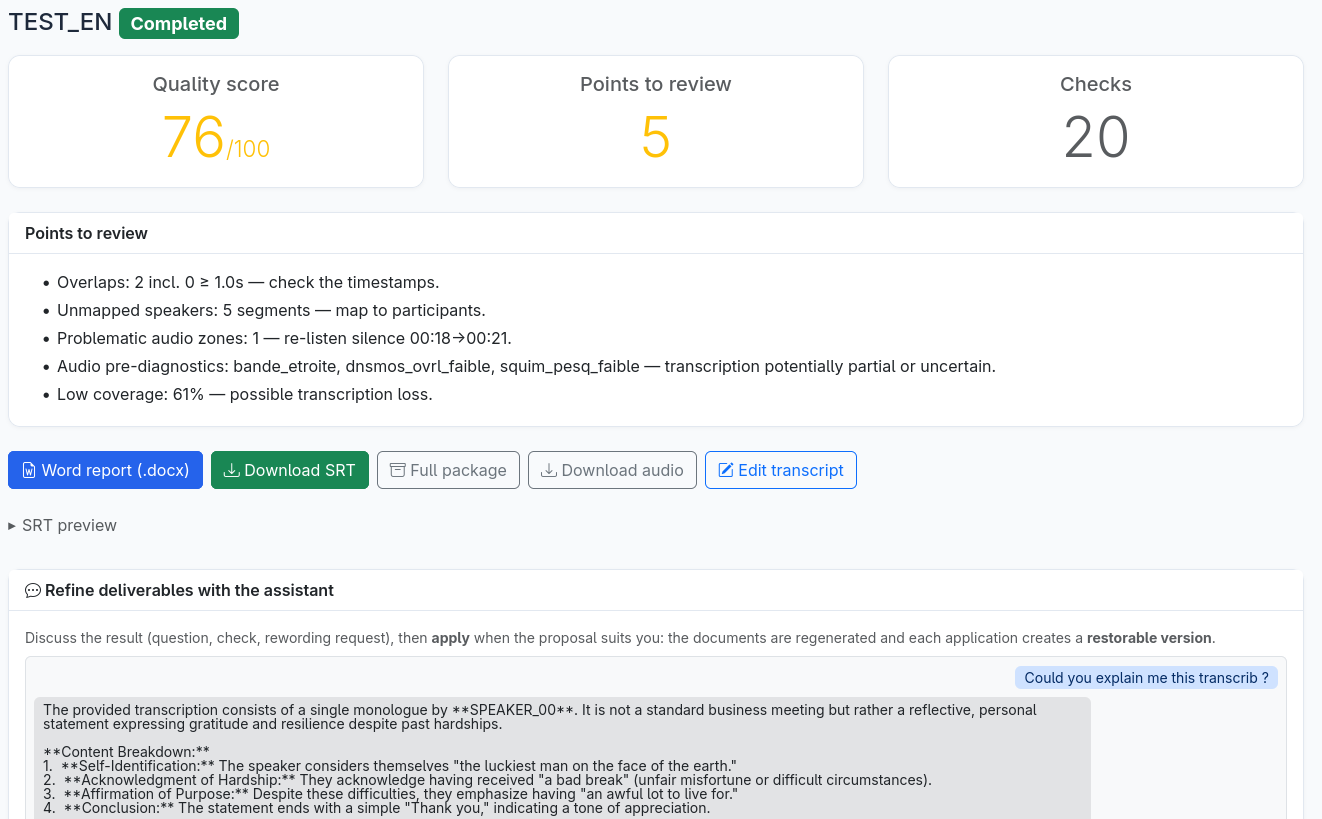
Chat with your deliverables — ask a question about the transcript, summary or quality findings and get a fast, read-only answer; then, when a rewrite suits you, apply it in one click. A single fix propagates coherently across the SRT, the summary and the Word minutes, each apply saved as a restorable version and the exports regenerated on download
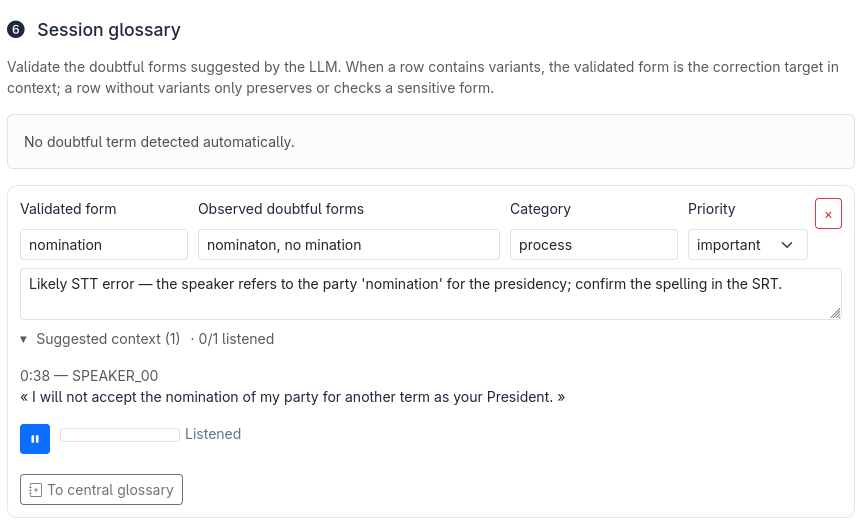
Human correction feeds the lexicon — a suspect term (here "nominaton", an STT mis-spelling of "nomination") comes with the audio excerpt you can play to hear what was actually said. Confirm the correct spelling, set a category and priority, then add it to the lexicon in one click: the LLM correction applies it across this transcript and reuses it on future jobs
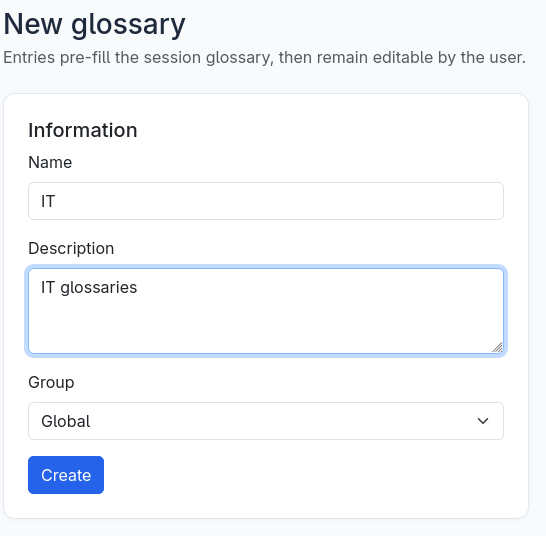
Central lexicons — a shared glossary scoped either Global (the whole install) or to a single group. Its entries pre-fill the session lexicon on every job, then stay editable per meeting; managers curate them, and a term corrected on one job (above) can be promoted straight into one — so the whole team spells "Kubernetes" or an internal acronym the same way
Processing profiles
After upload, you choose a deliverable on a single slider instead of an opaque fast/quality switch. The portal greys out profiles your hardware cannot run, pre-selects the most complete one that fits, and then executes only the pipeline phases — and reserves only the GPU/LLM — that the chosen profile actually needs.
| Profile | Deliverable | Pipeline |
|---|---|---|
| Express SRT | Plain subtitles | STT only |
| SRT with speakers | Speaker-attributed subtitles | STT + diarization |
| Single-pass speaker SRT (MOSS) | Speaker-attributed subtitles, zero wizard step | One MOSS pass (opt-in, short meetings — guarded against silent skips) |
| Quick Word | Basic Word report | STT + summary |
| Structured Word | Structured Word (context, participants) | STT + diarization + LLM extraction |
| Corrected Word | Corrected, enriched Word | + LLM correction and final review |
| Full quality package | Full minutes with quality file | Complete pipeline + quality scoring |
Word minutes adapt to built-in meeting types (works council, executive committee, project review, crisis, and more), and teams can create, theme, and share their own types — see docs/archive/TYPES_REUNION_PERSONNALISES.md.
How it works
upload -> audio diagnosis -> quick summary (STT + LLM) -> context, participants,
  lexicon (human validation) -> final pipeline:
  preprocess -> transcription -> diarization -> LLM correction -> final review
  -> quality scoring -> exports (SRT, segments, quality report, DOCX minutes, ZIP)
  -> results page: refine chat (discuss / apply, versioned and restorable)
- STT backends (interchangeable): Cohere transcribe (default), Whisper large-v3 /
faster-whisper, Mistral Voxtral Mini 3B (Apache-2.0), IBM Granite Speech, NVIDIA
Parakeet TDT (experimental), MOSS-Transcribe-Diarize (experimental — transcription,
speaker labels and fine timestamps in a single pass; best text WER of our benchmark),
and Kroko-ASR — the no-GPU option: per-language
streaming Zipformer models (~155 MB) on sherpa-onnx that matched our best GPU engines
on real meetings, CPU only. All can also be served by a remote OpenAI-compatible
server (vLLM, SGLang). Going further, two C++ serving runtimes are first-class
engines: audio.cpp (
qwen3asr— Qwen3-ASR-1.7B, 2nd-best WER of our whole benchmark) and parakeet.cpp (nemotron— ~2 s per 5-minute window). TranscrIA installs them pinned (one command each), starts them on demand before jobs, health-checks and stops them — the same lifecycle discipline as the local arbitration LLM (see docs/EXTERNAL_STT_RUNTIMES.md). We benchmark everything on real French meeting recordings against a professional human transcript — WER, an English-drift detector, a multi-run LLM judge and human reading of the failure modes: docs/STT_BENCHMARK_REAL_MEETINGS.md (English). - Diarization backends: "auto" (default) = NVIDIA Nemotron 3 via audio.cpp for 1 to 8 speakers (no token, seconds, CPU at upload) with pyannote.audio above 8 or for an exact count; pyannote, Sortformer (NeMo) and Nemotron 3 also selectable explicitly.
- Arbitration LLM: a local OpenAI-compatible server (Ollama / llama.cpp / vLLM), selected per hardware from a benchmarked VRAM tier catalog (12 → 64 GB, one validated model + quant + context per tier) — see docs/LLM_TIERS.md (English).
Every phase is checkpointed: a re-dispatched job resumes at the first incomplete phase, even on a different worker.
Built for teams, not just for runs
Most of the work went into the parts around the transcription — the things you need once real people share the tool week after week.
- Roles and groups. Four roles (admin, manager, operator, viewer) and groups with their own admins; jobs, lexicons, and meeting types can be shared to a group or to the whole install.
- Enterprise identity (SSO). Optional single sign-on through OIDC (Keycloak, Entra ID…), an authentication proxy (Authelia, oauth2-proxy), or LDAP / Active Directory directly — with just-in-time provisioning and group-to-role mapping, configurable from the admin UI. Personal API tokens let scripts drive the stable API. Local accounts stay the default and a break-glass local login is always available (docs/GESTION_IDENTITE.md).
- Central lexicons. Shared, group-scoped glossaries that admins curate and users apply. A term validated on one job can be promoted into a central lexicon, so the whole organization spells "SIRET" or an internal acronym the same way next time.
- Optional cloud LLM. The arbitration LLM can be an external provider (Mistral, Ollama cloud, OpenRouter…) instead of a local model — a pass-through the administrator chooses and must explicitly approve, with a permanent banner, a per-group ban and per-job provenance. No GPU needed for that tier (docs/LLM_CLOUD.md).
- Audit trail and data protection. Every sensitive action is logged (actor, IP, timestamp) in a filterable, exportable trail; retention is configurable with an automatic purge, documented for a DPO in docs/AUDIT_DPO.md.
- Voice enrollment. Consent-gated known-voice matching: a signed form and a hashed proof are required before any embedding is generated, and reference audio is deleted by default.
- Backup, restore, and guided upgrade — CLI or admin UI. An Administration → Maintenance
page creates, lists, downloads and restores backups (restore runs a privileged one-shot that
stops the service, restores, and restarts) and installs a scheduled backup (systemd timer);
the same operations plus a tooled, migration-aware upgrade live on the
maintenanceCLI — on SQLite or PostgreSQL. - Model manager. An Administration → Models page shows which models this install needs
(arbitration-LLM tier for the detected VRAM, STT, diarization), checks free disk, and downloads
them with a progress bar — HuggingFace token handled for gated models (pyannote, Cohere),
one-click activation of the served LLM. Also on the
maintenance opencode-upgradeCLI. - Configuration you can actually manage. A classified 423-key schema drives a friendly
admin UI and a generated reference; secrets stay out of the versioned config, and a
doctorpreflight validates the whole thing before you go live.
Installation
TranscrIA runs on Linux with an NVIDIA GPU. Two paths, depending on your goal — and a single-page walkthrough from zero to your first minutes: docs/QUICKSTART.en.md.
Recommended — install on a GPU host
The installer is the reliable path for a real deployment: it detects your GPUs and CUDA,
sets up the virtual environment and CUDA-matched PyTorch, helps you pick and download the
arbitration LLM that best fits your VRAM, and installs a systemd service.
git clone https://github.com/Martossien/transcria.git
cd transcria
./install.sh          # EXPRESS mode: detects everything, shows ONE summary, asks ONE confirmation
./start.sh            # database migrations, then start the server -> http://localhost:7870
Prefer to decide each step yourself? ./install.sh --expert restores the historical
question-by-question flow. After login, a first-run checklist on the home page
points out anything still missing (models, GPU, correction engine) with a fix link
per item — it disappears once everything is green.
Once installed as a service, manage it the usual way (this is how it runs in production):
sudo systemctl enable --now transcria
sudo systemctl status transcria
Validate any install with the built-in preflight — no GPU needed, no side effects:
venv/bin/python scripts/doctor.py            # config, DB schema, LLM server, opencode, storage
venv/bin/python scripts/doctor.py --strict   # warnings become failures (for deployment gates)
Options, model prerequisites, and distributed roles are documented in docs/INSTALL.en.md (exhaustive French reference: docs/INSTALL.md).
Just evaluating — one Docker command
The bundled image ships with default models baked in, so there is no token, no download, and it works offline. You only need an NVIDIA GPU (compute capability 7.5 or newer, 8 GB VRAM or more — under 12 GB the smaller LLM tier is picked automatically) with Docker GPU access.
scripts/docker_quickstart.sh --bundled # try it: models included, no token
Image details, the slim-vs-bundled trade-off, the GPU/VRAM compatibility table, and rollback are in docs/DOCKER.en.md (French: docs/DOCKER.md).
First login: open
http://localhost:7870— on the first visit, the portal asks you to create the administrator account (username + password of your choice). For automation, setauth.first_admin_passwordinconfig.yamlbefore first boot and the account is created without any page shown.
Deployment topologies
The installer takes a --profile that selects the role each machine plays; the same
codebase and configuration schema serve all of them.
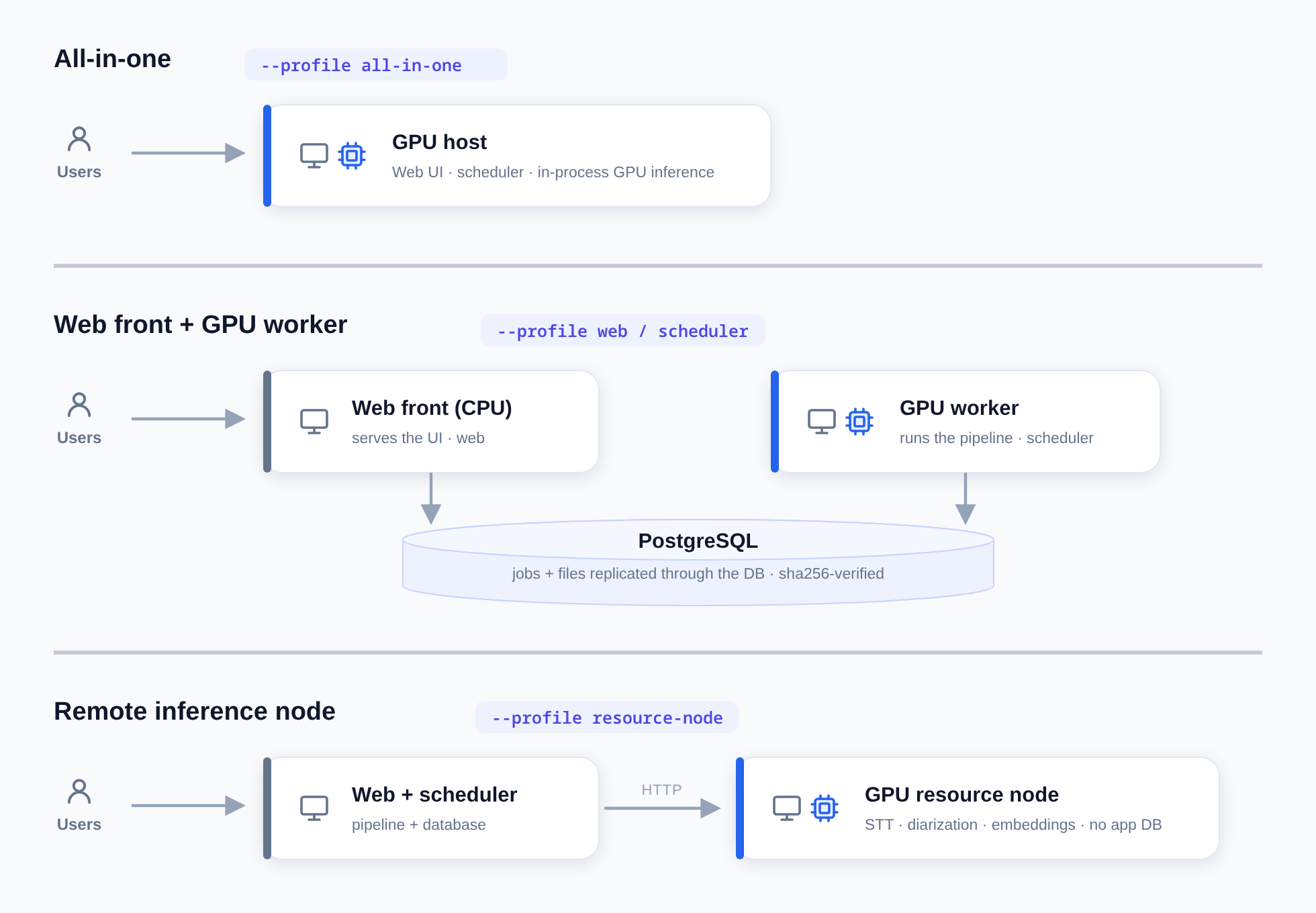
- All-in-one (
./install.sh --profile all-in-one, the default) — a single GPU box runs the web UI, the scheduler, and in-process GPU inference. - Web frontend + GPU worker — a CPU-only front (
--profile web, "frontale") and a GPU worker (--profile scheduler) share a PostgreSQL database; job files are replicated through the database (no shared filesystem to operate, sha256-verified). See docs/STOCKAGE_PARTAGE_JOBS.md. - Remote inference node (
--profile resource-node) — a GPU resource server that runs no application database and serves STT, diarization, and voice embedding over HTTP with VRAM autonomy (reuse, launch on demand, explicit 503 under pressure). See docs/SERVICE_RESSOURCES_GPU.md.
The same roles exist as container entrypoints for Docker deployments (docs/DOCKER.en.md).
Known limitations
We keep this list honest and current.
| Area | Limit | Behaviour beyond it |
|---|---|---|
| Meeting length | Tested to about 4h30 (~3,000 segments) | Editor and pipeline stay responsive; beyond that is not guaranteed |
| Upload size | security.max_upload_size_mb (1 GB default) |
A clear "file too large" (413), never a raw error |
| Speakers (default "auto" diarization) | Up to 8 without a token (Nemotron 3) | pyannote (gated) takes over above 8 or for an exact count |
| Interface language | French / English / Portuguese (Brazil, native contribution) + German / Spanish / Italian (beta) | UI, deliverables and prompts localized; de/es/it are machine-translated with enforced glossaries, flagged beta until a native speaker reviews them — native reviews welcome |
| Cloud LLM (opt-in) | Transcripts (never the audio or voices) leave the server for the provider the administrator approved | Off by default; refused until approved in Administration → Cloud LLM; can be banned per group |
| Below 8 GB VRAM | No summary/correction LLM | Falls back to raw transcription (8-11 GB cards get the 4B tier automatically) |
| Disk space | Monitored by doctor (< 10 GB warns, < 2 GB fails) |
A full disk fails a job cleanly and surfaces in diagnostics |
| Retention | Jobs 365 days, audit 1095 days (configurable) | Automatic purge plus a maintenance.cli purge command |
Requirements
- Linux, Python 3.11+, an NVIDIA GPU (compute capability 7.5 or newer).
- PostgreSQL in production (SQLite is supported for development and tests).
- Reference quality uses gated models — Cohere STT and pyannote — which require a Hugging Face token and accepting each model's conditions. Without a token, TranscrIA still runs the full workflow using non-gated engines (Whisper, NVIDIA Nemotron 3 diarization, a small non-gated arbitration LLM).
Tech stack
| Layer | Technology |
|---|---|
| Backend | Python 3.11+, Flask 3, SQLAlchemy + Alembic (PostgreSQL in production, SQLite for dev) |
| STT serving | vLLM / SGLang / any OpenAI-compatible server; local engines |
| Diarization and voice | NVIDIA Nemotron 3 (audio.cpp), pyannote.audio, NVIDIA NeMo (Sortformer), local voice embeddings |
| LLM phases | opencode driving a local OpenAI-compatible LLM — selectable backend (Ollama / llama.cpp / vLLM), chosen per hardware from a benchmarked VRAM tier catalog (docs/LLM_TIERS.md, English) |
| Audio | ffmpeg/ffprobe, Demucs, Silero VAD, SQUIM / DNSMOS quality metrics |
| Frontend | Server-rendered Jinja2 + Bootstrap 5, vanilla JS |
| Exports | python-docx (themed minutes), SRT, JSON, ZIP package |
Documentation
Full documentation lives in docs/ (French). A few entry points:
- docs/TESTERS.md — testing TranscrIA: what to expect, the 15-minute smoke test, what to report
- docs/INSTALL.en.md — installation, models,
systemd, distributed roles (condensed; exhaustive French: docs/INSTALL.md) - docs/DOCKER.en.md — containerized deployment (French: docs/DOCKER.md)
- docs/TECHNICAL.md — architecture, pipeline, API, database
- docs/CONFIG_REFERENCE.md — complete
config.yamlreference - docs/EXTERNAL_STT_RUNTIMES.md — plugging external C++ STT servers (audio.cpp, parakeet.cpp), configuration only
- docs/INSTALL.md § 13 bis — live meeting capture: install with
--with-meeting-bots, one admin click, schedule from the home page — a bot joins, per-participant tracks, live provisional feed, then the usual wizard
License
Apache-2.0 — see LICENSE. Third-party components retain their own licenses; see THIRD_PARTY_NOTICES.md. Security policy: SECURITY.md. Contributing: CONTRIBUTING.md. Changes: CHANGELOG.md.
Explore related projects
affaan-m/ECC
The agent harness performance optimization system. Skills, instincts, memory, security, and research-first development for Claude Code, Codex, Opencode, Cursor and beyond.
300,677 starsNousResearch/hermes-agent
The agent that grows with you
262,390 starsmultica-ai/andrej-karpathy-skills
A single CLAUDE.md file to improve Claude Code behavior, derived from Andrej Karpathy's observations on LLM coding pitfalls.
231,799 starsfirecrawl/firecrawl
Supercharge your AI agents with data from the web and beyond. Building the library for superintelligence. 🔥
200,444 stars