
Marius-Adam/claude-files-pane
Marius-Adam/claude-files-pane has 40 GitHub stars and 3 forks. GitHot measured +1 stars in 24 hours. Last checked 2026-11-15 11:50 UTC. Last push 2026-11-13.
What you can do
- Live card: Claude's thinking, the command it runs, the file it reads or edits
- Tree that follows Claude: opens to each file it edits, even in another project
- Touched list: files read or edited this turn or session, with lines added and removed, including files changed by a command Claude runs
- Timeline: every change to a file this session, newest first, and who made it: Claude's edit, a command ("during npm run format", since a save of yours in those seconds would look the same), or outside Claude. A press opens its diff
Measured star growth
- in 24h
- +1
- in 7 days
- Collecting history
- in 15 days
- Collecting history
- in 1 month
- Collecting history
Net star changes over overlapping periods, not daily totals. Missing measurements are left blank. Stars measure attention, not software quality.
About
A file explorer for Claude Code: see what Claude reads, edits and commits, live, in a VS Code-style file tree beside your chat.
Developer ToolsREADME.md
Original




Files pane for Claude Code
See what Claude reads, edits and commits, live, in a VS Code-style file tree beside your chat.
View Demo
·
What's New
·
Report Bug
·
Request Feature
If you find this project helpful, please consider giving it a ⭐!
Table of Contents
About The Project
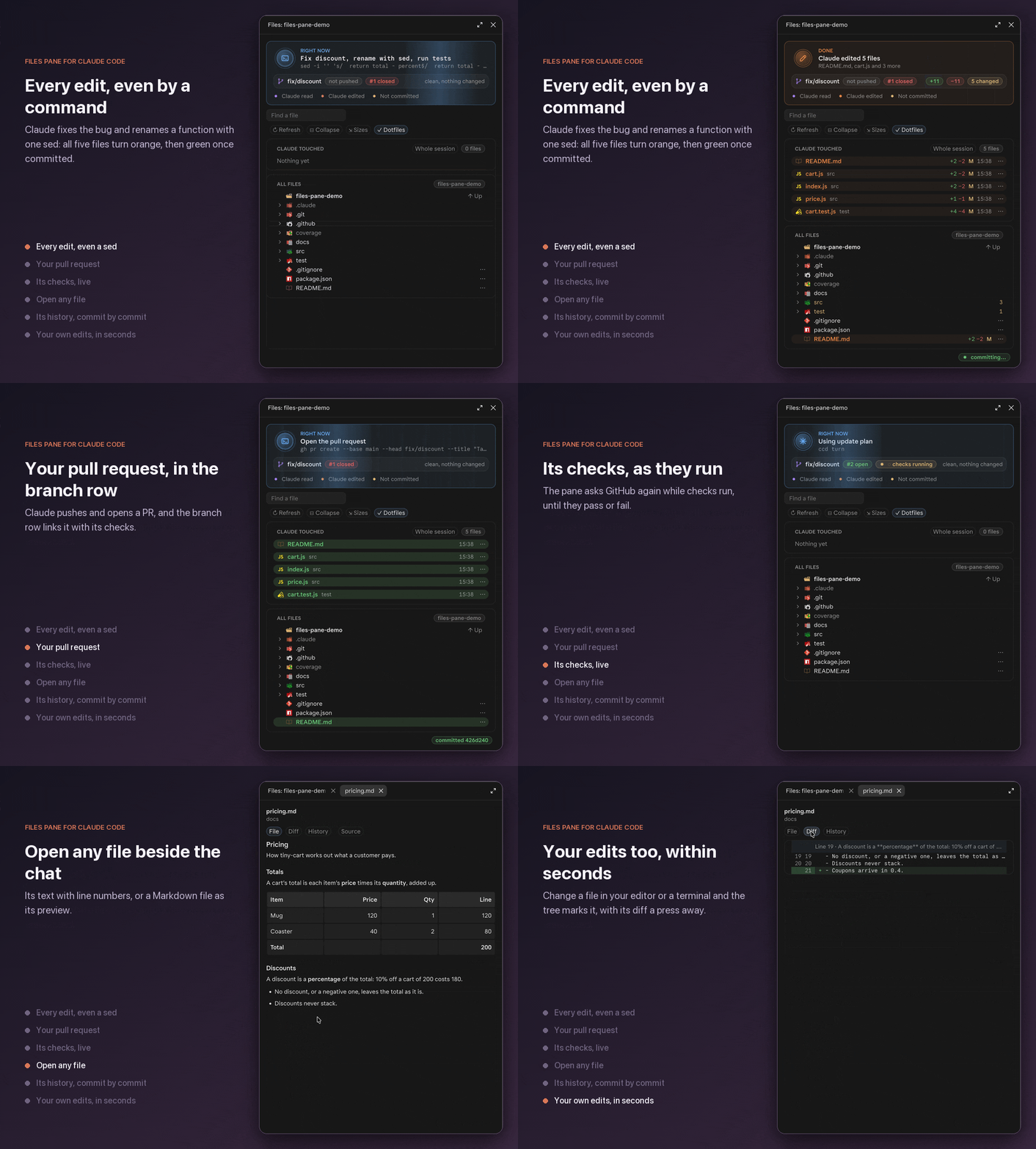
New in 1.1
- Pictures open as themselves: SVG, PNG, JPEG, GIF and WebP, and a Markdown preview draws its pictures in place
- Timeline of every change to a file this session, and who made it: Claude, a command it ran, or you
Everything that changed is in the changelog.
Features
Follow Claude
- Live card: Claude's thinking, the command it runs, the file it reads or edits
- Tree that follows Claude: opens to each file it edits, even in another project
- Touched list: files read or edited this turn or session, with lines added and removed, including files changed by a command Claude runs
- Timeline: every change to a file this session, newest first, and who made it: Claude's edit, a command ("during
npm run format", since a save of yours in those seconds would look the same), or outside Claude. A press opens its diff
Open a file
- File: its text with line numbers; a Markdown file as its preview, its pictures drawn in place; a picture as itself
- Diff: what changed since the last commit
- History: the commits that changed it, each a press from what it changed
Git at a glance
- Branch, commits ahead and behind, and its upstream
- The branch's pull request with its checks and review
- The worktree you're in, and a rebase or merge in progress with its conflicts
- Changed files, with ignored files dimmed
Find and act
- Search with VS Code's icons, best matches first
- A file's ⋯ menu:
@-mention it, copy its path, see its diff, or open it in your editor, Finder or Explorer
Works everywhere
| Desktop app | Terminal |
|---|---|
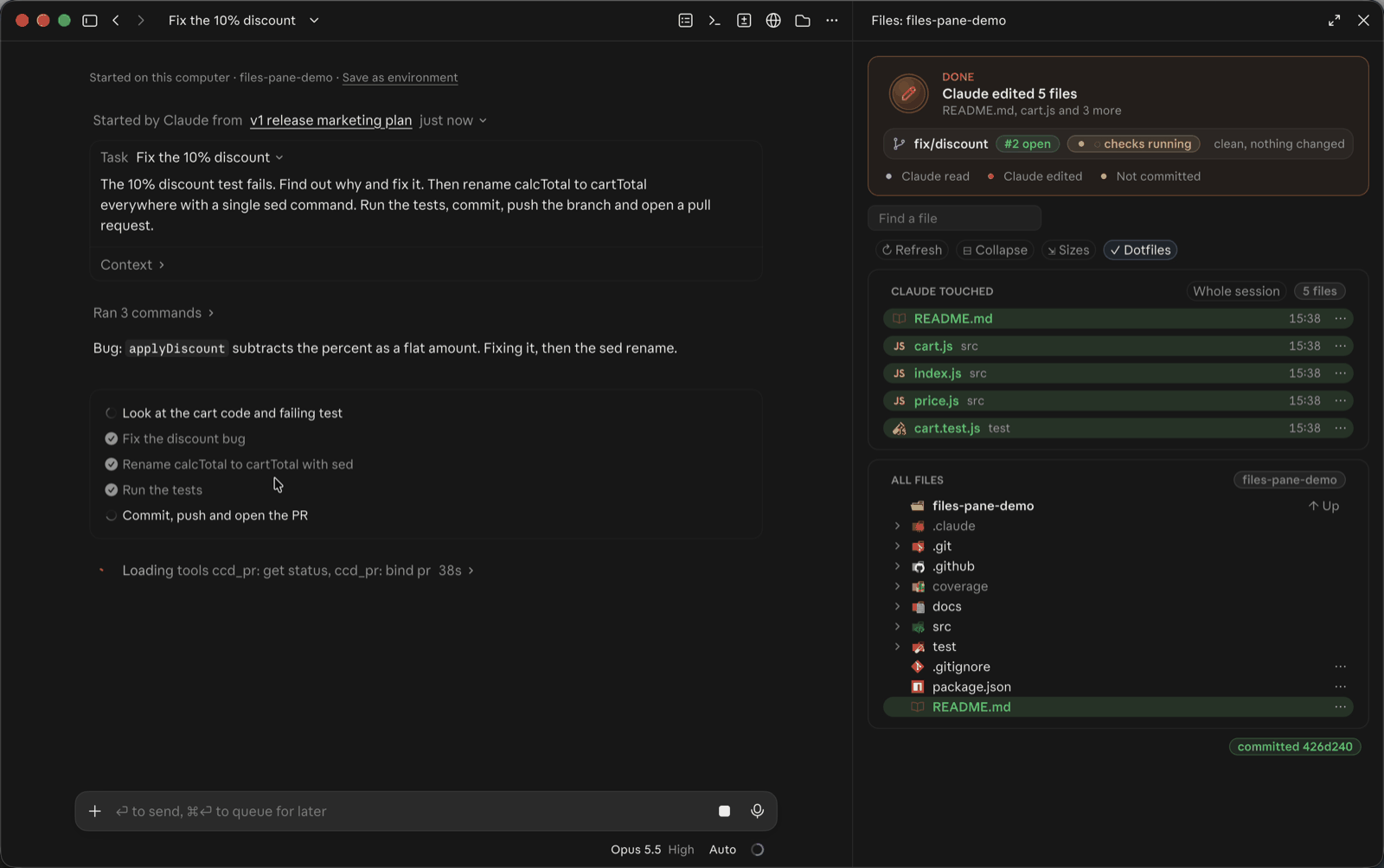 |
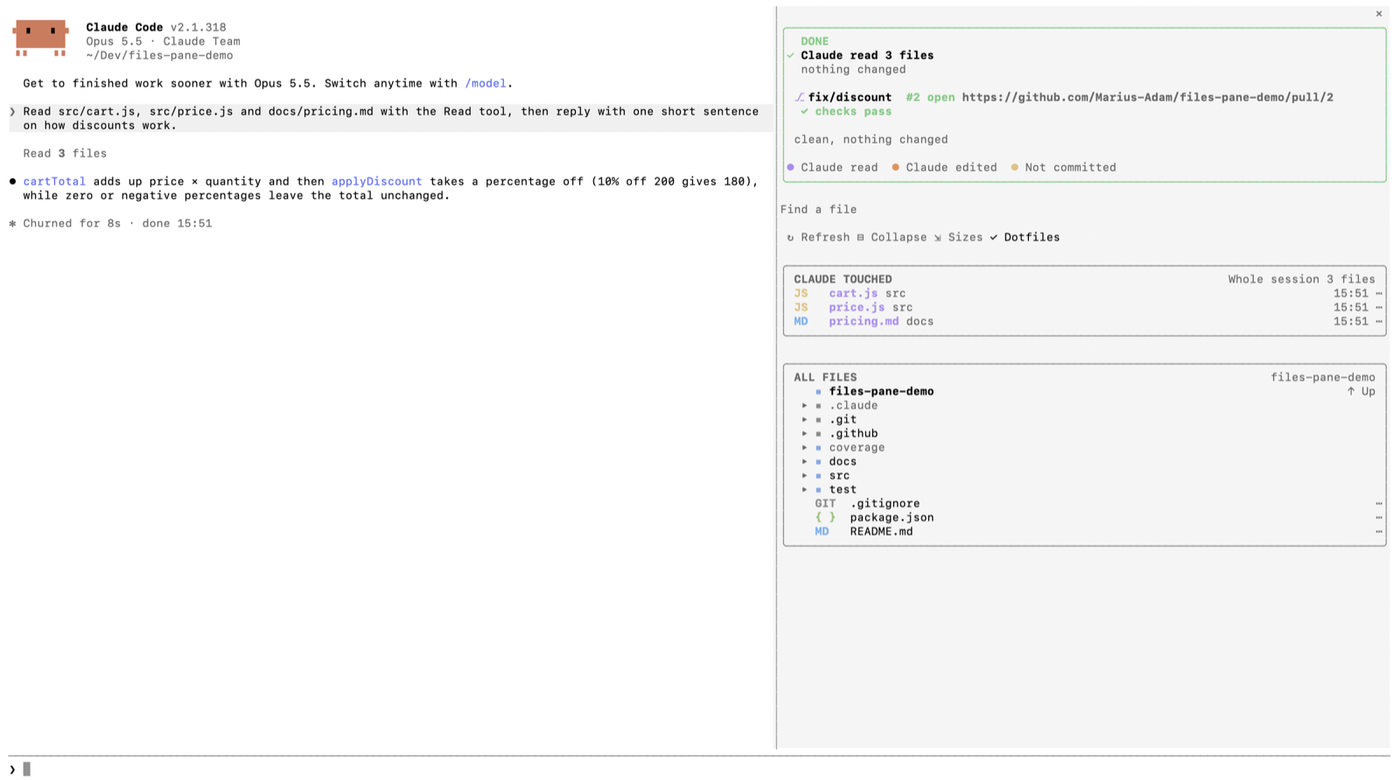 |
It works the same in the Claude Code extension for VS Code, where a file opens from its ⋯ menu.
Built With


Getting Started
Prerequisites
Claude Code 2.1.299 or newer: the desktop app, the VS Code extension or the CLI, on macOS, Linux or Windows. On an older one the mod does not load, and no pane appears (see Troubleshooting). On Windows, Open in offers VS Code, Cursor, Windsurf, Zed and Sublime Text when their command is on the PATH, and no JetBrains IDE.
Installation
In the terminal:
claude plugin marketplace add Marius-Adam/claude-files-pane && claude plugin install files-pane@marius-adam
Or in a Claude Code session:
/plugin install files-pane --marketplace Marius-Adam/claude-files-pane
Restart Claude Code and the pane opens beside the chat.
To update or remove it later:
claude plugin marketplace update marius-adam && claude plugin update files-pane@marius-adam
claude plugin uninstall files-pane@marius-adam
Usage
/filesbrings the pane back if you close it.- A click on a folder opens or closes it; a double click goes into it. The tree's first row names the folder you are in, and its ↑ Up leads to the folder above.
- N changed shows only the files git reports changed, in their folders; press it again for the whole tree. A folder git tracks nothing in counts as one change, as
git statusshows it, and it and everything in it are marked U. - Colours tell you what happened to a file: read purple, edited orange, uncommitted yellow, committed green.
- A press on a file opens it in a pane of its own, beside the Files pane, with three tabs: File, its text with its lines numbered (a Markdown file as its preview, a press from its source), Diff, what changed since the last commit, and History, the commits that changed it, each a press from what it changed. In VS Code, open it from its ⋯.
- A file a command changes (a
sed, a script, a formatter) counts as edited by Claude, as an Edit does, in a git repository. Not counted: files a command rewrites by moving HEAD, stashing, or starting or ending a merge or rebase, since git brought those in. Counted: a file a command puts back as it was committed (git restore), as Claude changed it. Counted by mistake: a file you save while one of Claude's commands is running, since the pane can't tell who wrote it. - What changes without Claude, such as a file you make in your editor or a branch you check out in a terminal, shows within a few seconds while the pane is in sight.
- A file's ⋯ menu can open it,
@-mention it, copy its path, show its diff, reveal it in the tree, or open it in your editor, Finder or Explorer.
Privacy: the pane is read-only. It lists folders, reads the files you open, reads git, asks GitHub's CLI for the branch's pull request and looks for your editors, sends nothing else anywhere, writes to your prompt only on @ Mention, and opens an app only on Open in or Show in Finder (Show in Explorer on Windows). SECURITY.md lists every command it runs, and says how to report a vulnerability.
Tokens: the pane costs none. Its hooks hand Claude's events on unchanged, and what it shows comes from your folders and git, so Claude never sees it. Only @ Mention adds to your prompt, the same as typing @file.
Troubleshooting
I closed the pane. Type /files in a session to bring it back.
No pane ever appears, and there is no /files. The mod did not load. Check both:
claude --version
claude plugin list
Files pane needs Claude Code 2.1.299 or newer, and should be listed as files-pane@marius-adam with its status enabled. In the terminal, update with claude update; the desktop app and the VS Code extension update with the app and the extension. Then restart Claude Code.
The tree has no git colours or branch. Git is read only in the repository the session started in. A project the tree follows Claude into shows no git.
The branch's pull request does not show. It comes from GitHub's CLI, which must be on the PATH and signed in to an account that can see the repository: check with gh auth status. Without it the pane works the same, with no pull request. The pane asks again on ↻ Refresh.
Open in is missing, or lacks my editor. On macOS the editor's app must be installed, and on Linux its command (code, cursor, windsurf, zed, subl) must be on the PATH. On Windows, see Prerequisites. The pane looks once a session, so restart Claude Code after installing one.
Something else is wrong. Report a bug with the output of both commands above.
Contributing
Contributions are welcome. Fork the repo and open a pull request, or open a feature request. If the pane is useful to you, a star helps others find it.
- Fork the project
- Create your feature branch (
git checkout -b feature/amazing-feature) - Commit your changes (
git commit -m 'feat: add an amazing feature') - Push to the branch (
git push origin feature/amazing-feature) - Open a pull request against the
stagingbranch
Develop
Run it from a clone, then check it before you push:
git clone https://github.com/Marius-Adam/claude-files-pane.git && cd claude-files-pane && claude --plugin-dir .
claude plugin validate . && claude plugin test .
Claude Code writes its API types into .claude-plugin/types/ the first time it loads the mod; then npx -p typescript tsc -p . --noEmit type-checks it. CI runs validation and tests on every push.
Pull requests go to staging. A release is one pull request from staging to main that bumps the version in .claude-plugin/plugin.json, merged with a merge commit, since the marketplace installs from main.
| Path | What's there |
|---|---|
hooks/register.tsx |
The mod's hooks: what Claude does reaches the pane through these |
hooks/pane.tsx |
The pane's drawing: the card, git's line, search, the toolbar, the touched list and the tree |
hooks/file.tsx |
The file pane: a file opened from the tree, with its File, Diff and History tabs |
hooks/activity.ts |
Following Claude: the card's timing, commits, diffs, the files a command changes |
hooks/disk.ts |
Git, the branch's pull request, folder listings, the search index, a file's text, diff and history |
hooks/paths.ts |
Paths and sizes as the pane prints them, and search ranking |
hooks/look.ts |
Colours, type chips and SVGs |
hooks/icons.ts, icon-svgs*.ts |
Which vscode-icons icon a file or folder gets, and the SVGs (generated, in two files to stay under the plugin directory's 256 KiB limit) |
tests/ |
Tests, against the terminal and desktop surfaces |
To add an icon, map a name, extension or folder in hooks/icons.ts to a vscode-icons id, then:
npm pack @iconify-json/vscode-icons && tar xzf iconify-json-vscode-icons-*.tgz && python3 scripts/gen_icons.py package/icons.json hooks/icons.ts hooks/icon-svgs.ts
Top contributors
License
Distributed under the MIT License. See LICENSE for more information.
Support
Files pane is free. If it saves you time, you can buy me a coffee on Ko-fi.
Project link: github.com/Marius-Adam/claude-files-pane
Acknowledgments
- vscode-icons (MIT) for the file and folder icons
- Best-README-Template for this README's layout