
MarcelMichau/fake-survey-generator
MarcelMichau/fake-survey-generator has 87 GitHub stars and 18 forks. GitHot measured 0 stars in 24 hours. Last checked 2026-11-18 11:26 UTC. Last push 2026-11-18.
What you can do
- Observable, production ready, distributed application support using Aspire
- Unit & integration tests for a CQRS/DDD project with TUnit
- Integration tests that start SQL Server and Redis through Aspire testing
- Server test doubles using NSubstitute
Measured star growth
- in 24h
- 0
- in 7 days
- Collecting history
- in 15 days
- Collecting history
- in 1 month
- Collecting history
Net star changes over overlapping periods, not daily totals. Missing measurements are left blank. Stars measure attention, not software quality.
About
A slightly more-than-trivial full-stack application built with DDD & CQRS concepts
Web & AppsREADME.md
OriginalFake Survey Generator
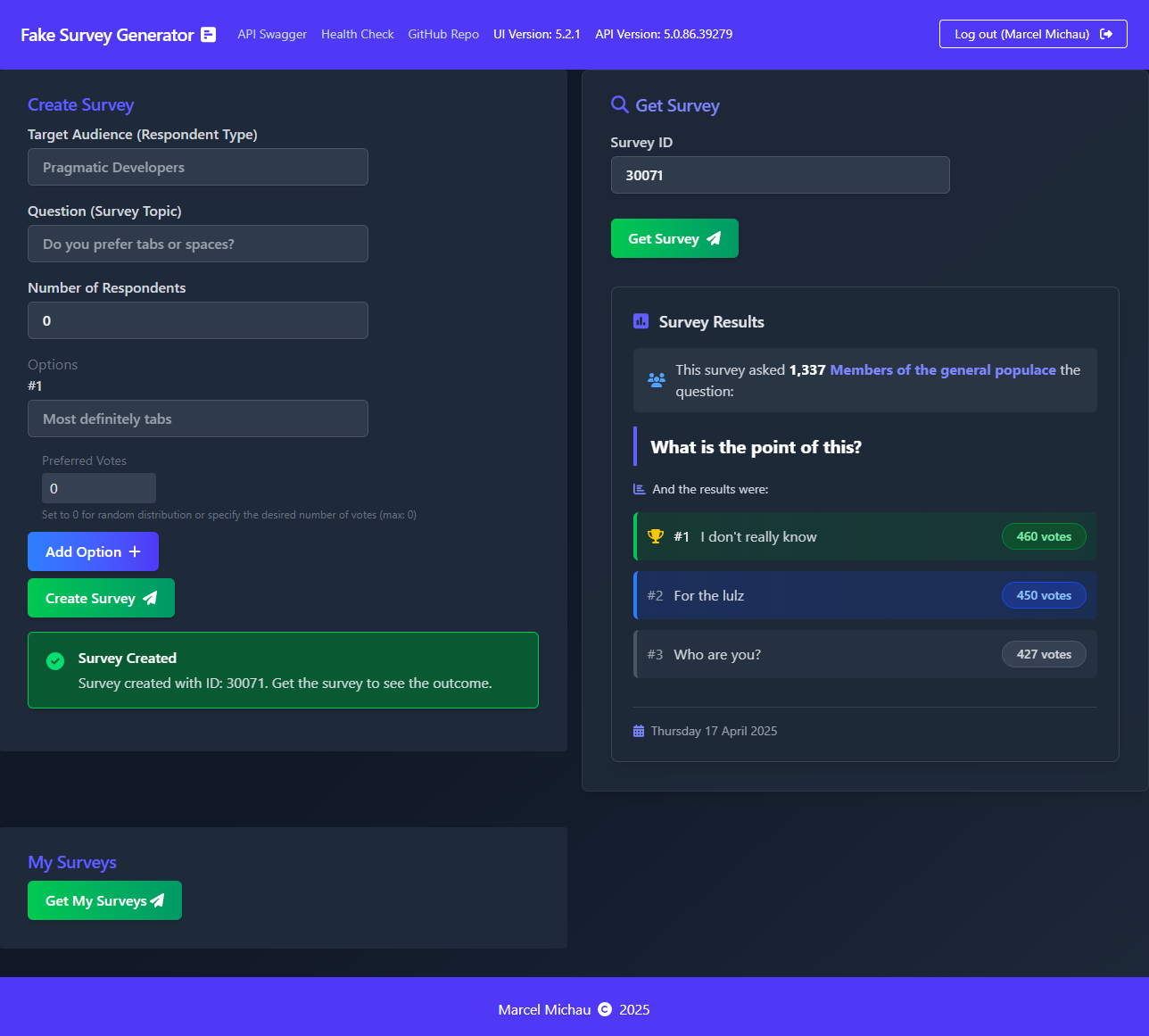
This is an app. That generates surveys. Fake ones. For fun. That is all.
Screenshot
What is this?
This is a .NET | C# | React | TypeScript full-stack application of moderate complexity (not just a to-do app), used as a playground for experimentation. Simply put: This is where I mess around with code. It is heavily inspired by the .NET Microservices: Architecture for Containerized .NET Applications book, as well as its companion reference application eShopOnAzure. It also incorporates various elements from different repos & blog posts which served as inspiration.
It is built using Vertical Slice Architecture principles with CQRS (Command Query Responsibility Segregation) and DDD (Domain-Driven Design) thrown into the mix. It doesn't follow these principles to the letter, but provides a decent example of how to apply the basics of these principles.
It is heavily centered around the Microsoft .NET + Azure technology stacks as these are what I have the most experience in & just like building things with. 😀
Here are some of the features incorporated into this project:
Application Features
- Observable, production ready, distributed application support using Aspire
- Unit & integration tests for a CQRS/DDD project with TUnit
- Integration tests that start SQL Server and Redis through Aspire testing
- Server test doubles using NSubstitute
- Frontend unit and browser tests using Vitest and Playwright
- E2E acceptance tests using Aspire Test Projects & Playwright for .NET
- Implementing
/health/liveand/health/readyhealth-check endpoints, including identity-provider readiness checks using ASP.NET Core health checks - Adding OpenAPI to an ASP.NET Core Web API with Scalar for API documentation
- Adding OpenID Connect for Authentication
- Adding OpenID Connect to Scalar
- Securing an ASP.NET Core Web API using JWT Bearer authentication
- Adding security headers to API responses using NetEscapades.AspNetCore.SecurityHeaders
- Using Hosted Services in ASP.NET Core Web API
- Using a distributed Redis cache
- Using Microsoft.Extensions.Http.Resilience for resilient HTTP requests
- Implementing Forwarded Headers for hosting ASP.NET Core Web API behind a load balancer
- Validation of commands using FluentValidation
- Configuring Azure Monitor OpenTelemetry for telemetry
- Using Dapr with the .NET SDK for secret-store configuration: a local file store during development and Azure Key Vault in production
Infrastructure Features
- Automatic semantic versioning using Nerdbank.GitVersioning
- Creating trusted SSL certificates for HTTPS in development
- Deploying Entity Framework Core Code-First Migrations to Azure SQL Database using Azure Pipelines
- Using Microsoft Entra ID authentication to Azure SQL Database with Entity Framework Core
- Running a distributed application locally using Aspire
- Using Azure Pipelines with the Azure Developer CLI to provision infrastructure and deploy the API container to Azure Container Apps
- Infrastructure as Code for Azure resources using Bicep
Some of the above features are relatively straightforward to implement, others have some intricacies that require some Googling in order to set up. I just like to have them placed in the context of a complete working application to refer back to when necessary.
Why is this here?
I wanted something to try new things out on, without the risk of substantially endangering an actual production environment used by actual people.
It was for this reason that I built the Fake Survey Generator (FSG) app as a way to test out tools, libraries, patterns, frameworks & various other stuff.
It has a very simple domain: it generates surveys. Fake ones. They can be used as a tool for helping you decide what to have for dinner, which book you should read next, where you should go for your next team lunch, or anything that tickles your fancy.
This application is also used as a reference for configuring/wiring up some common things I sometimes forget how to do. Living Documentation if you will. You know the culprits: How do I wire up that database again? What is the syntax for that logging configuration? How do I make thing A talk to thing B?
The domain is kept relatively simple such that it doesn't overwhelm the app with unnecessary complexity. It should be quite easy to wrap your head around without requiring a degree in Computer Science.
I also felt that a lot of reference/demo/boilerplate projects out there cover the core application domain & don't go into much detail around the building/deployment/hosting of final application. So this project aims to cover both. It contains application code, configuration, CI/CD pipelines, infrastructure-as-code needed to run the application, as well as a live, running version of the application (as long as budget allows 😁). So this repo hopefully may contain something for everyone & fill in the potential gaps across the whole spectrum of application development. It falls somewhere between a template/boilerplate project & a real-world production open-source application.
How is this thing structured?
FSG consists of two parts:
Server
The server side consists of the following main components:
- Fake Survey Generator API
- Fake Survey Generator Worker
- Aspire AppHost
- Service Defaults
- Application Project
- Application Tests Project
- API Integration Tests Project
- E2E Acceptance Tests Project
The Aspire AppHost also runs SQL Server, Redis, Redis Insight, a Dapr sidecar, and the Vite UI during local development.
Browser acceptance-test failures attach a screenshot (page.png), page HTML (page.html), browser console/JavaScript/network errors (browser.log), and a Playwright trace (trace.zip) to the test result. In Azure Pipelines, download these from the failed test's attachments. Open the trace with pwsh src/server/FakeSurveyGenerator.Acceptance.Tests/bin/Debug/net11.0/playwright.ps1 show-trace <path-to-trace.zip>. Each diagnostic capture is awaited sequentially with a 10-second limit; operations that finish after their timeout do not attach artifacts. Diagnostic capture errors are logged without replacing the original test failure.
The server side makes use of the following tools, libraries & frameworks:
- Fake Survey Generator API
- .NET 11 SDK (currently pinned to a .NET 11 RC in
global.json) - ASP.NET Core Minimal API
- Aspire
- Entity Framework Core with Code-First Migrations
- Dapper
- Redis distributed and hybrid caching
- Scalar and OpenAPI
- FluentValidation
- ASP.NET Core health checks
- Docker
- .NET 11 SDK (currently pinned to a .NET 11 RC in
- Fake Survey Generator Worker
- .NET 11 SDK
- .NET Worker Service
Client
The client side consists of the following main components:
- UI
The client side makes use of the following tools, libraries & frameworks:
For production, the UI is built by the API's Dockerfile and served by the API container; it does not have a separate UI Dockerfile.
Common
The application is containerized and orchestrated locally with Aspire. During local development, the Aspire AppHost runs the API, Worker, SQL Server, Redis, Redis Insight, Dapr, and the Vite UI. The UI is a separate Vite resource locally.
For production, the current Azure deployment publishes the API container only. The API Dockerfile builds the React UI and
serves its static files from wwwroot; the Worker is not currently deployed by azure.yaml or the Azure infrastructure.
In Development, the API applies Entity Framework migrations during startup. In production, Azure Pipelines generates a migration script and executes it against Azure SQL as a separate deployment stage.
The hosted version of the application is deployed here: https://fakesurveygenerator.mysecondarydomain.com
The following endpoints are accessible:
- /api-docs - Scalar OpenAPI documentation UI
- /openapi/v1.json - OpenAPI 3.1 JSON document
- /health/live - Liveness endpoint used by Azure Container Apps ingress; it does not check external dependencies
- /health/ready - Readiness endpoint used by Azure Container Apps ingress; it runs the configured readiness checks
The hosted version utilizes the following infrastructure:
- Azure Container Apps for the API and Redis
- Azure SQL Database
- Azure Container Registry
- Azure Key Vault
- Azure Log Analytics
- Azure Application Insights
- Azure Container Apps managed certificates
- Azure DNS
- Azure DevOps (for CI/CD)
Authentication
The application uses OpenID Connect through Auth0. The API
validates Auth0 JWT bearer tokens with the audience fake-survey-generator-api, while the React UI uses the Auth0 React
SDK. The Auth0 tenant's enabled connections are external configuration; the current tenant supports:
- Auth0
The client configuration is in src/client/ui/src/auth_config.json, and the local API identity-provider URL is in
src/server/FakeSurveyGenerator.Api/appsettings.Development.json. If you use a different Auth0 tenant, update both
configurations and configure its allowed callback/logout URLs for the local and deployed UI origins.
Semantic survey analysis
The Analyse Survey button uses Microsoft-Decision-1 to check survey wording and options for potential issues such as leading questions, multiple-choice ambiguity, incomplete coverage, and semantically duplicate options. The model is deployed to a Microsoft Foundry resource and project provisioned by infra/modules/foundry.bicep in France Central (Decision-1 is not offered to new deployments in South Africa North; DataZoneStandard keeps processing in the EU data zone), and the API calls its SystemOne endpoint server-side; the browser never talks to Foundry.
Foundry accepts Microsoft Entra ID only (local/key authentication is disabled). The API authenticates with DefaultAzureCredential: the API's user-assigned managed identity in Azure, or your Azure CLI or Visual Studio sign-in locally. The identity needs the Cognitive Services User role on the Foundry resource. The deployment grants it to the API's managed identity and to every principal in foundryDeveloperPrincipalIds in infra/main.bicepparam; add your Microsoft Entra object ID there to call the dev resource locally.
Configuration lives under SurveyAnalysis:
| Setting | Description |
|---|---|
SurveyAnalysis:Endpoint |
The Foundry resource endpoint, for example https://aif-fake-survey-generator.services.ai.azure.com/. Analysis returns 503 Service Unavailable when this is not configured. |
SurveyAnalysis:Deployment |
The Microsoft-Decision-1 deployment name. Defaults to decision-1. |
SurveyAnalysis:TenantId |
Optional. Pins the Microsoft Entra tenant that DefaultAzureCredential requests tokens from, which helps when your developer tools are signed in to several tenants. A token issued by another tenant is rejected with 401 (Foundry reports it as an incorrect audience). |
src/server/FakeSurveyGenerator.Api/appsettings.Development.json points local development at the dev Foundry resource. Deployed environments receive the endpoint and deployment name from the infrastructure outputs.
Survey analysis uses its own HTTP resilience pipeline: a 55-second attempt timeout, a 60-second total timeout, a circuit breaker,
and at most eight concurrent requests per API process with no waiting queue. These policies cover the complete response body,
and analysis POSTs are never retried. The native HttpClient.Timeout is disabled so it cannot preempt the resilience timeouts.
Settings can be overridden under SurveyAnalysis:Resilience (for example,
SurveyAnalysis__Resilience__AttemptTimeout__Timeout=00:00:45); the attempt timeout must be strictly shorter than the total timeout
(invalid overrides are rejected), and circuit-breaker sampling duration must be at least twice the attempt timeout.
Other HTTP clients inherit the standard pipeline, with retries disabled for unsafe methods.
How do I run this thing?
In order to run FSG on your local machine, you will need the following prerequisites:
- Visual Studio 2026 or another IDE that supports the .NET 11 SDK
- The .NET 11 SDK version pinned in
global.json(currently a prerelease SDK) - Docker or Podman
- Dapr CLI, initialized with
dapr init - Node.js and npm, required by the Vite UI resource
The local AppHost uses the Dapr component in dapr/components/local-file.yml and its accompanying
dapr/components/secrets.json file for development secrets.
Open
FakeSurveyGenerator.slnxin Visual Studio 2026, or in an IDE with .NET 11 SDK support.Ensure that the
FakeSurveyGenerator.AppHostproject is selected as the startup project.Hit
F5to debug the application, orCtrl+F5to run without debugging.The Aspire Dashboard should open automatically, along with the local UI.
API contracts and UI queries
The UI's API types in src/client/ui/src/api/generated.d.ts are generated from the API's native OpenAPI document.
After changing endpoints or DTOs, run these commands from the repository root:
npm ci --prefix tools/api-contracts
npm ci --prefix src/client/ui
npm run generate:api --prefix src/client/ui
npm run check:api --prefix src/client/ui
Generation builds the API using the SDK in global.json; SQL Server, Redis, Dapr and identity-provider secrets
are not needed. Commit the generated declaration file. CI checks for contract drift and builds the UI before
running browser tests. The generator has a separate tooling package because its compiler API currently requires
TypeScript 5; the UI continues to use TypeScript 7.
openapi-fetch provides typed requests and responses. TanStack Query shares requests, cancels abandoned reads,
and updates or invalidates survey caches after creation and deletion. Each authenticated session has its own
query client; changing users or logging out clears the previous cache. Queries and mutations do not retry
automatically, and user registration must complete before survey actions become available.
The session query module enforces registration readiness for every Survey read and mutation, including manual refreshes; disabled controls are presentation, not the only safeguard. Requested reads resume after successful registration, while mutations requested too early fail without being queued. Failed registration requires the explicit Retry registration action; mounting another caller or refreshing a Survey does not retry registration. Switching users or logging out cancels session-owned registration and mutation requests and discards late outcomes. Cancellation cannot undo a mutation already accepted by the server.
Survey creation accepts up to 1,000,000 respondents and 100 options; analysis retains its 20-option limit. Fixed distributions preserve unassigned votes, while random distributions still cast one independent vote per respondent. JSON numeric fields require numbers rather than quoted strings; date/time fields in generated UI contracts are ISO strings.
How do I contribute?
If you find a bug, want to add a feature, or want to improve the documentation, open up a PR!
References
My deepest thanks to all the people who provided these resources as reference: