
Lzxpan/CodeWorker
Lzxpan/CodeWorker has 30 GitHub stars and 5 forks. GitHot measured 0 stars in 24 hours. Last checked 2026-11-16 00:44 UTC. Last push 2026-05-24.
Measured star growth
- in 24h
- 0
- in 7 days
- Collecting history
- in 15 days
- Collecting history
- in 1 month
- Collecting history
Net star changes over overlapping periods, not daily totals. Missing measurements are left blank. Stars measure attention, not software quality.
About
離線 Windows 本地 LLM 程式碼助理,支援 Gemma4、Qwen 3.5 影音、圖文分析,可分析整個專案或釘選檔案針對單檔分析,隱私優先的本機專案補助LLM。
AIREADME.en.md
OriginalCodeWorker V1.02.001
A privacy-first offline Windows code assistant built around local LLM workflows.
1. Features
CodeWorker packages llama.cpp, WinPython, PortableGit, GGUF models, and a local Web UI into one Windows workspace. It is intended for projects where source code cannot be uploaded, cloud models cannot be used, or the assistant must run inside customer, intranet, or air-gapped environments.
Core capabilities:
- Local model service:
Gemma 4 26Bis the initial fallback model, then CodeWorker uses the last successfully used model as the next default. All models are served by the bundledllama.cppservice. Ollama is not required. - Model download progress: large GGUF downloads show percent, downloaded size, and total size so users can tell that the model is still downloading.
- Model catalog:
Gemma 4 26BandQwen 3.5 9B Visionremain available, with new options forQwen3.6-35B-A3B Vision,Gemma 4 E4B Uncensored Q6,Qwen3.6-35B-A3B Uncensored IQ2_M,Qwen3-Coder 30B A3B,GLM-4.6,Qwen2.5-Coder 14B Instruct, andDeepSeek-Coder V2 Lite. - Hardware auto-optimization: the Web UI detects RAM, CPU, GPU vendor, VRAM,
nvidia-smi, and Vulkan availability, then recommends a model and applies backend, context, threads, GPU layers, and 8GB NVIDIA MoE offload settings; performance tests write local hardware-model profiles for reuse on matching machines. - Context selector: each model remembers its own context options from
4kto256k;GLM-4.6also exposes a200koption. - Context capacity measurement: the current model can be benchmarked for the KB it can actually receive. Results are stored locally in
data\model-context-calibration.json, and edit plans prefer the measuredstructuredEditChars. - Full-file edit context: pinned files and resolver-selected files are sent as complete files when they fit within the measured budget; only then does CodeWorker fall back to full function / class regions and line windows.
- Edit-plan diagnostics: every edit plan reports context coverage. Unsafe model suggestions are shown as
unverified reference snippetsand do not expose apply controls. - Full-project retrieval: once a project is opened, chat can use the local RAG index to search paths, symbols, summaries, and chunks even when no files are pinned.
- CodeGraph-style semantic index: every RAG rebuild also writes
code_nodes,code_edges, andcode_unresolved_refsfor symbol entry points, imports, calls, extends, and impact navigation. - File-structure analysis: deterministic multi-language classification finds entrypoints, core source, project config, UI, assets, tests, and ignored outputs before pinning files.
- Single transcript stream: AI replies, file-structure analysis, CodeGraph queries, context coverage, and generated-file confirmations are kept in one scrollable transcript.
- Busy indicators: AI replies, streaming, and edit-plan generation show a spinner / busy bar while the model is still working.
- Codex plugin:
plugins\codeworker-codegraphcan be installed in Codex so agents query the local CodeWorker graph before deciding which files to read. - Focused context: checked files in the
File treebecome pinned context and take priority over broad RAG. - Attachments: code, config, documents, images, audio, and video can be attached. CodeWorker sends extracted text, keyframes, or transcripts when available, otherwise metadata fallback.
- Threads: the right
240pxthread panel can create, switch, rename, and delete conversations. Each thread keeps its own history, memory, and transcript. - Model-driven file generation: ask for a document in normal chat. The model produces the content and title, CodeWorker uses the title to name the file, creates a pending preview, and only writes
.txt/.md/.py/.js/.ts/.json/.html/.css/.yaml/.sql/.cs/.docx/.pdf/.pptx/.xlsxafter confirmation. - Agent safety: writes, patches, deletes, renames, and commands become pending actions and only run after user confirmation; applying changes creates a pre-edit Git checkpoint and creates a post checkpoint when files changed, so users can inspect diffs and restore the edit.
2. Important Notes
- The first run needs internet access to download runtimes and models; later use can be offline.
Qwen3.6-35B-A3B Vision,Qwen3-Coder 30B A3B,GLM-4.6,Qwen2.5-Coder 14B Instruct, andDeepSeek-Coder V2 Liteare not downloaded during the first bootstrap. They are downloaded only when explicitly selected.- The
Qwen3.6-35B-A3B Vision8GB NVIDIA profile still needs enough system RAM. It chooses32k/64kcontext by hardware, usesq4_0KV cache,--n-cpu-moe=999,--flash-attn,--jinja,--batch-size=512,--ubatch-size=128, and the required GPU offload settings, keeping MoE weights in CPU/RAM while CUDA offloads non-MoE layers. Qwen3.6-35B-A3B Visioncan also run in CPU-only mode when no discrete GPU is available, but it needs more system RAM, smaller context, and longer wait times. The full setup guide is docs\qwen36a3b-cpu-only-llamacpp.md; the README summary is in Qwen3.6-35B-A3B CPU-only llama.cpp Settings.256kcontext is an available upper option, not a guarantee that every machine can run it stably. If startup fails, the UI shows the error and log path instead of silently downgrading.32GB RAMclass memory is recommended. Large context, images, video keyframes, and long answers increase memory pressure.- High-end models and GPU backends still need validation on high-end PCs. When testing, keep
logs\hardware-optimization.jsonland the matchinglogs\llama-server-<model>-*.log/.err.logfiles. - Without an opened project, chat behaves as normal Q&A. With an opened project and no pinned files, chat uses full-project RAG. With pinned files, pinned context takes priority.
- Videos are analyzed through
FFmpegkeyframes, not by sending raw MP4 binaries to the model. Audio and video audio tracks trywhisper.cppspeech-to-text. - File generation and Agent writes require confirmation before touching the project root. After a file is written, the UI shows the final path and filename.
Create edit planprepares reviewable file actions first;Apply changescreates a Git checkpoint before the edit and a post checkpoint when files changed,View Git diffcompares changes, andRestore this editcan return to the pre-edit checkpoint.- The CodeGraph feature follows local semantic-indexing ideas from
colbymchenry/codegraph; source, author, and license attribution are listed in THIRD_PARTY_NOTICES.md.
3. Installation
First full bootstrap
scripts\bootstrap.cmd
This prepares the components defined in config\bootstrap.manifest.json:
llama.cppWinPythonPortableGitFFmpegwhisper.cppplus the speech-to-text modelGemma 4 26B/Qwen 3.5 9B VisionGGUF files andmmproj- Python document packages:
pypdf,pdfplumber,python-docx,reportlab,python-pptx,openpyxl
Update an existing installation
git pull
scripts\bootstrap.cmd
scripts\launch-webui.cmd
Update checks:
- The Web UI brand should show
CodeWorker V1.02.001. scripts\bootstrap.cmdfills missing runtimes, Python packages, model manifest data, and already downloaded assets without redownloading files that still pass validation.scripts\launch-webui.cmdstartshttp://127.0.0.1:8764; if an older CodeWorker Web UI owns the port, it reclaims that process first.- After opening a project,
Analyze file structure,Query CodeGraph from input,Rescan index, and normal chat should all append results into the same transcript.
Launch the Web UI
scripts\launch-webui.cmd
Open:
http://127.0.0.1:8764
Optional CLI agent setup
scripts\install-aider.cmd
4. Usage and Tutorial
Screenshot
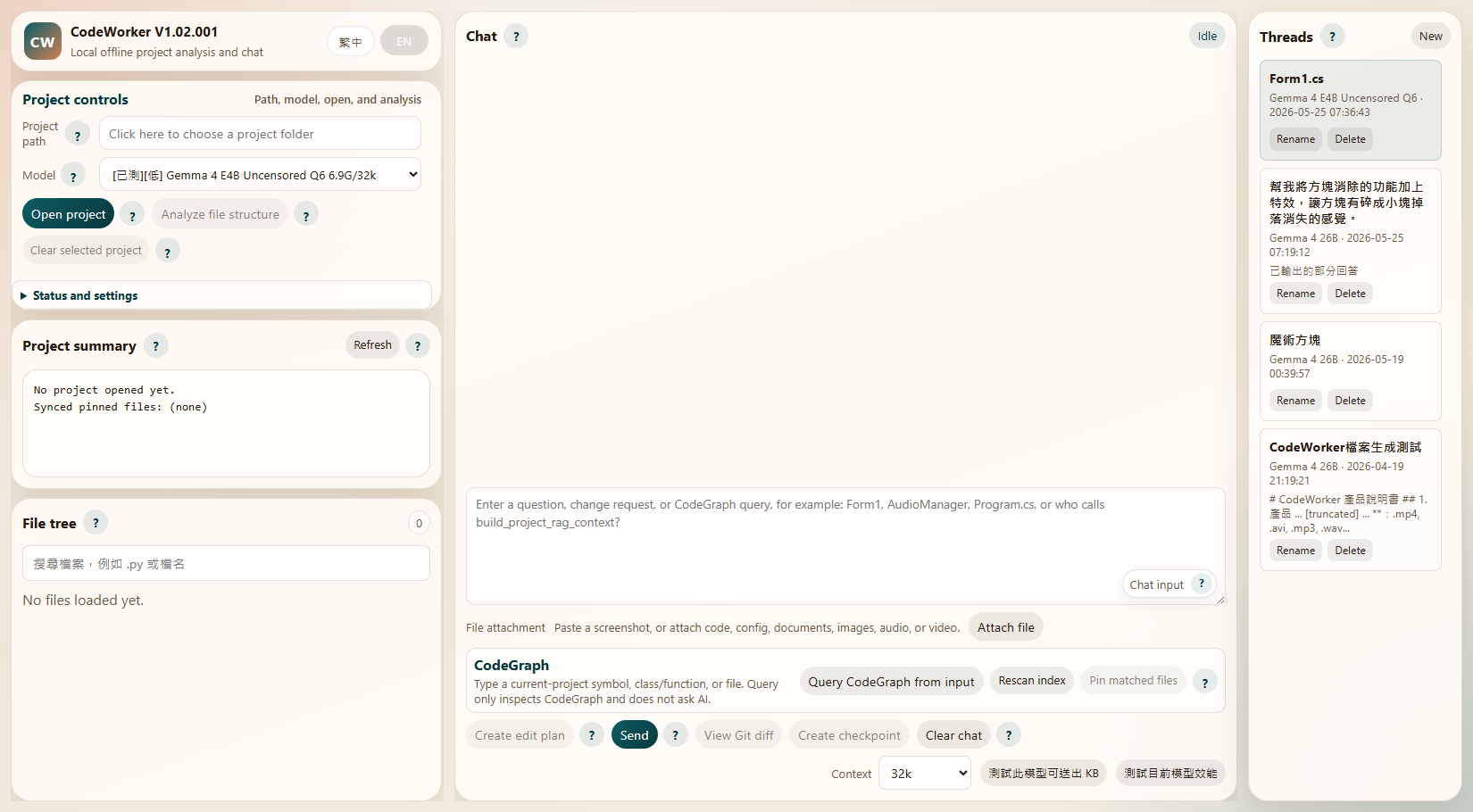
The screenshot shows the current workflow areas: project controls, Clear selected project, project summary and virtual file tree, the single transcript, input / CodeGraph / Git edit actions, and thread management.
General Q&A
- Launch the Web UI.
- Ask directly in the main chat without opening a project.
- This mode does not add
PROJECT RAG CONTEXT, pinned files, or file tree data. - If a project is already open, click
Clear selected projectto clear project context while preserving the current model and chat history.
Project search and Q&A
- Choose the project root in
Project path. - Click
Open project. - Click
Analyze file structurewhen many files need to be organized before pinning; clickClear selected projectnext to it when you want to return to general Q&A. - Ask where code lives, which files matter, or how to change a behavior. Without pinned files, CodeWorker searches the whole project through RAG.
- Check file names in the
File treewhen you want focused context.
Analyze File Structure And Pinning
- Open a project and click
Analyze file structure. - CodeWorker classifies files by language and toolchain into entrypoints, core source, project configs, UI/forms, assets, tests, generated files, and build outputs.
- The result appears as a transcript tool card, so it does not overwrite chat history.
- Click
Pin recommended filesto add entrypoints, configs, core source, UI, and tests to pinned files before asking AI to analyze or modify code.
CodeGraph Relationship Query
Use CodeGraph when you do not yet know which files to pin, or when you want an impact map before editing.
- Type a current-project symbol, class/function, file name, or question in the chat input, for example
Form1,AudioManager,Program.cs, orwho calls build_project_rag_context?. - Click
Query CodeGraph from input. This only queries the local SQLite graph; it does not ask AI. - The transcript shows matched symbols, relationships, matched files, nodes/edges/unresolved counts, and next-step guidance.
- If the result is relevant, click
Pin matched files, then press the normalSendbutton so AI answers with those pinned files. - If a new file or symbol is missing, click
Rescan index. It rebuilds both RAG and CodeGraph indexes, keeps the rebuild summary, and appends a follow-up query card if the input still has a query.
Benefits:
- Find symbols and relationships before reading files, reducing blind exploration in large projects.
- Check callers/callees/imports/extends before editing, which lowers the risk of missing affected code.
- Runs through local SQLite and local models; no API key is required and project code is not sent to the cloud.
- Works well with
Analyze file structure: classify files first, then use CodeGraph to inspect symbol relationships.
Single Transcript And Streaming Reading
- Chat, tool results, CodeGraph, file-structure analysis, context coverage, and file confirmations all live in one transcript.
- During AI streaming, the chat follows only when you are near the bottom. If you scroll up to read older content, it will not force-scroll back down.
- After switching threads or reloading the page, chat and tool cards replay from persisted
transcript. Old threads withouttranscriptfall back from existinghistory.
Install The CodeWorker CodeGraph Codex Plugin
CodeWorker also ships a repo-local Codex plugin:
codex plugin install plugins\codeworker-codegraph
After installation, use the codeworker-codegraph skill in Codex. Common queries:
runtime\WinPython\python\python.exe C:\Users\Admin\.codex\skills\codeworker-codegraph\scripts\query_codeworker_graph.py --project C:\path\to\project --status
runtime\WinPython\python\python.exe C:\Users\Admin\.codex\skills\codeworker-codegraph\scripts\query_codeworker_graph.py --project C:\path\to\project --rebuild --query "Form1"
runtime\WinPython\python\python.exe C:\Users\Admin\.codex\skills\codeworker-codegraph\scripts\query_codeworker_graph.py --project C:\path\to\project --query "AudioManager callers" --json
Use cases:
- Before changing a feature, find related symbols and call relationships.
- When onboarding to an unfamiliar project, find entrypoints and core files first.
- To help Codex avoid aimless
rg/Read, use the graph as a navigation map and then read targeted files.
Suggested prompts:
Where is the code that loads the model? Include file path and why.How should I change the game speed? List file paths and reasons.I want to add online multiplayer. Which files should I modify first?
Context Settings
- Use the
Contextdropdown at the bottom of the chat input. - Each model remembers its own selected context.
- If the running
llama-servercontext is lower than the selected value, the next model startup uses the new context. - Click
Measure model KB capacityto benchmark the current model and context. Successful results are stored locally indata\model-context-calibration.json; this local calibration file is not committed. Create edit planprefers the measuredstructuredEditChars; without calibration data it falls back to conservative estimates.- If
256kor another large context fails locally, inspect the left error panel andlogs/llama-server-*.err.log.
Qwen3.6-35B-A3B CPU-only llama.cpp Settings
Full setup guide: docs\qwen36a3b-cpu-only-llamacpp.md. This README section only lists the common CPU-only startup command; use the guide for CodeWorker auto-start behavior, low-memory adjustments, and troubleshooting paths.
Qwen3.6-35B-A3B Vision can start in CPU-only mode when there is no discrete GPU, or when GPU offload should be disabled. This is not the 8GB GPU-optimized path: it is slower and depends heavily on system RAM. Start with 16k or 32k context, then raise it only after the machine is stable.
runtime\llama.cpp\llama-server.exe ^
  -m models\qwen3.6-35b-a3b-ud-q4-k-m\Qwen3.6-35B-A3B-UD-Q4_K_M.gguf ^
  --mmproj models\qwen3.6-35b-a3b-ud-q4-k-m\mmproj-BF16.gguf ^
  --host 127.0.0.1 ^
  --port 8087 ^
  --ctx-size 32768 ^
  --cache-type-k q4_0 ^
  --cache-type-v q4_0 ^
  --threads 12 ^
  --n-gpu-layers 0 ^
  --n-cpu-moe 999 ^
  --batch-size 256 ^
  --ubatch-size 64 ^
  --jinja
Settings and notes:
--n-gpu-layers 0: disables GPU offload explicitly.--n-cpu-moe=999: keeps MoE layers on CPU/RAM.--ctx-size 32768: start at32k; reduce to16384or8192if RAM is tight.--cache-type-k q4_0 --cache-type-v q4_0: lowers KV cache memory use.--batch-size 256 --ubatch-size 64: more conservative than the 8GB NVIDIA profile and better for CPU-only testing.- Keep
--mmprojonly when image understanding is needed. For pure text or code edits, omit it first to reduce startup and memory pressure. - Do not enable
--mlockby default in CPU-only mode. Unless RAM is abundant, it can make Windows memory pressure worse. - The GGUF file is roughly 21GB-class, so CPU-only use is best with at least
64GB RAM;32GB RAMcan be very slow or fail outright. - On failure, inspect
logs\llama-server-qwen36a3b-*.err.logandlogs\hardware-optimization.jsonlfirst.
Edit Plans And Full-File Context
- Prefer checking explicit related files in the
File tree; multiple pinned files are sent in full when their total size fits the measured model budget. - Without pins, or when pins are insufficient, CodeWorker uses project structure, RAG, and CodeGraph to locate candidate files and symbols.
- If full files do not fit, CodeWorker falls back to full function / class regions, then to line windows.
- The transcript
Context/Edit plan contextcard reports whether each file was sent asfull,region, orwindow, plus sent size and truncation state. - If model output cannot be uniquely located in local files, the UI marks it as an
unverified reference snippetand disables apply. Only backend-validatedactionscan be applied.
Threads
- The right
Threadspanel can create, switch, rename, and delete conversations. - Each thread stores
history,memory_summary,modelKey, andprojectPath. Clear chatonly clears the current thread.
Attachment Analysis
- Click
Attach file, or paste a screenshot into the chat input. - You can attach code, config, PDF, DOCX, images, audio, and video.
- Images try native vision first. Videos extract keyframes first. Audio tries speech-to-text.
- If extraction or native payload fails, CodeWorker sends metadata and a limitation note instead of pretending the content was seen.
File Generation
- Open a project.
- Ask in normal chat, for example:
Generate a project feature introduction PPT file. - The model first writes the document content. Its first heading is used as the automatic filename source, and CodeWorker creates a pending preview from that reply.
- To export the previous assistant answer, write:
Turn the previous explanation and use cases into PPTX and PDF files.orGenerate a Word document from the explanation. - If the same message already includes complete Markdown content, such as
Generate this as a docx filefollowed by# Title, CodeWorker creates the pending preview directly without calling the model to rewrite the content. - If the request says to generate a file from
the above content,the previous answer, orthe last answer, CodeWorker uses the previous visible assistant answer directly and does not call the model. - If one request mentions multiple formats, CodeWorker creates multiple pending previews, such as one
.pptxand one.pdf. - For Word, mention
Word,word file,docx, ordocx file, for example:Generate a Word file from the previous answer. - For text and code, mention the extension or format alias, such as
txt file,md file,py file,js file,json file,html file,css file,yaml file,sql file, orcs file. - For Excel, mention
Excel,xlsx,spreadsheet, or the target extension, for example:Turn the test checklist into an Excel spreadsheet. - Review the pending preview and click
Confirm write. After writing, the chat shows the absolute path, relative path, and file size. If the file was not actually written, the backend returns an error instead of a success message.
5. File Structure
CodeWorker/
├─ config/        # bootstrap, model registry, and aider settings
├─ data/          # RAG indexes, chat threads, model context choices, and audit log
├─ docs/          # screenshots, internal docs, and test notes
├─ downloads/     # bootstrap download cache
├─ logs/          # Web UI, model server, and context bench logs
├─ models/        # GGUF models and mmproj
├─ runtime/       # WinPython, PortableGit, llama.cpp, FFmpeg, whisper.cpp
├─ scripts/       # bootstrap, model resolution, server launch, and regression tests
├─ webui/         # Python backend, RAG/Agent modules, and frontend assets
├─ plugins/       # Codex plugins such as codeworker-codegraph
├─ THIRD_PARTY_NOTICES.md
├─ README.md
├─ README.zh-TW.md
└─ README.en.md
Key files:
config\bootstrap.manifest.json: runtime, model sources,contextWindow, KV cache type,mmproj, and defaults.scripts\resolve_model_env.py: resolves model file, port, context, KV cache type, andmmprojfrom the manifest.scripts\launch_llama_server.py: launches the bundledllama.cppmodel server.scripts\run_webui_regression.py: regression tests for Web UI, attachments, RAG, and streaming.webui\server.py: API routes, streaming chat, context assembly, threads, file generation, attachment handling, memory, and model calls.webui\core\hardware.py: detects the hardware profile, chooses the backend, recommends a model, and generates auto-optimization settings.webui\core\models.py: model registry, status, and OpenAI-compatible endpoint data.webui\rag\index.py: hierarchical project index, SQLite FTS5 fallback, chunk search, and impact hints.webui\rag\code_graph.py: CodeGraph-style symbol graph, relationship edges, graph search, and compact graph context.webui\agent\runtime.py: ReAct-style Agent, tool calls, pending actions, and audit log.webui\static\js\app-*.js: frontend state, API, UI, file tree, threads, chat, CodeGraph, and bootstrapping.webui\static\styles.css: 450px sidebar, single transcript chat, input area, and 240px thread panel.plugins\codeworker-codegraph: repo-local Codex plugin with thecodeworker-codegraphskill andquery_codeworker_graph.pyquery tool.THIRD_PARTY_NOTICES.md: third-party source, author, and license notices.
6. Workflow Architecture
flowchart LR
    U["User"] --> W["Web UI"]
    W --> K["Context selector per model"]
    W --> T["Thread panel"]
    W --> O["Open project / Analyze file structure"]
    O --> I["Local RAG index / CodeGraph"]
    W --> X["CodeGraph query / rescan"]
    W --> P["Pinned files"]
    W --> F["Attachments"]
    W --> G["Model decides file generation"]
    I --> S["webui/server.py"]
    P --> S
    F --> S
    T --> S
    K --> S
    G --> A["Auto pending preview"]
    O --> H["Transcript tool card"]
    X --> H
    A --> Q["User confirmation"]
    Q --> D["Write generated file"]
    S --> C["Assemble memory / RAG / pinned context / attachments"]
    C --> M["llama.cpp local model server"]
    M --> R["Streaming reply"]
    R --> H
Workflow rules:
- Without an opened project, the chat payload only contains the user question, attachments, and conversation memory.
- With an opened project and no pinned files, RAG searches paths, symbols, summaries, and chunks.
Analyze file structureand CodeGraph queries are written only totranscript; they are not sent into model history.- With pinned files, pinned context takes priority.
- Long-answer continuation uses the previous answer tail instead of resending large
PROJECT RAG CONTEXT. - File generation is triggered through normal chat. The model first produces content and a title, then CodeWorker creates the pending preview. Multi-format requests create multiple previews. Document outputs clean Markdown markers and use a CJK-capable PDF font.
CodeGraph attribution:
- Upstream project:
colbymchenry/codegraph - Author / copyright holder: Colby Mchenry
- License: MIT License
- CodeWorker implementation: follows the upstream local symbol graph + relationships + SQLite workflow, rewritten as a Python-native lightweight implementation. See THIRD_PARTY_NOTICES.md.
7. Version History
V1.02.001
- advanced the Web UI and launch checks to
CodeWorker V1.02.001, updatingVERSION,/api/status,scripts\launch-webui.cmd, frontend display strings, and README screenshots. - added
Clear selected projectnext toAnalyze file structure; it clears project path, summary, file tree, pinned files, preview, and pending edit while preserving the current model and chat history so the same thread can return to general Q&A. - added
Gemma 4 E4B Uncensored Q6andQwen3.6-35B-A3B Uncensored IQ2_Mto the model catalog, manifest, and resolver, including dedicated ports, context options, matchingmmproj, and--jinjalaunch arguments. - improved hardware optimization and model performance testing:
/api/models,/api/status, and/api/hardware/optimizationreturn a consistentoptimizationPlan, and performance tests write localdata\model-performance-calibration.jsonplusdata\hardware-model-profiles.jsonfor future exact / compatible profile matches. - made CPU-only and shared-memory iGPU launches safer for large models with
--no-repack, smaller batch / ubatch values, and adaptive startup timeouts instead of short fixed timeout assumptions. - expanded regression coverage for project clearing, the two new HauhauCS models, hardware profile matching, performance-test profile writes, low-memory launch arguments, adaptive timeouts, and frontend
/api/project/clearwiring.
V1.02.000
- advanced the Web UI and launch checks to
CodeWorker V1.02.000, updatingVERSION,/api/status,scripts\launch-webui.cmd, frontend display strings, and README screenshots. - added last-used model preferences: after a model is successfully used for opening a project, chat, model ensure, context calibration, or
Create edit plan, CodeWorker writesdata\model-preferences.jsonand uses that model as the next startup / new-project default. Invalid or missing preferences fall back togemma4. Create edit plannow sends the currently selectedmodelKeyfrom the frontend; the backend builds edit context for that model, starts it when needed, and persists it as the last-used default after success.- added context calibration for enabled models including
qwen36a3b; results are stored indata\model-context-calibration.json, and/api/modelsexposescalibrated,structuredEditChars, andmeasuredAt. - rewrote edit target resolution and context assembly: pinned files are first priority and can include multiple files; without pins, project structure, RAG, and CodeGraph locate candidates; when budget allows, complete files are sent before falling back to member regions and line windows.
- every edit plan now reports context coverage, including file paths,
full/region/windowmode, sent size, total size, truncation, and omitted candidates. - precise patch validation failures now write raw reply logs; advisory suggestions include
verified=false,source="model-unverified",failureReason, andmissingSearchSnippet, and the UI renders them as unverified reference snippets with apply disabled. call_local_model()can collect streaming replies so edit plans and advisory fallback can preserve partial reply logs and avoid treating long local inference as empty output too early.- added Qwen request options:
qwen36a3bsendsenable_thinking=falseby default so visible CodeWorker answers do not include thinking-template output. - documented CPU-only
llama.cppsettings forQwen3.6-35B-A3B Vision, including--n-gpu-layers 0,--n-cpu-moe=999, conservative batch sizes, KV cache, context reduction, and--mlockcautions. - expanded regression coverage for last-used defaults, edit-plan selected model, full pinned-file context, multiple pinned files, RAG/CodeGraph resolver behavior, calibration budgets, advisory UI, raw reply logging, and streaming timeout fallback.
V1.01.003
- advanced the Web UI and launch checks to
CodeWorker V1.01.003, updatingVERSION,/api/status,scripts\launch-webui.cmd, and frontend display strings. - updated README documentation and annotated Traditional Chinese / English screenshots that label project controls entry, project summary, virtual file tree, single transcript, AI busy indicator, CodeGraph, Git edit actions, and thread management.
- tightened the Web UI layout density:
Project controlsis collapsible, the sidebar uses a flex layout, hidden error-state gaps are removed, and buttons, inputs, labels, headings, and chat cards are smaller. - moved the
Chat inputhelp label to the textarea corner so theContextdropdown and main action buttons no longer crowd the same label row. - model downloads now show file-size based percent, downloaded size, and total size, for example
38% (3.4 GB / 9.0 GB), so large GGUF downloads do not look stalled. - AI replies, streaming, and
Create edit planshow a spinner / busy bar while work is still running, then clear it when the operation finishes; E2E can verify the busy state. - added
Qwen3.6-35B-A3B Vision, usingUD-Q4_K_Mandmmproj-BF16.gguffromunsloth/Qwen3.6-35B-A3B-GGUF, and recommend it on 64GB RAM + RTX 3070 8GB class hardware. scripts\launch_llama_server.pyand the Web UI launch path now whitelist--n-cpu-moe,--batch-size,--ubatch-size, and--mlock, allowing manifest-controlled 8GB NVIDIA MoE offload launches.- fixed stale project/thread paths when the stored path no longer exists; failures now clear stale project state and return the UI to idle.
- relaxed
Create edit plantimeouts for local coding models so slower PCs are not interrupted while the model is still legitimately thinking. - expanded regression and browser E2E coverage for version display, model download progress, AI busy indicator, CodeGraph, Git edit actions, and responsive layout.
V1.01.002
- updated the Web UI version to
CodeWorker V1.01.002. - added the local file-edit workflow:
Create edit plan, pending action cards,Apply changes,View Git diff,Create checkpoint, andRestore this edit. - added a Git safety layer that creates a pre-edit checkpoint before applying file changes and a post-edit checkpoint when files changed; restore is limited to CodeWorker-created pre-edit checkpoints.
- added
/api/edit/apply,/api/edit/status,/api/git/diff,/api/git/checkpoint, and/api/git/restore, supportingcreate_file,patch_file,replace_file,delete_file,rename_file, andrun_commandpending actions. - integrated chat, AI streaming, file-structure analysis, CodeGraph query / rebuild, context coverage, and generated-file confirmations into one transcript scroll container.
- added persisted
transcriptVersion: 1andtranscriptthread data; old threads fall back from existinghistory. - kept
historyas the model-context source while tool cards and status cards only entertranscript, preventing CodeGraph / analysis cards from being sent to the LLM. - repositioned
Analyze projectasAnalyze file structure, a pre-pin classifier for entrypoints, core source, project configs, UI/forms, assets, tests, generated files, and build outputs. - expanded multi-language classification for Delphi / Object Pascal, C, C++, VB, .NET, JS/TS, Python, Java/Kotlin, Go, Rust, PHP, Ruby, and common resource folders.
- changed the CodeGraph toolbar to use the chat input; query results, no-match suggestions, matched files, rebuild summaries, and pin feedback are appended into the transcript.
- added regression coverage for
/api/project/structure,/api/codegraph/status,/api/codegraph/query, andPOST /api/threads/cleanup-empty. - officially added
scripts\run_webui_e2e.mjsandscripts\run_webui_e2e.cmd, covering three browser E2E rounds, thread cleanup, CodeGraph, file tree virtualization, busy indicator, and responsive layout. - added
THIRD_PARTY_NOTICES.mdwith attribution forcolbymchenry/codegraph, author Colby Mchenry, and MIT License. - added V1.01.002 Traditional Chinese and English Web UI screenshots for README usage documentation.
V1.01.001
- added high-end model options
Qwen3-Coder 30B A3BandGLM-4.6, plus standard / low-tier fallbacksQwen2.5-Coder 14B InstructandDeepSeek-Coder V2 Lite. - added hardware detection and auto-optimization based on RAM, CPU threads, GPU vendor, VRAM,
nvidia-smi, and Vulkan availability; CodeWorker now recommends model, backend, context, threads, and--n-gpu-layers. /api/modelsnow returnshardwareProfile,recommendedModelKey, model tier, estimated model size, runtime backend, GPU layers, and threads.- the Web UI model dropdown now shows tier, model size, context, and recommendation state, with a new hardware status block in the left sidebar.
scripts\launch_llama_server.pynow supports--n-gpu-layers,--flash-attn, and--jinjainstead of forcing CPU-only startup.- added
logs\hardware-optimization.jsonlwith hardware profile, model recommendation, launch plan, backend, context, threads, GPU layers, model file paths, and log paths. - every
llama-server-*.logstarts with[CODEWORKER_LAUNCH_METADATA]so the actual command and llama.cpp startup arguments can be inspected. - added a CodeGraph-style local semantic index inside the RAG index with
code_nodes,code_edges, andcode_unresolved_refsso model context receives symbol and relationship maps first. - added the
plugins\codeworker-codegraphCodex plugin for thecodeworker-codegraphskill andquery_codeworker_graph.pylocal graph query script. - pending high-end validation: CUDA / Vulkan runtime selection,
Qwen3-Coder 30B A3B,GLM-4.6, large contexts, and GPU offload stability need logs from a high-end PC.
V1.01.000
- added a per-model
Contextdropdown with fixed4k / 8k / 16k / 32k / 64k / 128k / 256koptions. - changed the default context for
Gemma 4 26BandQwen 3.5 9B Visionto256k, launched asllama-server -c 262144. - added KV cache type settings with
cacheTypeK=q4_0andcacheTypeV=q4_0. - added the right
240pxthread panel with create, switch, rename, and delete operations. - added the file generation pending workflow for text/code,
.docx,.pdf,.pptx, and.xlsx. - removed the frontend
Generate filebutton. File generation is now detected and initiated from normal model chat. - changed generated filenames to use the model reply's first Markdown H1 heading, and shows the final path after writing.
- fixed prompts such as
Generate a Word file from the previous answerbeing misclassified as continuation; Word generation now creates a.docxpending preview. - expanded text and code aliases, including
txt file,md file,py file,js file,ts file,json file,html file,css file,yaml file,sql file, andcs file. - added inline-content file generation; when a user pastes complete Markdown and asks for
.docxor another format in the same message, CodeWorker creates the preview directly without model inference. - added previous-answer direct file generation; when a user asks to export the above or previous assistant answer, CodeWorker creates the preview from history without model inference.
- after confirmation, CodeWorker verifies that the physical file exists and returns its absolute path plus size; the frontend success message now shows the absolute path to avoid relative-path confusion.
- added parsing for multi-format generation requests such as
PPTX and PDF, and previous-answer export when the prompt referencespreviousorlast answer. - fixed garbled Chinese text in generated PDFs, raw Markdown markers in PPTX / DOCX, and Word generation prompts that should use the previous answer.
- added
pdfplumber,reportlab,python-pptx, andopenpyxltoscripts\bootstrap.ps1. - refreshed README, workflow diagrams, file structure, and usage guidance for V1.01.000.
V1.00.000
- changed the default model to
Gemma 4 26B;Qwen 3.5 9B Visionremains available as an optional backup model. - moved Gemma4 to Unsloth GGUF with bundled
llama.cpp, and validates the livemodel_pathplus visionmmprojstate. - added full-project RAG search so opened projects can be searched without pinned files.
- added universal attachment handling: document text extraction, native image vision, video keyframes, audio/video speech-to-text, and metadata fallback.
- added compressed conversation memory plus recent raw turns to improve follow-up questions while reducing token use.
- fixed long-answer truncation and manual continuation.
- changed reasoning to collapsed-by-default with auto-scroll when expanded.
- removed the right-side file preview panel and moved to a 450px sidebar with a single-column chat workspace.
V0.98b
- updated
Gemma 4from E4B to 26B GGUF, served by CodeWorker's bundledllama.cppservice without Ollama. - removed the project/pinned-file requirement for general chat.
- added
/api/chat/streamwith streaming content and reasoning/thinking display. - added local RAG index, Agent v1 APIs, pending action confirmation, and audit logging.
V0.97b
- aligned main chat and
Analyze projectwith a more raw-first response path. - fixed large pinned-file cases that could degrade to filename-only context.
V0.96b
- aligned the landing page, bilingual docs, and Web UI positioning.
V0.95b
- added the README landing page and split bilingual docs.
- added
繁中 / ENlanguage switching in the Web UI.
V0.94b
- removed the old edit-plan modal.
- moved analysis and suggestion iterations back into the main chat.
8. Copyright and License
This project is licensed under MIT.
CodeGraph notice:
- CodeWorker's CodeGraph-style feature follows the local semantic-indexing and graph-first exploration workflow from
colbymchenry/codegraph. colbymchenry/codegraphauthor / copyright holder is Colby Mchenry and it is licensed under MIT License.- CodeWorker does not currently vendor the upstream TypeScript package; this repository provides a Python-native lightweight implementation in
webui\rag\code_graph.py. - See THIRD_PARTY_NOTICES.md for detailed third-party source and license notes.
If you use CodeWorker inside customer environments or air-gapped networks, verify:
- the licenses of local models and third-party runtimes.
- local rules for USB tools, portable software, and offline AI.
- whether target project data is allowed to be read by a local model.