
LoSenTrad/LSTPopView
LoSenTrad/LSTPopView has 1,070 GitHub stars and 103 forks. GitHot measured 0 stars in 24 hours. Last checked 2026-11-09 10:43 UTC. Last push 2026-10-22.
LSTPopView iOS万能弹窗 (QQ群:1045568246 微信:a_LSTKit)
Measured star growth
- in 24h
- 0
- in 7 days
- Collecting history
- in 15 days
- Collecting history
- in 1 month
- Collecting history
Net star changes over overlapping periods, not daily totals. Missing measurements are left blank. Stars measure attention, not software quality.
README_EN.md
OriginalLSTPopView
简体中文 | English




A UIKit popup library with two independent implementations: the original Objective-C LSTPopView and the native Swift LSTPopViewSwift. Choose the implementation that fits your project, or use both in one app.
Existing Objective-C users can continue using pod 'LSTPopView'. Its source files, headers, CocoaPods name, default subspec and LSTTimer dependency retain their original integration path. Installing the native Swift module is an explicit choice.
Contents
- Overview
- Choose an implementation
- Run a demo first
- Installation
- Basic usage
- Ownership, concurrency and cleanup
- Using both implementations
- Native Swift demo: 16 scenes
- Verification
- Original Objective-C gallery
- History, issues and license
Overview
- Present your own
UIView, built in code or loaded from a nib, inside an explicit parent view or window. - Combine entrance/exit animations with nine anchors, local offsets and configurable rounded corners.
- Configure background taps, long presses, dragging, swipe dismissal and keyboard avoidance.
- Organize multiple popups with groups, priorities, stacking and single-display behavior.
- Observe lifecycle events through callbacks and weak multiple delegates; add optional countdown dismissal.
- Use the native Swift module for MainActor isolation, scoped presentation sessions, monotonic countdowns and accessibility policies.
The library manages presentation. Your content view owns its controls, validation and layout, and must have a meaningful size before presentation.
Choose an implementation
| Objective-C | Native Swift | |
|---|---|---|
| Pod / module | LSTPopView |
LSTPopViewSwift |
| Sources | LSTPopView/Classes/Code/ |
Swift/Sources/LSTPopViewSwift/ |
| Minimum iOS | 8.0 in the existing podspec metadata | 15.0 |
| Toolchain | Existing Objective-C integration | Swift 6.2+ / Xcode 26+, Swift 6 language mode |
| Third-party dependencies | LSTTimer |
None; system frameworks only |
| Installation | CocoaPods or manual integration | Swift Package Manager, a separate CocoaPod, or manual integration |
| Learning demo | Original Example/ |
NativeDemo, 16 separate scene pages |
The Swift requirements do not raise the deployment target of the original OC pod. Deployment metadata describes the supported integration target; it does not establish that every historical iOS version or device has been tested.
Run a demo first
| Demo | Open / prepare | Purpose |
|---|---|---|
| Original OC demo | Run cd Example and pod install, then open Example/LSTPopView.xcworkspace |
Original Objective-C examples and dependencies |
| Native Swift demo | Open NativeSwiftDemo.xcodeproj, select NativeSwiftDemo and an iOS Simulator |
Uses the local Swift Package; no Pods required |
| OC + Swift coexistence | Follow Coexistence/README.md |
Links both real implementations and LSTTimer in one app; app/test host requires iOS 16+ |
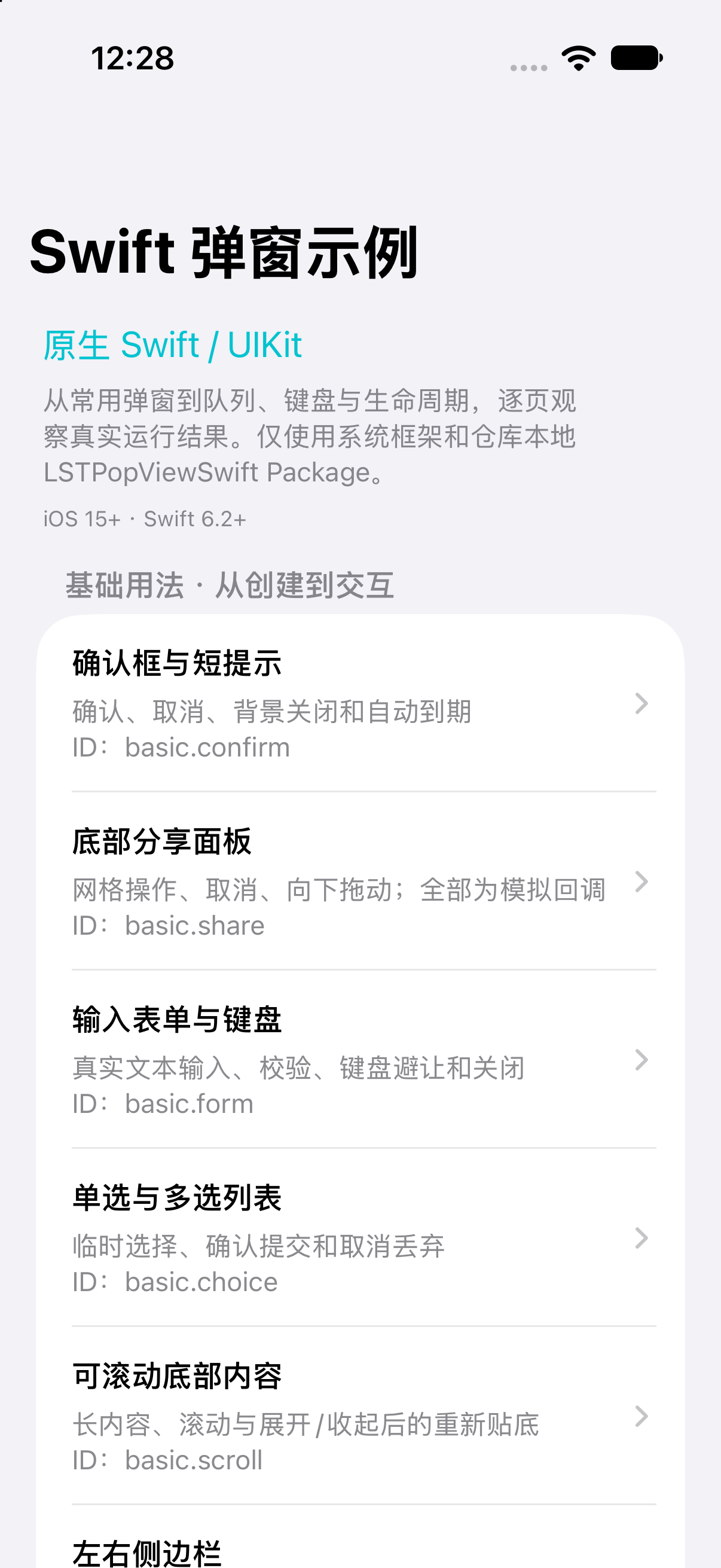
NativeDemo uses Chinese UI, explanations and source comments. The detailed scene guide describes each operation and the relevant code. The demo's deployment target is iOS 15; device runs require your own signing team.
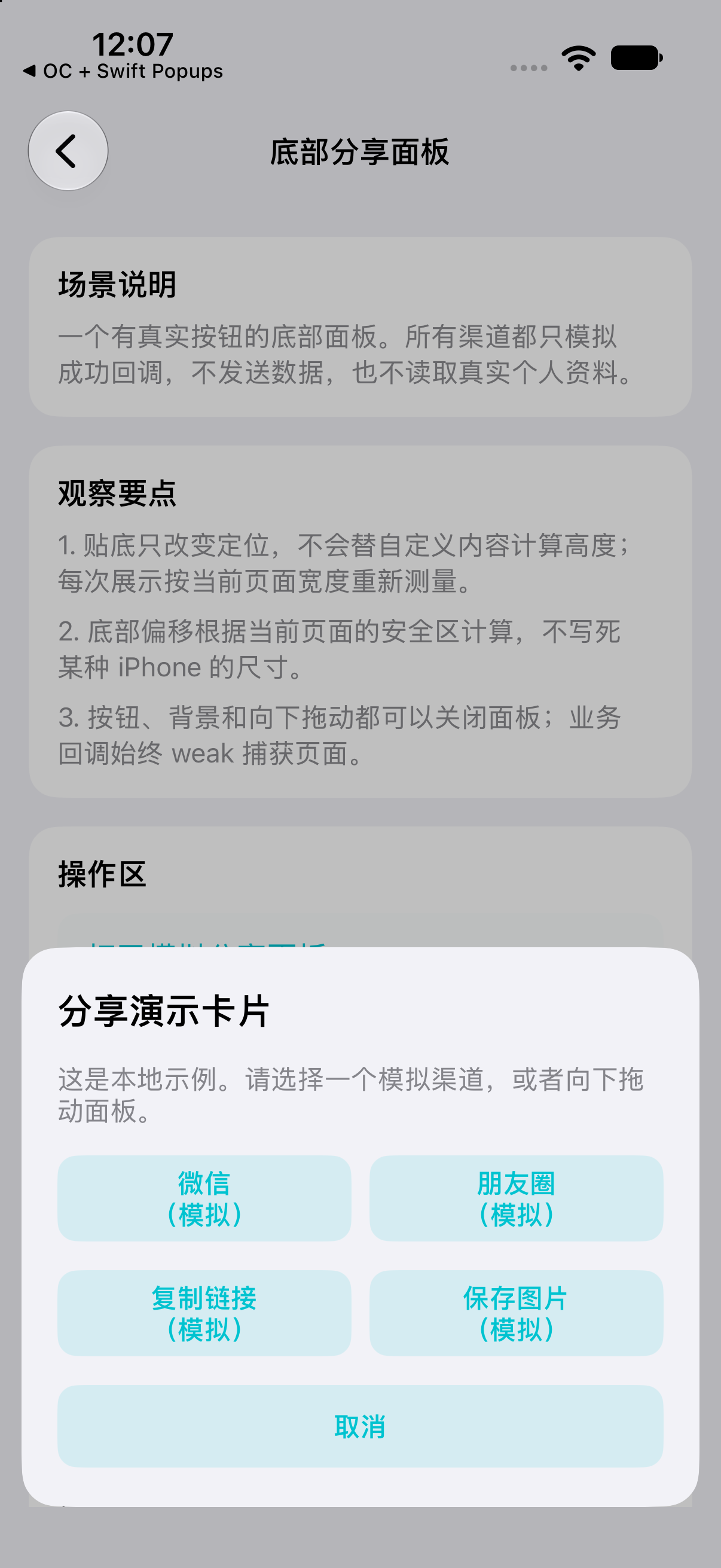
| Scene catalog | Simulated share panel | Input form |
|---|---|---|
 |
 |
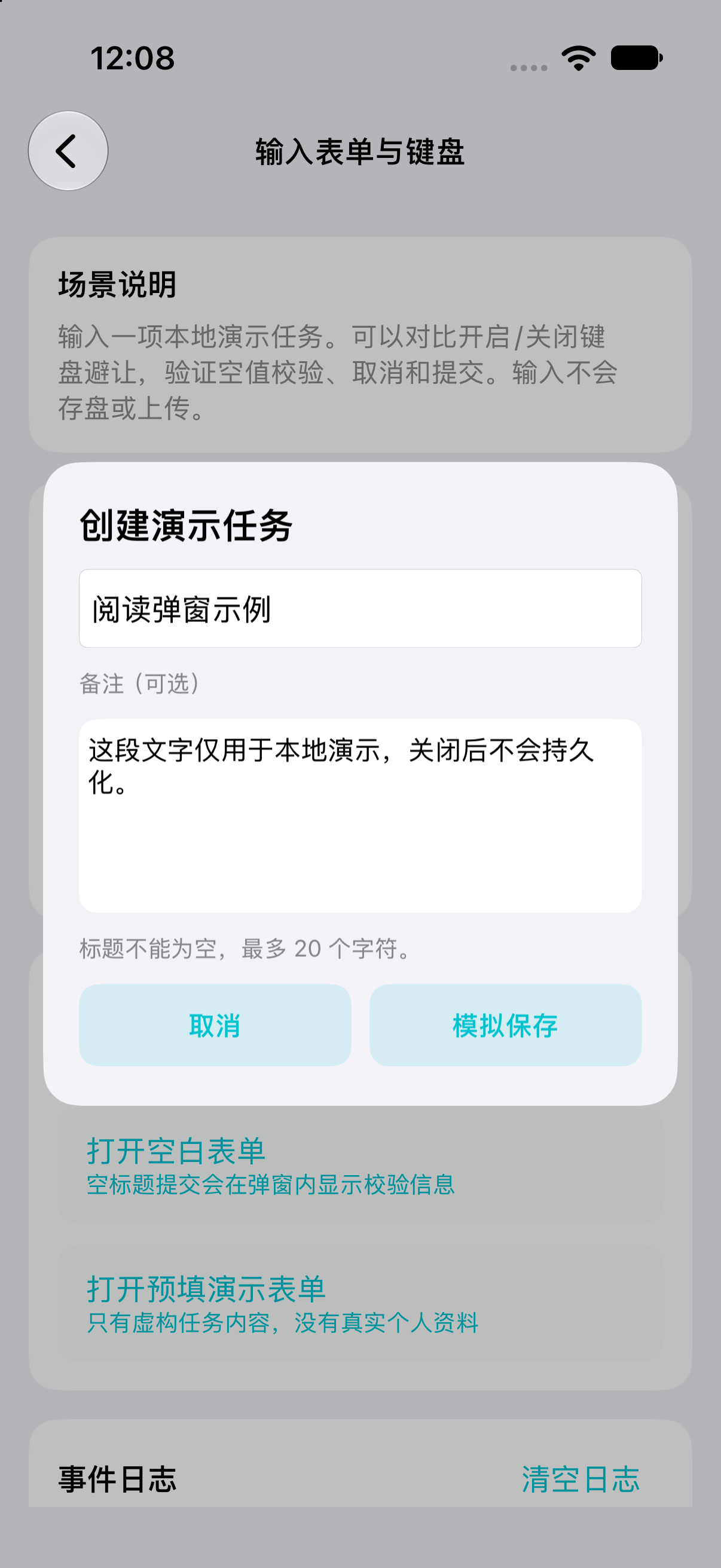 |
These images are simulator captures. Share/save buttons in the demo only update local results and logs.
Installation
Objective-C: CocoaPods
pod 'LSTPopView'
Run pod install and open your workspace. The original podspec includes LSTTimer and defaults to the Code subspec. No Swift module is installed automatically.
Native Swift: Swift Package Manager
In Xcode, choose File → Add Package Dependencies and enter:
https://github.com/LoSenTrad/LSTPopView.git
Choose Branch: master and add the LSTPopViewSwift product to your target. The package requires Swift tools 6.2 and selects Swift 6 language mode.
Existing OC tags such as 0.3.10 predate Package.swift and cannot select the native Swift package. To pin integration before a dedicated Swift release, use a specific commit revision that contains the package. Branch-based dependencies follow changes to that branch.
Native Swift: separate CocoaPod
The Swift pod uses its own name and source glob. Until it is published to CocoaPods Trunk, install from the repository branch:
platform :ios, '15.0'
pod 'LSTPopViewSwift', :git => 'https://github.com/LoSenTrad/LSTPopView.git', :branch => 'master'
Use a Swift 6.2+ compiler. s.swift_version = '6.0' in the podspec selects the language mode, not the minimum compiler version. The podspec's Swift release tag metadata does not mean that tag or a Trunk release is already available.
Choose one installation method for the Swift implementation in each app target. Do not link the same implementation through SPM, CocoaPods and manual sources at the same time.
Manual integration
- Objective-C: add the files under
LSTPopView/Classes/Code/to your target, keep the root license, and integrate the realLSTTimerdependency. The core files includeLSTPopView.h/.m,LSTPopViewProtocol.handUIView+LSTPV.h/.m. - Native Swift: add all five
.swiftfiles underSwift/Sources/LSTPopViewSwift/, retainSwift/LICENSE, and configure iOS 15+, Swift 6 language mode and a Swift 6.2+ compiler. When compiled directly into your app target, omitimport LSTPopViewSwift; that import is for a separate module.
For OC files copied directly into an app target, use #import "LSTPopView.h" instead of the CocoaPods module header path shown below. For Swift files compiled directly into the app, also remove the LSTPopViewSwift. module qualifier from type references. Manual integration does not require copying either demo. Carthage integration is not provided.
Basic usage
Objective-C
Call UIKit presentation code on the main thread. Keep the factory result in a local strong variable until it has been configured and passed to pop.
#import <LSTPopView/LSTPopView.h>

- (void)showPopupInView:(UIView *)parent {
    UILabel *content = [[UILabel alloc] initWithFrame:CGRectMake(0, 0, 280, 160)];
    content.text = @"Objective-C popup";
    content.textAlignment = NSTextAlignmentCenter;
    content.backgroundColor = UIColor.whiteColor;
    content.textColor = UIColor.blackColor;

    LSTPopView *popup = [LSTPopView initWithCustomView:content
                                        parentView:parent
                                          popStyle:LSTPopStyleSmoothFromBottom
                                      dismissStyle:LSTDismissStyleSmoothToBottom];
    if (!popup) { return; }
    popup.hemStyle = LSTHemStyleBottom;
    popup.cornerRadius = 16;
    __weak LSTPopView *weakPopup = popup;
    popup.bgClickBlock = ^{ [weakPopup dismiss]; };
    [popup pop];
}
The original OC implementation has its own ownership and callback behavior. Use weak popup properties and avoid content/block reference cycles. In particular, its dismissal notification includes dealloc semantics; retaining the popup can delay that notification.
Native Swift
import UIKit
import LSTPopViewSwift

@MainActor
func showPopup(in parent: UIView) {
    let content = UILabel(frame: CGRect(x: 0, y: 0, width: 280, height: 160))
    content.text = "Native Swift popup"
    content.textAlignment = .center
    content.backgroundColor = .systemBackground

    guard let popup = LSTPopViewSwift.LSTPopView.initWithCustomView(
        content,
        parentView: parent,
        popStyle: .smoothFromBottom,
        dismissStyle: .smoothToBottom
    ) else { return }

    popup.hemStyle = .bottom
    popup.cornerRadius = 16
    popup.isClickBgDismiss = true
    popup.popViewDidDismissBlock = { print("Native popup removed") }
    popup.pop()
}
Both examples explicitly provide a parent and a 280 × 160 content size. Add offsets based on that parent's safe area when needed. For Auto Layout content, measure with systemLayoutSizeFitting, then set the content frame before calling pop().
Common configuration names
The table maps public spellings; it does not promise identical internal behavior or defaults between implementations.
| Purpose | Objective-C example | Native Swift example |
|---|---|---|
| Bottom anchor | popup.hemStyle = LSTHemStyleBottom; |
popup.hemStyle = .bottom |
| Entrance / exit | LSTPopStyleSmoothFromBottom / LSTDismissStyleSmoothToBottom |
.smoothFromBottom / .smoothToBottom |
| No animation | LSTPopStyleNO / LSTDismissStyleNO |
.no / .no |
| Anchor offsets | adjustX, adjustY |
adjustX, adjustY |
| Rounded corners | cornerRadius, rectCorners |
cornerRadius, rectCorners |
| Backdrop appearance | bgColor, bgAlpha |
bgColor, bgAlpha |
| Background / tap dismissal | isHideBg, isClickBgDismiss |
isHideBg, isClickBgDismiss |
| Keyboard avoidance | isAvoidKeyboard, avoidKeyboardSpace |
isAvoidKeyboard, avoidKeyboardSpace |
| Group / priority | groupId, priority |
groupId, priority |
| Stack / single display | isStack, isSingle |
isStack, isSingle |
| Countdown | showTime, popViewCountDownBlock |
showTime, popViewCountDownBlock |
| Downward drag | LSTDragStyleY_Positive + dragDistance |
.y_Positive + dragDistance |
| Downward swipe | LSTSweepStyleY_Positive + swipeVelocity |
.y_Positive + swipeVelocity |
In native Swift, isClickBgDismiss defaults to false, showTime to 0, keyboard avoidance to true, and both gesture direction sets to .no. A zero backdrop alpha does not enable touch passthrough; use isHideBg for that. The custom-view-only factory selects no animation; factories with style arguments use those arguments.
Swipe dismissal requires the matching direction in both dragStyle and sweepStyle. Position and animation are independent settings. See the full Swift configuration reference for defaults and thresholds.
Ownership, concurrency and cleanup
Content and callbacks: a native Swift presentation Session retains its popup while queued or displayed; the popup retains its content. Removal releases the manager's ownership. Use weak captures when content callbacks reference the popup or a controller, and weak back-references from content to its popup. An external strong reference can keep a removed object alive; Swift didDismiss still reports actual removal rather than waiting for destruction.
Original OC dismissal callback: popViewDidDismissBlock is a special case: its setter stores callbacks in a weak collection, and invokes them from dealloc. To receive it reliably, keep a copied/strong reference to the callback itself in the consumer and avoid having it strongly capture the popup. Other ordinary copy Block properties do not share this weak-storage behavior. A strong popup reference delays deallocation; it does not by itself establish a reference cycle. Both implementations keep delegates weak, so the consumer owns delegate lifetimes.
MainActor: native Swift popup APIs and state are main-actor isolated. Enter that isolation correctly from other asynchronous contexts. MainActor serializes state access; session snapshots, transactions and generation checks additionally protect against synchronous callback reentry and late callbacks. Keep synchronous expensive work outside the UI actor.
An actor-isolated asynchronous operation can interleave with other work across await; isolation does not make an entire asynchronous workflow atomic.
Groups: native Swift groups include both host identity and groupId. Each enqueue freezes group, priority and mode for that presentation. Changing those properties affects a later presentation, not the currently registered Session. Higher/equal-priority queued presentations can suspend the current item; closing it resumes the appropriate waiter. isStack permits coexistence; isSingle replaces existing same-group items. Choose one mode deliberately.
Multiple scenes: pass the intended parent explicitly. The Swift factory only infers a window when the foreground choice is unambiguous; otherwise it can return nil. Do not select an arbitrary connectedScenes.first for a different scene's content.
| Native Swift operation | Use it for |
|---|---|
popup.dismiss() |
Close this popup with its configured exit animation |
getAllPopView(forParentView:) followed by individual dismissal |
Clear one page or container |
removeAllPopView() |
Clear the Swift module's current queue; deliberate later presentation remains allowed |
invalidateAllScopes() |
Before account logout/root replacement, permanently invalidate old creation contexts; create fresh popups afterward |
invalidatePopViews(in: scene) |
Invalidate the disconnected scene's contexts |
The demo cleans its own hosts when leaving each page. Swift countdowns use a monotonic clock and pause while suspended. Reduce Motion/cross-fade preferences, modal accessibility and guarded focus restoration are supported; injected environment tests do not replace a real VoiceOver check.
Using both implementations
Use LSTPopViewSwift.LSTPopView or a local type alias to distinguish the native type when both modules are present. The Swift class has its module runtime name; do not add @objc(LSTPopView) and collide with the original Objective-C class. Internal Swift UIView.pv_* helpers are not exported as a competing public category.
The two implementations maintain independent queues. Clearing Swift does not clear OC, and priorities do not coordinate across implementations. Swift does not replace the original OC class, provide an automatic migration layer or include the OC-only LSTAlert wrapper. Their lifecycle timing is intentionally documented separately.
See the real coexistence consumer for a UIKit-facing Objective-C adapter, ordinary Swift module imports and hosted tests for class identity, display/dismissal and queue isolation.
Native Swift demo: 16 scenes
Each scene has its own page, operations and event log. Read the full Chinese guide for instructions and source-reading order.
| Basic scenes (6) | Try |
|---|---|
| Confirmation and timed notice | Confirm/cancel, background policy, countdown and early close |
| Bottom share panel | Four simulated channels, cancel, background tap and downward drag |
| Input form and keyboard | Validation, draft input, keyboard avoidance, hide-keyboard toolbar and cancellation |
| Single/multiple choice | Temporary selection, confirmation and discarded changes; scrolling in short hosts |
| Scrollable bottom sheet | Long local content, compact/expanded heights and automatic re-anchoring |
| Left/right sidebars | Directional animations, local menu results and a local switch |
| Advanced scenes (10) | Try |
|---|---|
| Priority queues and groups | Low/high/equal priority, independent groups and queue inspection |
| Stacking and single display | Multiple retained cards versus same-group replacement |
| Nine anchors and offsets | Row/column positions and local X/Y offsets |
| Entrance/exit animation | Independent styles, requested duration and no-animation lifecycle |
| Drag, swipe and scrolling | Distance/velocity thresholds, rebound and scroll handoff |
| Countdown suspension/resumption | Priority interruption, remaining time and manual stop |
| Dynamic content and corners | Resize the real content frame and update the corner mask |
| Lifecycle and weak delegates | Delegate/Block order, releasing a delegate and explicit removal |
| Host lifetime and invalidation | Replace a local demo host and reject its retired popup |
| Passthrough and accessibility | Background hit testing, modal behavior and current system preferences |
The scenes use public APIs through ordinary import LSTPopViewSwift. They do not require accounts, backend services or personal data. Their existence does not mean every scene, gesture, device or accessibility configuration has been manually validated.
Verification
Build the native demo from the repository root:
xcodebuild build \
  -project Swift/Examples/NativeDemo/NativeSwiftDemo.xcodeproj \
  -scheme NativeSwiftDemo \
  -destination 'generic/platform=iOS Simulator' \
  CODE_SIGNING_ALLOWED=NO
Run the external public-API compile check from the repository root:
./Swift/Scripts/verify-public-api.sh
It compiles and links a real iOS Simulator library in Swift 6 with complete strict concurrency and warnings treated as errors, then type-checks a consumer without @testable.
Behavior tests under Swift/Tests/ require a UIKit test host with a real connected UIWindowScene. This is an iOS package; a plain macOS swift test is not an iOS UI validation. The coexistence instructions prepare that iOS 16+ host and run both regression and coexistence tests against an explicit simulator UDID, preserving an .xcresult bundle.
There are two independent podspecs. Select the intended one explicitly:
pod lib lint LSTPopView.podspec
pod lib lint LSTPopViewSwift.podspec
Build success, simulator interaction, complete manual scene coverage, physical-device runs and historical OS coverage are separate results. Use the actual command output and result bundle to establish what passed.
Original Objective-C gallery
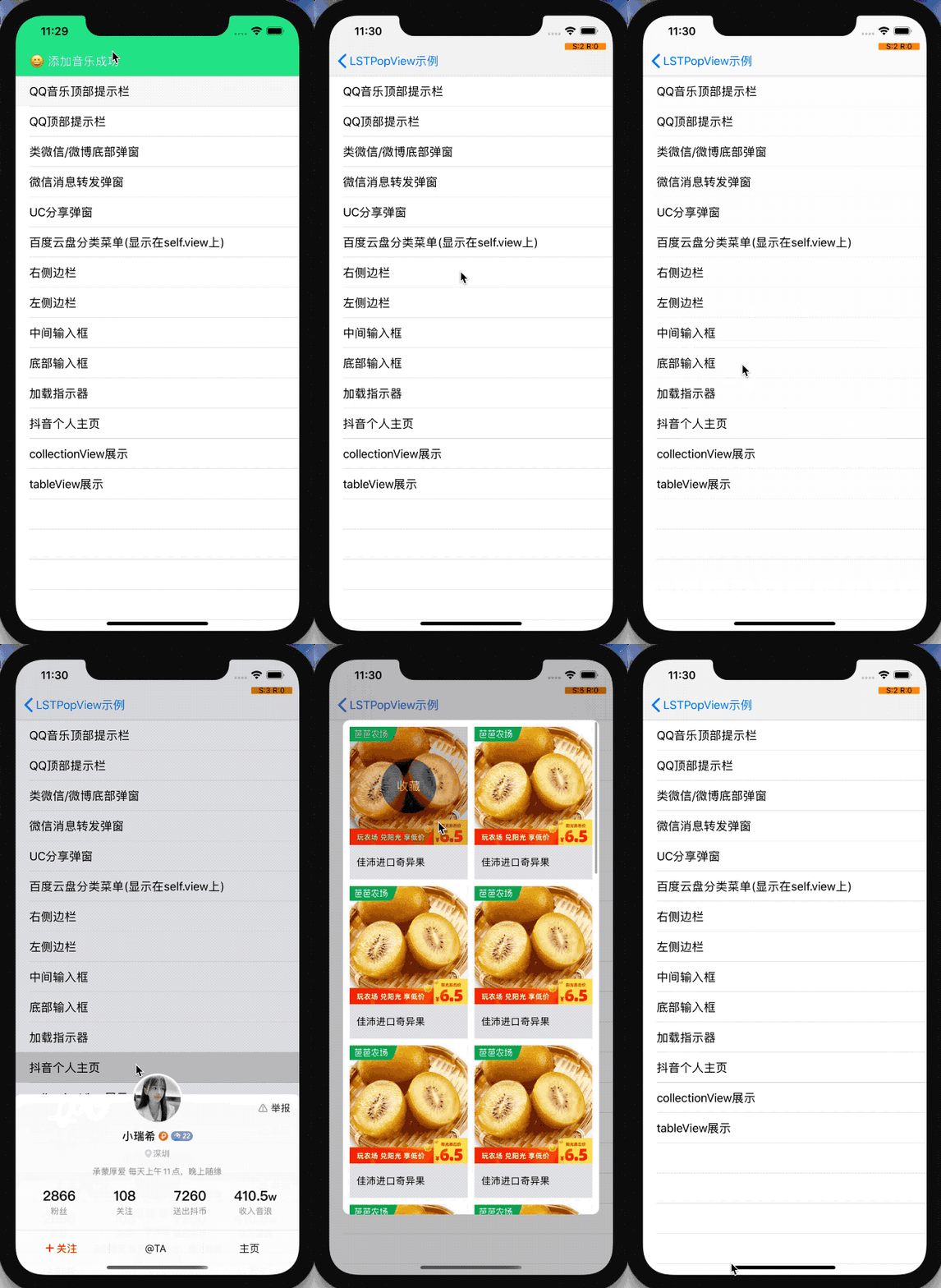
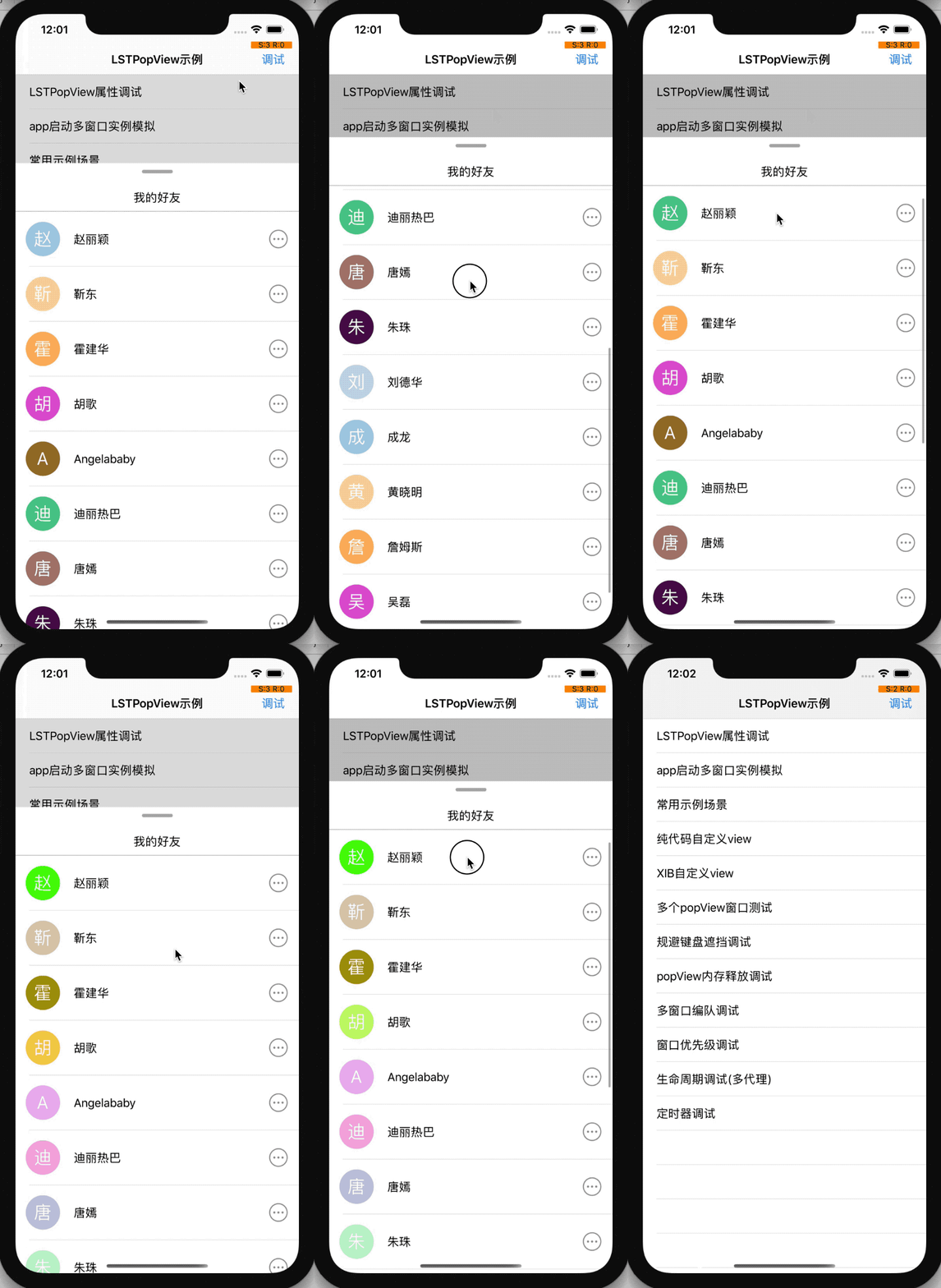
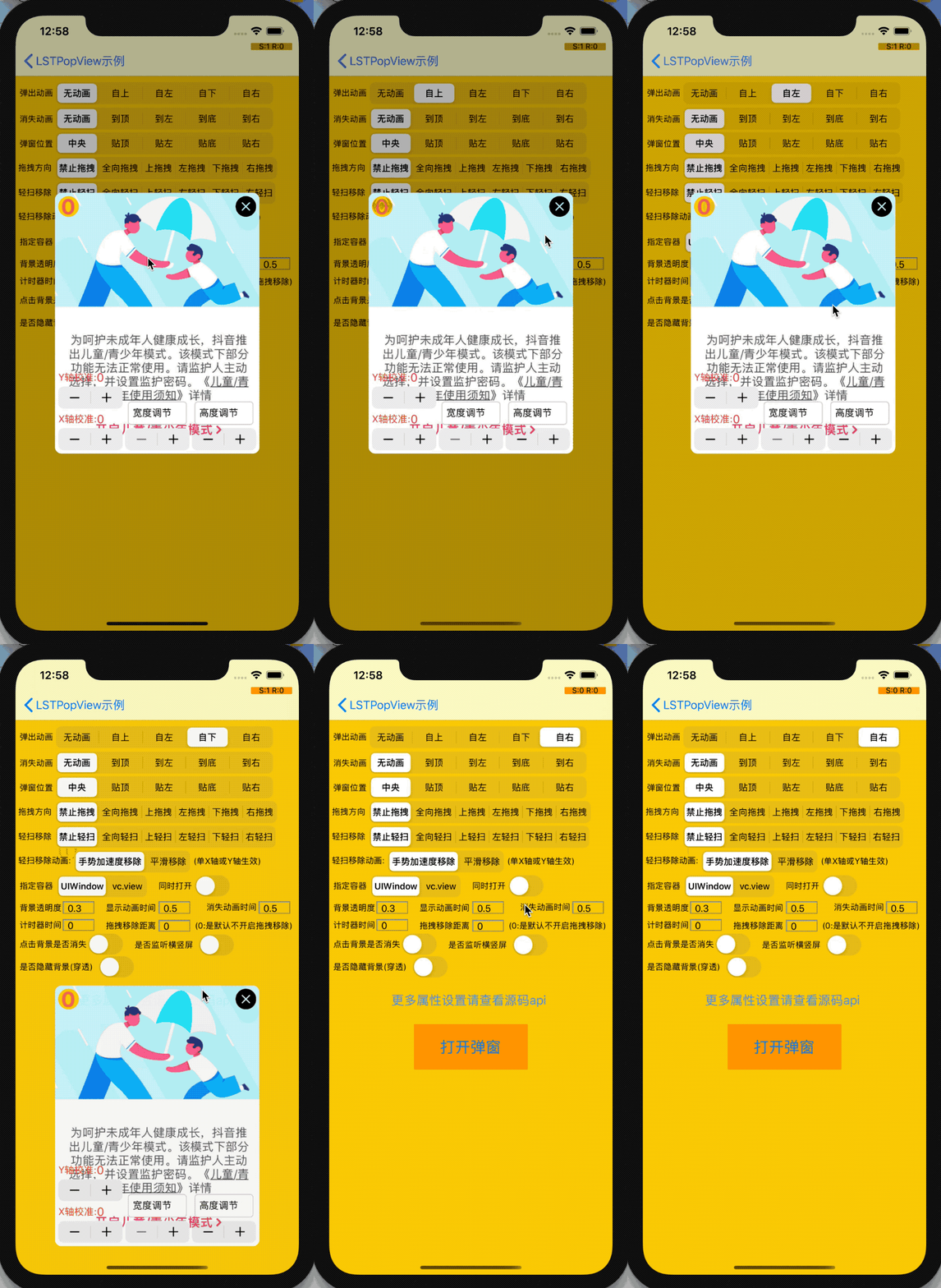
Show four original animation previews
| Common popup scenarios | Drag and swipe |
|---|---|
 |
 |
| Entrance animations | Keyboard avoidance |
|---|---|
 |
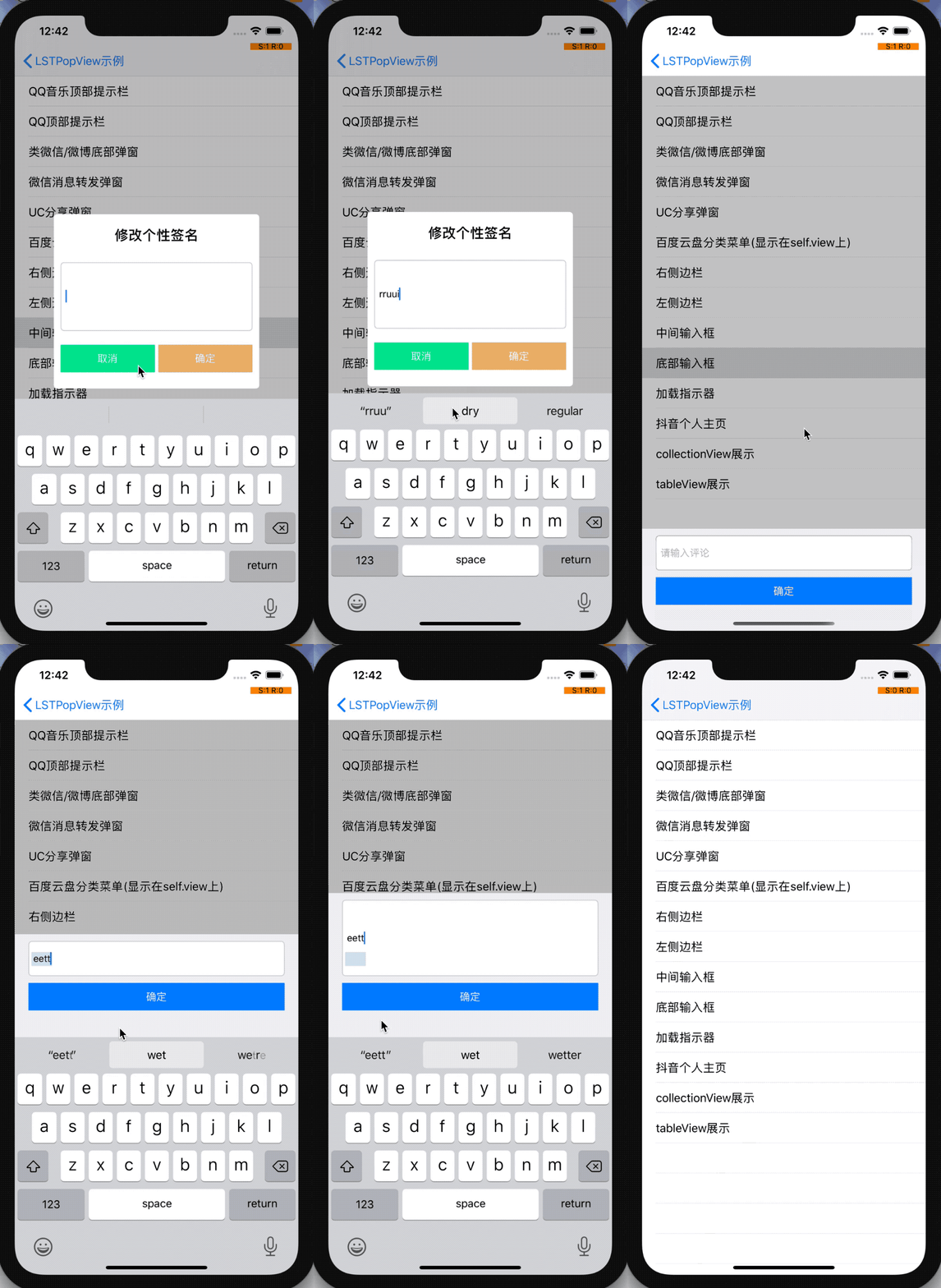 |
These are the original OC previews, distinct from the native Swift screenshots above.
History, issues and license
- Original release history
- Issues and feature requests: include the implementation/module, installation method, Xcode/iOS version and a minimal reproduction.
- Maintainer: [email protected] · QQ group:
1045568246· WeChat:a_LSTKit. - MIT licensed: root license and native Swift license. Keep the applicable copyright and license notices when redistributing source.
Explore related projects
codecrafters-io/build-your-own-x
Master programming by recreating your favorite technologies from scratch.
561,337 starspublic-apis/public-apis
A collective list of free APIs
497,585 starsmorluto/rea
Reverse engineer anything with agents, from app behavior down to native binaries.
446,644 starsopenclaw/openclaw
The AI that really does things. Any OS. Any Platform. The lobster way. 🦞
394,251 stars