
Liubsyy/M3U8Quicker
Liubsyy/M3U8Quicker has 241 GitHub stars and 26 forks. GitHot measured +1 stars in 24 hours and +2 in 7 days. Last checked 2026-11-16 23:40 UTC. Last push 2026-11-12.
Measured star growth
- in 24h
- +1
- in 7 days
- +2
- in 15 days
- Update delayed
- in 1 month
- Update delayed
Net star changes over overlapping periods, not daily totals. Missing measurements are left blank. Stars measure attention, not software quality.
About
跨平台HLS(M3U8格式)/DASH/MP4视频下载器和直播录制器,支持多线程下载、断点续传、边下边播、AES解密、浏览器自动扫描地址一键下载。A cross-platform video downloader and live stream recorder supporting HLS (M3U8), DASH, and MP4 formats.
Creative & MediaREADME.en.md
OriginalM3U8 Quicker
简体中文 | English



M3U8 Quicker is a desktop application built with Tauri + Rust + React + TypeScript for downloading HLS, DASH, and MP4 videos and recording live streams. It supports Windows, macOS, and Linux. ⬇ Download and install
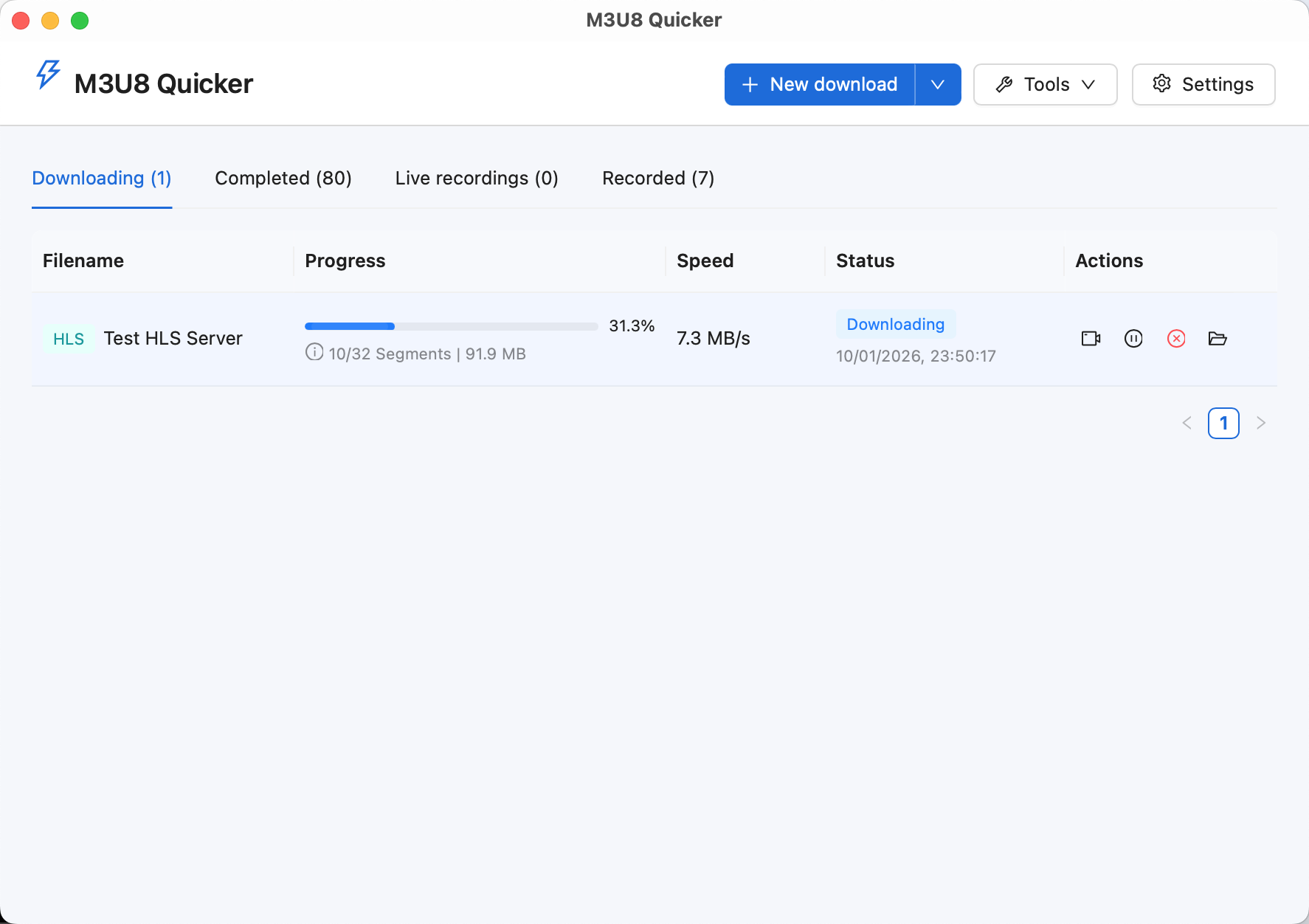
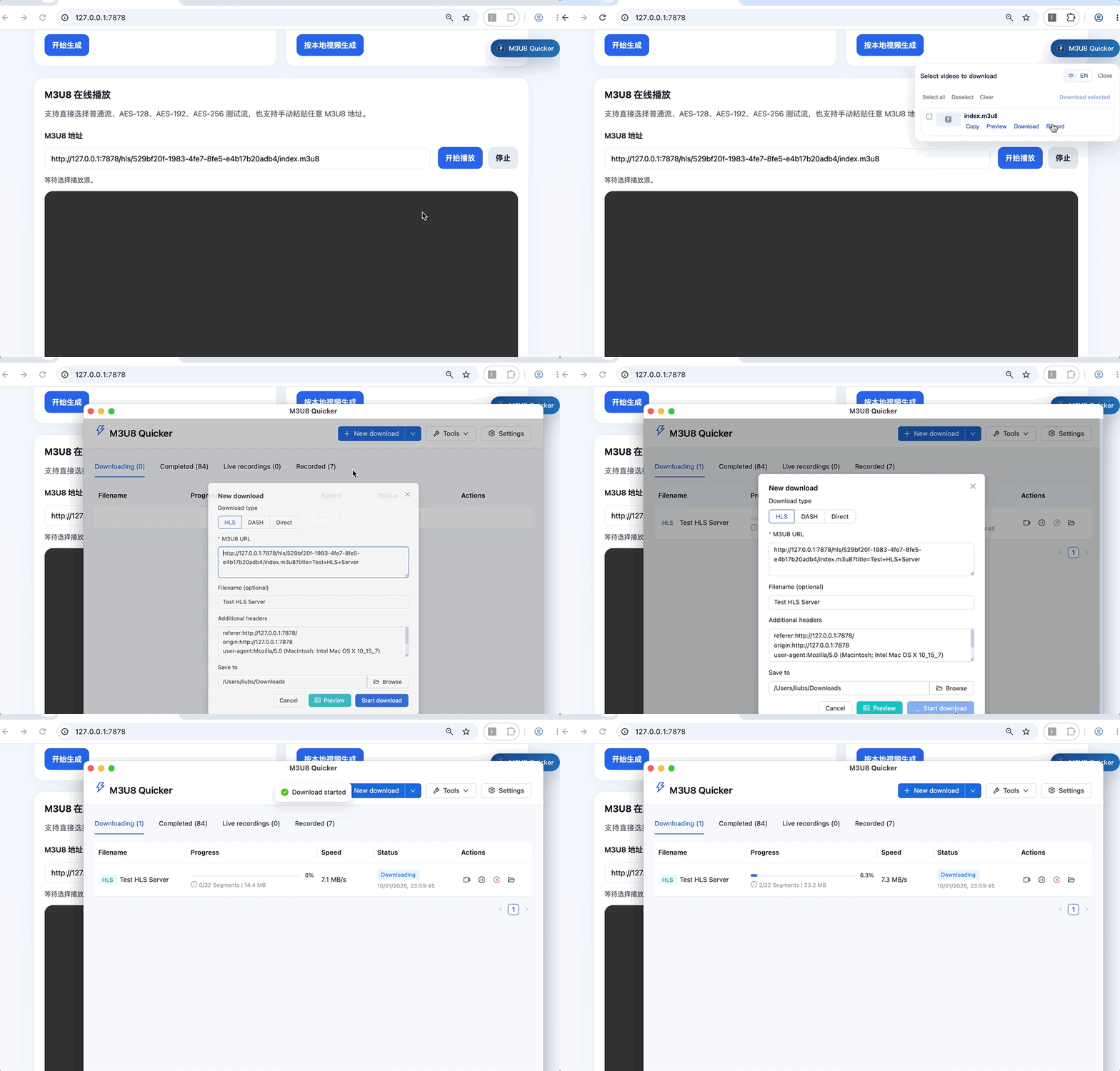
The application includes an optional browser extension (Chrome/Firefox/Edge) that automatically detects videos on web pages and lets you create download or live recording tasks with the required information filled in.
Features
Video downloads
- Download HLS videos (M3U8), with AES-128/AES-192/AES-256 decryption and support for multiple tracks, including separate video, audio, and subtitles.
- Download DASH videos.
- Download regular video files: mp4, mkv, avi, wmv, flv, webm, mov, and rmvb.
- Use concurrent downloads with a configurable concurrency limit.
- Play videos while downloading, pause and resume downloads, and retry failed segments.
- Convert completed downloads to MP4, transcode videos, and convert between formats.
- Configure a proxy.
- Download videos in batches.
- Preview video thumbnails.
Live recording
- Record HTTP-FLV and HLS streams.
- Convert completed recordings to MP4.
Browser extension
- Automatically detect videos and live streams on web pages.
- Create video download or live recording tasks with one click.
- Support sites such as Bilibili, Douyin, and CCTV in addition to generic video URLs.
- Switch between Chinese and English with “中 / EN”. The extension initially follows the browser language and remembers your manual selection.
Usage
Installation
Download the desktop installer or release archive for your system from GitHub Releases, or use the direct links below:
| System | Files | Which to choose |
|---|---|---|
 Windows |
x64: Installer | Portable x86: Installer | Portable |
Choose x64 for most PCs. Choose x86 for 32-bit systems. |
 macOS |
Apple Silicon: Installer | App archive Intel: Installer | App archive |
Choose Apple Silicon for M-series chips. Choose Intel for Intel-based Macs. |
 Linux |
Packages: deb | rpm Portable: AppImage |
Choose deb for Ubuntu, Debian, or Linux Mint. Choose rpm for Fedora, RHEL, CentOS, or openSUSE. |
If macOS displays a message such as “cannot be opened” or “app is damaged” when you first install the application:
- Open System Settings → Privacy & Security, find the blocked application, and click Open Anyway.
- If that does not work, run the following command in Terminal and open the application again:
xattr -rd com.apple.quarantine /Applications/M3U8\ Quicker.app
Browser extension (optional)
Open M3U8 Quicker → Tools → Install Browser Extension and follow the instructions for Chrome, Firefox, or Microsoft Edge.
FFmpeg downloads
FFmpeg is used for transcoding, merging, and video previews. Download or configure it under Settings → FFmpeg, or use the direct links for your platform below:
| Platform | Architecture | Download |
|---|---|---|
| Windows | x64 | ffmpeg-windows-x64.zip |
| Windows | x86 (32-bit) | ffmpeg-windows-x86.zip |
| Linux | x64 | ffmpeg-linux-x64.tar.xz |
| Linux | ARM64 | ffmpeg-linux-arm64.tar.xz |
| macOS | Intel x64 | ffmpeg-macos-x64.zip |
| macOS | Apple Silicon | ffmpeg-macos-arm64.zip |
All packages include FFmpeg and FFprobe. After extracting, select ffmpeg.exe (Windows) or ffmpeg (macOS/Linux) under Settings → FFmpeg, and keep ffprobe.exe or ffprobe in the same directory.
Create a download
Option 1: Use the browser extension (recommended)
After installing the browser extension, it automatically detects video and live stream URLs on web pages. A M3U8 Quicker button appears in the upper-right corner. Use it to open the desktop application and create a download or live recording task with url, referer, origin, and user-agent filled in automatically.
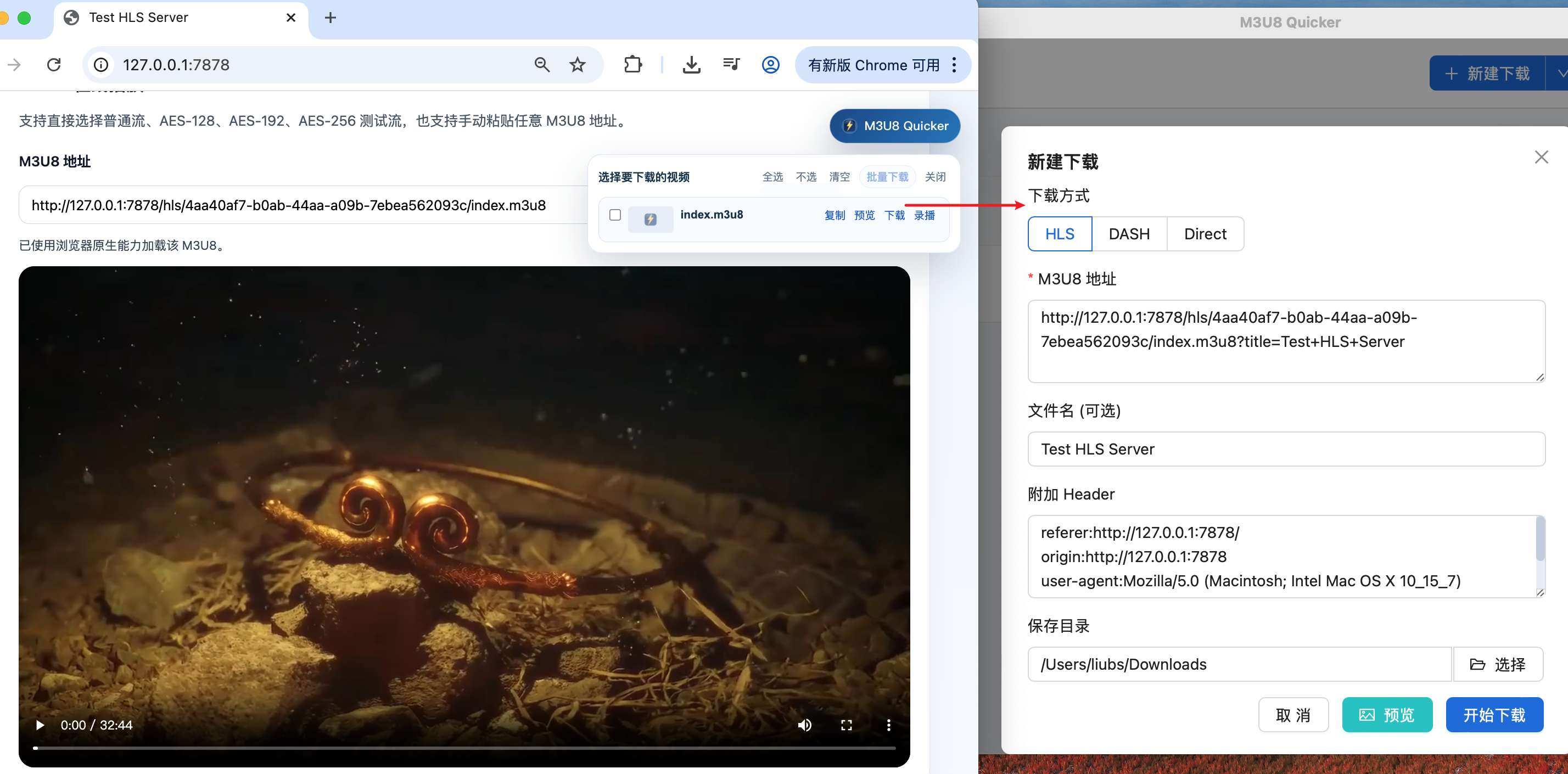
Option 2: Enter a URL manually
Click New Download in the main window and enter an HLS/DASH/MP4 URL to create a task.
If the resource requires additional request headers, enter them in the extra headers field. For example:
referer:http://127.0.0.1:7878/
origin:http://127.0.0.1:7878
user-agent:Mozilla/5.0 (Macintosh; Intel Mac OS X 10_15_7)
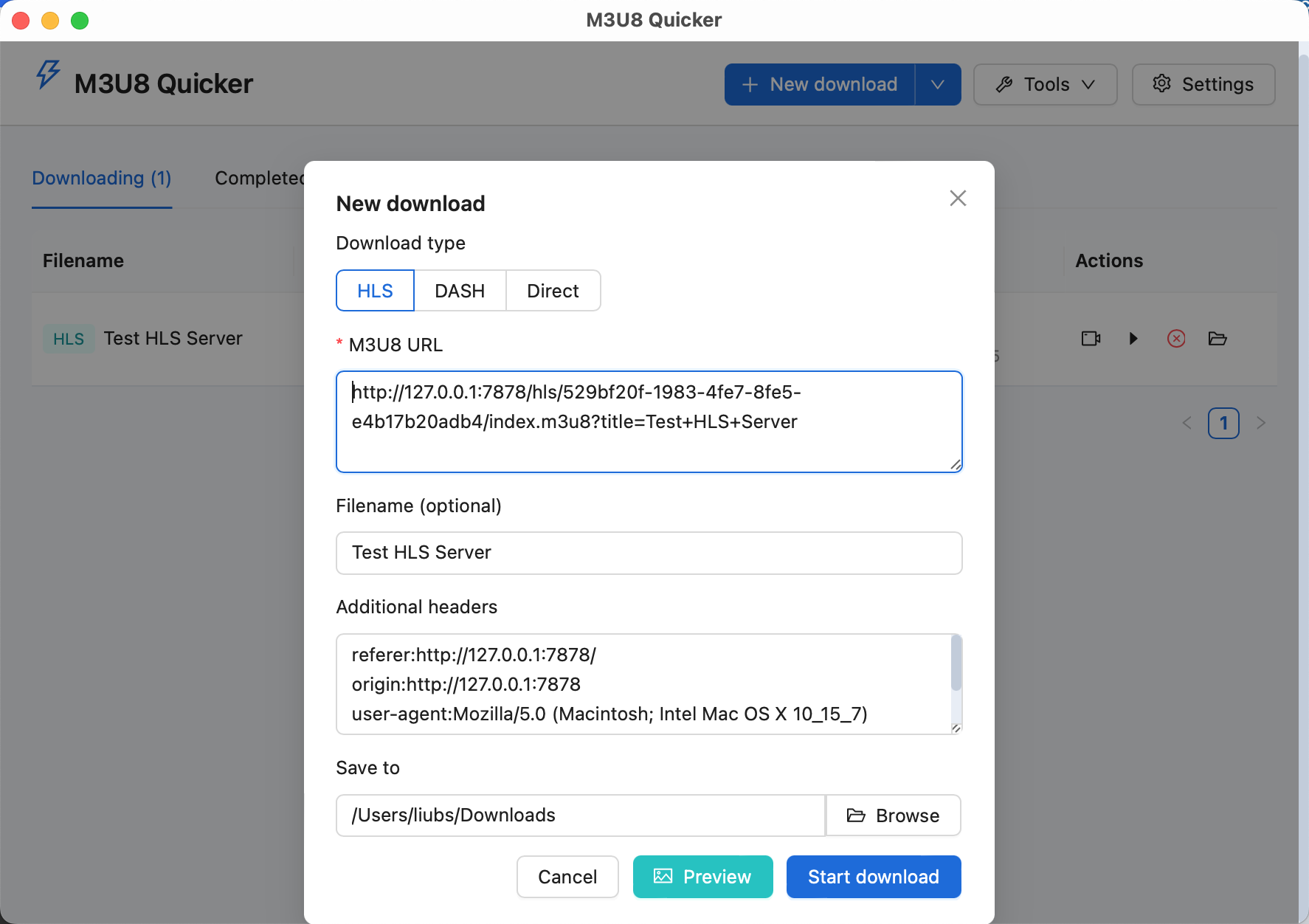
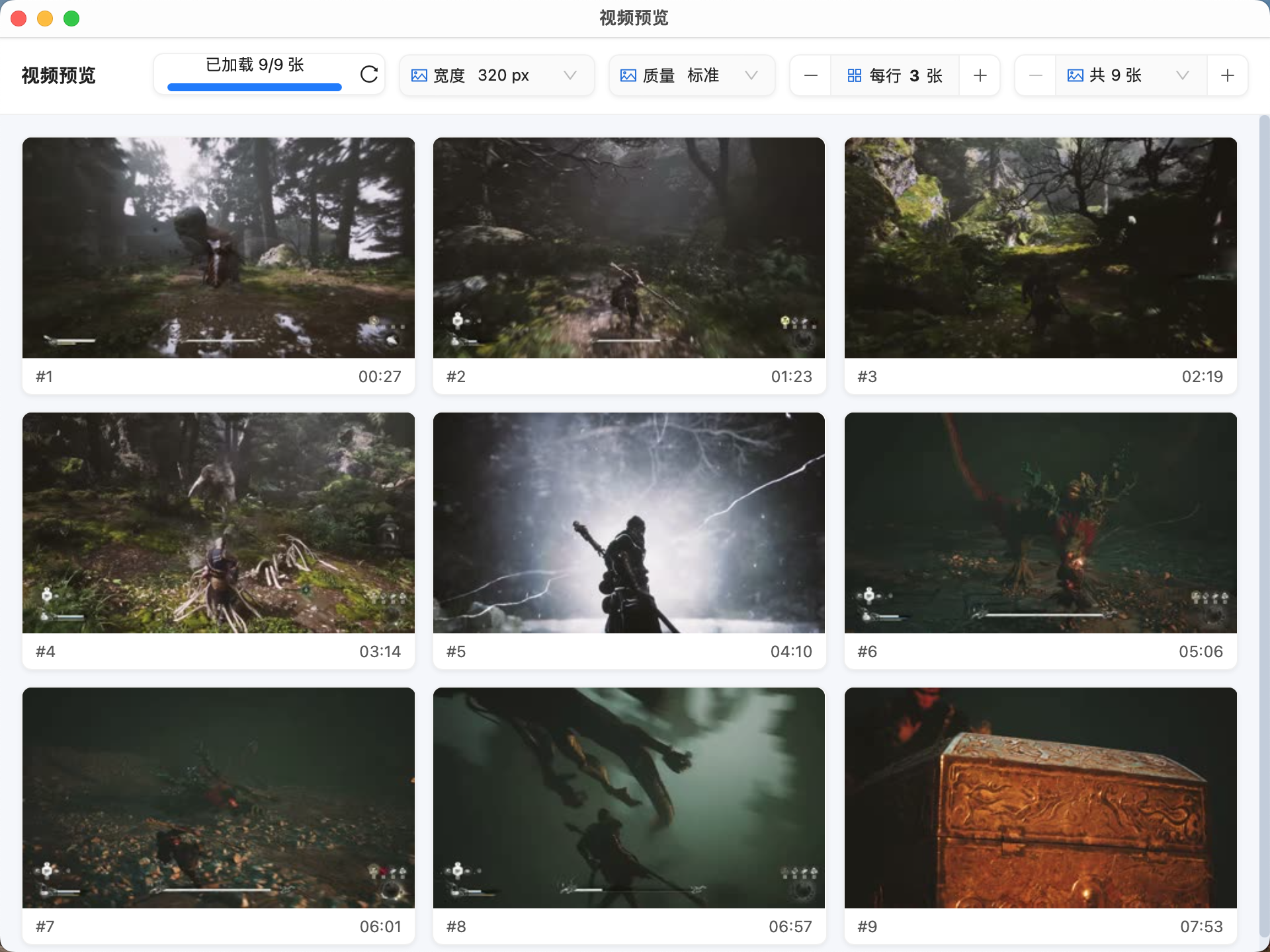
You can preview video thumbnails before downloading.
During a download
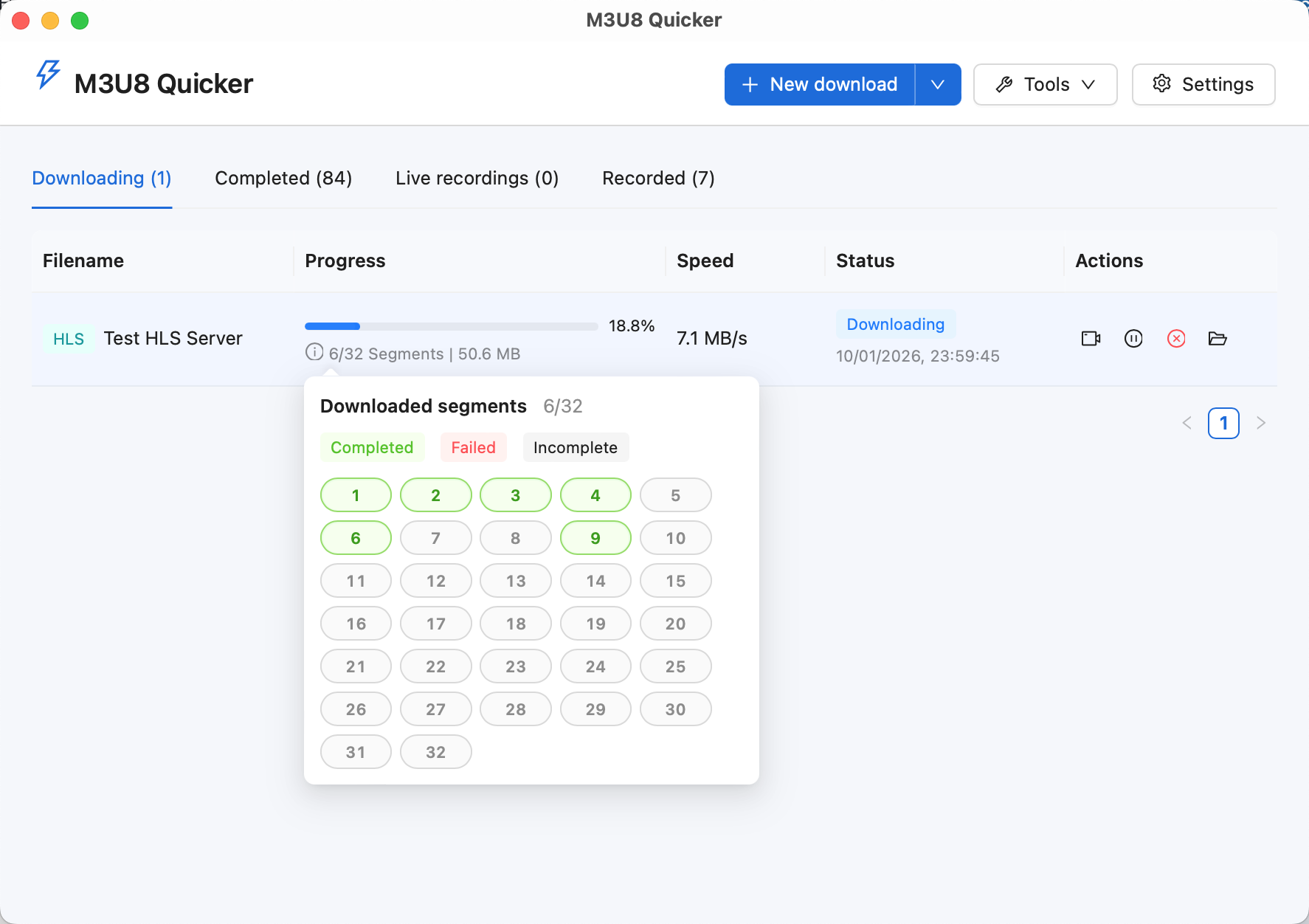
New tasks appear in the download list. While downloading, you can:
- Pause and resume tasks without starting over.
- Retry only the segments that failed.
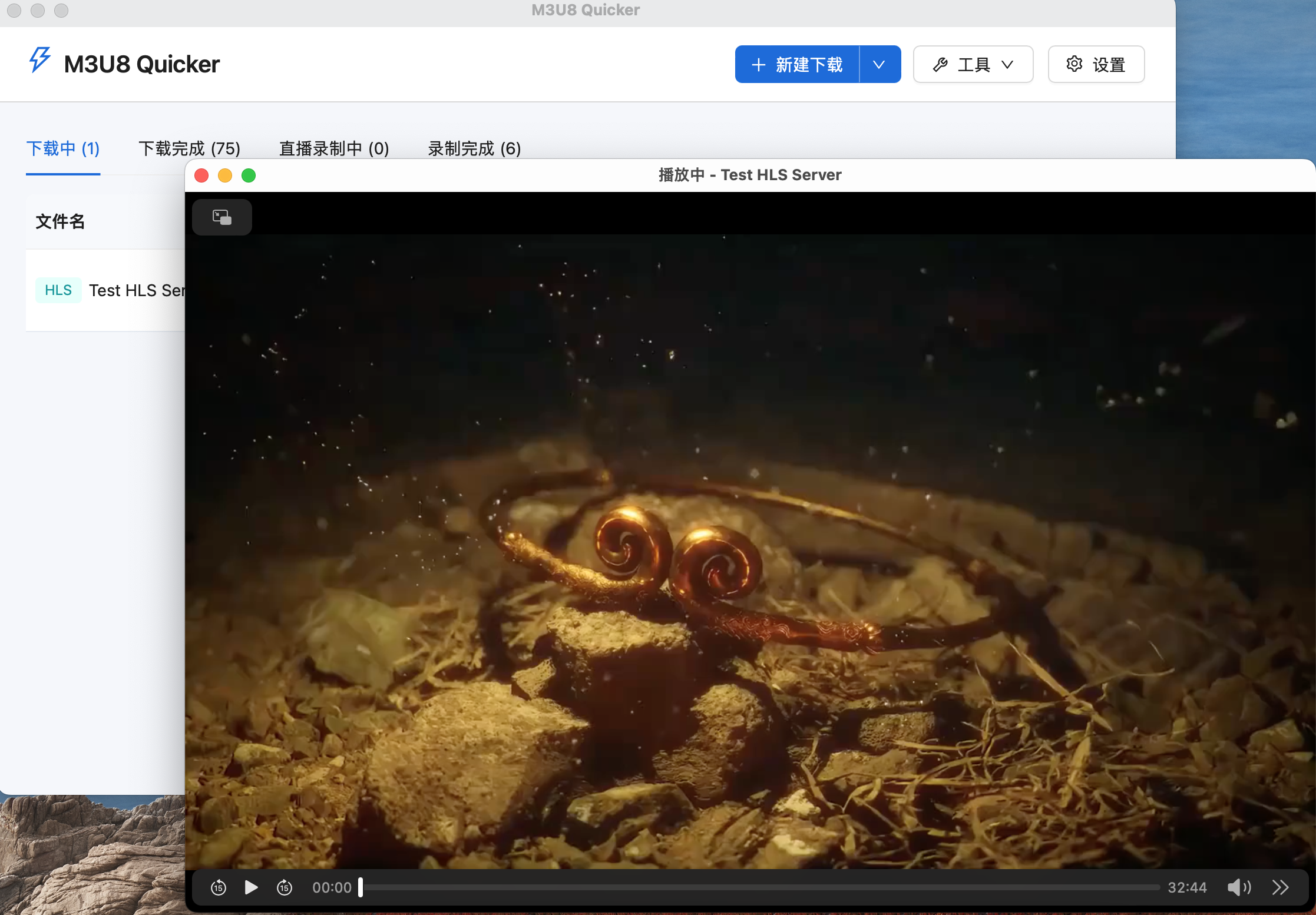
- Play videos while they are still downloading.
The download list displays task status, progress, and download speed so you can track each task.
Playback
You can play videos while they are downloading. If you seek to a segment that has not been downloaded yet, the application prioritizes that segment.
Settings
The settings panel includes:
- Theme selection.
- Proxy toggle and address.
- Download settings: concurrency, speed limit, and actions after completion.
- Live recording settings.
- FFmpeg download and management.
Development and building
Technology stack
- Frontend:
React 19,TypeScript,Vite 8, andAnt Design 6. - Desktop framework:
Tauri 2. - Backend logic:
Rust.
Requirements
- Node.js: a recent LTS version is recommended.
- Rust: version
1.88or later.
Project structure
src/: React frontend and UI logic.src-tauri/: Tauri desktop application and Rust backend.browser-extension/: optional browser extension source code, withchrome/andfirefox/subdirectories.test-hls-server/: a standalone local Rust test server that splits videos intom3u8 + tsfiles.public/: static assets.
Local development
1. Install dependencies
npm install
2. Start the desktop application in development mode
Press F5 in VS Code, or run:
npm run dev:desktop
npm run dev:desktop is the cross-platform development entry point, also used by VS Code's F5 launch configuration:
- Windows / Linux: equivalent to
npm run tauri dev. - macOS: starts Vite, builds the development binary, bundles it into an
.appthat declares them3u8quicker://protocol, and registers and launches it. This lets the browser extension open the application during development, as it does on Windows. The bare binary produced bytauri devcannot be registered as a protocol handler on macOS.
Common commands
| Command | Description |
|---|---|
npm install |
Install frontend dependencies. |
npm run dev |
Start the frontend development server. |
npm run dev:desktop |
Start desktop development mode; also register a deep-link .app on macOS. |
npm run preview |
Preview the frontend build. |
npm run tauri dev |
Start desktop development mode without extension deep-link support on macOS. |
npm run lint |
Run frontend lint checks. |
npm run build |
Run TypeScript checks and build the frontend. |
npm run tauri build |
Build desktop application installers. |
cargo check --manifest-path src-tauri/Cargo.toml |
Check the Rust / Tauri code. |
cargo test --manifest-path src-tauri/Cargo.toml |
Run Rust unit tests. |
Packaging and resources
- Application name:
M3U8 Quicker. - Application identifier:
com.liubsyy.m3u8quicker.
Desktop installers bundle the repository's
browser-extension/directory as an application resource, so the installed application can locate the extension files when guiding users through installation.
The repository and default packaging configuration do not bundle an
FFmpegbinary. FFmpeg binaries downloaded through the application or configured by users remain subject to their respective upstream licenses and distribution terms.
License
- This repository's source code is licensed under Apache License 2.0. See LICENSE.
- Any
FFmpegused at runtime, including system installations and third-party binaries downloaded through the application, remains subject to its own license. The repository'sApache-2.0license does not change those terms. - See THIRD_PARTY_NOTICES.md for third-party licenses and notices.