
Lincb522/GitGatto
Lincb522/GitGatto has 343 GitHub stars and 1 forks. GitHot measured 0 stars in 24 hours, 0 in 7 days, and +1 in 15 days. Last checked 2026-11-18 01:18 UTC. Last push 2026-09-16.
Measured star growth
- in 24h
- 0
- in 7 days
- 0
- in 15 days
- +1
- in 1 month
- Collecting history
Net star changes over overlapping periods, not daily totals. Missing measurements are left blank. Stars measure attention, not software quality.
About
原生 macOS Git 客户端,以 Agent 驱动仓库管理、审阅与协作。
AIREADME.en.md
Original
GitGatto
macOS · Git · GitHub
简体中文 · 繁體中文 · English · 日本語 · 한국어 · Deutsch · Français · Español · Português · Русский · العربية





Website · Download · Changelog · Issues
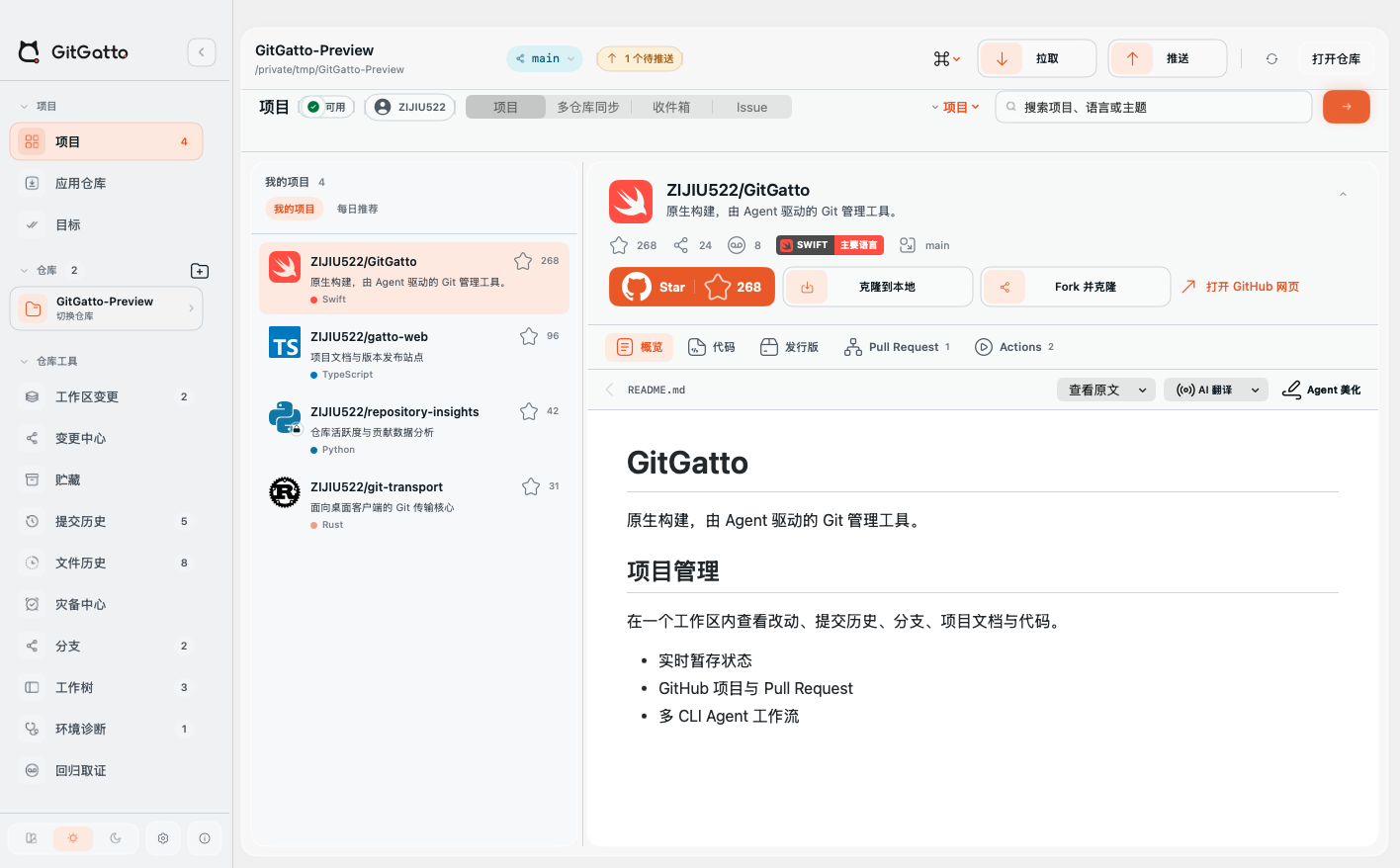 GitHub project |
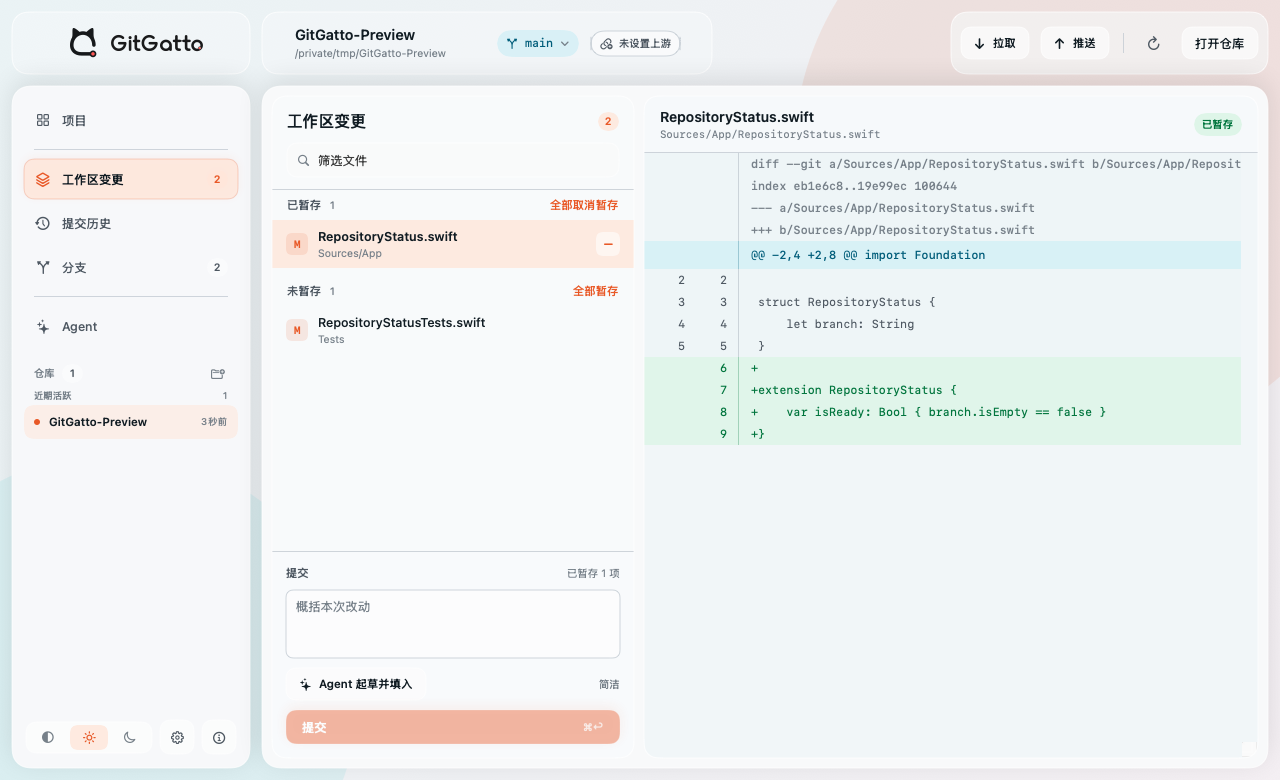 Working tree and diff |
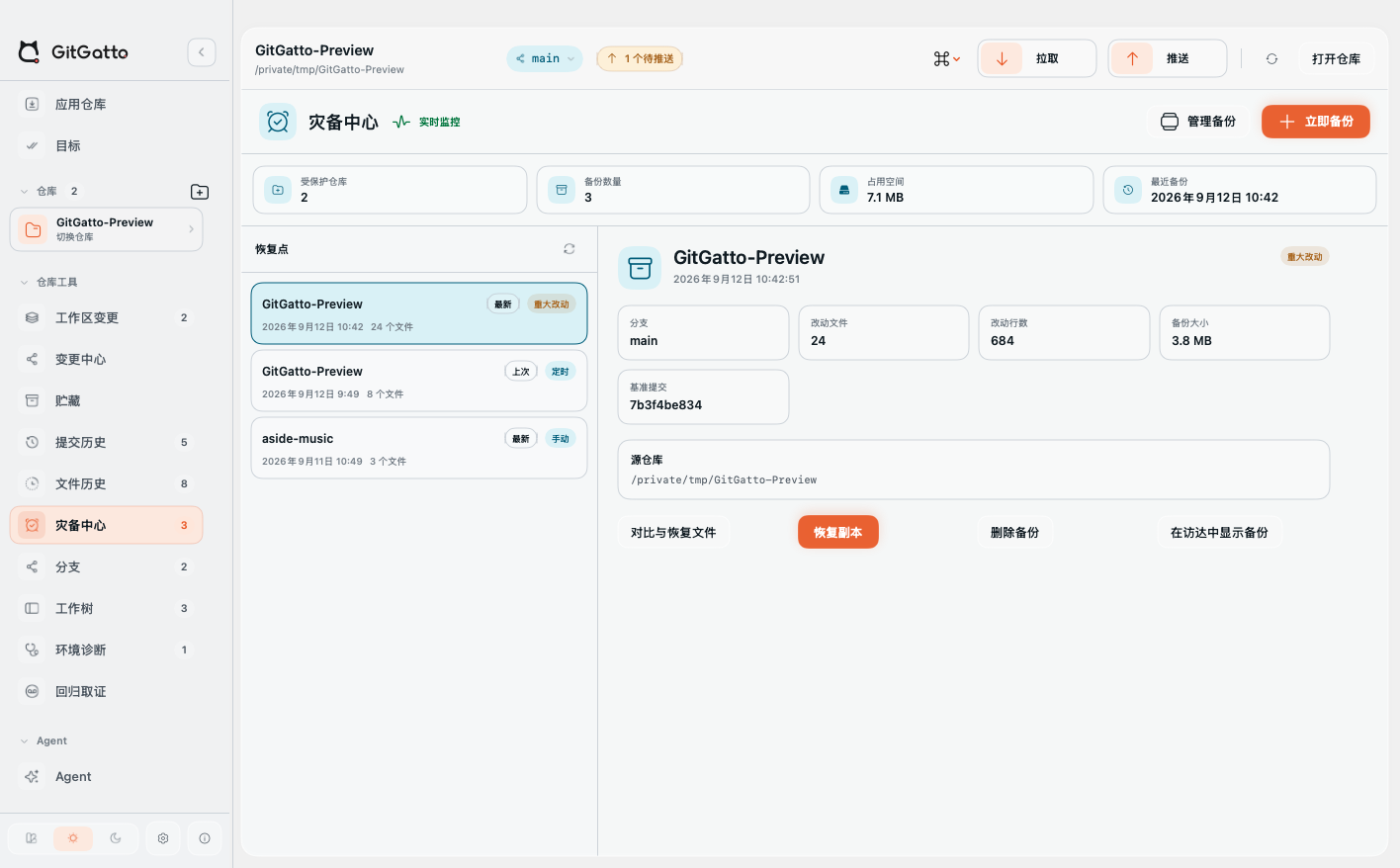 Recovery Center |
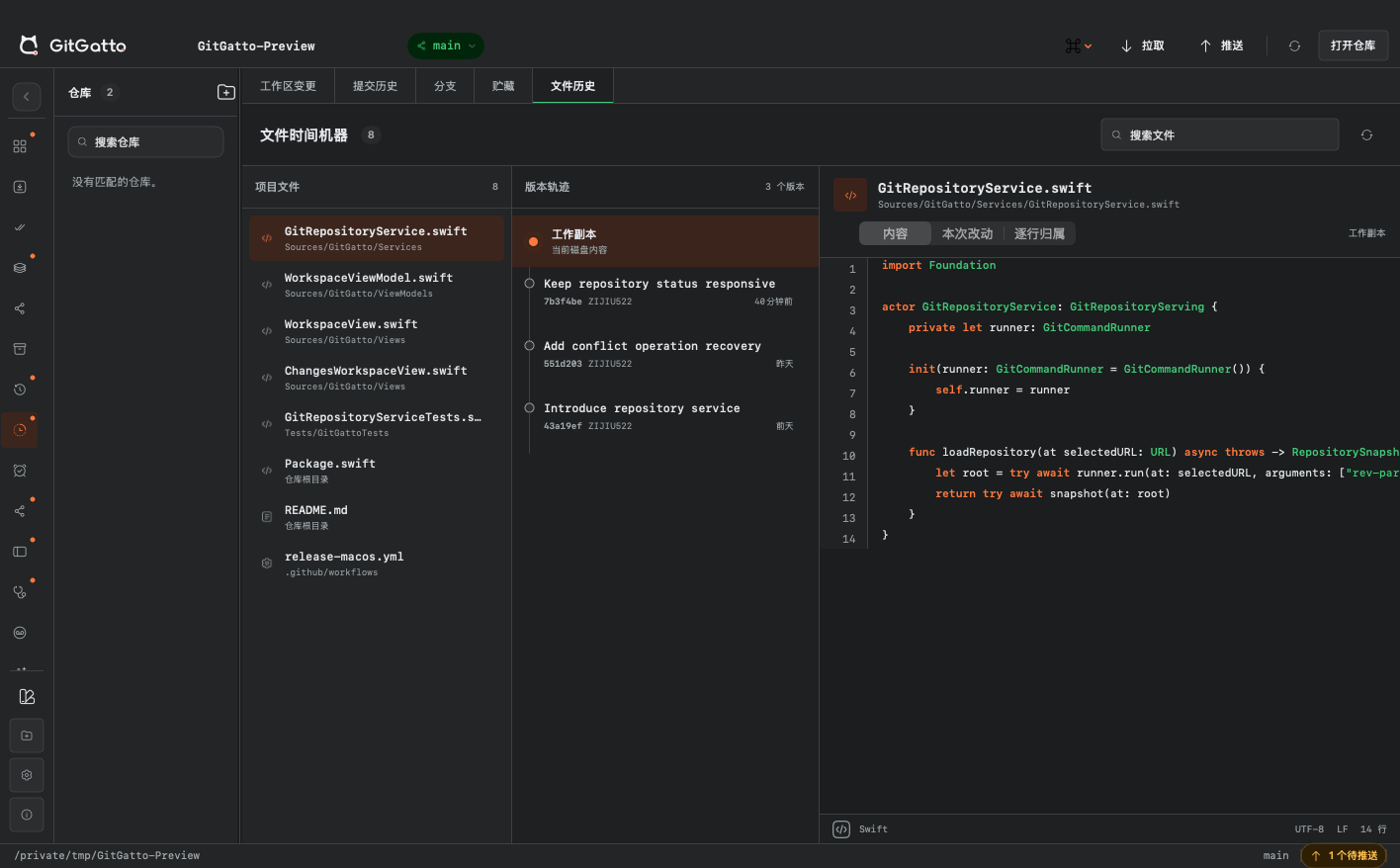 File Time Machine |
Screenshots use demo data to show the interface; project names and counts are not usage metrics.
GitGatto is a native Git and GitHub client for macOS, supporting Apple Silicon and Intel. Alongside repository operations, it provides backups of uncommitted work, external Agent activity records, delivery goals, regression investigation, and development-tool setup.
Why we built GitGatto
Writing the code is only part of the work. Untangling changes, finding the commit that introduced a regression, waiting for CI, reviewing a PR, and shipping a release all take time. Switching tasks can also leave drafts and uncommitted files behind.
Agents add practical questions: what changed, why, what evidence remains after a failure, and whether “done” actually means the result works. We built GitGatto to address those tasks, not just put buttons over Git commands. It uses system Git and existing CLIs while keeping changes, evidence, recovery points, and follow-up actions accessible.
Recovery · Menu-bar monitoring · Delivery goals · Commit grouping · Regression · Project tools · Installation
Distinctive features
Back up uncommitted work and observe external changes
Recovery Center stores a Git bundle and uncommitted files for each added local repository. Scheduled and major-change backups skip unchanged content; manual recovery points are also available. Each repository retains at most three rotating backups.
Create a point before in-app Agent writes. Repository Guard watches external Agents, terminals and scripts for deletions, lost edits, ref rollback and unavailable repositories, and lists affected paths. Inspect and compare backup files, export selected files, or restore a new repository copy. Changing the backup directory migrates existing backups.
Power-loss recovery uses the latest completed point. Contents and the manifest are synced before the completion marker; old backups rotate only afterward. Startup handles interrupted writes. Only disk-saved files included in a successful backup are covered. Later edits, editor-only changes and excluded files may be lost. Guard detects changes; it does not intercept every command from other apps.
Check repositories from the menu bar
Choose all repositories or one independently of the main window. The menu bar shows changes, upstream status, recovery points, Actions, goals and daily activity. Its collapsed label includes scope, change count and alerts; the scrollable popover follows the app theme. Activity counts commits and observed changes, not working hours.
Enable “Monitor after quitting” in Settings to let the independent helper take over monitoring, scheduled backups, major-change backups and Repository Guard according to your existing settings. Reopening the main app transfers work back without duplicate scans. Background operation is off by default and may require macOS approval.
The engine, channels, menu-bar visibility and intervals have separate settings. Hiding the menu bar does not disable enabled background recovery; disabling the engine or repository protection stops the corresponding work.
Save delivery as a goal you can resume
Choose Commit and Push, Create PR, Publish Release or Custom, or start from changes, an Issue, PR or failed check. Current progress stays visible; detailed steps and history expand when needed.
The selected flow checks staging, commits, push, PR, review, Actions, artifacts, Release, DMG, Appcast, and the installed version. Custom goals require approval of the Agent's proposed conditions. After interruption, GitGatto reads actual state again; Agent prose alone does not establish success. Merging, publishing tags, and installation retain separate confirmations.
Split mixed changes into commits
Change Center groups files or diff hunks with separate commit messages; an Agent can help organize the groups. Before execution, it checks missing or duplicate assignments and whether the repository changed, then creates a recovery point and commits in order.
Each commit runs a diff check or a chosen verification command. Failure triggers an attempt to restore the original HEAD and staging boundary. The recovery point remains available; automatic rollback is not guaranteed under every failure.
Investigate regressions in an isolated worktree
Run git bisect without switching your working directory. Automatic mode runs a verification command; manual mode marks candidates good, bad, or skipped. Commits, verdicts, exit codes, duration, and output stay with the investigation.
Pass the evidence to an Agent for a fix, verification, and PR preparation. The command must test the actual failure; too many skipped commits may leave more than one candidate.
Code provenance, failure capsules, and activity records
- Code Provenance: trace a line to its commit, then inspect associated PRs, issues, reviews, and checks when GitHub CLI is available.
- Reproduction Capsules: export the base commit, patches, eligible untracked files, failing command, output, and tool versions as
.gatto. Import validates structure and hashes before restoring an isolated worktree; embedded commands never run automatically. Only known sensitive paths and recognized content are filtered, so inspect before sharing. - External Agent activity: associate file and ref changes with known Agent processes working in the repository and show evidence strength. A running process is not proof of responsibility for each change.
Agents beyond commit messages
Use Codex CLI, Claude Code, Gemini CLI, OpenCode, DeepSeek Harness (dsh), Cursor Agent, GitHub Copilot CLI, Qwen Code, or a custom CLI. Built-in Git guidance covers staged review, commit drafting, conflicts, branch maintenance, history recovery, repository health, and release checks. Investigations can carry original Git LFS, hook, signing, or synchronization errors.
Project work, translation, search, and installation have separate execution lanes. Preview README rewrites before applying them. Issue and PR replies are drafted from discussion and diffs, remain editable, and are sent only after confirmation. Keep the CLI and model configuration you already use.
Alternatively, configure an OpenAI-compatible or DeepSeek API without installing a CLI for API mode. Project work and translation have separate endpoints and models, model discovery, capability checks and streamed replies. API keys are stored in macOS Keychain. API Agents can read projects, run commands and write within controlled paths; translation has no project-writing tools.
Save more than a branch when switching tasks
Work scenes save staged and unstaged changes, untracked files, the branch, drafts, selected file, and related goals and links. Restore checks repository state; a scene can also open in an isolated worktree. Ignored files are excluded, and a scene is not an independent backup.
| Tool | What it does |
|---|---|
| Code search | Search current files, a revision, or historical changes across managed repositories; filter directory, language, or extension, preview evidence, and send it to an Agent. Literal matching with bounded results. |
| Run commands | Discover project scripts or add custom commands, pin favorites, inspect live output, duration and exit status, stop, retry, and open local services. Noninteractive execution with individually entered arguments. |
| Ignore rules | Explain rule sources; preview edits to shared .gitignore or local .git/info/exclude. Stop tracking without deleting disk files. |
| Commit identities | Bind author and signing settings by repository or directory, inspect effective sources, and check identity before committing. Git authorship is separate from GitHub sign-in. |
Open Project tools in the toolbar or use ⌘K.
Finish configuration and verification after installation
The application catalog finds versions and assets from GitHub Releases and distinguishes downloads from installations. DMG and ZIP use the native installer; command-line packages go to an Agent. Download management shows stages, output, and retry actions.
The development catalog contains 99 tools and runtimes, detects local versions, and supports multi-selection and batch upgrades. Installation and upgrade queues allow up to three concurrent tasks; Homebrew writes are serialized to avoid simultaneous dependency changes.
Tasks continue with required PATH setup, plugin registration, initialization, and configuration migration, then check the executable and actual version. A finished download or Agent message cannot replace local verification. Missing permissions or configuration remain actionable; account sign-in and system authorization still require you. The installed-app list records GitGatto installations, not every app on the Mac.
Everyday Git and GitHub
- Workspace and history: stage, commit, diff, commit graph, blame, file history, and historical media; combine SHA, author, path, text, date, and ref search filters.
- Branches and recovery: branches, tags, remotes, stashes, worktrees, ref comparison, and recovery branches from reflog. Reorder, squash, split, amend, cherry-pick, revert, and reset; history rewriting checks published commits and destructive actions require confirmation.
- Conflicts and diagnostics: edit merge, rebase, or stash conflicts; continue, skip, or abort Git operations; inspect LFS, hooks, and tools.
- Multi-repository sync: batch fetch, pull, and push with separate ahead, behind, diverged, conflict, and failure results; retry failed items.
- GitHub projects: account repositories, repository/developer and natural-language search, Star, Fork, clone, code, README, Releases, and assets.
- Inbox, issues, and PRs: filter reviews, mentions, and failed checks; create and manage issues; review PR files, mark viewed, and post inline comments, replies, and reviews.
- Actions: inspect runs and logs, rerun or cancel, and download artifacts. Explicit actions trigger remote writes, not page refreshes.
Reading and translation
Preview Markdown, relative images, source, SVG, and media in the app. Documents use language detection and a separate translation configuration. Cached translations are keyed to source, path, and target language; changed source does not reuse stale text. Already-target-language or insufficient text can remain unchanged. Translation does not automatically commit a README.
Themes and interface
Six themes—Light Mist, Soft Frosted Glass, Console, Emerald, Folio, Luminous Stage—vary layout, panels, sidebar, and controls, not only accents. Luminous Stage has separate light/dark background, panel, text, button, and status colors, with Coral, Coast, Forest, Dusk presets.
Sidebar sections collapse and scroll; workspace regions resize. Eleven interface languages switch without restarting. See Help → User Guide for instructions.
Install and get started
Download the DMG from Releases and drag GitGatto into Applications. Requires macOS 14+; releases support Apple Silicon and Intel. Changelog and Releases identify shipped versions; this README describes the current repository.
| Use | Requirement |
|---|---|
| Local Git and ordinary remote sync | Git and the remote's Git / SSH authentication |
| GitHub account, PRs, issues, Actions | Signed-in GitHub CLI |
| Agents, translation, Agent installation | Configured CLI or OpenAI-compatible / DeepSeek API, with a model and permissions for the selected task |
| Homebrew detection and upgrades | Homebrew |
Open a local repository or manually scan and select repositories to add; there is no automatic whole-disk import. Configure GitHub and Agents in Settings. Updates use GitHub Releases and the Appcast.
Data and permissions
Repository lists, settings, goals, investigations, conversations, translations, download records, and recovery points are stored locally; backup storage can move. Git, SSH, GitHub CLI, and Agent CLIs reuse their credential sources.
Local storage does not mean everything is offline. GitHub features contact GitHub. Agents and translation pass necessary context to your configured CLI or API; subsequent handling depends on that tool and model service. Review what you send and keep credentials out of commands, drafts, and capsules. System-directory changes remain subject to macOS authorization.
Roadmap, architecture, and project history
Roadmap and plans · Architecture · Version history
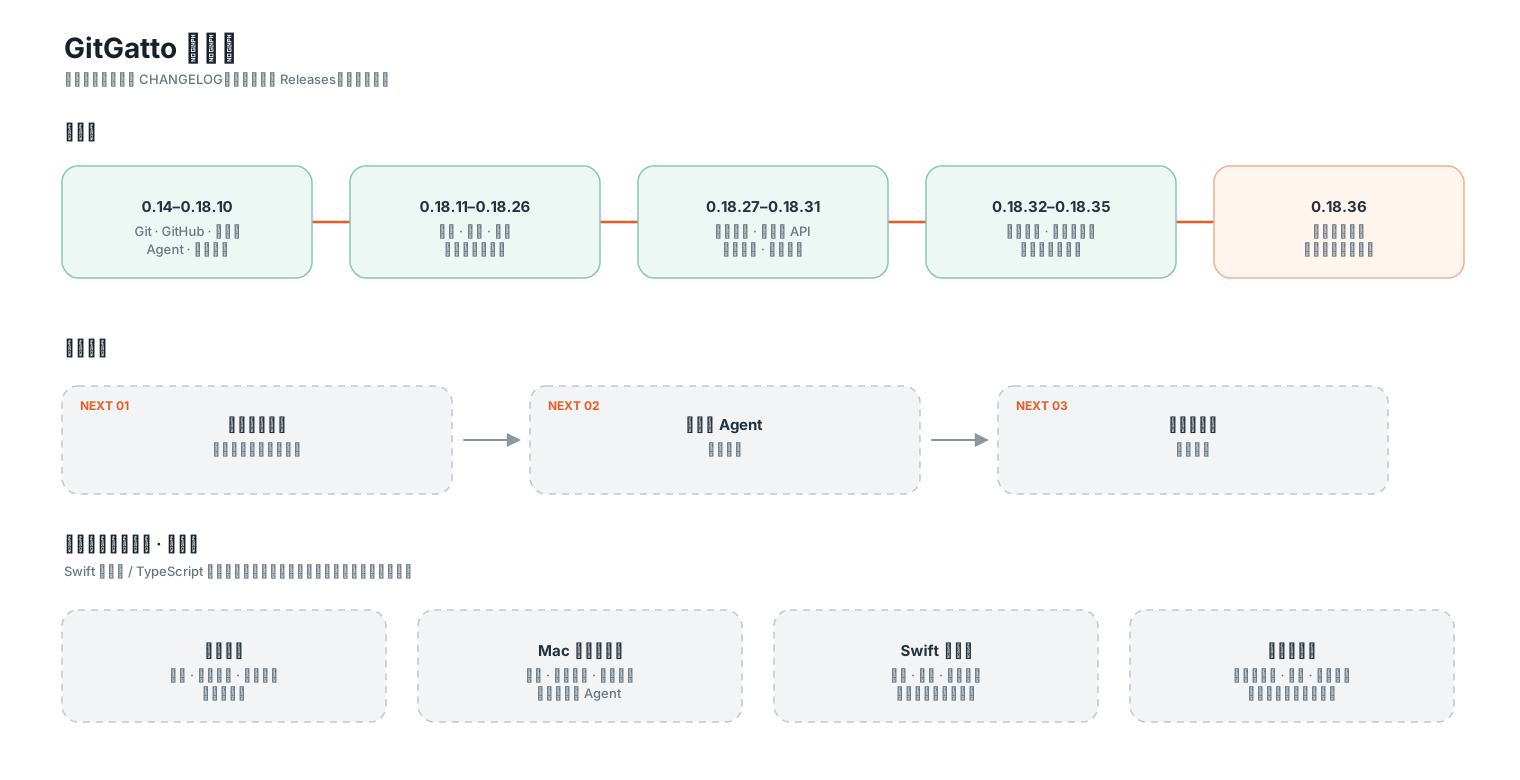
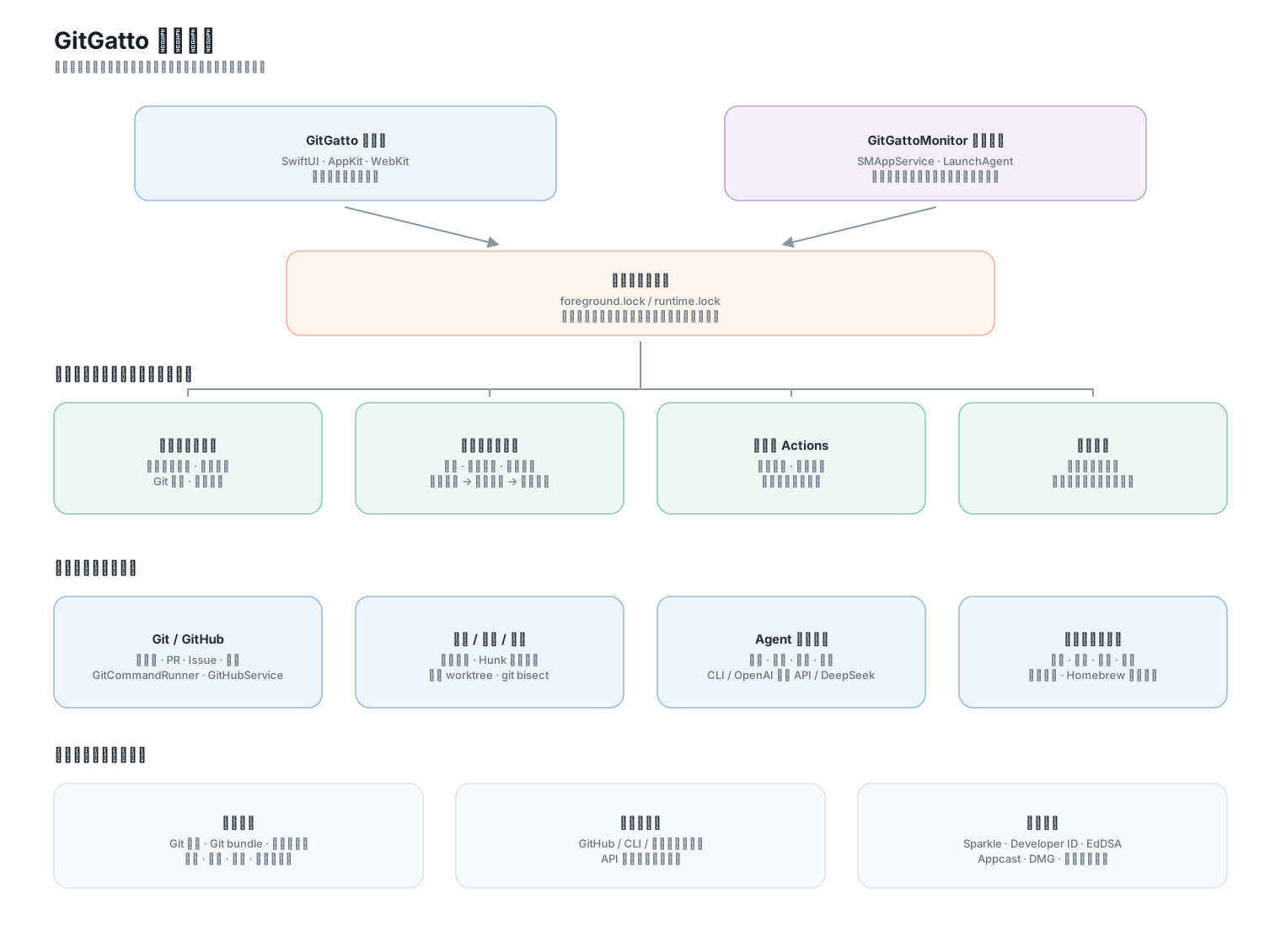
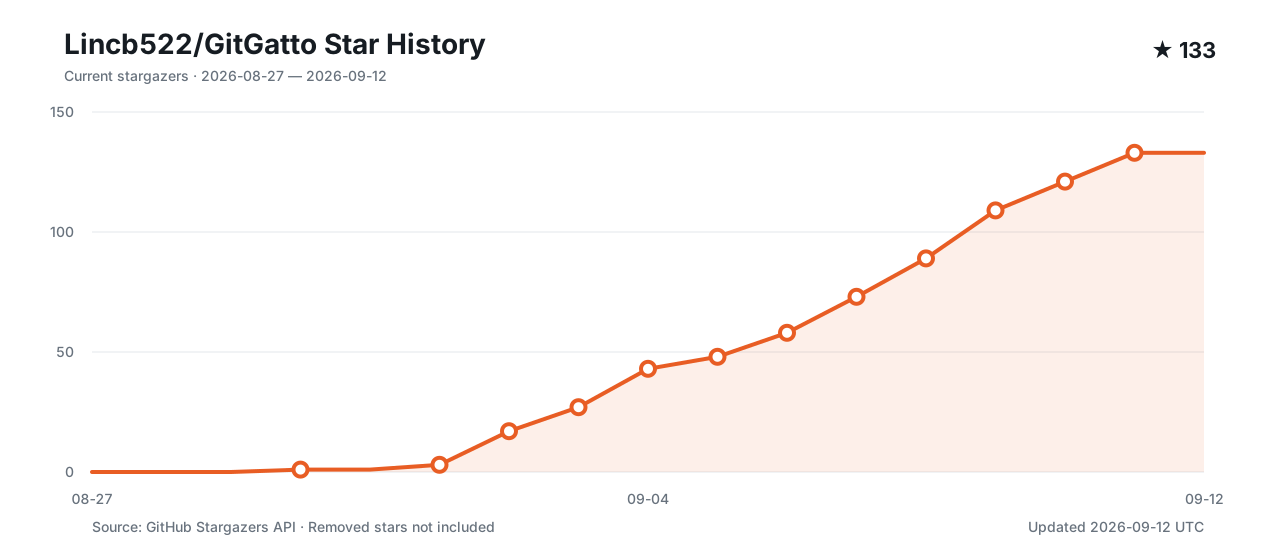
The roadmap follows source and version records; dashed stages are plans. Updated 2026-09-12 UTC, the Star chart accumulates current stargazers by their star dates and excludes removed stars. Click for the online record.
Run from source
Requires macOS 14+ and Swift 6.1+. Xcode configuration lives in project.yml.
git clone https://github.com/Lincb522/GitGatto.git
cd GitGatto
swift package resolve
swift test --no-parallel
swift run GitGatto
Alternatively open GitGatto.xcodeproj with the GitGatto scheme. After structural changes, regenerate with XcodeGen via ./scripts/generate-xcodeproj.sh; do not hand-edit the project. The app uses SwiftUI, AppKit, WebKit, AVKit, Alamofire, and Sparkle; versions are pinned in Package.resolved.
Contributing and license
See CONTRIBUTING.md and SECURITY.md. Thanks to GitHub CLI, Sparkle, Alamofire, Reicon, and the icon and animation authors. Full sources and licenses are in THIRD_PARTY_NOTICES.md.
GitGatto is developed by ZIJIU522 and released under the MIT License.