
Layen-lang/PTCGP-Private-Server
Layen-lang/PTCGP-Private-Server has 46 GitHub stars and 7 forks. GitHot measured 0 stars in 24 hours. Last checked 2026-11-15 23:53 UTC. Last push 2026-11-14.
What you can do
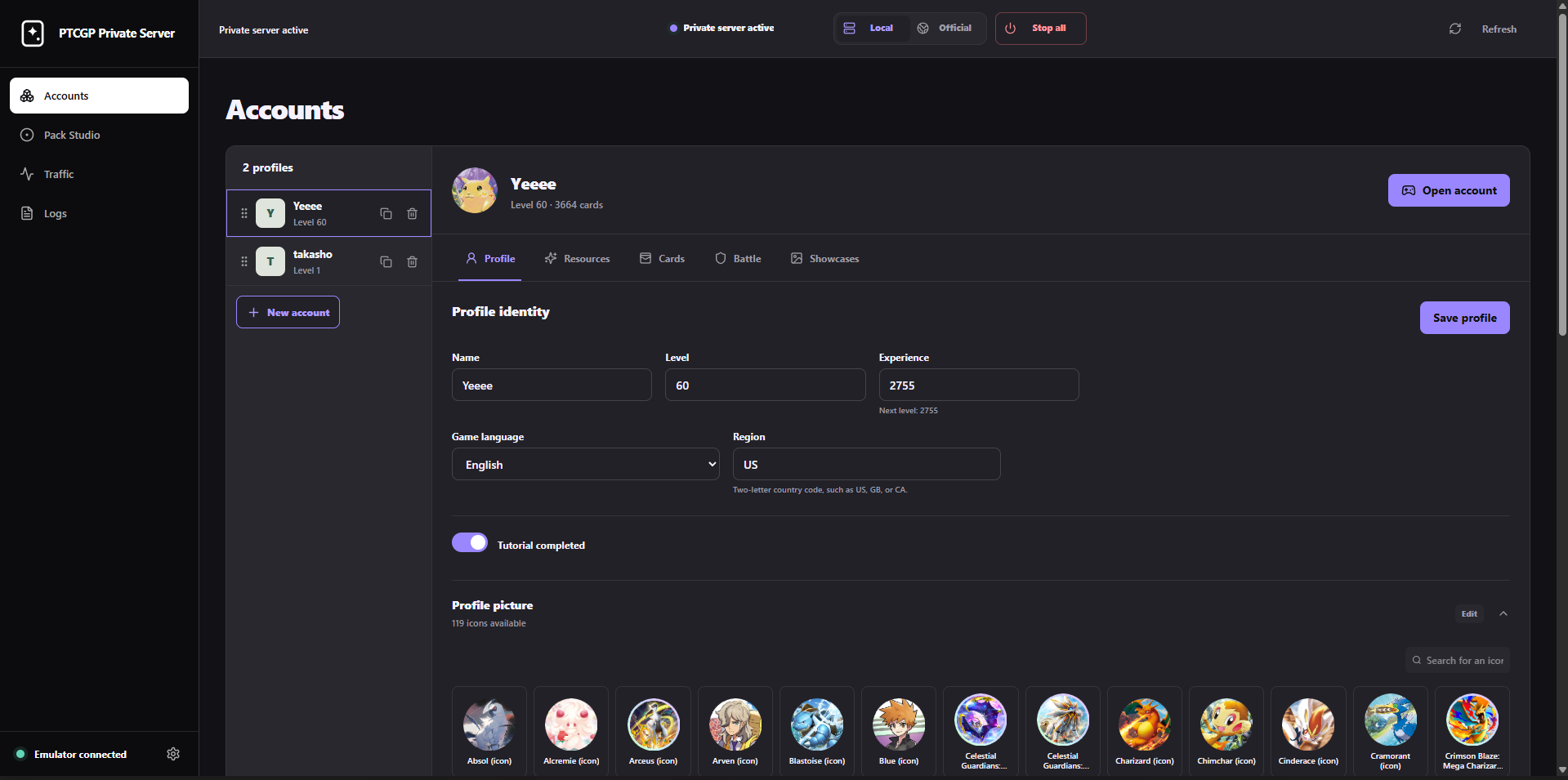
- Create, duplicate, reorder, edit, and delete independent local profiles.
- Change a profile's level, experience, resources, cards, emblems, and cosmetics.
- Open a selected local profile directly in the game.
- Play on a rooted Android phone over USB or Wi-Fi ADB.
Measured star growth
- in 24h
- 0
- in 7 days
- Update delayed
- in 15 days
- Update delayed
- in 1 month
- Update delayed
Net star changes over overlapping periods, not daily totals. Missing measurements are left blank. Stars measure attention, not software quality.
About
Unofficial local compatibility server and profile workshop for Pokémon TCG Pocket
Self-hostedREADME.md
OriginalPTCGP Private Server
Run Pokémon TCG Pocket against your own local server, create separate profiles, edit their collections, and control pack openings from a native Windows app.
[!IMPORTANT] This is an unofficial, local-only interoperability project for advanced users. It currently supports Pokémon TCG Pocket 1.8.1 on Windows with a rooted Android emulator or rooted physical Android phone. It is not affiliated with Nintendo, The Pokémon Company, Creatures Inc., or DeNA.

Download the latest release · Installation guide · User guide · Troubleshooting
See it in action
Manage independent local profiles, resources, collections, and cosmetics from the control panel.
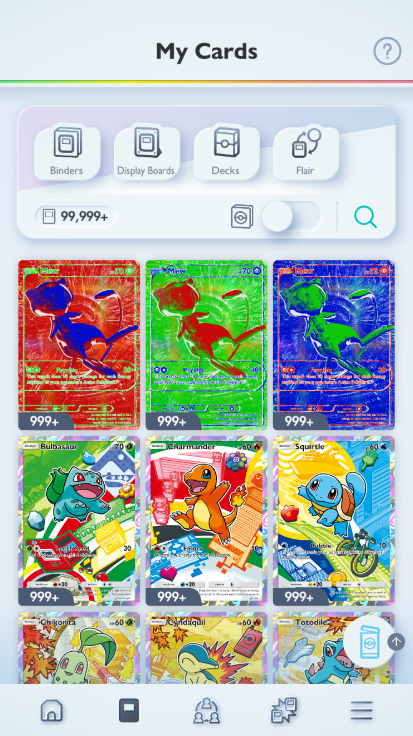
Open a local profile in the game and experiment with its collection without touching an official account.
What can you do with it?
- Create, duplicate, reorder, edit, and delete independent local profiles.
- Change a profile's level, experience, resources, cards, emblems, and cosmetics.
- Open a selected local profile directly in the game.
- Play on a rooted Android phone over USB or Wi-Fi ADB.
- Run different local profiles on several Android devices at the same time.
- Keep official pack odds or force a table, rarity, exact composition, or custom nonstandard pack.
- Inspect sanitized HTTP and gRPC traffic and follow launcher logs live.
- Switch safely between the private server and the official service.
- Receive updates automatically and install them from the control panel.
Local profiles are stored in SQLite on your computer. They do not replace or
modify your official account. PvP matchmaking and the bidirectional
Battle/Connect stream are not implemented.
Before you start
You need:
- Windows 10 or later;
- Pokémon TCG Pocket 1.8.1, installed by you;
- a rooted 64-bit Android phone (ARM64) or emulator (x86-64 or ARM64) that runs
the supported ARM64 game, with ADB, root access,
adb reverse, and writable system mounts; adb.exeavailable inPATH.
You do not need Go or Rust when using a published release. Those tools are only required to run the project from source.
A rooted physical phone has been tested successfully, including over Wi-Fi ADB. Root is required on phones too; developer options alone are insufficient. See phone setup over USB or Wi-Fi for the connection steps. The Windows computer still runs the server and must stay on and connected while you play.
[!CAUTION] Local mode temporarily changes Android routing, installs a local certificate authority, and applies a hash-verified patch to one game library. Always use Official before signing in to an official account. Never expose ports
443,8080,8081, or additional emulators' game and administration ports to your network or the Internet.
Install in 5 minutes
- Download
PTCGPPrivateServer-win-Setup.exefrom the latest release. - Run it. It installs for your Windows user, without administrator rights, and opens the control panel.
- Start your rooted emulator, or connect your rooted phone using the phone setup guide.
- Open Command Prompt and check that
adb deviceslists the Android device asdevice. - Open PTCGP Private Server from the Start menu or the desktop shortcut.
- Let the panel import data from the installed game. Select a device if several are connected. The Accounts page opens when validation completes.
If any requirement is unclear, follow the step-by-step installation guide before continuing.
[!TIP] Automatic updates are built in — download once, then update from the panel. The installed app checks GitHub releases at startup and every six hours while it is open, and downloads new versions in the background. When an update is ready, click Update and restart at the bottom of the sidebar (Mettre à jour et redémarrer in French) to install it. Your accounts and settings are preserved; nothing needs to be downloaded manually. See how updates work.
First local profile
- After preparation, select Local and wait for Private server active.
- Open Accounts, select New account, and choose an empty or complete inventory.
- Adjust the profile if needed, then select Open account.
- When you finish, select Official to restore normal game routing, or Stop all to restore every managed emulator and close the local tools.
Choose the Android device at the top right, next to Refresh. To play on a second device, select it, enable Local, and open a different profile. The first game keeps running. Each profile can be used on only one device at a time. Local and Official apply to the selected device; Stop all applies to all managed devices. Switching devices or accounts reuses the prepared game data.
The user guide explains every section of the control panel and the safest daily workflow.
Documentation
| Guide | For |
|---|---|
| Documentation index | Finding the right guide |
| Installation | Releases, source setup, and emulator checks |
| Using the server | Modes, profiles, packs, traffic, and backups |
| Troubleshooting | Startup, ADB, root, ports, and recovery |
| Configuration | server.json, environment variables, and CLI |
| Architecture | Components, ports, data flow, and boundaries |
| Game data | Runtime data layout and compatibility |
| Preparation and updates | First launch, recovery, and signed updates |
| Development | Build, test, and release workflow |
Also see Security, Contributing, the changelog, and the third-party notice.
Data and privacy
The project stays on your machine by default:
| Path | Contents |
|---|---|
data/ |
Profiles, SQLite database, logs, and runtime state |
certs/ |
Locally generated certificate authority and private key |
profiles/ |
Validated extraction and compatibility metadata |
data/generations/ |
Locally imported game images and master data |
data/ and certs/ are ignored by Git. Treat them as private and never attach
them to a public issue without carefully reviewing their contents.
License and third-party material
Original project code is available under the MIT License. Pokémon names, artwork, and game data remain the property of their respective owners and are not covered by that license. See NOTICE.md for details.