
LawrenceRiver/FigFox-Gen-skill
LawrenceRiver/FigFox-Gen-skill has 35 GitHub stars and 4 forks. GitHot measured 0 stars in 24 hours and +2 in 7 days. Last checked 2026-11-09 15:48 UTC. Last push 2026-08-26.
Scientific paper figure generation Skill for agents: web research-figure conventions, controlled colour, topology planning, and image generation. 科研论文图生成 Skill:联网参考、配色与拓扑规划。
Measured star growth
- in 24h
- 0
- in 7 days
- +2
- in 15 days
- Update delayed
- in 1 month
- Update delayed
Net star changes over overlapping periods, not daily totals. Missing measurements are left blank. Stars measure attention, not software quality.
README.md
OriginalFigFox-Gen-skill
Domain-specific SVG conventions, FigureBench evidence, and human-editable figure generation.
Scholarly SVG convention crops · FigureBench construction patterns · 13 named palette groups · Creative Director taste control · final PNG1
中文说明 · Installation · Workflow · Practical results · Reference pack
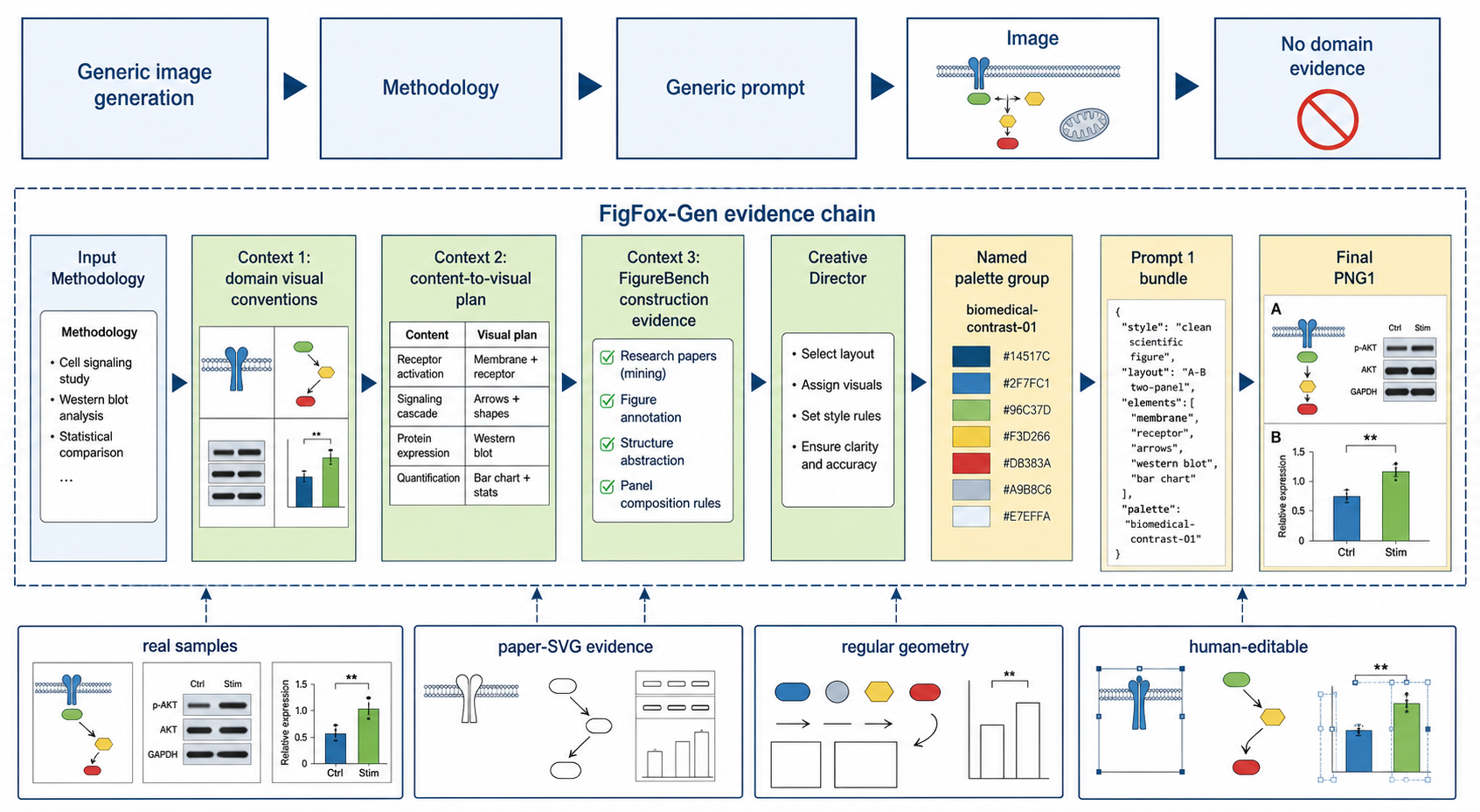
FigFox-Gen-skill starts from a scientific Methodology, identifies its related field, and studies how that field's papers repeatedly draw their methods. It extracts targeted crops from standard scholarly SVG/HTML figures and learns their visual conventions as human-editable evidence. It also inspects FigureBench's vector-like geometry and SVG-style construction patterns for reusable structure and explanatory components.
From the 13 bundled palette groups, each run selects one eligible group. The first representative scholarly figure found during the domain search sets how many dominant colours are needed; the remaining papers corroborate that count. The selected group must provide that many compatible colour roles. Those colours are then extended with aesthetic neighbouring tints, shades, tones, or analogous variants rather than unrelated palette mixing. The Creative Director assembles the evidence into Prompt 1, removes hard AI-looking treatments, and provides an open point for contributors to improve the taste rules and visual planning. One image-generation pass produces PNG1 for author inspection.
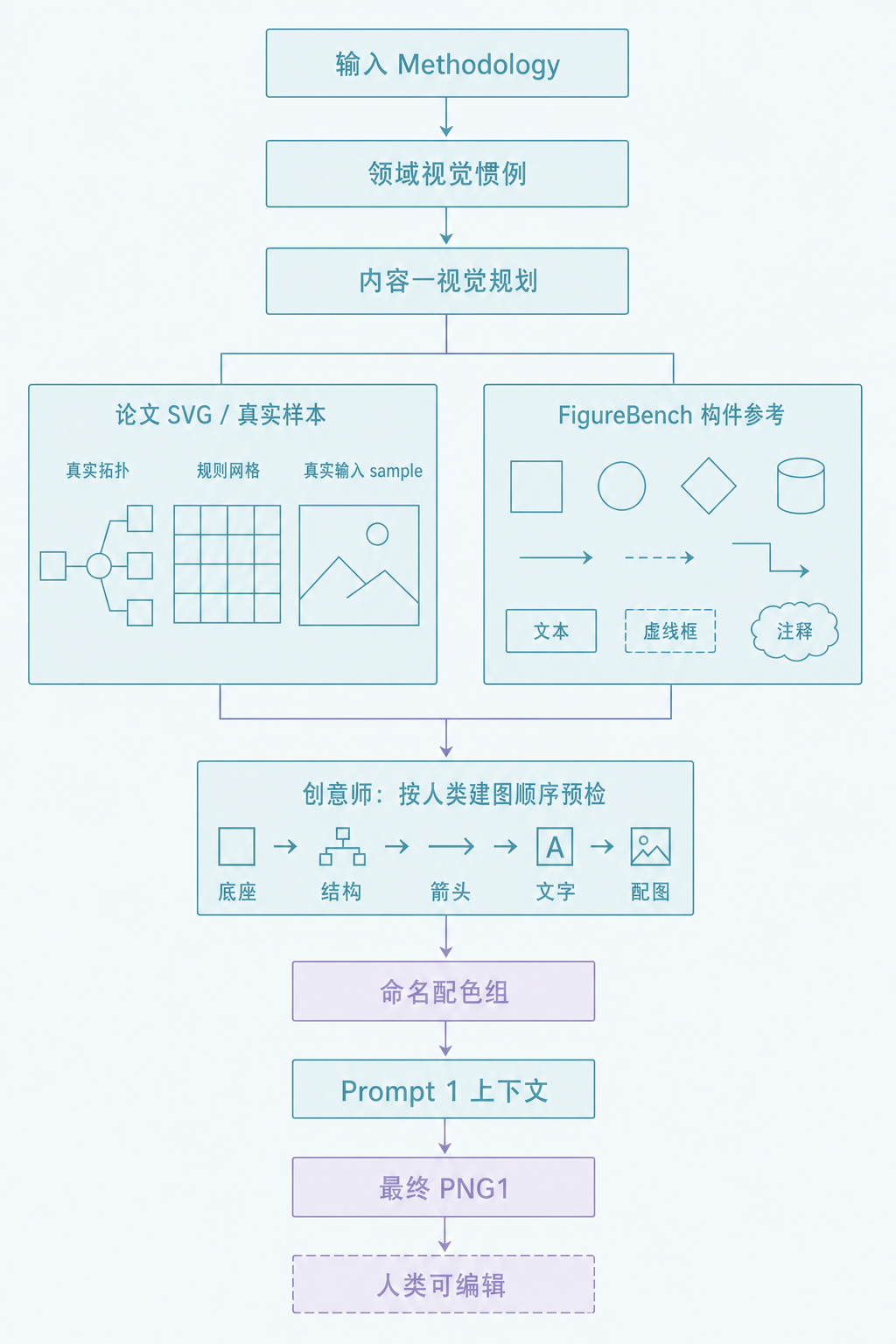
FigFox-Gen-skill 从 Methodology 出发,先识别所属领域,学习该领域论文中反复出现的 SVG 画法,并把关键构件裁图作为可编辑证据;同时参考 FigureBench 的几何和 SVG 式 结构,借鉴配图与布局。联网检索时先从第一张代表性论文图识别主色数量,再由后续 论文核对;每次从 13 组配色中选一组,按这个数量选对应的主色角色,再用近色扩展, 而不是混用无关配色。创意师把证据整理成 Prompt 1,去掉明显 AI 味,并留下可由 贡献者持续完善的审美规则。最后只生成一次 PNG1,供作者检查。
Workflow overview
The two overview figures are intentionally different compositions: the English version uses a horizontal evidence chain, while the Chinese version uses a vertical spine with side evidence branches.
 |
 |
Installation
npx skills@latest add LawrenceRiver/FigFox-Gen-skill
Then provide a Methodology and, if useful, one reference image. A supplied reference is a strict visual exemplar: match its composition, spacing, hierarchy, line weight, corner radius, fill treatment, typography scale, arrow grammar, and sample treatment wherever the Methodology permits. Do not beautify, complicate, stylize, or switch visual language. It is not an active colour source. For a local integrity check after installation:
python scripts/check_installation.py
Workflow
The complete workflow is shown in the two-column overview above; the text path below keeps the same order without repeating the image.
Methodology + optional reference
  -> Context 1: recurring domain visual language
  -> Context 2: content-to-visual plan
  -> Context 3: inspected FigureBench crops + one selected palette group
  -> Creative Director brief + targeted paper-SVG crops when needed
  -> Prompt 1 with every mapped crop -> PNG1
  -> stop
FigureBench and palette-library preview
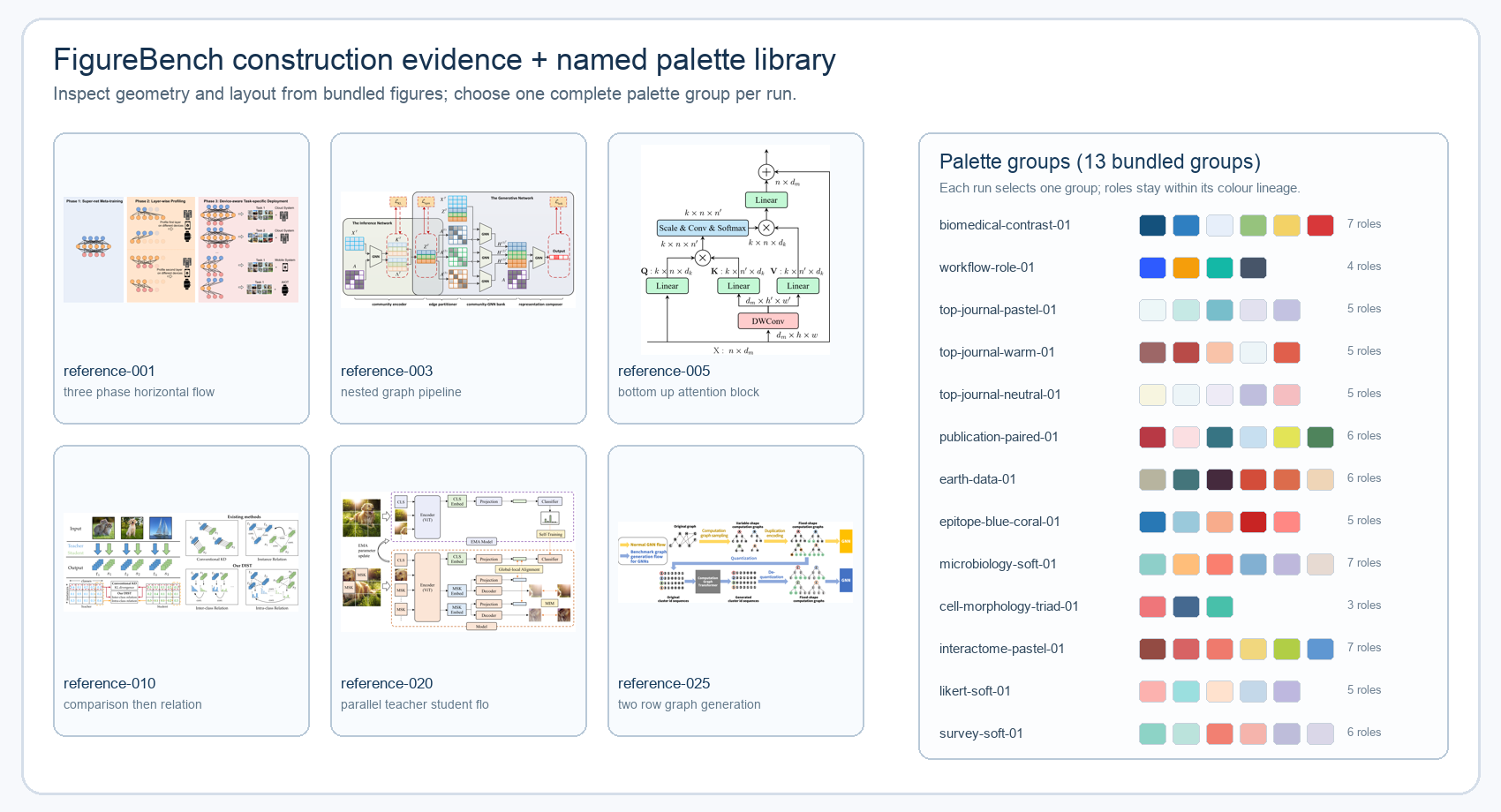
FigureBench is a compact local construction library, not a colour source. The model inspects at least two distinct bundled figures and continues until every required frame, connector, geometric primitive, layout relationship, and special visualization has evidence. The palette library stores named groups; each run selects one complete group and may use several role-labelled colours from that group. The preview below shows the kind of geometry evidence and the current 13 bundled palette groups.
Practical results
These are the three recorded Methodology cases. The table keeps the comparison horizontal: the original Methodology is named in the first column and the generated result is shown in the second. Full verbatim inputs are preserved later in Full Methodology inputs.
| Methodology | Generated result |
|---|---|
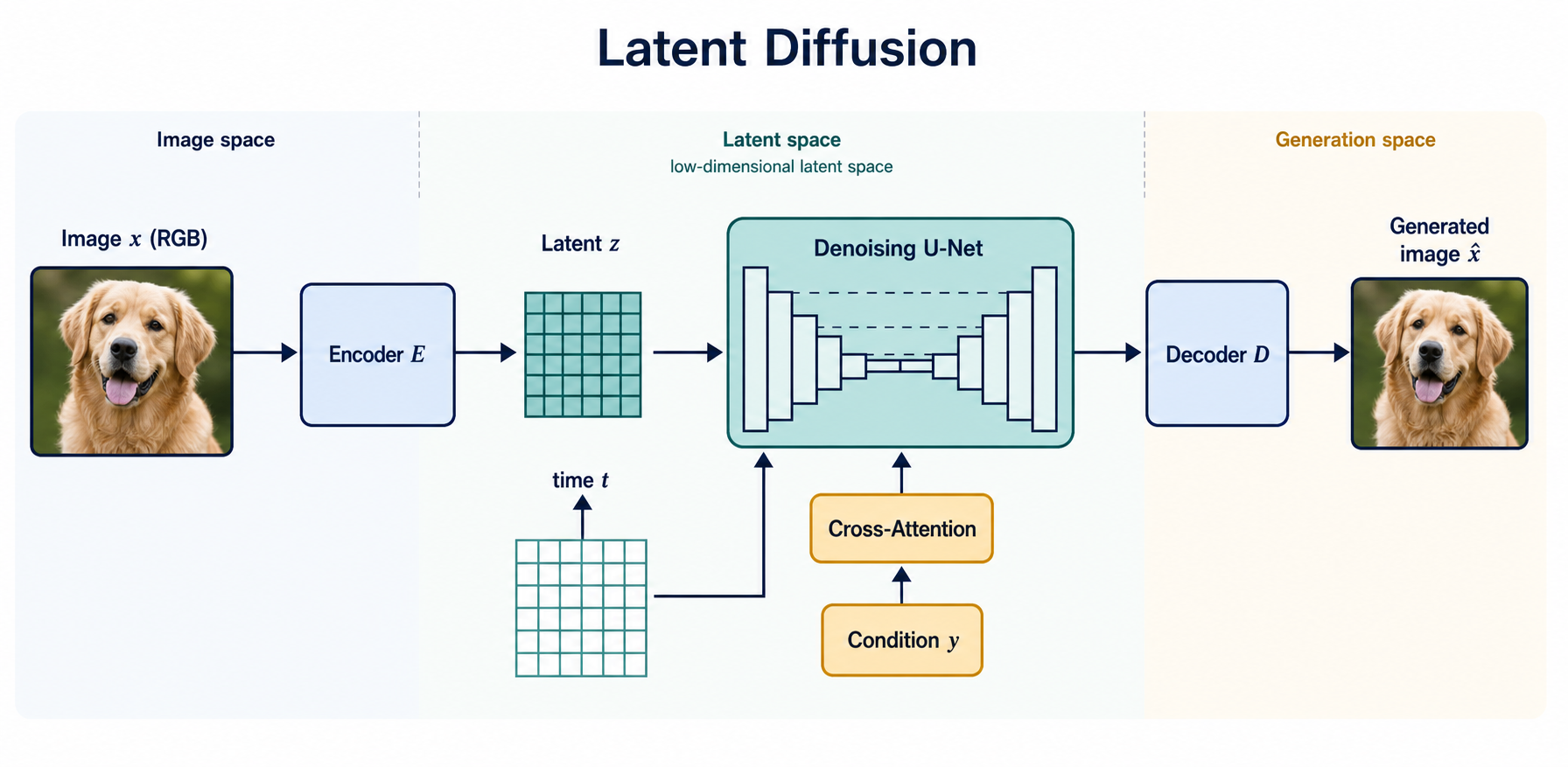
| Latent Diffusion Rombach et al. Image space → latent space → denoising U-Net → generated image |
 |
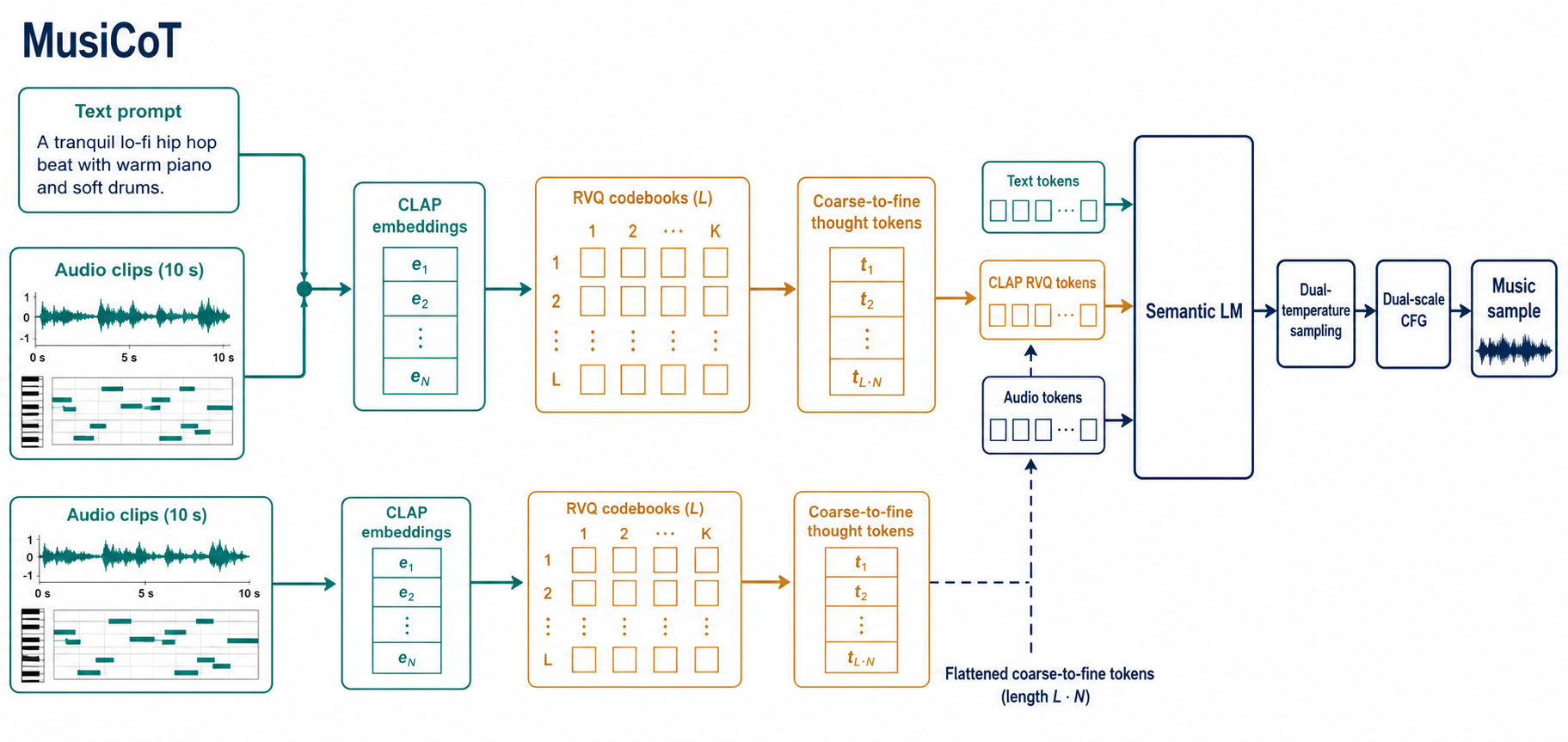
| MusiCoT MusiCoT Text/audio inputs → CLAP/RVQ thought tokens → semantic LM → music sample |
 |
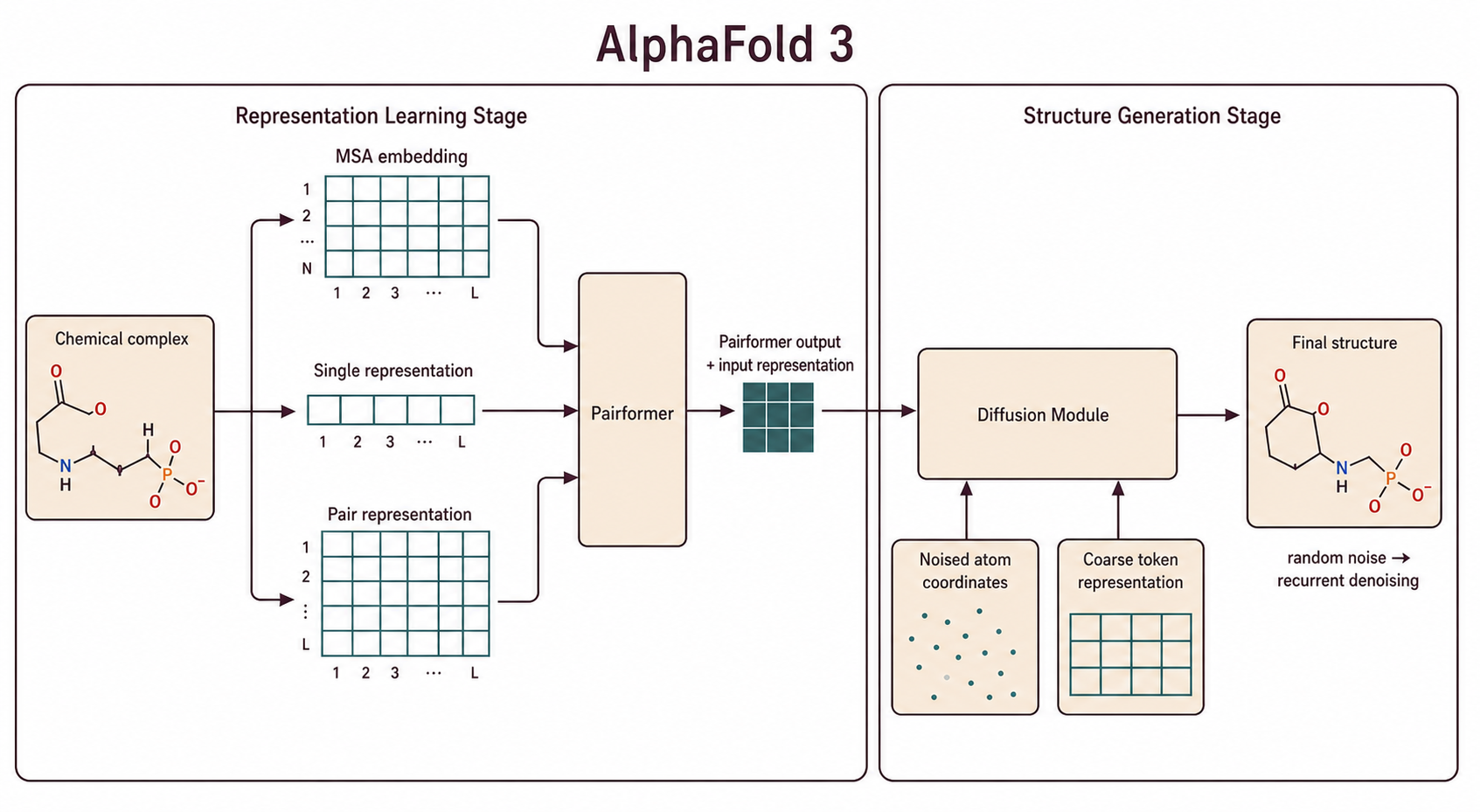
| AlphaFold 3 Abramson et al. Chemical complex → pairformer/diffusion module → final structure |
 |
Full workflow specification
Context 1: recurring domain visual language
The model identifies the field and screens figure panels from 3–4 scholarly papers,
preferably accessible arXiv SVG/HTML sources and otherwise credible extractable figures.
The first representative figure selected in this search is the colour-count anchor: inspect
its visible panel and record its dominant-colour count before using the remaining papers to
corroborate the count and the recurring conventions.
It compares actual panels and records only recurring, Methodology-relevant objects,
intermediate representations, relationships, drawing treatments, grouping, professional
terminology, and the evidence needed for the visual plan. The anchored count is recorded as
dominant_colour_count; source-figure colours themselves are not copied. One-off treatments
remain marked as such. The selected palette group must contain at least that many colour
roles; if it does not, select another eligible group rather than silently reducing the count.
Context 2: content-to-visual planning
The Methodology, Context 1, and optional reference are compressed into exact blocks, labels, relationships, reading order, and a visual treatment for every component. Treatments must be human-producible: basic geometry, a recurring domain convention, a deliberate manual drawing, a draw.io-like construction, or a scientifically necessary real photo crop. Any special visual explains why it is needed and how a human would make it. Decorative generated-looking elements are rejected.
The Creative Director plans the build in the order a person would use an editor: choose the base canvas and simple geometry, build the meaningful structures, add plain arrows, place concise exact text, then place a nearby explanatory visual. Inputs should be real or explicitly documented samples; known topologies, grids, and model diagrams should use targeted scholarly construction evidence when available. Regular grids must stay exact, each geometric block uses a flat or single controlled fill, and arrows remain visually subordinate. A subtle fill transition is allowed only on a planned base shape; gradients inside blocks or as decoration are rejected.
Context 3: inspected construction evidence and named palette groups
The model inspects the pixels of at least two distinct bundled FigureBench images, then continues adaptively until every required geometry, frame, connector, layout relationship, and special visualization is covered. Useful regions become mapped crops with a target component, what to borrow, what must change, and why the result remains human-editable. Complete reference images are not dumped into Prompt 1.
The local palette library stores every named palette group (palettes records). Each run
randomly selects one eligible group and may use several role-labelled colours from it:
python scripts/figure_workflow.py select-palette --run RUN
python scripts/figure_workflow.py select-palette --run RUN --seed SEED  # reproducible
This is not a single-colour or monochrome rule. If a group lacks a functional colour, only an evidenced tint, shade, tone, analogous neighbour, compatible neutral, or controlled contrast may extend it. FigureBench, domain figures, and the user reference never supply active palette colours. Taste guidance is subordinate to scientific meaning, user constraints, domain evidence, human editability, and the selected palette-group lineage. The final figure uses exactly Context 1's observed dominant-colour count from that group. Other swatches remain subordinate neutral, tint, shade, or support roles and cannot be promoted beyond that anchored count. If no group can support the count, report the palette selection failure instead of changing the scientific evidence.
Creative Director: pre-PNG1 visual ideation
After Contexts 1–3, a Creative Director prompt gives the model one bounded chance to
propose a new visual treatment before PNG1 exists. It does not generate an image or redesign
the figure. If an idea needs a construction not already evidenced, the model must find a
real scholarly paper figure available as SVG or extractable SVG/HTML, inspect it, and request
a targeted crop under references/web/crops/creative-director/. Each crop records its
target component, HTTPS source and evidence URLs, source_format: "svg", borrow,
must_change, and why the construction remains human-editable. Complete paper figures are
never attached, and sources cannot be invented. If no new treatment is needed, the brief
must say no_external_svg_needed.
python scripts/figure_workflow.py build-creative-director-prompt --run RUN
python scripts/figure_workflow.py validate-creative-director --run RUN
Prompt 1 and final PNG1
Prompt 1 contains the Methodology, Contexts 1–3, the Creative Director brief, the optional reference, domain crops, every mapped FigureBench crop, and any validated paper-SVG crops proposed by the Creative Director. The only image-generation pass creates PNG1. Paper-SVG crops guide only their declared component and are variants; they do not donate source labels, colours, proportions, or complete compositions.
PNG1 has two absolute anti-AI bans: no module may use a boxed-off upper title band with a horizontal divider (the screenshot-like title-bar/content-box pattern), and no sticker-like cutout, clip-art badge, medal, seal, or pasted raster badge may be inserted. Use inline labels or editable geometry; only a scientifically necessary real photo can be an explicitly documented special treatment.
The image-generation model receives prompt-1/prompt.md and every manifest attachment once.
It must produce one complete labelled figure with flat, deliberate, human-producible
geometry. PNG1 is the final deliverable for this workflow; there is no conversion or second
generation after it. Authors must inspect PNG1 before publication.
Full Methodology inputs
These examples preserve the original Methodology inputs rather than replacing them with keyword-only summaries. They are recorded source inputs for the workflow, not reconstructions of the cited papers' figures. The generated figures above are original interpretations and must not copy the source figures.
Latent Diffusion · visual generation
Source: Rombach et al., High-Resolution Image Synthesis with Latent Diffusion Models, §3. The following is the recorded Methodology input; the source paper remains authoritative.
Methodology input (verbatim)
We propose to circumvent this drawback by introducing an explicit separation of the compressive from the generative learning phase. To achieve this, we utilize an autoencoding model which learns a space that is perceptually equivalent to the image space, but offers significantly reduced computational complexity. By leaving the high-dimensional image space, we obtain DMs which are much more computationally efficient because sampling is performed on a low-dimensional space. We exploit the inductive bias of DMs inherited from their UNet architecture, which makes them particularly effective for data with spatial structure.
Given an image x in RGB space, the encoder E encodes x into a latent representation z = E(x), and the decoder D reconstructs the image from the latent, giving x-tilde = D(z) = D(E(x)). Our subsequent DM is designed to work with the two-dimensional structure of our learned latent space z = E(x). The neural backbone of our model is realized as a time-conditional UNet. Samples from p(z) can be decoded to image space with a single pass through D. We turn DMs into more flexible conditional image generators by augmenting their underlying UNet backbone with the cross-attention mechanism.
Labels derived from the original Methodology: Image x, Encoder E, Latent z, Denoising U-Net, Cross-Attention, Condition y, Decoder D, and Generated image.
Generated figure: Latent Diffusion PNG
MusiCoT · music generation
Source: MusiCoT: Analyzable Chain-of-Musical-Thought Prompting, §4.1–§4.3. The following is the recorded Methodology input; the source paper remains authoritative.
Methodology input (verbatim)
This paper proposes a novel approach to representing intermediate musical thoughts using the contrastively trained cross-domain embedding model, known as the CLAP model, rather than relying on natural language descriptions. Specifically, the CLAP model encodes segments of music audio into continuous-valued embeddings every 10 seconds. For a typical 3-minute song, this results in a sequence of audio embeddings. Each embedding, corresponding to a 10-second clip, is analyzable that allows for cosine similarity calculations against any relevant text.
To tackle this issue, we introduce a residual vector quantization (RVQ) based coarse-to-fine tokenization method. This RVQ model consists of L codebooks. In MusiCoT, we arrange the RVQ tokens in a flattened coarse-to-fine sequence for LM prediction, ensuring that coarser tokens are predicted before finer ones. During training, the semantic LM utilizes the flattened CLAP RVQ tokens as additional prediction targets. We integrate tokens from three domains: text tokens, flattened CLAP RVQ tokens, and audio tokens, into a single LM. We introduce a dual-temperature sampling method and a dual-scale CFG sampling strategy for MusiCoT.
Labels derived from the original Methodology: Text prompt, Audio clips, CLAP embeddings, RVQ codebooks, Coarse-to-fine thought tokens, Semantic LM, Audio tokens, and Music sample.
Generated figure: MusiCoT PNG
AlphaFold 3 · biomolecular structure
Source: Abramson et al., Accurate structure prediction of biomolecular interactions with AlphaFold 3, “Network architecture and training.” The following is the recorded Methodology input; the source article remains authoritative.
Methodology input (verbatim)
The overall structure of AF3 echoes that of AlphaFold 2 with a large trunk evolving a pairwise representation of the chemical complex followed by a Structure Module that uses the pairwise representation to generate explicit atomic positions, but there are large differences in each major component. Within the trunk, MSA processing is substantially de-emphasized with a much smaller and simpler MSA embedding block. The “Pairformer” replaces the “Evoformer” of AlphaFold 2 as the dominant processing block. It operates only on the pair representation and the single representation; the MSA representation is not retained and all information passes via the pair representation.
The resulting pair and single representation together with the input representation are passed to the new Diffusion Module that replaces Structure Module of AlphaFold 2. The Diffusion Module operates directly on raw atom coordinates, and on a coarse abstract token representation. The diffusion model is trained to receive “noised” atomic coordinates then predict the true coordinates. At inference time, random noise is sampled and then recurrently denoised to produce a final structure.
Labels derived from the original Methodology: Chemical complex, MSA embedding, Pair representation, Single representation, Pairformer, Noised atom coordinates, Diffusion Module, and Final structure.
Generated figure: AlphaFold 3 PNG
Bundled reference pack
The installed Skill includes exactly 30 complete, indexed, attributed FigureBench development images. They are a compact construction library for geometry, layout, spacing, connectors, and human-edited finish. Ordinary users do not download FigureBench; the larger dataset is only a maintainer input when curating a future revision of the bundled pack. The Skill never uses official FigureBench test images.
Attributions and source metadata for all 30 bundled images are in
assets/figurebench-references/index.json.
Maintainers
Use scripts/curate_figurebench_reference_pack.py only for pack curation. Runtime artifact
validation and crop execution are exposed through scripts/figure_workflow.py.
python scripts/check_installation.py
Explore related projects
ytdl-org/youtube-dl
Command-line program to download videos from YouTube.com and other video sites
141,500 starsexcalidraw/excalidraw
Virtual whiteboard for sketching hand-drawn like diagrams
135,396 starsgodotengine/godot
Godot Engine – Multi-platform 2D and 3D game engine
119,840 starsmrdoob/three.js
JavaScript 3D Library.
117,983 stars