
Latand/delegatus
Latand/delegatus has 37 GitHub stars and 12 forks. GitHot measured 0 stars in 24 hours. Last checked 2026-11-09 20:52 UTC. Last push 2026-11-06.
Hand your software work to Claude Code, Codex and GitHub Copilot agents and steer it from a local board, in the browser or on your phone.
Measured star growth
- in 24h
- 0
- in 7 days
- Collecting history
- in 15 days
- Collecting history
- in 1 month
- Collecting history
Net star changes over overlapping periods, not daily totals. Missing measurements are left blank. Stars measure attention, not software quality.
README.md
Original

Delegate everything.
Delegatus lets you hand software work to AI coding agents and get it back done. You tell an orchestrator what you want. It plans the work, starts Claude Code, Codex and GitHub Copilot agents to do it, has other agents review and check the result, and reports back. Turn on merging and it merges what passes review as well. It runs on its own and stops to ask you only when a decision is yours. You watch and steer from a board in your browser or on your phone.
New here? The Delegatus guide takes you from installation to your first pipeline.
Why Delegatus
Delegatus runs on your own machine with your own agent accounts. What it adds:
- Every step is on record. Any agent's conversation opens as a chat, and one search covers all of them.
- Several accounts per engine. Add more than one Claude, Codex or Copilot account and switch before a usage limit stops you.
- Agents talk to each other. A Claude Code agent can message a Codex agent and the other way round.
- Shared memory. Claude and Codex agents can look up what either engine learned, and a message you send can carry the memories that fit it.
- Agents learn from their stages. A pipeline stage can leave short rules that the next agents of its role, its project or the machine start with.
- Telegram built in. Agents post to chats you allow through a bot, and read your own Telegram account through a read-only MCP server.
- Made for a team. People sign in as themselves and see the projects of their workspaces, and two machines can share one board.
Quick start
These steps take you from nothing to an orchestrator working on your project.
Install Bun 1.4 or newer:
curl -fsSL https://bun.com/install | bashInstall Claude Code or Codex. The orchestrator runs on one of them.
- Claude Code:
curl -fsSL https://claude.ai/install.sh | bash - Codex:
curl -fsSL https://chatgpt.com/codex/install.sh | sh
You can add GitHub Copilot as well:
bun add -g @github/copilot- Claude Code:
Start Delegatus:
bunx delegatus-cli. If neither CLI is found, the start output says how to install each.Open
http://127.0.0.1:8898/if your browser did not open it for you.Follow the setup guide. It signs you in to your agent CLIs, asks for a project folder and creates the project's orchestrator. Using a service that speaks the Anthropic Messages API? See Compatible providers.
Tell the orchestrator what you want done.
Linux is the main platform and macOS works; native Windows runs Claude Code
only, so use WSL 2 for the rest (Platforms).
Copilot runs single agents; it cannot run the orchestrator. To keep a
delegatus command installed, change the port or set environment variables,
read Configuration.
From a clone
Use this to run Delegatus from its source code.
bun install
bun run build
bun bin/cli.mjs
The CLI serves the output of the last build, so build again after you pull.
bun dev runs the app with hot reload, and you start the runtime host for it
yourself.
To keep any install current, use Updates in the sidebar's ⋯ menu (Updates).
Docker
The published image is ghcr.io/latand/delegatus for linux/amd64 and
linux/arm64. Use edge for the latest main build or a version tag to pin a
release. From a repository checkout, start a test instance on port 8901:
DELEGATUS_IMAGE=ghcr.io/latand/delegatus:edge docker compose --profile test pull viewer-test
DELEGATUS_IMAGE=ghcr.io/latand/delegatus:edge docker compose --profile test up -d --no-build viewer-test
The Docker setup is how the maintainer runs Delegatus as a long-running service. docs/docker.md is the runbook for a pinned deployment, with a runtime host that owns releases and the listening port.
How it works
Each project gets one orchestrator: the agent you talk to about that project. You ask it for something in its chat. It opens a task on the project's board and starts a pipeline for it: one agent builds the change, another reviews it, and the builder fixes what the review found. The pipeline ends with its pull request open for you to merge, or merged for you once you turn on Merge when the review passes. The orchestrator files a short report each time a piece lands, and the task's card says so when it needs a decision from you. Pipeline stages run on Claude Code or Codex, on your own accounts; you and the orchestrator can also start single agents, Copilot included. Core concepts explains each part.
The orchestrator
Write to it the way you would message a colleague: "take issues 12 and 14", "fix the flaky test in the scanner", "review PR 30". For each piece of work it opens a task, starts a pipeline in a worktree of its own and keeps the task's card up to date. A decision it cannot make alone reaches you as a form with a recommended answer for each question, in the Decisions tab beside its chat and under Needs you.

More: The orchestrator in depth.
Tasks and the board
Each task is a card in one of four columns: Inbox, In progress, Waiting and Done. A card shows the agents working on it, each pipeline with its stages and pull request, and, when it needs you, what it is waiting for.
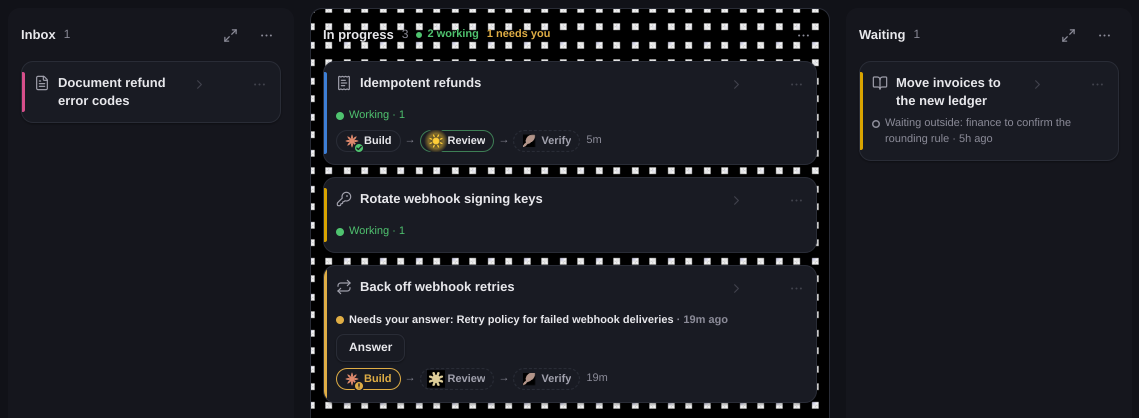
More: A tour of the interface.
Pipelines and review loops
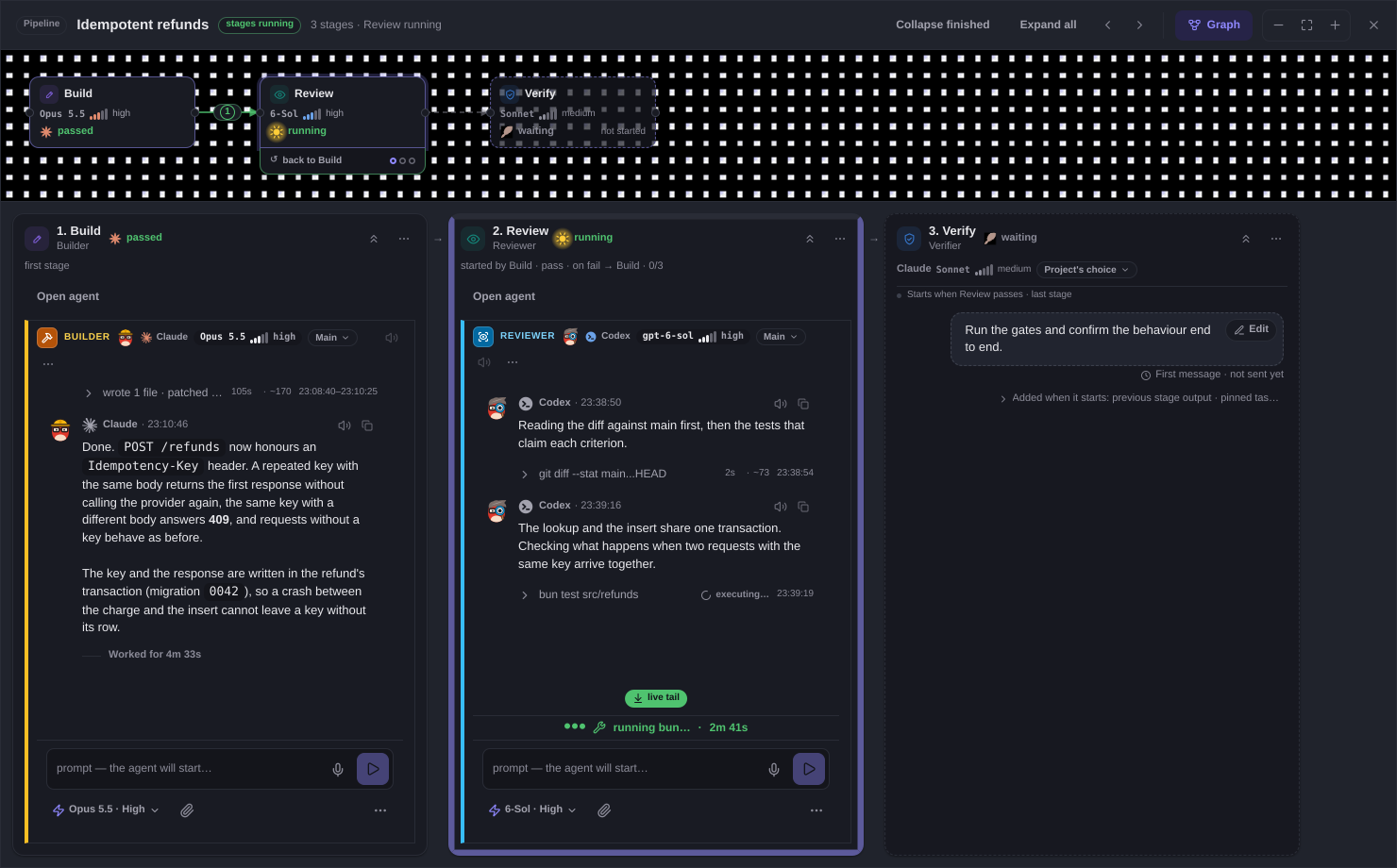
A pipeline runs one task through up to eight agent stages in a git worktree of its own. Every review round starts a fresh reviewer, within a budget fixed when the pipeline is created. Merging is off until you turn on Merge when the review passes; until then the pipeline ends with its pull request open. The picture at the top shows one.
More: Pipelines in depth.
Read any agent as a chat
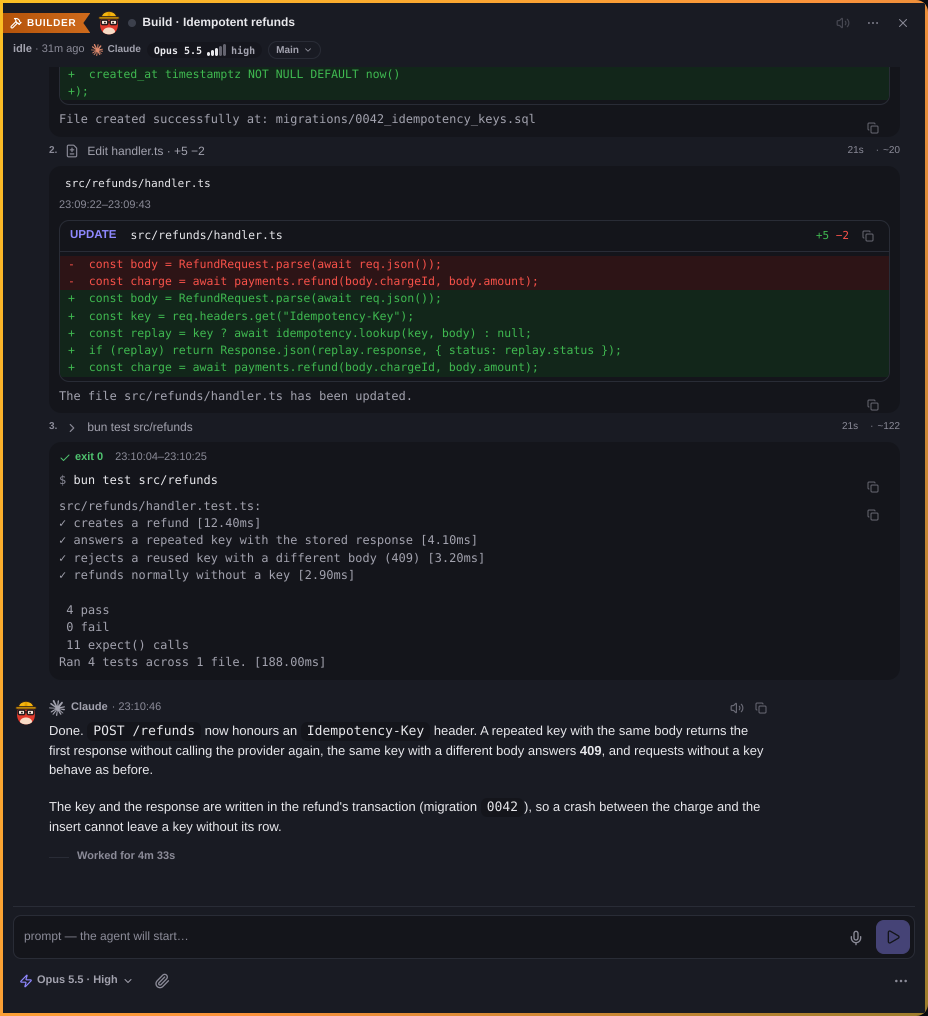
Delegatus shows every Claude Code, Codex and Copilot conversation on your machine as a readable chat, whoever started it, with diffs, command output and one search across all of them.
Each account shows its five-hour, weekly and per-model limits.
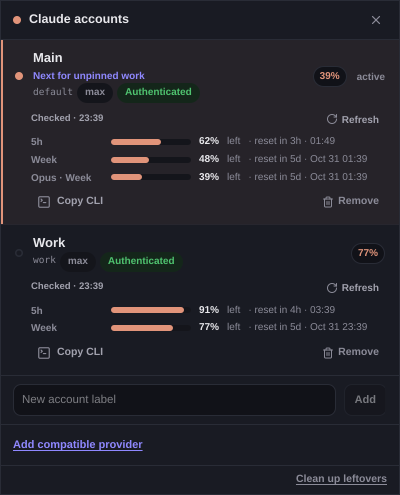
More: Conversations · Accounts, limits and roles.
From your phone
The board's four columns become tabs you swipe between, and you hold a card to move it. Open Delegatus on your phone through your Tailscale network.
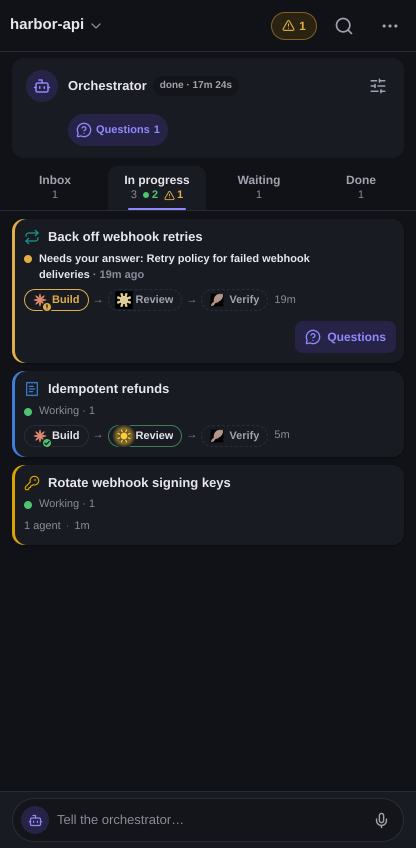
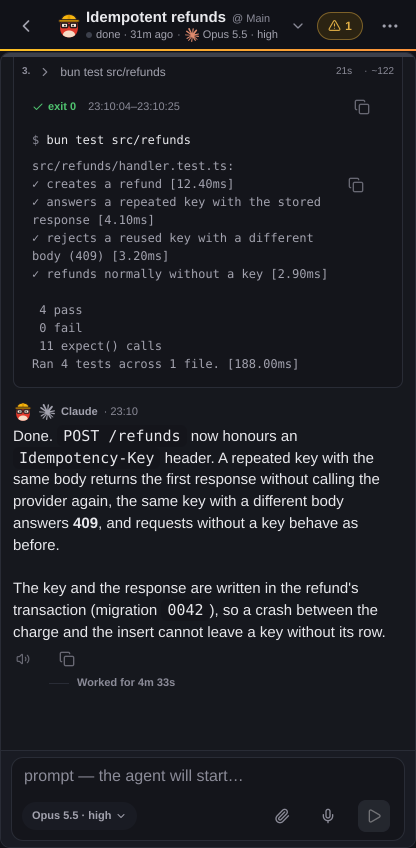
More: From your phone.
Everything else
| Feature | What it gives you |
|---|---|
| Voice | Dictation, answers read aloud, voice conversations, Voice Delegatus |
| Telegram | A bot for reports and files; read-only access to your own account |
| External relay | A relay service's chats answered by this install |
| Team | People sign in as themselves |
| Linked installs | Two machines share one board |
| Memory | Learned rules for the next agents; memory shared by Claude and Codex |
| MCP server | Your own Claude Code or Codex sessions get the same tools |
| Updates and services | Updates, automatic updates, memory and CPU limits for agents |
| Configuration | Command options, files, environment variables |
Documentation
- Delegatus guide: install, concepts, workflows and a page for every feature above.
- docs/pipelines.md: stage definitions, verdicts, the HTTP API and recovery.
- docs/orchestrator.md: seat authority, mandate versions and rotation.
- docs/review-loop.md: how a review round runs in a pipeline.
- docs/docker.md: the long-running Docker runbook.
- docs/RELEASING.md: how a release is cut.
- docs/merge-batch.md: landing several reviewed pull requests as one batch.
- ARCHITECTURE.md: how the scanner, API routes, runtime host and UI fit together.
- CONTRIBUTING.md: commit identity, the privacy check, the local hooks and what CI runs.
- docs/media/readme/: where the screenshots come from.
Security
Anyone who can reach Delegatus can run commands as you. It binds to
127.0.0.1; any other bind address, and --tailscale, turn on the access key.
Treat a phone-access link as a secret.
Security and privacy has the rest.
What leaves your machine
Delegatus sends one anonymous install ping per UTC day to
https://delegatus.org/api/ping, with exactly id, v, os, arch and
kind. Turn it off in the sidebar's ⋯ menu under Settings → Install ping,
or with DELEGATUS_TELEMETRY=0 or DO_NOT_TRACK=1.
What leaves your machine
has the details.
Memory profiles and voice-call summaries send selected rules or call text to
Anthropic through Claude Code, using your subscription. Limits are read through
Claude Code /usage. Delegatus's direct subscription-token request to Anthropic's
usage endpoint requires Direct Anthropic API calls with my subscription under
Settings → Install ping → What leaves my machine. It starts off on new installs;
existing installations with recorded direct usage keep it on.
License
MIT
Explore related projects
codecrafters-io/build-your-own-x
Master programming by recreating your favorite technologies from scratch.
561,398 starspublic-apis/public-apis
A collective list of free APIs
497,679 starsmorluto/rea
Reverse engineer anything with agents, from app behavior down to native binaries.
447,495 starsopenclaw/openclaw
The AI that really does things. Any OS. Any Platform. The lobster way. 🦞
394,261 stars