
L00PLeGeNd/code-for-word
L00PLeGeNd/code-for-word has 38 GitHub stars and 1 forks. GitHot measured 0 stars in 24 hours, 0 in 7 days, and 0 in 15 days. Last checked 2026-11-09 13:57 UTC. Last push 2026-11-07.
Code for Word: Paste highlighted code into Word, with customizable formatting options and a handy built-in translation feature.
Measured star growth
- in 24h
- 0
- in 7 days
- 0
- in 15 days
- 0
- in 1 month
- Collecting history
Net star changes over overlapping periods, not daily totals. Missing measurements are left blank. Stars measure attention, not software quality.
README.md
OriginalCode for Word · 码文
English | 中文


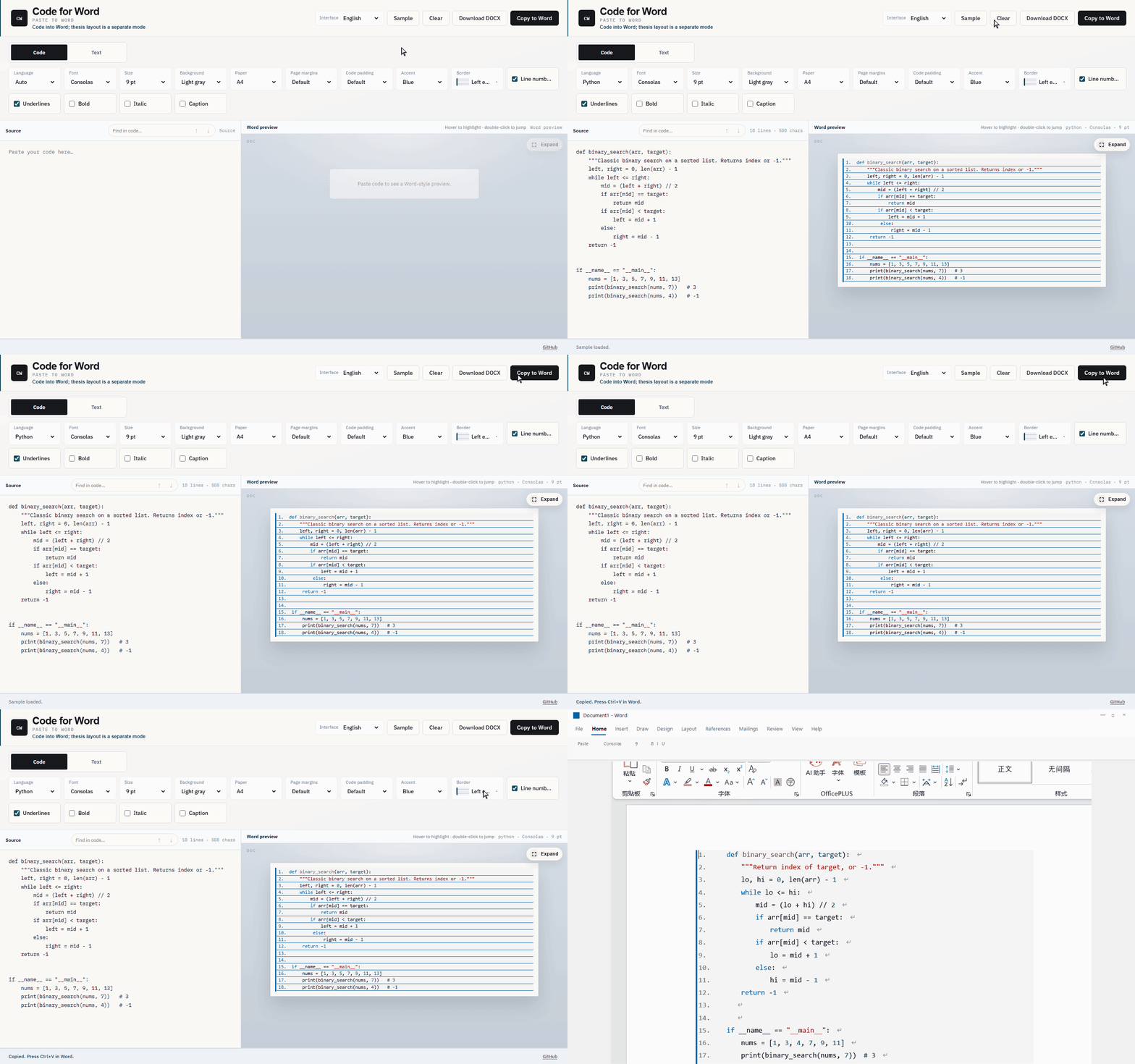
Paste highlighted code into Word — colors, frame, margins, and optional caption rows stay put. That is the main job. An optional text mode can set prose like a thesis; the app always opens in code mode.
If this saves you a thesis night, ★ Star the repo and tell a classmate who still screenshots code into Word.
Use it
1) In the browser (no install)
Open web app: https://l00plegend.github.io/code-for-word/
Source mirror: Gitee · loopisme/code-for-word (synced with GitHub; one web URL only, so it cannot drift)
- Paste → adjust options → Download DOCX (recommended on the web)
- Copy to Word works in the browser too, but paste quality varies; desktop app is better for that
2) Windows app (best paste quality)
- Download
CodeForWord-Setup-*.exe:- Gitee Releases (China): https://gitee.com/loopisme/code-for-word/releases
- GitHub Releases: https://github.com/L00PLeGeNd/code-for-word/releases/latest
- Install and open Code for Word
- Paste → Copy to Word →
Ctrl+Vin Word / WPS, then choose Keep Source Formatting (保留源格式) in the paste options — otherwise Word remaps fonts/colors and the frame looks wrong
If Windows SmartScreen says the publisher is unknown, choose More info → Run anyway (builds are not code-signed yet).
Closing the window hides the app to the system tray.
Word vs WPS: Desktop paste targets Microsoft Word first. WPS usually works; if a caption row looks clipped, try Download DOCX or turn off underlines and paste again.
Modes
Opens in Code. Switch to Text when you need thesis-style prose. There is no auto-detect mode (too easy to misclassify).
Code mode (default)
Syntax highlighting, type size, line numbers, page margins, code inset, frame, optional underlines, and in-box caption rows. The desktop app copies RTF so Word keeps the colors and the frame.
Text / paper mode (optional)
Choose Text when you want prose set like a thesis — not required for pasting code:
- Body defaults to 宋体 12 pt, Times New Roman for Latin, 1.5 line spacing, 2-character first-line indent, justified
- Headings use 黑体: 16 pt, 14 pt, then 12 pt
- Numbering can be academic
1 / 1.1, thesis chapters, official-document style, or left as written - Lists, captions, references, formulas, code blocks inside prose, and Markdown or Excel tables
- Optional cleanup for OCR full-width characters, extra spaces, and some LaTeX markup
Translation stays off. When you enable it, text is sent only to the free engine or the endpoint you configure.
Community
This project grows when people paste, break things, and report back. Promo copy is English-first (GitHub audience); Chinese blurbs live at the bottom of the share kit for domestic groups.
| Do this | Where |
|---|---|
| Ask a question / share a tip | Discussions |
| Report Word / WPS paste bugs | Issues |
| Send a fix or small polish | Pull requests — see CONTRIBUTING |
| Share the project | Copy an English blurb from docs/share.md |
China mirror: Gitee. Prefer GitHub Discussions when you can — one thread, less drift.
Develop
git clone https://github.com/L00PLeGeNd/code-for-word.git
cd code-for-word
npm install
npm run dev   # Vite + Electron shell
npm test      # vitest
npm run dist:win
License
MIT
Explore related projects
n8n-io/n8n
Fair-code workflow automation platform with native AI capabilities. Combine visual building with custom code, self-host or cloud, 400+ integrations.
209,939 starslanggenius/dify
Build Agentic workflows, RAG pipelines, with rich AI model and tool support on one collaborative workspace. Deploy on cloud, VPC, or self-hosted, so teams move from prototype to production without rebuilding the stack.
160,773 starsmicrosoft/PowerToys
Microsoft PowerToys is a collection of utilities that supercharge productivity and customization on Windows
140,755 starsstablyai/orca
Orca is the place for working with a fleet of agents (e.g. Grok Bot, Claude Code). Run any coding agent with your own subscription. Available on desktop, mobile and remote runtime.
120,418 stars