
Kronic90/Mimirs-Memory-Hub
Kronic90/Mimirs-Memory-Hub has 38 GitHub stars and 3 forks. GitHot measured +1 stars in 24 hours. Last checked 2026-11-17 02:27 UTC. Last push 2026-11-15.
What you can do
- 💬 Streaming chat - Token-by-token streaming with full Markdown rendering
- 🧠 Persistent memory - Every conversation is stored, emotionally tagged, and recalled in future sessions
- 👤 Characters - Create custom AI personas with names, personalities, backstories, and avatars
- 🃏 SillyTavern import - Import character cards directly — PNG, JSON, single files, or entire folders
Measured star growth
- in 24h
- +1
- in 7 days
- Collecting history
- in 15 days
- Collecting history
- in 1 month
- Collecting history
Net star changes over overlapping periods, not daily totals. Missing measurements are left blank. Stars measure attention, not software quality.
About
Local AI companion with persistent, human-like memory that remembers you across sessions. Works with Ollama, GGUF/llama.cpp, LM Studio & any OpenAI-compatible API; imports SillyTavern cards. Windows portable zip, no install.
AIREADME.md
OriginalMimir's Memory Hub
The local AI companion that actually remembers you.



Mimir's Memory Hub is a free AI companion and character platform that runs on your own PC. Connect any local model (Ollama, GGUF via llama.cpp, LM Studio) or a cloud API and talk to a character that builds a persistent, human-like memory of you. Memories fade, strengthen, carry emotion and get consolidated in "sleep", the way a human mind's do.
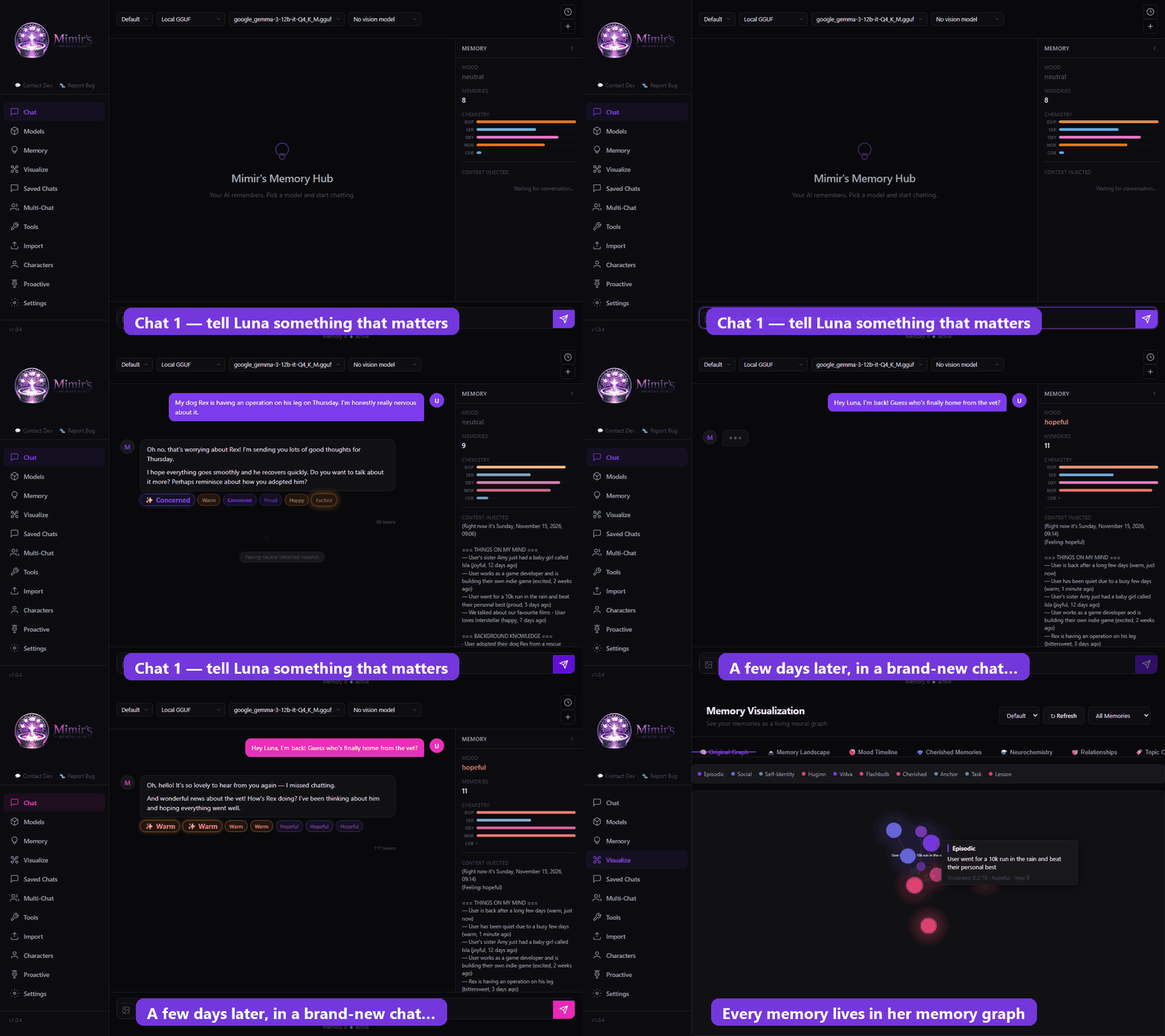
Real, unscripted output from Gemma 3 12B running locally. Chat 2 is a fresh conversation, so Luna only knows about Rex from her memory. (For the demo, that memory's date was moved back 3 days to stand in for the time passing.)
⬇ Download for Windows (portable, no install) · macOS / Linux · Discussions
No subscriptions. No data leaving your machine (unless you choose a cloud API). No conversation limits. Always 100% free: no paid tiers, no premium features, no catches.
⬇️ Download & Run (no Python or coding knowledge required)
Just want to use it? Download the ready-to-run Windows package — Python is included, nothing to install.
⬇ Download Mimirs-Memory-Hub-windows-portable.zip
- Unzip it anywhere
- Double-click
run.bat- Your browser opens automatically — done
macOS / Linux users: see the Installation section below.
How it compares
Most chat apps "remember" by stuffing recent messages into the context window, or by searching a vector database for similar text. Mimir models memory the way people experience it.
| Typical chat app | Vector-store memory (RAG) | Mimir's Memory Hub | |
|---|---|---|---|
| Remembers across sessions | ❌ limited to the context window | ✅ | ✅ |
| Important / emotional moments recalled more readily | ❌ | ❌ similarity only | ✅ |
| Natural forgetting (real forgetting curve) | ❌ | ❌ keeps everything equally | ✅ |
| Mood shapes what comes to mind | ❌ | ❌ | ✅ |
| Updates beliefs when facts change ("I moved to Leeds") | ❌ | ⚠️ old and new both match | ✅ |
| Consolidation, "sleep" and dreams | ❌ | ❌ | ✅ |
| Remembers images it was shown, and can show them again | ❌ | ❌ | ✅ |
| See and browse the memory graph | ❌ | ❌ | ✅ |
| Runs fully offline on your PC | varies | varies | ✅ |
Benchmarks: 93.9% Recall@5 on LongMemEval, and 4.4× the no-memory baseline on Mem2ActBench tool accuracy (0.44 vs 0.10). Full methodology and the categories where it's weaker are in BENCHMARKS.md.
Community
Mimir's Memory Hub is a community-driven project. All feedback, suggestions, feature requests, and bug reports are welcome and will be taken into consideration. If you have an idea for something you'd like to see, open an issue or start a discussion — this project is built for the people who use it.
- Issues & feature requests — GitHub Issues
- Discussions — GitHub Discussions
- ⭐ If Mimir remembers something that surprises you, a star helps other people find it.
What Makes It Different
Most AI chat apps give the AI a simple sliding context window — it forgets everything once the window fills up. Mimir gives it something closer to an actual mind:
- Memories persist forever — the AI remembers things you told it weeks ago, across sessions
- Memories carry emotional weight — important or emotional moments are recalled more readily, just like in humans
- Memories fade naturally — less significant things are gradually forgotten following a real forgetting curve
- Mood evolves in real time — how the AI feels right now shapes what it remembers and how it responds
- Neurochemistry simulation — dopamine, serotonin, oxytocin, norepinephrine, and cortisol modulate encoding, recall, and emotional responses
- Consolidation and dreams — a sleep cycle merges, prunes, and synthesizes memories, producing dream-like cross-theme insights
- Multiple characters — create distinct AI personalities, each with their own completely separate memory
- Group chats — get multiple characters talking together with you in one conversation
- 10 LLM backends — run fully local, connect to cloud APIs, or use your own endpoint
Beyond the companion/character experience, Mimir also offers optional agent-style capabilities (21 built-in tools, MCP server connections, autonomous task mode) for anyone who wants an assistant rather than — or alongside — a companion. These are opt-in, off by default, and have no effect on how your characters remember or behave unless you deliberately switch a character into the Agent/Assistant preset.
Features at a Glance
| 💬 Streaming chat | Token-by-token streaming with full Markdown rendering |
| 🧠 Persistent memory | Every conversation is stored, emotionally tagged, and recalled in future sessions |
| 👤 Characters | Create custom AI personas with names, personalities, backstories, and avatars |
| 🃏 SillyTavern import | Import character cards directly — PNG, JSON, single files, or entire folders |
| 🤝 Group chats | Multiple characters in one conversation with 3 turn modes (address by name, sequential, all respond) |
| 📊 Memory browser | Search, filter, edit, cherish, pin, or delete individual memories |
| 📈 8 Visualizations | Neural graph, 3D constellation, mood timeline, neurochemistry, relationships, topic clusters, cherished wall, memory attic |
| 🖥️ 10 LLM backends | Ollama, Local GGUF, Transformers/SafeTensors (GPU), OpenAI, Anthropic, Google, OpenRouter, vLLM, OpenAI-Compatible, Custom |
| 🎤 Voice I/O | Text-to-speech (Edge TTS, Piper, Kokoro) and speech-to-text (Whisper) |
| 🖼️ Vision | Send images to VL models, with automatic BLIP captioning as a fallback |
| 📥 Memory import | Import memories from any format — paste text, upload files, with optional AI enrichment |
| 🔍 Conversation search | Search and sort saved conversations by date, title, or content |
| 📊 Token tracking | Real-time token count and cost estimation in the chat header |
| 🎨 Light & dark themes | Full light theme support alongside the default dark theme |
| 🧪 Connection test | One-click backend connection test from Settings |
| — | — |
| 🔧 21 optional tools (Agent/Assistant presets only) | File I/O, web search, code execution, page fetching, reminders, and more — opt-in, never used by companion/character presets |
| 🔌 MCP support (optional) | Connect external tool servers via the Model Context Protocol |
The Memory System — How It Works
Mimir's memory isn't a simple conversation log. It's a layered cognitive simulation inspired by real neuroscience research. Here's what happens under the hood.
Memory Encoding
When you say something, Mimir doesn't just store the text. It:
- Assigns an emotion — detected from the content using a 42-label emotion classifier
- Rates importance (1–10) — based on emotional intensity, personal relevance, and novelty
- Calculates novelty — new topics get an encoding boost; repeated things don't
- Encodes with mood context — the AI's current emotional state is baked into the memory
- Modulates via neurochemistry — high dopamine boosts encoding strength; cortisol warps recall
- Checks for flashbulb moments — extremely important + highly emotional = permanent, unforgettable memory
- Applies hippocampal pattern separation — similar-but-distinct memories are kept separate to avoid interference
Memory Recall
When the AI needs to respond, it searches memory using a multi-signal hybrid retrieval system:
- BM25 keyword matching — finds memories with literal word overlap
- VividEmbed semantic search — a custom emotion-aware embedding model that weights emotional similarity alongside content similarity
- Spreading activation — activating one memory boosts connected memories through the Yggdrasil graph (temporal, emotional, entity-based links)
- Mood-congruent recall — the AI's current mood biases which memories surface (happy mood → happier memories)
- State-dependent retrieval — memories encoded during a similar neurochemical state are easier to recall
- Proustian recall — 5% chance of a random faded memory spontaneously resurfacing, sometimes unlocking forgotten context
- Retrieval-induced forgetting — recalling some memories temporarily suppresses competing ones, creating natural recall dynamics
- Zeigarnik effect — incomplete tasks and unresolved threads get a recall boost
- Prospective memory — time-based reminders and scheduled intentions surface automatically
Memory Consolidation (Sleep)
Running "Sleep" triggers a Norse-themed consolidation cycle modeled on real sleep memory processing:
- Huginn (the "thinking raven") — scans for recurring themes, sentiment arcs per entity, open conversational threads, and emotional drift
- Muninn (the "remembering raven") — merges near-duplicates, prunes dead memories (archiving them to the Memory Attic), and strengthens co-activated pairs
- Völva (the "dreaming seeress") — synthesizes cross-theme insights from distant memory pairs, like dreams connecting unrelated experiences
- Chunking — old memories with high overlap are combined into gist summaries, preserving the core while freeing space
Memory Decay
Every memory has a vividness score that decays over time following a modified Ebbinghaus forgetting curve:
- Recent memories are vivid; old ones naturally fade
- Each time a memory is recalled, its stability increases, slowing future decay (spaced repetition)
- Flashbulb memories (importance ≥ 9, high emotion) never decay
- Cherished (💎) and Anchored (⚓) memories are protected from pruning
- Memories that fade below the vividness threshold are archived to the Memory Attic — not deleted, but recoverable
- Reconsolidation drift — each time a memory is recalled, it can subtly shift based on the current emotional context, just like real reconsolidation
Yggdrasil — The Memory Graph
All memories are connected in a graph structure called Yggdrasil (the World Tree). Edges form automatically from 6 types of relationships:
| Edge Type | What It Connects |
|---|---|
| Temporal | Memories from the same conversation or day |
| Emotional | Memories sharing the same emotional tone |
| Thematic | Memories about the same topic (word overlap) |
| Causal | Sequential memories where one builds on another |
| Entity | Memories mentioning the same person or entity |
| Contrast | Memories with opposing emotional drift (e.g., sadness → joy) |
This graph drives spreading activation during recall, and it's the data structure powering the visualizations.
Social Memory
Mimir maintains separate memory tracks for people and entities. Every mention of a person gets stored in their social memory file, building a persistent impression that tracks:
- What they said and did
- How you felt about interactions with them
- Sentiment arcs over time (are things getting better or worse?)
- Relationship Strength scores — a composite metric from memory count, emotional warmth, recency, consistency
Emotional Architecture
The AI's emotional state is a 3-axis PAD (Pleasure-Arousal-Dominance) vector that evolves every turn:
- Pleasure — positive to negative valence
- Arousal — calm to excited intensity
- Dominance — in-control to overwhelmed
This maps to 42 discrete emotion labels. The mood shifts each turn based on the detected emotion in the conversation, with smooth interpolation. The entire chat background shifts color to reflect the AI's current emotional state — all 42 emotions have unique color profiles.
Neurochemistry
When using character or companion presets, a full neurochemistry engine runs alongside the mood system. Five neurotransmitters are simulated with individual baselines, decay rates, and interaction effects:
| Chemical | Role | Effect on Memory |
|---|---|---|
| Dopamine (DOP) | Reward, motivation, novelty | Boosts encoding strength for novel/rewarding content |
| Serotonin (SER) | Contentment, emotional stability | Stabilizes mood, reduces emotional volatility |
| Oxytocin (OXY) | Social bonding, trust | Strengthens social memory encoding |
| Norepinephrine (NOR) | Alertness, attention, stress response | Sharpens recall precision under moderate arousal |
| Cortisol (COR) | Stress, threat response | Distorts recall at high levels, enhances at moderate levels |
The system includes:
- Yerkes-Dodson curve — moderate arousal improves performance; extreme arousal degrades it
- Flashbulb mechanism — extreme dopamine + cortisol spikes create permanent memories
- Emotional firewall — prevents runaway chemical cascades with self-dampening and cognitive override
- Sleep reset — consolidation normalizes chemistry toward baselines
- Auditable log — every chemical change is logged with timestamps and triggers for debugging
Task & Project Memory
In Agent mode, Mimir tracks:
- Tasks — goals, priorities, status, deadlines
- Actions — what was done and its result
- Solution patterns — reusable strategies learned from successes
- Artifacts — files, code, or outputs produced
Lessons
The AI learns explicit lessons from experience. Each lesson tracks:
- The topic and context trigger
- The strategy that worked (or didn't)
- Success/failure history
- Consecutive failure count (for automatic strategy rotation)
Visualizations
Mimir includes 8 interactive visualization modes, all accessible from the Visualize tab.
🧠 Neural Memory Graph
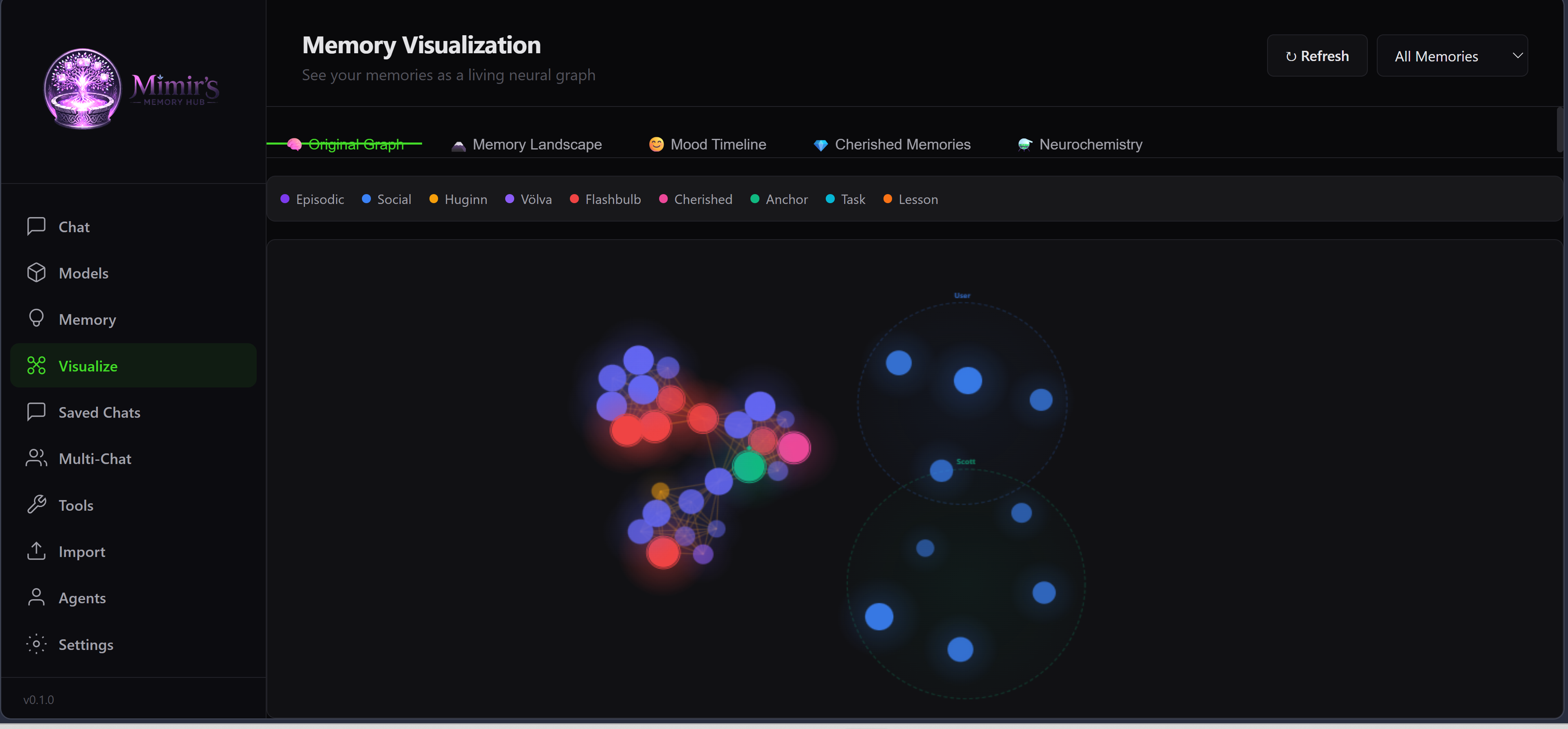
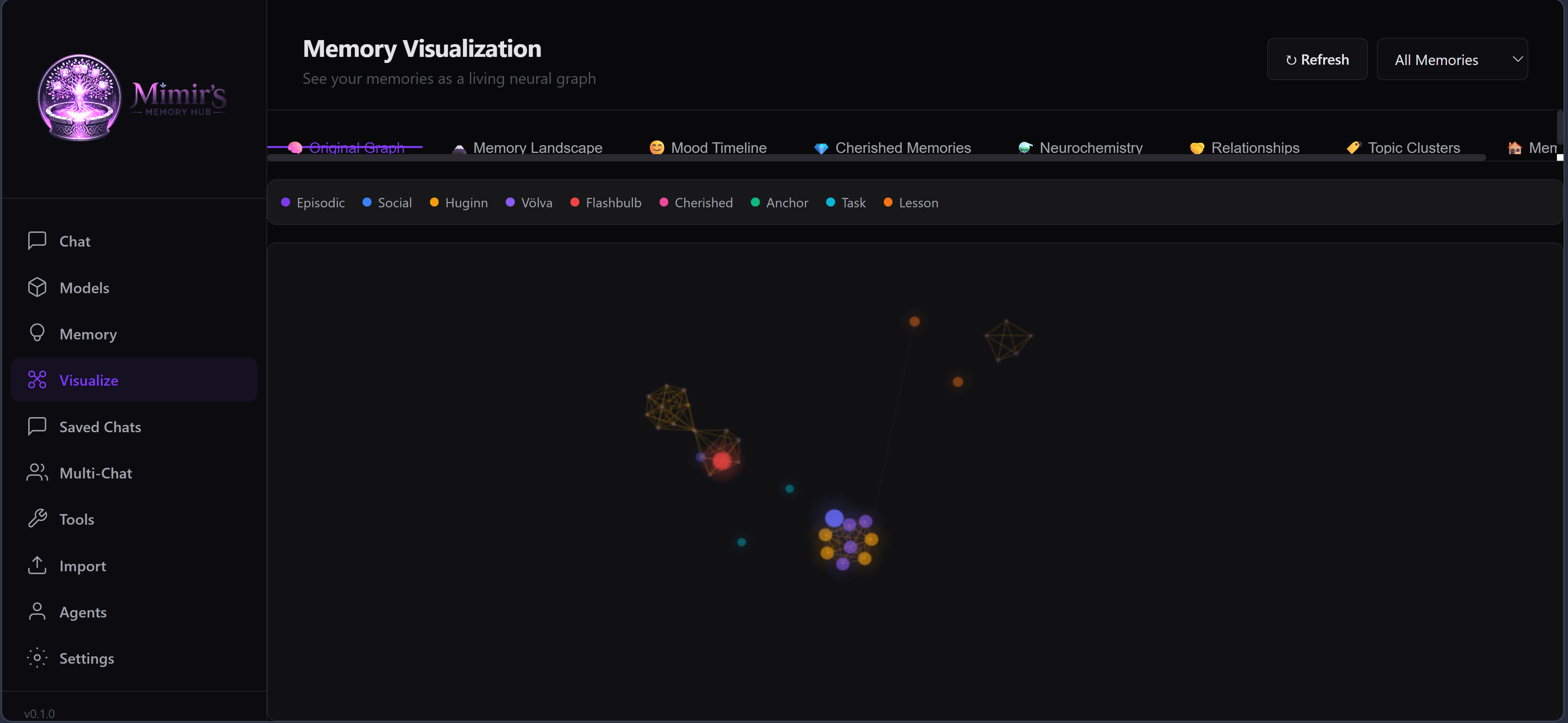
The default view. Shows all memories as nodes in a force-directed graph, connected by Yggdrasil edges. Node colors indicate source type (episodic, social, Huginn insight, Völva dream, flashbulb, cherished, anchor, task, lesson). Click any node to see the full memory content, emotion, importance, and when it was formed. Social memories cluster together visually — you can see relationship groups forming naturally.
The graph below shows social memory clustering (left) and faded/dormant memories visible as smaller, more transparent nodes (right):
🗻 3D Neural Constellation
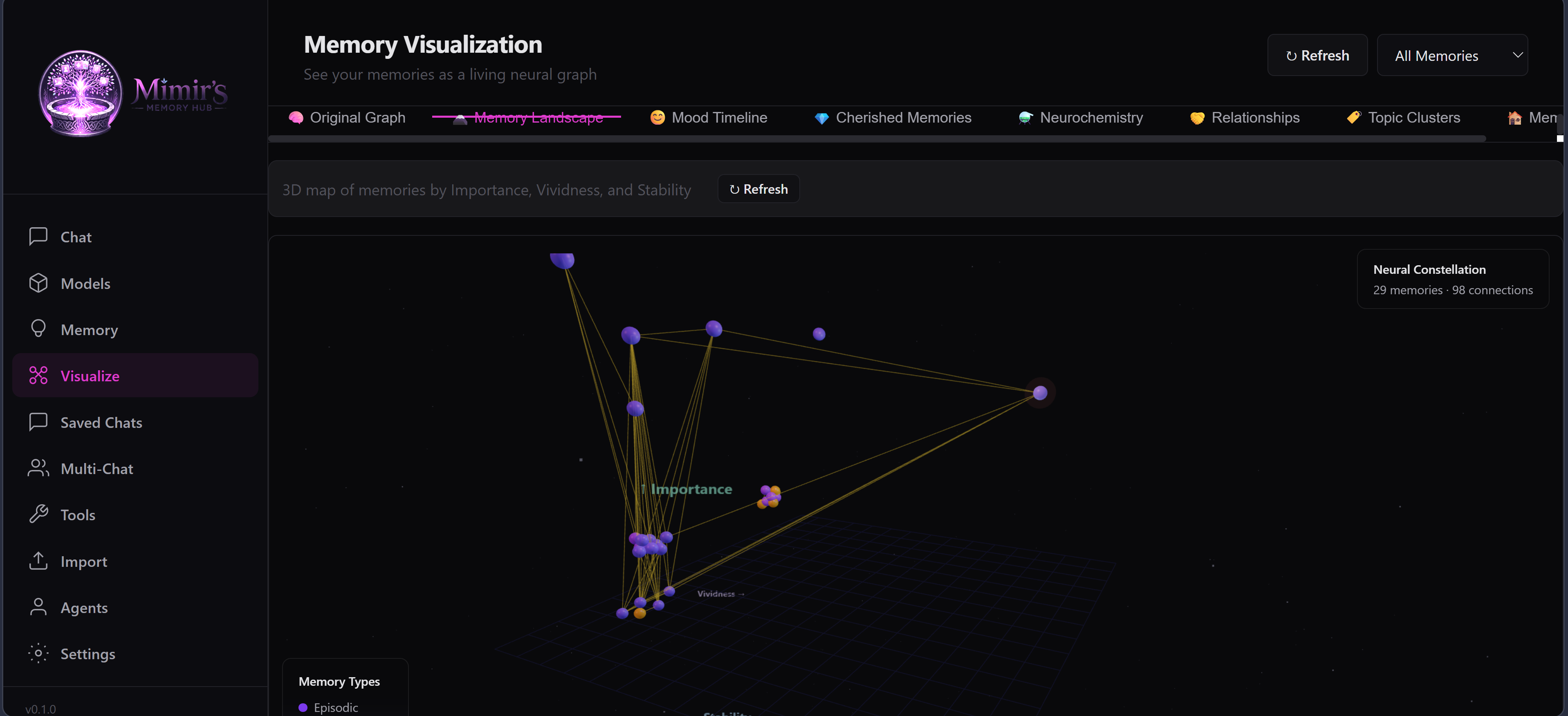
An immersive 3D scatter plot where each memory is a glowing star. The axes map to Importance, Vividness, and Stability. Brighter stars are more important; node size reflects access count. Rotate, zoom, and hover to explore. Connection lines show Yggdrasil edges in 3D space.
😊 Mood Timeline
A line chart tracking the AI's emotional state over the current session. Shows Pleasure, Arousal, and Dominance values over time, with mood labels annotated at each data point. Useful for seeing how a conversation's emotional arc evolved.
⚗️ Neurochemistry Timeline
Tracks dopamine, serotonin, oxytocin, norepinephrine, and cortisol levels over the session. Each neurotransmitter is plotted as a separate line. Watch how emotional conversations spike certain chemicals and how they decay between turns.
💎 Cherished Memories Wall
A gallery of all memories you've marked as cherished (💎). These are the memories that matter most — protected from decay, always accessible, displayed as glowing cards with their emotion, importance, and timestamp.
🤝 Relationship Strength
Shows every social entity (person) the AI has memories about, with a computed relationship strength score (0–100) based on:
- Memory count — how many memories involve this person
- Average importance — how significant those memories are
- Emotional warmth — average positive valence in interactions
- Recency — how recently you mentioned them
- Consistency — how regularly they appear over time
Each entity is labeled: distant, acquaintance, friend, good friend, or close confidant.
🏷️ Topic Clusters
Automatically groups memories by shared themes using word-overlap adjacency. Each cluster shows its computed theme label, dominant emotion, average importance, time span, and individual memory previews. Useful for seeing what topics dominate the AI's memory.
🏚️ Memory Attic
The Memory Attic has two sections:
- Archived Memories — pruned by Muninn during consolidation but preserved here instead of being permanently deleted. Click ✨ Rediscover to bring any archived memory back.
- Dormant Memories — still in active storage but fading (low vividness, rarely accessed). Click 💡 Nudge to boost their stability and prevent them from being pruned.
Supported LLM Backends
Mimir supports 10 backends. You can switch between them at any time from Settings.
| Backend | What You Need |
|---|---|
| Ollama (recommended) | Install Ollama and pull any model — free, fully local |
| Local GGUF | Any .gguf model file on your drive — GPU acceleration via llama.cpp |
| Transformers / SafeTensors | HuggingFace models loaded directly via Transformers — full GPU support |
| OpenAI | An OpenAI API key (GPT-4o, GPT-4-turbo, o1, etc.) |
| Anthropic | An Anthropic API key (Claude Sonnet, Haiku, Opus) |
| A Google API key (Gemini 2.0 Flash, Pro, etc.) | |
| OpenRouter | An OpenRouter API key — access hundreds of models through one endpoint |
| vLLM | A running vLLM server — high-throughput GPU inference |
| OpenAI-Compatible | Any server with an OpenAI-compatible API (LM Studio, text-generation-webui, etc.) |
| Custom | Any URL + headers — bring your own endpoint |
Agent Tools
When using the Agent preset, Mimir has access to 21 built-in tools:
- File read/write — sandboxed within whitelisted directories
- Web search — via DuckDuckGo or configurable SearXNG instance
- Page fetch — retrieve and extract text from URLs
- Code execution — run Python snippets in a sandboxed environment
- Reminders — set timed reminders that surface automatically
- Memory operations — search, store, and recall memories programmatically
- Image generation prompts — describe images for generation pipelines
- MCP tool servers — connect external tool servers via the Model Context Protocol
Configure tool permissions, allowed paths, and allowed domains from the Tools page in the sidebar. Each tool shows its execution status and results directly in the chat.
Testing & Known Limitations
We believe in being transparent about what works and what doesn't. The project includes a comprehensive automated test suite that simulates a full year of usage across every preset mode — companion, agent, character roleplay, creative writing, personal assistant, and group conversations.
Test Suite Overview
The test framework lives in tests/long_term/ and runs 80 individual tests covering 413 separate assertions across 7 test suites:
| Suite | Tests | Assertions | Pass Rate |
|---|---|---|---|
| Memory Lifecycle (CRUD, recall, decay, cherished, anchors, dedup, consolidation) | 15 | 84 | 98.8% |
| Neurochemistry (chemicals, mood, sleep reset, year-long stability) | 8 | 24 | 100% |
| Tag Parsing (remember, cherished, remind, social, task, solution) | 11 | 41 | 100% |
| Presets (all 6 presets, chemistry toggles, emotion weights, context gen) | 9 | 29 | 100% |
| Conversation Quality (process turn, emotion detection, multi-day, high volume) | 15 | 81 | 100% |
| API Endpoints (all 16 server endpoints) | 16 | 27 | 100% |
| Year-Long Simulations (6 full-year scenarios with time-warped clocks) | 6 | 127 | 82.7% |
| Total | 80 | 413 | 94.4% |
These numbers come from the test clock genuinely driving the engine's own age-based decay math (a harness bug that let the clock advance without the engine ever seeing it was found and fixed — see Known Limitations below), not from a model simulating what might happen. The time-warped clock fully stands in for real time, so a "full year" run finishes in about two minutes.
What Works Well
- Memory CRUD — storing, recalling, editing, and deleting memories is reliable
- Neurochemistry — dopamine, serotonin, oxytocin, norepinephrine, and cortisol remain stable over a full simulated year with no runaway cascades
- Tag parsing — all memory tags (
[REMEMBER],[CHERISHED],[REMIND],[TASK], etc.) are parsed correctly - All presets — every preset initializes properly with correct chemistry and emotion weight configurations
- Conversation pipeline — turn processing, emotion detection, context generation, and multi-day continuity all work correctly
- All API endpoints — every server endpoint returns expected data
- Cherished & anchored memory protection — protected memories survive consolidation and pruning
- Consolidation (sleep) — Huginn, Muninn, and Völva stages complete without errors, duplicates are merged, insights are generated
- Creative writing scenario — perfect 20/20 assertions over a full simulated year of novel collaboration
- Multi-character memory isolation — characters maintain fully separate memory stores with zero cross-contamination
Known Limitations
Long-term recall accuracy degrades for specific details. Over a simulated year, recall accuracy now measures 84.9% — the system reliably remembers broad themes and emotional arcs, but specific details (exact names, numbers, technical specifics) can drop out of the top recall results by the 6–12 month mark, even though the general topic is still retained. This figure was re-measured after fixing a bug in the test harness itself (it was advancing a simulated clock that the memory engine's own age calculations weren't actually reading, so every long-horizon decay/recall check had silently been running against zero elapsed time) — the previous 90.8% figure was measured against that broken clock and wasn't actually testing long-term decay at all. 84.9% is the first number anyone has gotten by actually letting a year pass.
Specific patterns observed in year-long simulations:
- Companion mode: After ~3 months, specific facts like job title or hobby names may not surface in recall, though the emotional context of those conversations is retained
- Agent mode: Cross-referencing between projects works well short-term, but specific technical solutions (e.g., which JWT library was chosen, exact CI/CD pipeline details) can fall out of recall after ~6 months
- Character roleplay: Long narrative arcs are mostly preserved, but minor plot details and proper nouns from early sessions (specific locations, secondary character names) can be lost by the 12-month mark
- Assistant mode: Conference topics and career milestones from 6–12 months ago may not surface without explicit prompting
These are not bugs — the system is working as designed (memories fade naturally via the Ebbinghaus curve), and separately, low-importance/never-revisited memories lose the bulk of their vividness within the first week, not months — the "months" timeline above is specifically about when a name or number drops out of the top-5 recall results, not when a memory disappears outright; the gist of it is retained far longer. The open question is whether the current decay rates and recall-boosting mechanisms are tuned aggressively enough for users who expect to be able to ask "what was that again?" a year later and get the exact detail back. This is an active area of development.
Other known limitations:
- Emotion detection (the keyword-based auto-detector used when no explicit emotion tag is given) now covers the full advertised emotion vocabulary, but as a keyword heuristic it still won't catch every nuanced phrasing (e.g., "I feel so drained" may not map to a specific emotion)
- The reminder system relies on real clock time, so time-warped testing can't fully validate reminder delivery
- Memory consolidation (sleep) is most effective when run periodically — if you never run it, the memory store grows unbounded and recall latency may increase over very long usage
Installation
Option A — Portable (no Python required, Windows)
The easiest way. Python is bundled — you don't need to install anything.
- Download
Mimirs-Memory-Hub-windows-portable.zipfrom the Releases page - Unzip it anywhere
- Double-click
run.bat - Your browser opens automatically at
http://127.0.0.1:19009
That's it. No Python, no terminal, no setup.
First run only:
run.batdownloads Python packages (~100 MB) into the app folder. This takes about a minute and only happens once.
Option B — Clone and run (Windows / macOS / Linux)
If you already have Python 3.10+ installed, this works anywhere.
Python version note: We recommend Python 3.11 or 3.12. Python 3.13+ may have compatibility issues with some dependencies (PyTorch, transformers, etc.).
1. Clone the repo
git clone https://github.com/Kronic90/Mimirs-Memory-Hub.git
cd Mimirs-Memory-Hub
2. Run it
Windows:
run.bat
macOS (double-click):
start.command ← double-click this in Finder
macOS / Linux (Terminal):
chmod +x run.sh && ./run.sh
Note:
start.commandhandles thechmodautomatically so you don't have to open a terminal.
The first run creates a virtual environment and installs packages automatically. After that, launching is instant.
Setting up a model (required for both options)
Mimir needs an LLM to generate responses. Choose one:
Ollama — free, fully local, recommended:
# Install from https://ollama.com, then:
ollama pull qwen3:8b
Any model from ollama.com/library works — llama3, qwen2.5, phi4, gemma3, qwen3, etc.
Cloud API — OpenAI / Anthropic / Google / OpenRouter: Have your API key ready. Enter it on the Settings page after launching. Use the Connection Test button to verify it works.
Local GGUF or SafeTensors:
Drop any .gguf or SafeTensors model anywhere on your drive. Use the Models page to scan, discover, and load them with GPU acceleration.
Quick Start Guide
First launch
- Go to Settings (sidebar)
- Select your backend (Ollama, Local, OpenAI, etc.)
- Enter your API key if using a cloud backend — click Test Connection to verify
- Set a persona name — this is what the AI calls itself
Start chatting
- Go to Chat (sidebar)
- Select a Preset — try Companion for a friendly conversational AI, or Agent for a task-focused assistant
- Type and press
Enter
The AI will remember your conversations automatically. Each time you return, it recalls relevant things from past sessions to inform its responses.
Create a character
- Go to Characters from the sidebar
- Click New Character
- Fill in the name, personality description, and an opening greeting
- Select the character from the Chat page to start a conversation with it
Each character has completely separate memory — their experiences don't bleed into each other.
Import characters or memories
- SillyTavern characters — go to Characters → Bulk Import, enter the path to your ST
Charactersfolder - Memory import — go to the Import page, paste text or upload files in any format. Mimir will parse them automatically, with optional AI enrichment to add emotion, importance, and context
Group chats
- Go to Multi-Chat (sidebar)
- Click New Conversation and give it a title
- Click + Character to add characters
- Use the ⚙️ gear button to set turn order:
- Address by Name — only characters you mention by name respond
- Sequential — characters take turns one at a time, round-robin
- All Respond — every character responds each round
Browse and manage memory
- Go to Memory (sidebar)
- Browse — scroll through all stored memories, filter by emotion or source
- Search — find memories by topic using semantic search
- Click any memory to Edit, Cherish (protect from decay), Pin (permanent), or Delete
Download models
- Go to Models (sidebar)
- Ollama tab — pull models by name (e.g.
qwen3:8b,llama3.2) - HuggingFace tab — search for GGUF or SafeTensors models, browse files, and download with a progress bar
- Local tab — scan your drives to discover model files you already have
The Presets
Mimir ships with 6 presets that control how the AI uses memory, tools, and personality:
| Preset | Best for | Memory style |
|---|---|---|
| Companion | Friendly, emotional conversations | High emotion weight, relationship-focused, neurochemistry active |
| Character | Roleplay and immersive fiction | Maximum emotion weight, fully in-character, neurochemistry active |
| Agent | Tasks, research, file work | Low emotion weight, tool-use enabled, task/project memory active |
| Writer | Creative writing and storytelling | Literary analysis, narrative-aware recall, neurochemistry active |
| Assistant | General help and Q&A | Minimal emotional processing, practical recall, efficient |
| Custom | Whatever you want | Fully configurable — every parameter exposed |
UI Features
Mood-Reactive Background
The entire chat background subtly shifts color based on the AI's current emotional state. All 42 emotions have unique HSL color profiles. The color transitions smoothly over 2–3 conversational turns.
Neurochemistry Sidebar
When using character/companion presets, the right sidebar shows real-time neurotransmitter levels as animated color bars — dopamine, serotonin, oxytocin, norepinephrine, and cortisol. It also displays the current mood label, memory count, and what context was injected into the last response.
Tool Activity in Chat
When the Agent uses tools (web search, file operations, etc.), each tool call is displayed inline in the chat with expandable details showing the tool name, parameters, and results.
Rage Quit
If the AI experiences 5 consecutive turns of negative emotion (sadness, anger, frustration, etc.), it will dramatically leave the conversation. This only activates with character presets that have chemistry enabled.
Auto Wake-Up
Between sessions, the AI undergoes an automatic wake-up cycle that consolidates memories, runs Huginn/Muninn analysis, and generates a reflection on what happened while it was "asleep."
Light & Dark Themes
Switch between a full light theme and the default dark theme from Settings.
Data Storage
All your data is stored locally in playground_data/ (created automatically on first run):
playground_data/
├── settings.json          ← Your settings (backend, model, API keys)
├── profiles/
│   └── default/
│       └── mimir_data/
│           ├── reflections.json    ← Episodic memories
│           ├── social/             ← Per-entity social memories
│           ├── lessons.json        ← Learned strategies
│           ├── reminders.json      ← Timed reminders
│           ├── facts.json          ← Short-term facts
│           ├── chemistry.json      ← Neurochemistry state
│           ├── meta.json           ← Mood, session count
│           ├── mood_history.json   ← Persistent emotional trajectory
│           ├── attic.json          ← Archived (pruned) memories
│           ├── tasks.json          ← Task records
│           ├── actions.json        ← Action log
│           ├── solutions.json      ← Solution patterns
│           └── inferred_edges.json ← Yggdrasil graph edges
├── characters/            ← Character files
├── conversations/         ← Group chat conversation history
└── models/                ← Downloaded models (GGUF, SafeTensors)
Nothing is synced anywhere. API keys are stored only in settings.json on your machine.
API Endpoints
Mimir exposes a full REST API for all features. Key endpoints:
| Endpoint | Method | Description |
|---|---|---|
/api/memory/stats |
GET | Memory statistics |
/api/memory/recall |
POST | Recall memories by query |
/api/memory/remember |
POST | Store a new memory |
/api/memory/browse |
GET | Browse all memories with filters |
/api/memory/graph |
GET | Full Yggdrasil graph data |
/api/memory/relationships |
GET | Relationship strength scores |
/api/memory/clusters |
GET | Auto-detected topic clusters |
/api/memory/trajectory |
GET | Emotional trajectory analysis |
/api/memory/dormant |
GET | Fading/dormant memories |
/api/memory/attic |
GET | Archived (pruned) memories |
/api/memory/rediscover |
POST | Recover or nudge a memory |
/api/memory/sleep |
POST | Run consolidation cycle |
/api/memory/mood |
GET | Current mood state |
/api/memory/chemistry |
GET | Neurochemistry levels |
Recommended Model
If you're not sure which model to use, we recommend Qwen 3 — it works excellently with all of Mimir's presets (Companion, Agent, Writer, Assistant, Character) and handles tool calls, creative writing, and conversations naturally.
- Ollama:
ollama pull qwen3:8b(or any size variant) - Local GGUF: Download a GGUF quantization from HuggingFace
Any model that supports chat completion will work. Larger models (12B+) produce richer emotional memory and more nuanced recall.
Tips
- Cherish important memories so they never decay — use the 💎 button in the Memory browser
- Anchor critical facts so they always surface — use the ⚓ button
- Run Sleep (Memory → Sleep) to consolidate and tidy the memory database
- Each profile is a completely separate memory space — useful for keeping different contexts isolated
- In Agent mode, configure tool permissions under the Tools page
- Check the Memory Attic periodically — you might find forgotten memories worth rediscovering
- View Relationships to see how strong the AI's bonds are with different people
- Browse Topic Clusters to see what themes dominate the AI's memory landscape
- Use Connection Test in Settings to verify your backend is working before chatting
Credits & Acknowledgements
Mimir's Memory Hub builds on several open-source projects and models:
| Component | Used For | License |
|---|---|---|
| Qwen 3 | Recommended default LLM | Apache 2.0 |
| BLIP | Vision fallback — automatic image captioning for non-VL models | BSD-3-Clause |
| Edge TTS | Text-to-speech (Microsoft Edge voices) | GPL-3.0 |
| OpenAI Whisper | Speech-to-text transcription | MIT |
| llama.cpp | Local GGUF model inference via llama-cpp-python | MIT |
| SearXNG | Optional self-hosted search provider | AGPL-3.0 |
| sentence-transformers | Semantic embedding for memory recall | Apache 2.0 |
| FastAPI | Backend web framework | MIT |
| Three.js | 3D Neural Constellation visualization | MIT |
| D3.js | Force-directed memory graph | ISC |
How it's built
Mimir's memory system (its architecture, the neuroscience-inspired mechanisms and the original engine) was designed and built by me, Kronic90.
I'm a self-taught Python developer, so I used an AI coding assistant (Claude) to help build the Hub around it, mostly the web interface (JavaScript, HTML/CSS) and the app plumbing. It has also helped implement some newer memory features and bug fixes, always to my design and reviewed by me. Every idea about how memory should work, and every decision about what ships, is mine.
License
PolyForm Noncommercial 1.0.0 — free for personal and non-commercial use. See LICENSE for details.