
KristopherKubicki/glimpser
KristopherKubicki/glimpser has 34 GitHub stars and 3 forks. GitHot measured 0 stars in 24 hours. Last checked 2026-11-10 03:08 UTC. Last push 2026-10-30.
Real-time camera, timelapse, and LLM summarization system for IP camera and NVR workflows
What you can do
- Real-time Monitoring: Continuously captures data from multiple sources. Whether it's a traffic camera or a weather dashboard, Glimpser ensures you’re always up-to-date with the latest information.
- Image Processing: Employs advanced techniques to compare images and detect even subtle changes, making it ideal for monitoring evolving situations effectively.
- Motion Detection: Automatically detects motion in the captured images and videos, triggering alerts and actions as configured by the user.
- AI Integration: Integrates with models like ChatGPT to provide intelligent insights. It can summarize data, detect anomalies, and generate alerts based on predefined rules.
Measured star growth
- in 24h
- 0
- in 7 days
- Collecting history
- in 15 days
- Collecting history
- in 1 month
- Collecting history
Net star changes over overlapping periods, not daily totals. Missing measurements are left blank. Stars measure attention, not software quality.
README.md
OriginalGlimpser


Introduction
Glimpser is a straightforward yet powerful real-time monitoring application designed to capture, analyze, and summarize live data from various sources such as cameras, dashboards, and video streams. Utilizing advanced image processing techniques and AI models, Glimpser provides insightful summaries and alerts. It’s highly configurable, allowing users to tailor it to their specific monitoring needs through an easy-to-use interface.
For more documentation, see the documentation index. You can find a summary of the documentation structure in docs/README.md. Read a high-level Architecture Overview to understand how the pieces fit together. See OpenSSF Scorecard for details on the security badge.
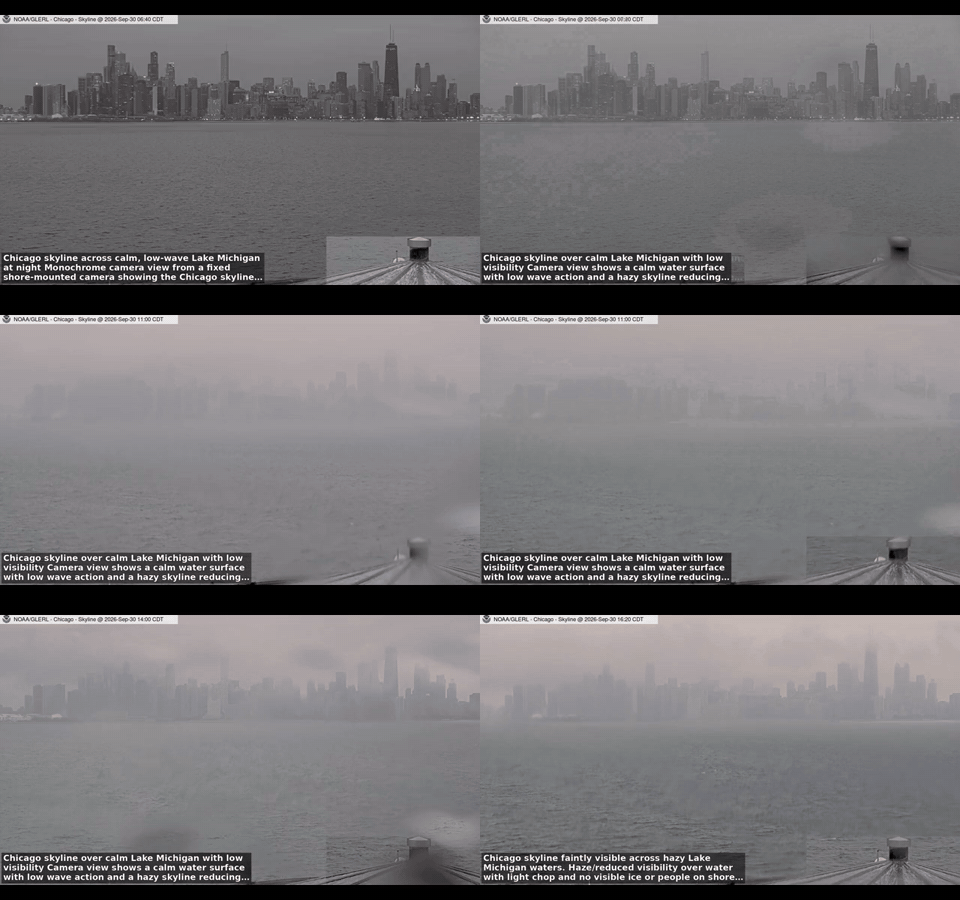
Weather and sky examples
See real timelapses of Chicago's skyline and continental cloud movement, assembled from Glimpser's archived NOAA imagery, with source credits and capture details.
Features
Real-time Monitoring: Continuously captures data from multiple sources. Whether it's a traffic camera or a weather dashboard, Glimpser ensures you’re always up-to-date with the latest information.
Image Processing: Employs advanced techniques to compare images and detect even subtle changes, making it ideal for monitoring evolving situations effectively.
Motion Detection: Automatically detects motion in the captured images and videos, triggering alerts and actions as configured by the user.
AI Integration: Integrates with models like ChatGPT to provide intelligent insights. It can summarize data, detect anomalies, and generate alerts based on predefined rules.
Auto-captioning: Automatically generates concise and informative captions for images and videos, providing quick insights into the content.
Auto-summarization: Summarizes data from multiple sources into a coherent and concise format, highlighting the most important information.
RTSP Streaming: Exposes a basic RTSP endpoint (
/test.rtsp) so external NVRs can ingest the MJPEG stream. Supported verbs areOPTIONS,DESCRIBE,SETUP,PLAY,PAUSE,GET_PARAMETER, andTEARDOWN.MJPG Test Stream: Provides
/test.mjpgfor clients that lack RTSP support.Customizable Configuration: Easily configure different data sources and processing rules through the user-friendly interface. Glimpser’s configuration is fully database-driven, ensuring flexibility and ease of use.
Data Retention Policies: Automatically manages storage by cleaning up old data, ensuring the system remains efficient without requiring constant manual intervention.
HTTP Callbacks: When a template specifies a callback URL, Glimpser sends a JSON webhook with caption or motion updates to that endpoint. See the HTTP Callback Guide for setup details and payload examples.
SMS Alerts: Configure Twilio credentials to receive important notifications by text message.
Camera Discovery: Open Settings and switch to the Discover tab to automatically scan the local network for ONVIF, RTSP, RTMP, HTTP/MJPEG, HLS, and SSDP devices. The table now displays each camera's MAC address plus manufacturer and model information when available. Glimpser checks common system OUI databases, an online lookup service, and the ONVIF device service to gather these details.
Camera Fix Suggestions: Validate a template and discover alternative URLs with
/suggest_fix/<template>. See Camera Fix Suggestions.Local Cameras: The Discover tab also lists any available
/dev/video*devices for easy webcam integration.MCP Integration: Delegate actions to an external control plane. See the MCP Integration Guide.
Web Interface: A user-friendly web interface allows for easy monitoring and configuration. Users can view live feeds, summaries, and configure settings without delving into the code.
Installation
Prerequisites
- Python 3.11 to 3.13
Steps
Install the Package
pip install glimpserOr, if you want to install from source:
git clone https://github.com/KristopherKubicki/glimpser.git
cd glimpser
pip install .
Run the Application
glimpser
You can pass command-line options to customize the runtime configuration. The most common flags are:
# Start without the background scheduler
glimpser --no-scheduler

# Skip scheduling crawler jobs
glimpser --no-crawlers

# Disable the watchdog thread
glimpser --no-watchdog
Run glimpser --help to see all available options.
For a full description of every command-line flag, including the separate credentials utility, see docs/command_line.md.
You will be prompted to create a secret key to initialize the local sqlite database. Follow the rest of the guided setup and then direct your browser to http://127.0.0.1:8082 to finish the rest of the setup.
Docker Quick Start
If you prefer to run Glimpser in Docker, copy .env.example to .env and set at least SECRET_KEY and API_KEY. You may also adjust SESSION_TIMEOUT_MINUTES and related cookie settings. The timeout resets after each request, so active use keeps the session alive. Then build and start the container using Gunicorn:
docker-compose up --build
The web interface will be available at http://localhost:8082.
Common Setup Issues
If you cannot log in or see video feeds, double-check that your .env file matches the configuration values in the database. Missing SECRET_KEY or API credentials often cause startup failures. Refer to Troubleshooting for more solutions.
Developer Dependencies
To install Python packages required for development, run:
uv sync --group dev
Then install linters and JavaScript tools with make setup (or scripts/setup_env.sh).
Usage
Configuration
Glimpser uses a database-driven configuration to manage data sources and processing rules. Users can easily add, update, or remove configurations through the web interface. SMS alerts can be enabled by setting TWILIO_SID, TWILIO_TOKEN, and TWILIO_NUMBER in the configuration.
Capturing Screenshots
The preferred method for capturing screenshots is through the Glimpser web interface. Simply navigate to the capture section, select your desired source, and click the capture button. This ensures a seamless and user-friendly experience.
Adding a Camera Source
Open the Discover tab under Settings to scan your network for ONVIF, RTSP, or local devices and click Add next to any result. You can also open Add Source in the web interface to manually supply a camera URL and group. See Camera Discovery for more details.
Running Tests
To ensure everything works as expected, you can run the included unit tests:
python -m coverage run -m pytest
Troubleshooting Quick Tips
If the summarizer stops working, ensure the scheduler is running and check /jobs for a summary entry. Review logs/glimpser.log for errors. More solutions are listed in Troubleshooting.
Motion Detection
Glimpser automatically detects motion in the captured images and videos. When motion is detected, the system can trigger alerts, capture additional data, and generate relevant summaries and captions.
Auto-captioning
Using advanced AI models, Glimpser generates concise and informative captions for images and videos. This feature helps users quickly understand the content and context of the captured data.
Auto-summarization
Glimpser can summarize data from multiple sources into a coherent and concise format. The summaries highlight the most important information, making it easier for users to stay informed.
RTSP Streaming
Glimpser exposes a simple RTSP endpoint at /test.rtsp. When a client issues the standard RTSP verbs, the /rtsp_stream route serves MJPEG frames packetized with RTP headers.
An equivalent MJPEG feed is available at /test.mjpg for quick testing or clients without RTSP support.
Typical sequence:
OPTIONSDESCRIBESETUPPLAY- (optional)
PAUSE/PLAY - Periodic
GET_PARAMETERto keep the session alive TEARDOWNto close the session
This allows external NVR software to ingest the stream as a basic camera source.
Development
To set up the project for development:
Clone the repository:
git clone https://github.com/KristopherKubicki/glimpser.git
cd glimpser
Create and activate a virtual environment:
python -m venv env
source env/bin/activate  # On Windows use `env\Scripts\activate`
Install Python and JavaScript dependencies:
uv sync --group dev
npm install
Install Git hooks and additional tooling:
uv run pre-commit install
make setup  # optional helper to configure tools
Verify hooks and run linters:
uv run pre-commit run --all-files
uv run ruff check --exit-zero .
uv run ruff format --check .
uv run pytest
npm test -- --coverage
See Developer Guide and Testing for more details.
Releases
Release packages are built automatically when a version tag is pushed.
The workflow runs tests and creates the Debian package on an Ubuntu runner.
The Windows executable is built on a Windows runner with build_windows.py, and
a macOS archive is produced with build_macos.py. When all steps finish, the
resulting Debian package and platform binaries are uploaded to the GitHub
release for that tag.
If the repository contains a PYPI_API_TOKEN secret, the workflow also
builds Python distributions and publishes them to PyPI. These files can be
downloaded from the Releases page or installed with pip.
If the Releases page shows an older version than the footer, ensure the
version tag was pushed. You can run scripts/auto_tag_release.py to create
and push the tag manually.
Contributing
Contributions are always welcome. If you have an idea to improve Glimpser, feel free to fork the repository and submit a pull request. Please read our Code of Conduct to understand the expectations for participants and how to report issues.
Steps to Contribute
- Fork the repository.
- Create a feature branch.
git checkout -b feature-branch - Commit your changes.
git commit -m "Description of changes" - Push to the branch.
git push origin feature-branch - Open a pull request.
Branching Workflow
All changes start in a feature branch and merge into staging first. The main
branch is always deployable and receives commits only from the CD pipeline.
Direct pushes to main are blocked by a branch protection workflow. See
Staged GitHub Flow for a detailed diagram.
Recommendations
For detailed suggestions on how to use Glimpser effectively, please check out our Recommendations guide.
License
This project is licensed under the MIT License. See the LICENSE.md file for details.
Acknowledgements
We are grateful to the contributors and the open-source community. Special thanks to OpenAI for their powerful models that enable Glimpser's advanced features.
Explore related projects
affaan-m/ECC
The agent harness performance optimization system. Skills, instincts, memory, security, and research-first development for Claude Code, Codex, Opencode, Cursor and beyond.
300,313 starsNousResearch/hermes-agent
The agent that grows with you
262,134 starsmultica-ai/andrej-karpathy-skills
A single CLAUDE.md file to improve Claude Code behavior, derived from Andrej Karpathy's observations on LLM coding pitfalls.
231,460 starsfirecrawl/firecrawl
Supercharge your AI agents with data from the web and beyond. Building the library for superintelligence. 🔥
200,178 stars