
KoukeNeko/FinderHover
KoukeNeko/FinderHover has 28 GitHub stars and 5 forks. GitHot measured 0 stars in 24 hours, 0 in 7 days, and +1 in 15 days. Last checked 2026-11-15 07:24 UTC. Last push 2026-10-27.
Measured star growth
- in 24h
- 0
- in 7 days
- 0
- in 15 days
- +1
- in 1 month
- Collecting history
Net star changes over overlapping periods, not daily totals. Missing measurements are left blank. Stars measure attention, not software quality.
About
A beautiful, highly customizable macOS app that displays rich file information when hovering over files in Finder, similar to Windows file preview behavior.
ProductivityREADME.md
OriginalFinderHover
The missing "Data HUD" for macOS.
Inspect file metadata instantly. No Cmd+I required.
🇺🇸 English | 🇹🇼 繁體中文 | 🇯🇵 日本語







📝 What's New
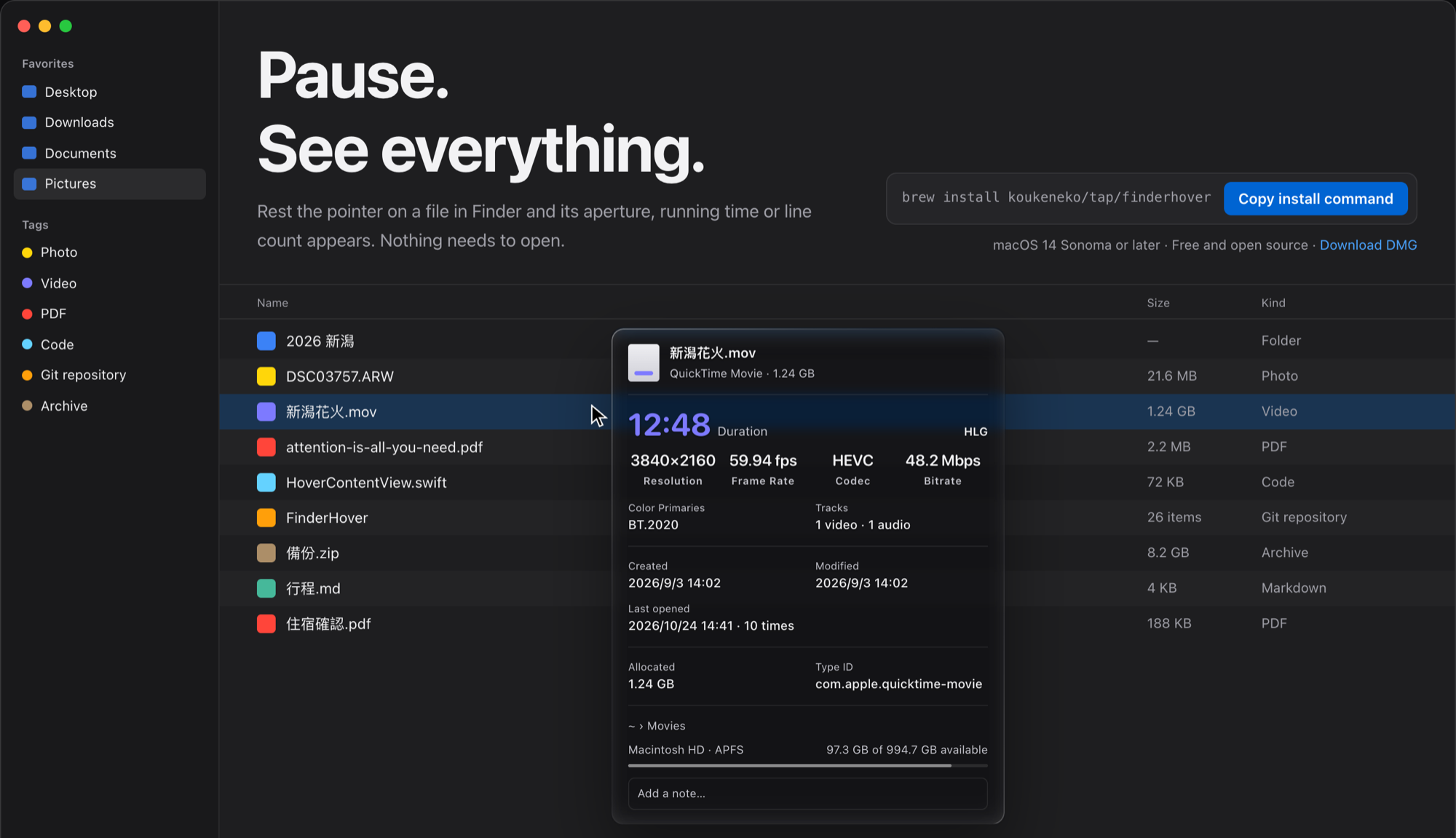
v1.10 - Redesigned popup and settings
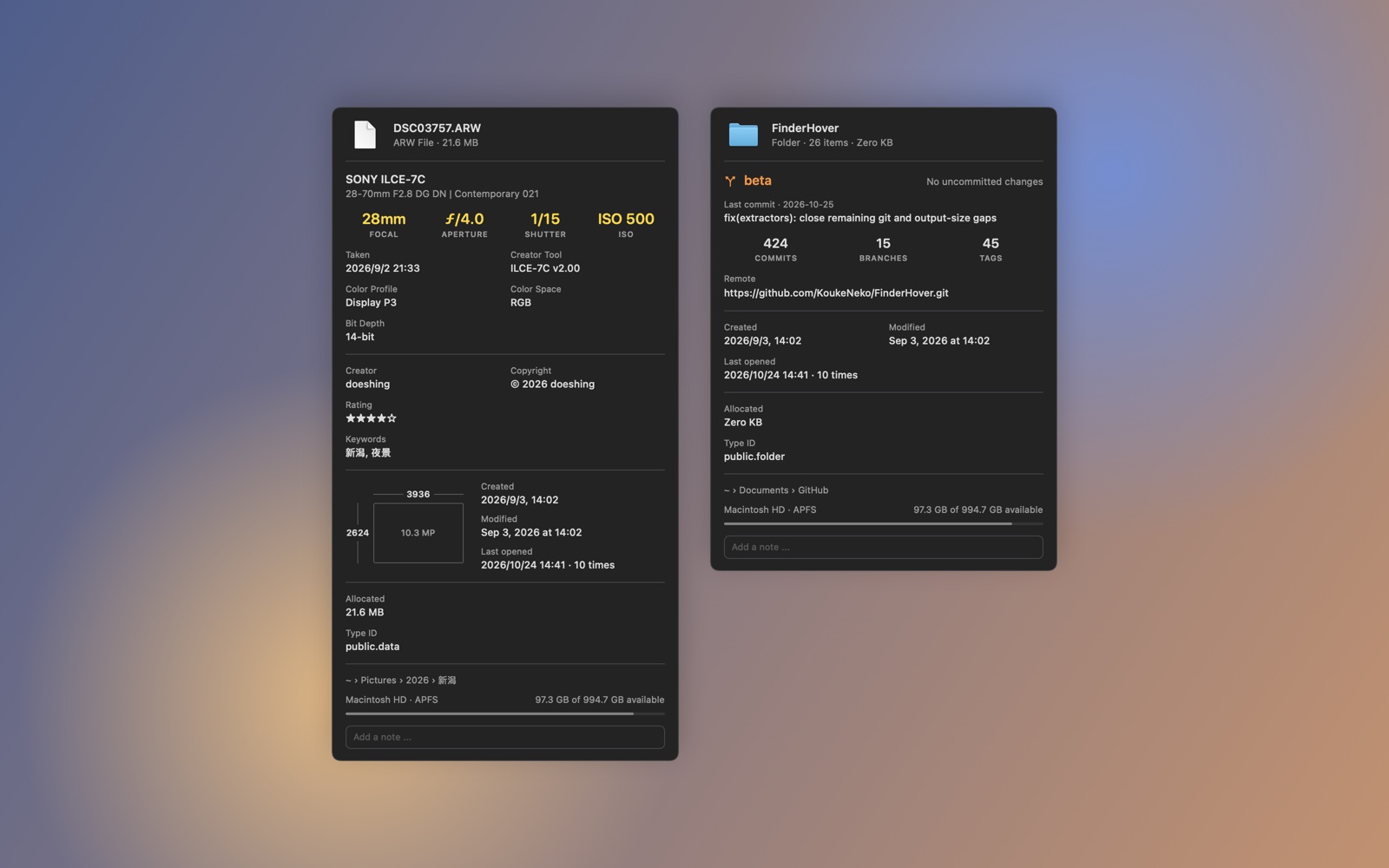
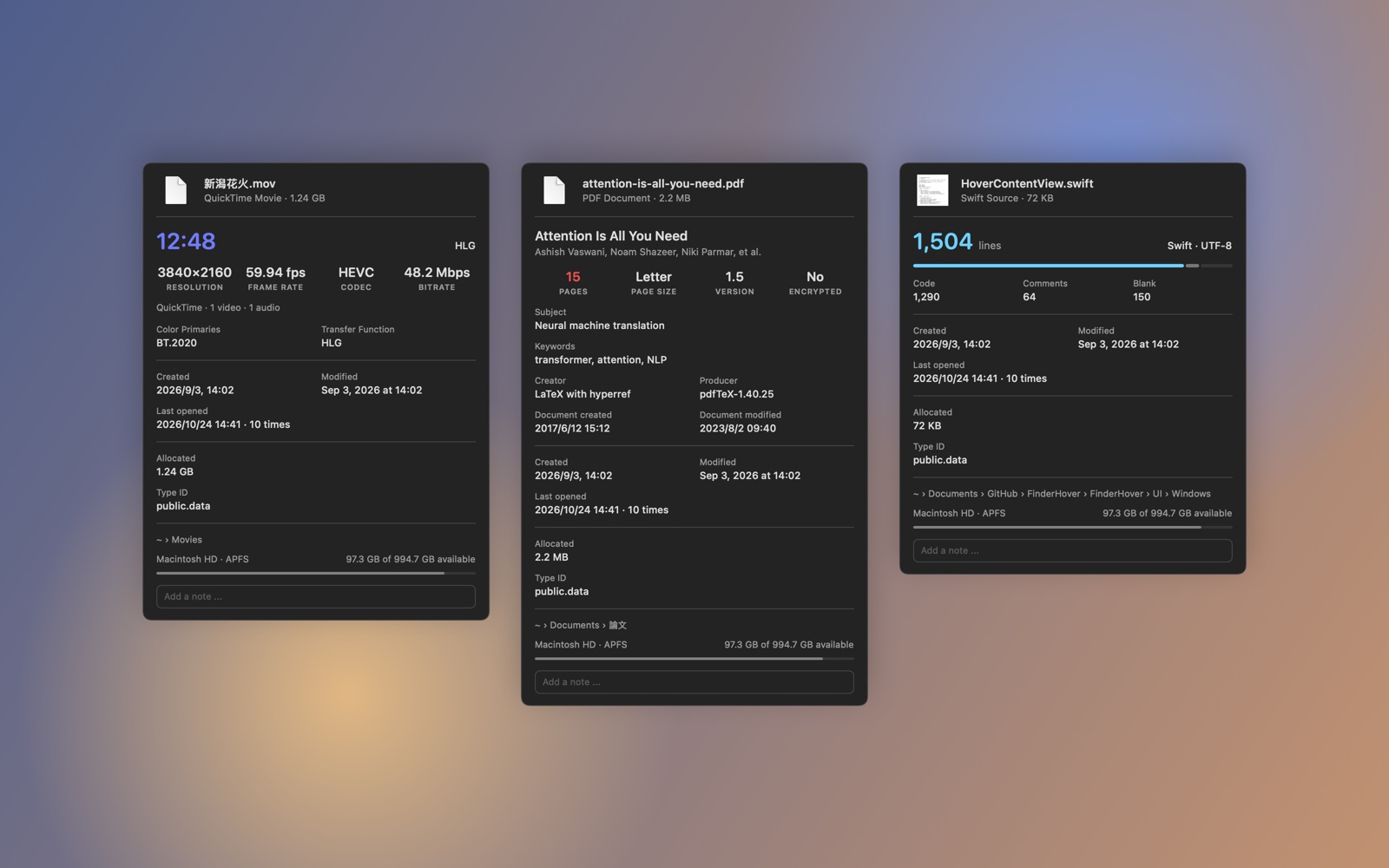
- New popup: A header, one block per file type with its key figures in color, then dates, file details, location and notes
- Copy anything: Hold Option to copy any value in the popup
- Every setting works: Each display setting now takes effect, and details that were read but never shown now appear
- Live-preview settings: See the popup for a sample file while you turn its fields on or off; Behavior and Appearance preview the delay, offset, glass and blur
- Faster and safer: Reading apps, disk images and large archives no longer freezes the popup; Git repositories can no longer run a program named in their settings
- New app icon, and a redesigned website with the popup you can try in the browser (v1.10.1)
- 🙏 Huge thanks to @elvisdragonmao for designing the new popup and settings — this release is built on their design
v1.9.0 - Notes
- Notes: Attach a personal note to any file, right in the hover popup — stored with the file (so it persists and travels with the file when copied/moved)
- Auto-sizing field: 3-line minimum that grows as you type, with a focused text-field style while editing
- More stable: Accessibility lookups moved off the main thread (no more UI freezes when Finder is slow), plus leaner/safer reading of large files and many fixes
- Fixed: Black edge behind the Liquid Glass popup when focused
- 🙏 Huge thanks to @zmlim for designing and contributing the Notes feature (#14) — this release is built on their work
⚡️ Why FinderHover?
The Problem: Want to check image resolution? Video codec? Zip contents? You have to:
- Right-click → Get Info (or press
Cmd+I) - Wait for the window to open
- Close it manually
- Repeat for every file
The Solution: FinderHover acts as an X-ray layer over Finder. Just hover your mouse over any file, and see the data that matters—instantly.
Comparison: Get Info vs FinderHover
macOS Get Info (Cmd+I) |
FinderHover | |
|---|---|---|
| Trigger | Right-click → Get Info (or Cmd+I) |
Hover mouse |
| Speed | Slow, window stacks up | Instant, auto-hides |
| Depth | Basic (size, kind, dates) | Deep metadata (EXIF, codecs, archive contents, Git info) |
| Workflow | Interrupts your flow | Non-intrusive overlay |
✨ Features
🔍 Beyond Finder
FinderHover reveals metadata that Finder never shows:
📦 X-Ray for Archives
Peek inside zip, rar, 7z, tar.gz, and iso files without extracting them.
- 📋 Instantly see file lists & file counts
- 🔐 Detect encryption status (know if it's password-protected before opening)
- 📊 Check compression ratios and real uncompressed sizes
💻 Developer Centric
Built by a developer, for developers.
- Code Insights: Instant line counts and syntax detection for 38+ languages
- Git Aware: See current branch, commit count, remote URL, and uncommitted changes on repo folders
- Binary Analysis: Inspect Mach-O headers, architectures (
arm64/x86_64/Universal), code signing status, and SDK versions for executables - Xcode Projects: View targets, build configurations, Swift version, and deployment targets
📸 Photography & Media
- Photos: Camera model, lens info, focal length, ISO, aperture, shutter speed, GPS coordinates, IPTC/XMP metadata (author, copyright, keywords, rating)
- Videos: Codec (H.264, HEVC, etc.), resolution, bitrate, frame rate, HDR format (Dolby Vision, HDR10, HLG), chapters, subtitle tracks
- Audio: Track name, artist, album, genre, duration, bitrate, sample rate, channels
🎨 Smart & Customizable
🧠 Intelligent Context Awareness
- Instant Preview: Adjustable hover delay (0.1s - 2.0s)
- Auto-Hide: Disappears when renaming files, dragging items, or using context menus
- QuickLook Integration: Native thumbnails for PDFs, images, and documents
🌈 Dual Personalities
- macOS Style: Rich visual presentation with thumbnails, icons, and full metadata
- Windows Style: Minimal tooltip-style display with essential info only
🎛️ Full Control
- Adjustable window size, opacity (70-100%), and font scaling
- Layout Editor: Toggle each metadata field per category, with a live preview of the popup
- Localization: Native support for English, Traditional Chinese (繁體中文), and Japanese (日本語)
📊 Rich Metadata Support (120+ File Formats)
| Category | Supported Metadata |
|---|---|
| 📷 Photography | Camera model, lens, ISO, aperture, shutter speed, GPS, IPTC/XMP data, color profiles, HDR gain maps |
| 🎬 Video | Codec, resolution, bitrate, frame rate, HDR formats (Dolby Vision, HDR10, HLG), chapters, subtitle tracks |
| 🎵 Audio | Track name, artist, album, genre, duration, bitrate, sample rate, channels |
| 💻 Code | Line counts for 38+ languages, file encoding, syntax detection |
| 📝 Markdown | Title, frontmatter (YAML/TOML/JSON), heading/image/link/code block counts |
| 🌐 HTML/Web | Title, meta description, keywords, author, language, Open Graph tags |
| ⚙️ Config | JSON/YAML/TOML key counts, nesting depth, syntax validity |
| 🎨 Design | PSD layers/color mode/bit depth, SVG/AI dimensions, font glyphs |
| 📦 Archives | Format type, file count, compression ratio, encryption status |
| 📚 eBooks | Title, author, publisher, ISBN, language |
| 🖼️ Vector | SVG viewBox, EPS color mode, element counts |
| 📱 App Bundles | Bundle ID, version, minimum macOS, code signing, entitlements, architectures |
| ⚡ Executables | Architecture (arm64/x86_64), code signing, minimum OS, SDK version |
| 🗄️ SQLite | Table/index/trigger/view counts, total rows, schema version, encoding |
| 📂 Git Repos | Current branch, commit count, remote URL, uncommitted changes, tags |
| 💿 Disk Images | Format (DMG, ISO), compression ratio, encryption status, partition scheme |
| 🧊 3D Models | Vertex/face counts, mesh/material counts, animations, bounding box |
| 🛠️ Xcode | Project name, targets, build configs, Swift version, deployment target |
| 🏷️ System | Finder tags, download source, quarantine info, iCloud status, symlink targets |
🛡️ Privacy First
100% Local Processing. FinderHover uses the macOS Accessibility API to detect the file under your cursor. All metadata extraction happens on your machine—no network requests, no analytics, no tracking.
- ✅ Zero Network Access: All processing happens locally
- ✅ Open Source: Inspect the code yourself on GitHub
- ✅ Apple Native: Built with Swift, AVFoundation, PDFKit, and other native frameworks
Why Accessibility API? Unlike legacy tools that rely on slow AppleScript polling, FinderHover listens to the system's accessibility event stream for high performance and minimal overhead.
📦 Installation
Homebrew (Recommended)
brew install koukeneko/tap/finderhover
Direct Download
- Download
FinderHover.app.zipfrom Releases - Extract and move to Applications folder
- Grant Accessibility permission when prompted
Build from Source
git clone https://github.com/KoukeNeko/FinderHover.git
cd FinderHover
xcodebuild -scheme FinderHover -configuration Release
Requirements: Xcode 15+ and macOS Sonoma 14.0+
Note: macOS 26.4 Beta 1 is not supported. Please update to Beta 2 or later.
⚙️ Setup & Usage
First Launch
- Launch FinderHover from Launchpad or Applications
- The app appears in your Menu Bar
- Grant Accessibility permission (System Settings → Privacy & Security → Accessibility)
- Hover over any file in Finder to see metadata
Settings
Click the menu bar icon to access the settings panel.
Tip: Enable "Launch at Login" to start FinderHover automatically when you boot your Mac.
Known issue (macOS 27 beta): On macOS 27 beta, the Settings interface may render incorrectly. This is cosmetic — all core hover features work normally.
🚀 Technical Highlights
⚡️ High-Performance Architecture
- Reactive UI Updates: Leverages Combine framework with
debounceoperators to ensure fluid UI updates while keeping CPU usage negligible - Native Frameworks: Built on Apple's
AVFoundation,PDFKit,QuickLookThumbnailing,SQLite3, andCoreGraphics—no external dependencies - Smart Caching: Thumbnail and metadata caching reduces redundant processing
🛠️ Robust Metadata Engine
Supports 120+ file formats with deep inspection capabilities:
- Archives: Reads zip/rar/7z/iso structure without extraction (using
libarchiveand native APIs) - Media: Extracts video codecs, HDR metadata, and audio specs using
AVFoundation - Code: Detects 38+ programming languages with accurate line counting
- Git: Parses
.gitdirectory for branch, commit, and remote info - Binaries: Analyzes Mach-O headers for architecture and code signing
🛠️ Project Structure
FinderHover/
├── App/          # Application lifecycle (FinderHoverApp, HoverManager)
├── Core/         # MouseTracker, FinderInteraction, FileInfo
├── Extractors/   # Metadata extraction logic (ArchiveExtractor, DeveloperExtractor, etc.)
├── UI/
│   ├── Windows/  # Floating hover window, settings container
│   └── Settings/ # Modular settings pages
└── Utilities/    # Localization, logging, formatting helpers
📸 Screenshots
🤝 Contributing
Contributions are welcome! Here's how you can help:
- Add Extractors: Check out Core/FileInfo.swift for metadata extraction logic
- UI Improvements: Explore UI/Windows/ for visual enhancements
- Localization: Add translations in Localizable.strings
Feature Requests & Bug Reports: Open an issue on GitHub Issues.
🙏 Acknowledgments
Thanks to everyone who has contributed — especially @zmlim, who designed and contributed the Notes feature (#14) that headlines v1.9.0, and to @elvisdragonmao, who designed the popup and settings of v1.10.
📄 License
MIT License - see LICENSE file for details.
Made with ❤️ and Swift
Built for Power Users, Developers, and File Hoarders