
Kohulan/DECIMER-Image-Segmentation
Kohulan/DECIMER-Image-Segmentation has 157 GitHub stars and 38 forks. GitHot measured 0 stars in 24 hours and 0 in 7 days. Last checked 2026-11-10 01:33 UTC. Last push 2026-10-25.
Chemical structure detection and segmentation tool for Journal articles.
What you can do
- 🤖 Deep Learning Powered Built on Mask R-CNN architecture for state-of-the-art detection accuracy - 📖 Universal Compatibility Works with PDFs, scanned pages, and bitmap images from any publisher - 🆓 Open Source Freely available code and pre-trained models for the community
Measured star growth
- in 24h
- 0
- in 7 days
- 0
- in 15 days
- Update delayed
- in 1 month
- Update delayed
Net star changes over overlapping periods, not daily totals. Missing measurements are left blank. Stars measure attention, not software quality.
README.md
Original🔬 DECIMER Image Segmentation 📄
Deep Learning for Chemical Image Recognition - Automated Structure Detection & Extraction
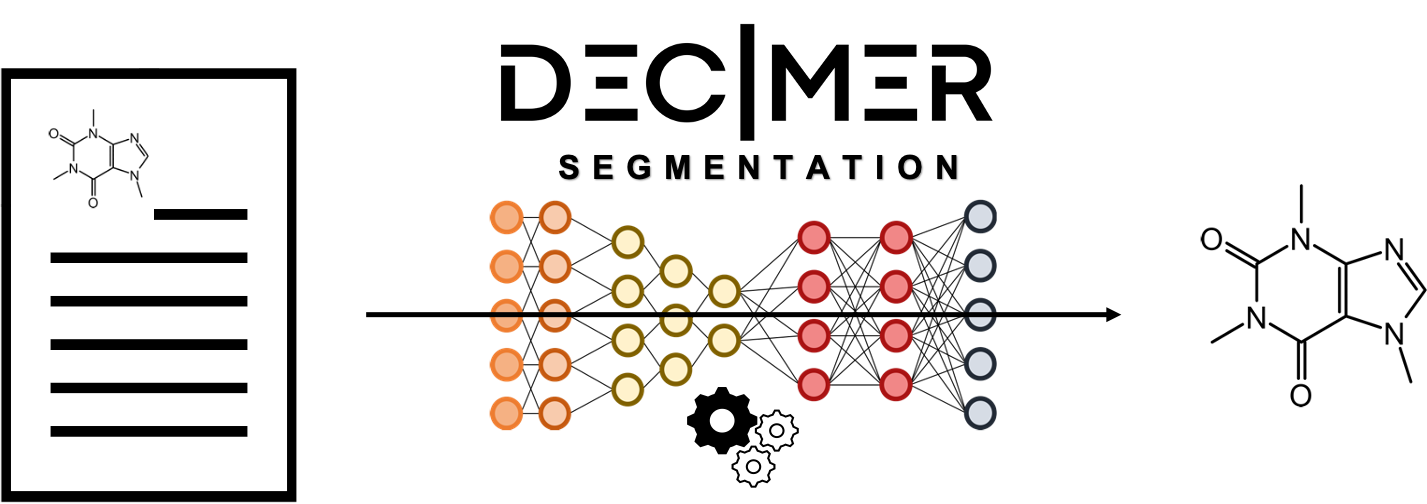


🌐 Try it live at decimer.ai
📚 Table of Contents
- 📝 Overview
- ✨ Key Features
- 🎯 How It Works
- ⚙️ Installation
- 🚀 Usage
- 📊 Model Information
- 📄 Citation
- 🙏 Acknowledgements
- 👥 Authors
- 🌐 Project Website
- 🏛️ Research Group
📝 Overview

Unlocking decades of chemical knowledge from scientific literature!
Chemistry has accumulated vast amounts of knowledge about chemical compounds, structures, and properties across countless scientific publications. DECIMER Segmentation is the first open-source, deep learning-based tool designed to automatically recognize and extract chemical structure depictions from scientific documents.
🎯 The Challenge
Converting images of chemical structures into machine-readable formats (OCSR - Optical Chemical Structure Recognition) is a crucial step in digitizing chemical knowledge. But before we can recognize structures, we need to find and extract them from complex document pages!
💡 The Solution
DECIMER Segmentation uses advanced deep learning to:
- 🔍 Detect chemical structure depictions in scientific publications
- ✂️ Extract individual structure images with precision
- 📚 Process both modern PDFs and scanned historical documents
- ⚡ Automate the entire workflow from document to segmented structures
✨ Key Features
🤖 Deep Learning PoweredBuilt on Mask R-CNN architecture for state-of-the-art detection accuracy |
📖 Universal CompatibilityWorks with PDFs, scanned pages, and bitmap images from any publisher |
🆓 Open SourceFreely available code and pre-trained models for the community |
⚡ High PerformanceGPU acceleration support for rapid batch processing |
🎨 Smart Post-ProcessingAutomatic mask expansion to capture complete structures |
🌐 Web ApplicationUser-friendly interface available at decimer.ai |
🎯 How It Works
DECIMER Segmentation employs a sophisticated two-stage workflow:
1️⃣ Detection Stage
📄 Input Document → 🤖 Mask R-CNN Model → 🎭 Structure Masks
The deep learning model analyzes the page and creates precise masks indicating the location of each chemical structure.
2️⃣ Post-Processing Stage
🎭 Initial Masks → 🔧 Expansion Algorithm → ✅ Complete Structures
An intelligent post-processing workflow ensures that potentially incomplete masks are expanded to capture the full structure.
🎨 Visual Workflow
┌─────────────────┐
│  PDF/Image File │
└────────┬────────┘
         │
         ▼
┌─────────────────┐
│  Page Extraction│
└────────┬────────┘
         │
         ▼
┌─────────────────┐
│ Mask R-CNN      │
│ Detection       │
└────────┬────────┘
         │
         ▼
┌─────────────────┐
│ Mask Expansion  │
└────────┬────────┘
         │
         ▼
┌─────────────────┐
│ Segmented       │
│ Structures      │
└─────────────────┘
⚙️ Installation
🐍 Prerequisites
We strongly recommend using a Conda environment for seamless dependency management.
Install Miniconda (if not already installed)
# Linux
wget https://repo.anaconda.com/miniconda/Miniconda3-latest-Linux-x86_64.sh
bash Miniconda3-latest-Linux-x86_64.sh

# macOS
wget https://repo.anaconda.com/miniconda/Miniconda3-latest-MacOSX-x86_64.sh
bash Miniconda3-latest-MacOSX-x86_64.sh
📦 Installation Options
Option 1: Install from GitHub (Development Version)
# Clone the repository
git clone https://github.com/Kohulan/DECIMER-Image-Segmentation.git
cd DECIMER-Image-Segmentation

# Create and activate conda environment
conda create --name DECIMER_IMGSEG python=3.10
conda activate DECIMER_IMGSEG

# Install dependencies
conda install pip
python -m pip install -U pip

# Install DECIMER-Segmentation
pip install .

# Optional: PyMuPDF as an alternative PDF reader (licensed under the AGPL-3.0)
pip install ".[pdf]"
Option 2: Install from PyPI (Stable Release)
# Create and activate conda environment
conda create --name DECIMER_IMGSEG python=3.10
conda activate DECIMER_IMGSEG

# Install from PyPI
pip install decimer-segmentation

# Optional: PyMuPDF as an alternative PDF reader (licensed under the AGPL-3.0)
pip install "decimer-segmentation[pdf]"
📄 Reading PDFs
PDF pages are rendered at 300 DPI with pypdfium2 (Apache-2.0 /
BSD-3-Clause), which is installed with decimer-segmentation, so a plain pip install decimer-segmentation reads PDFs.
No extra program is needed (Poppler is no longer used, and the poppler_path argument is ignored).
PyMuPDF can be used instead. It is licensed under the AGPL-3.0 while this package is MIT-licensed, so it is an optional extra that is never imported unless you ask for it:
pip install "decimer-segmentation[pdf]"
segments = segment_chemical_structures_from_file("document.pdf", pdf_backend="pymupdf") # default: "pdfium"
On the command line: python3 segment_structures_in_document.py document.pdf --pdf-backend pymupdf (--pdf_backend works too). Without PyMuPDF
installed, pdf_backend="pymupdf" raises an ImportError that tells you how to install it. Images (PNG, JPEG, ...) and
numpy arrays need neither reader.
Changed in 1.6.0:
- PDFs are read with pypdfium2 instead of PyMuPDF, which is no longer installed with the package. The two readers draw the
same pages with slightly different anti-aliasing, so a few bounding boxes can differ by some pixels, or include a dashed
frame that the other reader leaves out;
pdf_backend="pymupdf"renders the pages as 1.5.x did. Pages are rendered one after the other, because neither reader is thread-safe. - The model is downloaded and loaded on first use instead of at import, so
set_inference_config()and the command-line--fastflag now take effect (before, the model was already loaded when they ran). With--fast,DETECTION_MIN_CONFIDENCEis 0.7 instead of 0.75; the default mode is unchanged.
📥 The model is downloaded on first use
Importing decimer_segmentation does not download or load anything. The first segmentation (or an explicit call to
decimer_segmentation.get_model()) downloads the Mask R-CNN weights (about 270 MB) if they are missing, loads the
model and keeps it for later calls. The weights live in $PYSTOW_HOME/DECIMER-Segmentation_model/
(~/.data/DECIMER-Segmentation_model/ by default); weights that are already there are used without network access.
🖥️ Hardware Requirements
- CPU Mode: Works on any modern CPU
- GPU Mode (Recommended): CUDA-compatible GPU with appropriate drivers
- Significantly faster processing
- Essential for batch processing
🚀 Usage
Command Line Interface
Process entire documents with a single command:
# Segment structures from a PDF or image file
python3 segment_structures_in_document.py your_document.pdf

# Output will be saved in a folder named after your input file
# e.g., your_document/ containing all segmented structures
Python API
🎨 Example 1: Segment from Image Array
from decimer_segmentation import segment_chemical_structures
import cv2

# Load your scanned page
page_image = cv2.imread("path/to/scanned_page.png")

# Extract all chemical structures
segments = segment_chemical_structures(page_image, expand=True)

# segments is a list of numpy arrays, each containing a structure
for idx, structure in enumerate(segments):
    cv2.imwrite(f"structure_{idx}.png", structure)
    print(f"✅ Saved structure {idx}")
📄 Example 2: Segment from File (PDF or Image)
from decimer_segmentation import segment_chemical_structures_from_file

# Process a PDF file
segments = segment_chemical_structures_from_file(
    "path/to/document.pdf",
    expand=True
)

# Process an image file
segments = segment_chemical_structures_from_file(
    "path/to/page_image.jpg",
    expand=True
)

print(f"🎉 Extracted {len(segments)} chemical structures!")
To find out where each structure was found, ask for the bounding boxes and the page numbers:
segments, bboxes, page_numbers = segment_chemical_structures_from_file(
    "path/to/document.pdf",
    expand=True,
    return_bboxes=True,         # (y0, x0, y1, x1) in pixels of the page image
    return_page_numbers=True,   # the page of the PDF, counted from 1
)

for segment, bbox, page_number in zip(segments, bboxes, page_numbers):
    print(f"Page {page_number}: structure at {bbox}")
There is one bounding box and one page number per segment, in the order of the segments. The pages of a PDF are rendered at 300 DPI, and the bounding boxes are in pixels of these page images. Every segment of an image file is on page 1. Which values are returned depends on the two options:
return_bboxes |
return_page_numbers |
Returns |
|---|---|---|
False (default) |
False (default) |
segments |
True |
False |
(segments, bboxes) |
False |
True |
(segments, page_numbers) |
True |
True |
(segments, bboxes, page_numbers) |
🔧 Example 3: Batch Processing
from decimer_segmentation import segment_chemical_structures_from_file
import os
from pathlib import Path

def batch_segment(input_dir, output_dir):
    """Process multiple PDF files"""
    Path(output_dir).mkdir(parents=True, exist_ok=True)

    for pdf_file in Path(input_dir).glob("*.pdf"):
        print(f"📄 Processing {pdf_file.name}...")

        segments = segment_chemical_structures_from_file(
            str(pdf_file),
            expand=True
        )

        # Save each segment
        file_output_dir = Path(output_dir) / pdf_file.stem
        file_output_dir.mkdir(exist_ok=True)

        for idx, segment in enumerate(segments):
            output_path = file_output_dir / f"structure_{idx:03d}.png"
            cv2.imwrite(str(output_path), segment)

        print(f"✅ Extracted {len(segments)} structures from {pdf_file.name}")

# Use it
batch_segment("input_pdfs/", "output_structures/")
🎯 Example 4: Advanced Usage with Custom Parameters
from decimer_segmentation import segment_chemical_structures
import cv2

# Load image
image = cv2.imread("complex_page.png")

# Segment with custom settings
segments = segment_chemical_structures(
    image,
    expand=True,          # Enable mask expansion
    visualization=True    # Generate visualization (if available)
)

# Process results
for idx, segment in enumerate(segments):
    # You can now pass this to DECIMER Image Transformer
    # for structure recognition
    print(f"Structure {idx}: {segment.shape}")
📓 Interactive Tutorial
For more comprehensive examples and interactive demonstrations, check out our Jupyter Notebook!
🪟 Notes for Windows Users
Windows-Specific Instructions
1️⃣ Use Anaconda PowerShell Prompt
Run all commands in the Anaconda PowerShell Prompt (not regular Command Prompt or PowerShell).
2️⃣ PDF Support
PDF files are read with pypdfium2, which is installed with the package and needs no extra program on Windows
(Poppler is no longer used, and the poppler_path argument is ignored).
3️⃣ GPU Support on Windows
Ensure you have:
- CUDA Toolkit installed
- cuDNN libraries configured
- Compatible GPU drivers
📊 Model Information
🤖 Pre-trained Model
The Mask R-CNN model is publicly available and ready to use:

🎓 Model Architecture
- Base Network: Mask R-CNN
- Training Data: Diverse chemical literature from multiple publishers
- Task: Instance segmentation of chemical structure depictions
- Performance: Manually validated on publications from various sources
🔍 Model Performance
The model has been rigorously evaluated on:
- ✅ Publications from multiple scientific publishers
- ✅ Documents spanning different time periods
- ✅ Both modern PDFs and scanned historical pages
- ✅ Various image qualities and layouts
📄 Citation
If DECIMER Segmentation contributes to your research, please cite:
@article{Rajan2021,
  author = {Rajan, Kohulan and Brinkhaus, Henning Otto and Sorokina, Maria and Zielesny, Achim and Steinbeck, Christoph},
  title = {DECIMER-Segmentation: Automated extraction of chemical structure depictions from scientific literature},
  journal = {Journal of Cheminformatics},
  year = {2021},
  volume = {13},
  number = {20},
  doi = {10.1186/s13321-021-00496-1}
}
Full Citation:
Rajan, K., Brinkhaus, H.O., Sorokina, M. et al. DECIMER-Segmentation: Automated extraction of chemical structure depictions from scientific literature. J Cheminform 13, 20 (2021). https://doi.org/10.1186/s13321-021-00496-1
🙏 Acknowledgements
🌟 Special Thanks
This project wouldn't be possible without the support and contributions from the community and funding organizations.
|
Contributors All our amazing contributors who helped improve the codebase |
Community Users providing feedback and reporting issues |
Open Source Projects we build upon: TensorFlow, Mask R-CNN |
🌐 Project Website
Experience DECIMER Live!
🚀 Try DECIMER.ai - Web application.
📦 Complete DECIMER Suite
DECIMER Segmentation is part of a comprehensive chemical structure recognition pipeline:
🔍 DECIMER Segmentation (You are here)
Extract chemical structures from documents🧠 DECIMER Image Transformer
Convert structure images to SMILES strings🗄️ MARCUS
Molecular Annotation and Recognition for Curating Unravelled Structures
🏛️ Research Group
🎓 Maintained by the Kohulan @ Steinbeck Group

Natural Products Cheminformatics Research Group
Institute for Inorganic and Analytical Chemistry
Friedrich Schiller University Jena, Germany
⭐ Star History
📊 Project Analytics
🤝 Contributing
We welcome contributions! Please feel free to submit a Pull Request.
📝 Report Bug · 💡 Request Feature · ⭐ Star this repo
Made with ❤️ and ☕ for the global chemistry community
© 2025 Kohulan @ Steinbeck Lab, Friedrich Schiller University Jena
🔬 Advancing Open Science in Chemistry | 🌍 Digitizing Chemical Knowledge | 🤖 Powered by Deep Learning
Explore related projects
tensorflow/tensorflow
An Open Source Machine Learning Framework for Everyone
201,427 starshuggingface/transformers
🤗 Transformers: the model-definition framework for state-of-the-art machine learning models in text, vision, audio, and multimodal models, for both inference and training.
168,711 starsAUTOMATIC1111/stable-diffusion-webui
Stable Diffusion web UI
165,274 starsComfy-Org/ComfyUI
The most powerful and modular diffusion model GUI, api and backend with a graph/nodes interface. The fastest local inference engine in the world.
146,024 stars