
KnudsenMorten/SecurityInsight
KnudsenMorten/SecurityInsight has 45 GitHub stars and 2 forks. GitHot measured 0 stars in 24 hours. Last checked 2026-11-09 13:43 UTC. Last push 2026-11-04.
Rethink Secure Score: risk-based scoring across Defender XDR, Entra, AD, Azure, ExposureGraph, and Shodan — weighted by consequence, Tier 0–3 criticality, and risk factors. Fix what attackers reach for first. Asset profiling, ready-to-use reports, executive summary. Zero footprint, MVP-built, free.
Measured star growth
- in 24h
- 0
- in 7 days
- Update delayed
- in 15 days
- Update delayed
- in 1 month
- Update delayed
Net star changes over overlapping periods, not daily totals. Missing measurements are left blank. Stars measure attention, not software quality.
README.md
Original

SecurityInsight
Think like the attacker. Act like the defender. Fix what matters first.
SecurityInsight turns the Microsoft security data you already have into one ranked list of what to fix first, across vulnerabilities, recommendations, attack paths, identities, devices, Azure resources and public IPs. It runs in your own Azure, reads read-only, and installs no agent.
⬇️ Install Community: free
Install in Azure Cloud Shell (five copy-and-paste samples) · Download the latest release · Community vs Pro
Two lines into your own Azure subscription. No PowerShell modules, no Azure CLI, no client secret.
Contents
- Why SecurityInsight
- What it covers
- See it in action
- What you need
- Install SecurityInsight: five samples
- Updates, status reports and 2.2
- Community vs Pro
- Documentation
- Pro editions and support
- License
Why SecurityInsight
Microsoft Defender sorts by severity. An attacker sorts by opportunity.
Defender shows you thousands of vulnerabilities, misconfigurations and risky identities. An attacker looks at the same list and asks one question: what gets me to a domain controller, a Global Administrator or the tenant itself? When every finding looks equally urgent, your team stays busy and the real risk stays open.
SecurityInsight looks at your estate the way the attacker does.
- One ranked list of what to fix first. Every finding is scored by its severity, the criticality of the asset it sits on and the risk factors around it, such as internet exposure, a known exploit or leaked credentials. The same weakness ranks higher on a domain controller than on a Tier 3 laptop, and you see the evidence behind every rank.
- Tiers from the rights identities really hold. An identity's Tier 0-3 comes from the Entra roles, API permissions, Azure roles and Active Directory groups it really holds, including eligible roles and nested PIM-for-Groups chains. Not from a tag someone set years ago, and every tier shows what set it.
- Every source, one picture. Defender vulnerabilities and recommendations, Exposure Graph attack paths, Entra ID, Active Directory, Azure and your public IPs, joined into one record per asset.
- Read-only, in your own Azure, no agent. SecurityInsight runs in your own subscription as Azure Container Apps jobs and reads Microsoft data as its own managed identity with read-only permissions. Nothing is installed on your devices.
- Your rules, kept. More than 500 built-in rules classify server roles, applications and appliances. Your own rules and settings live apart from the built-in ones, so an update never overwrites them.
- Evidence for the auditors. The asset inventory and risk model support NIS2, DORA, ISO 27001 and GDPR Art. 32 evidence needs.
What it covers
Every area below is in the free Community edition unless it says Pro. Community vs Pro has the short comparison.
Defender vulnerabilities and recommendations
Community and Pro
Every vulnerability Defender lists, read straight from Defender Vulnerability Management, plus Defender for Cloud recommendations and their CVEs. Each finding names the affected software and the recommended security update, so the fix travels with the finding. A recommendation on a virtual machine is scored by what the machine is: a domain controller is Tier 0, tag or no tag.
Exposure Graph and attack paths
Community and Pro
Attack-path reports built on Defender Exposure Graph trace credential-driven and lateral-movement paths to sensitive data and Tier 0 targets, ranked by the business impact of the final target. You see the routes an attacker would take, not just the doors.
Identities and the rights they really hold
Community and Pro
Users, guests, service principals and managed identities are tiered from their real permissions: Entra roles, API permissions, Azure roles, Active Directory groups and eligible (PIM) roles, including nested PIM-for-Groups chains. MFA, SSPR and passwordless registration are captured per identity, and disabled accounts that still hold rights are included. A shipped privilege tier catalog ranks every role and permission by what an attacker could do with it, and an optional AI step places roles it has not seen before.
Devices
Community and Pro
Servers are classified from installed software, detected roles, Defender tags, subnet and naming, matched against a catalog of more than 500 known server applications. Clients inherit their tier from the most-privileged users who actually sign in to them. One machine is one row, even when Exposure Graph and Defender keep duplicate records, and a device you exclude by tag shows up in a report of every excluded asset, so nothing hides forever.
Azure resources
Community and Pro
Every resource is profiled from Azure Resource Graph, with tags inherited from resource group, subscription and management group, so criticality flows down the hierarchy by itself. Read one subscription, a management group or the whole tenant.
Public IPs
Community and Pro
The public IPs of your devices and Azure resources, with Shodan's view of open ports and CVEs mapped straight back to the asset behind them, its tier and its business context. See your internet edge the way an attacker does.
138 Risk Analysis reports
Community and Pro
138 ready-made reports (69 summary, 69 detailed) across identity, endpoint, Azure and public IP. Every row carries its severity, tier, the risk factors that raised it, the weighted score, business context, links to the Defender, Entra and Azure portals, and MITRE ATT&CK. Add, override, narrow or exclude reports in your own files. A report that suddenly finds less than last time is flagged, so a broken report never looks like an estate that improved.
A risk score that explains itself
Community and Pro
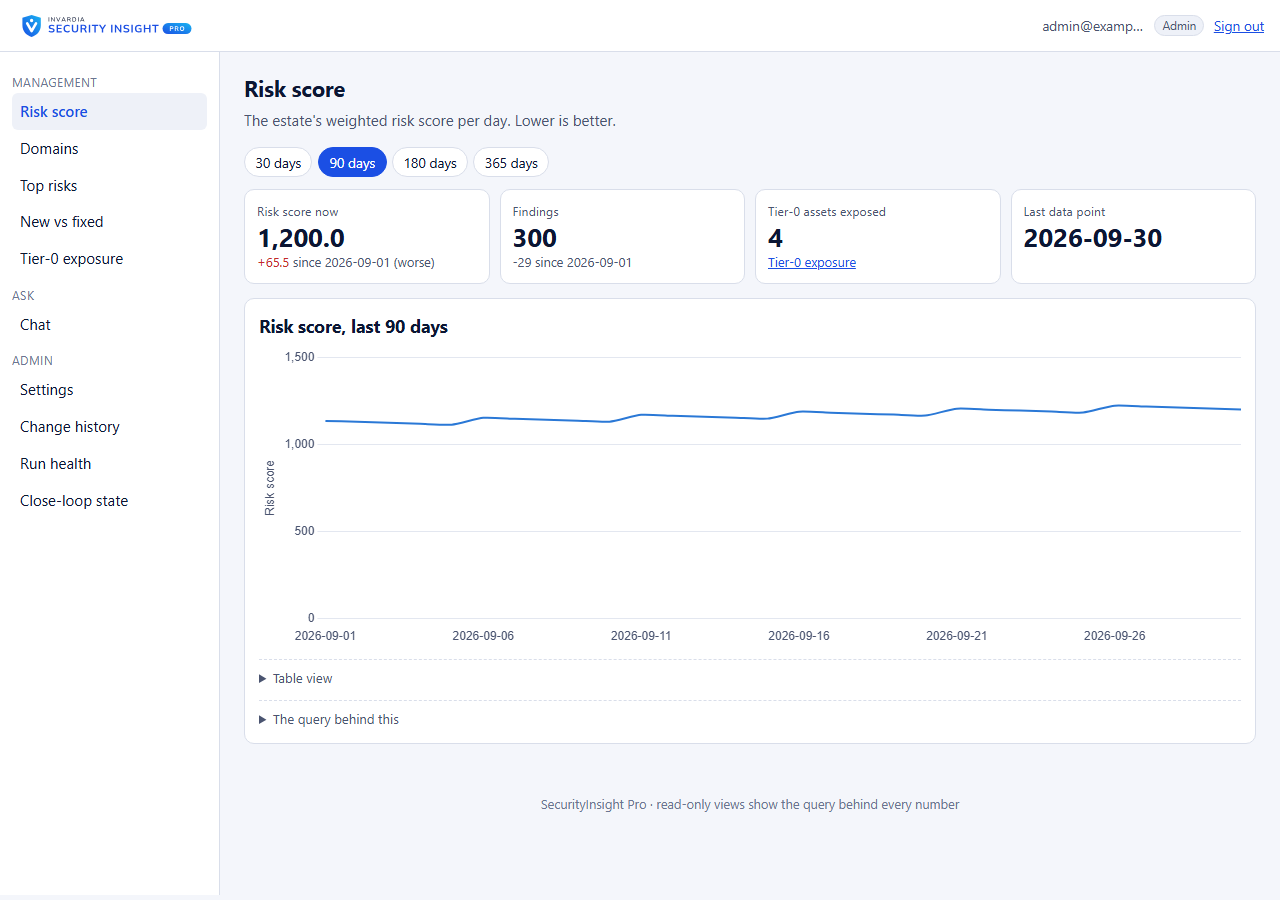
Risk Score = consequence (severity) x probability (the asset's Tier 0-3) x risk factors, weighted by the business criticality and data sensitivity from your CMDB. You get one headline number with a breakdown per security domain for management, and for every asset the reason behind its tier: which rule, tag or default set it. The scoring matrix and the weights are plain files you can tune to your own risk appetite.
One object across every source
Community and Pro
Correlation joins the same machine, identity or resource across Defender, Exposure Graph, Entra ID and Azure. An Azure virtual machine and its Defender device become one asset, with one tier, counted and reported once.
The web app: findings and management views
Community and Pro
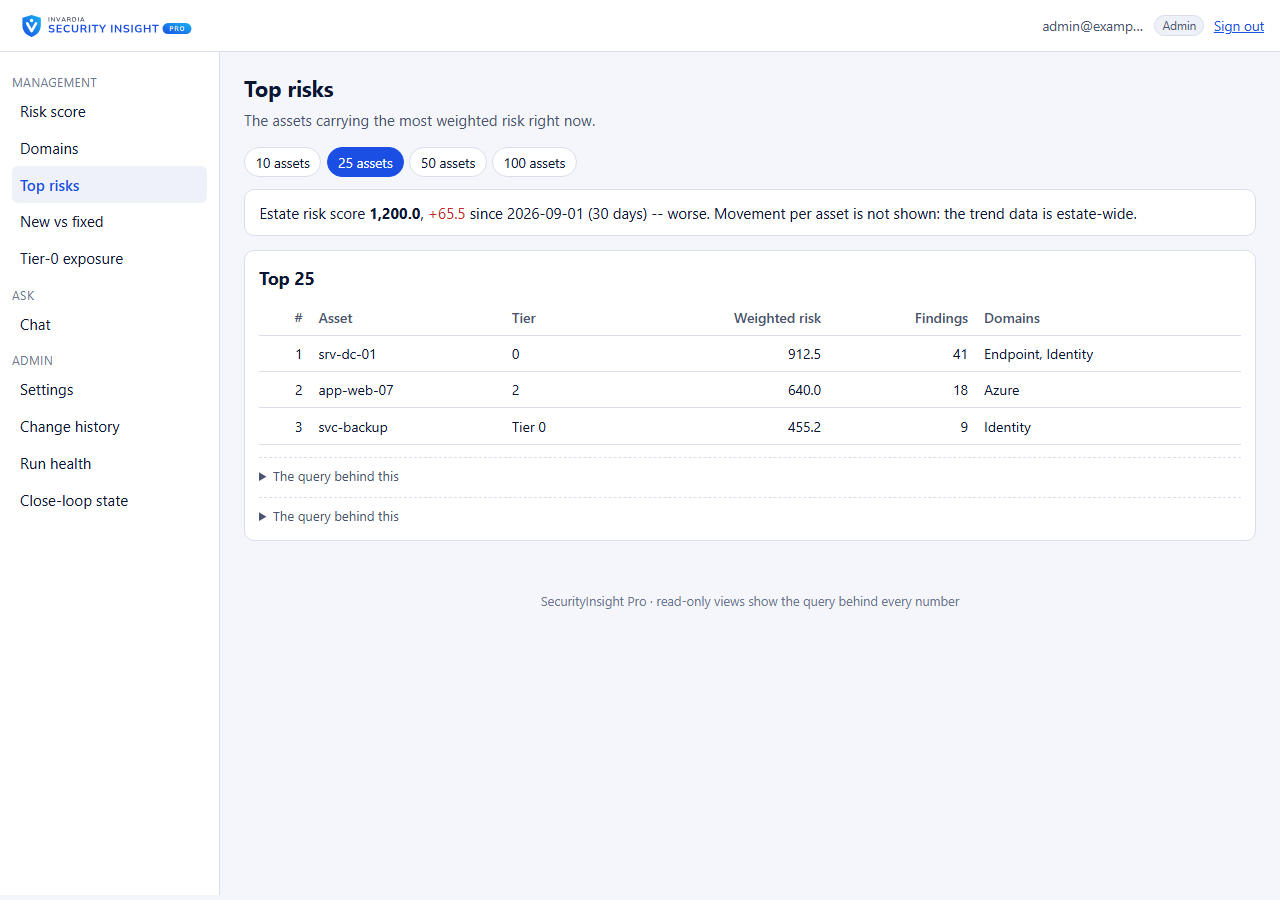
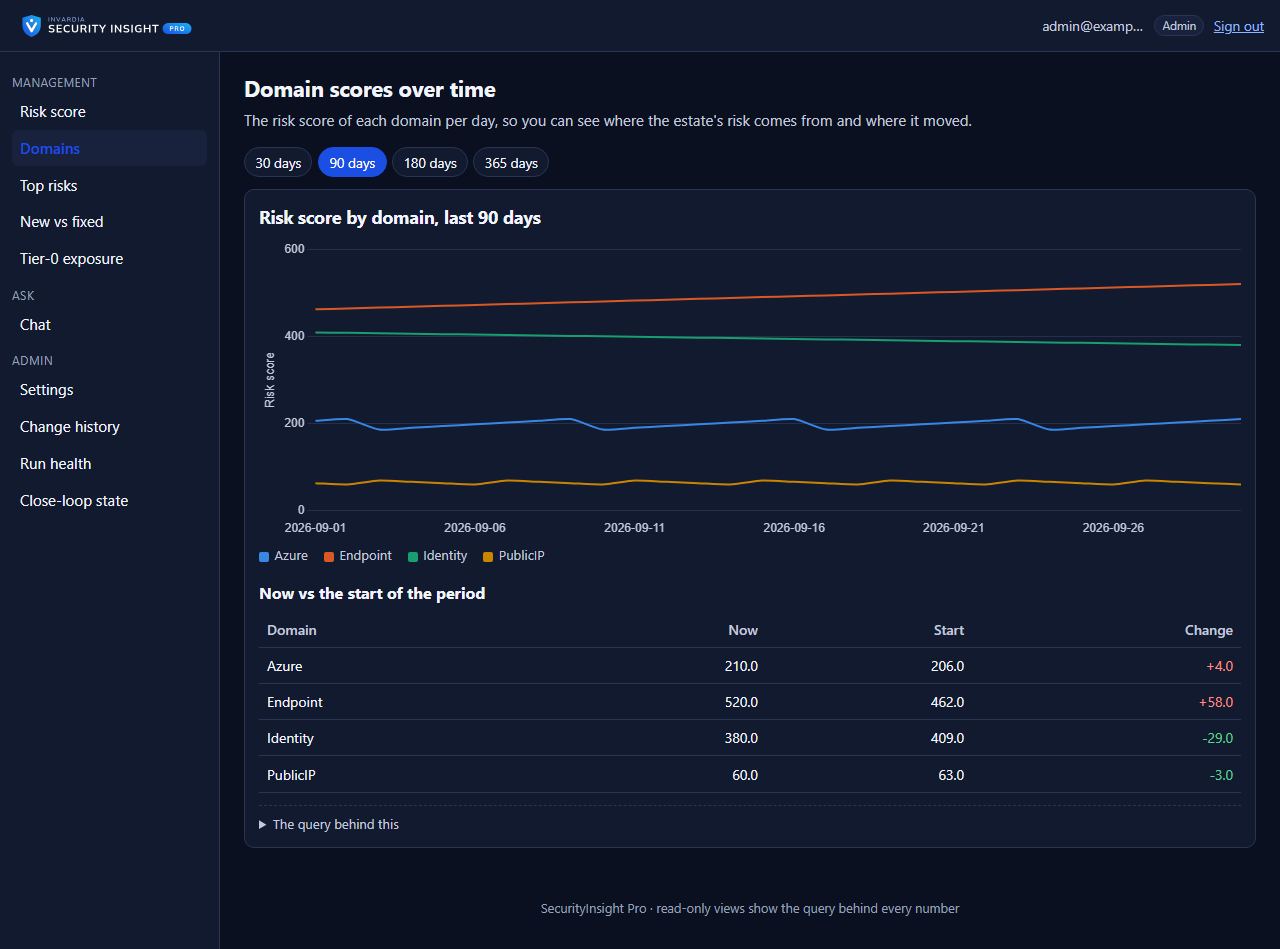
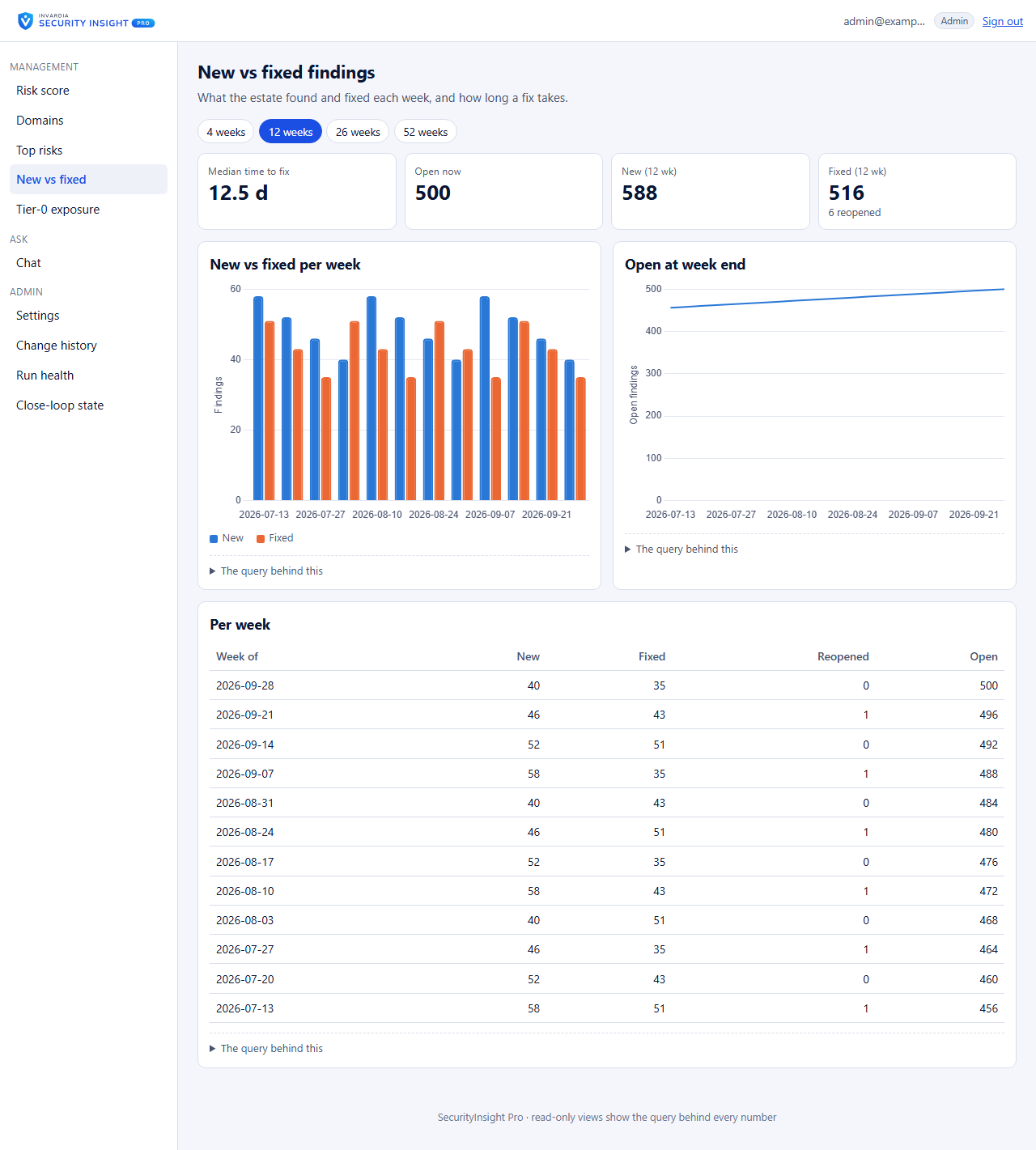
The SecurityInsight web app shows every finding of a run, most critical asset first: filter, sort, search and export to Excel or CSV. Management views show the risk score, the risk per domain, the top risks, new versus fixed, and Tier-0 exposure. A wall board refreshes itself for the SOC screen. Every setting says in plain words what it is for and what its default really does.
Trends
Community and Pro
Is the estate getting safer? Daily trends of the risk score per tier, severity and security domain, and new versus fixed findings per week with the median time to fix. Each asset is counted once.
Mail reports and Excel
Community and Pro
A ranked Excel workbook, built without Office, and a summary mail that reads well on a phone, with an optional AI-written executive summary from your own Azure OpenAI. Mail goes from a shared mailbox that SecurityInsight may send from and nowhere else. Results also land in Log Analytics tables (query them from Sentinel or Defender XDR), as JSON files, and in Azure blob storage or a file share.
Asset tagging, with a dry run first
Community and Pro
Write SecurityInsight's classification back as Defender, Azure and Entra tags, under its own identity. It only reports what it would change until you switch writing on.
Departments and governed exemptions
Pro
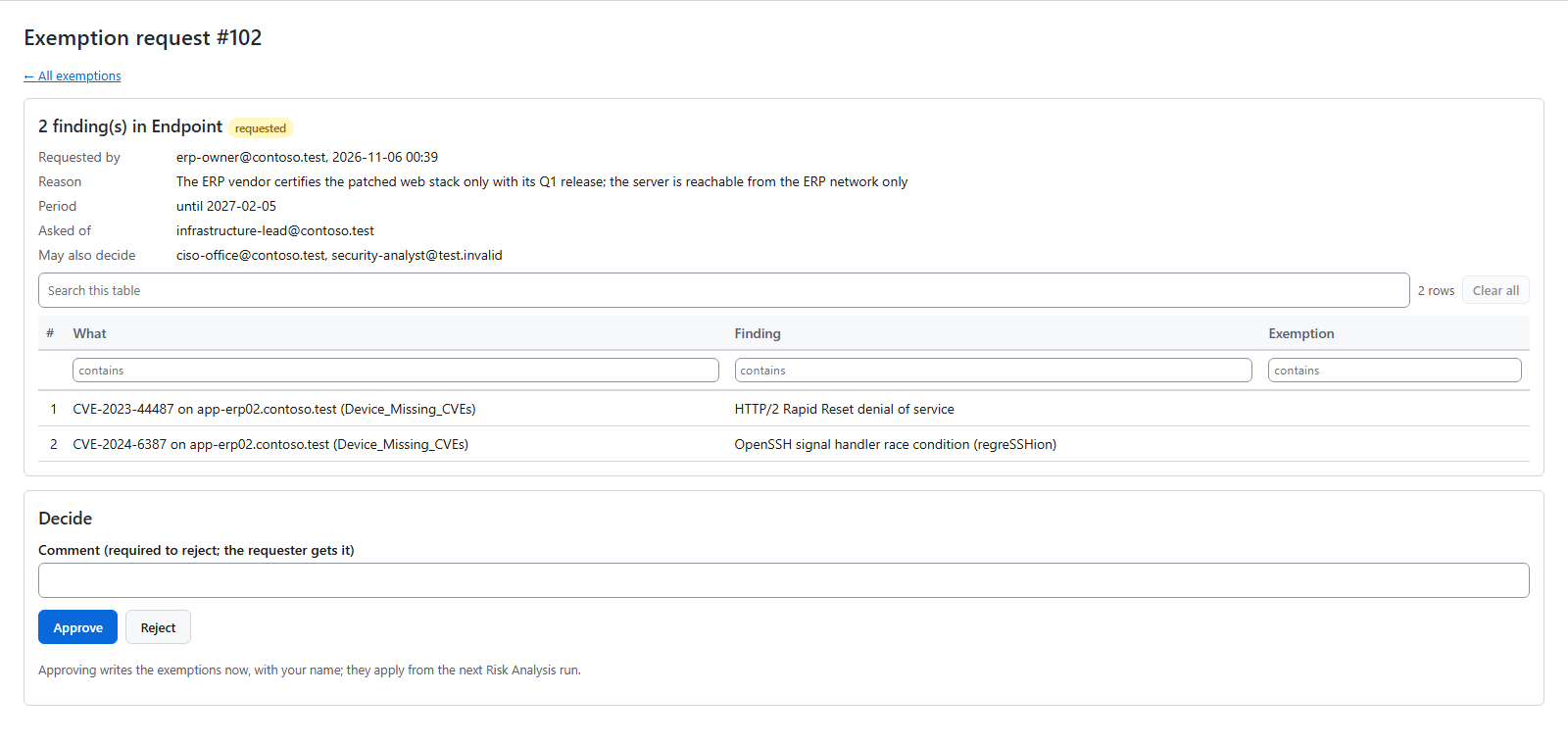
Every asset and recommendation has a department, with owners who see their own work. Accepted risk is requested, approved per security domain, time-limited and reviewed, with governance mails and follow-up tasks. Every change is recorded with who, when, why and the value before and after, in an audit trail the database itself protects.
CMDB, business services and ServiceNow
CMDB from a CSV file: Community and Pro. CMDB in SecurityInsight, business services and ServiceNow: Pro
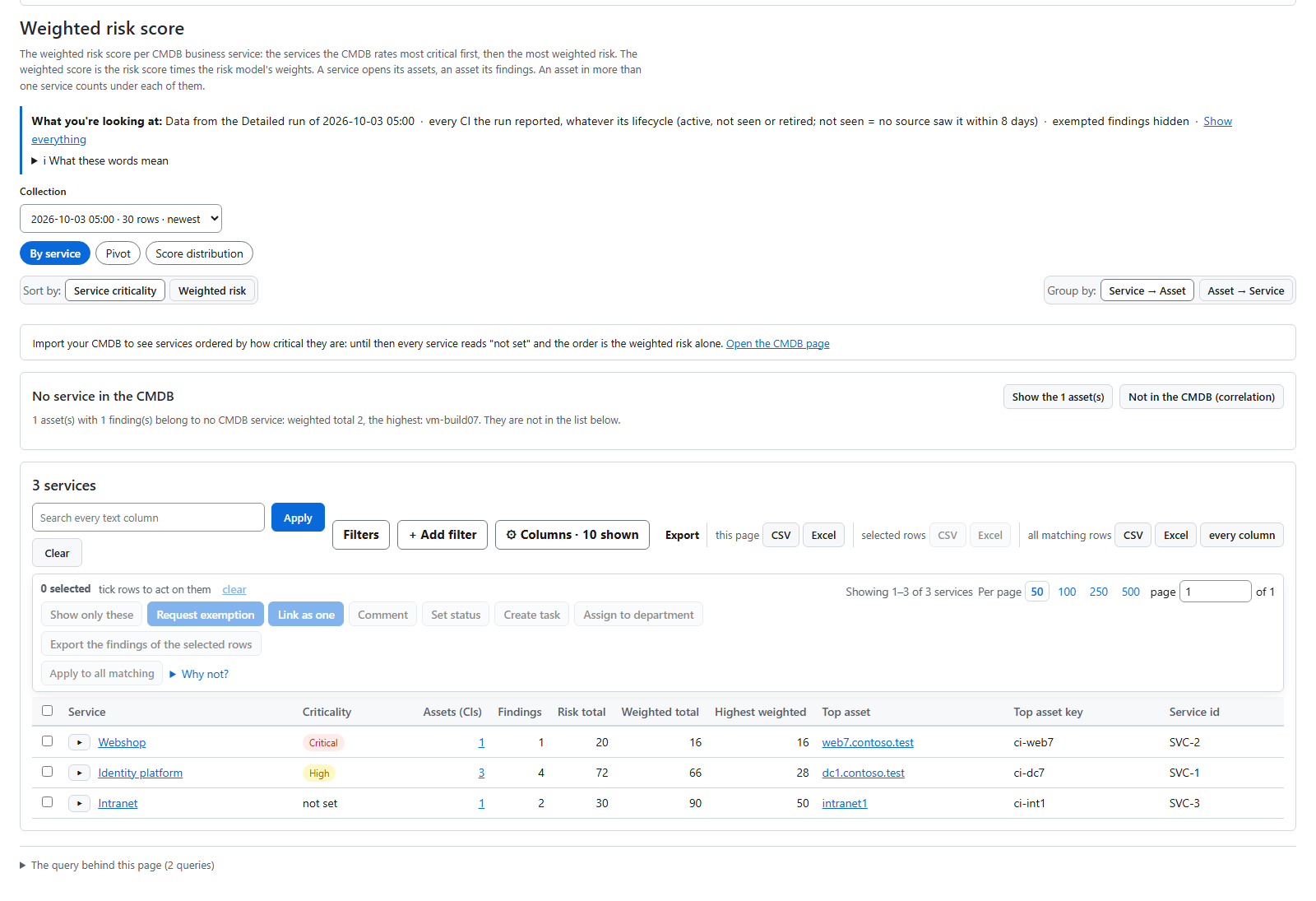
Drop in a CMDB export as CSV and SecurityInsight folds business criticality, data sensitivity and owners onto every matched asset, weights the risk score with them, and reports CMDB items nothing discovered (and assets with no CMDB record). Pro keeps a CMDB in SecurityInsight with your business services ranked by weighted risk, writes your assets to a SQL CMDB table with their history, and feeds the ServiceNow CMDB.
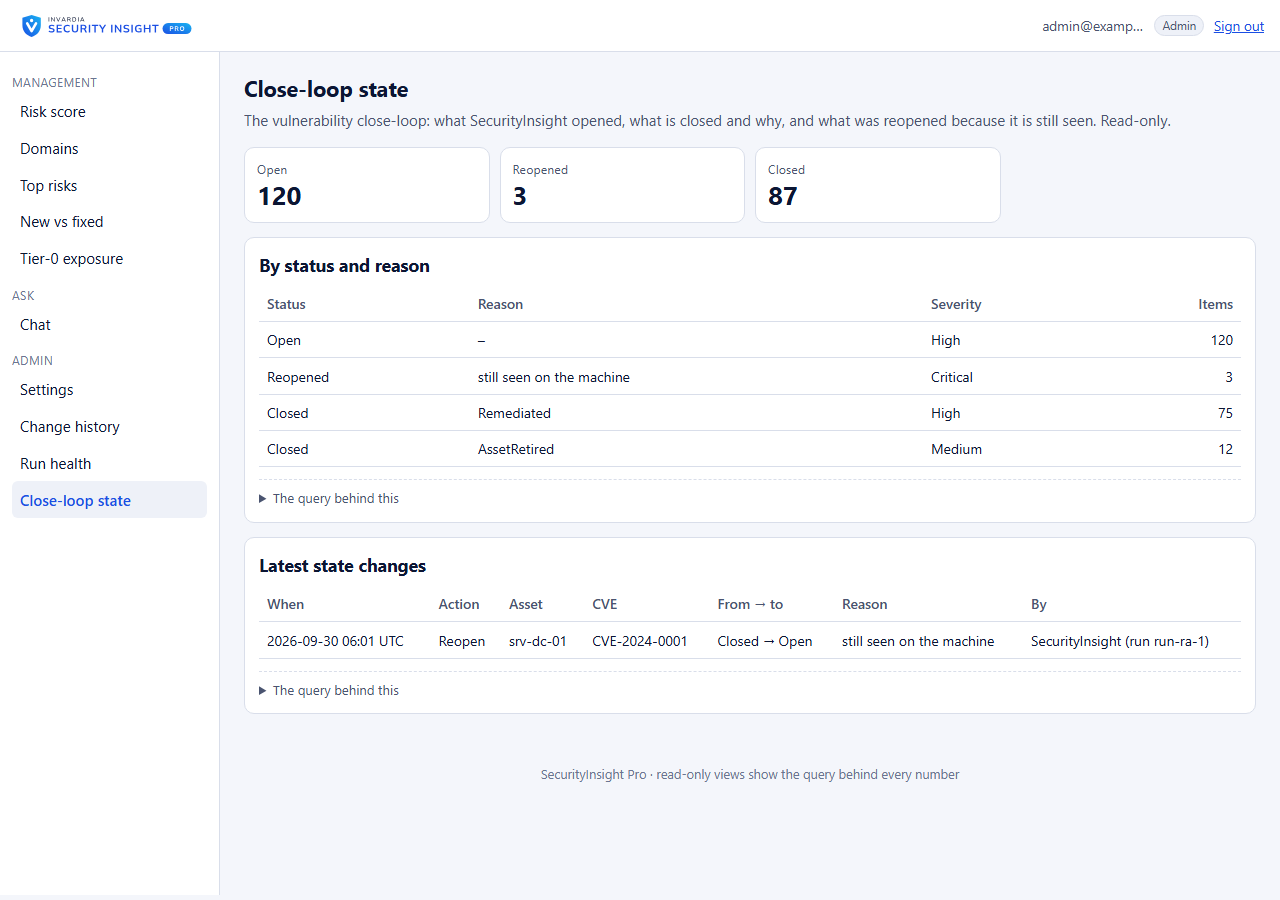
Vulnerability close-loop
Pro
Every finding becomes a vulnerability record in ServiceNow, a SQL table or any REST system: opened, kept current, closed with its real reason and reopened if it comes back. Absence is not remediation: a vulnerability closes as fixed only after a complete run, and an asset that is gone closes as "asset retired", never as fixed. Batched hand-off moved 12,271 real findings to ServiceNow in under three minutes.
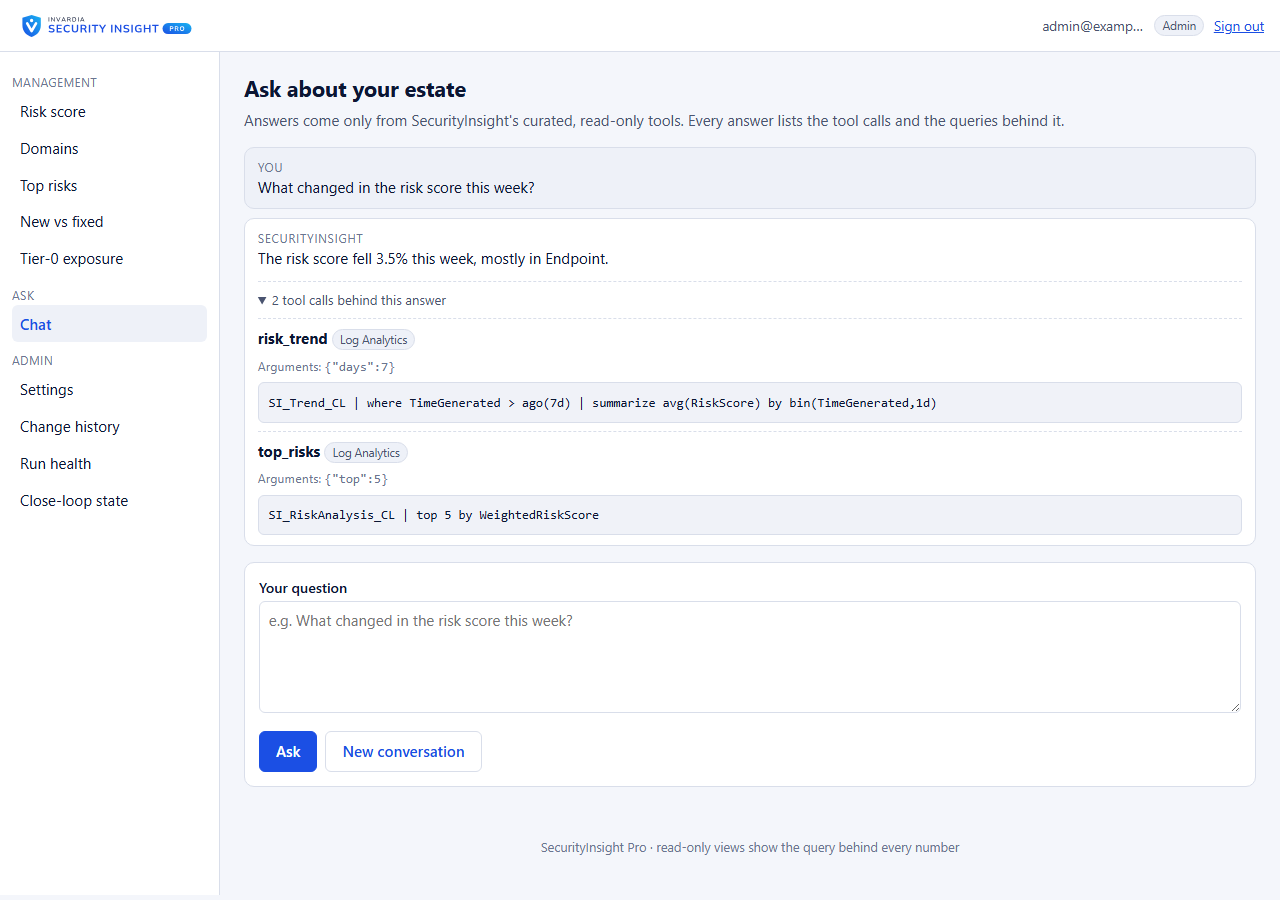
Ask SecurityInsight and MCP
Pro
Ask in plain language, "what changed in the risk score this week?", and get an answer that shows the tool calls and queries behind it. Answers come only from SecurityInsight's own read-only tools. An MCP server gives AI assistants the same read-only tools, protected by Entra tokens.
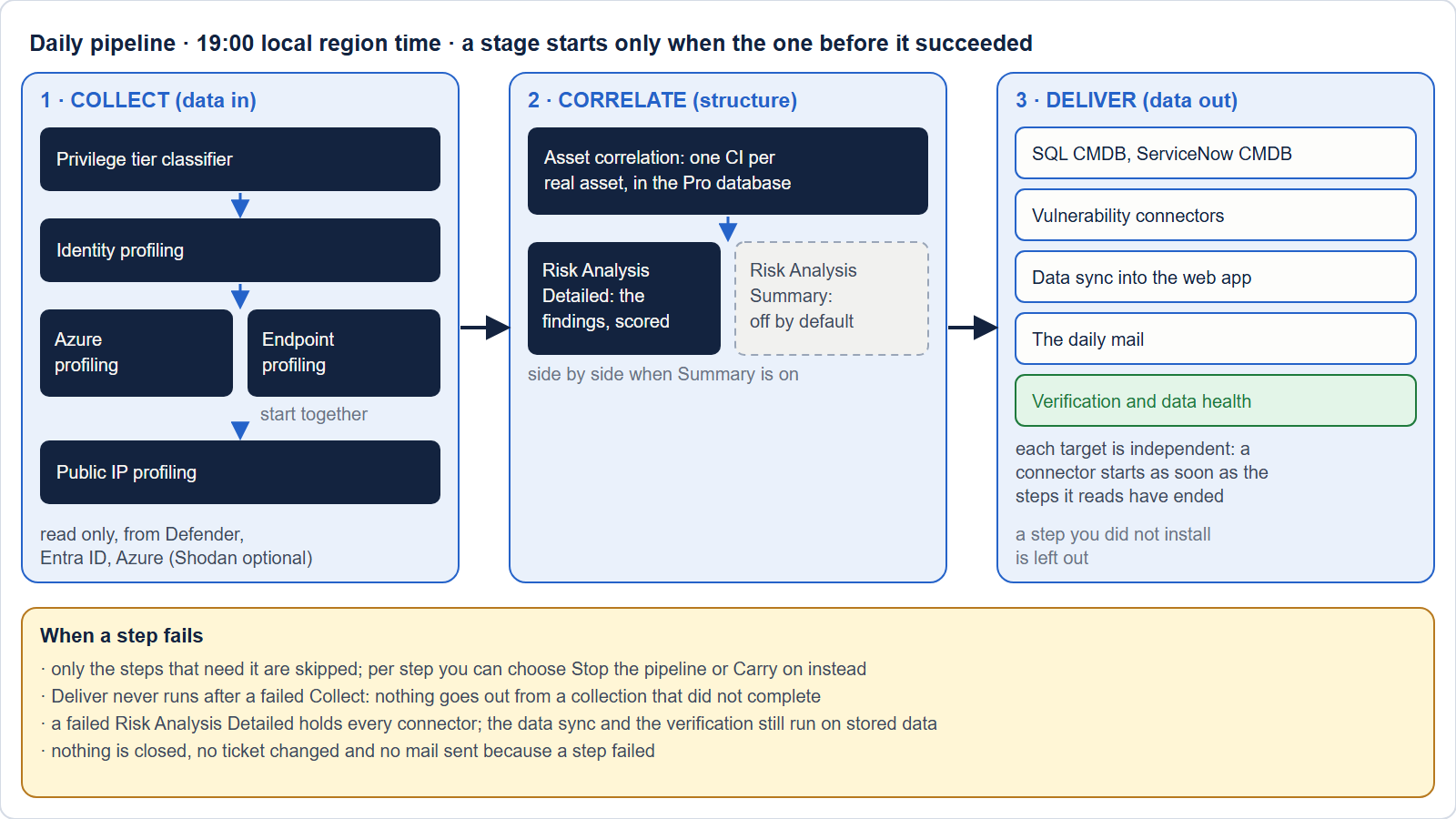
Runs itself
Community and Pro
One daily pipeline runs Collect, Correlate and Deliver at the time you choose; each step starts as soon as the steps it needs have finished. Only what changed is rebuilt, large reports split themselves to stay inside Defender's limits, and the Detailed reports run side by side on several workers, so large estates finish. A run that did not publish everything says so.
See it in action
 |
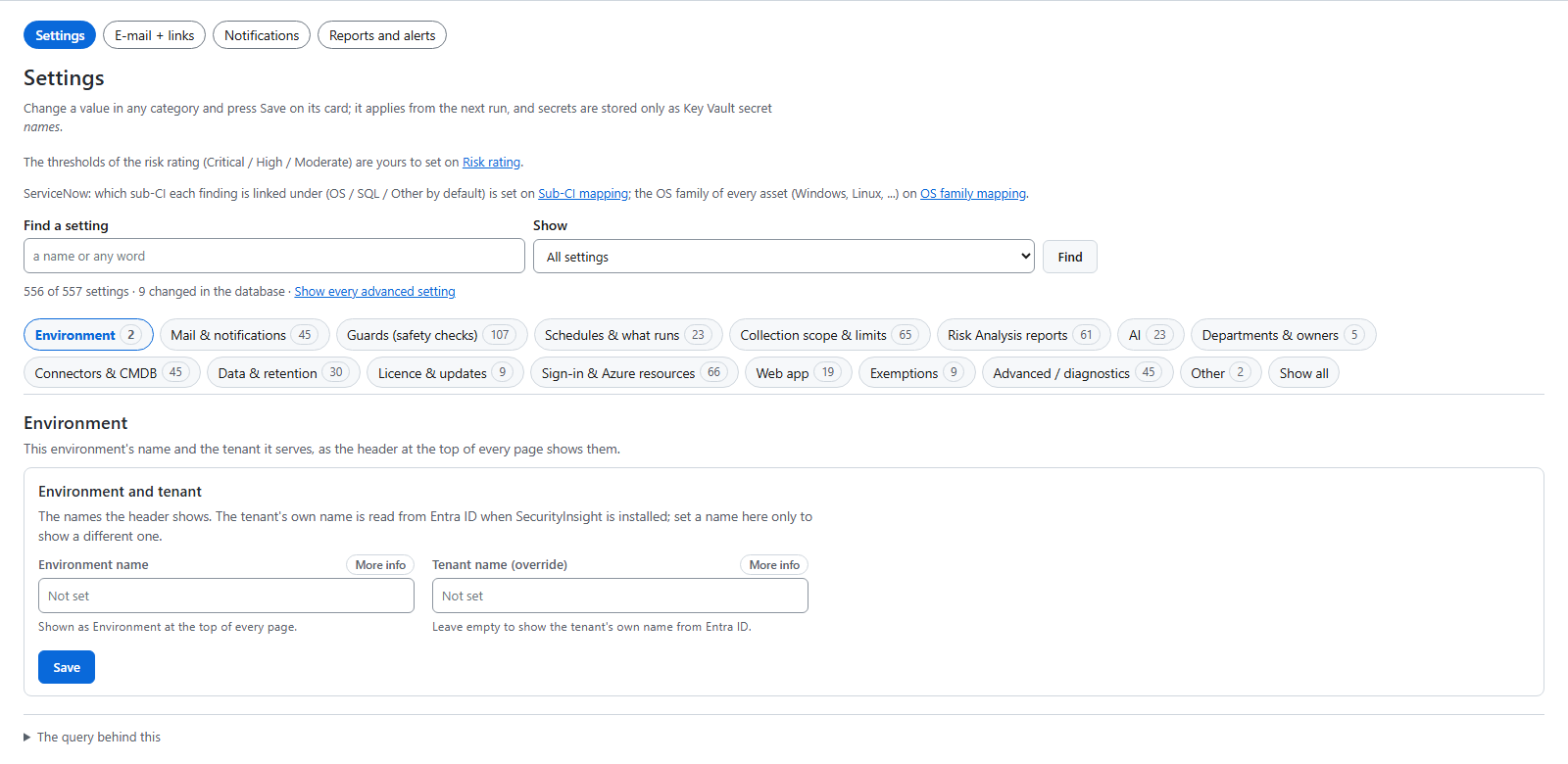 |
| New versus fixed, and how long a fix takes | Every setting explained in plain words |
Screenshots use synthetic demo data. More on invardia.com/products/securityinsight.
What you need
- An Azure subscription where SecurityInsight runs as Azure Container Apps jobs, with its own Log Analytics workspace, database, storage account and Key Vault. The install creates them.
- To install: Owner on the resource group, or Contributor and Role Based Access Control Administrator on it. When the resource group does not exist yet, Owner or Contributor on the subscription.
- Once, for the read-only Microsoft Graph and Defender permissions (for example SecurityRecommendation.Read.All, Vulnerability.Read.All and SecurityAlert.Read.All): a Privileged Role Administrator or Global Administrator. Without one, the install finishes and prints the exact command for them.
- Microsoft licenses for the data you want scored: Defender for Endpoint Plan 2 or Defender Vulnerability Management for vulnerabilities, Defender Exposure Management for Exposure Graph, Defender for Identity for Active Directory data, and Entra ID P2 for identity risk.
Install SecurityInsight: five samples
Open Azure Cloud Shell in PowerShell, signed in to the tenant you want to assess. The install is two lines: line 1 downloads one small file from the latest public release, line 2 runs it with your tenant and subscription. It downloads the release, checks it and runs its installer.
Invoke-WebRequest https://github.com/KnudsenMorten/SecurityInsight/releases/latest/download/Install-SecurityInsight.ps1 -OutFile Install-SecurityInsight.ps1
./Install-SecurityInsight.ps1 -TenantId '<tenant id>' -SubscriptionId '<subscription id>'
Every sample below is the same line 2; you only add what you want to change. You sign in as yourself: in Cloud Shell there is no prompt; on your own PC (PowerShell 7 or Windows PowerShell 5.1) a browser window asks you to sign in. No PowerShell modules, no Azure CLI and no client secret are needed. Everything you leave out has a sensible default.
1. The quickest install (most people start here)
Use this when you want SecurityInsight running in one subscription with all the defaults: a new resource group in West Europe, a new Log Analytics workspace, the web app, and the reports mailed to you from a shared mailbox SecurityInsight@<your domain> that the install creates. It is the two lines above, with nothing added:
./Install-SecurityInsight.ps1 -TenantId '<tenant id>' -SubscriptionId '<subscription id>'
The checks run first and nothing is created until they pass. The first results arrive after the first run.
2. Your own region, resource group and mail recipients
Use this when your company has naming rules, wants the data in a given region, or the reports should go to a team.
./Install-SecurityInsight.ps1 -TenantId '<tenant id>' -SubscriptionId '<subscription id>' `
    -Location 'northeurope' -ResourceGroup 'rg-securityinsight' -MailTo '[email protected]'
3. Read a management group or the whole tenant
Use this when SecurityInsight should see Azure resources in every subscription, not only the one it runs in.
# a management group
./Install-SecurityInsight.ps1 -TenantId '<tenant id>' -SubscriptionId '<subscription id>' `
    -CollectionScope 'managementGroup' -ManagementGroupId '<management group id>'

# or the whole tenant
./Install-SecurityInsight.ps1 -TenantId '<tenant id>' -SubscriptionId '<subscription id>' `
    -CollectionScope 'tenantRoot'
If your account cannot grant read access there, the install still finishes and prints the exact command for someone who can.
4. Private network only
Use this when SecurityInsight must have no public endpoints: it runs in your virtual network, the database, Key Vault and storage get private endpoints, and the web app is reachable from your network only.
./Install-SecurityInsight.ps1 -TenantId '<tenant id>' -SubscriptionId '<subscription id>' `
    -PrivateNetwork -VnetId '<resource id of your virtual network>' `
    -AppsSubnetName 'snet-si-apps' -EndpointsSubnetName 'snet-si-endpoints' `
    -HubVnetId '<resource id of your hub virtual network>' -WebAppAccess internal
The subnets are created when they are not there (add -AppsSubnetPrefix and -EndpointsSubnetPrefix with their
address ranges). No network of your own yet? Use -PrivateNetwork -VnetAddressPrefix '10.0.24.0/24' instead of
-VnetId, and SecurityInsight makes its own. At the end you get the hand-off list for your network team (peering to
your hub, DNS).
5. Check first, or continue an install that stopped
Use this before a change window, or when an install stopped half-way (for example a missing permission). Add the switch to the command you used.
./Install-SecurityInsight.ps1 -TenantId '<tenant id>' -SubscriptionId '<subscription id>' -PreflightOnly   # checks only, changes nothing
./Install-SecurityInsight.ps1 -TenantId '<tenant id>' -SubscriptionId '<subscription id>' -Resume          # continues from the step that stopped
Pro trial
Take the trial at invardia.com/trial, then run the same two lines as SecurityInsight Pro. Line 1 downloads the Pro copy from invardia.com instead of GitHub; line 2 is the same, with the same parameters as the samples above. No licence or key goes on the line: Pro and the trial install the same way, and only the licence differs.
Invoke-WebRequest https://invardia.com/support/si/Install-SecurityInsight.ps1 -OutFile Install-SecurityInsight.ps1
./Install-SecurityInsight.ps1 -TenantId '<tenant id>' -SubscriptionId '<subscription id>'
Every setting
Every setting is a parameter of the same line 2, so any install is two lines with your values. The list, with
defaults and what each one does: Get-Help ./Install-SecurityInsight.ps1 -Full (after line 1) and
Community edition: the scripts you run.
Updates, status reports and 2.2
Updates. A Community install updates itself from the SecurityInsight update channel. Before anything is installed, the release is checked against a signed entry: its version, its size and its SHA-256.
Status reports. The Community edition sends Invardia an anonymous daily status report: version, hosting type and
run results, with no tenant id, host name or company. Set $global:SI_Telemetry_Enabled = $false in your
configuration and nothing is sent.
Coming from 2.2? SecurityInsight 3 is installed beside 2.2, not over it. Branch
main keeps 2.2 unchanged. Read
SecurityInsight 3 beside 2.2.
Community vs Pro
Community is "see your risk". Pro is "work on it." Everything that finds, scores and shows your risk is free.
| Community | Pro | |
|---|---|---|
| Four profilers: devices, identities, Azure resources, public IPs (Shodan) | ✅ | ✅ |
| Defender vulnerabilities and recommendations, Exposure Graph attack paths | ✅ | ✅ |
| Tiers from real rights, privilege tier catalog, optional AI role classification | ✅ | ✅ |
| One object across every source (correlation) | ✅ | ✅ |
| 138 Risk Analysis reports, risk score and weighted risk score | ✅ | ✅ |
| CMDB from a CSV file | ✅ | ✅ |
| Excel, summary mail with optional AI summary, Log Analytics tables, JSON | ✅ | ✅ |
| Web app: findings, management views, trends, wall board, Excel export | ✅ | ✅ |
| Asset tagging with a dry run first | ✅ | ✅ |
| Signed updates from the Community channel | ✅ | |
| Departments, governed exemptions, follow-up tasks and governance mails | ✅ | |
| CMDB in SecurityInsight, business services ranked by weighted risk | ✅ | |
| ServiceNow CMDB and the vulnerability close-loop (ServiceNow, SQL, REST) | ✅ | |
| Alert mails and management summary mails | ✅ | |
| Roles and scopes for people and groups, audit trail | ✅ | |
| Template releases by update ring, conformance and deviations | ✅ | |
| Ask SecurityInsight (AI chat) and the MCP server | ✅ | |
| Updates from Invardia by update ring, licence, support from Invardia | ✅ |
Move from Community to Pro without reinstalling.
Documentation
Everything about SecurityInsight is at invardia.com/docs/securityinsight:
- Community edition: the scripts you run
- The daily pipeline and Weighted risk by CMDB service
- Security and Identities and permissions
- Operations, Guards and Data health
- Updates, including SecurityInsight 3 beside 2.2
Pro editions and support
SecurityInsight Pro (Pro Business and Pro Enterprise) adds the ServiceNow CMDB connector, a CMDB with business services and its connectors, the vulnerability close-loop to ServiceNow, a SQL table or a REST system, departments and governed exemptions with governance mails and follow-up tasks, Ask SecurityInsight and the MCP server, managed updates from Invardia and support from Invardia.
- Product page and editions: invardia.com/products/securityinsight
- Pricing: invardia.com/pricing · 60-day Pro trial: invardia.com/trial
- Pro support: [email protected] or portal.invardia.com > Support
- Questions: [email protected]
- Community questions and bugs: GitHub issues
License
From version 3.0.0, the Community edition is licensed under the PolyForm Shield License 1.0.0: you may use, change and run it, also commercially inside your own organization, but not to offer a product that competes with it. Pro components are not in this repository and need a license from Invardia. Versions published before 3.0.0 stay under the MIT License they were published with.
Invardia is a brand of 2LINKIT, founded and owned by Morten Knudsen.
Explore related projects
trimstray/the-book-of-secret-knowledge
A collection of inspiring lists, manuals, cheatsheets, blogs, hacks, one-liners, cli/web tools and more.
257,216 starsHack-with-Github/Awesome-Hacking
A collection of various awesome lists for hackers, pentesters and security researchers
125,103 starsswisskyrepo/PayloadsAllTheThings
A list of useful payloads and bypass for Web Application Security and Pentest/CTF
82,508 starscaddyserver/caddy
Fast and extensible multi-platform HTTP/1-2-3 web server with automatic HTTPS
78,910 stars