
KitsuneKode/kunai has 44 GitHub stars and 4 forks. GitHot measured +2 in 7 days. Last checked 2026-11-10 22:09 UTC. Last push 2026-11-05.
Watch anime, movies, TV series and YouTube from your terminal with mpv. Search, switch sources, resume playback and queue offline downloads.
Measured star growth
- in 24h
- Update delayed
- in 7 days
- +2
- in 15 days
- Collecting history
- in 1 month
- Collecting history
Net star changes over overlapping periods, not daily totals. Missing measurements are left blank. Stars measure attention, not software quality.
README.md
Original
Kunai
Watch anime, movies, TV series and YouTube from your terminal. Search, choose a source and play in mpv, with subtitles, resume and offline downloads.


Linux / macOS
curl -fsSL https://kunai.kitsunekode.in/install.sh | bash
Windows (PowerShell)
irm https://kunai.kitsunekode.in/install.ps1 | iex
Then run:
kunai --setup && kunai -S "Dune"
Native binaries include their runtime. Install mpv for desktop playback.
Installation guide · What you can do · Release notes
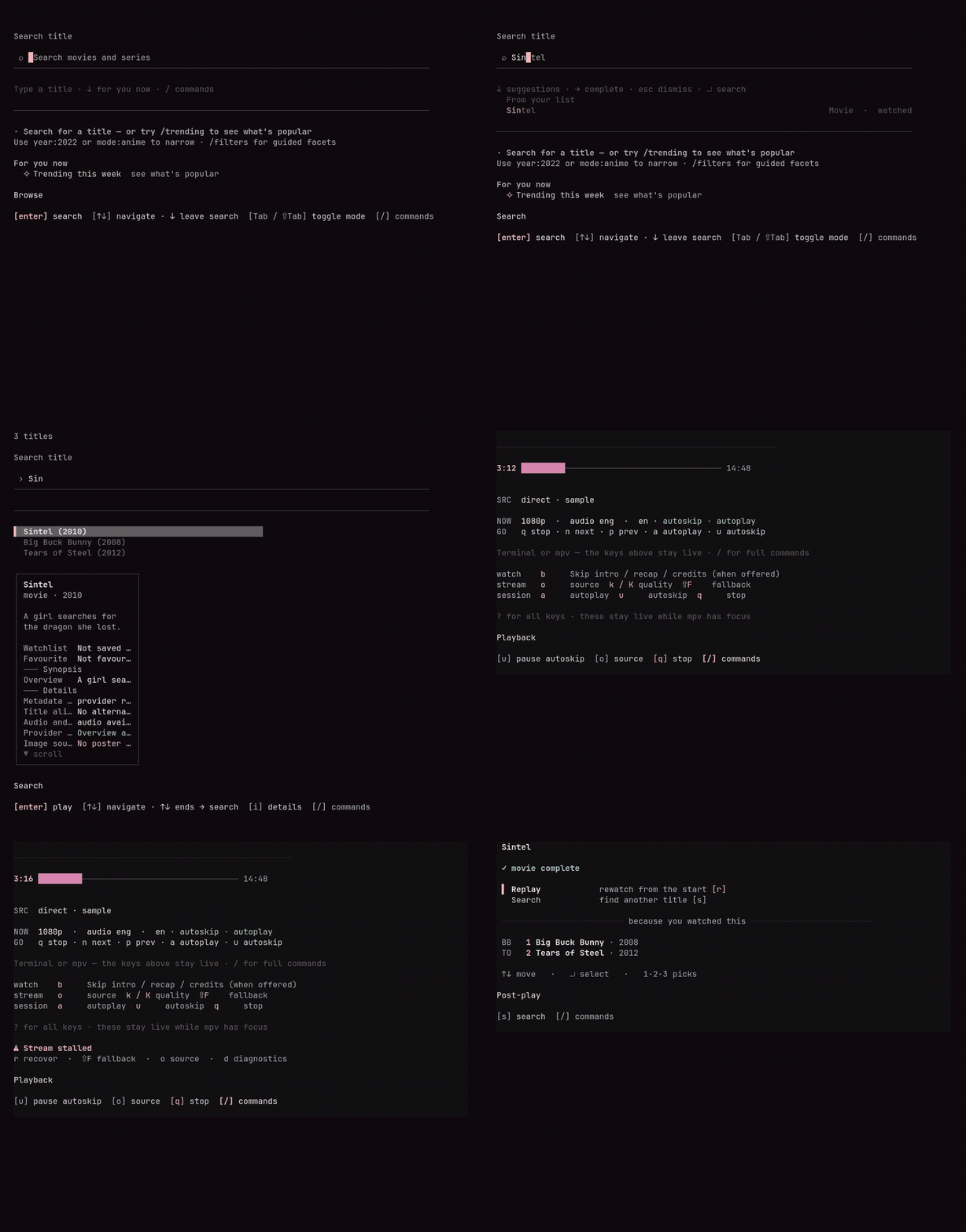
Kunai keeps search, title details, episodes and playback controls in one keyboard-driven terminal session. The shell stays open while mpv plays, so you can switch sources, manage Up Next or find your next video.
Kunai is in beta. This README describes the current source; check the release notes for the published version. Provider availability, subtitles and quality choices depend on the title, upstream service and your network.
Why Kunai
- Find something to watch. Search anime, movies, TV series and YouTube. Preview details before opening a result.
- Recover when playback stalls. Refresh the current stream, choose another source or try the next compatible provider without restarting.
- Continue watching. Resume from local history, arrange Up Next, save a Watchlist and organize Playlists.
- Watch offline. Queue supported media for offline use, then play downloaded media from Library.
- Use the controls you prefer. Navigate with the keyboard or supported mouse controls. Each screen shows its available shortcuts.
For viewers looking for an ani-cli alternative, Kunai brings anime and other video catalogs into a persistent terminal interface. It builds on tools such as ani-cli, mpv and yt-dlp; playback remains in mpv.
Quick Start
Install Kunai
Use the native installer for a self-contained binary:
curl -fsSL https://kunai.kitsunekode.in/install.sh | bash
irm https://kunai.kitsunekode.in/install.ps1 | iex
Or use npm with Node on your PATH:
npm install -g @kitsunekode/kunai
Native binaries need no separate Bun or Node installation. The npm and Bun global-package channels use a Node launcher and need Node on your PATH.
Install Playback Tools
| Tool | When you need it |
|---|---|
| mpv | Desktop playback |
| yt-dlp | YouTube playback and offline downloads |
| ffprobe, included with FFmpeg | Download validation where available |
| curl-impersonate | Providers that require an impersonating HTTP client |
Install mpv with your package manager:
sudo pacman -S mpv                              # Arch Linux
sudo apt install mpv                            # Debian / Ubuntu
brew install mpv                                # macOS
winget install --id mpv-player.mpv-CI.MSVC -e     # Windows
See the installation guide for optional tools and the platform guide for support levels, Alpine, WSL and terminal images.
Verify
kunai --version
mpv --version
kunai --setup
kunai -S "Dune"
Search and Resume
kunai                       # open the shell
kunai -a -S "Demon Slayer"  # search anime
kunai -y -S "live coding"   # search YouTube
kunai --continue           # resume an unfinished title
These search commands open results; select a title before playback begins.
Watching, Organized
| Workflow | What Kunai provides |
|---|---|
| Search and previews | Type-ahead suggestions, title details and mode-specific search history |
| Sources and tracks | Provider, source, quality, audio and subtitle choices where available |
| Continue watching | Local resume positions and episode navigation |
| Up Next | A recoverable playback order, separate from saved Playlists |
| Watchlist and Playlists | Save titles for later and organize named collections |
| Downloads and Library | Opt-in download jobs and local playback |
| Discovery | Recommendations and release-calendar views when catalog data is available |
| Autoskip | Intro, recap and credits controls when supported timing data exists |
| Personalization | Themes, contextual tips and optional Discord Rich Presence |
Read the feature guide for supported workflows and limitations. Mobile terminal work is experimental.
Controls to Start With
/       command palette
Tab     switch between series, anime and YouTube modes
o       open Tracks during playback
k       choose quality during playback
r       recover the current stream
Shift+F try the next compatible provider
Ctrl+C  quit
Movies and TV series share series mode. The footer shows the shortcuts for the screen you are using. See commands and shortcuts for the full list.
Local Data and Optional Integrations
History, Up Next, Playlists and download records are stored on your machine. Kunai does not require a Kunai account. Optional AniList and TMDB integrations send progress to the service you connect; Discord presence is opt-in.
Usage analytics requires explicit consent. It does not include titles, queries, providers, stream URLs or file paths. See reliability and privacy.
Get Help and Keep Kunai Updated
- Troubleshooting: find a recovery step for your symptom.
- Providers: understand source capabilities and availability.
- Downloads and offline: manage jobs and local media.
- Customization: set language, quality and theme preferences.
- Diagnostics: inspect and export a redacted report.
Run kunai doctor to check installation and tool discovery.
Keep it current with kunai upgrade, which follows your install channel.
kunai uninstall keeps your data unless you explicitly add --purge.
Contribute
Provider fixes, platform testing, accessibility improvements and clear bug reports help Kunai stay useful. Read CONTRIBUTING.md before opening a change, or report an issue.
Kanna, Kunai's fox, appears during setup and in the shell. Read Kanna's guide for her controls.
Built with Bun, TypeScript, React and Ink, with help from mpv, yt-dlp, ani-cli, AniSkip and VLC. Kunai is MIT licensed.
Disclaimer
Kunai is a client-side playback tool. It does not host, upload, mirror, seed, or distribute video content. Streams and related assets are served by non-affiliated third-party providers. Use responsibly and in accordance with applicable laws and service terms.
Explore related projects
codecrafters-io/build-your-own-x
Master programming by recreating your favorite technologies from scratch.
561,622 starspublic-apis/public-apis
A collective list of free APIs
497,963 starsmorluto/rea
Reverse engineer anything with agents, from app behavior down to native binaries.
450,165 starsopenclaw/openclaw
The AI that really does things. Any OS. Any Platform. The lobster way. 🦞
394,303 stars