
KiWi233333/JiwuChat
About
JiwuChat 🍂 - A lightweight cross-platform instant messaging app with integrated AI assistants (DeepSeek/Gemini/Kimi). Features real-time messaging, audio/video calls, multi-device sync, and customizable themes. Built with Vue3 & Tauri2 🍒
Creative & MediaMeasured star growth
- in 24h
- 0
- in 7 days
- -1
- in 15 days
- Collecting history
- in 1 month
- Collecting history
Net star changes over overlapping periods, not daily totals. Missing measurements are left blank. Stars measure attention, not software quality.
.doc/README.en.md
Original
JiwuChat Tauri APP








Official Website: JiwuChat
Language : 简体中文 | English | Deutsch | Español | Français | 日本語 | 한국어 | Português | Русский
Introduction
JiwuChat is a lightweight (~10MB) multi-platform chat application built with Tauri2 and Nuxt3. It features various real-time messaging capabilities, AI group chat bots (iFlytek Spark, KimiAI, etc. integrated), WebRTC audio/video calls, screen sharing, and AI shopping functionality. It supports seamless cross-device communication with various message types including text, images, files, and voice. It also supports group chats and customizable settings. Available in light/dark modes to enhance efficient social networking. ✨
One Codebase, Multi-Platform Support
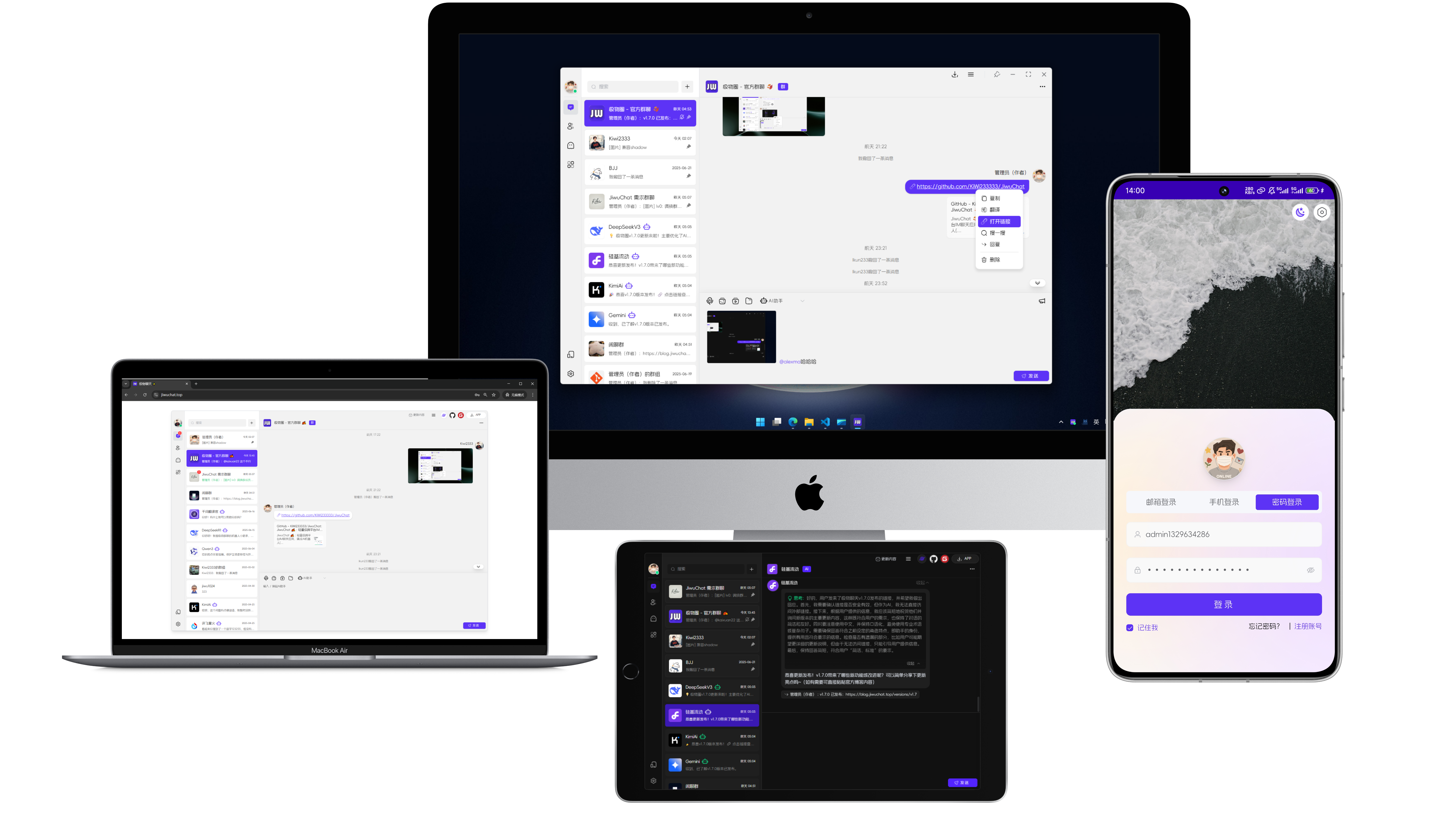
Default Account
- Username: ikun233
- Password: 123456
- Try it: Web Version
⚠ Note: This account has limited permissions for file uploads, profile modifications, and password changes. It is for testing purposes only.
Self-Hosted
To self-host the backend, go to ** jiwu-chat-core** — Docker one-click deployment supported.
Project Screenshots
- 🖥️ Desktop


- 📱 Mobile Adaptation


- 🌐 Web

🌌 System Features

Feature Table [Expand/Collapse]
| Module | Sub-Module | Feature Description | Status |
|---|---|---|---|
| User Module | Account Management | User registration, login, historical login account selection | ✅ |
| Account Security | Email/phone binding reminder, device management, account security verification | ✅ | |
| Message Module | Basic Chat | Text messages, image messages, video messages, file uploads, message recall, message read status | ✅ |
| Data Sync | Multi-device message synchronization, read status synchronization | ✅ | |
| Advanced Chat | Quote replies, @mentions, announcements, re-edit recalled messages | ✅ | |
| Session Module | Session Management | Session list, pin sessions, hide sessions, unread count statistics, session sorting | ✅ |
| Group Chat Module | Group Operations | Create group chat, leave group chat, view group chat details | ✅ |
| Group Member Management | Manage group members, set administrators, revoke administrators, get @list | ✅ | |
| Contacts Module | Friend Operations | Friend requests, friend search, friend list, reject friend requests, delete friends | ✅ |
| Profile & Notifications | View friend details, unread request count statistics | ✅ | |
| AI Module | Chat Features | Private AI chat, group AI chat, multi-AI simultaneous chat | ✅ |
| Model Management | Support for Gemini, Kimi AI, DeepSeek, Silicon Flow and other vendors, model list, token calculation | ✅ | |
| Plaza Feature | AI robot plaza display | ✅ | |
| Communication Module | Audio/Video Calls | WebRTC-based voice calls, video calls, screen sharing | ✅ |
| Call History | Call status updates, hang-up records | ✅ | |
| Notification System | Message Notifications | Desktop notifications, system tray alerts, ringtone settings, do not disturb | ✅ |
| Extension Features | Comprehensive Integration | Mall integration, blog integration, update log panel | ✅ |
| Other Modules | Other Features | Social chat features, AI shopping features, file download management, translation tools (AI translation/Tencent translation) | ✅ |
| Files & Playback | Image viewer, video player, file download, batch image upload | ✅ | |
| Theme Configuration | Light/dark theme switching, follow system theme, font settings, adaptive layout | ✅ | |
| Platform Compatibility | Windows, MacOS, Linux, Android, Web adaptation | ✅ |
⏳ Development
📦 Prerequisites
- Prerequisites and configuration Tauri Official Documentation
✨ Documentation
- For detailed operational documentation, please refer to Run.md
🔧 Tech Stack
| Category | Technology/Component | Version |
|---|---|---|
| Framework | Nuxt | 4.2.2+ |
| Tauri | ^2.9.6 | |
| UI Component Library | Element Plus | 2.13.1 |
| State Management | Pinia | 3.0.4 |
| Utility Library | Vueuse | 14.1.0 |
| Build & Dev Tools | Nuxi | 4.2.2 |
| Vite | 7.2.11(rolldown-vite) | |
| Code Quality | ESLint | 9.39.2 |
| Prettier | 3.3.2 | |
| Type Checking | TypeScript | 5.9.3 |
| Style Processing | Sass | 1.97.3 |
📢 Promotion
302.AI is a pay-as-you-go enterprise-level AI resource platform that provides the most up-to-date and comprehensive AI models and APIs on the market, as well as various out-of-the-box online AI applications.

❓ FAQ
- MacOS Installation Errors:
Open「System Settings」-「Privacy & Security」, and check to allow apps downloaded from "Anywhere" to run (as shown in: img_10.png).
If errors persist, please execute the following commands in Terminal:
Before installation:
sudo xattr -rd com.apple.quarantine /path/to/your/installer/installer-nameIf already installed:
sudo xattr -r -d com.apple.quarantine /Applications/AppName.app
- For common questions, feel free to leave a message in the Issues section, or contact us through the methods below. We will supplement and answer promptly.
🦾 Trends
💬 Contact
- Email: [email protected]
- QQ: 1329634286
- QQ Group: 939204073
Explore related projects
Loading…