
Kevoyuan/AgentSCAD
Kevoyuan/AgentSCAD has 26 GitHub stars and 4 forks. GitHot measured 0 stars in 24 hours. Last checked 2026-11-15 01:53 UTC. Last push 2026-11-13.
Measured star growth
- in 24h
- 0
- in 7 days
- Collecting history
- in 15 days
- Collecting history
- in 1 month
- Collecting history
Net star changes over overlapping periods, not daily totals. Missing measurements are left blank. Stars measure attention, not software quality.
About
AI-native CAD agent converting natural-language requests into validated OpenSCAD artifacts with automated geometry repair and manufacturing validation.
AIREADME.md
OriginalEnglish | 中文

AgentSCAD
AI-Native Parametric CAD Workspace — Generate Editable 3D Models & Physical Checks from Natural Language





AgentSCAD is a local-first, open-source AI parametric CAD workspace. Built like a precision metrology instrument bench, it features a full-bleed 3D viewport and floating instrument modules. Type a single natural-language sentence to generate editable OpenSCAD code, real-time 3D rendered geometry, deterministic physical validation metrics, and 3D-printable STL artifacts.
Live Demo: https://agentscad.vercel.app
📸 Overview

Precision Metrology Instrument Design:
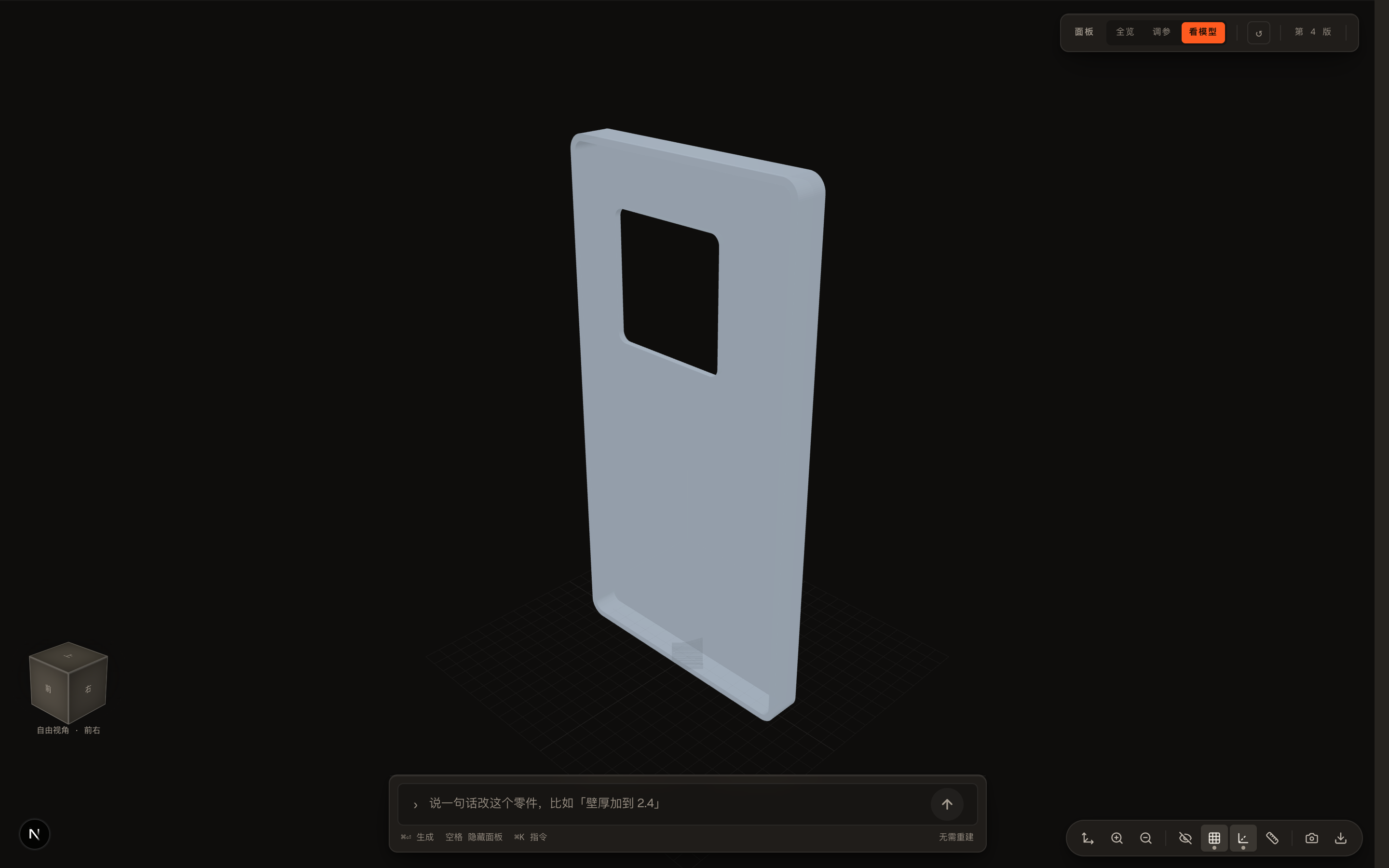
- Full-Bleed 3D Viewport: Immersive real-time WebGL rendering with zero docked-sidebar clutter.
- Floating Instrument Modules: Draggable, collapsible plates for parameter steppers, manufacturing checks, and physical readouts.
- Solid 56px ViewCube: 26 clickable standard orientation zones (faces, edges, corners) mirroring camera rotation.
- Single Centred Composer: One unified prompt field with one dominant action (
Generate,Rebuild, orStop).
⚡ Quick Start (3 Minutes)
1. Launch AgentSCAD
Run locally using Bun or Docker Compose:
# Clone the repository
git clone https://github.com/Kevoyuan/AgentSCAD.git
cd AgentSCAD

# Install dependencies
bun install

# Create local configuration (includes DATABASE_URL for SQLite)
cp .env.example .env

# Initialize SQLite schema
bun run db:push

# Start the dev server
bun run dev
Or using Docker Compose:
cp .env.example .env
docker compose up --build
Open http://localhost:3000 in your browser.
The interface defaults to English. Use Settings → Language to switch to 简体中文; your choice applies immediately and is saved in this browser.
2. Configure Your LLM Provider
Click the Settings gear (⚙️) in the top-left status module:

- Select a preset (e.g. DeepSeek, OpenAI, OpenRouter, Anthropic, Gemini, or local models).
- Paste your API key, click Test, then click Save.
- Keys are saved locally in
.agentscad/or in encrypted browser-session cookies.
3. Generate Your First CAD Model
Type your part description in the bottom input bar:
Create a wall-mountable phone holder with rounded corners and two screw holes.
Press ⌘ Enter (or click the orange circle button ↑). AgentSCAD automatically:
- Understands Intent: Extracts dimensions, tolerances, and mechanical constraints;
- Generates OpenSCAD Code: Matches your request against a local alias index — Chinese and English alike — then injects ranked reference examples, design patterns, and known failure modes before writing parametric OpenSCAD source;
- Renders Real Geometry: Invokes OpenSCAD (Native CLI or pinned WebAssembly) to generate mesh & STL;
- Performs Deterministic Checks: Validates manifoldness, minimum wall thickness, and outer bounds.
🎯 Key Capabilities
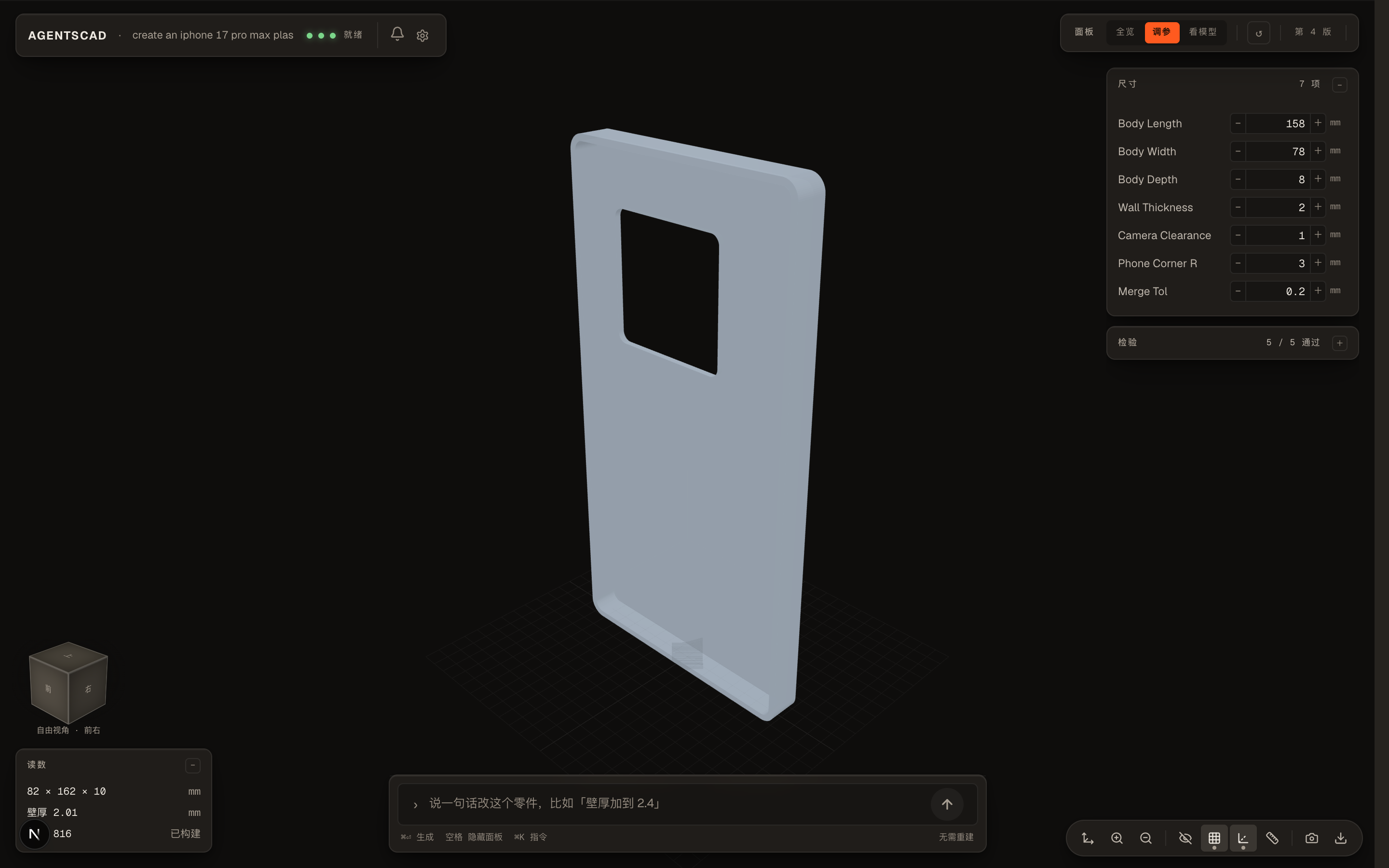
1. Instant Parameter Tuning (Steppers)
Once generated, the right floating module exposes extracted dimensions. Increment or decrement parameters (wall thickness, hole diameter, width/height) and rebuild instantly:
| Parameter Tuning (调参) | Focus View (看模型) |
|---|---|
 |
 |
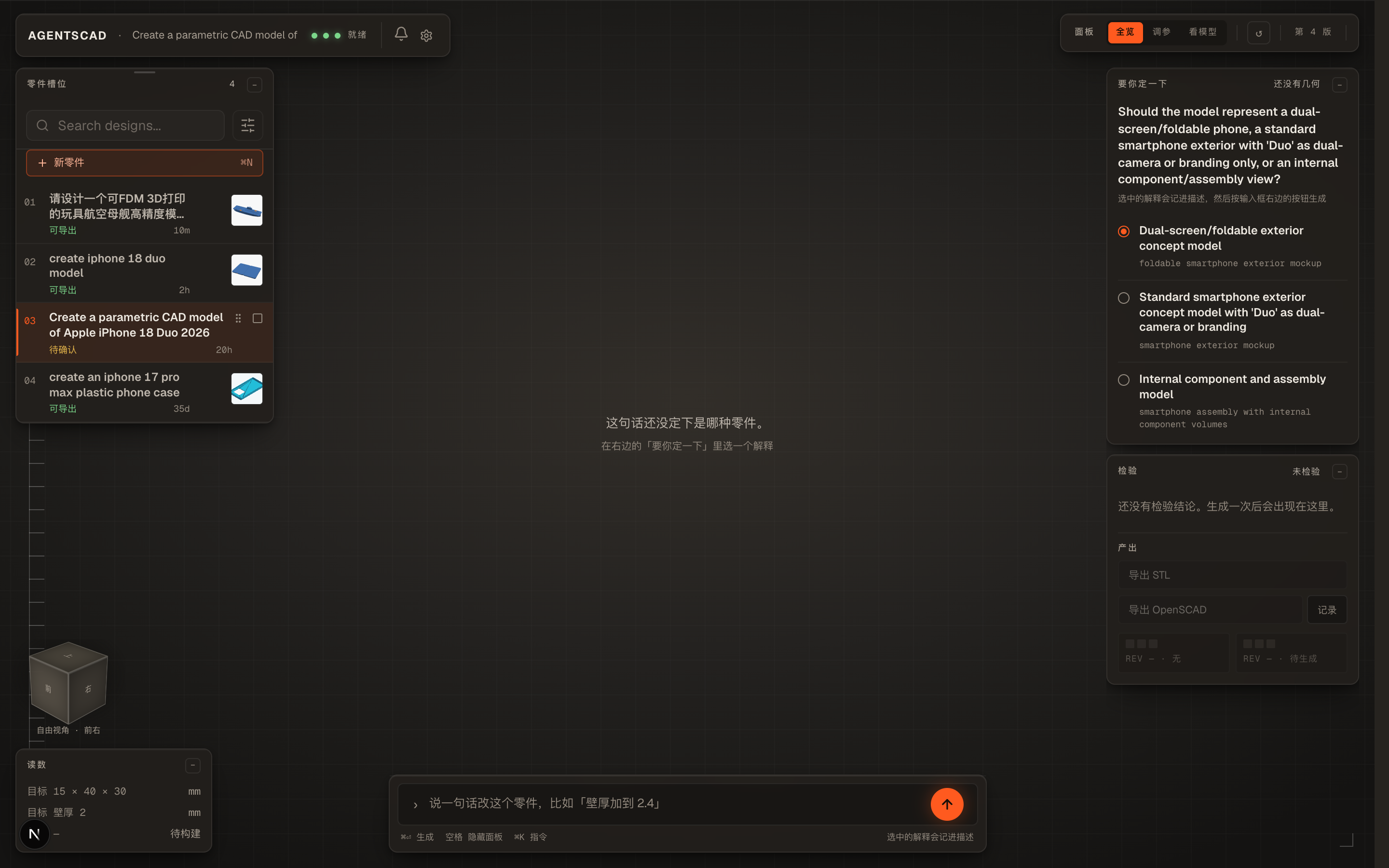
2. Intent Disambiguation ("Needs Decision")
When a natural language description contains mechanical ambiguity, AgentSCAD halts before rendering and presents options for you to decide, ensuring engineering precision:
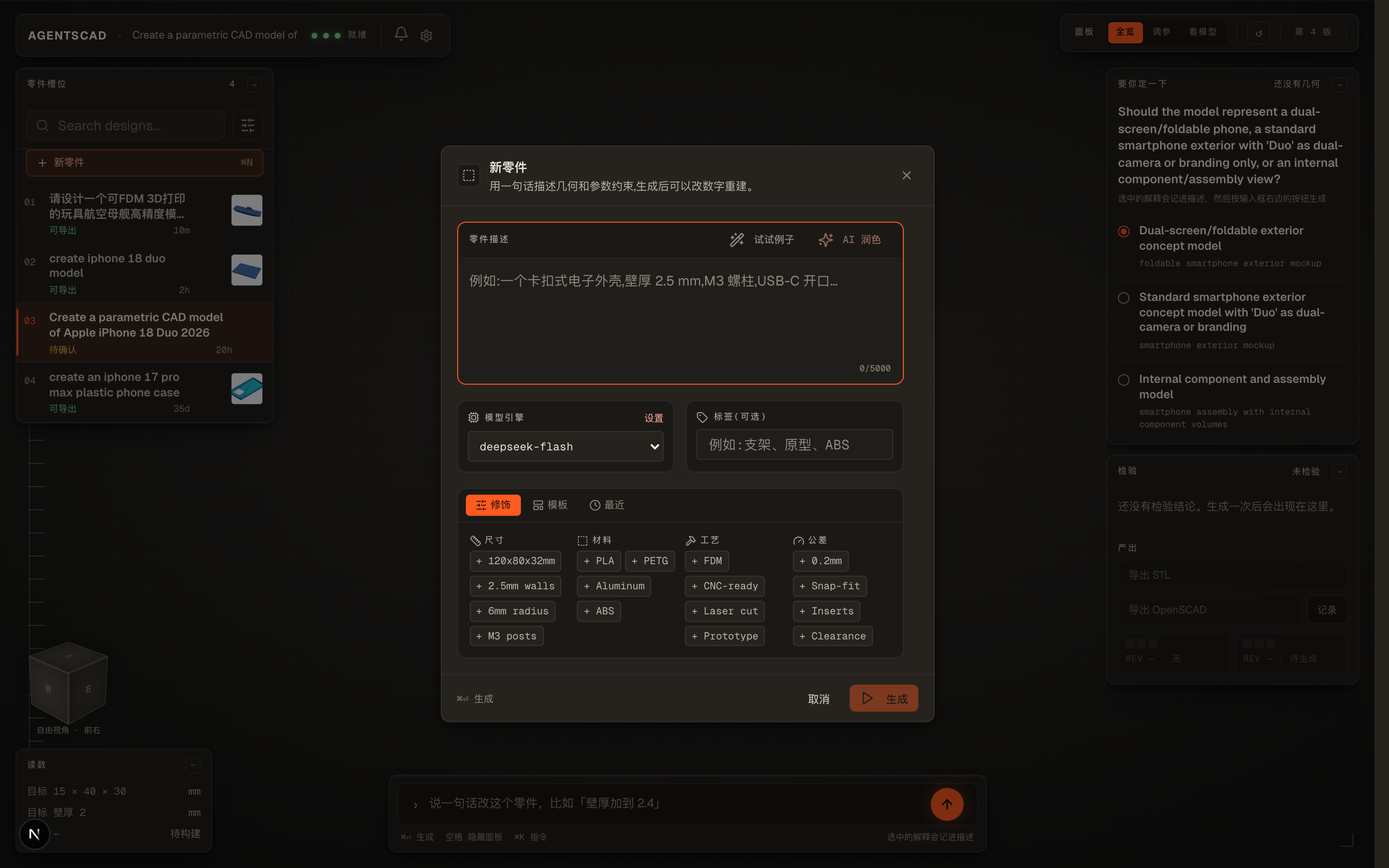
3. Fast New Design Creator (⌘ N)
Click + New Design on the rail to open the quick composer, with built-in material, manufacturing, and tolerance presets:
⌨️ Keyboard Shortcuts
| Shortcut | Action |
|---|---|
⌘ Enter |
Submit prompt / Rebuild model |
Space |
Toggle all floating modules (instant switch to clean 3D focus view) |
⌘ N |
Create a new design |
1 – 6 |
Standard views: Front (1), Right (2), Top (3), Back (4), Left (5), Bottom (6) |
0 |
Default isometric view |
F |
Fit model to viewport |
⌘ K |
Open command palette |
🛠️ Architecture & Principles
AgentSCAD strictly follows: "LLMs write code; deterministic tools govern geometry facts."
- OpenSCAD Geometry Authority: Native OpenSCAD CLI for local development; pinned official OpenSCAD WebAssembly (WASM) runtime for zero-install serverless setups.
- Measurable Physical Checks: Python / Trimesh inspects actual STL geometry for manifold topology, bounding boxes, wall thickness, and hole connectivity.
- Deterministic Retrieval:
cad_knowledge/retrieval-index.jsonis the source of truth for what retrieval can match. Requests and aliases are normalized (case, full-width forms, punctuation), scored by strong/supporting alias weight and specificity, ranked deterministically, and cut to a per-group budget. Hard negatives keep near-miss families apart — a planetary gearbox never matches the spur-gear entry. Unmatched requests receive no examples rather than order-by-filename noise. It is lexical, not semantic: there is no embedding index, and none is claimed. - Separate Evidence Levels:
DELIVEREDproves the artifacts exist, not that you accepted the part. An append-onlyJobOutcomeledger recordsaccepted,rejected,user_edited, andexportedevents, and the summary only reportstaskSucceededwhen the most recent decision isaccepted. Edits and exports are process signals, never success. Read it atGET /api/jobs/{id}/outcome. - Local-First Persistence: SQLite stores
Jobrecords,JobVersionhistory, and the append-onlyJobOutcomeledger locally; artifacts are saved directly on disk with complete export capabilities.
📋 Common Commands
| Task | Command |
|---|---|
| Dev server | bun run dev |
| Build for production | bun run build |
| Start production server | bun run start |
| Unit tests | bun run test |
| Test WASM runtime | bun run test:wasm |
| Push database schema | bun run db:push |
| Reset database | bun run db:reset |
| Run CAD eval benchmark | bun run cad:eval:fast |
| Verify a downloaded assembly ZIP | bun run cad:assembly:verify path/to/assembly.zip |
| Reconstruct an assembly layout from ZIP | bun run cad:assembly:reconstruct assembly.zip layout.stl |
| Download assembled layout in the app | Assembly panel → Download assembly layout (STL) (only complete generated-part assemblies; viewing-only STL) |
📚 Deeper Documentation
- Architecture
- Functional Assembly Target & Execution Plan(中文)
- Skills and Routing
- Memory and Outcomes
- Development and CI
- Benchmarking
- OpenSCAD Runtime & Libraries
- Design System (DESIGN.md)
- Changelog
📄 License
Distributed under the MIT License.