
KenKaiii/agent-steroids
About
A local corpus of open-source code, searchable by you or your coding agent. One Rust binary, no runtime, no MCP.
Developer ToolsMeasured star growth
- in 24h
- 0
- in 7 days
- 0
- in 15 days
- Collecting history
- in 1 month
- Collecting history
Net star changes over overlapping periods, not daily totals. Missing measurements are left blank. Stars measure attention, not software quality.
README.md
Original💉 Agent Steroids

Your coding agent writes last year's code. One command fixes it.






macOS · Linux · Windows · one command · no server, no API key, no monthly fee
[!TIP] Want the step-by-step guide?
- Raid+: land your first paying client in 90 days or your money back, plus private tools you won't find anywhere else: skool.com/kenkai
- Want it built for you? work.kenkais.com
😬 The problem
Your AI learned to code from a snapshot of the internet. That snapshot is old.
The libraries kept shipping. New APIs, breaking changes, better ways of doing it. Your agent never saw any of it, so it writes outdated code and sounds completely sure about it.
💉 The fix
Real projects, downloaded to your machine. Your agent reads them before it writes.
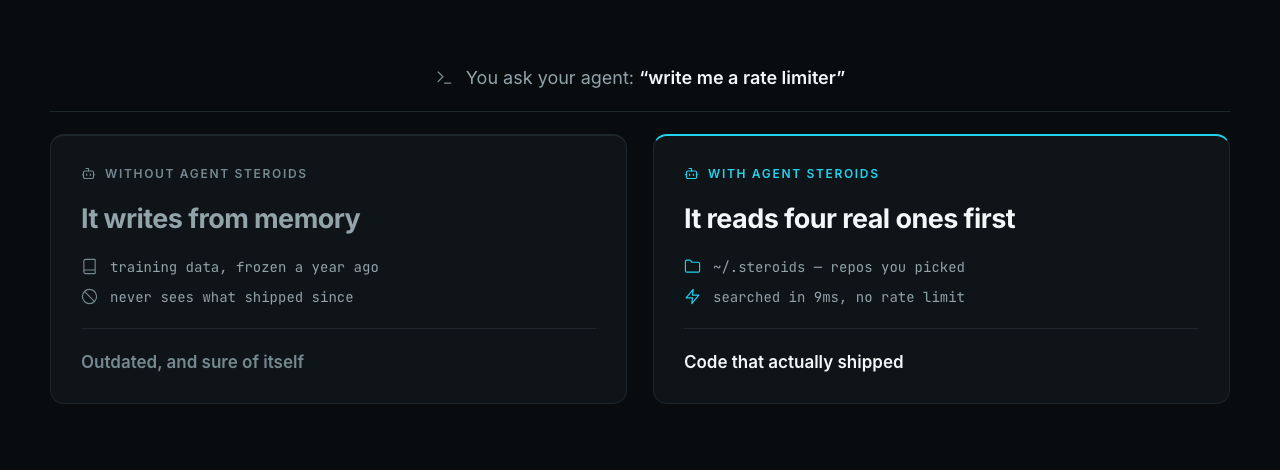
| Before | After | |
|---|---|---|
| Where its code comes from | a year-old memory | repos updated this week |
| Ask it for a rate limiter | it guesses one | it reads 4 real ones first |
| When it doesn't know | it makes something up | it says so, and finds repos |
⚡ Why not a hosted tool?
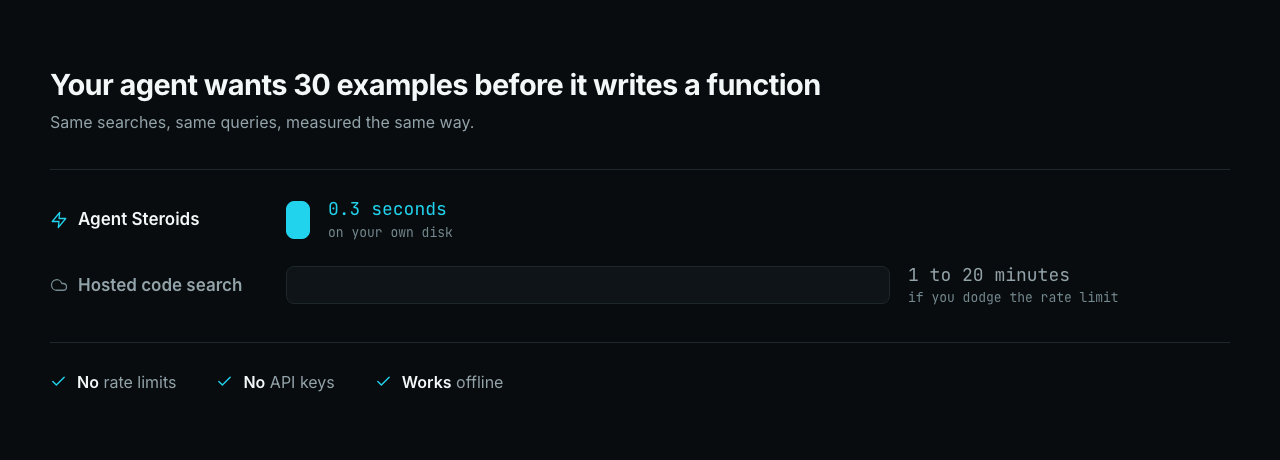
| 💉 Agent Steroids | ☁️ Hosted code search | |
|---|---|---|
| One search | 0.009s | 2s to 40s |
| Rate limit | none | hit within minutes |
| Works offline | yes | no |
| Costs | nothing | account, keys, quotas |
| What it can search | repos you chose | whatever they index |
Fine for looking something up once. Useless when your agent wants 30 examples before writing a function, which is exactly what you want it doing.
🪶 And it's tiny
| 40 repos | 145 MB | fits on a USB stick |
| 500 repos | 1.8 GB | the entire starter pack |
90% of every repo gets thrown away. No images, no docs, no lock files. Your agent can't read any of that anyway. Only the source it needs is kept.
🚀 Get it
One line, no Rust needed. macOS / Linux:
curl -fsSL https://raw.githubusercontent.com/KenKaiii/agent-steroids/main/install.sh | sh
Windows (PowerShell):
irm https://raw.githubusercontent.com/KenKaiii/agent-steroids/main/install.ps1 | iex
The script downloads the release for your machine, checks it against the release's SHA256SUMS, and puts it on your PATH. Read it first if you like; it is short. Have Rust? cargo install --git https://github.com/KenKaiii/agent-steroids works too.
Done. You now have a steroids command. It updates itself: steroids update also installs the latest release, and other commands mention one once a day. steroids config auto_upgrade false to opt out.
🤖 Then let your agent do the rest
Don't set this up yourself. Paste this into GG Coder, Claude Code, Cursor, Codex, whatever you run:
Install Agent Steroids for me: https://github.com/KenKaiii/agent-steroids

Then look at what I am building and curate a corpus for it:
  - Use `steroids discover` to find well starred, actively maintained repos
    that solve similar problems
  - Add around 20 of them with `steroids add`
  - Show me what you added and how much space it used
It reads the docs, installs itself, works out what your project needs, and fills the library.
Last step. Paste this into your agent's permanent instructions (CLAUDE.md, .cursorrules, wherever yours live) so it keeps using it:
I have a local corpus of current open source code at ~/.steroids. Use it
when the answer may be newer than your training, or when you don't know
which projects do this. Skip it when you already know the answer: it is
not a default research step. Results say when their code is from.

If your agent has a built-in `steroids` tool (GG Coder does; load it with
tool_search if it isn't listed), use it instead of the CLI below: several
calls in one reply run in parallel. Otherwise run the CLI.

  steroids search '<regex>' [--tag T] [--repo a/b,c/d] [--language L] [--path src] [--limit N]
  steroids search -F '$HOME'     literal text instead of a regex; past 10 matches,
                                 one line each (-C N for code around them)
  steroids define <a,b,c> [--repo a/b] [--path P]   where each is defined; with
                                 --repo or --path, each whole body (no file needed)
  steroids show <repo> <dir>     outline of every file in a folder
  steroids show <repo> <file>    a file, or its outline if over 6,000 characters
  steroids show <repo> <file> --symbols a,b      just those definitions' bodies
  steroids show <repo> <file> --from N --to M    a range, 6,000 characters a read
                                 (--no-comments drops comments)
  steroids changes <repo> [--version X]          a release's contents; --pattern
                                 'form|param' for the items that matter, whole
  steroids files <repo> [--path dir]   indexed files by directory (a big repo:
                                 its directories, then ask with --path)
  steroids repos [name]          indexed repos, with version and commit
  steroids recent --tag X        what changed upstream in the last 72 hours

Read the least that answers the question, in this order: `show <dir>` or a
file's outline to find where things are, then `--symbols` (or `define a,b
--repo X`) for the bodies, `--from/--to` only for code that is not a
definition. A read of part of a file ends with "uses": the same-repo helpers
that code calls, so you don't have to look them up one by one. Put all the reads you
need in one reply. Never loop `show` over whole files.

Repository names and languages are case-insensitive; any form `add` takes
(URL, owner/name) works for --repo. A --path without glob characters is a
prefix: `src` means `src/**`.

Add --json to search, define, show, changes, files, repos or discover for structured
output; a failure with --json is `{"error": "..."}` on stdout, exit 1.
Search and define stop at --max-tokens (default 1500, about 6,000 characters)
and name what they left out; show and changes take it only as a lower ceiling. Text says "N of M shown", JSON reports the cut as
`omitted`, separate from `more_available`.

If a search says the topic is not covered, that is a gap in my corpus, not a
bad query. Do not retry variations. Instead: run `steroids discover` to find
well starred, actively maintained repos that solve the problem, tell me what
you found and why it fits, and add them once I agree.
That's it. No plugin, no server. Without a built-in tool, your agent calls it the same way it calls grep.
📦 Or grab 500 repos in one go
curl -O https://raw.githubusercontent.com/KenKaiii/agent-steroids/main/starter-repos.txt
steroids add --from-file starter-repos.txt
TypeScript, Python, Rust, Go, React, Next.js, AI agents, RAG, MCP, databases, DevOps, security, mobile, game dev. Thirty categories. Every repo was checked: not archived, not a fork, committed to within the last year, well starred.
Takes about 25 minutes. Too much? The file is grouped by category with comments, so delete the sections you don't care about. One section is closer to 100 MB and a couple of minutes.
🎛️ Everything you can do
| Command | What it gets you |
|---|---|
steroids |
The full interface. Browse repos, search as you type |
steroids add <repo> |
Add a repo, or refresh one already added (skipped when upstream hasn't moved). Pasting a GitHub URL works too |
steroids index |
Runs by itself after every add, update and remove. --rebuild starts the index over |
steroids discover 'topic:ai-agents' |
Finds good repos for you. Add --add to take them |
steroids search '<regex>' |
What your agent calls. Results spread across projects |
steroids recent --hours 72 |
What these projects shipped in the last 3 days |
steroids update |
Pull the latest code. 98 repos in 5.5 seconds |
steroids tag --add rust,cli <repo> |
Label repos so your agent can search just a slice |
steroids tag --remove cli <repo> |
Take a label off again |
steroids audit |
What the filters let through: test-like names still indexed, lopsided repos, empty ones |
steroids index --refilter |
Drop tests/samples/generated files an older version indexed; no network. compact afterwards reclaims the disk |
steroids decay |
Auto-drop repos that went quiet. Dry run first |
steroids stats |
What it's costing you in disk |
steroids upgrade |
Install the latest release. --check only tells you if there is one |
Keep the corpus on a portable SSD and carry it between machines. Set it once and every later command, and the agent's tool, uses it:
steroids config root /Volumes/MyDrive/steroids   # remembers it; `default` goes back
mv ~/.steroids/corpus.db ~/.steroids/blobs.bin /Volumes/MyDrive/steroids/  # carry over what you have
Or press l in the interactive browser (steroids with no arguments): the
system folder dialog opens (Finder, zenity/kdialog, or the Windows picker);
pick the drive, then press Enter to confirm or add a subfolder. The dialog
shows hidden folders on macOS so ~/.steroids is reachable (elsewhere press
Ctrl+H); leaving the field empty also goes back to the default. Over SSH or
without a desktop you type the path instead. If the
drive is unplugged, commands stop with a clear error rather than quietly
starting an empty corpus on the internal disk. For a one-off, --root <dir>
or STEROIDS_ROOT=<dir> win over the stored setting.
⚙️ Settings
steroids config                  # show everything
steroids config min_stars 500    # change one
| Setting | Default | What it does |
|---|---|---|
decay_months |
0 |
Drop repos with no commits in N months. 0 means never |
decay_archived |
true |
Also drop repos the owner has archived |
auto_discover |
false |
Top up with new repos on every update |
discover_query |
topic:ai-agents |
What to look for when discovering |
discover_limit |
25 |
Cap on how many one discovery run adds |
min_stars |
500 |
Skip anything below this |
auto_upgrade |
true |
Replace the binary with new releases during update |
max_age_months |
24 |
Skip repos with no commits in N months. 0 accepts any age |
Decay measures from the repo's last commit, not when you added it. A library first published in 2011 but committed to yesterday counts as fresh. Archived repos are dropped whatever their age, since an archive never gets another fix.
Settings live inside the library itself, so they travel with it.
👨💻 For devs
Rust 1.88 or newer. No other dependencies, no runtime, no daemon.
git clone https://github.com/KenKaiii/agent-steroids.git
cd agent-steroids
cargo install --path .
cargo test --release                       # engine and unit tests
bash tests/commands.sh                     # every command, including failures
cargo clippy --release --all-targets -- -D warnings
cargo fmt
tests/commands.sh asserts on output and exit code, since a command that prints an error and exits 0 looks like success to whatever called it. It needs network access. Some tests need a populated corpus and skip without one:
STEROIDS_TEST_ROOT=~/.steroids cargo test --release
How it works. Repos come down as tarballs straight from codeload, which has no rate limit, so a 500 repo ingest is capped by your bandwidth and nothing else. Files are filtered while the download is still streaming, so the full repo never lands on disk. What survives gets compressed against a shared zstd dictionary trained on your own corpus. Search narrows candidates with a non-positional trigram index, then confirms each hit with a real regex, which is why the index costs a fraction of what a normal one would.
add, update and decay make zero GitHub API calls. Code comes from codeload, the head commit from git's own protocol, and the last-commit date out of the archive's file timestamps. None of those are rate limited. discover is the one exception: GitHub search allows 10 requests a minute without a token. Set GITHUB_TOKEN to raise it; when it is unset and the gh CLI is logged in, gh auth token is used automatically.
update checks each repo's latest commit first and only downloads the ones that moved, so the cost scales with how many repos you have rather than how big they are. A repo that fails, renamed, deleted or dropped connection, is reported and skipped; re-running retries only what is missing.
Gitee. References can be prefixed gitee:owner/name and the plumbing works, but ingest usually fails from outside China, because Gitee answers archive requests with a captcha unless it recognises the client. Getting past that would mean impersonating another tool to evade their bot check, so the request is made honestly and the failure reported.
src/filters.rs  what earns disk space
src/fetch.rs    tarball download and filtering
src/bulk.rs     parallel ingest
src/store.rs    compressed content store (sqlite + blobs.bin)
src/index.rs    trigram index
src/search.rs   query: narrow by trigram, verify by regex
src/tui/        the interactive browser
👥 Come hang out
- YouTube @kenkaidoesai, tutorials and demos
- Raid+: first paying client in 90 days or your money back, plus private tools
- work.kenkais.com: want it built for you?
AGPL-3.0 licensed. Use it, change it, ship it. If you run a modified version as a service, share your changes under the same license.
Your agent stops guessing. It reads what actually shipped.
curl -fsSL https://raw.githubusercontent.com/KenKaiii/agent-steroids/main/install.sh | sh
Explore related projects
Loading…