
KalenHwei/PaperDuet
KalenHwei/PaperDuet has 63 GitHub stars and 3 forks. GitHot measured 0 stars in 24 hours. Last checked 2026-11-15 08:46 UTC. Last push 2026-11-08.
Measured star growth
- in 24h
- 0
- in 7 days
- Collecting history
- in 15 days
- Collecting history
- in 1 month
- Collecting history
Net star changes over overlapping periods, not daily totals. Missing measurements are left blank. Stars measure attention, not software quality.
About
Mirror your translation! A lightweight AI paper translator for Mac and Windows. The original PDF and its translation sit side by side, page for page, with formulas, figures and tables in place. Translates into eight languages with a local model: no sign-in, no fees, and papers stay on your computer.
Developer ToolsREADME.md
Original

PaperDuet
A lightweight AI paper translator built for researchers!
paperduet.com
English · 简体中文 · 繁體中文 · 日本語 · 한국어 · Français · Deutsch · Español · Italiano · Polski · Русский









PaperDuet is a lightweight AI mirror translator for papers that keeps the original layout.
Six open-source AI translation models run on your computer, or connect an online API.
Free to use, no sign-up needed!
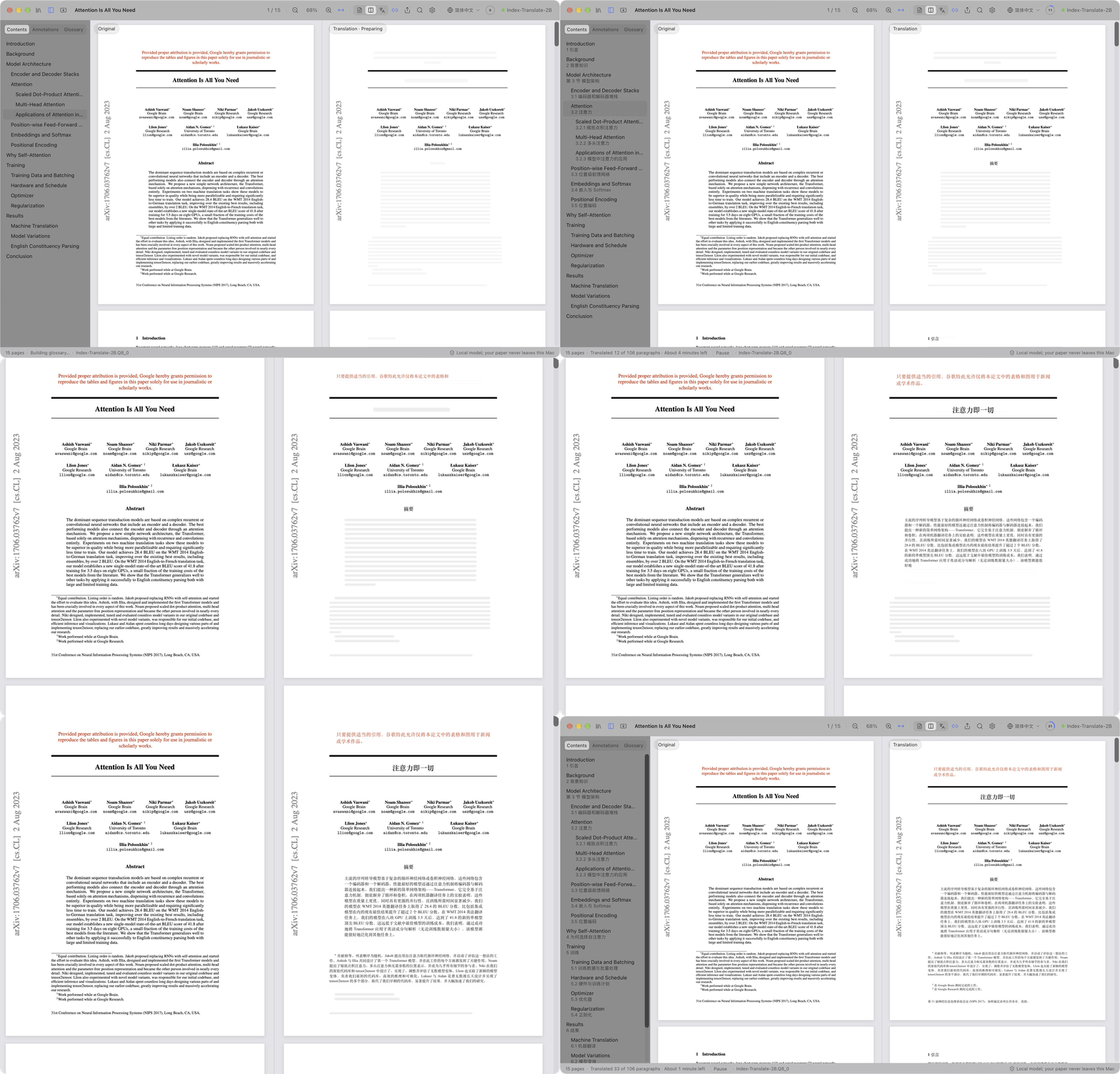
A recording of Attention Is All You Need (15 pages) being translated from scratch
PaperDuet is a lightweight AI mirror translator for papers. It lays out the original and the translation as mirror images, with formulas, figures and tables corrected and aligned page by page. It's free: with a local model everything runs on your computer, and an online API is there if you want one.
Every page, made easy

The original paper is on the left and its translation on the right, and both sides scroll and zoom together. Columns, headings, captions, footnotes and references are recognised automatically, and paragraphs that run across columns or pages are joined up. The two sides line up exactly, so comparing them is easy.
Saving translation? AI summary? No problem!

The toolbar shows the translation progress. When the whole paper is done, the ring turns into a green check and a bubble pops up: one click saves the translation as a PDF wherever you choose. The light bulb next to it is the AI summary: open it to read what the paper asks, how it works and what it found, written by the model after reading the whole paper. You can also choose from six models to suit your computer and your needs!
Think it. Find it.

Every paper you've read lives in your library, ordered by last studied, date added or name, and a right-click puts your own labels on it. AI Organize tags each one by field and topic, and the papers you pick rise to the top. AI Search finds a paper by its title, its text, its translation or its summary, in English or Chinese.
Everything you've learned, at a glance.

Open the Knowledge Space in your library: the papers you've studied gather by field, subfield and topic in a 3D space. Drag with ⌘ held (Ctrl on Windows and Linux) to turn it, scroll to zoom, and double-click a field to see only its papers. The timeline keeps track of which papers you read each day, for how long, and how many days in a row you've kept at it.
Don't get it? Go click it.

Headings are translated first, so you can see how the paper is structured; then the title, abstract and introduction. Want a later passage now? Double-click it and it jumps the queue, no waiting for the progress to get there.
Taking notes? You got it!

Highlight, underline and write notes right on the translation; the matching sentences in the original are marked too. Export the original PDF with your notes as standard PDF annotations, ready for Preview, Zotero and other apps.
And there's more
- Ten languages to translate into. Switch between 简体中文, 繁體中文, 日本語, 한국어, Français, Deutsch, Español, Italiano, Polski and Русский in one click from the toolbar.
- A translated PDF in one click. Once a paper is fully translated, one click saves the translation wherever you choose, in the original layout.
- Quality checks built in. Formulas, numbers and sentence order are checked in every reply, with automatic retries, and a glossary for each paper keeps terms consistent.
- You decide what gets translated. Right-click any block to translate it or keep the original.
- Read your way. Search the original and the translation at once, browse a bilingual outline, point at a paragraph to find its twin, and show the original, the translation or both. PaperDuet remembers where you left off.
- Your library, Knowledge Space and AI search. Every paper you read or import is in the library, ordered by last studied, date added or name, with your own labels a right-click away. AI Search finds one again by its title, text, translation or summary, in English or Chinese, AI Organize sorts papers by field and topic, and the Knowledge Space shows what you've studied as a 3D map and a timeline.
- A summary of every paper. Once a paper is translated, click the light bulb: the translation model writes a short summary in your interface language and keeps it with the paper.
- Export anywhere. The original PDF with your marks, the translated PDF and your notes as Markdown, all readable in other apps too.
- One-click updates. Updating is easy: one click installs the new version.
- Made to look good. A clean, beautiful glass design, with light, dark and night reading modes.
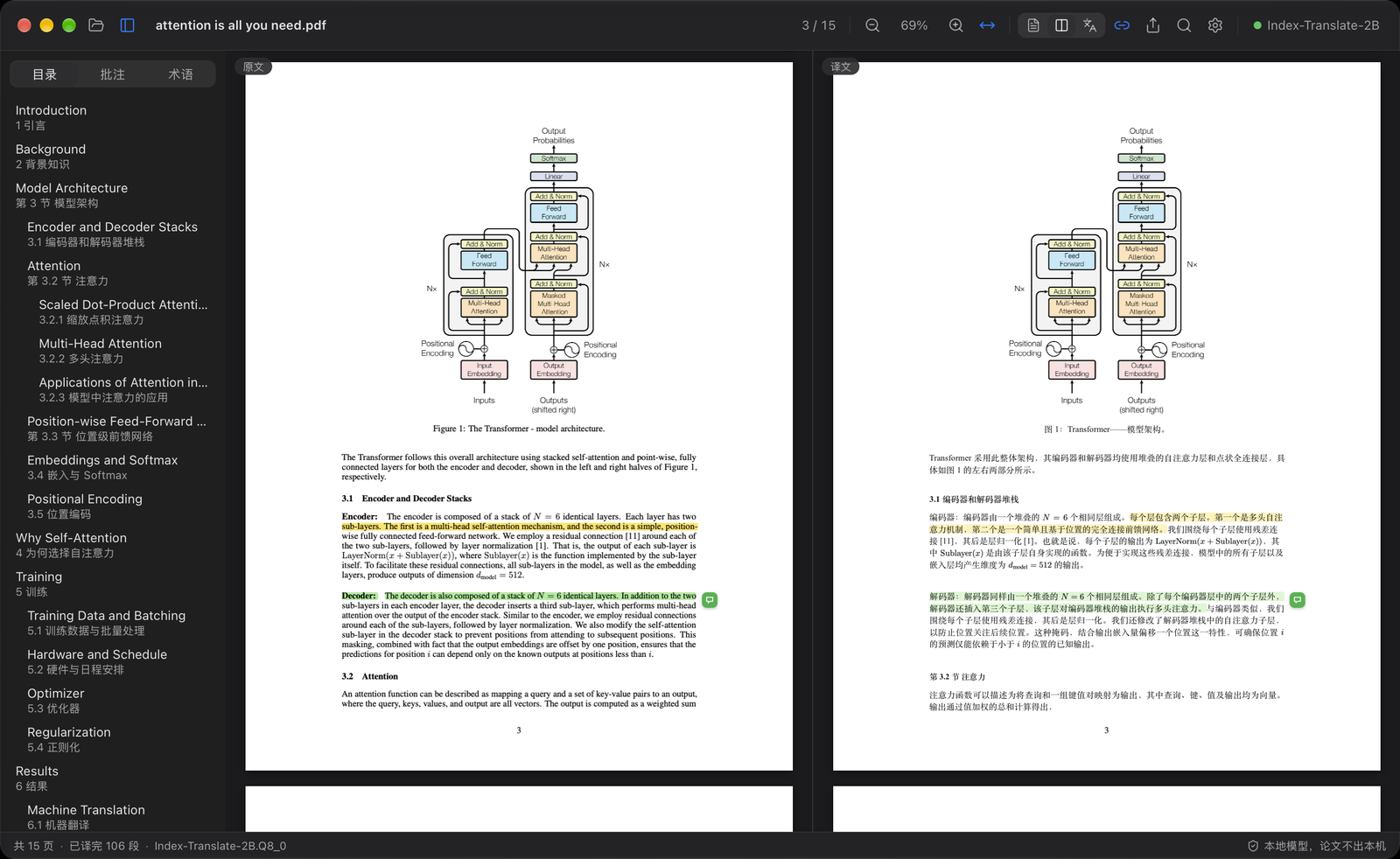
Six models, all on your computer
Pick a model the first time you open PaperDuet, and switch anytime in Settings › Model › Change Model. Every one of them is built for translation and runs fully offline once it is downloaded.
| Model | By | Size | Best for |
|---|---|---|---|
| Index-Translate-2B (recommended) | bilibili Index team | 2.1 GB | The best all-rounder, tuned for PaperDuet's checks and glossary |
| Hy-MT2-1.8B | Tencent Hunyuan | 1.9 GB | Fast and light |
| LMT-60-4B | NiuTrans | 4.7 GB | Translations that stay close to the source |
| LMT-60-0.6B | NiuTrans | 0.8 GB | Modest computers: the smallest and fastest |
| Hy-MT2-7B | Tencent Hunyuan | 8.0 GB | The most fluent Chinese, on computers with 16 GB of memory or more |
| TranslateGemma-4B (experimental) | 4.1 GB | Trying Google's translation model |
With the recommended model, a 15-page paper takes about 2 minutes on an M5 Pro, or about 1 minute with "Paragraphs at Once" set to 2 or 3 in Settings › Model.
Already have one of these models from LM Studio, llama.cpp or Hugging Face? PaperDuet finds it and uses it where it is, with no second download.
Computer too slow for a local model? Pick Use an API in the model choice and enter your own API key to use OpenAI, Claude, DeepSeek, Qwen, Kimi, GLM, Doubao or any OpenAI-compatible service. The local models fold away, and translation, summaries, AI Organize and AI Search all go through that service. Your key stays on your computer.
Private by design
- Your papers, translations and notes stay on your computer. With an API, the text to translate is sent to the service you chose.
- Only if you agree, PaperDuet sends anonymous usage and diagnostic data (version, system, interface language, model and kinds of errors), never paper content, and you can turn it off anytime in Settings.
- When something goes wrong, PaperDuet sends an error report to the developer: what went wrong, the version and the system, without file paths or paper content. You can turn this off in Settings › Data.
- When you write feedback in the app and click Send, what you wrote (and your email, if you give one) goes to the developer with the version and the system.
- With a local model, PaperDuet goes online only to download a model, to check for updates, to send the data and reports above and to send your feedback; you can turn off all but the model download.
Get started
A Mac needs Apple silicon (M1 or later) and macOS 13.3 or later; a PC needs 64-bit Windows 10 or 11; Linux needs 64-bit Ubuntu 22.04 or later (or a similarly recent distribution).
Mac
- Download the latest
.dmgfrom Releases. - Drag PaperDuet into Applications and open it from there.
- First launch only: PaperDuet isn't notarized by Apple yet, so macOS asks you to confirm. Open System Settings › Privacy & Security and click Open Anyway. (Or run
xattr -dr com.apple.quarantine /Applications/PaperDuet.appin Terminal.) - Pick a model. PaperDuet downloads it, or finds the copy you already have, and starts translating right away.
Windows
- Download the latest Windows installer (
_x64-setup.exe) from Releases. - Run it. First time only: if Windows says “Windows protected your PC,” click More info, then Run anyway.
- Pick a model. PaperDuet downloads it, or finds the copy you already have, and starts translating right away.
Linux
- Download the latest
.deb(Ubuntu, Debian) or.AppImage(other distributions, or without administrator rights) from Releases. .deb: runsudo apt install ./PaperDuet_*_amd64.debin a terminal, then open PaperDuet from the applications menu..AppImage: nothing to install; runchmod +x PaperDuet_*_amd64.AppImage, then open it.- Pick a model. PaperDuet downloads it, or finds the copy you already have, and starts translating right away.
That's all. The translation engine is built into the app, and updates take one click.
Keyboard shortcuts
| Action | Shortcut |
|---|---|
| Open a PDF | ⌘O |
| Close the paper | ⌘W |
| Search both sides | ⌘F |
| Next / previous match | ⌘G / ⇧⌘G |
| Zoom in / out / fit width | ⌘+ / ⌘− / ⌘0 |
| Zoom around the pointer | ⌘ + scroll, or pinch on the trackpad |
| Move the pages | ⌘ + drag |
| Translate this part next | Double-click text that is not translated yet |
| Highlight the selection | H |
| Add a note to the selection | N |
| Highlight colour | 1 to 5 |
| Undo / redo | ⌘Z / ⇧⌘Z |
| Show or hide the sidebar | ⌘\ |
| Synchronized scrolling on or off | ⌘L |
| All shortcuts | ⌘/ |
H, N and 1 to 5 work on selected text. On Windows and Linux, use Ctrl for ⌘ and Shift for ⇧.
FAQ
Which model should I choose?
Start with Index-Translate-2B. For more speed, pick Hy-MT2-1.8B. For the most fluent Chinese on a computer with 16 GB of memory or more, pick Hy-MT2-7B. If your computer struggles, pick Use an API.
Is it free?
Yes, for personal study and research, and for universities, schools, research institutes and other non-profits. Using PaperDuet at or for a company needs a commercial license: write to [email protected].
Roadmap
- Typeset translations from arXiv. Translate a paper's LaTeX source and compile it with Chinese fonts for a fully typeset Chinese edition.
Changelog
- 0.7.4 (2026-11-08): fixed the highlighting issue reported on GitHub.
- 0.7.3 (2026-11-08): a highlighter (hold Shift to change its color) and a light/dark switch; translation retries on its own instead of stopping; feedback can include screenshots.
- 0.7.2 (2026-11-05): smoother animations.
- 0.7.1 (2026-11-05): we made the library nicer to use.
- 0.7.0 (2026-11-05): we rebuilt the AI Library 🎉! It adds the Knowledge Space, and working with the library is much smoother. The toolbar buttons are also simpler and more practical.
- 0.6.12 (2026-11-05): to fix layout problems, a visual page layout model now checks the layout: tables, formulas, pictures, page headers and footers are no longer translated by mistake, and text taken for a table is translated, which makes translations far more accurate and robust. The layout model downloads in the background with the translation model.
- 0.6.11 (2026-11-04): Thank you to the many users who have sent us so many valuable error reports; for privacy reasons we cannot thank you by name. This update mainly fixes whole papers that could not be translated because of a recursion bug, paragraphs partly left untranslated because a checking rule misjudged them, and inaccurate layout recognition. We hope this update brings everyone a better experience.
- 0.6.10 (2026-11-04): API connection issues are fixed.
- 0.6.9 (2026-11-03): laggy scrolling in the Linux version is fixed.
- 0.6.8 (2026-11-03): a new model, LMT-60-0.6B: the smallest (805 MB) and fastest, for modest computers.
- 0.6.7 (2026-11-03): we're happy to release PaperDuet for Linux!
- 0.6.6 (2026-11-03): journal papers whose layout was misread: the two columns no longer run together, an abstract on a shaded panel is translated, and the outline lists only the section headings.
- 0.6.5 (2026-10-31): papers with line numbers (manuscripts, for example): the numbers no longer get into the translation or break paragraphs apart.
- 0.6.4 (2026-10-30): fixed some known formatting issues.
- 0.6.3 (2026-10-29): fixed some known interface logic issues.
- 0.6.2 (2026-10-28): on Windows, you can choose where the models are kept; models already downloaded move along.
- 0.6.1 (2026-10-28): fixed some known formatting issues.
- 0.6.0 (2026-10-28): a short tour of the main controls the first time you open a paper, and Beta feedback: send us a note right from the status bar.
- 0.5.17 (2026-10-28): fixed some known formatting issues.
- 0.5.16 (2026-10-28): paragraphs of manuscripts (exported from Word, double-spaced) no longer stay in English: lines with a highlight behind them are translated, double-spaced paragraphs are translated whole instead of line by line, and figure legends after the references are translated.
- 0.5.15 (2026-10-28): formula symbols in Elsevier journals are no longer garbled: Greek letters, ≤, ∀, ≠ and hatted letters (Ŝ, q̂) no longer show up as plain letters, and a superscript set high no longer jumps to the line above.
- 0.5.14 (2026-10-28): fixed some known formatting errors.
- 0.5.13 (2026-10-28): formulas no longer come out garbled: display equations with fractions and sums are kept whole instead of being translated piece by piece over themselves, and inline sums, square roots and widely spaced lines of formulas no longer break their sentence apart.
- 0.5.12 (2026-10-27): journal papers come out more accurately: lines of statistics, numbered subsection headings, sentences running on into the next column, Greek letters such as χ², accented names and minus signs in tables are no longer garbled; the exported translated PDF has even letter spacing. Special thanks to momo on RedNote for the suggestions.
- 0.5.11 (2026-10-27): pseudo-code is translated line by line, keeping its line numbers, indentation and keywords; tables are found more reliably, their cells stay in the original and only titles and notes are translated, so they no longer come out jumbled; sums within a sentence no longer go missing from the translation.
- 0.5.10 (2026-10-27): translation through an online API: if your computer struggles with the local models, pick Use an API in the model choice to use OpenAI, Claude, DeepSeek, Qwen, Kimi, GLM, Doubao or any OpenAI-compatible service; the local model list folds away when you do.
- 0.5.9 (2026-10-26): fixed existing problems.
- 0.5.8 (2026-10-26): Polish as a translation and interface language; fixes: on macOS 26 and earlier, papers could not be read or translated; on macOS 27, saving the translated PDF failed for some papers.
- 0.5.7 (2026-10-26): better reading and translation of journal papers, tested paper by paper on articles from 20 journals: columns, headings, reference lists, tables, captions and publishers' own symbols; Science papers are no longer left largely in English, and appendices after the references are translated.
- 0.5.6 (2026-10-25): Italian as a translation and interface language; error reports to the developer when something goes wrong, to help fix problems (on by default, can be turned off in Settings › Data).
- 0.5.5 (2026-10-25): fixed loosely set lines in journal papers being split into stray words, which left words out of the translation or put them in the wrong place; the abstract is translated right after the title; fewer "Layout analysis failed" errors; dashes in Elsevier papers no longer read as "e".
- 0.5.4 (2026-10-24): a cleaner interface without the extra explanatory text; the AI search field now reads "Search with AI".
- 0.5.3 (2026-10-24): PaperDuet now asks once whether you'd like to share anonymous usage and diagnostic data to help improve it; never paper content, and you can turn it off anytime in Settings › Data.
- 0.5.2 (2026-10-24): AI Search 🔍 in the library finds papers you've read by title, original text, translation, summary or tags, in English or Chinese; search and AI Organize move the papers found to the top and grey out the rest.
- 0.5.1 (2026-10-24): a library in place of the folder panel, with every paper read or imported, renamed in place and summarised; import many PDFs or a whole folder; AI Organize ✨ filters papers by field and topic; fixes for garbled tables and paragraphs that failed to translate in some papers.
- 0.5.0 (2026-10-24): a paper summary 💡 behind the light bulb once the whole paper is translated; the folder panel opens its folder in one click; a Windows version.
- 0.4.1 (2026-10-23): clearer descriptions in the model list and in Settings.
- 0.4.0 (2026-10-23): the interface comes in 9 languages. It follows your system language by default, and you can switch it in Settings › Appearance › Interface Language.
- 0.3.2 (2026-10-23): further alignment fixes when translating into other languages.
- 0.3.1 (2026-10-23): improvements to the progress ring and the toolbar.
- 0.3.0 (2026-10-23): eight languages to translate into 🎉, switched in one click from the toolbar; a better progress ring and smoother interactions.
- 0.2.1 (2026-10-23): five translation models to choose from; a new launch screen.
- 0.2.0 (2026-10-23): update checks inside the app, with one-click updates.
- 0.1.0 (2026-10-22): first release.
Full history: CHANGELOG.md.
License
PaperDuet is free for noncommercial use under the PolyForm Noncommercial License 1.0.0. Use it and share it for personal, study, research or non-profit purposes; when you share it, include the license and the line Required Notice: Copyright (c) 2026 Kalen Yongda Wei. For commercial use, write to [email protected].
Copyright © 2026 Kalen Yongda Wei.
Acknowledgments
PaperDuet is built on Tauri, pdf.js, pdf-lib, llama.cpp, React, Zustand and Lucide. The translation models come from the bilibili Index team (Index-Translate-2B), Tencent Hunyuan (Hy-MT2), NiuTrans (LMT) and Google (TranslateGemma); they are released under Apache-2.0, except TranslateGemma, which is under the Gemma Terms of Use. Full license texts are in the app (Settings › About › Third-Party Licenses).
The paper in the animations is Attention Is All You Need by Vaswani et al.