
JohT/speclet
JohT/speclet has 37 GitHub stars and 4 forks. GitHot measured 0 stars in 24 hours. Last checked 2026-11-09 23:13 UTC. Last push 2026-11-02.
Audio Spectrum Analyzer using Fourier- and Wavelet-Transformation
Measured star growth
- in 24h
- 0
- in 7 days
- Update delayed
- in 15 days
- Update delayed
- in 1 month
- Update delayed
Net star changes over overlapping periods, not daily totals. Missing measurements are left blank. Stars measure attention, not software quality.
README.md
Original Speclet
VST Audio Spectrum Analyzer Plugin using Fourier- and Wavelet-Transformation.
- (c)2011 by Johannes Troppacher (Austria)
- For graduation at Hochschule Mittweida - University of Applied Science (Germany)
- Paper (german): Echtzeitspektralanalyse auf Basis der Fourier- und Wavelet-Transformation implementiert als VST-Plugin
- License: GNU GENERAL PUBLIC LICENSE v3
- For prototyping and experimentation without programming visit JoWa Wavelet Library in Native Instruments Reaktor User Library
🖥 User Interface
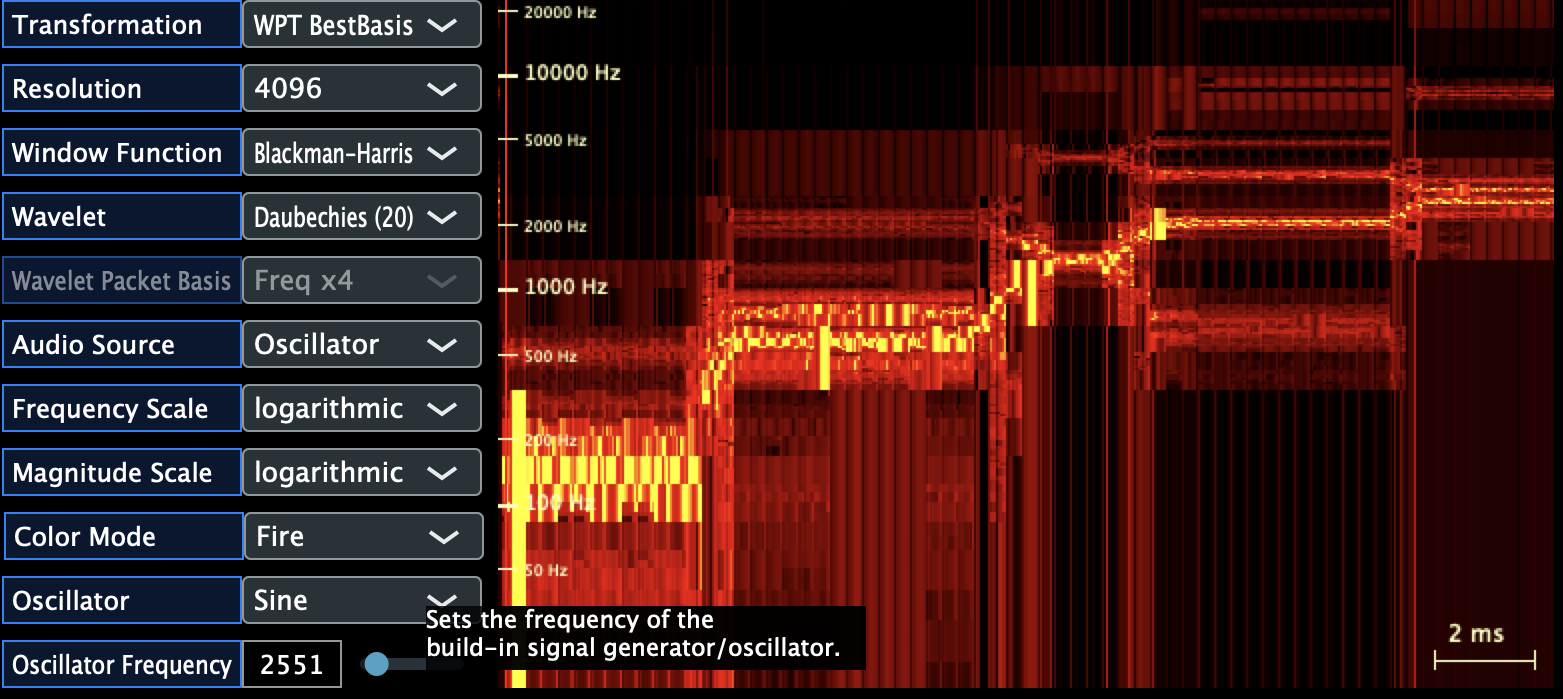
📖 User Guide
Have a look at the User Guide for further screenshots and to get started using the analyzer.
🏛️ Architecture
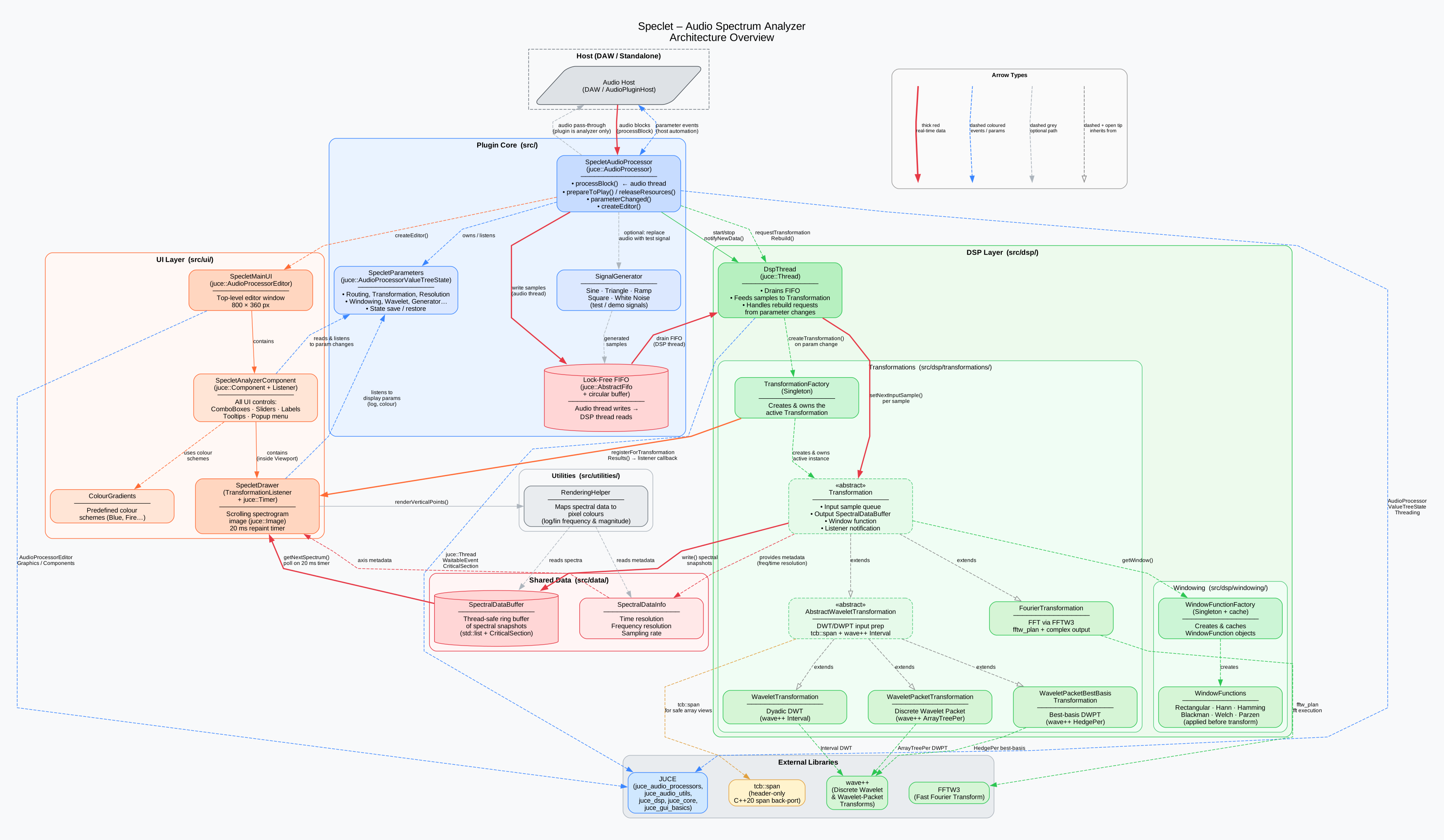
See Architecture Documentation for detailed explanations of components, threading model, and data flow.
🏗 Build the Project
Prerequisites
- Installing GIT
- Installing CMake
- Download Ninja
- (Windows only) Install Visual Studio Build Tools with Visual Studio Installer, select Desktop Development for C++ and add all optional "Clang" components
- (Optional) Download Visual Studio Code
Clone
Download the project as zip or clone it using GIT:
git clone https://github.com/JohT/speclet.git
Command Line
See COMMANDS.md if you prefer to use the command line.
Visual Studio Code (MacOS)
- Using Clang in Visual Studio Code
- Install recommended extensions specified in speclet.code-workspace
- Select the kit that fits to your machine (
STRG+SHIFT+P, Type "CMAKE kit")
Visual Studio Code (Windows)
- Install Visual Studio Build Tools with Visual Studio Installer, select Desktop Development for C++ and add all optional Clang Features
- Install recommended extensions specified in speclet.code-workspace
- Select the kit that fits your machine (e.g. amd64) (
STRG+SHIFT+P, Type "CMAKE kit"). Successfully tested with "Visual Studio Build Tools 2022 Release - amd64".
🩺 Testing
Run Unit Tests within your command line interface (CLI)
ctest --test-dir build/test
Run Unit Tests in Visual Studio Code
Build the project and use extension "matepek.vscode-catch2-test-adapter" to show all the Catch2 CTest cases under "Testing" (left "activity bar", below extensions button).
Build AudioPluginHost for exploratory testing
cmake.exe --build build --config Debug --target AudioPluginHost
🔎 Troubleshooting
See TROUBLESHOOTING.md for common issues and their resolutions.
🛠 Used Tools
Modernized 2022 using the following tools:
- The LLVM Compiler Infrastructure
- Ninja
- CMake
- Setup-free CMake dependency management
- Plugin Validator
This version is not ready yet.
It contains the code from back then, that doesn't compile any more.
It also contains the plugin made with the tutorial Learn Modern C++ by Building an Audio Plugin (w/ JUCE Framework) - Full Course YouTube
as a template to start the modernization.
📚 Used Libraries
This plugin was made in 2011 (modernized 2022) using the following frameworks and libraries:
VST SDK 2.4 rev2 (2011) by Steinberg
http://www.steinberg.net/en/company/developer.html
visit the link above for licensingVST 3 Audio Plug-Ins SDK (2022) by Steinberg
http://www.steinberg.net/en/company/developer.html
visit the link above for licensingJUCE
by Raw Material Software (2011)
http://www.rawmaterialsoftware.com/juce (2011)
License: https://github.com/juce-framework/JUCE/blob/master/LICENSE.md (2022)FFTW
by MIT (Matteo Frigo and Steven G. Johnson) http://www.fftw.org
GNU General Public LicenseWAVE++
by Ryerson Computrational Signal Analysis Group
(c) 1999 by S. E. Ferrando, L. A. Kolasa and N. Kovacevic
https://math.ryerson.ca/~lkolasa/CppWavelet.html
" Permission is granted for anyone to copy, use, or modify these programs and documents for purposes of research or education, provided this copyright notice is retained, and note is made of any changes that have been made. Use for commercial applications is only allowed by permission of the copyright holders. "Implementation of C++20's std::span for older compilers (c) 2019 by Tristan Brindle https://github.com/tcbrindle/span Boost Software License 1.0
Trademarks
- Steinberg is a registered trademarks of Steinberg Media Technologies GmbH.
🔎 References
Digital Signal Processing
- ⭐ Window Functions and Their Applications in Signal Processing (PDF)
- Understanding FFT Windows (PDF, 2013)
- Comparison of Matching Pursuit Algorithm with Other Signal Processing Techniques for Computation of the Time-Frequency Power Spectrum of Brain Signals
- Fourier uncertainty principle
- JoWa Wavelet Library in Native Instruments Reaktor User Library
Templates and Examples
- ⭐ Pamplejuce
- Cross-platform CI for JUCE audio plugins with Github Actions
- JUCE CMake Repo Prototype
- Example using CPM package manager with JUCE
- CLAP CLever Audio Plugin
- Integration of Catch, CMake and CMake CodeCoverage
- The Stochas Sequencer
- JUCE 6 Preview - Demo Project
Performance Tracing/Logging (Profiling, Instrumentation)
- Google Chrome Browser Trace Log Viewer
- The Cherno - VISUAL BENCHMARKING in C++ (YouTube)
- ⭐ Instrumentor.h (Code Snippet)
- Instrumentor.h David Churchill Mod (Code Snippet)
- Instrumentor.h Mattias Aronsson Mod
Testing
- ⭐ CMake's CTest
- ⭐ Catch2 CMake Integration
- ⭐ Plugin Validator
- Catch2 Data Generators
- Coverage for tests with cmake and catch2
- Findcodecov.cmake
Windows Build
Installation
- VST plug-in locations on Windows
- VST plug-in locations on Mac OS X and macOS
- Where are third-party Audio Units plug-ins installed on Mac?
Other
- ⭐ std::span implementation for C++11 and later
- C++ Singleton
- 10 Cmake Tips & Tricks
- Reference to non-static member function must be called
- Pointer-to-Member Function
- Commit Message Guidelines
- Undefined symbol _kIOMainPortDefault
- CheckTypeSize (FFTW failed for multiple architectures)
- Article CMake Ninja Combo: The Gist
Explore related projects
ytdl-org/youtube-dl
Command-line program to download videos from YouTube.com and other video sites
141,527 starsexcalidraw/excalidraw
Virtual whiteboard for sketching hand-drawn like diagrams
135,396 starsgodotengine/godot
Godot Engine – Multi-platform 2D and 3D game engine
119,942 starsmrdoob/three.js
JavaScript 3D Library.
117,983 stars