
JoaoPauloCMarra/react-native-nitro-qrcode
JoaoPauloCMarra/react-native-nitro-qrcode has 26 GitHub stars and 0 forks. GitHot measured 0 stars in 24 hours and 0 in 7 days. Last checked 2026-11-21 09:32 UTC. Last push 2026-11-18.
Measured star growth
- in 24h
- 0
- in 7 days
- 0
- in 15 days
- Collecting history
- in 1 month
- Collecting history
Net star changes over overlapping periods, not daily totals. Missing measurements are left blank. Stars measure attention, not software quality.
About
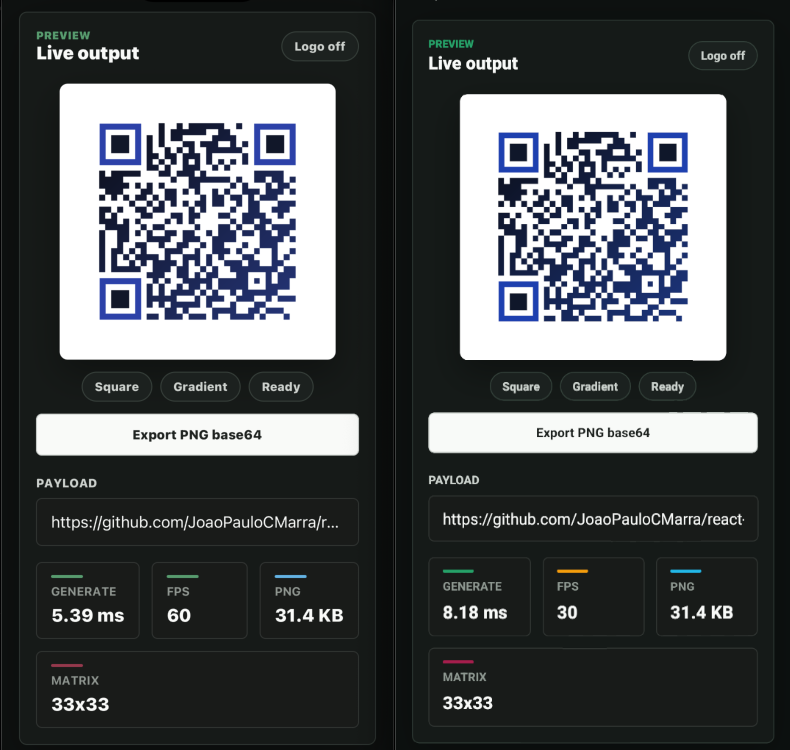
Fast QR code generator for React Native and Expo with Nitro, native C++, PNG export, gradients, and no react-native-svg or Skia.
Web & AppsREADME.md
Originalreact-native-nitro-qrcode






Typed QR code generation for React Native, Expo development builds, and web.
The native iOS and Android paths use a shared C++ Nitro module and the web path
uses a JavaScript fallback. The component renders a PNG-backed React Native
Image, so apps do not need react-native-svg, Skia, or canvas packages.
Use it when you need a single package for live QR rendering, PNG export, SVG export, packed matrix export, styling, logo safe areas, scanability checks, and deterministic caching.
Install
Use your app's package manager to install the package and its Nitro peer:
bun add react-native-nitro-qrcode react-native-nitro-modules
For Expo development builds:
bunx expo install react-native-nitro-qrcode react-native-nitro-modules
bunx expo prebuild
For bare React Native apps:
cd ios && pod install
Expo Go cannot load Nitro native modules. Use an Expo development build or a bare React Native app.
Compatibility
| Package | Supported range |
|---|---|
| React | >=18.2.0 <20.0.0 |
| React Native | >=0.77.0 <1.0.0 (Nitro 0.37 minimum); tested on 0.88.0 |
| Nitro Modules | >=0.37.0 <0.38.0 |
| Expo | SDK 53 and newer development builds; tested on SDK 58; Expo Go is not supported |
| iOS | React Native's min_ios_version_supported (15.1 on RN 0.77–0.88) |
| React Native Web | >=0.19.0 <1.0.0 |
| Node | >=18.0.0 |
Supports React Native 0.77 or newer and Expo SDK 53 or newer (the
react-native-nitro-modules 0.37 minimum); tested on React Native 0.88.0 and
Expo SDK 58.
The current example and package gate use React Native 0.88.0 and Expo SDK 58
(expo@~58.0.16).
check:ci also compiles the public source against React Native 0.87.0 for
Strict TypeScript compatibility. Expo SDK 58 selects React Native 0.88.0; do
not override that version in the example. The baseline uses React 19.3.0 and
Nitro Modules 0.37.1. Versions below the tested baseline follow the declared
peer ranges but have no automated coverage in this repository.
Upgrade from 0.8.x
Version 0.9.0 changes default output. Check these points:
- React Native 0.77 or newer. The
react-nativepeer range is now>=0.77.0(Expo SDK 53 or newer), becausereact-native-nitro-modules0.37 does not compile on React Native 0.76. - Gradients cover finders, timing, and alignment patterns. Unset
eyeColor,eyeballColor,alignmentColor, andtimingColornow follow the foreground fill, including a gradient. To keep solid patterns, set those colors explicitly, for exampleeyeColor="#000000"andeyeballColor="#000000". Explicit colors always paint solid. - Web edge rounding. Web PNG module and quiet-zone edges use floor rounding like native, so web PNG bytes change by up to one pixel per module edge. Regenerate stored web snapshots.
- Package resolution. Resolvers without the
react-nativecondition (node,import,require,default) now load the web entry. That entry importsreact-native, so those environments must aliasreact-nativetoreact-native-web, as Expo web and Next.js setups do. - Strokes are unchanged.
strokeColorandeyeStrokeColordraw a stroke only when set to a color other than#000000;#000000still means no stroke.
Upgrade from 0.7.x
Version 0.8.0 adds toPngArrayBuffer / toPngArrayBufferAsync (and the
matching Nitro object methods). Existing base64 and data-URI helpers stay;
they now wrap raw PNG bytes. Native RGBA export (gradients, layered colors,
logo-area clearing) uses vendored fpng, so those PNG files can differ in
size and compressed bytes from 0.7.x while decoding to the same pixels. Flat
two-color codes still use the 1-bit indexed zlib writer. New optional looks
are classy, mosaic, and fluid (diamond, squircle, and neighbor-aware
classy shapes). Alignment, timing, quiet-zone, and finder-inner colors/shapes
are independently optional; omitted values keep the previous body/background
look. There are no breaking JavaScript API changes.
Upgrade from 0.7.0
Version 0.7.1 is a compatible patch. It pins Nitrogen and Nitro Modules
0.37.1 inside the existing >=0.37.0 <0.38.0 peer range, applies the
Kotlin Android plugin only when the Gradle Kotlin extension is absent so
AGP 9 consumers with built-in Kotlin can configure the library, and
aligns the example with Expo SDK 57.0.21 / React Native 0.86.3. There
are no JavaScript API or encoded PNG/SVG changes.
Upgrade from 0.6.x and earlier
Version 0.7.0 requires react-native-nitro-modules >=0.37.0 <0.38.0.
Upgrade the Nitro peer before upgrading this package; Nitro Modules 0.36.x is
not compatible with the 0.7.0 native bindings. There are no breaking changes
to the JavaScript generation API when upgrading from 0.6.x. The four older
positional PNG methods remain available on the native HybridObject as
deprecated compatibility wrappers; new native integrations should use the
object methods.
Direct upgrades from 0.5.x or earlier still require the Nitro 0.37 native rebuild described above. Review the matching 0.6.0 changelog entry when skipping releases.
iOS static frameworks are supported with source-built React Native. After
upgrading, regenerate the Expo native project or run pod install, then rebuild
the app so CocoaPods applies the updated header paths.
Expo Config
No app config options are required.
The package includes a no-op config plugin for apps that keep every native
package in the Expo plugins array:
export default {
  expo: {
    plugins: ["react-native-nitro-qrcode"],
  },
};
New apps can omit the plugin if they do not need that convention.
Quick Start
import { QRCode } from "react-native-nitro-qrcode";

export function PaymentCode() {
  return (
    <QRCode
      value="https://example.com/pay/invoice_123"
      size={220}
      foregroundColor="#111827"
      backgroundColor="#FFFFFF"
      errorCorrectionLevel="H"
      scanSafe
    />
  );
}
Styled QR Codes
import { Image, View } from "react-native";
import { QRCode } from "react-native-nitro-qrcode";

const logo = require("./logo.png");

export function BrandedCode() {
  return (
    <QRCode
      value="https://example.com/app"
      size={260}
      preset="classy"
      foregroundColor="#111827"
      backgroundColor="#FFFFFF"
      eyeColor="#1E40AF"
      eyeballColor="#0F172A"
      gradient={{
        type: "linear",
        colors: ["#111827", "#2563EB"],
        start: { x: 0, y: 0 },
        end: { x: 1, y: 1 },
      }}
      alignmentColor="#B45309"
      timingColor="#0F766E"
      quietZoneColor="#F8FAFC"
      finderInnerColor="#FFF7ED"
      shapeOptions={{
        shape: "rounded",
        eyeFrameShape: "rounded",
        eyeballShape: "circle",
        alignmentShape: "diamond",
        timingShape: "circle",
        gap: 1,
        bodyDensity: "dense",
      }}
      logoAreaSize={58}
      logoAreaBorderRadius={12}
      logoPadding={4}
      logo={
        <View>
          <Image
            source={logo}
            resizeMode="contain"
            style={{ width: 40, height: 40 }}
          />
        </View>
      }
      scanSafe
    />
  );
}
Export Helpers
import {
  getMatrix,
  getQRCodeCacheBytes,
  toPngArrayBuffer,
  toPngArrayBufferAsync,
  toPngBase64,
  toPngBase64Async,
  toPngDataUri,
  toSvgString,
} from "react-native-nitro-qrcode";

const options = {
  value: "https://example.com",
  size: 320,
  errorCorrectionLevel: "H",
  foregroundColor: "#111827",
  backgroundColor: "#FFFFFF",
} as const;

const pngBytes = toPngArrayBuffer(options);
const png = toPngBase64(options);
const uri = toPngDataUri(options);
const asyncPngBytes = await toPngArrayBufferAsync(options);
const asyncPng = await toPngBase64Async(options);
const svg = toSvgString(options);
const matrix = getMatrix(options);
Async PNG helpers are useful for UI flows that should yield before native generation completes.
The exported NitroQRCode object exposes the same PNG, SVG, matrix, validation,
cache, and metrics helpers for callers that prefer an object API. Native
HybridQRCode integrations should use the object-shaped methods
generatePngArrayBufferObject, generatePngArrayBufferAsyncObject,
generatePngBase64Object, generatePngBase64AsyncObject,
generatePngDataUriObject, and generatePngDataUriAsyncObject. Prefer the
ArrayBuffer methods when the caller can consume PNG bytes directly; the
base64 and data-URI methods remain thin wrappers over that byte path. The four older
positional PNG methods remain available only as deprecated compatibility
wrappers; they are not used by the JavaScript entrypoints.
The positional async methods (generatePngBase64Async,
generatePngDataUriAsync) validate numeric and color options synchronously and
throw before a promise is returned. The object-shaped *AsyncObject methods
report every error through the returned promise. Wrap positional calls in
try/catch and also handle the promise rejection.
getMatrix returns the QR symbol size and a Base64-encoded, row-major bitset.
Each module uses one bit, most-significant bit first; dark modules are 1.
Rendering-only options such as colors, size, shapes, gradients, and logo area do
not change this encoding result.
toSvgString exports the encoded matrix with quiet zone, background,
foreground, and gradient settings. Component-only logo nodes are not embedded
in PNG or SVG exports. PNG rendering clears the configured logoAreaSize; SVG
does not reserve or clear a logo area, so reserve that space in the consuming
SVG tool if needed.
Native and web output caches verify the full normalized request after hashed
lookup. Each cache retains at most 128 entries or 4 MiB, whichever limit is
reached first, and evicts least-recently-used output. An output larger than 4
MiB is returned without being cached. Remounting <QRCode> with the same
normalized options is a cache hit; apps should not keep a second in-memory URI
map for that. Use clearQRCodeCache() to clear cached output,
getQRCodeCacheSize() to inspect the entry count, and
getQRCodeCacheBytes() to inspect retained output bytes.
Native matrix export reuses a small bounded least-recently-used cache (32
entries or 512 KiB, whichever comes first) and returns the size and packed data
through one getMatrixObject bridge call. The native output cache retains at
most 4 MiB, so the default combined native output and matrix cache bound is
4.5 MiB. getQRCodeCacheBytes() reports retained native output-cache bytes;
Nitro's native external-memory report also accounts for the matrix cache. Native
SVG serialization keeps the established output contract: each dark module is
emitted as its own 1x1 path segment. Web SVG keeps its existing equivalent
horizontal-run serialization. Normalized color spellings such as transparent
and #00000000 remain observable in the returned string where that platform
entry preserves them.
PNG cache keys still use parsed color bytes so equivalent PNG requests can
share entries without changing their pixels.
Generation metrics are available through getQRCodeMetrics(),
resetQRCodeMetrics(), and setQRCodeMetricsEnabled(). They are enabled by
default in development builds (__DEV__) and disabled in production builds;
when disabled they return a zeroed snapshot. The snapshot counts requests,
async requests, failed generations, cache hits and misses (web only), retained
cache bytes (all platforms), plus total and last generation milliseconds. Generation attempts that reach the encoder are counted once, including failures and completed work whose result a component supersedes. Validation rejections are excluded; web PNG cache hits update cache counters without adding a generation sample. Named and grouped web metrics expose the same cache byte count. No production logging is performed.
Encoding Parity And Limits
Native (Project Nayuki encoder) and web (qrcode encoder) output identical
matrices when version, error correction level, and mask are fixed. Both encode
the whole value as one segment, picked the same way: numeric when every
character is a digit, alphanumeric when every character is in the QR
alphanumeric set, byte otherwise. Mixed text therefore gets the same version on
both platforms. This contract is
enforced by a committed parity corpus (src/__tests__/fixtures/parity-corpus.json,
regenerable with bun scripts/generate-parity-corpus.js) plus decode-back
tests (JavaScript jsqr and host-only C++ quirc). Automatic mask selection (mask: -1) can pick different but equally
valid masks because the two encoders interpret the ISO N4 penalty rounding
differently; fixed masks always match.
boostEcl is honored on both platforms. On web the encoder tries the same
version at higher error correction levels and keeps the highest level that
fits, mirroring the native behavior. Version bounds are applied before boosting; a payload that cannot fit maxVersion is rejected. Native payloads preserve embedded NUL bytes.
Generation input bounds:
| Input | Accepted values |
|---|---|
value |
Non-empty string; maximum length is limited by QR version 40 capacity (about 2953 bytes, 4296 alphanumeric characters, or 7089 numeric digits) |
size |
Integer from 1 through 4096 for synchronous and asynchronous helpers |
quietZone |
Integer from 0 through 32 |
minVersion, maxVersion |
Integers from 1 through 40, with minVersion <= maxVersion |
mask |
-1 for automatic selection, or integer 0 through 7 |
logoAreaSize |
Integer from 0 through 4096 and no larger than size |
logoAreaBorderRadius |
Integer from 0 through 2048 and no larger than half of size |
| Shape gaps and radii | Integers from 0 through 256 |
| Gradient colors | 2 through 8 valid hex colors |
| Gradient locations | Same count as colors, finite values from 0 through 1 in non-decreasing order |
| Gradient points | Finite x and y values from 0 through 1 |
Undefined component props do not erase preset defaults. Explicit values, including zero radii, override the preset. Native gradients use the first or last stop color outside the declared stop range.
PRESET_SHAPE_OPTIONS exports the read-only shape table behind each preset name (a frozen Record<QRCodePreset, QRCodeShapeOptions>). Use it to seed a builder UI or to spread a preset into shapeOptions for the imperative helpers, which take no preset option: shapeOptions: { ...PRESET_SHAPE_OPTIONS.dots, gap: 0 }.
Option loss and platform differences:
- SVG output encodes the matrix with quiet zone, background, foreground, and gradient only. Body shape, gaps, density, stroke, eye, eyeball, alignment, timing, quiet-zone, finder-inner colors, and logo-area clearing do not apply to the SVG path.
- Web PNG transparency uses an alpha-cleared background; transparent pixels are truly transparent instead of black.
- Pixel geometry uses the same integer rules on both platforms: module and
quiet-zone edges are
floor(index * pixelSize / totalModules), body strokes inset bymax(1, floor(moduleSize / 5)), and the logo hole starts atfloor((pixelSize - logoAreaSize) / 2). Square modules therefore land on the same pixel boundaries. Curved shapes (circles, rounded corners, diamonds, squircles) are antialiased by the web canvas and rasterized per pixel natively, so their edge pixels can differ by at most one pixel per module. - Layer colors: an unset
eyeColor,eyeballColor,alignmentColor, ortimingColorfollows the foreground fill, including a gradient. An explicitly set layer color always paints solid, even when it equalsforegroundColor.strokeColorandeyeStrokeColordraw a stroke only when set to a color other than#000000; unset or#000000means no stroke. - Translucent colors: a foreground, gradient stop, or layer color with
alpha (for example
eyeColor: "#FF000080") is composited over the QR background color on both platforms, so the PNG pixel is the blended color (opaque over an opaque background, translucent over a translucent or"transparent"one). It does not keep the module's own alpha on an opaque background, and it does not blend with another layer drawn beneath it (body stroke, eye stroke, finder inner color). A fully transparent layer color shows the background. - Colors are normalized on the JavaScript side (
#RGBand#RGBAshorthand expand to full hex before the native bridge). The native ABI itself accepts full#RRGGBB/#RRGGBBAAhex or"transparent"for the background. - Web async PNG helpers render in row bands and yield to the main thread between bands so large canvas work does not block the UI in one step.
- Native sync PNG helpers remain available through 4096 pixels for
compatibility; prefer
toPngArrayBufferAsync/toPngBase64Async/toPngDataUriAsyncfor UI flows. - Native PNG encoding writes flat two-color codes as 1-bit indexed zlib
PNGs and layered colors or logo-area clearing as 4-bit palette PNGs with a
tRNSalpha table. Gradients of 1024 px or smaller use vendoredfpngfor RGBA; larger gradients use a streaming zlib RGBA writer that keeps memory low. The QR matrix still comes from Project Nayuki. Web PNG stays on canvastoDataURL. - Native memory scales with the square of
size. Host measurements of the C++ renderer (macOS,clang++ -O2, one call) peaked at about 18 MiB of heap for a two-color 4096 px code, 24 MiB for a 4096 px palette code with a logo area or custom layer colors, 18 MiB for a 4096 px gradient, and 20 MiB for a 1024 px gradient. Four concurrent 4096 px gradient renders peaked at about 70 MiB. Keep exports near the displayed size. - Styled modules stay on the standard QR matrix.
classyconnects neighbors,diamonddraws rhombi, andsquircleuses extra-rounded cells. Rust crates such asqr-code-stylingandmodo-rswere not vendored; the existing C++/canvas rasterizer draws these shapes.
Rendering, Logos, And Errors
QRCode generates a PNG data URI and renders it through React Native Image
on iOS, Android, and web. Web PNG rendering requires a browser canvas. SVG is
available through toSvgString; the component itself remains PNG-backed.
The component exposes accessible semantics: the generated image is
announced as an image with the label QR code for <value>, where <value> is
the payload of the image currently on screen. While keepPreviousImage shows
an older image, the label keeps describing that image and the container
reports a busy state until the new image loads or generation/decoding fails.
Before any image loads, the default label is Generating QR code; a decoding
failure without a prior image uses QR code unavailable. Set
accessibilityLabel="Código de pagamento" for a localized description that
does not announce the encoded payload. Label-only changes do not regenerate the PNG. The
logo overlay is hidden from the accessibility tree. Screen readers announce the QR meaning
and its generation state on iOS and Android.
The logo prop is a React node layered above the generated PNG. Only
logoAreaSize clears PNG pixels and reserves room in the encoded image.
logoPadding and logoBackgroundColor style the overlay but do not reserve
additional modules. When logo is present and logoAreaSize is omitted, the
component reserves 28% of size. Keep the logo area near or below 30% for
reliable scanning. When errorCorrectionLevel is omitted and a logo area is
reserved, error correction defaults to H; an explicit level is always honored.
With scanSafe, quiet zones smaller than four modules are raised to four. When
scanSafe is enabled with a non-zero logo area, error correction is raised to
H.
scanSafe: "strict" additionally rejects generation when scanability warnings
remain. Synchronous methods throw, asynchronous methods reject, and the component
reports the error through onError. validateOptions returns the warnings as
structured errors without throwing. With an active gradient, contrast checks
use every configured gradient stop instead of the unused solid foreground.
Explicit layer colors are checked separately. These checks do not guarantee
scanner success; test the actual output and backdrop.
Generation starts when normalized render options change. placeholder is
shown only while no image is available. keepPreviousImage defaults to true:
the prior QR stays visible until the replacement image finishes loading, so
the placeholder appears on the first mount only. Pass
keepPreviousImage={false} to clear the image and show the placeholder on
every change. hideLogoUntilReady also defaults to true and delays the
overlay until an image is ready. QR images do not use Android's default
fade animation when the value or options change.
onReady receives the successful PNG data URI when generation completes,
before native image loading. It is not a presentation or decoding callback. Stale or unmounted async
completions are ignored. Identical options on a later mount reuse the package
cache, so onReady can fire with the cached URI without a second encode.
Synchronous export helpers throw validation or generation errors. Async helpers
reject with them. The component calls onError for generation or image-decoding failures when supplied; otherwise it
throws the error during render so the nearest React error boundary can handle
it. Invalid component layout sizes throw before rendering or QR generation.
Validation And Scanability
import { validateOptions } from "react-native-nitro-qrcode";

const result = validateOptions({
  value: "https://example.com",
  size: 180,
  backgroundColor: "transparent",
  logoAreaSize: 64,
  scanSafe: "strict",
});

if (!result.valid) {
  console.log(result.errors);
}

console.log(result.warnings);
validateOptions reports invalid values as hard errors and scanability risks as
warnings.
| Code | Kind | Meaning |
|---|---|---|
invalid |
Error | An option is out of range, malformed, or the payload does not fit. |
too-small-size |
Warning | The rendered size is too small for the module count to scan reliably. |
bad-quiet-zone |
Warning | The quiet zone is narrower than two modules or wider than twelve. |
logo-too-large |
Warning | The logo area covers too much of the symbol. |
low-ecl-for-logo |
Warning | The logo area exceeds what the error correction level recovers: more than 15% of size for L, 20% for M, 25% for Q. |
low-contrast |
Warning | The foreground or a pattern color has low contrast against an opaque background. |
With scanSafe: "strict", scanability warnings are also returned as |
||
| errors so forms and design tooling can block risky output before rendering. |
Errors are deterministic: validation returns typed QRCodeValidationResult
entries with QRCodeValidationErrorCode values. invalid and the scanability
warning codes are the package-known values exposed by
QRCodeKnownValidationErrorCode. Generation failures throw (or reject with)
Error instances;
message text is never used for control flow. The JavaScript layer validates
all options before the native boundary, so the native side surfaces unexpected
failures as ordinary exceptions rather than a separate error envelope.
TypeScript Guardrails
The public API is intentionally narrow so editors and AI-assisted changes catch common mistakes before runtime:
- colors are typed as
#...strings and validated as hex at runtime, with"transparent"allowed only for backgrounds; - gradient color and location arrays require 2 to 8 entries;
- QR versions are limited to
1through40; - mask patterns are limited to
-1or0through7; - shapes, presets, density, layout, and error correction values are string literal unions;
logoBackgroundColoruses the same background color type as the QR output.
These contracts are checked by the package's declaration tests, so changes to the public types fail CI when they stop rejecting invalid options.
API
Main exports:
QRCodeReact component.NitroQRCodeobject with the same generation helpers.toPngArrayBuffer,toPngBase64,toPngDataUri,toSvgString, andgetMatrix.toPngArrayBufferAsync,toPngBase64Async, andtoPngDataUriAsync.validateOptions.clearQRCodeCache,getQRCodeCacheSize, andgetQRCodeCacheBytes.getQRCodeMetrics,resetQRCodeMetrics, andsetQRCodeMetricsEnabledfor development instrumentation.- TypeScript types including
QRCodeOptions,QRCodeProps,QRCodeRef,QRCodeMatrix,QRCodeValidationResult,QRCodeValidationErrorCode,QRCodeKnownValidationErrorCode,QRCodeColor,QRCodeBackgroundColor,QRCodeGradient, andQRCodeShapeOptions.
Component Options
| Option | Description |
|---|---|
value |
Non-empty QR payload string. Required. |
size |
Positive component layout size up to 2048 points; default 180. Rasterized internally at at least 96 pixels and at least 2x (up to 4096 pixels). Export helpers default to 512 pixels. |
quietZone |
Quiet-zone width in QR modules; integer 0 through 32; default 4. |
errorCorrectionLevel |
L, M, Q, H, or their long-form aliases; default M (H when scanSafe reserves a logo area). |
minVersion / maxVersion |
QR version bounds from 1 through 40, with the minimum no larger than the maximum. |
mask |
-1 for automatic mask selection, or a fixed mask from 0 through 7. |
boostEcl |
Raises error correction within the selected version when the payload fits; default true. |
scanSafe |
Raises unsafe defaults; "strict" turns scanability warnings into errors. |
foregroundColor |
#RGB, #RGBA, #RRGGBB, or #RRGGBBAA foreground color. |
backgroundColor |
#RGB, #RGBA, #RRGGBB, #RRGGBBAA, or "transparent". |
strokeColor |
Body-module stroke color. Unset or #000000 draws no stroke. |
eyeColor |
Finder frame fill color. Unset follows the foreground fill (including a gradient); a set value paints solid. |
eyeStrokeColor |
Finder frame stroke color. Unset or #000000 draws no stroke. |
eyeballColor |
Finder center color. Unset follows the foreground fill (including a gradient); a set value paints solid. |
alignmentColor |
Alignment-pattern color. Unset follows the foreground fill (including a gradient); a set value paints solid. |
timingColor |
Timing-pattern color. Unset follows the foreground fill (including a gradient); a set value paints solid. |
quietZoneColor |
Quiet-zone color; defaults to backgroundColor. |
finderInnerColor |
Finder inner-ring color; defaults to backgroundColor. |
gradient |
Linear or radial foreground gradient with 2 through 8 colors. |
orbit |
Deprecated no-op retained for source compatibility. |
shapeOptions |
Body, finder, alignment, timing, gap, density, and radius controls; component rasterization scales visual gaps and radii before generator bounds apply. |
preset |
default, rounded, dots, branded, classy, mosaic, or fluid. |
shapeOptions.shape |
square, circle, rounded, diamond, squircle, or classy. Finder, alignment, and timing shapes accept the same set. |
shapeOptions.alignmentShape |
Alignment-pattern shape; defaults to shape. |
shapeOptions.timingShape |
Timing-pattern shape; defaults to shape. |
logo |
React node overlaid above the generated image; not embedded in exports. |
logoAreaSize |
Cleared center area in points; integer 0 through size. |
logoAreaBorderRadius |
Reserved-area radius; integer 0 through half of size. |
logoPadding |
Visual padding inside the logo overlay; does not enlarge the reserved area. |
logoBackgroundColor |
Overlay background color; does not change the generated PNG. |
keepPreviousImage |
Keeps the previous image visible while the next image generates; default true. |
hideLogoUntilReady |
Delays logo rendering until the QR image is ready; default true. |
accessibilityLabel |
Optional localized image description; overrides the default payload-based label. |
onReady |
Called with the generated PNG data URI. |
onError |
Called when generation or image decoding fails. |
Error Handling
Validation failures are typed and deterministic on every platform. Options are
validated before generation and surfaced as QRCodeValidationError entries
with stable string codes; scanability findings arrive as typed
QRCodeScanabilityWarning entries rather than boolean flags. The same bounds
are enforced again in native code for direct HybridObject consumers, so a
value rejected by the React component is rejected by the native bridge with an
equivalent error. Invalid numeric inputs (NaN, Infinity, fractional
sizes) are rejected at the bridge instead of being coerced. The React
component reports asynchronous generation failures through onError and keeps
the last successful image when keepPreviousImage is set. See
Validation And Scanability and
Rendering, Logos, And Errors for the full
option-by-option rules.
Platform Support
| Platform | Status |
|---|---|
| iOS | Native Nitro module with shared C++ QR engine. |
| Android | Native Nitro module with shared C++ QR engine. |
| Web | JavaScript fallback through React Native Web. |
| Expo | Development builds; Expo Go is not supported for native Nitro code. |
The qrcode npm package powers only the web entry
(src/index.web.ts, built as lib/*/index.web.js). The package exports map
sends react-native resolvers to the native entry and browser, node,
import, require, and default resolvers to the web entry, so those
resolvers never load the Nitro module. The web entry imports react-native
for Image and View, so it runs only where react-native is aliased to
react-native-web (Expo web and server rendering, Next.js with
react-native-web). Plain Node without that alias cannot load it. Native iOS and Android builds resolve the
platform-specific entry and never bundle it; web bundlers include it only for
web targets. Consumers do not need react-native-svg, Skia, canvas packages,
or another QR package.
Recommended Settings For Reliable Scanning
Host tests decode the rendered PNG and SVG with an independent decoder, but real cameras, lighting, and screens cannot be tested in CI. Start from these values and test the final output on target devices.
| Setting | Recommendation |
|---|---|
quietZone |
Keep the default of 4 modules (ISO/IEC 18004). Do not go below 2; scanSafe raises smaller values to 4. |
| Contrast | Dark foreground on a light, opaque background, with a ratio of at least 2.5. Avoid inverted (light on dark) codes. |
| Transparency | Translucent colors are composited over the background. A transparent background shows the surface behind the PNG; use a light surface. |
| Logo area | logoAreaSize of at most 15% of size with L, 20% with M, 25% with Q, and 30% with H. Prefer H with a logo. |
size |
At least 120, and enough for about 4 pixels per module on the device. |
| PNG and SVG | Both encode the same matrix and quiet zone. SVG does not clear a logo area; reserve that space in the consuming UI. |
Troubleshooting
- Expo Go error: build a development client; Expo Go cannot load Nitro modules.
- Logo makes the code hard to scan: use
errorCorrectionLevel="H",scanSafe, and a smallerlogoAreaSize. - Transparent background scans poorly: validate contrast in the actual UI where the QR code appears.
- Need SVG output: use
toSvgString; the component itself renders a PNG-backedImage. - Repeated renders in a parent screen: memoize parent option objects or rely
on the component's value-based option stabilization for
shapeOptionsandgradient.
Development
bun install
bun run check
bun run test:types
bun run example:prebuild
bun run example:android
bun run example:ios
bun run release:preflight
Run native example builds locally before release when changing plugin, native,
Nitro, or packaging files. GitHub CI does not build the Android or iOS example.
bun run example:smoke reports each platform as executed,
skipped (with a reason), or failed and never passes silently; use
bun run example:smoke -- --strict when a release must fail if no Android
device or booted iOS simulator is available. bun run release:preflight runs
the strict smoke after the device-free gates; the publish workflow runs
bun run release:preflight:ci, which omits the device smoke, so a green
workflow step is not device evidence.
For a physical iPhone, set IOS_DEVICE_UDID and install agent-device (or set
AGENT_DEVICE_BIN to its executable). This uses the same rendered-content
assertions and closes its own session. Use IOS_UDID for a simulator; do not
set both selectors. An unavailable explicitly selected target fails the smoke.
Use bun run example:replay -- --platform android --serial <serial> --flow image-swap
with a current installed example to record twelve QR values at two-second intervals.
For iOS, pass --platform ios --udid <simulator-udid>; physical iPhones use
bun run example:e2e:ios-device -- <udid> image-swap. Inspect the recording for
blank or faded frames. See the maintained replay guide
for all flows, source freshness, prerequisites, cleanup and evidence limits.
The e2e/qa-scanability.ad flow checks sizes, payloads, shapes, gradients, logos,
transparent backgrounds, strict validation, and recovery. Decode the captured
QR images with an independent scanner and compare the exact payloads with
apps/example/app/e2e-scanability.tsx.
bun run benchmark:cpp measures only an isolated optimized native C++ process
in a temporary build directory. It does not measure React Native mounting,
canvas rendering, device scanning, or UI responsiveness. The smoke variant uses
the reduced benchmark run counts and rejects averages above 1,000,000
microseconds; local timings still vary with compiler and machine load. See the
benchmark methodology for the measured cases.
When changing encoder behavior, regenerate and verify the parity corpus with
bun scripts/generate-parity-corpus.js (and --write after the native side
is proven by bun run --cwd packages/react-native-nitro-qrcode test:cpp).
Links
License
MIT
Third-party native sources shipped with this package:
cpp/qrcodegen— Project Nayuki QR Code generator library (MIT)cpp/vendor/fpng— fpng RGBA PNG encoder (Unlicense)
Host-only C++ tests also vendor cpp/tests/quirc (ISC-style). That decoder is
not linked into the published iOS or Android libraries.