
JaiminPatel345/AuraOrbit
JaiminPatel345/AuraOrbit has 94 GitHub stars and 9 forks. GitHot measured +1 stars in 24 hours and +3 in 7 days. Last checked 2026-11-24 15:04 UTC. Last push 2026-10-21.
What you can do
- Rotate apps with natural quaternion-based momentum at up to 120 FPS (30/60/90/120 selectable)
- Drag-and-drop sphere positioning — center, top, bottom, or anywhere via custom position editor
- Adjustable icon size and rotation speed
- Upload a custom background image or use the default gradient
Measured star growth
- in 24h
- +1
- in 7 days
- +3
- in 15 days
- Collecting history
- in 1 month
- Collecting history
Net star changes over overlapping periods, not daily totals. Missing measurements are left blank. Stars measure attention, not software quality.
About
3D orbital widget/app sphere for Android with so many features
Creative & MediaREADME.md
OriginalAuraOrbit 🌍✨ (v3.0.1)
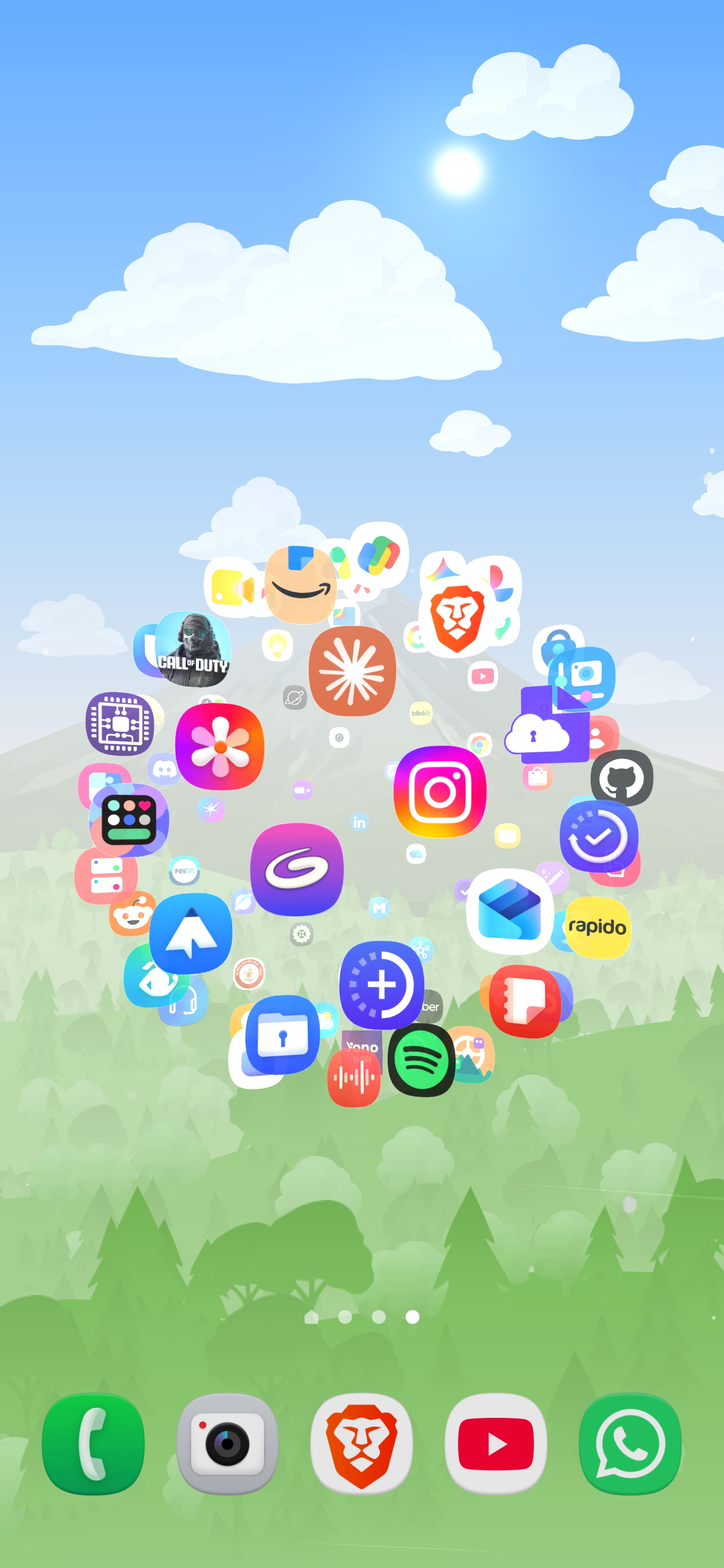
AuraOrbit is a next-generation Android application featuring a fully interactive 3D sphere that orbits your favorite apps right on your home screen via customizable widgets or a standalone immersive launcher mode. Built on the high-performance libGDX game engine, it leverages a golden angle Fibonacci distribution to plot your apps perfectly in a 3D space, supporting true 120 FPS hardware refresh rates!
🚀 Core Features (v3.0.0)
3D Sphere Engine
- Rotate apps with natural quaternion-based momentum at up to 120 FPS (30/60/90/120 selectable)
- Drag-and-drop sphere positioning — center, top, bottom, or anywhere via custom position editor
- Adjustable icon size and rotation speed
Background & Full-Screen Blur
- Upload a custom background image or use the default gradient
- Full-screen background blur radius with granular Blur Strength control (0% to 100%)
Icon Pack Support
- Apply third-party icon packs (Nova, Apex, Arcticons, etc.) to all apps orbiting your sphere
- Automatically applies across group widgets, app picker, and the central logo
Independent Widget Spheres (v3.0.0)
- Create and pin multiple independent 3D widget spheres to your home screen
- Each widget maintains its own app selection, sphere position, scale, blur strength, icon size, orbit color, and custom logo
- Multi-layer widget icons matching home screen (Planet + Color-Tinted Ring + Custom Logo)
- Enhanced widget editor with dedicated app selection dialog and integrated "Add to Home Screen" pin button
Smart Gesture & Launcher Compatibility (v3.0.0)
- Smart Touch Pass-Through:
TouchOverlayViewseparates drag gestures (> 16px) for sphere rotation from quick taps (< 16px). Quick taps pass cleanly to 2D apps in App Drawer / Recent Apps. - Samsung One UI Optimization: Dynamic page-distance calculations for offset-silent launchers, keeping the sphere strictly visible on the selected page.
- Launcher State Accessibility Integration: Detects app drawer and recents state across OEM launchers.
- Compatibility Notice: Non-intrusive banner on Permanent Sphere configuration page.
Standalone Sphere Mode
- Launch AuraOrbit as a fullscreen immersive app from any group widget or app drawer
- Floats over your home screen seamlessly with zero black dimming!
Performance & Privacy
- Advanced memory caching for instant sphere loads
- Zero unnecessary permissions — FOSS, no tracking
📖 Want to see everything AuraOrbit can do? Check out the Comprehensive Features Guide.
🛠️ Architecture
AuraOrbit seamlessly merges standard Android UI with a high-performance C++ OpenGL backend via libGDX:
SphereEngine.java: The core 3D engine running libGDX (ApplicationListener). UsesDecalBatchfor ultra-fast 3D billboarding andModelBatchfor translucent group backdrops.WidgetEditFragment.java&PermanentSphereFragment.java: Modern Material 3 configuration fragments for managing 3D widgets and wallpaper settings.AppFetcher.java: The data pipeline directly interfacing with Android'sPackageManagerto pull high-res application icons and convert them safely into OpenGL textures on the fly.
📦 How to Build & Install
AuraOrbit will be available on the Google Play Store very soon!
In the meantime, you can download the latest signed APK from the Releases page: 👉 Download the latest APK
If you prefer to build it from source, the codebase requires Java 17+ (due to AGP 8.x) to build correctly.
Via Android Studio (Recommended)
- Open the project folder in Android Studio.
- Connect your device (ensure USB Debugging is on).
- Click the green ▶️ Run button.
Via Command Line (Mac/Linux)
# Ensure Java 17 is active in your terminal environment
export JAVA_HOME=/path/to/java/17
./gradlew assembleDebug
adb install app/build/outputs/apk/debug/app-debug.apk
Note: If you have a running emulator or connected device, you can use ./gradlew installDebug to build and deploy in a single step.
⚙️ Configuration
Once installed, you can open the AuraOrbit settings dashboard (v3.0.0) from your launcher to:
- Configure Permanent Sphere wallpaper or create custom 3D Widget Spheres.
- Select which apps appear on your orbit via dedicated app selection dialogs.
- Apply third-party icon packs directly to your 3D sphere.
- Drag and scale the sphere to any position on your screen.
- Adjust full-screen background blur strength (0-100%).
- Set target framerate (30/60/90/120 FPS).
- Pin widgets directly to your home screen.
🤝 Contributing
Contributions are welcome! Please check open issues or submit pull requests on GitHub.
Explore related projects
Loading…