
JGRFW/comfyui-AICG3D-CSR
JGRFW/comfyui-AICG3D-CSR has 32 GitHub stars and 0 forks. GitHot measured +1 stars in 24 hours. Last checked 2026-11-15 14:22 UTC. Last push 2026-11-06.
Measured star growth
- in 24h
- +1
- in 7 days
- Collecting history
- in 15 days
- Collecting history
- in 1 month
- Collecting history
Net star changes over overlapping periods, not daily totals. Missing measurements are left blank. Stars measure attention, not software quality.
About
Standalone ComfyUI nodes for MiniMax H3 person, scene and product replacement with resumable segments, optional second pass, detached audio and seam repair.
AIREADME.md
Original一条线,把裁切、分段、替换、断点续跑、二采、音轨后封装和接缝修复,组织成可恢复的视频生产流水线。
comfyui-AICG3D-CSR 是面向 ComfyUI 与 MiniMax H3 的独立人物、场景、物品和产品替换节点包。它把长视频替换里最容易断裂的环节连成一条单线工作流,并让每一段生成结果都能立即保存、检查和续跑。
为什么是 CSR
- 一条线走完整条链:模型包 -> 视频任务包 -> 素材任务包 -> 分段结果 -> 可选二采 -> 合并 -> SaveVideo。
- 分段即保存:每段生成后立即落盘,中断后只补未完成部分,不把昂贵任务全部重做。
- 音频完全独立:源视频上传后先剥离完整音轨,所有生成分段保持静音,最终视频完成后再封装音频。
- 接缝处理针对生成问题:跨段曝光锁定、段首低频光影匹配、加性亮度过渡、同镜头运动桥接和硬切保护,不是简单交叉淡化。
- 二采按需开启:默认直接透传;需要时展开 3D Latent 放大、模型、LoRA、采样器、步数、denoise 和独立断点续跑。
- 本地提示词优化:在
CSR ③内接入 Ollama、LM Studio、llama.cpp 等 OpenAI 兼容 API,也可选本地 GGUF,并提供背景强制替换与失败修复方案。 - 视觉分析可选:默认只发送文字;主动开启后可读取目标段首/中/尾帧与少量参考图,API 可单独选择视觉模型,本地 GGUF 可选配套
mmproj。 - 第三方加速可桥接:加载器保留原始
MODEL输出,视频裁剪节点提供可选model_patch,可在不改动主任务包的情况下接 Sage、FlashAttention、TorchCompile 等兼容模型补丁。 - 分辨率真正可控:支持 360P、480P、540P、720P、1080P 和自定义尺寸,并实时显示最终模型画布。
- 素材库默认更轻:默认显示两个替换物、背景和参考帧四张卡,最多扩展到七个替换物,全部图片参考控制在 H3 的九图上限内。
- 开源兼容边界清楚:节点、前端扩展和路由使用独立命名空间,不全局修改 ComfyUI 采样器、注意力后端或画布行为。
以上是 CSR 的组合式差异化亮点,不等同于“全球唯一”或市场排他声明。开源生态和第三方模型持续变化,能力与兼容性以当前版本和测试结果为准。
功能详解
- 中文完整功能、技术细节、适用场景和能力边界:docs/features.zh-CN.md
- 安装、FFmpeg/ffprobe 与故障排查:docs/install-and-troubleshooting.md
- 第三方模型加速接入:docs/acceleration.md
- 四大专用替换 Skill:skills/README.md
- 替换提示词模板:docs/replacement-prompts.md
- 本地提示词优化器:docs/prompt-optimizer.md
- 法律声明与可接受使用:LEGAL.md
- 隐私说明:PRIVACY.md
- 安全策略:SECURITY.md
- 第三方代码与模型声明:THIRD_PARTY_NOTICES.md
- MIT 许可证:LICENSE
安装前必看:FFmpeg 与 ffprobe
如果 MiniMax H3 Aicg 视频裁剪 · CSR独立版 提示“需要与 FFmpeg 配套的 ffprobe,请把二者加入 PATH”,请先确认系统同时提供 ffmpeg 和 ffprobe,且二者来自同一个 FFmpeg 构建的 bin 目录。
where.exe ffmpeg
where.exe ffprobe
ffmpeg -version
ffprobe -version
四条命令都必须成功。修改 PATH 后必须完全退出并重新启动 ComfyUI,正在运行的旧进程不会自动读取新的环境变量。imageio-ffmpeg 不能替代独立的 ffprobe。Windows、macOS、Linux、Docker 安装步骤和提示词优化配置请看:安装与故障排查。
提示词优化器
CSR ③ 的“提示词优化”支持 Ollama、LM Studio、llama.cpp server 等 OpenAI 兼容 API,也支持可选 llama-cpp-python 本地 GGUF。视觉分析默认关闭,未选择 API 视觉模型或本地 mmproj 时只处理文字,不读取素材。详细配置、模型目录、隐私边界和视觉模型说明见 docs/prompt-optimizer.md。
重要使用边界
本项目是独立的开源技术工具,与 MiniMax、ComfyUI、AICG3D、nkxx188、模型或 LoRA 作者不存在隶属或背书关系。模型权重不随仓库提供。使用真实人物素材时必须取得必要授权;不得用于未经同意的私密或性化内容、冒充、诈骗、骚扰、未成年人剥削、虚假新闻、非法监控或其他违法用途。生成式 AI 输出不保证真实、准确、合法或适合特定目的。
Technical Overview (English)
AICG3D-CSR is a ComfyUI custom-node pack for free-range person/scene replacement. It was designed from the existing AICG3D person/scene action-transfer workflow without modifying that reference workflow.
The current release uses a single-wire standalone chain and does not import nodes from the original comfyui-AICG3D plugin:
MiniMax H3 Aicg 加载器 -> MiniMax H3 Aicg 视频裁剪 -> MiniMax H3 Aicg资源库 -> CSR ③ -> CSR ③B 二采(可选) -> CSR ④ -> SaveVideo
Scene Replacement
Background replacement is bound directly to its uploaded <Picture N> instead of a person subject. The prompt explicitly removes the original walls, floor, ceiling, furniture, décor and room structure rather than merely recolouring them.
If 参考/首帧 is also uploaded, it is automatically ignored as an environment lock and first-frame guide while a replacement background is present, because the old frame would otherwise force the original scene back into the result.
FFmpeg and ffprobe
This plugin requires both ffmpeg and ffprobe. Install them from the same complete FFmpeg build, add that build's bin directory to PATH, open a new terminal, and verify ffmpeg -version and ffprobe -version before restarting ComfyUI. imageio-ffmpeg does not provide a separate ffprobe. Full instructions: Install and troubleshooting.
Optional Third-Party Model Acceleration
The model loader exposes both the CSR task bundle and a raw MODEL output. Pass that MODEL through compatible third-party acceleration nodes, then connect the final patched MODEL to the video-crop model_patch input. Leaving model_patch unconnected preserves the original single-bundle behavior. See docs/acceleration.md.
Prompt Optimizer
The prompt optimizer inside CSR ③ supports local OpenAI-compatible APIs and optional local GGUF models through llama-cpp-python. Vision analysis is opt-in and remains text-only unless a vision model or matching mmproj is selected. See docs/prompt-optimizer.md for API setup, model directories, visual-model behavior, VRAM handling and privacy boundaries.
Replacement Prompt Tags
The prompt optimizer has an opt-in vision mode. It stays off by default, so the optimizer sends text only and never reads uploaded media. When enabled, CSR samples up to three low-resolution frames from the current target segment and up to three resource-library images, validates every path against ComfyUI's input, output and temp roots, and sends at most six compressed images. API mode accepts a separate vision model ID; local GGUF mode requires a matching mmproj projector.
CSR ③ includes a replacement-tag menu for person, scene/background, object/product, and their combinations. Selecting a tag only records the task category; clicking 应用模板 writes that tag's full prompt into the existing description field. This prevents accidental loss of a hand-edited prompt when switching tags.
The full prompt set and slot-type rules are in docs/replacement-prompts.md. Mark replacement slots as 人物 or 物品/产品 before running. A background replacement belongs in the dedicated 背景替换 slot, not in a person slot.
What It Does
- Upload the source video, target timeline and segment plan inside
MiniMax H3 Aicg 视频裁剪. - The uploaded video preview automatically expands to its real aspect ratio, shows the complete frame and hides the empty-upload copy.
- The resource library opens with four cards: two generic replacement-object slots, one background slot and one reference/first-frame slot. Additional object slots can be added up to seven; each object slot can be marked as a person, product, prop or backpack.
- Choose default short-edge sizing, exact 480P, 720P, 1080P delivery, or custom width and height in the video-crop node.
- The model loader uses a native scrollable LoRA selector. Each LoRA has a persistent enabled switch that disables it without clearing the selected file or strength.
- Extract the complete source audio immediately into a standalone 48 kHz stereo PCM WAV file.
- Choose any target length such as 10 or 15 seconds, then move that window with a slider to select the exact replacement range.
- Generate each segment independently and save its MP4 immediately.
- Optionally run a per-segment second pass that upscales the H3 video latent, rebuilds prompt/reference conditioning at the new size, resamples with independent model/sampler settings, and saves resumable refined segments.
- Resume completed segments after an interruption.
- Merge the completed video-only segments into one CFR 24 fps timeline, then mux the standalone audio as the final step.
- Re-encode the final timeline as one continuous video instead of relying on stream-copy concatenation.
- Match the exposure baseline and low-frequency opening grade at each segment boundary, suppressing short brightness flashes without dissolving real hard cuts.
The output ranges are exact. Internal overlap context is read from the previous segment but is not duplicated in the final video.
Optional Second Pass
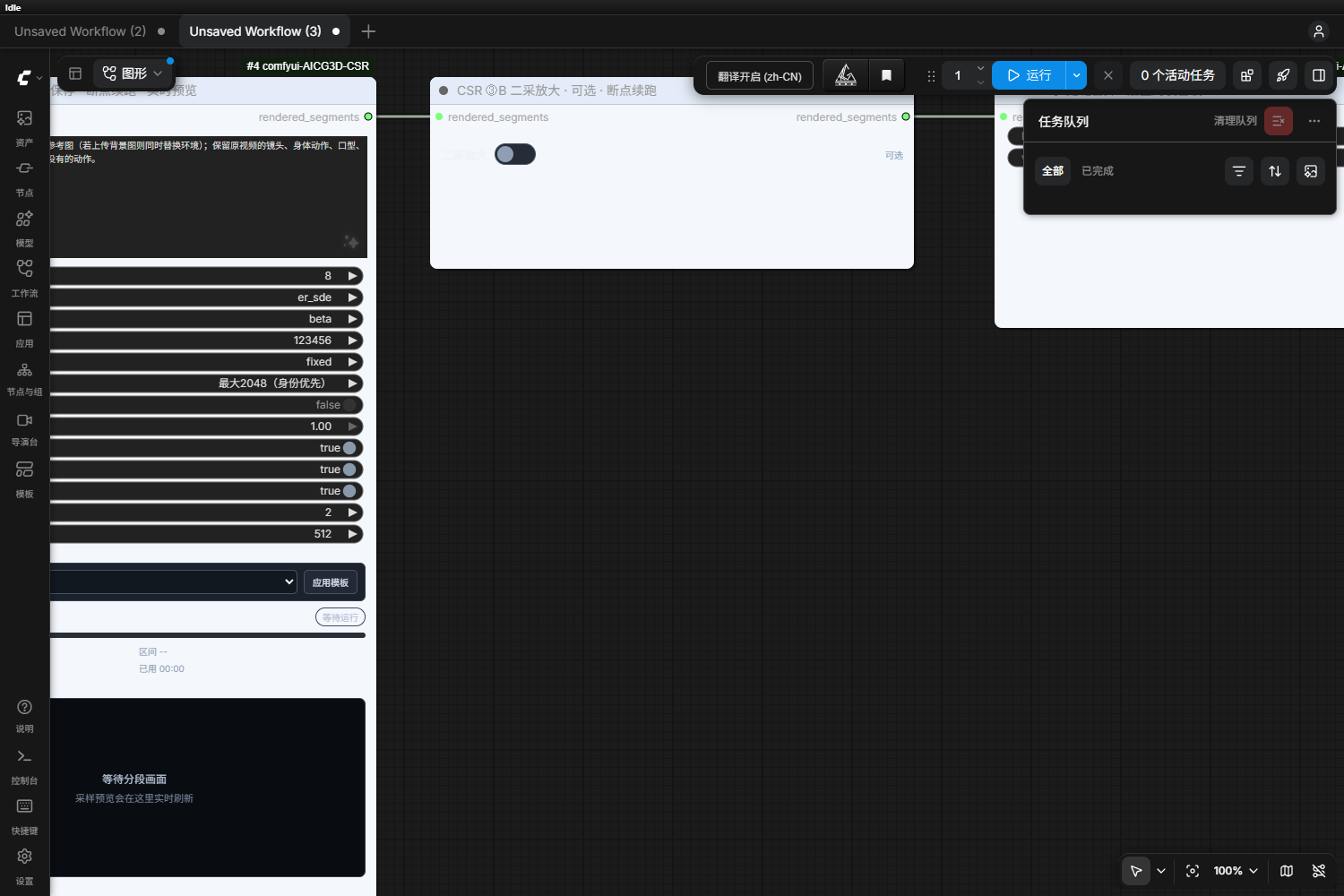
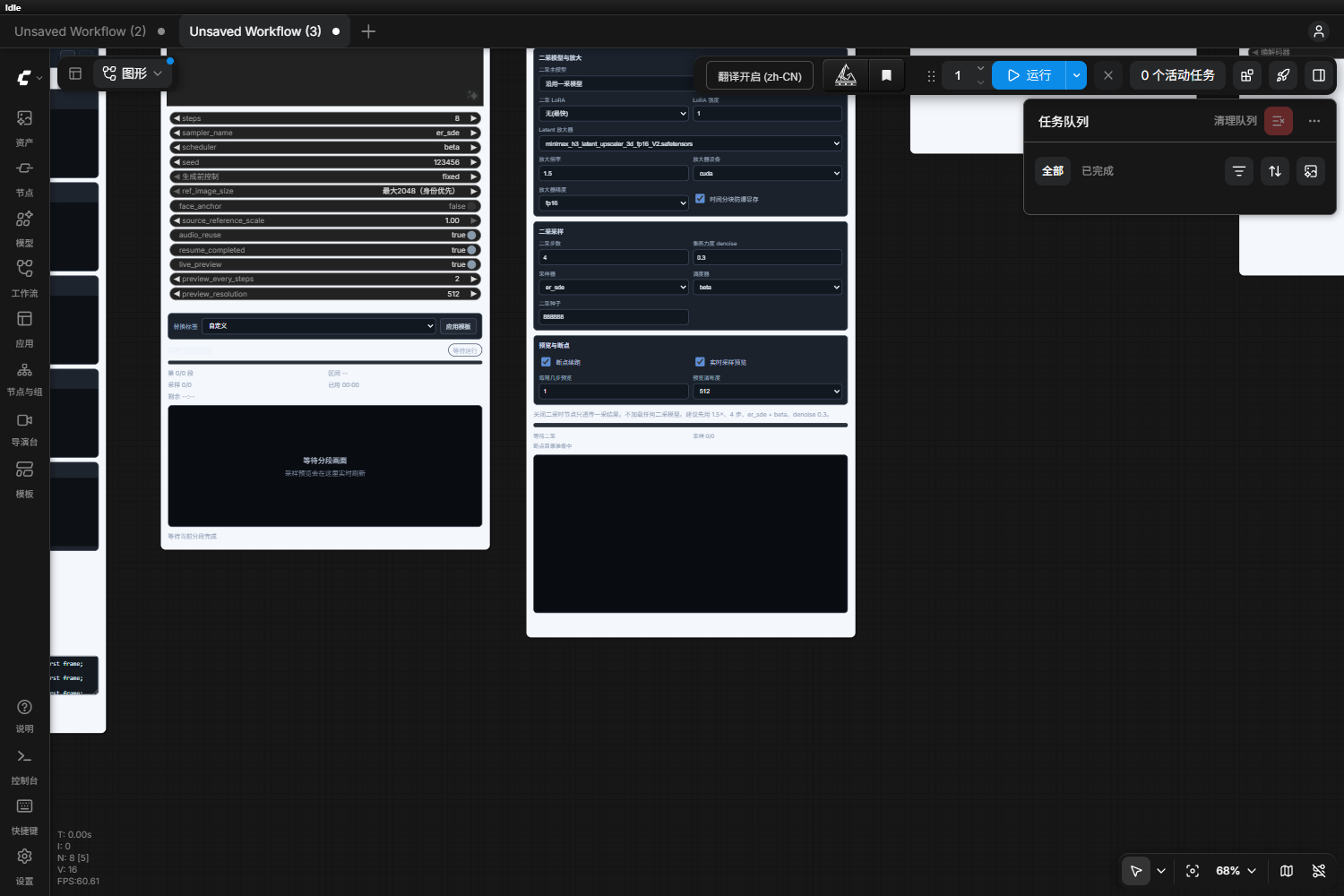
CSR ③B 二采放大 sits between CSR ③ and CSR ④. It is disabled by default and passes the first-pass segment files through unchanged. When enabled, its compact switch expands the full second-pass parameter panel.
- One video in and one video bundle out; no additional graph branches.
- Optional H3 main model and LoRA override, or
沿用一采模型. - Neural 3D latent upscale with
models/latent_upscale_models, configurable scale, device, precision, and temporal chunking. - Independent sampler, scheduler, steps, denoise, and seed.
- Rebuilds reference conditioning at the second-pass resolution instead of stretching the first-pass condition.
- Saves each refined segment separately and supports checkpoint resume.
- Uses the same standalone audio track only after all refined segments are merged in
CSR ④.
Starting preset used by the bundled workflow: 1.5x, 4 steps, er_sde + beta, denoise 0.3, fp16, CUDA latent upscale, temporal chunking on.
Separate Audio Pipeline
Audio is not encoded into any generated segment.
MiniMax H3 Aicg 视频裁剪probes the source and applies its audio/video start offset.- The complete soundtrack is extracted to
source_audio.wavat 48 kHz, stereo, PCM 16-bit. - The normalized video and every generated segment use
-anand contain no audio stream. - H3 sampling uses only one structural audio placeholder token; no real waveform is sampled.
CSR ④first creates the complete silent video timeline, then muxes the extracted WAV with AAC.
This avoids extracting, decoding, generating, encoding and re-concatenating audio once per segment.
Output Resolution
MiniMax H3 Aicg 视频裁剪 presents exact resolution and aspect-ratio controls on one horizontal row. Resolution choices are 360P, 480P, 540P, 720P, 1080P, and custom width/height; aspect choices are source ratio, 16:9, 16:10, 9:16, 1:1, 4:3, 3:4, and 21:9.
Resolution means the short edge. For example, 540P + 16:9 delivers 960x540, while 540P + 9:16 delivers 540x960. When the requested ratio differs from the source, the normalized source is scaled to fill and center-cropped, so the image is never stretched.
H3's internal model canvas is rounded upward to the next 32-pixel block and is always shown below the controls. For example, 960x540 uses a 960x544 model canvas and is delivered as exact 960x540 in the final encode. The model canvas can never be smaller than the requested delivery frame.
Live Segment Preview
CSR ③ now has a monitor panel directly under the node. It reports the current segment, sampling step, overall progress, elapsed time and estimated remaining time. It can decode intermediate sampler predictions into live JPEG previews and automatically switches to the saved segment MP4 when that segment finishes.
live_preview controls intermediate frame decoding. preview_every_steps controls its frequency, and preview_resolution limits the preview image size. Progress and saved-segment previews remain available even when intermediate live decoding is disabled.
The default live preview resolution is 512; 768 gives a sharper intermediate preview at additional decoding cost. Intermediate sampler previews remain approximate until the node switches to the saved segment MP4.
Measured on the local RTX 5070 Ti test case (2.25 s, two segments, 704x384, 4 steps): runtime dropped from 52.8 s to 48.3 s. Both generated segment files were verified to have no audio stream; only the completed 54-frame final video contained audio.
Nodes
| Node | Purpose |
|---|---|
MiniMax H3 Aicg 加载器 |
Standalone FL2VA/REF2VA model loader, text encoder, video/audio VAE, 8 LoRA slots, plus model_bundle and raw MODEL outputs |
MiniMax H3 Aicg 视频裁剪 |
Source video, target-duration slider, optional sub-segmentation, exact output resolution and optional third-party model_patch; outputs one video bundle |
MiniMax H3 Aicg资源库 |
Two visible replacement-object slots by default, expandable to seven, plus background and reference upload; outputs one task bundle |
CSR ③ 逐段替换 · 自动保存 · 断点续跑 · 实时预览 |
H3 Ref2VA sampling, live step preview, segment video preview, checkpoint resume, face anchor, continuity context and boundary blending |
CSR ③B 二采放大 · 可选 · 断点续跑 |
Optional pass-through/refine stage; latent upscale, independent H3 model/LoRA, sampler schedule, denoise, seed, live preview and resumable refined segments |
CSR ④ 无缝合并 · 后置封装音轨 |
Unified silent video encode, standalone audio mux, frame-count and boundary verification |
The merge node enables 跨段曝光锁定 by default. This is not a cross-fade: it samples only the opening frames of a new segment and matches their broad exposure/colour baseline to the saved previous tail. A structural hard-cut detector skips the repair across intentional camera or scene cuts.
Installation
Requirements: Python 3.10 or newer, a ComfyUI build that provides MiniMax H3 core nodes, the core SaveVideo node, and a complete FFmpeg build containing both ffmpeg and ffprobe. The plugin imports only ComfyUI core modules; it does not import or depend on comfyui-AICG3D or any third-party attention-patch plugin.
- Copy or link this folder into
ComfyUI/custom_nodes/comfyui-AICG3D-CSR, or clone it from the repository root:
cd ComfyUI\custom_nodes
git clone https://github.com/JGRFW/comfyui-AICG3D-CSR.git
- Install requirements in the ComfyUI Python environment:
python -m pip install -r requirements.txt
- Install a complete FFmpeg build and add its
bindirectory to the systemPATH. Both binaries must work from a newly opened terminal:
where.exe ffmpeg
where.exe ffprobe
ffmpeg -version
ffprobe -version
imageio-ffmpeg may supply the ffmpeg executable, but it cannot replace the separate ffprobe requirement. See Install and troubleshooting for Windows, macOS, Linux and Docker instructions.
- Fully quit and restart ComfyUI. Existing processes do not automatically receive newly added
PATHentries. Then load:
workflows/AICG3D-CSR_视频裁剪_资源库_单线.json
Required H3 Assets
The bundled workflow uses these local models:
models/diffusion_models/MiniMax/DasiwaMinimaxH3_dasiwaREF2VAHybridV1_0.safetensors
models/text_encoders/qwen3vl_32b_minimax_h3_nvfp4_awq.safetensors
models/vae/minimax_h3_video_vae_int8_convrot.safetensors
models/vae/minimax_h3_audio_vae_fp32.safetensors
models/latent_upscale_models/minimax_h3_latent_upscaler_3d_fp16_V2.safetensors
models/loras/minimax/h3_character_swap_pro4500_1000.safetensors
models/loras/minimax/minimax_h3_turbo_v4_step600_ema_DasiwaREF2VAHybridV1_0_curveproj1025_compat_v001.safetensors
Change the loaders in the workflow if your folder names differ.
Optional face anchoring expects one of:
models/ultralytics/bbox/face_yolov8m.pt
models/ultralytics/face_yolov8m.pt
models/ultralytics/bbox/face_yolov8n.pt
Recommended First Run
- Short edge
480 - A target window around
5–10seconds er_sde+beta- 8 steps with Turbo LoRA
- Character Swap LoRA
1.0for a single character - Source reference scale
1.0 - Face anchor off first, then try it if a single character is not being replaced
- Keep
resume_completedenabled
Use test_seconds in MiniMax H3 Aicg 视频裁剪 while checking the pipeline before processing the entire video.
Segment Rules
- Set the target duration, then use the position slider to move that window anywhere in the source video.
- The target window may start after
0and may end before the video end. - Inside the target window, every next sub-segment starts exactly where the previous one ends.
- Do not put overlaps or gaps in the UI. The node internally reads context frames and then excludes them from the output range.
- The editor provides quick 5/10/15-second targets, arbitrary duration input, a move slider,
按3.75秒, equal division and add/remove controls.
Seam Handling
The old combined MiniMax H3 Aicg资源库(旧版合并) node remains registered for compatibility with the previous single-node workflow. New work should use the split video-crop and resource-library nodes.
Seams are controlled at four levels:
- The next segment uses the saved tail of the previous segment as sampling context.
- An optional short boundary blend smooths the first few generated frames before export.
CSR ④locks the exposure baseline across segments, matches only the opening low-frequency lighting, and writes a per-seam diagnostic record. The bounded correction targets H3's one- or two-frame brightness flash while preserving local contrast and intentional lighting changes.- The repaired frames are streamed into one fixed-CFR 24 fps encode, the exact frame count is verified, and the independently extracted audio is muxed only after the complete video timeline is built.
A structural hard-cut guard skips spatial mixing when the adjacent segments belong to different shots. CSR ④ also has a 跨段曝光锁定 switch: leave it on for normal shots and turn it off only when an intentional exposure jump must remain untouched. The repair cannot guarantee identical identity or motion when the generative model itself fails at a cut; those remain model-quality variables.
Multiple People
The resource library exposes two replacement-object slots by default and can expand to seven. Background and reference/first-frame cards occupy the remaining two image slots, so a full library remains exactly within H3's nine-image limit. More references still increase VRAM use, sampling time and identity competition; the most reliable route for many people is to split them across sequential CSR ③ passes.
Open-Source Compatibility
- Every public node class starts with
CSR; no class name is shared with the original AICG3D plugin. - All frontend extensions use the
AICG3D.CSR.*namespace and only wrap the lifecycle methods of their own node types. - Every HTTP route uses the
/aicg3d_csr/namespace; the video-info and prompt-optimizer routes do not reuse the original AICG3D endpoints. - Uploaded media paths are restricted to ComfyUI
input,output, andtempdirectories. - No global ComfyUI node, sampler, attention backend, or canvas behavior is patched.
- The optional acceleration bridge only passes a user-connected
MODELback into the CSR bundle; it does not import or hard-code third-party acceleration plugins. - Legacy canvas mode and Nodes 2.0 both receive the measured DOM-widget height. The resource library and video-crop nodes no longer leak content outside their node bodies when Nodes 2.0 is disabled.
Pillow,numpyandfilelockare declared consistently inpyproject.tomlandrequirements.txt.- The optional 3D latent upscaler helper is bundled from the MIT-licensed MiniMax H3 Easy project, with attribution in
THIRD_PARTY_NOTICES.md.
Outputs
Each run writes to:
ComfyUI/output/AICG3D-CSR/job_<digest>/
source_<digest>/
  source_audio.wav
  normalized.mp4
  plan.json
job_<digest>/
  second_pass/
    job_<second_digest>/segments/
      segment_00000.mp4
      segment_00000.json
  segments/
    segment_00000.mp4
    segment_00000.json
    segment_00001.mp4
    segment_00001.json
  progress.json
  run_report.json
  second_pass_report.json
  merge_report.json
  final_seamless.mp4
Validation
python -m unittest discover -s tests -v
node --check web/csr_model_loader.js
node --check web/csr_video_crop.js
node --check web/csr_media_assets.js
node --check web/csr_media_library.js
node --check web/csr_segment_preview.js
node --check web/csr_second_pass.js
The reference workflow is not modified or copied into this plugin.