
Innoptech/OpenSTL
Innoptech/OpenSTL has 32 GitHub stars and 4 forks. GitHot measured 0 stars in 24 hours and 0 in 7 days. Last checked 2026-11-09 13:24 UTC. Last push 2025-10-27.
The fastest and most intuitive library to manipulate STL files (stereolithography) for C++ and Python, header-only.
Measured star growth
- in 24h
- 0
- in 7 days
- 0
- in 15 days
- Collecting history
- in 1 month
- Collecting history
Net star changes over overlapping periods, not daily totals. Missing measurements are left blank. Stars measure attention, not software quality.
README.md
OriginalOpenSTL
The fastest and most intuitive library to manipulate STL files (stereolithography) for C++ and Python, header-only.pip install openstl


Performances benchmark
Discover the staggering performance of OpenSTL in comparison to numpy-stl, meshio and stl-reader, thanks to its powerful C++ backend. See benchmark.py. Benchmark performed on an Intel i5-9600KF CPU @ 3.70GHz.
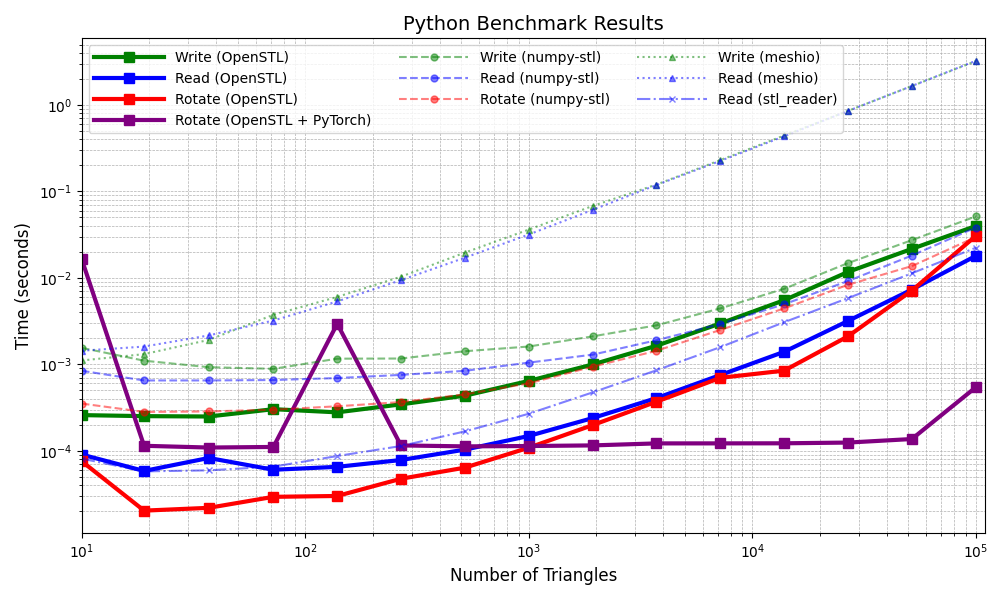
Performance gains over numpy-stl, meshio and stl-reader
#openstl vs numpy-stl
Write:	OpenSTL is 1.262 to 5.998 X faster than numpy-stl
Read:	OpenSTL is 2.131 to 11.144 X faster than numpy-stl
Rotate:	OpenSTL is 0.971 to 13.873 X faster than numpy-stl
Rotate:	OpenSTL + PyTorch is 0.022 to 100.25 X faster than numpy-stl

#openstl  vs meshio
Write:	OpenSTL is 4.289 to 80.714 X faster than meshio
Read:	OpenSTL is 15.915 to 311.365 X faster than meshio

#openstl vs stl_reader
Read:	OpenSTL is 0.719 to 2.2 X faster than stl_reader
Note: meshio has no specific way of rotating vertices, so it was not benchmarked.
Python Usage
Install
pip install openstl or pip install -U git+https://github.com/Innoptech/OpenSTL@main
Read and write from a STL file
import openstl
import numpy as np

# Define an array of triangles
# Following the STL standard, each triangle is defined with : normal, v0, v1, v2
quad = np.array([
    # normal,          vertices 0,      vertices 1,      vertices 2
    [[0.0, 0.0, 1.0], [0.0, 0.0, 0.0], [1.0, 0.0, 0.0], [1.0, 1.0, 0.0]], # Triangle 1
    [[0.0, 0.0, 1.0], [0.0, 0.0, 0.0], [0.0, 1.0, 0.0], [1.0, 1.0, 0.0]], # Triangle 2
])

# Serialize the triangles to a file
success = openstl.write("quad.stl", quad, openstl.format.binary) # Or openstl.format.ascii (slower but human readable)

if not success:
    raise Exception("Error: Failed to write to the specified file.")

# Deserialize triangles from a file
deserialized_quad = openstl.read("quad.stl")

# Print the deserialized triangles
print("Deserialized Triangles:", deserialized_quad)
Rotate, translate and scale a mesh
import openstl
import numpy as np

quad = openstl.read("quad.stl")

# Rotating
rotation_matrix = np.array([
    [0,-1, 0],
    [1, 0, 0],
    [0, 0, 1]
])
rotated_quad = np.matmul(rotation_matrix, quad.reshape(-1,3).T).T.reshape(-1,4,3)

# Translating
translation_vector = np.array([1,1,1])
quad[:,1:4,:] += translation_vector # Avoid translating normals

# Scaling
scale = 1000.0
quad[:,1:4,:] *= scale # Avoid scaling normals
Convert Triangles :arrow_right: Vertices and Faces
import openstl

# Define an array of triangles
triangles = [
    # normal,          vertices 0,      vertices 1,      vertices 2
    [[0.0, 0.0, 1.0], [0.0, 0.0, 0.0], [1.0, 0.0, 0.0], [1.0, 1.0, 0.0]], # Triangle 1
    [[0.0, 0.0, 1.0], [0.0, 0.0, 0.0], [0.0, 1.0, 0.0], [1.0, 1.0, 0.0]], # Triangle 2
]

# Convert triangles to vertices and faces
vertices, faces = openstl.convert.verticesandfaces(triangles)
Convert Vertices and Faces :arrow_right: Triangles
import openstl

# Define vertices and faces
vertices = [
    [0.0, 0.0, 0.0],
    [1.0, 1.0, 1.0],
    [2.0, 2.0, 2.0],
    [3.0, 3.0, 3.0],
]

faces = [
    [0, 1, 2],  # Face 1
    [1, 3, 2]   # Face 2
]

# Convert vertices and faces to triangles
triangles = openstl.convert.triangles(vertices, faces)
Find Connected Components in Mesh Topology (Disjoint solids)
import openstl

# Deserialize triangles from a file
triangles = openstl.read("disjoint_solids.stl")

# Convert triangles to vertices and faces
vertices, faces = openstl.convert.verticesandfaces(triangles)

# Identify connected components of faces
connected_components = openstl.topology.find_connected_components(vertices, faces)

# Print the result
print(f"Number of connected components: {len(connected_components)}")
for i, component in enumerate(connected_components):
    print(f"Faces of component {i + 1}: {component}")
Use with Pytorch
import openstl
import torch

quad = torch.Tensor(openstl.read("quad.stl")).to('cuda')

# Rotating
rotation_matrix = torch.Tensor([
    [0,-1, 0],
    [1, 0, 0],
    [0, 0, 1]
]).to('cuda')
rotated_quad = torch.matmul(rotation_matrix, quad.reshape(-1,3).T).T.reshape(-1,4,3)

# Translating
translation_vector = torch.Tensor([1,1,1]).to('cuda')
quad[:,1:4,:] += translation_vector # Avoid translating normals

# Scaling
scale = 1000.0
quad[:,1:4,:] *= scale # Avoid scaling normals
Read large STL file
To read STL file with a large triangle count > 1 000 000, the openstl buffer overflow safety must be unactivated with
openstl.set_activate_overflow_safety(False) after import. Deactivating overflow safety may expose the application
to a potential buffer overflow attack vector since the stl standard is not backed by a checksum.
This can cause significant risks if openstl (and any other STL reader) is used as part of a service in a backend server for example. For
domestic usage, ignore this warning. OpenSTl is the only stl reader to provide such default safety feature.
C++ Usage
Read STL from file
#include <openstl/core/stl.h>

std::ifstream file(filename, std::ios::binary);
if (!file.is_open()) {
    std::cerr << "Error: Unable to open file '" << filename << "'" << std::endl;
}

// Deserialize the triangles in either binary or ASCII format
std::vector<openstl::Triangle> triangles = openstl::deserializeStl(file);
file.close();
Write STL to a file
std::ofstream file(filename, std::ios::binary);
if (!file.is_open()) {
    std::cerr << "Error: Unable to open file '" << filename << "'" << std::endl;
}

std::vector<openstl::Triangle> originalTriangles{}; // User triangles
openstl::serialize(originalTriangles, file, openstl::StlFormat::Binary); // Or StlFormat::ASCII

if (file.fail()) {
    std::cerr << "Error: Failed to write to file " << filename << std::endl;
} else {
    std::cout << "File " << filename << " has been successfully written." << std::endl;
}
file.close();
Serialize STL to a stream
std::stringstream ss;

std::vector<openstl::Triangle> originalTriangles{}; // User triangles
openstl::serialize(originalTriangles, ss, openstl::StlFormat::Binary); // Or StlFormat::ASCII
Convert Triangles :arrow_right: Vertices and Faces
using namespace openstl

std::vector triangles = {
    //        normal,             vertices 0,         vertices 1,        vertices 2
    Triangle{{0.0f, 0.0f, 1.0f}, {1.0f, 1.0f, 1.0f}, {2.0f, 2.0f, 2.0f}, {3.0f, 3.0f, 3.0f}},
    Triangle{{0.0f, 0.0f, 1.0f}, {2.0f, 2.0f, 2.0f}, {3.0f, 3.0f, 3.0f}, {4.0f, 4.0f, 4.0f}}
};

const auto& [vertices, faces] = convertToVerticesAndFaces(triangles);
Convert Vertices and Faces :arrow_right: Triangles
using namespace openstl

std::vector vertices = {
    Vec3{0.0f, 0.0f, 0.0f}, Vec3{1.0f, 1.0f, 1.0f}, Vec3{2.0f, 2.0f, 2.0f}, Vec3{3.0f, 3.0f, 3.0f}
};
std::vector<Face> faces = {
    {0, 1, 2}, {3, 1, 2}
};

const auto& triangles = convertToTriangles(vertices, faces);
Find Connected Components in Mesh Topology
using namespace openstl;

// Convert to vertices and faces
const auto& [vertices, faces] = convertToVerticesAndFaces(triangles);

// Find connected components
const auto& connected_components = findConnectedComponents(vertices, faces);

std::cout << "Number of connected components: " << connected_components.size() << "\\n";
for (size_t i = 0; i < connected_components.size(); ++i) {
    std::cout << "Component " << i + 1 << ":\\n";
    for (const auto& face : connected_components[i]) {
        std::cout << "  {" << face[0] << ", " << face[1] << ", " << face[2] << "}\\n";
    }
}
Integrate to your C++ codebase
Smart method
Include this repository with CMAKE Fetchcontent and link your executable/library to openstl::core library.
Choose weither you want to fetch a specific branch or tag using GIT_TAG. Use the main branch to keep updated with the latest improvements.
include(FetchContent)
FetchContent_Declare(
    openstl
    GIT_REPOSITORY https://github.com/Innoptech/OpenSTL.git
    GIT_TAG main
    GIT_SHALLOW TRUE
    GIT_PROGRESS TRUE
)
FetchContent_MakeAvailable(openstl)
Naïve method
Simply add stl.h to your codebase.
Test
git clone https://github.com/Innoptech/OpenSTL
mkdir OpenSTL/build && cd OpenSTL/build
cmake -DOPENSTL_BUILD_TESTS=ON .. && cmake --build .
ctest .
Requirements
C++17 or higher.
DISCLAIMER: STL File Format
The STL format is simple and widely used, but that simplicity brings important limitations:
- No validation: STL files include no checksums, hashes, or structure verification, so corruption (e.g., truncated or malformed data) often goes undetected until parsing.
- Sensitive to corruption: Errors during download, storage, or editing may only fail at runtime, causing crashes or undefined behavior.
- Security concerns: Without built-in bounds checks, malformed STL files can potentially trigger buffer overflows, especially risky when handling untrusted input.
Because STL offers no internal protection, applications must implement their own validation and error-handling when loading these files.
Explore related projects
ytdl-org/youtube-dl
Command-line program to download videos from YouTube.com and other video sites
141,500 starsexcalidraw/excalidraw
Virtual whiteboard for sketching hand-drawn like diagrams
135,396 starsgodotengine/godot
Godot Engine – Multi-platform 2D and 3D game engine
119,840 starsmrdoob/three.js
JavaScript 3D Library.
117,905 stars